Want bigger window for Windows Virtual PC after winXp installed

pintree3

Mich
Member
VIP
Local time
4:14 AM
Messages
394
Location
Canada
A 1st time here in having installed Windows Virtual PC after which I installed Windows XP from my old original CD (yup I still kept it). Anyhow I fooled around a bit with with desktop setting and managed to get the window a little larger but it is still to small. Is there any way of getting that window larger, or even full screen?
[I installed the virtual machine and XP only so I could play old games (STEAM) on them since other methods proved unsuccessful) ].
Thanks
 

My Computer My Computer

At a glance

Windows 7 Home Premium 64Intel Core i5 760 @ 2800MHz12288MBAMD Radeon HD 7800 Series
Computer type
PC/Desktop
Computer Manufacturer/Model Number
OEM Designed by me :-)
OS
Windows 7 Home Premium 64
CPU
Intel Core i5 760 @ 2800MHz
Motherboard
Asus P7P55D-E LX
Memory
12288MB
Graphics Card(s)
AMD Radeon HD 7800 Series
Sound Card
ASUS Xonar DG
Monitor(s) Displays
ViewSonic VX2453 Series, HDMI 1080p Full HD
Screen Resolution
1920X1080
Hard Drives
Samsung SSD 840 EVO 250GB& two others
PSU
Tagan BZ Series, TG800-BZ 800W
Keyboard
Logitech MK250
Mouse
Logitech M310
Internet Speed
toppest, mostest :-) <-- bad, but fun English
Browser
Firefox, Crrome, IE
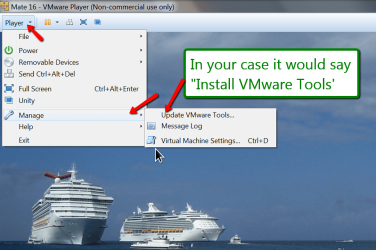
I can only suggest to install the VMware Tools and/or maximize the window (that helps sometimes).

But playing Steam in virtual may not yield what you expected.
 

Attachments

  • 2014-10-26_1955.png
    2014-10-26_1955.png
    151.1 KB · Views: 3

My Computer My Computer

At a glance

Vista, Windows7, Mint Mate, Zorin, Windows 8from 1.6GHz Duo to i7
Computer Manufacturer/Model Number
HP, Dell, Gateway, Toshiba - 4 laptops and 2 desktops
OS
Vista, Windows7, Mint Mate, Zorin, Windows 8
CPU
from 1.6GHz Duo to i7
Monitor(s) Displays
2x HP w2207
Hard Drives
5x HDD, 7x SSD, 12x Externals
Keyboard
with trackball - no mices
Mouse
Trackball mice
Internet Speed
DSL 6000
Thanks buddy. It was not possible to maximize the window hence y I wrote here. But, you know what you are right. The Micsft VM is causing a whole bunch of other problems. Too many headaches for me to go bananas over just due to the occasional game. I think I will try VirtualBox followed by VMware (as you suggested) since the latter seems to be a little harder to configure than the former.
And as to Steam maybe not working as I hope. I am expecting that and if such be the case than so be it.
Steam sold me a series of games which even in their own page, (more than one) they advise that it is not compatible with Win 7, and yet, even after the fact they refuse to give me a refund. I knew of their 'no refund' policy but in this case I thought there should have been an exception since it is they who sold me a game which can't be played/used-- equal to selling me a defective non-working product as far as I'm concerned but I stopped the fight after a while since we are talking about, about $10 I think--and I think the knew the fight would stop given time.
 

My Computer My Computer

At a glance

Windows 7 Home Premium 64Intel Core i5 760 @ 2800MHz12288MBAMD Radeon HD 7800 Series
Computer type
PC/Desktop
Computer Manufacturer/Model Number
OEM Designed by me :-)
OS
Windows 7 Home Premium 64
CPU
Intel Core i5 760 @ 2800MHz
Motherboard
Asus P7P55D-E LX
Memory
12288MB
Graphics Card(s)
AMD Radeon HD 7800 Series
Sound Card
ASUS Xonar DG
Monitor(s) Displays
ViewSonic VX2453 Series, HDMI 1080p Full HD
Screen Resolution
1920X1080
Hard Drives
Samsung SSD 840 EVO 250GB& two others
PSU
Tagan BZ Series, TG800-BZ 800W
Keyboard
Logitech MK250
Mouse
Logitech M310
Internet Speed
toppest, mostest :-) <-- bad, but fun English
Browser
Firefox, Crrome, IE
Actually I find VMware Player easier to deal with than Virtual Box. I have used both for years but now I only ise VMware Player. Here is a tutorial I made for the installation of a Linux distro. But you can use it as guideline for XP - just select Windows > XP in lieu of Linux.
 

My Computer My Computer

At a glance

Vista, Windows7, Mint Mate, Zorin, Windows 8from 1.6GHz Duo to i7
Computer Manufacturer/Model Number
HP, Dell, Gateway, Toshiba - 4 laptops and 2 desktops
OS
Vista, Windows7, Mint Mate, Zorin, Windows 8
CPU
from 1.6GHz Duo to i7
Monitor(s) Displays
2x HP w2207
Hard Drives
5x HDD, 7x SSD, 12x Externals
Keyboard
with trackball - no mices
Mouse
Trackball mice
Internet Speed
DSL 6000
Thanks will prabably give it a try if the already installed VB doesn't suit me. Meanwhile though there is another question: It seems as if the default choice is Wndows XP 64 bit. I'm assuming that thought my PC is obviously msde for 64bit and my Current OS is 64bit should I follow the XP 64bit as well? I was thinking not since my Win XP CD is 32bit: what I have on my XP is "Windows xp Home Edition -- Version 2002"
 

My Computer My Computer

At a glance

Windows 7 Home Premium 64Intel Core i5 760 @ 2800MHz12288MBAMD Radeon HD 7800 Series
Computer type
PC/Desktop
Computer Manufacturer/Model Number
OEM Designed by me :-)
OS
Windows 7 Home Premium 64
CPU
Intel Core i5 760 @ 2800MHz
Motherboard
Asus P7P55D-E LX
Memory
12288MB
Graphics Card(s)
AMD Radeon HD 7800 Series
Sound Card
ASUS Xonar DG
Monitor(s) Displays
ViewSonic VX2453 Series, HDMI 1080p Full HD
Screen Resolution
1920X1080
Hard Drives
Samsung SSD 840 EVO 250GB& two others
PSU
Tagan BZ Series, TG800-BZ 800W
Keyboard
Logitech MK250
Mouse
Logitech M310
Internet Speed
toppest, mostest :-) <-- bad, but fun English
Browser
Firefox, Crrome, IE
In virtual it does not matter. You can use 32 or 64bit.
 

My Computer My Computer

At a glance

Vista, Windows7, Mint Mate, Zorin, Windows 8from 1.6GHz Duo to i7
Computer Manufacturer/Model Number
HP, Dell, Gateway, Toshiba - 4 laptops and 2 desktops
OS
Vista, Windows7, Mint Mate, Zorin, Windows 8
CPU
from 1.6GHz Duo to i7
Monitor(s) Displays
2x HP w2207
Hard Drives
5x HDD, 7x SSD, 12x Externals
Keyboard
with trackball - no mices
Mouse
Trackball mice
Internet Speed
DSL 6000
Thanks whs. I had assumed not using an iso, but my actual original CD, that it would matter. Anyhow, thanks as well for the vmware suggestion, though I knew of it, your suggestion made me try it even more, since I was not happy with the other 2. Unfortunately, it too has its problems: its virtual VGA card isn't recognized by steam, and as u may recall, it is the main reason for me installing a virtual machine. If I can't fix this I will have to scrap the whole idea.
 

My Computer My Computer

At a glance

Windows 7 Home Premium 64Intel Core i5 760 @ 2800MHz12288MBAMD Radeon HD 7800 Series
Computer type
PC/Desktop
Computer Manufacturer/Model Number
OEM Designed by me :-)
OS
Windows 7 Home Premium 64
CPU
Intel Core i5 760 @ 2800MHz
Motherboard
Asus P7P55D-E LX
Memory
12288MB
Graphics Card(s)
AMD Radeon HD 7800 Series
Sound Card
ASUS Xonar DG
Monitor(s) Displays
ViewSonic VX2453 Series, HDMI 1080p Full HD
Screen Resolution
1920X1080
Hard Drives
Samsung SSD 840 EVO 250GB& two others
PSU
Tagan BZ Series, TG800-BZ 800W
Keyboard
Logitech MK250
Mouse
Logitech M310
Internet Speed
toppest, mostest :-) <-- bad, but fun English
Browser
Firefox, Crrome, IE
Hmm, that's tough. If Steam cannot work with the virtual devices, then I guess you have no viable solution in virtual.

There is one other suggestion I could make - although I never tried that wirh XP. Install it on a flash drive. Here is a tutorial I once made for the installation of Windows 8. Maybe it works for XP too. It may be worth a try because then you have native hardware support.

Just make first sure your PC can boot from a USB stick. I also recommend to use a stick with a fast access time - preferably under 1ms. USB3 is of course preferable. You can also use an external USB3 or eSata attached SSD. That is the fastest. A small SSD costs little money.
 

My Computer My Computer

At a glance

Vista, Windows7, Mint Mate, Zorin, Windows 8from 1.6GHz Duo to i7
Computer Manufacturer/Model Number
HP, Dell, Gateway, Toshiba - 4 laptops and 2 desktops
OS
Vista, Windows7, Mint Mate, Zorin, Windows 8
CPU
from 1.6GHz Duo to i7
Monitor(s) Displays
2x HP w2207
Hard Drives
5x HDD, 7x SSD, 12x Externals
Keyboard
with trackball - no mices
Mouse
Trackball mice
Internet Speed
DSL 6000
There is one other suggestion I could make - although I never tried that wirh XP. Install it on a flash drive. Here is a tutorial I once made for the installation of Windows 8.....
Just make first sure your PC can boot from a USB stick. I also recommend to use a stick with a fast access time - preferably under 1ms. USB3 is of course preferable. ....
OK got myself a bigger and faster USB stick and am ready to try out what your tutorial suggests. Here's the problem I ran into. Your tutorial says both Win 7 & Win 8.
In step 2 mounting the WAIK it is not clear if your doing this, reading and mounting info related to my actual OS (Win 7) or the XP ISO, which logic would imply it is not doing so the info attained here is in reference to '7'
so when later it says to choose either 32bit or 64 bit version I am assuming it is still referring to Win 7 (or 8 I think in your example) which when going to "Step 3 - Mount the Windows 8 .iso in a virtual BD ROM" In my case it would be my XP iso but considering the previous steps may have nothing to do with my XP.
So I think somehow when earlier I run the WAIK somehow I have to direct it to my XP iso instead. Anyhow, as you can see I am running into problems. Any guidance?
 

My Computer My Computer

At a glance

Windows 7 Home Premium 64Intel Core i5 760 @ 2800MHz12288MBAMD Radeon HD 7800 Series
Computer type
PC/Desktop
Computer Manufacturer/Model Number
OEM Designed by me :-)
OS
Windows 7 Home Premium 64
CPU
Intel Core i5 760 @ 2800MHz
Motherboard
Asus P7P55D-E LX
Memory
12288MB
Graphics Card(s)
AMD Radeon HD 7800 Series
Sound Card
ASUS Xonar DG
Monitor(s) Displays
ViewSonic VX2453 Series, HDMI 1080p Full HD
Screen Resolution
1920X1080
Hard Drives
Samsung SSD 840 EVO 250GB& two others
PSU
Tagan BZ Series, TG800-BZ 800W
Keyboard
Logitech MK250
Mouse
Logitech M310
Internet Speed
toppest, mostest :-) <-- bad, but fun English
Browser
Firefox, Crrome, IE
As I have said earlier, I am not 100% certain whether it will work for XP because I never tried that. But if you read XP wherever it says 7 or 8, you should see how far you can get. Maybe there will be no problem at all - at least that's what I would expect.
 

My Computer My Computer

At a glance

Vista, Windows7, Mint Mate, Zorin, Windows 8from 1.6GHz Duo to i7
Computer Manufacturer/Model Number
HP, Dell, Gateway, Toshiba - 4 laptops and 2 desktops
OS
Vista, Windows7, Mint Mate, Zorin, Windows 8
CPU
from 1.6GHz Duo to i7
Monitor(s) Displays
2x HP w2207
Hard Drives
5x HDD, 7x SSD, 12x Externals
Keyboard
with trackball - no mices
Mouse
Trackball mice
Internet Speed
DSL 6000
Thanks again whs.
I do remember what you had said regarding if it would work or not. My main concern was with the 1st part, 'In step 2 mounting the WAIK'. Does this part matter anywhere it's doing its reading from (considering the mentioning of 32bit/64 bit)? or not? Or does just the last part, considering the XP iso, ""Step 3 - Mount the Windows 8 .iso in a virtual BD ROM" matter?

Addendum to the above: In addition to the above: I think I know where perhaps my problems lies. The AIK for Win7 download says" The...AIK for Windows 7 helps you install, customize and deploy ..the Win 7 family of Os's". This suggests to me then that perhaps I would need an AIK for WinXP. But you do say you can use this to install Win 8 and this is exactly what you do.
The problem I ran into is that the USB flash drive is on Drive H: however once the mounting is done 'H' disappears. It is now "I" and in using the command: C:\Users\Your Name\Desktop\imagex.exe" /apply H:\sources\install.wim 1 F:\ what happens is that according to you your H: becomes my I: But what about your F: Do I stick to my original H: what the drive used to be, Or is this 'I:' as well?
So now mine would read
C:\Users\Mich\Desktop\imagex.exe" /apply I:\sources\install.wim 1 I:\
 
Last edited:

My Computer My Computer

At a glance

Windows 7 Home Premium 64Intel Core i5 760 @ 2800MHz12288MBAMD Radeon HD 7800 Series
Computer type
PC/Desktop
Computer Manufacturer/Model Number
OEM Designed by me :-)
OS
Windows 7 Home Premium 64
CPU
Intel Core i5 760 @ 2800MHz
Motherboard
Asus P7P55D-E LX
Memory
12288MB
Graphics Card(s)
AMD Radeon HD 7800 Series
Sound Card
ASUS Xonar DG
Monitor(s) Displays
ViewSonic VX2453 Series, HDMI 1080p Full HD
Screen Resolution
1920X1080
Hard Drives
Samsung SSD 840 EVO 250GB& two others
PSU
Tagan BZ Series, TG800-BZ 800W
Keyboard
Logitech MK250
Mouse
Logitech M310
Internet Speed
toppest, mostest :-) <-- bad, but fun English
Browser
Firefox, Crrome, IE
The problem with instructions; they are like directions. They seem simple enough and exact enough to the person giving them but this is only if he knows the place well and does so blindly so doesn't take into consideration the obvious)
Have you ever been in a country you've never been in or city (quite different from yours)? You ask for directions and the person tells you "Go straight ahead for 2 miles, then you'll see a 7/11 and a McDonalds. Make a left there and continue for 1/2 mile....etc."
It seem all clear to you until you start following the directions. You go straight ahead but the street actually curves and you begin to wonder if you missed what you were supposed to have already seen. And then straight ahead actually runs you into a fork, and you wonder which of the 'straight' the person meant, 'straight left' or 'straight right' or if you were on foot you question if you should continue following the directions exactly and skip the fork all together and actually go straight. And if you are lucky enough to pass that initial point,you then find yourself asking was it 7/11 1st or McD? And then there are things like, ''When the person said McD, did he actually mean Burger King?'' since you happen to notice one. And this is basically US/Canada but it gets much more complicated if you were to ask for directions in a country whose signs you can not read or can't read properly (China, Kuwait, France). So now its no more 7/11 but rather ''j%h^pw&*vub''
So you see computer lingo is the same as a different language. Since 'drive C' does not mean drive a vehicle called C, 'desktop' is not something sitting on top of your desk etc. etc. This may seem to obvious but the point here is not the obvious but the less so.
When I do edit work, I actually read my final work backwards and only then can I see things I had not seen before. The same as when revising your work a day or 2 later. If you do it immediately your brain automatically fills in the gap and things are invisible.
Having lived in 6 countries I have realized where even the present GPS can confuse you totally. You never but never get the complete directions right unless they're very simple, ''go straight 2 blocks and on your right you will see a big red sign 'ABC-Shop'. At times the lovely "how to'' work done here or elsewhere takes the same confusing path regardless how well written and detailed it may have seen--and the writer may be thinking "Hey can't you read?".
 

My Computer My Computer

At a glance

Windows 7 Home Premium 64Intel Core i5 760 @ 2800MHz12288MBAMD Radeon HD 7800 Series
Computer type
PC/Desktop
Computer Manufacturer/Model Number
OEM Designed by me :-)
OS
Windows 7 Home Premium 64
CPU
Intel Core i5 760 @ 2800MHz
Motherboard
Asus P7P55D-E LX
Memory
12288MB
Graphics Card(s)
AMD Radeon HD 7800 Series
Sound Card
ASUS Xonar DG
Monitor(s) Displays
ViewSonic VX2453 Series, HDMI 1080p Full HD
Screen Resolution
1920X1080
Hard Drives
Samsung SSD 840 EVO 250GB& two others
PSU
Tagan BZ Series, TG800-BZ 800W
Keyboard
Logitech MK250
Mouse
Logitech M310
Internet Speed
toppest, mostest :-) <-- bad, but fun English
Browser
Firefox, Crrome, IE
Yes I have lived in many countries myself and travelled in even more. I never really got lost except in the US where they have highway exits without an entry on the ohter side. So if you missed an exit and want to turn around at the next one, then you are even more lost, LOL.

In regards to the instructions - if they say "F" and your stick is "I", then of course you have to use "I". The problem with the USB addresses is that they are dynamically allocated and can be anything depending on how many USB devices you have connected.
 

My Computer My Computer

At a glance

Vista, Windows7, Mint Mate, Zorin, Windows 8from 1.6GHz Duo to i7
Computer Manufacturer/Model Number
HP, Dell, Gateway, Toshiba - 4 laptops and 2 desktops
OS
Vista, Windows7, Mint Mate, Zorin, Windows 8
CPU
from 1.6GHz Duo to i7
Monitor(s) Displays
2x HP w2207
Hard Drives
5x HDD, 7x SSD, 12x Externals
Keyboard
with trackball - no mices
Mouse
Trackball mice
Internet Speed
DSL 6000
I know your problem with highways, here in Canada as well. And missing the exit is something I have done often enough. You have something in your mind, and oops, there goes that exit. And the exit you miss just happens to be the furthest away from the next one :-)
My total countries visited is 54, most of them at least 3 X. And no, I never got lost myself (at least not for long) but I attribute this more to other factors and not directions given.
 

My Computer My Computer

At a glance

Windows 7 Home Premium 64Intel Core i5 760 @ 2800MHz12288MBAMD Radeon HD 7800 Series
Computer type
PC/Desktop
Computer Manufacturer/Model Number
OEM Designed by me :-)
OS
Windows 7 Home Premium 64
CPU
Intel Core i5 760 @ 2800MHz
Motherboard
Asus P7P55D-E LX
Memory
12288MB
Graphics Card(s)
AMD Radeon HD 7800 Series
Sound Card
ASUS Xonar DG
Monitor(s) Displays
ViewSonic VX2453 Series, HDMI 1080p Full HD
Screen Resolution
1920X1080
Hard Drives
Samsung SSD 840 EVO 250GB& two others
PSU
Tagan BZ Series, TG800-BZ 800W
Keyboard
Logitech MK250
Mouse
Logitech M310
Internet Speed
toppest, mostest :-) <-- bad, but fun English
Browser
Firefox, Crrome, IE
Ok at this point it seems that I did not do something right somewhere. Either that or this method unfortunately does not work with XP. But somehow I feel its me. I know the XP has been mounted because besides there having an assigned letter, I could see all the files within it. the attained 'imagex.exe' file is on the desktop, (along with every other file attained in the '32' folder) I then follow the CMD instruction with the following :"C:\Users\Mich\Desktop\imagex.exe" /apply I:\sources\install.wim 1 K:\
I know that "I" is my virtual drive with XP and I know that "K" is where my flash drive is (Which was H before all this started) Anyhow what I get instead is a list of commands. It starts with: microsoft DiskPart version 6.1.7601 and then the list ACTIVE - Mark the selective partition......I know this is not what is supposed to show since doing anything wrong will display such a thing.
(BTW though I used 'VirtualCloneDrive' as you suggested. I already had 'Phantom CD Drive' installed which I assume is the same thing and would not have required me to install V.C.D.)Where could I possibly have gone wrong? The command given does include the quotes correct?
---- Addendum: I had not closed the cmd window and re-opened it thinking it was not necessary. Then I did and this time things changed. I got "ImageX Tool for Windows...." bla bla and then 'error opening file [I:\sources\install.wim"' Strangely "K" is 'H' again. I don't get it. Though the error refers to "I"
 

My Computer My Computer

At a glance

Windows 7 Home Premium 64Intel Core i5 760 @ 2800MHz12288MBAMD Radeon HD 7800 Series
Computer type
PC/Desktop
Computer Manufacturer/Model Number
OEM Designed by me :-)
OS
Windows 7 Home Premium 64
CPU
Intel Core i5 760 @ 2800MHz
Motherboard
Asus P7P55D-E LX
Memory
12288MB
Graphics Card(s)
AMD Radeon HD 7800 Series
Sound Card
ASUS Xonar DG
Monitor(s) Displays
ViewSonic VX2453 Series, HDMI 1080p Full HD
Screen Resolution
1920X1080
Hard Drives
Samsung SSD 840 EVO 250GB& two others
PSU
Tagan BZ Series, TG800-BZ 800W
Keyboard
Logitech MK250
Mouse
Logitech M310
Internet Speed
toppest, mostest :-) <-- bad, but fun English
Browser
Firefox, Crrome, IE
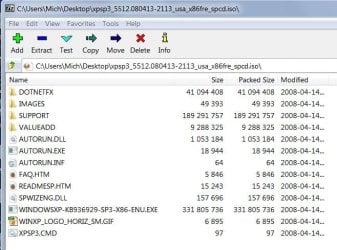
OK maybe I found the problem. The file in question (install.wim) is not found because it is not there. I am assuming therefore that for windows XP the file has another name.
Here below is a pic of what's inside the Win XP.
 

Attachments

  • WinXP.jpg
    WinXP.jpg
    60.7 KB · Views: 11

My Computer My Computer

At a glance

Windows 7 Home Premium 64Intel Core i5 760 @ 2800MHz12288MBAMD Radeon HD 7800 Series
Computer type
PC/Desktop
Computer Manufacturer/Model Number
OEM Designed by me :-)
OS
Windows 7 Home Premium 64
CPU
Intel Core i5 760 @ 2800MHz
Motherboard
Asus P7P55D-E LX
Memory
12288MB
Graphics Card(s)
AMD Radeon HD 7800 Series
Sound Card
ASUS Xonar DG
Monitor(s) Displays
ViewSonic VX2453 Series, HDMI 1080p Full HD
Screen Resolution
1920X1080
Hard Drives
Samsung SSD 840 EVO 250GB& two others
PSU
Tagan BZ Series, TG800-BZ 800W
Keyboard
Logitech MK250
Mouse
Logitech M310
Internet Speed
toppest, mostest :-) <-- bad, but fun English
Browser
Firefox, Crrome, IE
Yeah you are right. The wim file seems to be different in XP. Unfortunately I am not an expert in that area. If you send a PM to SIW2, he may be able to help you. He knows all that stuff.
 

My Computer My Computer

At a glance

Vista, Windows7, Mint Mate, Zorin, Windows 8from 1.6GHz Duo to i7
Computer Manufacturer/Model Number
HP, Dell, Gateway, Toshiba - 4 laptops and 2 desktops
OS
Vista, Windows7, Mint Mate, Zorin, Windows 8
CPU
from 1.6GHz Duo to i7
Monitor(s) Displays
2x HP w2207
Hard Drives
5x HDD, 7x SSD, 12x Externals
Keyboard
with trackball - no mices
Mouse
Trackball mice
Internet Speed
DSL 6000
Yeah you are right. The wim file seems to be different in XP. Unfortunately I am not an expert in that area. If you send a PM to SIW2, he may be able to help you. He knows all that stuff.
Hi whs
I have written to siw2 and hopefully he won't mind replying and has the time to do so.
I thank you fully and sincerely for all of your help. It has been quite appreciated. :)
 

My Computer My Computer

At a glance

Windows 7 Home Premium 64Intel Core i5 760 @ 2800MHz12288MBAMD Radeon HD 7800 Series
Computer type
PC/Desktop
Computer Manufacturer/Model Number
OEM Designed by me :-)
OS
Windows 7 Home Premium 64
CPU
Intel Core i5 760 @ 2800MHz
Motherboard
Asus P7P55D-E LX
Memory
12288MB
Graphics Card(s)
AMD Radeon HD 7800 Series
Sound Card
ASUS Xonar DG
Monitor(s) Displays
ViewSonic VX2453 Series, HDMI 1080p Full HD
Screen Resolution
1920X1080
Hard Drives
Samsung SSD 840 EVO 250GB& two others
PSU
Tagan BZ Series, TG800-BZ 800W
Keyboard
Logitech MK250
Mouse
Logitech M310
Internet Speed
toppest, mostest :-) <-- bad, but fun English
Browser
Firefox, Crrome, IE
No problem. Keep us updated. It will be interesting how XP can be dealt with.
 

My Computer My Computer

At a glance

Vista, Windows7, Mint Mate, Zorin, Windows 8from 1.6GHz Duo to i7
Computer Manufacturer/Model Number
HP, Dell, Gateway, Toshiba - 4 laptops and 2 desktops
OS
Vista, Windows7, Mint Mate, Zorin, Windows 8
CPU
from 1.6GHz Duo to i7
Monitor(s) Displays
2x HP w2207
Hard Drives
5x HDD, 7x SSD, 12x Externals
Keyboard
with trackball - no mices
Mouse
Trackball mice
Internet Speed
DSL 6000
No problem. Keep us updated. It will be interesting how XP can be dealt with.
-- Sure thing. I will. Thanks for the interest.
SIW2 hasn't replied yet. Maybe he (or she) has been busy. Would it be polite if after a few days I remind him/her? Being a private message I feel that perhaps doing so may not be an OK thing to do.
 

My Computer My Computer

At a glance

Windows 7 Home Premium 64Intel Core i5 760 @ 2800MHz12288MBAMD Radeon HD 7800 Series
Computer type
PC/Desktop
Computer Manufacturer/Model Number
OEM Designed by me :-)
OS
Windows 7 Home Premium 64
CPU
Intel Core i5 760 @ 2800MHz
Motherboard
Asus P7P55D-E LX
Memory
12288MB
Graphics Card(s)
AMD Radeon HD 7800 Series
Sound Card
ASUS Xonar DG
Monitor(s) Displays
ViewSonic VX2453 Series, HDMI 1080p Full HD
Screen Resolution
1920X1080
Hard Drives
Samsung SSD 840 EVO 250GB& two others
PSU
Tagan BZ Series, TG800-BZ 800W
Keyboard
Logitech MK250
Mouse
Logitech M310
Internet Speed
toppest, mostest :-) <-- bad, but fun English
Browser
Firefox, Crrome, IE
Back
Top