Solved Possible Problem with Hard drive

Krent8

New member
Local time
2:36 AM
Messages
6
So a few days ago I was on my computer trying to update "adobe flash" and during the download my computer froze. I couldn't get task manager to run ctrl+alt+delete wouldn't work so I force shut it down by holding the power button. It loads back up normally and I uninstall and then reinstall "adobe flash" and everything was working fine. But now there is this small half a second freeze that happens every 5 seconds and usually ends up making everything "not responding" and leading to another freeze. This NEVER happens when I'm in safe mode and this is how I'm am writing on this forum right now.

I did a diagnostics test on the boot screen and it came up with this~
Error Code: 2001-0142
Validation: 23002
Msg: Hard drive O S/N 5WX3JOT2 (i don't remember if the last O was indeed an O or a zero)
Self test unsuccessful. Status=7

I did some searching online with the code but none were similar, i tried using dells error code look up and it gave me nothing. I feel like this is something only a new hard drive would fix and since I'm on a laptop that won't really be possible.

I don't know much about computers but I'm hoping to build a gaming computer soon. This computer i'm using right now is a stock Dell Inspiron laptop.
Processor: Intel Core i3-2310M
RAM: 6 GB
I believe the graphics card was: Graphics Family? I don't really remember.
and i am running a 32bit windows 7

I am running in safe mode right now I don't know if that effects what it shows on my computer properties but if i have to I'll try and get other info.

Thanks in advance.
 

My Computer My Computer

At a glance

Windows 7 Home Premium x32Intel Core i3-2310M CPU @ 2.10GHz6GB
Computer type
Laptop
Computer Manufacturer/Model Number
Dell Inspiron, N5110
OS
Windows 7 Home Premium x32
CPU
Intel Core i3-2310M CPU @ 2.10GHz
Memory
6GB
Hello and welcome Krent mate one thing you can do is run these for starters

http://www.sevenforums.com/tutorials/1538-sfc-scannow-command-system-file-checker.html

http://www.sevenforums.com/tutorials/433-disk-check.html < use the /f and /r options in Option 2 ifnecessary
If you want to find detailed info then run this if you can

Using HW Info general components

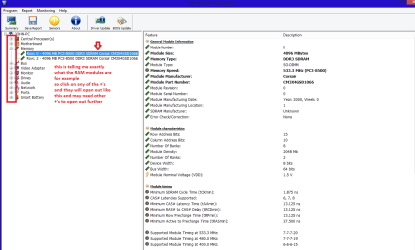
DownloadHW Info and pick the right bit version - HWiNFO, HWiNFO32/64 - Download - (copy andpaste this site into the search bar) If you do not need the running informationin the smaller right hand panel close it. In the left hand window click on the+ for the individual device groupings and they will open out to the variouscomponents.

Go onopening out further until you get to the device itself. click on it and it willhighlight. In the right hand window there will be a very detailed descriptionof that device as in brand, speeds model number etc etc These are very detailedand are just what is needed for searching for drivers etc.

See my picfor an example - in this I have opened out one my components and then highlight one you need andyou can see the detail.

Now all you have to do is highlight the various bits you want find out about and the detailed info is much better than most programs give.
 

Attachments

  • HW INFO DEVICESX2.PNG
    HW INFO DEVICESX2.PNG
    36.5 KB · Views: 1

My Computer My Computer

At a glance

Desk1 7 Home Prem / Desk2 10 Pro / Main lap A...Desk1 i5 3750K / Laptop i7 GTX 860M / Desk2 i...Desk1 8GB (1866) / Desk2 16GB (1333) / Laptop...Desk 1& 2NVidia GTX 650 & Laptops on board Intel
Computer type
PC/Desktop
Computer Manufacturer/Model Number
Own build (new) Desk1 / Asus ROG Win 7 / Desk2 1st build
OS
Desk1 7 Home Prem / Desk2 10 Pro / Main lap Asus ROG 10 Pro 2 laptop Toshiba 7 Pro Asus P2520 7 & 10
CPU
Desk1 i5 3750K / Laptop i7 GTX 860M / Desk2 i5 2500
Motherboard
Desk1 Asus P877-V / Desk2 Gigabyte H67 UD3H / Laptop ?
Memory
Desk1 8GB (1866) / Desk2 16GB (1333) / Laptop 8Gb DDR3
Graphics Card(s)
Desk 1& 2NVidia GTX 650 & Laptops on board Intel
Sound Card
Desk 1 & 2 -XONAR DG Realtek High Def audio Laptop
Monitor(s) Displays
Desk 1 Benq HD 2450 / Desk2 Philips 24" / Laptop 17.5"
Screen Resolution
1920x1080 D1 & D2 & Laptop 1
Hard Drives
Desk1 Samsung 120GB 830 SSD
Asus ROG 256GB 850 Pro SSD
Desk2 Samsung 840 256 SSD
Toshiba 120GB EVO
PSU
Desk 1 Corsair HX 1050/ Laptop ? / Desk 2 Corsair HX 650
Case
Desk 1 Cooler HAF XM ? Toshiba laptop / Desk2 Coolermaster
Cooling
Fans on all Desk1 -2 Desk2 - all Coolermasters 5 Laptop ?
Keyboard
Desk 1 MS Sidewinder X6 Desk 2 MS Sidewinder X 4
Mouse
Desk 1&2 - Gigabyte MS 900 gamer - laptop - Logitec wireless
Internet Speed
ADSL2+
Other Info
One other Desktop (tester) and spare Toshba laptop both with SSD's
Running Kaspersky 2016 ISS on all machines config'd identically
Logitec audio stereo systems on each machine (x3)
Canon MG5250MFC
Router/modem TP-Link running WPA2SK
Hello and welcome Krent mate one thing you can do is run these for starters

http://www.sevenforums.com/tutorials/1538-sfc-scannow-command-system-file-checker.html

http://www.sevenforums.com/tutorials/433-disk-check.html < use the /f and /r options in Option 2 ifnecessary
If you want to find detailed info then run this if you can

Using HW Info general components

DownloadHW Info and pick the right bit version - HWiNFO, HWiNFO32/64 - Download - (copy andpaste this site into the search bar) If you do not need the running informationin the smaller right hand panel close it. In the left hand window click on the+ for the individual device groupings and they will open out to the variouscomponents.

Go onopening out further until you get to the device itself. click on it and it willhighlight. In the right hand window there will be a very detailed descriptionof that device as in brand, speeds model number etc etc These are very detailedand are just what is needed for searching for drivers etc.

See my picfor an example - in this I have opened out one my components and then highlight one you need andyou can see the detail.

Now all you have to do is highlight the various bits you want find out about and the detailed info is much better than most programs give.
Thanks for the reply I have just tired the scan from the first website you linked. I did a sfc /verifyonly scan first and it said it came up with a problem. I tried the sfc/scannow and it got 55% through the scan and failed to finish it.

Just posting while i try some of the other things the site mentioned. Downloading the system update thing now.
 

My Computer My Computer

At a glance

Windows 7 Home Premium x32Intel Core i3-2310M CPU @ 2.10GHz6GB
Computer type
Laptop
Computer Manufacturer/Model Number
Dell Inspiron, N5110
OS
Windows 7 Home Premium x32
CPU
Intel Core i3-2310M CPU @ 2.10GHz
Memory
6GB
Hello and welcome Krent mate one thing you can do is run these for starters

http://www.sevenforums.com/tutorials/1538-sfc-scannow-command-system-file-checker.html

http://www.sevenforums.com/tutorials/433-disk-check.html < use the /f and /r options in Option 2 ifnecessary
If you want to find detailed info then run this if you can

Using HW Info general components

DownloadHW Info and pick the right bit version - HWiNFO, HWiNFO32/64 - Download - (copy andpaste this site into the search bar) If you do not need the running informationin the smaller right hand panel close it. In the left hand window click on the+ for the individual device groupings and they will open out to the variouscomponents.

Go onopening out further until you get to the device itself. click on it and it willhighlight. In the right hand window there will be a very detailed descriptionof that device as in brand, speeds model number etc etc These are very detailedand are just what is needed for searching for drivers etc.

See my picfor an example - in this I have opened out one my components and then highlight one you need andyou can see the detail.

Now all you have to do is highlight the various bits you want find out about and the detailed info is much better than most programs give.
So the system update didn't work at all it just made the option in control panel fail and give an error code. I intalled that HWiNFO and looked at my hard drives but what am I looking for here? Also after installing that im not getting any freezes right now, i had this happen before and then I tried to update my computer and its started all over again. lol, im so confused.
 

My Computer My Computer

At a glance

Windows 7 Home Premium x32Intel Core i3-2310M CPU @ 2.10GHz6GB
Computer type
Laptop
Computer Manufacturer/Model Number
Dell Inspiron, N5110
OS
Windows 7 Home Premium x32
CPU
Intel Core i3-2310M CPU @ 2.10GHz
Memory
6GB
I feel like this is something only a new hard drive would fix and since I'm on a laptop that won't really be possible.

Why do you say this. It's as easy or easier to replace a laptop hard drive than it is a desktop hard drive.
 

My Computer My Computer

At a glance

Windows 10 Pro X64Intel Quad Core i7-4770 @ 3.4Ghz16.0GB PC3-12800 DDR3 SDRAM 1600 MHzIntel Integrated HD Graphics
Computer type
PC/Desktop
Computer Manufacturer/Model Number
Lenovo IdeaCenter 450
OS
Windows 10 Pro X64
CPU
Intel Quad Core i7-4770 @ 3.4Ghz
Memory
16.0GB PC3-12800 DDR3 SDRAM 1600 MHz
Graphics Card(s)
Intel Integrated HD Graphics
Sound Card
Realtek HD Audio
Monitor(s) Displays
HP 22" LCD
Screen Resolution
1680 x 1050
Hard Drives
250GB Samsung EVO SATA-3 SSD
2TB Seagate ST2000DM001 SATA-2
1.5TB Seagate ST3150041AS SATA
Keyboard
Dell USB
Mouse
Lenovo USB
Internet Speed
Cable via Road Runner 3MB Upload, 30MB Download
Antivirus
Windows Defender, MBAM Pro, MBAE
Browser
Seamonkey
Other Info
UEFI/GPT
PLDS DVD-RW DH16AERSH

Krent it is mainly to see what they are and in some detail too because thesystem specs really needs a little more in them mate t makes life a littleeasier.

Now just what are you updating ?? if you can track down the Windows updatethat is causing problems then you need to system restore and then Hide theupdate/s when they come up.
If for example you are going to change the hard drive then as Ztrukersays so easily done in a laptop than a desktop although really that is no bigdeal just more stuff to remove to get it out.

I always tape a white bath towel onto the top - it stops those small screws form skidding of onto the floor where they most likely get lost and it protects the machine surfaces.
Now having said that this video shows it is more difficult a job than normal on that Dell.


My Computer My Computer

At a glance

Desk1 7 Home Prem / Desk2 10 Pro / Main lap A...Desk1 i5 3750K / Laptop i7 GTX 860M / Desk2 i...Desk1 8GB (1866) / Desk2 16GB (1333) / Laptop...Desk 1& 2NVidia GTX 650 & Laptops on board Intel
Computer type
PC/Desktop
Computer Manufacturer/Model Number
Own build (new) Desk1 / Asus ROG Win 7 / Desk2 1st build
OS
Desk1 7 Home Prem / Desk2 10 Pro / Main lap Asus ROG 10 Pro 2 laptop Toshiba 7 Pro Asus P2520 7 & 10
CPU
Desk1 i5 3750K / Laptop i7 GTX 860M / Desk2 i5 2500
Motherboard
Desk1 Asus P877-V / Desk2 Gigabyte H67 UD3H / Laptop ?
Memory
Desk1 8GB (1866) / Desk2 16GB (1333) / Laptop 8Gb DDR3
Graphics Card(s)
Desk 1& 2NVidia GTX 650 & Laptops on board Intel
Sound Card
Desk 1 & 2 -XONAR DG Realtek High Def audio Laptop
Monitor(s) Displays
Desk 1 Benq HD 2450 / Desk2 Philips 24" / Laptop 17.5"
Screen Resolution
1920x1080 D1 & D2 & Laptop 1
Hard Drives
Desk1 Samsung 120GB 830 SSD
Asus ROG 256GB 850 Pro SSD
Desk2 Samsung 840 256 SSD
Toshiba 120GB EVO
PSU
Desk 1 Corsair HX 1050/ Laptop ? / Desk 2 Corsair HX 650
Case
Desk 1 Cooler HAF XM ? Toshiba laptop / Desk2 Coolermaster
Cooling
Fans on all Desk1 -2 Desk2 - all Coolermasters 5 Laptop ?
Keyboard
Desk 1 MS Sidewinder X6 Desk 2 MS Sidewinder X 4
Mouse
Desk 1&2 - Gigabyte MS 900 gamer - laptop - Logitec wireless
Internet Speed
ADSL2+
Other Info
One other Desktop (tester) and spare Toshba laptop both with SSD's
Running Kaspersky 2016 ISS on all machines config'd identically
Logitec audio stereo systems on each machine (x3)
Canon MG5250MFC
Router/modem TP-Link running WPA2SK
I managed to schedule a disc check and restart before my computer froze. Everything is working fine right now hopefully it'll last until I save up enough for a gaming desktop. That disc check took over 12 hours but it found lots of corruptions and seems to have fixed it all.

Thank you! Very much appreciated!:)
 

My Computer My Computer

At a glance

Windows 7 Home Premium x32Intel Core i3-2310M CPU @ 2.10GHz6GB
Computer type
Laptop
Computer Manufacturer/Model Number
Dell Inspiron, N5110
OS
Windows 7 Home Premium x32
CPU
Intel Core i3-2310M CPU @ 2.10GHz
Memory
6GB
Now just what are you updating ?? if you can track down the Windows updatethat is causing problems then you need to system restore and then Hide theupdate/s when they come up.
If for example you are going to change the hard drive then as Ztrukersays so easily done in a laptop than a desktop although really that is no bigdeal just more stuff to remove to get it out.
I was just trying to update the computer. I hadn't updated for well over a couple months, also because the site was recommending an update first before trying the other steps.
 

My Computer My Computer

At a glance

Windows 7 Home Premium x32Intel Core i3-2310M CPU @ 2.10GHz6GB
Computer type
Laptop
Computer Manufacturer/Model Number
Dell Inspiron, N5110
OS
Windows 7 Home Premium x32
CPU
Intel Core i3-2310M CPU @ 2.10GHz
Memory
6GB
I feel like this is something only a new hard drive would fix and since I'm on a laptop that won't really be possible.
Why do you say this. It's as easy or easier to replace a laptop hard drive than it is a desktop hard drive.
I'm not very computer savvy, all I know was that some laptops are not able to swap out certain parts like graphic cards and such. I guess I'm wrong about my computer?
 

My Computer My Computer

At a glance

Windows 7 Home Premium x32Intel Core i3-2310M CPU @ 2.10GHz6GB
Computer type
Laptop
Computer Manufacturer/Model Number
Dell Inspiron, N5110
OS
Windows 7 Home Premium x32
CPU
Intel Core i3-2310M CPU @ 2.10GHz
Memory
6GB
I feel like this is something only a new hard drive would fix and since I'm on a laptop that won't really be possible.
Why do you say this. It's as easy or easier to replace a laptop hard drive than it is a desktop hard drive.
I'm not very computer savvy, all I know was that some laptops are not able to swap out certain parts like graphic cards and such. I guess I'm wrong about my computer?

That's no problem mate there are certain parts of the laptopthat sometimes cannot be swapped out and I talk of the graphics, South and Northbridge and BIOS chips that are soldered in. The other stuff like hard drives, CPU's and RAMyes and usually a lot easier than your machine.
You are not alone in knowing that but at least you have learnt something eh? :)

I shall PM you - look for a notification at the top of the page .
 

My Computer My Computer

At a glance

Desk1 7 Home Prem / Desk2 10 Pro / Main lap A...Desk1 i5 3750K / Laptop i7 GTX 860M / Desk2 i...Desk1 8GB (1866) / Desk2 16GB (1333) / Laptop...Desk 1& 2NVidia GTX 650 & Laptops on board Intel
Computer type
PC/Desktop
Computer Manufacturer/Model Number
Own build (new) Desk1 / Asus ROG Win 7 / Desk2 1st build
OS
Desk1 7 Home Prem / Desk2 10 Pro / Main lap Asus ROG 10 Pro 2 laptop Toshiba 7 Pro Asus P2520 7 & 10
CPU
Desk1 i5 3750K / Laptop i7 GTX 860M / Desk2 i5 2500
Motherboard
Desk1 Asus P877-V / Desk2 Gigabyte H67 UD3H / Laptop ?
Memory
Desk1 8GB (1866) / Desk2 16GB (1333) / Laptop 8Gb DDR3
Graphics Card(s)
Desk 1& 2NVidia GTX 650 & Laptops on board Intel
Sound Card
Desk 1 & 2 -XONAR DG Realtek High Def audio Laptop
Monitor(s) Displays
Desk 1 Benq HD 2450 / Desk2 Philips 24" / Laptop 17.5"
Screen Resolution
1920x1080 D1 & D2 & Laptop 1
Hard Drives
Desk1 Samsung 120GB 830 SSD
Asus ROG 256GB 850 Pro SSD
Desk2 Samsung 840 256 SSD
Toshiba 120GB EVO
PSU
Desk 1 Corsair HX 1050/ Laptop ? / Desk 2 Corsair HX 650
Case
Desk 1 Cooler HAF XM ? Toshiba laptop / Desk2 Coolermaster
Cooling
Fans on all Desk1 -2 Desk2 - all Coolermasters 5 Laptop ?
Keyboard
Desk 1 MS Sidewinder X6 Desk 2 MS Sidewinder X 4
Mouse
Desk 1&2 - Gigabyte MS 900 gamer - laptop - Logitec wireless
Internet Speed
ADSL2+
Other Info
One other Desktop (tester) and spare Toshba laptop both with SSD's
Running Kaspersky 2016 ISS on all machines config'd identically
Logitec audio stereo systems on each machine (x3)
Canon MG5250MFC
Router/modem TP-Link running WPA2SK
Back
Top