Possible problem with HDD

askic

New member
Member
Local time
7:18 AM
Messages
62
Hello to all,

I have recently experienced a strange problem and would like to read opinion from you guys. It's about possible HDD failure. I have recently bought used computer that was previously used as an office computer. It was pretty cheap and I bought for my parents since they don't do much than usual (e-mail, surfing news, youtube and similar). The motherboard is Fujitsu Siemens and the HDD is SATA 500 GB Seagate 7200 rpm, 2 GB RAM, CPU INtel Pentium 4 3.6 GHz. After few weeks of using they started complain that computer works slow. I have checked for viruses and it is clean. I have discovered that the speed of copy large file from partition to the another is in average 1 MB/sec which is rather slow. On the forums I have found that it is either problem with motherboard or with HDD. That's why I have downloaded Seagate Seatools for windows and performed different kinds of tests, all were successful. I have used then one older HDD (IDE) 80 GB made image of C partition of old HDD and restored partition on new (IDE) HDD.
I copied the same file (1 GB) again and this time average speed was higher than 15 MB/sec (sometimes even higher that 20 MB/s). The computer works significantly faster. So somehow the problem is with SATA 500 GB disk. I wonder what could it be since scan disk tool in windows 7 returns no error and seagate (manufacturer) checking tools also say that the HDD is OK.

What could that be. The only thing I didn't change is SATA cable but I doubt that problem can be cause by 15 cm of cable.

Do you have any possible explanation what could be the cause for this behavior. I have made a back of all data from the HDD,
It is interesting that older HDD (IDE) works much faster than newer SATA. I have newer used computer in the beginning but parents told me it worked faster in the beginning.

Thank you.
 

My Computer

Computer type
PC/Desktop
Computer Manufacturer/Model Number
Dell T5500
OS
Windows 7 64 vir
I would try another SATA cable. You would be surprised what a bad cable can do even a very short one.
 

My Computer

Computer type
PC/Desktop
Computer Manufacturer/Model Number
Custom Built
OS
Windows 10 Pro x64, Windows 8.1 Pro x64, Windows 7 Ultimate x64 SP1,
CPU
INTEL i9-7920X LGA 2066
Motherboard
Gigabyte X299-WU8 F3
Memory
64 GB (4 X 16 GB) G-Skill V Series DDR4 3200 Quad Channel
Graphics Card(s)
EVGA GTX 1060 SC 3 GB
Sound Card
Realtek Onboard ALC1220
Monitor(s) Displays
2 x Samsung S27E310
Screen Resolution
1920x1080
Hard Drives
Samsung 2 x 970 EVO Plus 500 GB NVMe
1 x 6TB WD 6003FZBX SATA
1 x 6TB WD 60EFRX SATA
12 x 3TB WD 30EFRX SATA
PSU
Seasonic X-1050
Case
Thermaltake Armor+
Cooling
Corsair H80i V2 Liquid AOI Cooler
Keyboard
Logitech G510s
Mouse
Logitech MX Master 2S
Internet Speed
200 Mb/s
Antivirus
ESET NOD32 13.1
Browser
EDGE (Dev, Canary, Beta), Chrome
Other Info
ASUS RT-AC68U router
Malwarebytes 4.0.4
Ok, I'll buy a new SATA cable and try it. But I cannot understand what could be wrong. Everything works jut slower. How bad cable can cause this? Thereis no in the computer source of noise or EMC disturbance that can cause this.
Furthermore, I have used existing IDE cable that was used to connect DVD drive to put HDD as master and it worked really faster. Anyway the next test is with the cable.
 

My Computer

Computer type
PC/Desktop
Computer Manufacturer/Model Number
Dell T5500
OS
Windows 7 64 vir
The problem was not in SATA cable. The HDD is just slow. So I have made a complete backup. I'm going to replace the drive soon. It is interesting that this drive passed all tests.
Thank you for the support.
 

My Computer

Computer type
PC/Desktop
Computer Manufacturer/Model Number
Dell T5500
OS
Windows 7 64 vir
If your parents only uses for trivial tasks, buy a 120G SSD. Win 7 will take about 50G so you will have 70G for data.
You have no idea what a SSD can do for an old computer.
I have one of these PNY CS1311 2.5 SSD7CS1311-120-RB - Newegg.com
So far, so good.
 

My Computers

System One System Two

  • Computer type
    PC/Desktop
    Computer Manufacturer/Model Number
    custom build
    OS
    Windows 7 HP 64
    CPU
    i5 6600K - 800MHz to 4200MHz
    Motherboard
    GA-Z170-HD3P
    Memory
    4+4G GSkill DDR4 3000
    Graphics Card(s)
    IG - Intel 530
    Monitor(s) Displays
    Samsung 226BW
    Screen Resolution
    1680x1050
    Hard Drives
    (1) -1 SM951 – 128GB M.2 AHCI PCIe SSD drive for Windows 7 and Lubuntu
    (2) -1 WD SATA 3 - 1T for Data
    (3) -1 WD SATA 3 - 1T for backup
    PSU
    Thermaltake 450W TR2 gold
    Keyboard
    Old and good Chicony mechanical keyboard
    Mouse
    Logitech mX performance - 9 buttons (had to disable some)
    Internet Speed
    500Mb/s
    Browser
    Firefox 64
    Other Info
    TinyWall firewall
  • Computer type
    Laptop
    System Manufacturer/Model Number
    Asus Q550LF
    OS
    Windows 7 Pro
    CPU
    i7-4500U 800MHz to 3.0GHz
    Motherboard
    Asus Q550LF
    Memory
    (4+4)G DDR3 1600
    Graphics Card(s)
    IG intel 4400 + NVIDIA GeForce GT 745M
    Sound Card
    Realtek
    Monitor(s) Displays
    LG Display LP156WF4-SPH1
    Screen Resolution
    1920 x 1080
    Hard Drives
    BX500 120G SSD for Windows and programs +
    1T HDD for data
    Internet Speed
    500 Mb/s
    Browser
    Firefox
    Other Info
    TinyWall firewall
Hello to all,

I have recently experienced a strange problem and would like to read opinion from you guys. It's about possible HDD failure. I have recently bought used computer that was previously used as an office computer. It was pretty cheap and I bought for my parents since they don't do much than usual (e-mail, surfing news, youtube and similar). The motherboard is Fujitsu Siemens and the HDD is SATA 500 GB Seagate 7200 rpm, 2 GB RAM, CPU INtel Pentium 4 3.6 GHz. After few weeks of using they started complain that computer works slow. I have checked for viruses and it is clean. I have discovered that the speed of copy large file from partition to the another is in average 1 MB/sec which is rather slow. On the forums I have found that it is either problem with motherboard or with HDD. That's why I have downloaded Seagate Seatools for windows and performed different kinds of tests, all were successful. I have used then one older HDD (IDE) 80 GB made image of C partition of old HDD and restored partition on new (IDE) HDD.
I copied the same file (1 GB) again and this time average speed was higher than 15 MB/sec (sometimes even higher that 20 MB/s). The computer works significantly faster. So somehow the problem is with SATA 500 GB disk. I wonder what could it be since scan disk tool in windows 7 returns no error and seagate (manufacturer) checking tools also say that the HDD is OK.
What could that be. The only thing I didn't change is SATA cable but I doubt that problem can be cause by 15 cm of cable.
Do you have any possible explanation what could be the cause for this behavior. I have made a back of all data from the HDD,It is interesting that older HDD (IDE) works much faster than newer SATA. I have newer used computer in the beginning but parents told me it worked faster in the beginning.
Thank you.

There is one HD failure mode that does not show up in CHKDSK or other disk tests. I just call it Slo-Mo.
For some reason, the drive just slows down to a crawl. It's got to be some failure of a component on the drives on-board controller board. A new board would fix the problem, but where on earth would you ever find a new board, with exactly the same build and firmware level? It's easiest and recommended to just get what you can off of that old/slow HD and replace it with a new one.
I've had to do this for several of my customers in years past. I must say though, that I've not seen this failure mode in quite some time.

SSD drives, of course, don't do this. They either work or they don't.
I bought a PNY SSD directly from the company, and one morning it failed to boot up. In fact, there was no way to get into it at all. So I called PNY, and they gave me a total run-around and refused to help me at all, even though the drive was only three months old.
I promptly got on the phone and ordered a Sandisk 120GB SSD from a trusted supplier.

Knowing that an SSD can fail without notice, I now have three of them. #1 is my main HD, while #2 is a clone of #1 (which I re-clone, every week) and #3 is in a little laptop that I use only occasionally.
If SSD #1 should ever fail, I'll just unplug it, plug in #2, (the clone), and keep right on computing.

It's true, so true, that if you want to give an old computer a Vitamin B-12 shot, clone the old mechanical HD to an SSD and set the old spinner on the shelf.

Before I ever do a backup or clone, I try to get the drive in as good shape as possible, buy deleting all the temp files and other junk, as well as UN-Installing any un-used and un-wanted programs. Even doing a defrag * on a mechanical HD will make a backup or clone go much easier, with less chance of a failure.

*Never try to run Defrag on an SSD! For SSD's there is a program called 'Trim'.

Good Luck, Mate,
TechnoMage :cool:


My Computer

Computer type
PC/Desktop
Computer Manufacturer/Model Number
Various
OS
Win 7 Pro, SP1, x86, Win-11/Pro/64
CPU
AMD
Motherboard
Various
Memory
8GB Crucial
Graphics Card(s)
Various
Sound Card
OnBoard
Monitor(s) Displays
Acer 21.5"
Hard Drives
Crucial SSD, 500 GB
PSU
OEM
Case
SFF Slim Line Case
Cooling
OEM
Keyboard
eMachines
Mouse
Logitech Wireless
Internet Speed
varies
Antivirus
Windows Defender/Super Anti-Spyware
Browser
Firefox
If all they ever do is internet-related activities, then it is likely that lots of scripts are running on the websites they frequent, slowing things to a crawl. This happened to me. My solution was to use Firefox as my browser, with the NoScript add-on installed. If you decide to go this route, it will take some time to fine-tune NoScript so as to allow all desired activity, while blocking the scripts which slow things down.

Another option would be to install the Opera browser, and turn on ad-blocking. Although not as fast as FireFox with NoScript, Opera with ad-blocking is almost as fast, and there is nothing to fine tune, so it is very easy to use.

You should increase your memory to at least 4 GB of RAM. I would go up to 8 GB if the computer allows that much. 2 GB of RAM is definitely causing slowness in this computer.

As Megahertz07 said, an SSD will also help. But in my experience, the additional memory will help more than the SSD, so if you had to choose between additional memory and an SSD, go with the memory.

I doubt that your hard drive is the cause of the problem. You can test this by doing only non-internet activities for a while, and see if that is also slow. My guess is that only the internet-related activities will be slow.
 

My Computer

Computer type
PC/Desktop
Computer Manufacturer/Model Number
Dell
OS
Linux Mint 18.2 xfce 64-bit (VMWare host) / Windows 8.1 Pro 32-bit (VMWare guest)
CPU
Haswell
Memory
4 GB
Monitor(s) Displays
Acer 23"
Screen Resolution
1920 x 1080
Hard Drives
Two hard drives, 1TB each: One for Linux, one for my data.
Keyboard
IBM Model M
Antivirus
Sophos (Linux), Trend Micro (Windows)
Browser
Firefox, Opera
Other Info
I use Samba to share my data drive with the other computers at my house and with my guest session in VMWare Workstation Player.
M$ states that Win 7 should have at least 1G of memory for 32 bits and 2G for 64 bits.
From my experience, I recommend as minimal, 2G of memory for 32 bits and 4G for 64 bits.

If the computer has Win 7 32 bits it can only deal with 3.2 G. In this case (32 bits) it doesn't make sense to use more than 4 G (3.2 for Windows and .8G for graphics)
 

My Computers

System One System Two

  • Computer type
    PC/Desktop
    Computer Manufacturer/Model Number
    custom build
    OS
    Windows 7 HP 64
    CPU
    i5 6600K - 800MHz to 4200MHz
    Motherboard
    GA-Z170-HD3P
    Memory
    4+4G GSkill DDR4 3000
    Graphics Card(s)
    IG - Intel 530
    Monitor(s) Displays
    Samsung 226BW
    Screen Resolution
    1680x1050
    Hard Drives
    (1) -1 SM951 – 128GB M.2 AHCI PCIe SSD drive for Windows 7 and Lubuntu
    (2) -1 WD SATA 3 - 1T for Data
    (3) -1 WD SATA 3 - 1T for backup
    PSU
    Thermaltake 450W TR2 gold
    Keyboard
    Old and good Chicony mechanical keyboard
    Mouse
    Logitech mX performance - 9 buttons (had to disable some)
    Internet Speed
    500Mb/s
    Browser
    Firefox 64
    Other Info
    TinyWall firewall
  • Computer type
    Laptop
    System Manufacturer/Model Number
    Asus Q550LF
    OS
    Windows 7 Pro
    CPU
    i7-4500U 800MHz to 3.0GHz
    Motherboard
    Asus Q550LF
    Memory
    (4+4)G DDR3 1600
    Graphics Card(s)
    IG intel 4400 + NVIDIA GeForce GT 745M
    Sound Card
    Realtek
    Monitor(s) Displays
    LG Display LP156WF4-SPH1
    Screen Resolution
    1920 x 1080
    Hard Drives
    BX500 120G SSD for Windows and programs +
    1T HDD for data
    Internet Speed
    500 Mb/s
    Browser
    Firefox
    Other Info
    TinyWall firewall
Thank you guys for the suggestions. Even though SSD are not really that expensive anymore, I doubt I'll buy a new SSD for my parents. It will most likely stay this HDD IDE for now and in the future.
The computer motherboard is more than 8 years old and I seriously doubt it can recognize SSD drive. I know that SSD instead of HDD can boost speed, but I'm not sure whether the drive would be recognized in BIOS.

The suggestion regarding the SSD insted of HDD is really interesting and I would probably open a new Thread regarding it.

Thank you all once again.
 

My Computer

Computer type
PC/Desktop
Computer Manufacturer/Model Number
Dell T5500
OS
Windows 7 64 vir
By the point of view from BIOS, there is no difference between a SATA HDD and a SATA SSD.
A SSD is seen by BIOS as a SATA disk.
 

My Computers

System One System Two

  • Computer type
    PC/Desktop
    Computer Manufacturer/Model Number
    custom build
    OS
    Windows 7 HP 64
    CPU
    i5 6600K - 800MHz to 4200MHz
    Motherboard
    GA-Z170-HD3P
    Memory
    4+4G GSkill DDR4 3000
    Graphics Card(s)
    IG - Intel 530
    Monitor(s) Displays
    Samsung 226BW
    Screen Resolution
    1680x1050
    Hard Drives
    (1) -1 SM951 – 128GB M.2 AHCI PCIe SSD drive for Windows 7 and Lubuntu
    (2) -1 WD SATA 3 - 1T for Data
    (3) -1 WD SATA 3 - 1T for backup
    PSU
    Thermaltake 450W TR2 gold
    Keyboard
    Old and good Chicony mechanical keyboard
    Mouse
    Logitech mX performance - 9 buttons (had to disable some)
    Internet Speed
    500Mb/s
    Browser
    Firefox 64
    Other Info
    TinyWall firewall
  • Computer type
    Laptop
    System Manufacturer/Model Number
    Asus Q550LF
    OS
    Windows 7 Pro
    CPU
    i7-4500U 800MHz to 3.0GHz
    Motherboard
    Asus Q550LF
    Memory
    (4+4)G DDR3 1600
    Graphics Card(s)
    IG intel 4400 + NVIDIA GeForce GT 745M
    Sound Card
    Realtek
    Monitor(s) Displays
    LG Display LP156WF4-SPH1
    Screen Resolution
    1920 x 1080
    Hard Drives
    BX500 120G SSD for Windows and programs +
    1T HDD for data
    Internet Speed
    500 Mb/s
    Browser
    Firefox
    Other Info
    TinyWall firewall
Hello guys,

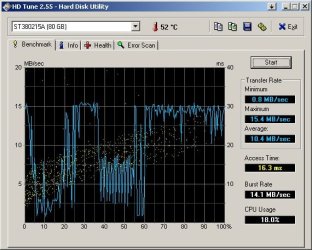
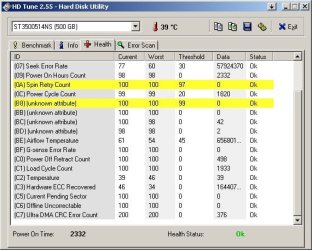
I have already made a complete backup of my 500 GB SATA very slow HDD and I decided to make a complete test in order to see if the drive is really failing. So, I have downloaded both seatools from windows and for DOS (test tools made by the drive's manufacturer) and performed all kind of tests. The HDD passed all tests. So I have made a performance test with the HD Tune and results are attached. I cannot understand how Seagate drives that shows good health can have constant test speed of about 3 MB/s. There must be some kind of test result that shows the drive is failing. Is it perhaps possible that there is some kind of "software switch" to reduce the speed of the drive?

I have also made a test of seagate 80 GB IDE drive to compare the results.
Interesting is that I have this problem with the HDD after only about 2000 operating hours.

I'll try to insert it into another computer in order to check whether the drive is failing or maybe the motherboard.
 

Attachments

  • Seagate 80 GB.jpg
    Seagate 80 GB.jpg
    49 KB · Views: 13
  • Seagate 500 GB SATA Health.jpg
    Seagate 500 GB SATA Health.jpg
    49.8 KB · Views: 13
  • Seagate 500 GB SATA.jpg
    Seagate 500 GB SATA.jpg
    47.2 KB · Views: 13

My Computer

Computer type
PC/Desktop
Computer Manufacturer/Model Number
Dell T5500
OS
Windows 7 64 vir
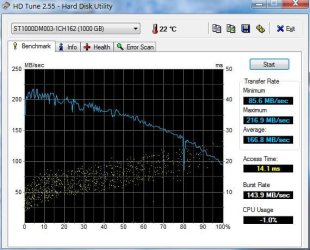
Here is my performance on a 1TB Seagate with 12,000 hours of operation.
Capture.JPG

The performance of your HDD is clearly bad at the moment. If you have everything backed up then you could reformat the drive and run the speed benchmark again.
Another benchmark program is CrystalDiskMark.
 

My Computer

Computer type
PC/Desktop
Computer Manufacturer/Model Number
Own build
OS
Windows 7x64 Home Premium SP1
CPU
Intel i7 2600k
Motherboard
ASUS P8Z68 Deluxe
Memory
G.Skill Ripjaws (DDR3-1600) 2x4GB
Graphics Card(s)
Nvidia GeForce GTS 450; Intel HD Graphics 3000(GT2+)
Monitor(s) Displays
Dell Ultrasharp IPS panel U2311H, Samsung SyncMaster P2350
Screen Resolution
1920x1080
Hard Drives
Samsung 850 Pro SSD 256GB, Samsung SSD 840 120GB, Seagates 1TB Barracuda ST31000528AS x2
PSU
Seasonic M12II 520W
Case
Lian Li Lancool PC-K60
Cooling
Case: 1x120mm, 3x140mm CPU: Hyper 212+
Keyboard
Logitech MK520 (wireless)
Mouse
Logitech MK520
Internet Speed
6-7 Mbps
Antivirus
Norton Security Premium, Malwarebytes on 2 (MSE on 3rd PC)
Browser
FireFox
Other Info
Audio: Logitech Z523 2.1
Solved!

Hello,

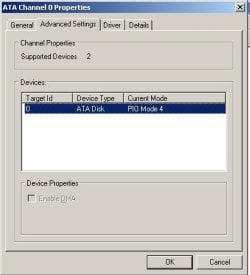
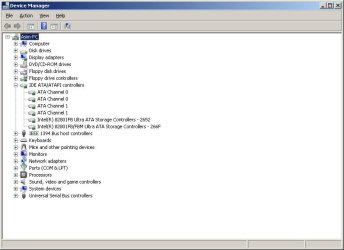
I have made a lot of surfing and I have finally found the cause of my problem. It was very strange to me that only that drive started failing after only 2000 hours (possible of course but unlikely) and I found very unlikely that HD performance test would show almost straight line. This very I suspect some "software limit" and I was right. One Tom's hardware forum I have found a clue and inspected "Device manager". I have found that "Enable DMA" mode is grayed out. After that I have found Intel Chipset drivers for my motherboard even though that motherboard is from year 2005 (I thought windows 7 must already have these drivers because it is newer).

So I have installed software drivers and chosen uninstall to all items listed under IDE/ATA/ATAPI. After restart, device manager list showed something else. It showed AHCI this time. The computer was obviously faster, so I performed the test again. The results are presented in the attachment.

Thank you all who gave me advises, the problem was actually in drivers.

So this thread can be locked.
 

Attachments

  • DeviceManager002.jpg
    DeviceManager002.jpg
    20.8 KB · Views: 9
  • DeviceManager.jpg
    DeviceManager.jpg
    39.9 KB · Views: 0
  • DeviceManager after chipset drivers.jpg
    DeviceManager after chipset drivers.jpg
    39.3 KB · Views: 0
  • Hdtune after.jpg
    Hdtune after.jpg
    48.5 KB · Views: 9

My Computer

Computer type
PC/Desktop
Computer Manufacturer/Model Number
Dell T5500
OS
Windows 7 64 vir
Back
Top