iTunes x64 not installing for windows 7 x64

balickma

New member
Local time
12:28 PM
Messages
5
I'm trying to install itunes 9 on a computer running windows 7 pro x64. I don't know why, but the installation goes to about 80% and then doesn't finish. And yes, I am using the itunes x64 installer. Is there any way to completely remove the apple files so that it would start installing fresh, or is there some kind of compatibility issue with win 7?
 

My Computer My Computer

At a glance

Windows 7 Pro x64Intel i710 GB PatriotEVGA 275
Computer Manufacturer/Model Number
Custom
OS
Windows 7 Pro x64
CPU
Intel i7
Motherboard
X-58
Memory
10 GB Patriot
Graphics Card(s)
EVGA 275
Monitor(s) Displays
LG
Hard Drives
1TB Western Digital 7200 RPM
Case
Antec 1200
Keyboard
Crap
Internet Speed
Wired
I downloaded and installed Itunes x64 today and it worked fine. Maybe if you run ccleaner and try and install it again. Failing that I guess the 32bit version should work.
 

My Computer My Computer

At a glance

Windows 7 Professional x64Intel i5-2500k @ 3.3Ghz4GB DDR3Nvidia GTS250 1GB
Computer Manufacturer/Model Number
Desktop
OS
Windows 7 Professional x64
CPU
Intel i5-2500k @ 3.3Ghz
Motherboard
Gigabyte GA-Z77X-UD5H
Memory
4GB DDR3
Graphics Card(s)
Nvidia GTS250 1GB
Monitor(s) Displays
Sony SDM S95A
Screen Resolution
1280x1024
Hard Drives
1x 1TB, 2x 250GB HDDs
PSU
Corsair HX850W
Case
Cooler Master 690 II
Cooling
Thermalright True Spirit 140mm & 3x 120mm & 3x 140mm Fans
Keyboard
Logitech Media Keyboard
Mouse
Microsoft Intellimouse
Internet Speed
8MB
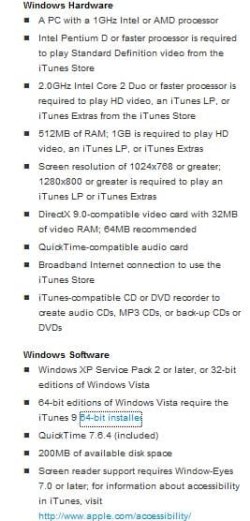
Just to let you know iTunes is NOT supported on Windows 7 yet... accroding to Apple's website..
but like Quackpot said he was able to install it.. It should work with Windows 7 but right now it is not supported..

I do not use iTunes personally but like Quackpot said run ccleaner and even restart your Operating System and try a reinstall..

Hope this Helps..
 

Attachments

  • itunes 9.jpg
    itunes 9.jpg
    30 KB · Views: 217

My Computer My Computer

At a glance

Windows Seven x642.2 GHz Dual Core4GBATI Mobility RADEON HD 3470
Computer Manufacturer/Model Number
HP Pavilion dv5 Notebook PC
OS
Windows Seven x64
CPU
2.2 GHz Dual Core
Motherboard
Quanta 3600
Memory
4GB
Graphics Card(s)
ATI Mobility RADEON HD 3470
Sound Card
ATI
Monitor(s) Displays
Laptop
Hard Drives
ATA Hitachi HTS543215 (5400RPM)
Case
Laptop
Cooling
Fan
Internet Speed
Basic DSL 1.5 up and Down
using itunes 9 on x64 win7. you will need to uninstall old itunes versions before installing it. or, run the installer in compatibility mode.
 

My Computer My Computer

At a glance

Windows® 8 Pro (64-bit)Intel® Core™ i5 Processor 2467M (1.60GHz, 3MB...6GB DDR3 System Memory at 1,333MHz (on BD 4GB...AMD Radeon™ HD7550M 1GB DDR3 (Ext. Graphic)
Computer Manufacturer/Model Number
Samsung NP530U4B-S02IN
OS
Windows® 8 Pro (64-bit)
CPU
Intel® Core™ i5 Processor 2467M (1.60GHz, 3MB L3 Cache)
Motherboard
Samsung Electronics
Memory
6GB DDR3 System Memory at 1,333MHz (on BD 4GB + 2GB x 1)
Graphics Card(s)
AMD Radeon™ HD7550M 1GB DDR3 (Ext. Graphic)
Sound Card
Realtek High Definition Audio
Monitor(s) Displays
35.56cm (14.0) SuperBright 300nit HD LED Display
Screen Resolution
1366x768
Hard Drives
1TB S-ATA II Hard Drive (5400RPM) with ExpressCache 16GB SSD
Internet Speed
sucks
Antivirus
Microsoft Security Essentials
Browser
Google Chrome (Sync enabled)
Well, still doesn't work. CCleaner didn't do anything. There was no version of itunes installed before, this is a brand new computer and I just installed windows 7 on it.

I hate iTunes with a passion, but I need to use it because I have an iPhone, and I am unable to update it at all without itunes working.

Trust me, if I could not use it, I wouldn't.

How do you run the installer in compatibility mode?
 

My Computer My Computer

At a glance

Windows 7 Pro x64Intel i710 GB PatriotEVGA 275
Computer Manufacturer/Model Number
Custom
OS
Windows 7 Pro x64
CPU
Intel i7
Motherboard
X-58
Memory
10 GB Patriot
Graphics Card(s)
EVGA 275
Monitor(s) Displays
LG
Hard Drives
1TB Western Digital 7200 RPM
Case
Antec 1200
Keyboard
Crap
Internet Speed
Wired
Try downloading it from another source or maybe an older version. It should work.

Failing that just download the 32bit version.
 

My Computer My Computer

At a glance

Windows 7 Professional x64Intel i5-2500k @ 3.3Ghz4GB DDR3Nvidia GTS250 1GB
Computer Manufacturer/Model Number
Desktop
OS
Windows 7 Professional x64
CPU
Intel i5-2500k @ 3.3Ghz
Motherboard
Gigabyte GA-Z77X-UD5H
Memory
4GB DDR3
Graphics Card(s)
Nvidia GTS250 1GB
Monitor(s) Displays
Sony SDM S95A
Screen Resolution
1280x1024
Hard Drives
1x 1TB, 2x 250GB HDDs
PSU
Corsair HX850W
Case
Cooler Master 690 II
Cooling
Thermalright True Spirit 140mm & 3x 120mm & 3x 140mm Fans
Keyboard
Logitech Media Keyboard
Mouse
Microsoft Intellimouse
Internet Speed
8MB
Nope, tried both of those.
 

My Computer My Computer

At a glance

Windows 7 Pro x64Intel i710 GB PatriotEVGA 275
Computer Manufacturer/Model Number
Custom
OS
Windows 7 Pro x64
CPU
Intel i7
Motherboard
X-58
Memory
10 GB Patriot
Graphics Card(s)
EVGA 275
Monitor(s) Displays
LG
Hard Drives
1TB Western Digital 7200 RPM
Case
Antec 1200
Keyboard
Crap
Internet Speed
Wired
Definitely installs and works on Win 7x64 without any compatibility settings. If you want to install it in Vista compatibility mode, just right click the setup-properties - Unblock it, then go to compatibility tab, and check the box, choose Vista-Apply/OK. If that doesn't work, try this..


If...iTunes/Quicktime appears in the Uninstall list in Programs and Features, or if any of these folders below exist in the listed places, then..


Uninstall iTunes and Quicktime, make sure after it's uninstalled that Apple Application Support, Bonjour, Apple Software Update are uninstalled as well in Programs and features.

Then find these folders/files and delete them if they're still there.

Program Files - iTunes folder
Program Files (x86) - iTunes/Quicktime folder
Program Data - Apple folder/Apple Computer folder
Appdata/Roaming - Apple Computer folder
Appdata/LocalLow - Apple Computer folder
Appdata/Local - Apple/Apple Computer folder

If anything in Appdata/Local/Temp folder exists, delete the contents in there, not the folder itself.

Open Regedit

go to Hkey_current_user/software- Delete Apple Computer, Inc.

Reboot, and download itunes for windows again, right click the setup, unblock it, and install. See if it will install then.

If that doesn't work, I don't really know why it won't install for you.
 

My Computer My Computer

At a glance

Windows 7 Ultimate x64 SP1Core i7 920 (D0) @ 4Ghz, *26c idle *65c full ...12GB DDR3 Corsair Dominator -CMD12GX3M6A1600C...Zotac Geforce GTX 770
Computer type
PC/Desktop
Computer Manufacturer/Model Number
Airbot 2.0
OS
Windows 7 Ultimate x64 SP1
CPU
Core i7 920 (D0) @ 4Ghz, *26c idle *65c full load on air
Motherboard
Asus P6X58D Premium - Sata 6Gb/s - USB 3.0
Memory
12GB DDR3 Corsair Dominator -CMD12GX3M6A1600C8 at 1600MHz
Graphics Card(s)
Zotac Geforce GTX 770
Sound Card
ASUS Xonar D2X
Monitor(s) Displays
1 LG 24" Flatron W2453V-PF 1 Samsung 24" P2450H both 2ms RT
Screen Resolution
1920x1080@60hz
Hard Drives
1 Samsung 250GB 840 Evo SSD
1 OCZ Vertex2 180GB SSD
1 TB Samsung Spinpoint F1 7200RPM 32MB cache
2 500GB WD Caviar Blacks 7200RPM 32MB cache (WD5001AALS)

Pioneer DVD Burner DVR-S18M
PSU
Corsair HX1000W
Case
Cooler Master HAF 932
Cooling
Case Fans *3 230mm, *1 140mm/CPU - *Tuniq Tower 120 Extreme
Keyboard
Logitech Wireless MK700
Mouse
Logitech Wireless MK700
Internet Speed
DL 15 Mbps UL 0.98 Mbps
Antivirus
None
Browser
Firefox Nightly
Other Info
Processor-7.7 *RAM- 7.9 *Graphics-7.9 *Gaming Graphics- 7.9 *SSD- 7.8 W.E.I final score= 7.7
*Phone- LG Nexus 5
I'm trying to install itunes 9 on a computer running windows 7 pro x64. I don't know why, but the installation goes to about 80% and then doesn't finish. And yes, I am using the itunes x64 installer. Is there any way to completely remove the apple files so that it would start installing fresh, or is there some kind of compatibility issue with win 7?
Thanks for posting, as we understand your issue that ITunes fails, then does install but fails to run.
We are not clear as to the version you are trying to install? I suggest that you may be trying to install ver. 9?
Since you attempted to install a version of ITunes and the first attempt was unsuccessful you will need to remove/uninstall all ITunes programs, either use windows uninstaller for clean removal or what ever program you favour.
Remove the following:
  • ITunes
  • Quicktime
  • Bonjour
  • ITunes updater
  • ITune Installer
  • Apple Mobile Device support
Reboot you system.
Download the latest version of ITunes, in this case it is ver. 9
Close all apps
Locate the installer app on your sysem, hilite the installer app and right click your mouse and on the drop down menu hilite run as administrator and run the installer. Some nomenclature on version 9, it does support Windows 7 both in x86 and x64 bit machines.

report back if you choose and let us know the outcome.
 

My Computer My Computer

At a glance

Windows 7 7600 1 X64AMD PHENOM II X 550 PROCESSOR 3.1 ghzCorsair 4 gig ddr 3ati radeon 3300
Computer Manufacturer/Model Number
Custom Build
OS
Windows 7 7600 1 X64
CPU
AMD PHENOM II X 550 PROCESSOR 3.1 ghz
Motherboard
ASUS M4A78-TE
Memory
Corsair 4 gig ddr 3
Graphics Card(s)
ati radeon 3300
Sound Card
ati hd
Monitor(s) Displays
syncmaster 2033sw
Screen Resolution
1600X900 60 hz refresh
Hard Drives
twin_seagates SATA's 1 TB & 500 Gig, hitachi_slimline 160 gig
PSU
antec_550 watt
Case
cooler master GLite
Cooling
stock_heat sink
Internet Speed
20mbs up/ 1.5mbs down
Other Info
favorite child "stewie"
favorite dog "brian"
Back
Top