Solved Wireless versus Ethernet Broadband

KenBaynham

Ken
Member
Local time
1:08 PM
Messages
89
Location
Hereford
Hi

I'm a bit confused about my broadband speed. When I connect from my router to my PC using Ethernet I get speeds of 40Mbps but when I connect using wireless only 20Mbs. When I check the network connection using internet options it tells me the wireless speed is 56Mbps.

Can anyone tell why there is such a large difference and whether the wireless speed can be improved?
 

My Computer

Computer type
PC/Desktop
Computer Manufacturer/Model Number
custom build
OS
Windows 7 Home Premium
CPU
Intel(R) Core(TM) i5-4670K CPU @ 3.40GHz
Motherboard
ASUSTeK COMPUTER INC. Z87-K
Memory
8GB Corsair PC3-12800 1600MHz DDR3 Memory (2 x 4GB sticks)
Graphics Card(s)
NVIDIA GeForce GTX 650 Ti BOOST
Sound Card
1) NVIDIA Virtual Audio Device (Wave Extensible) (WDM) (2)
Screen Resolution
1680x1050
Hard Drives
(1) ST1000DM ST1000DM003-1CH1 SCSI Disk Device (2) Hitachi HDS721010CLA332 USB Device
Keyboard
USB
Mouse
Wireless
Internet Speed
36 M
Antivirus
Bulldog
Browser
Internet Explorer
Hi It is normal for Wireless to be slower than the Lan Connection ... Though i have to admit your Wireless does seem to be under performing ... Which type of Adapter are you using ? ... There could be many causes for your slower speed including your ISP ... Read the Link below see if that is any Help ...


Broadband Speed Checker - How to improve wireless broadband speed
 

My Computer

Computer Manufacturer/Model Number
W530-3630QM1
OS
windows 7 home 64bit
CPU
INTEL-CORE I7
Memory
16GB
Hard Drives
750GB
Browser
Chrome
It depends on the wireless protocol as well. You need to get at least a 2x2 MIMO 802.11n connection to support 100 Mbps internet or greater at short range. Then you step up to the current 802.11ac (need at least a 2x2 MIMO) to extend that speed throughout the house (i.e. a common 3-4 bedroom without 2nd floor house that is) or use multiple 802.11n APs with direct Ethernet (not powerline or MoCA) connection between the APs.
 

My Computer

Computer type
Laptop
Computer Manufacturer/Model Number
Dell Optiplex SX270, Lenovo Z470
OS
Windows 7 Professional x64 SP1
CPU
Intel® Pentium® 4 @ 2.26 GHz, Intel Core i7-2670QM @ 2.20 GH
Motherboard
Dell, Lenovo
Memory
512MB Dual channel DDR SDRAM @ 400MHz 2.5-3-3-7, 8 GB DDR3
Graphics Card(s)
Intel 82865G, Nvidia GeForce 520M Graphics
Sound Card
SoundMax Integrated Audio, Integrated HD Audio
Monitor(s) Displays
LG W1952
Screen Resolution
1440x900, 1366 x 768
Hard Drives
40 GB 2.5" IDE 4200 RPM HDD, 500 GB 5400 RPM Sata 1.5 + 32 GB SSD
PSU
Dell 145 Watt, Lenovo 120 Watt Power Adapter
Case
Optiplex SX270 Small Form Factor, Laptop
Cooling
Dell Proprietary Air Cooling, Stock laptop cooling
Keyboard
Dell SK-8125 USB Keyboard
Mouse
Dell PS/2 2 button ball mouse with wheel scroll
Internet Speed
300 Mbit down / 20 Mbps up Time Warner Cable
Antivirus
MSE, Malwarebytes Scanner
Browser
Internet (Aizawa) Explorer 11
Other Info
Running Windows Server 2012 Datacenter on a virtual machine to run Metro Apps.
[FONT=Comic Sans MS, cursive]Hi Maxie and theveterans[/FONT]

[FONT=Comic Sans MS, cursive]Thanks for quick response.[/FONT]

[FONT=Comic Sans MS, cursive]I am a bit confused are adapters and routers one and the same?[/FONT]

[FONT=Comic Sans MS, cursive]My router is an EE Brightbox 2.[/FONT]

[FONT=Comic Sans MS, cursive]I have downloaded Netstumbler but when I scan I have a message “Noadapter detected”. I have set TCPOptimizer to 44 Mbps and optimal but there is no apparent improvement. I am probably doing somethingwrong and would appreciate advice.[/FONT]

[FONT=Comic Sans MS, cursive]Can I fit a better aerial to my router and since my PC is only 4mtrs away is this likely to give me any improvement?[/FONT]

[FONT=Comic Sans MS, cursive]Do I have to use router provide by EE and if not is it likely that changing it will achieve improvement?[/FONT]

[FONT=Comic Sans MS, cursive]I look forward to your thoughts.[/FONT]

[FONT=Comic Sans MS, cursive]Best regards Ken.[/FONT]
 

My Computer

Computer type
PC/Desktop
Computer Manufacturer/Model Number
custom build
OS
Windows 7 Home Premium
CPU
Intel(R) Core(TM) i5-4670K CPU @ 3.40GHz
Motherboard
ASUSTeK COMPUTER INC. Z87-K
Memory
8GB Corsair PC3-12800 1600MHz DDR3 Memory (2 x 4GB sticks)
Graphics Card(s)
NVIDIA GeForce GTX 650 Ti BOOST
Sound Card
1) NVIDIA Virtual Audio Device (Wave Extensible) (WDM) (2)
Screen Resolution
1680x1050
Hard Drives
(1) ST1000DM ST1000DM003-1CH1 SCSI Disk Device (2) Hitachi HDS721010CLA332 USB Device
Keyboard
USB
Mouse
Wireless
Internet Speed
36 M
Antivirus
Bulldog
Browser
Internet Explorer
Hi Ken .... If you go to the Device Manager click on Network Adapters ... There you will see what Wireless Adapter you are using ? ... The distance between your Router should not need any thing improve performance .. Read the Link below to answer your other Question ...


Using your own router for Fibre broadband
 

My Computer

Computer Manufacturer/Model Number
W530-3630QM1
OS
windows 7 home 64bit
CPU
INTEL-CORE I7
Memory
16GB
Hard Drives
750GB
Browser
Chrome
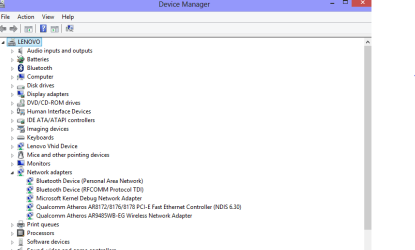
I don't see network adapters listed Maxie? I hope I have attached a screen shot of my device and printer page.
 

My Computer

Computer type
PC/Desktop
Computer Manufacturer/Model Number
custom build
OS
Windows 7 Home Premium
CPU
Intel(R) Core(TM) i5-4670K CPU @ 3.40GHz
Motherboard
ASUSTeK COMPUTER INC. Z87-K
Memory
8GB Corsair PC3-12800 1600MHz DDR3 Memory (2 x 4GB sticks)
Graphics Card(s)
NVIDIA GeForce GTX 650 Ti BOOST
Sound Card
1) NVIDIA Virtual Audio Device (Wave Extensible) (WDM) (2)
Screen Resolution
1680x1050
Hard Drives
(1) ST1000DM ST1000DM003-1CH1 SCSI Disk Device (2) Hitachi HDS721010CLA332 USB Device
Keyboard
USB
Mouse
Wireless
Internet Speed
36 M
Antivirus
Bulldog
Browser
Internet Explorer
Here is a pic of mine


Capture.PNG
 

My Computer

Computer Manufacturer/Model Number
W530-3630QM1
OS
windows 7 home 64bit
CPU
INTEL-CORE I7
Memory
16GB
Hard Drives
750GB
Browser
Chrome
Sorry tried to attach as a bitmap which obviously doesn't work. Have now attached as .jpg
 

Attachments

  • Device Manager.jpg
    Device Manager.jpg
    117.4 KB · Views: 6

My Computer

Computer type
PC/Desktop
Computer Manufacturer/Model Number
custom build
OS
Windows 7 Home Premium
CPU
Intel(R) Core(TM) i5-4670K CPU @ 3.40GHz
Motherboard
ASUSTeK COMPUTER INC. Z87-K
Memory
8GB Corsair PC3-12800 1600MHz DDR3 Memory (2 x 4GB sticks)
Graphics Card(s)
NVIDIA GeForce GTX 650 Ti BOOST
Sound Card
1) NVIDIA Virtual Audio Device (Wave Extensible) (WDM) (2)
Screen Resolution
1680x1050
Hard Drives
(1) ST1000DM ST1000DM003-1CH1 SCSI Disk Device (2) Hitachi HDS721010CLA332 USB Device
Keyboard
USB
Mouse
Wireless
Internet Speed
36 M
Antivirus
Bulldog
Browser
Internet Explorer
It is okay but you are in the wrong place ...

Click on the Start Orb.
In the Start menu Search box, type device manager
 

My Computer

Computer Manufacturer/Model Number
W530-3630QM1
OS
windows 7 home 64bit
CPU
INTEL-CORE I7
Memory
16GB
Hard Drives
750GB
Browser
Chrome
Ahh. Thanks for help Maxie. Looks like this is what I was looking for.
 

Attachments

  • From Start Orb.png
    From Start Orb.png
    80.7 KB · Views: 14

My Computer

Computer type
PC/Desktop
Computer Manufacturer/Model Number
custom build
OS
Windows 7 Home Premium
CPU
Intel(R) Core(TM) i5-4670K CPU @ 3.40GHz
Motherboard
ASUSTeK COMPUTER INC. Z87-K
Memory
8GB Corsair PC3-12800 1600MHz DDR3 Memory (2 x 4GB sticks)
Graphics Card(s)
NVIDIA GeForce GTX 650 Ti BOOST
Sound Card
1) NVIDIA Virtual Audio Device (Wave Extensible) (WDM) (2)
Screen Resolution
1680x1050
Hard Drives
(1) ST1000DM ST1000DM003-1CH1 SCSI Disk Device (2) Hitachi HDS721010CLA332 USB Device
Keyboard
USB
Mouse
Wireless
Internet Speed
36 M
Antivirus
Bulldog
Browser
Internet Explorer
You have the Atheros AR9287 Adapter ... Should be working fine Ken ...
 

My Computer

Computer Manufacturer/Model Number
W530-3630QM1
OS
windows 7 home 64bit
CPU
INTEL-CORE I7
Memory
16GB
Hard Drives
750GB
Browser
Chrome
Are you saying that 20Mbps is acceptable for wireless given that the optimum is 56 Mbps and Ethernet achieves 40 Mbps Max?
 

My Computer

Computer type
PC/Desktop
Computer Manufacturer/Model Number
custom build
OS
Windows 7 Home Premium
CPU
Intel(R) Core(TM) i5-4670K CPU @ 3.40GHz
Motherboard
ASUSTeK COMPUTER INC. Z87-K
Memory
8GB Corsair PC3-12800 1600MHz DDR3 Memory (2 x 4GB sticks)
Graphics Card(s)
NVIDIA GeForce GTX 650 Ti BOOST
Sound Card
1) NVIDIA Virtual Audio Device (Wave Extensible) (WDM) (2)
Screen Resolution
1680x1050
Hard Drives
(1) ST1000DM ST1000DM003-1CH1 SCSI Disk Device (2) Hitachi HDS721010CLA332 USB Device
Keyboard
USB
Mouse
Wireless
Internet Speed
36 M
Antivirus
Bulldog
Browser
Internet Explorer
No not at all Ken ... What is the Signal strength like ?
 

My Computer

Computer Manufacturer/Model Number
W530-3630QM1
OS
windows 7 home 64bit
CPU
INTEL-CORE I7
Memory
16GB
Hard Drives
750GB
Browser
Chrome

My Computer

Computer Manufacturer/Model Number
W530-3630QM1
OS
windows 7 home 64bit
CPU
INTEL-CORE I7
Memory
16GB
Hard Drives
750GB
Browser
Chrome
I'm a bit confused about my broadband speed. When I connect from my router to my PC using Ethernet I get speeds of 40Mbps but when I connect using wireless only 20Mbs. When I check the network connection using internet options it tells me the wireless speed is 56Mbps.
Let's be sure you're looking at the right things, and using the right tools to provide your objective measurement numbers.

When you ask about "broadband speed" I assume you're talking about the service performance tier of Internet download/upload speed you get from your ISP (e.g. cable company or phone company, typically). That speed is really from the ISP's head end to the modem in your house, although it typically is then passed on either (a) directly connected from the modem to your PC with an ethernet cable, or (b) indirectly through a router which is connected by ethernet cable to the WAN port on the modem and then through a second ethernet cable from one of the 1-4 LAN ports on the router to your PC. A minor variation would be to have a wireless connection from a wireless-capable device (e.g. laptop, phone via WiFi, smart TV, etc.) to the router capable of supporting wireless connects as well as the 1-4 wired connections.

Remember that the purpose of the modem, and/or modem+router, is to allow your PC and other Internet-enabled devices to get to the Internet through your ISP. And through whatever the wiring topology of your inter-connected equipment and with all of the components of your network working together, eventually there will be one final net effective speed that your PC sees getting to/from the Internet. That's what you want to measure if you're asking about "broadband speed".

The usual way to measure your "broadband speed" is to use an Internet-based speed test mechanism, either provided by a URL to your ISP, or through commonly used generally available web sites such as Speedtest.net. The Speedtest site (hosted by Oookla) also provides an identical phone app, so you can also test your phone's Internet-access speed the same way as you can test your PC's Internet access speed.


Now pretty much entirely separate from your "broadband speed" (i.e. to/from the Internet from your equipment), if you have a wired/wireless router in your home LAN so that you can share your modem's Internet connectivity with all of the Internet-enabled computers, phones, and other devices in your home, there is a second "intra-LAN speed" number which describes how fast any two devices inside of your home LAN can talk to each other... going through the router (either wired or wireless to reach the router from the device), or possibly going through "switches" (which are like wired ethernet port-multipliers that give you more than just the 1-4 wired ports available through direct wired connection to your router) added to your home cabling network.

The wired intra-LAN speeds are determined by the wired "network adapter card" (NIC) in each device (10/100 or 10/100/1000 aka gigabit), the type of wired ethernet cabling you have (CAT5, CAT5e, CAT6), and the type of router you have (10/100 aka "fast ethernet", or 10/100/1000 aka "gigabit router"). There pretty much is generally no distance issue for ethernet cabling in a home, as cable runs up to 300 feet should generally cause no problem (certainly not with Cat5e or CAT6 cabling).

Wireless intra-LAN speeds are determined by the the inherent maximum wireless speed capability of the router (i.e. 802.11a/b/g/n/ac) as well as the maximum wireless speed capability provided by the wireless NIC in the devices. Wireless speeds are also influenced by distance from the device to the wireless router (or nearest wireless access point or wireless range extender), natural obstacles like wall or floor materials, other radio interference in the vicinity, 2.4Ghz vs. 5Ghz wireless network used, etc.

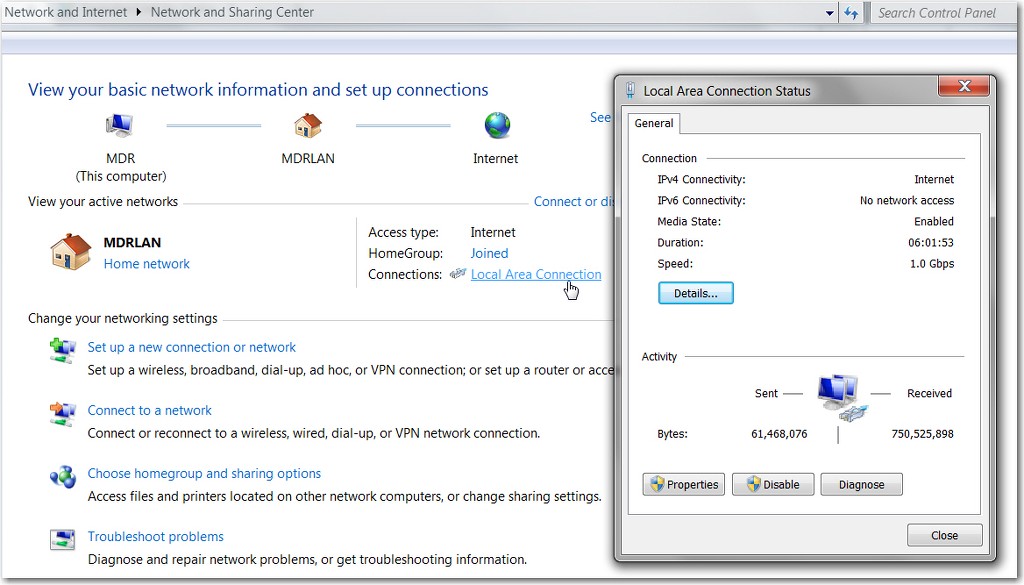
Connection speeds from PC to the router (as determined by all of the hardware and cabling involved) can be seen exactly by clicking (left or right) on the network icon in the system tray and selecting "Open Network and Sharing Center". On that dialog window, in the "View your active networks" section, click on the "local area connection" link and you will see your hardware connection speed in the resulting status window.

C8hmxl.jpg


This is where you'll see 100Mb/s or 1.0Gb/s. Of course this has nothing to do with your "broadband speed" to/from the Internet, as it is only the maximum speed at which your PC is connecting to the router (and which is completely determined by your hardware and cabling between the PC and router).

You'll get a similar display if you use a wireless connection.


Now, it's obvious that your true real world "broadband speed" is a function of not only the service tier you pay your ISP for, but also your "intra-LAN" maximum speed capability in getting to the router (and then on to the modem and out to the Internet) from your PC. Of course if you use a wired connection from PC to router, you're almost certainly going to then be seeing the fastest possible "broadband speed" test measurement numbers as well.

However if you have a wireless connection from PC to router, well now you're subject to all the variables which influence how fast your PC can just get to the router wirelessly. Just because your wireless NIC and wireless router support say N150 or N300 wireless connection speeds, in the real world unless your wireless device is rather close to the wireless router or access point, there's no way you're going to see that type of wireless connection speed. And if you don't already start with a high-speed intra-LAN connection from device to the router, there's no way you can then see a measured "broadband speed" to/from the Internet which will compare to the comparable speed going through a wired connection from device to router.

 

My Computer

Computer type
PC/Desktop
Computer Manufacturer/Model Number
Home-built, two systems (1) and (2)
OS
Windows 7 Pro x64 (1), Win7 Pro X64 (2)
CPU
i5-3350p 3.1Ghz/6MB-cache (1); E8400 3.0Ghz/6MB-cache (2)
Motherboard
ASUS P8Z77-V Pro (1); ASUS P5Q3 (2)
Memory
8GB PC3-12800 DDR3 (1); 4GB PC3-10600 DDR3 (2)
Graphics Card(s)
ATI HD7750 (1), (see TV cards); ATI R7 250 (2)
Sound Card
Realtek ALC892 HD Audio (1); Realtek ALC1200 HD Audio (2)
Monitor(s) Displays
Eizo HD2441W LCD, Eizo S2433W (1); Eizo 24" S2433W (2)
Screen Resolution
1920x1200, 1920x1200 (1); 1920x1200 (2)
Hard Drives
(1) 1TB SATA-II (7200RPM), 2x2TB SATA-III (7200RPM), 250GB SATA-III (10000RPM) for OS; 2x2TB external USB 3.0

(2) 320GB SATA-II (7200RPM), 750GB SATA-II (7200RPM), 150GB SATA-II (10000RPM) for OS; 2TB external USB 3.0
PSU
Nesteq ECS-6001 600W (1); Nesteq ECS-5001 500W (2)
Case
Acousti-Case 360 (1) and (2)
Cooling
Noctua NH-U12P SE2 for CPU, 2x120mm case fans (1) and (2)
Keyboard
IBM PS/2 (1) and (2)
Mouse
Logitech MX Revolution wireless (1); Microsoft wired (2)
Internet Speed
100mbps down / 10mbps up
Antivirus
Microsoft Security Essentials; Malwarebyte Anti-Malware Pro
Browser
Firefox
Other Info
Ceton InfiniTV 4-tuner cablecard-enabled TV card as well as Hauppauge HVR-2250 OTA/ATSC 2-tuner TV card in (1), running under Win7 WMC
I just found out that your EE Bright Box 2 has 802.11ac capability. You will definitely benefit from a USB 802.11ac adapter or if your laptop doesn't have a WiFi BIOS Whitelist, you can get Intel 7260 or similar pcie 802.11ac adapter to get all your broadband speed (assume 40 Mbps) even at 10 meters away from the router. Basically, 802.11ac at long range will be much faster than 2.4 GHz 802.11n (despite that 802.11ac has less range than 2.4 GHz 802.11g/n)
 

My Computer

Computer type
Laptop
Computer Manufacturer/Model Number
Dell Optiplex SX270, Lenovo Z470
OS
Windows 7 Professional x64 SP1
CPU
Intel® Pentium® 4 @ 2.26 GHz, Intel Core i7-2670QM @ 2.20 GH
Motherboard
Dell, Lenovo
Memory
512MB Dual channel DDR SDRAM @ 400MHz 2.5-3-3-7, 8 GB DDR3
Graphics Card(s)
Intel 82865G, Nvidia GeForce 520M Graphics
Sound Card
SoundMax Integrated Audio, Integrated HD Audio
Monitor(s) Displays
LG W1952
Screen Resolution
1440x900, 1366 x 768
Hard Drives
40 GB 2.5" IDE 4200 RPM HDD, 500 GB 5400 RPM Sata 1.5 + 32 GB SSD
PSU
Dell 145 Watt, Lenovo 120 Watt Power Adapter
Case
Optiplex SX270 Small Form Factor, Laptop
Cooling
Dell Proprietary Air Cooling, Stock laptop cooling
Keyboard
Dell SK-8125 USB Keyboard
Mouse
Dell PS/2 2 button ball mouse with wheel scroll
Internet Speed
300 Mbit down / 20 Mbps up Time Warner Cable
Antivirus
MSE, Malwarebytes Scanner
Browser
Internet (Aizawa) Explorer 11
Other Info
Running Windows Server 2012 Datacenter on a virtual machine to run Metro Apps.
[FONT=Comic Sans MS, cursive]Thanks for all your kind replies most of which are outside my area expertisebut I am working hard at absorbing all the information given. Thanksagain.[/FONT]

[FONT=Comic Sans MS, cursive]The situation has worsened. This morning I lost my Ethernet connectionand my wireless speed dropped to between 8 and 16mbps. I decided to contact my ISP which I have been reluctant to do as my hearing isn'twhat it was and I find technical telephone conservations are difficult. We played around with the channel numbers a lot and at one point my connection was down to 1.8Mbps. We ended the day with a speed of around 16Mbs which I have been asked to monitor till tomorrow and get in contact again if no improvement. The diagnosis on my Ethernet connection is that the port on my PC requires replacing which all seems coincidental.[/FONT]

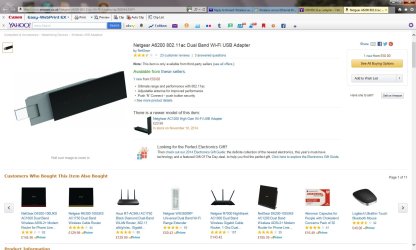
[FONT=Comic Sans MS, cursive]I am not sure what the USB 802.11ac adapter is. Does it transmit at a different frequency to the router? I am within the 10mtrs range and so it sounds good. Is the attached an example.[/FONT]
 

Attachments

  • USB Adapter.jpg
    USB Adapter.jpg
    330 KB · Views: 4
Last edited:

My Computer

Computer type
PC/Desktop
Computer Manufacturer/Model Number
custom build
OS
Windows 7 Home Premium
CPU
Intel(R) Core(TM) i5-4670K CPU @ 3.40GHz
Motherboard
ASUSTeK COMPUTER INC. Z87-K
Memory
8GB Corsair PC3-12800 1600MHz DDR3 Memory (2 x 4GB sticks)
Graphics Card(s)
NVIDIA GeForce GTX 650 Ti BOOST
Sound Card
1) NVIDIA Virtual Audio Device (Wave Extensible) (WDM) (2)
Screen Resolution
1680x1050
Hard Drives
(1) ST1000DM ST1000DM003-1CH1 SCSI Disk Device (2) Hitachi HDS721010CLA332 USB Device
Keyboard
USB
Mouse
Wireless
Internet Speed
36 M
Antivirus
Bulldog
Browser
Internet Explorer
Hi Ken ... So your Lan Connection is not working at all now ? .. Your Wireless Card should be fine i see no reason to replace that ...
 

My Computer

Computer Manufacturer/Model Number
W530-3630QM1
OS
windows 7 home 64bit
CPU
INTEL-CORE I7
Memory
16GB
Hard Drives
750GB
Browser
Chrome
[FONT=Comic Sans MS, cursive]Prognosis is that my PC Ethernet connection is dead Max but the wireless is working OK albeit slowly. How do I replace my Ethernet port. Ethernet seems the best way to get a good connection.[/FONT]
 

My Computer

Computer type
PC/Desktop
Computer Manufacturer/Model Number
custom build
OS
Windows 7 Home Premium
CPU
Intel(R) Core(TM) i5-4670K CPU @ 3.40GHz
Motherboard
ASUSTeK COMPUTER INC. Z87-K
Memory
8GB Corsair PC3-12800 1600MHz DDR3 Memory (2 x 4GB sticks)
Graphics Card(s)
NVIDIA GeForce GTX 650 Ti BOOST
Sound Card
1) NVIDIA Virtual Audio Device (Wave Extensible) (WDM) (2)
Screen Resolution
1680x1050
Hard Drives
(1) ST1000DM ST1000DM003-1CH1 SCSI Disk Device (2) Hitachi HDS721010CLA332 USB Device
Keyboard
USB
Mouse
Wireless
Internet Speed
36 M
Antivirus
Bulldog
Browser
Internet Explorer
Back
Top