Solved Wireless versus Ethernet Broadband

Thanks Max. I have ordered the card and should get it next Monday. Not sure about prying into the innards of my beloved PC so will probably be back for further help with installation.
 

My Computer

Computer type
PC/Desktop
Computer Manufacturer/Model Number
custom build
OS
Windows 7 Home Premium
CPU
Intel(R) Core(TM) i5-4670K CPU @ 3.40GHz
Motherboard
ASUSTeK COMPUTER INC. Z87-K
Memory
8GB Corsair PC3-12800 1600MHz DDR3 Memory (2 x 4GB sticks)
Graphics Card(s)
NVIDIA GeForce GTX 650 Ti BOOST
Sound Card
1) NVIDIA Virtual Audio Device (Wave Extensible) (WDM) (2)
Screen Resolution
1680x1050
Hard Drives
(1) ST1000DM ST1000DM003-1CH1 SCSI Disk Device (2) Hitachi HDS721010CLA332 USB Device
Keyboard
USB
Mouse
Wireless
Internet Speed
36 M
Antivirus
Bulldog
Browser
Internet Explorer
[FONT=Comic Sans MS, cursive]Thanks for all your kind replies most of which are outside my area expertisebut I am working hard at absorbing all the information given. Thanksagain.[/FONT]

[FONT=Comic Sans MS, cursive]The situation has worsened. This morning I lost my Ethernet connectionand my wireless speed dropped to between 8 and 16mbps. I decided to contact my ISP which I have been reluctant to do as my hearing isn'twhat it was and I find technical telephone conservations are difficult. We played around with the channel numbers a lot and at one point my connection was down to 1.8Mbps. We ended the day with a speed of around 16Mbs which I have been asked to monitor till tomorrow and get in contact again if no improvement. The diagnosis on my Ethernet connection is that the port on my PC requires replacing which all seems coincidental.[/FONT]

[FONT=Comic Sans MS, cursive]I am not sure what the USB 802.11ac adapter is. Does it transmit at a different frequency to the router? I am within the 10mtrs range and so it sounds good. Is the attached an example.[/FONT]


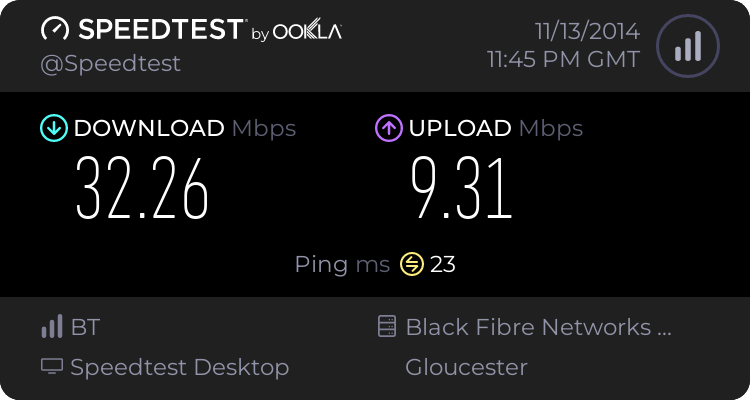
USB 802.11ac adapter allows you to have 802.11ac wireless capability to your laptop. 802.11ac transmits at 5 GHz frequency which your EE Brightbox 2 supports. The attached is an example and should be capable of transmitting up to 350 Mbps internet connection. Here's what my internet speed test looks like using Wireless 802.11ac with my 100 Mbps down/10 mbps internet subscription:

339885d1415554801-what-s-your-internet-speed-capture.jpg


My Computer

Computer type
Laptop
Computer Manufacturer/Model Number
Dell Optiplex SX270, Lenovo Z470
OS
Windows 7 Professional x64 SP1
CPU
Intel® Pentium® 4 @ 2.26 GHz, Intel Core i7-2670QM @ 2.20 GH
Motherboard
Dell, Lenovo
Memory
512MB Dual channel DDR SDRAM @ 400MHz 2.5-3-3-7, 8 GB DDR3
Graphics Card(s)
Intel 82865G, Nvidia GeForce 520M Graphics
Sound Card
SoundMax Integrated Audio, Integrated HD Audio
Monitor(s) Displays
LG W1952
Screen Resolution
1440x900, 1366 x 768
Hard Drives
40 GB 2.5" IDE 4200 RPM HDD, 500 GB 5400 RPM Sata 1.5 + 32 GB SSD
PSU
Dell 145 Watt, Lenovo 120 Watt Power Adapter
Case
Optiplex SX270 Small Form Factor, Laptop
Cooling
Dell Proprietary Air Cooling, Stock laptop cooling
Keyboard
Dell SK-8125 USB Keyboard
Mouse
Dell PS/2 2 button ball mouse with wheel scroll
Internet Speed
300 Mbit down / 20 Mbps up Time Warner Cable
Antivirus
MSE, Malwarebytes Scanner
Browser
Internet (Aizawa) Explorer 11
Other Info
Running Windows Server 2012 Datacenter on a virtual machine to run Metro Apps.
No problem Ken :)
 

My Computer

Computer Manufacturer/Model Number
W530-3630QM1
OS
windows 7 home 64bit
CPU
INTEL-CORE I7
Memory
16GB
Hard Drives
750GB
Browser
Chrome
Just out of interest I am on the same 40/10 EE package as Ken

Latest speedtest.net result


I'm connecting via gigabit Ethernet to my own TP-Link Archer C5 router.

I had the original Brightbox router and got similar results, but found the device dropped signal too often so replaced it, the C5 was better specified and cheaper than the EE upgrade but I still use the BT modem supplied, the Brightbox 2 includes the fibre modem and I would expect it to attain similar performance to the C5.

I also get the same results from another PC, a laptop, and several android devices

The service is Fibre to cabinet so the distance from the home to the cabinet, and the actual line quality, will limit the max speed available on the WAN side
 

My Computers

System One System Two

  • Computer type
    PC/Desktop
    Computer Manufacturer/Model Number
    ChillBlast - Custom to my design
    OS
    Windows 11 Pro x64 [Latest Release and Release Preview]
    CPU
    Ryzen 9 5950X, 3.8 - 5.2 MHz
    Motherboard
    Asus Prime X570-Pro
    Memory
    64GB [2 x 32GB] DDR4 3200MHz
    Graphics Card(s)
    4GB NVIDIA GEFORCE GTX 1650 Ti
    Sound Card
    On-board SPDIF to 5.1 System + HDMI [5.1 system]
    Monitor(s) Displays
    32" UHD 32 Bit HDR Monitor + 43" UHD 4K 32Bit HDR TV
    Screen Resolution
    2 x 3840 x 2160 @60Hz
    Hard Drives
    1TB M2 SSD OS, 500GB Fast Access SSD, 2 x 8TB Data + Various Externals from 1TB to 4TB, 10TB NAS
    PSU
    NZXT C750 80 PLUS Gold 750W Modular PSU
    Case
    Workstation Case [Matt Black]
    Cooling
    NZXT Kraken X63 280mm CPU Cooler +2x Quiet Case fans
    Keyboard
    Logitech Wireless MX Keys & K400 + others
    Mouse
    Logitech Wireless MX Master 3S
    Internet Speed
    920 MB Down 50 MB Up
    Antivirus
    BitDefender Total Security Pro
    Browser
    Chrome (always run latest Non-Beta)
    Other Info
    Also run ...
    Laptop - Quad 8GB - Windows 10 Pro x64
    Nexus 7 Android tablet x2
    Samsung 10.2" tablet
    Blackview TAB 8 4G Android Tablet c/w Keyboard
    Wacom Intuos Pro Medium Pen Pad
    Wacom Intuos Pro Small Pen Pad
    Wacom Expresskeys Remote
    Loopdeck+ Graphics Controller
    Shuttle Pro v2 Control
  • Computer type
    Laptop
    System Manufacturer/Model Number
    Dell XPS 17 10750H
    OS
    Windows 11 Pro x64 Latest RP
    CPU
    Intel I7 10750H 5.0GHz
    Motherboard
    Dell XPS
    Memory
    32GB [2x16GB] DDR4 2933 MHz
    Graphics Card(s)
    nVidia GTX1650Ti 4 GB GDDR6
    Sound Card
    Stock [Realtek] 4 Speaker
    Monitor(s) Displays
    17" IPS UHD+ Infinity Edge Touchscreen
    Screen Resolution
    3840 x 2400
    Hard Drives
    2TB M2 NVMe, 4TB External + various 500GB & 1TB External NVMe (also have access to spinner HDD from
    PSU
    Stock
    Case
    Stock XPS Aluminium & Carbon Fibre
    Cooling
    Stock - Active Fan Control
    Keyboard
    Backlit + Various Logitech
    Mouse
    Stock Track Pad + Logitech MX Trackball
    Internet Speed
    72 MB Down 18MB Up
    Browser
    Chrome
    Other Info
    Also run ...
    Laptop - Quad 8GB - Windows 10 Pro x64
    Nexus 7 Android tablet x2
    10.2" tablet
    Sony Z3 Android Smartphone
    Wacom Intuos Pro Medium Pen Pad
    Wacom Intuos Pro Small Pen Pad
    Wacom Expresskeys Remote
    Loopdeck+ Graphics Controller
    Shuttle Pro v2 Control Pad
    10TB NAS
[FONT=Comic Sans MS, cursive]Thanks for input Barman.[/FONT]

[FONT=Comic Sans MS, cursive]As I understand it the best signal I can get cabinet to home is around 41 Mbps which was was pretty much what I was getting with my Ethernet connection. Given this signal strength what do you think I should achieve via the wireless connection?[/FONT]
 

My Computer

Computer type
PC/Desktop
Computer Manufacturer/Model Number
custom build
OS
Windows 7 Home Premium
CPU
Intel(R) Core(TM) i5-4670K CPU @ 3.40GHz
Motherboard
ASUSTeK COMPUTER INC. Z87-K
Memory
8GB Corsair PC3-12800 1600MHz DDR3 Memory (2 x 4GB sticks)
Graphics Card(s)
NVIDIA GeForce GTX 650 Ti BOOST
Sound Card
1) NVIDIA Virtual Audio Device (Wave Extensible) (WDM) (2)
Screen Resolution
1680x1050
Hard Drives
(1) ST1000DM ST1000DM003-1CH1 SCSI Disk Device (2) Hitachi HDS721010CLA332 USB Device
Keyboard
USB
Mouse
Wireless
Internet Speed
36 M
Antivirus
Bulldog
Browser
Internet Explorer
I use wireless N on my wireless devices and I find no drop off at all against the main machines on Gigabit Ethernet, I'll have to check what throughput I'm getting on the laptop I'll RDP in and get right back ;)
 

My Computers

System One System Two

  • Computer type
    PC/Desktop
    Computer Manufacturer/Model Number
    ChillBlast - Custom to my design
    OS
    Windows 11 Pro x64 [Latest Release and Release Preview]
    CPU
    Ryzen 9 5950X, 3.8 - 5.2 MHz
    Motherboard
    Asus Prime X570-Pro
    Memory
    64GB [2 x 32GB] DDR4 3200MHz
    Graphics Card(s)
    4GB NVIDIA GEFORCE GTX 1650 Ti
    Sound Card
    On-board SPDIF to 5.1 System + HDMI [5.1 system]
    Monitor(s) Displays
    32" UHD 32 Bit HDR Monitor + 43" UHD 4K 32Bit HDR TV
    Screen Resolution
    2 x 3840 x 2160 @60Hz
    Hard Drives
    1TB M2 SSD OS, 500GB Fast Access SSD, 2 x 8TB Data + Various Externals from 1TB to 4TB, 10TB NAS
    PSU
    NZXT C750 80 PLUS Gold 750W Modular PSU
    Case
    Workstation Case [Matt Black]
    Cooling
    NZXT Kraken X63 280mm CPU Cooler +2x Quiet Case fans
    Keyboard
    Logitech Wireless MX Keys & K400 + others
    Mouse
    Logitech Wireless MX Master 3S
    Internet Speed
    920 MB Down 50 MB Up
    Antivirus
    BitDefender Total Security Pro
    Browser
    Chrome (always run latest Non-Beta)
    Other Info
    Also run ...
    Laptop - Quad 8GB - Windows 10 Pro x64
    Nexus 7 Android tablet x2
    Samsung 10.2" tablet
    Blackview TAB 8 4G Android Tablet c/w Keyboard
    Wacom Intuos Pro Medium Pen Pad
    Wacom Intuos Pro Small Pen Pad
    Wacom Expresskeys Remote
    Loopdeck+ Graphics Controller
    Shuttle Pro v2 Control
  • Computer type
    Laptop
    System Manufacturer/Model Number
    Dell XPS 17 10750H
    OS
    Windows 11 Pro x64 Latest RP
    CPU
    Intel I7 10750H 5.0GHz
    Motherboard
    Dell XPS
    Memory
    32GB [2x16GB] DDR4 2933 MHz
    Graphics Card(s)
    nVidia GTX1650Ti 4 GB GDDR6
    Sound Card
    Stock [Realtek] 4 Speaker
    Monitor(s) Displays
    17" IPS UHD+ Infinity Edge Touchscreen
    Screen Resolution
    3840 x 2400
    Hard Drives
    2TB M2 NVMe, 4TB External + various 500GB & 1TB External NVMe (also have access to spinner HDD from
    PSU
    Stock
    Case
    Stock XPS Aluminium & Carbon Fibre
    Cooling
    Stock - Active Fan Control
    Keyboard
    Backlit + Various Logitech
    Mouse
    Stock Track Pad + Logitech MX Trackball
    Internet Speed
    72 MB Down 18MB Up
    Browser
    Chrome
    Other Info
    Also run ...
    Laptop - Quad 8GB - Windows 10 Pro x64
    Nexus 7 Android tablet x2
    10.2" tablet
    Sony Z3 Android Smartphone
    Wacom Intuos Pro Medium Pen Pad
    Wacom Intuos Pro Small Pen Pad
    Wacom Expresskeys Remote
    Loopdeck+ Graphics Controller
    Shuttle Pro v2 Control Pad
    10TB NAS
The laptop is showing 150Mb/s on wireless n max throughput


This result is a little worse than the original I posted earlier but we have to realize that this is whilst I'm connected to the laptop remotely over the same wireless link so some bandwidth may be used for that - So as you can see the difference is not much between the two methods of connection. Personally I always prefer to use a wired connection where I can as this in immune to some of the transient issues that can happen to a wireless signal, ( sometimes the cat sits right by the router lol ;) )

Just for completeness I've just redone the direct Ethernet


My Computers

System One System Two

  • Computer type
    PC/Desktop
    Computer Manufacturer/Model Number
    ChillBlast - Custom to my design
    OS
    Windows 11 Pro x64 [Latest Release and Release Preview]
    CPU
    Ryzen 9 5950X, 3.8 - 5.2 MHz
    Motherboard
    Asus Prime X570-Pro
    Memory
    64GB [2 x 32GB] DDR4 3200MHz
    Graphics Card(s)
    4GB NVIDIA GEFORCE GTX 1650 Ti
    Sound Card
    On-board SPDIF to 5.1 System + HDMI [5.1 system]
    Monitor(s) Displays
    32" UHD 32 Bit HDR Monitor + 43" UHD 4K 32Bit HDR TV
    Screen Resolution
    2 x 3840 x 2160 @60Hz
    Hard Drives
    1TB M2 SSD OS, 500GB Fast Access SSD, 2 x 8TB Data + Various Externals from 1TB to 4TB, 10TB NAS
    PSU
    NZXT C750 80 PLUS Gold 750W Modular PSU
    Case
    Workstation Case [Matt Black]
    Cooling
    NZXT Kraken X63 280mm CPU Cooler +2x Quiet Case fans
    Keyboard
    Logitech Wireless MX Keys & K400 + others
    Mouse
    Logitech Wireless MX Master 3S
    Internet Speed
    920 MB Down 50 MB Up
    Antivirus
    BitDefender Total Security Pro
    Browser
    Chrome (always run latest Non-Beta)
    Other Info
    Also run ...
    Laptop - Quad 8GB - Windows 10 Pro x64
    Nexus 7 Android tablet x2
    Samsung 10.2" tablet
    Blackview TAB 8 4G Android Tablet c/w Keyboard
    Wacom Intuos Pro Medium Pen Pad
    Wacom Intuos Pro Small Pen Pad
    Wacom Expresskeys Remote
    Loopdeck+ Graphics Controller
    Shuttle Pro v2 Control
  • Computer type
    Laptop
    System Manufacturer/Model Number
    Dell XPS 17 10750H
    OS
    Windows 11 Pro x64 Latest RP
    CPU
    Intel I7 10750H 5.0GHz
    Motherboard
    Dell XPS
    Memory
    32GB [2x16GB] DDR4 2933 MHz
    Graphics Card(s)
    nVidia GTX1650Ti 4 GB GDDR6
    Sound Card
    Stock [Realtek] 4 Speaker
    Monitor(s) Displays
    17" IPS UHD+ Infinity Edge Touchscreen
    Screen Resolution
    3840 x 2400
    Hard Drives
    2TB M2 NVMe, 4TB External + various 500GB & 1TB External NVMe (also have access to spinner HDD from
    PSU
    Stock
    Case
    Stock XPS Aluminium & Carbon Fibre
    Cooling
    Stock - Active Fan Control
    Keyboard
    Backlit + Various Logitech
    Mouse
    Stock Track Pad + Logitech MX Trackball
    Internet Speed
    72 MB Down 18MB Up
    Browser
    Chrome
    Other Info
    Also run ...
    Laptop - Quad 8GB - Windows 10 Pro x64
    Nexus 7 Android tablet x2
    10.2" tablet
    Sony Z3 Android Smartphone
    Wacom Intuos Pro Medium Pen Pad
    Wacom Intuos Pro Small Pen Pad
    Wacom Expresskeys Remote
    Loopdeck+ Graphics Controller
    Shuttle Pro v2 Control Pad
    10TB NAS

My Computers

System One System Two

  • Computer type
    PC/Desktop
    Computer Manufacturer/Model Number
    ChillBlast - Custom to my design
    OS
    Windows 11 Pro x64 [Latest Release and Release Preview]
    CPU
    Ryzen 9 5950X, 3.8 - 5.2 MHz
    Motherboard
    Asus Prime X570-Pro
    Memory
    64GB [2 x 32GB] DDR4 3200MHz
    Graphics Card(s)
    4GB NVIDIA GEFORCE GTX 1650 Ti
    Sound Card
    On-board SPDIF to 5.1 System + HDMI [5.1 system]
    Monitor(s) Displays
    32" UHD 32 Bit HDR Monitor + 43" UHD 4K 32Bit HDR TV
    Screen Resolution
    2 x 3840 x 2160 @60Hz
    Hard Drives
    1TB M2 SSD OS, 500GB Fast Access SSD, 2 x 8TB Data + Various Externals from 1TB to 4TB, 10TB NAS
    PSU
    NZXT C750 80 PLUS Gold 750W Modular PSU
    Case
    Workstation Case [Matt Black]
    Cooling
    NZXT Kraken X63 280mm CPU Cooler +2x Quiet Case fans
    Keyboard
    Logitech Wireless MX Keys & K400 + others
    Mouse
    Logitech Wireless MX Master 3S
    Internet Speed
    920 MB Down 50 MB Up
    Antivirus
    BitDefender Total Security Pro
    Browser
    Chrome (always run latest Non-Beta)
    Other Info
    Also run ...
    Laptop - Quad 8GB - Windows 10 Pro x64
    Nexus 7 Android tablet x2
    Samsung 10.2" tablet
    Blackview TAB 8 4G Android Tablet c/w Keyboard
    Wacom Intuos Pro Medium Pen Pad
    Wacom Intuos Pro Small Pen Pad
    Wacom Expresskeys Remote
    Loopdeck+ Graphics Controller
    Shuttle Pro v2 Control
  • Computer type
    Laptop
    System Manufacturer/Model Number
    Dell XPS 17 10750H
    OS
    Windows 11 Pro x64 Latest RP
    CPU
    Intel I7 10750H 5.0GHz
    Motherboard
    Dell XPS
    Memory
    32GB [2x16GB] DDR4 2933 MHz
    Graphics Card(s)
    nVidia GTX1650Ti 4 GB GDDR6
    Sound Card
    Stock [Realtek] 4 Speaker
    Monitor(s) Displays
    17" IPS UHD+ Infinity Edge Touchscreen
    Screen Resolution
    3840 x 2400
    Hard Drives
    2TB M2 NVMe, 4TB External + various 500GB & 1TB External NVMe (also have access to spinner HDD from
    PSU
    Stock
    Case
    Stock XPS Aluminium & Carbon Fibre
    Cooling
    Stock - Active Fan Control
    Keyboard
    Backlit + Various Logitech
    Mouse
    Stock Track Pad + Logitech MX Trackball
    Internet Speed
    72 MB Down 18MB Up
    Browser
    Chrome
    Other Info
    Also run ...
    Laptop - Quad 8GB - Windows 10 Pro x64
    Nexus 7 Android tablet x2
    10.2" tablet
    Sony Z3 Android Smartphone
    Wacom Intuos Pro Medium Pen Pad
    Wacom Intuos Pro Small Pen Pad
    Wacom Expresskeys Remote
    Loopdeck+ Graphics Controller
    Shuttle Pro v2 Control Pad
    10TB NAS
[FONT=Comic Sans MS, cursive]Thanks for info and advice Nigel.[/FONT]

[FONT=Comic Sans MS, cursive]I will pursue my ISP in an attempt to achieve similar figures although I am coming around to the possibility that the fault lies with my PC.[/FONT]

[FONT=Comic Sans MS, cursive]I have installed Network Tumbler recommended by Maxie but the utility is unable to detect my adapter and given the result of Btwholesalespeed test (see attached screen shot) it would seem my cabinet to router speed is similar to yours.[/FONT]

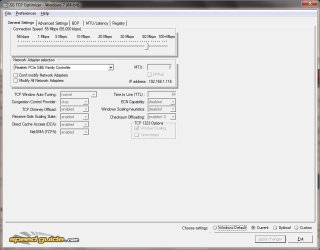
[FONT=Comic Sans MS, cursive]I have also tried setting my PC to optimum speed using TCPOptimizer and although I have tried several settings I have detected no improvement.[/FONT]

[FONT=Comic Sans MS, cursive]To try and determine if my PC was the problem I downloaded a broadband speed measuring app called Smarttest to my Ipad and found I got results close to the optimum (37-39Mbps). I tried measuring the speed close to the router and at my PC and got similar measurements. I even held the I pad adjacent to my PC Wi-Fi Ariel and again achieved closeto optimum.[/FONT]

[FONT=Comic Sans MS, cursive]This seemed to prove the problem did indeed lie with my PC but then I thought this wasn't really comparing like to like since I was usingthe Btwholesale speed test tool on my PC and Smarttest on my Ipad. To get a better comparison I resurrected my XP laptop and measure theWi-fi speed to that using Btwholsale test and got lower figures. MyPC was getting 8-18 Mbps and the laptop 21-23 Mbps.[/FONT]

[FONT=Comic Sans MS, cursive]This seems to make the results inconclusive. I would be interested to hear your interpretation.[/FONT]

[FONT=Comic Sans MS, cursive]Bestregards Ken. [/FONT]
 

Attachments

  • BT Wholesale 141114.jpg
    BT Wholesale 141114.jpg
    231.5 KB · Views: 4
  • SG TCP 56Mbps.jpg
    SG TCP 56Mbps.jpg
    124.8 KB · Views: 5

My Computer

Computer type
PC/Desktop
Computer Manufacturer/Model Number
custom build
OS
Windows 7 Home Premium
CPU
Intel(R) Core(TM) i5-4670K CPU @ 3.40GHz
Motherboard
ASUSTeK COMPUTER INC. Z87-K
Memory
8GB Corsair PC3-12800 1600MHz DDR3 Memory (2 x 4GB sticks)
Graphics Card(s)
NVIDIA GeForce GTX 650 Ti BOOST
Sound Card
1) NVIDIA Virtual Audio Device (Wave Extensible) (WDM) (2)
Screen Resolution
1680x1050
Hard Drives
(1) ST1000DM ST1000DM003-1CH1 SCSI Disk Device (2) Hitachi HDS721010CLA332 USB Device
Keyboard
USB
Mouse
Wireless
Internet Speed
36 M
Antivirus
Bulldog
Browser
Internet Explorer
I have installed Network Tumbler recommended by Maxie but the utility is unable to detect my adapter and given the result of Btwholesalespeed test (see attached screen shot) it would seem my cabinet to router speed is similar to yours.

Hi Ken I can not find any Reference to that statement ... Maybe it was an add on here ? ...
 

My Computer

Computer Manufacturer/Model Number
W530-3630QM1
OS
windows 7 home 64bit
CPU
INTEL-CORE I7
Memory
16GB
Hard Drives
750GB
Browser
Chrome
Sorry if I have misquoted you Max. I was referring to your first reply:

Hi It is normal for Wireless to be slower than the Lan Connection ... Though i have to admit your Wireless does seem to be under performing ... Which type of Adapter are you using ? ... There could be many causes for your slower speed including your ISP ... Read the Link below see if that is any Help ...


Broadband Speed Checker - How to improve wireless broadband speed

I guess you didn't recommend but I was grateful for info and hope I haven't offended. It was not my intention.
 

My Computer

Computer type
PC/Desktop
Computer Manufacturer/Model Number
custom build
OS
Windows 7 Home Premium
CPU
Intel(R) Core(TM) i5-4670K CPU @ 3.40GHz
Motherboard
ASUSTeK COMPUTER INC. Z87-K
Memory
8GB Corsair PC3-12800 1600MHz DDR3 Memory (2 x 4GB sticks)
Graphics Card(s)
NVIDIA GeForce GTX 650 Ti BOOST
Sound Card
1) NVIDIA Virtual Audio Device (Wave Extensible) (WDM) (2)
Screen Resolution
1680x1050
Hard Drives
(1) ST1000DM ST1000DM003-1CH1 SCSI Disk Device (2) Hitachi HDS721010CLA332 USB Device
Keyboard
USB
Mouse
Wireless
Internet Speed
36 M
Antivirus
Bulldog
Browser
Internet Explorer
No not at all Ken :) ... Are your Speeds any better today ...
 

My Computer

Computer Manufacturer/Model Number
W530-3630QM1
OS
windows 7 home 64bit
CPU
INTEL-CORE I7
Memory
16GB
Hard Drives
750GB
Browser
Chrome
No Max. Ethernet port is on its way but in the meantime wireless connection remains slow (8-18 Mbps). The speed on the Ipad surprised me.

My ISP helpdesk is in India and I find holding a technical conversation difficult due to my poor hearing. I fear the worst. The advise offered was to wait 24 hours and if no improvement contact again. I have been here before in the early days of broad band and what happened is I got to speak with a different help desk person 24 hours later who took me through all the same tests and then told me again to monitor for 24 hrs. and get back if no improvement. The same procedure went on for weeks until I decided to change my provider to BT and then an English advisor came on and fixed things within 24 hours.

Trouble is the deal EE give me is so good it's hard to justify moving and I still have a sneaking feeingl the problem lies within my PC.

I think I might get in touch with my PC providers. The PC is still under guarantee but it is return to base and I am not prepared to be without my PC.

Hope I haven't rambled to much.

Best regards Ken.
 

My Computer

Computer type
PC/Desktop
Computer Manufacturer/Model Number
custom build
OS
Windows 7 Home Premium
CPU
Intel(R) Core(TM) i5-4670K CPU @ 3.40GHz
Motherboard
ASUSTeK COMPUTER INC. Z87-K
Memory
8GB Corsair PC3-12800 1600MHz DDR3 Memory (2 x 4GB sticks)
Graphics Card(s)
NVIDIA GeForce GTX 650 Ti BOOST
Sound Card
1) NVIDIA Virtual Audio Device (Wave Extensible) (WDM) (2)
Screen Resolution
1680x1050
Hard Drives
(1) ST1000DM ST1000DM003-1CH1 SCSI Disk Device (2) Hitachi HDS721010CLA332 USB Device
Keyboard
USB
Mouse
Wireless
Internet Speed
36 M
Antivirus
Bulldog
Browser
Internet Explorer
Some thing is not right Ken ... It is difficult to see that the problem would be down to your Computer IMO ... When you get the new Card will it really matter as you know you can get good Speeds from that ? ...
 

My Computer

Computer Manufacturer/Model Number
W530-3630QM1
OS
windows 7 home 64bit
CPU
INTEL-CORE I7
Memory
16GB
Hard Drives
750GB
Browser
Chrome
Hi Ken,

The way I personally go about this is as follows ...

Reset your hardware to default, this is a case of a reset button or Reset instruction, (I prefer the hardware method, but that is just me)

Remove any and all 3rd party helper and tuning applications from your system

Completely remove your PC's Network adaptors and re-install the drivers, (obviously you need to download the latest drivers for your hardware, preferably from the manufacturers site, before your remove them ;) )

At regular, (Morning, Mid day, Afternoon & evening), times over the day run a test at speedtest.net test on your main system and, if possible, by running the same test on another device (a Laptop or phone - Speedtest.net is available on all major platforms, (either as an App or via a browser))

Make sure that Speedtest runs the test on the same source each time, (the standard run always goes to the server with the lowest latency, (ping)), you can select this manually if the test picks the Wrong One)

You can set up a free account on speedtest.net to store all your readings, (which I would recommend)

When you have a day or so's readings you can share these with your ISP, (EE), (when you talk to them ask to speak to the Fibre Broadband Team directly).

Explain your problems and explain that you have done the above and offer to supply the data you have. I have found the actual team to be helpful and knowledgeable.

Hopefully they will instigate a full line test which will check connectivity from their location to yours, at all relevant points, and can get BT to check for line issues, between the Cabinet and your properties, recent changes in line contention factors Etc.

This may take a little while as there is involvement required from both EE and BT, but definitely stick with it, the initial helplines at most ISP's are there to deal with general queries, and I suspect that yours needs a more in-depth approach.

This may seem a lot to do, but I have found, over many years, that Pre-emptive data collection on a base line system or systems means that the ISP is more likely to act rather than brush you off with excuses ;)

 

My Computers

System One System Two

  • Computer type
    PC/Desktop
    Computer Manufacturer/Model Number
    ChillBlast - Custom to my design
    OS
    Windows 11 Pro x64 [Latest Release and Release Preview]
    CPU
    Ryzen 9 5950X, 3.8 - 5.2 MHz
    Motherboard
    Asus Prime X570-Pro
    Memory
    64GB [2 x 32GB] DDR4 3200MHz
    Graphics Card(s)
    4GB NVIDIA GEFORCE GTX 1650 Ti
    Sound Card
    On-board SPDIF to 5.1 System + HDMI [5.1 system]
    Monitor(s) Displays
    32" UHD 32 Bit HDR Monitor + 43" UHD 4K 32Bit HDR TV
    Screen Resolution
    2 x 3840 x 2160 @60Hz
    Hard Drives
    1TB M2 SSD OS, 500GB Fast Access SSD, 2 x 8TB Data + Various Externals from 1TB to 4TB, 10TB NAS
    PSU
    NZXT C750 80 PLUS Gold 750W Modular PSU
    Case
    Workstation Case [Matt Black]
    Cooling
    NZXT Kraken X63 280mm CPU Cooler +2x Quiet Case fans
    Keyboard
    Logitech Wireless MX Keys & K400 + others
    Mouse
    Logitech Wireless MX Master 3S
    Internet Speed
    920 MB Down 50 MB Up
    Antivirus
    BitDefender Total Security Pro
    Browser
    Chrome (always run latest Non-Beta)
    Other Info
    Also run ...
    Laptop - Quad 8GB - Windows 10 Pro x64
    Nexus 7 Android tablet x2
    Samsung 10.2" tablet
    Blackview TAB 8 4G Android Tablet c/w Keyboard
    Wacom Intuos Pro Medium Pen Pad
    Wacom Intuos Pro Small Pen Pad
    Wacom Expresskeys Remote
    Loopdeck+ Graphics Controller
    Shuttle Pro v2 Control
  • Computer type
    Laptop
    System Manufacturer/Model Number
    Dell XPS 17 10750H
    OS
    Windows 11 Pro x64 Latest RP
    CPU
    Intel I7 10750H 5.0GHz
    Motherboard
    Dell XPS
    Memory
    32GB [2x16GB] DDR4 2933 MHz
    Graphics Card(s)
    nVidia GTX1650Ti 4 GB GDDR6
    Sound Card
    Stock [Realtek] 4 Speaker
    Monitor(s) Displays
    17" IPS UHD+ Infinity Edge Touchscreen
    Screen Resolution
    3840 x 2400
    Hard Drives
    2TB M2 NVMe, 4TB External + various 500GB & 1TB External NVMe (also have access to spinner HDD from
    PSU
    Stock
    Case
    Stock XPS Aluminium & Carbon Fibre
    Cooling
    Stock - Active Fan Control
    Keyboard
    Backlit + Various Logitech
    Mouse
    Stock Track Pad + Logitech MX Trackball
    Internet Speed
    72 MB Down 18MB Up
    Browser
    Chrome
    Other Info
    Also run ...
    Laptop - Quad 8GB - Windows 10 Pro x64
    Nexus 7 Android tablet x2
    10.2" tablet
    Sony Z3 Android Smartphone
    Wacom Intuos Pro Medium Pen Pad
    Wacom Intuos Pro Small Pen Pad
    Wacom Expresskeys Remote
    Loopdeck+ Graphics Controller
    Shuttle Pro v2 Control Pad
    10TB NAS
Ethernet card arrived this morning Max and I agree if it works the problem will go away temporarily but I am in the process of moving house and where I am moving to makes running an Ethernet cable difficult (my current cable is concealed by the lounge rug). Having said that the house I moving to has a kitchen between the BT main socket and the room where I intend to site my PC in and so the chances of a good wireless signal seem extremely unlikely. With this in mind I have decided to grip the bull by the horns and I have contacted a broadband engineer and he has quoted me for a high performance wireless point and an Ethernet cable to the PC site. He tells me the access point transmits at a higher frequency than my EE brightbox and typically doubles the reception to connected devices within range and so should give good bandwidth on the BT Socket side of the house and the Ethernet on the PC side of the house. Having said that my wife may not be to happy with her Ipad connection on the PC side but if that proves to be the case I am advised I can install a slave high performance wireless point in the PC area.

The reloading of drivers solution, although probably straight forward sounds scary to me Nigel (I would be lost without my internet connection) but I will be practicing your advice regarding monitoring and contacting EE broadband service directly. Many thanks for all your advice.

In the meantime I have to concentrate on my house move and so am going to live with the problem until I get moved. Thanks so much on all your help I am sure we will solve my problems eventually.

Best regards Ken
 

My Computer

Computer type
PC/Desktop
Computer Manufacturer/Model Number
custom build
OS
Windows 7 Home Premium
CPU
Intel(R) Core(TM) i5-4670K CPU @ 3.40GHz
Motherboard
ASUSTeK COMPUTER INC. Z87-K
Memory
8GB Corsair PC3-12800 1600MHz DDR3 Memory (2 x 4GB sticks)
Graphics Card(s)
NVIDIA GeForce GTX 650 Ti BOOST
Sound Card
1) NVIDIA Virtual Audio Device (Wave Extensible) (WDM) (2)
Screen Resolution
1680x1050
Hard Drives
(1) ST1000DM ST1000DM003-1CH1 SCSI Disk Device (2) Hitachi HDS721010CLA332 USB Device
Keyboard
USB
Mouse
Wireless
Internet Speed
36 M
Antivirus
Bulldog
Browser
Internet Explorer
Hi Ken ... I am sure your ISP should be able to move their BT Socket .. There would be a cost involved can not see it being that expensive ... As for your Wife WiFi range extenders should fix that problem ..
 

My Computer

Computer Manufacturer/Model Number
W530-3630QM1
OS
windows 7 home 64bit
CPU
INTEL-CORE I7
Memory
16GB
Hard Drives
750GB
Browser
Chrome

My Computers

System One System Two

  • Computer type
    PC/Desktop
    Computer Manufacturer/Model Number
    ChillBlast - Custom to my design
    OS
    Windows 11 Pro x64 [Latest Release and Release Preview]
    CPU
    Ryzen 9 5950X, 3.8 - 5.2 MHz
    Motherboard
    Asus Prime X570-Pro
    Memory
    64GB [2 x 32GB] DDR4 3200MHz
    Graphics Card(s)
    4GB NVIDIA GEFORCE GTX 1650 Ti
    Sound Card
    On-board SPDIF to 5.1 System + HDMI [5.1 system]
    Monitor(s) Displays
    32" UHD 32 Bit HDR Monitor + 43" UHD 4K 32Bit HDR TV
    Screen Resolution
    2 x 3840 x 2160 @60Hz
    Hard Drives
    1TB M2 SSD OS, 500GB Fast Access SSD, 2 x 8TB Data + Various Externals from 1TB to 4TB, 10TB NAS
    PSU
    NZXT C750 80 PLUS Gold 750W Modular PSU
    Case
    Workstation Case [Matt Black]
    Cooling
    NZXT Kraken X63 280mm CPU Cooler +2x Quiet Case fans
    Keyboard
    Logitech Wireless MX Keys & K400 + others
    Mouse
    Logitech Wireless MX Master 3S
    Internet Speed
    920 MB Down 50 MB Up
    Antivirus
    BitDefender Total Security Pro
    Browser
    Chrome (always run latest Non-Beta)
    Other Info
    Also run ...
    Laptop - Quad 8GB - Windows 10 Pro x64
    Nexus 7 Android tablet x2
    Samsung 10.2" tablet
    Blackview TAB 8 4G Android Tablet c/w Keyboard
    Wacom Intuos Pro Medium Pen Pad
    Wacom Intuos Pro Small Pen Pad
    Wacom Expresskeys Remote
    Loopdeck+ Graphics Controller
    Shuttle Pro v2 Control
  • Computer type
    Laptop
    System Manufacturer/Model Number
    Dell XPS 17 10750H
    OS
    Windows 11 Pro x64 Latest RP
    CPU
    Intel I7 10750H 5.0GHz
    Motherboard
    Dell XPS
    Memory
    32GB [2x16GB] DDR4 2933 MHz
    Graphics Card(s)
    nVidia GTX1650Ti 4 GB GDDR6
    Sound Card
    Stock [Realtek] 4 Speaker
    Monitor(s) Displays
    17" IPS UHD+ Infinity Edge Touchscreen
    Screen Resolution
    3840 x 2400
    Hard Drives
    2TB M2 NVMe, 4TB External + various 500GB & 1TB External NVMe (also have access to spinner HDD from
    PSU
    Stock
    Case
    Stock XPS Aluminium & Carbon Fibre
    Cooling
    Stock - Active Fan Control
    Keyboard
    Backlit + Various Logitech
    Mouse
    Stock Track Pad + Logitech MX Trackball
    Internet Speed
    72 MB Down 18MB Up
    Browser
    Chrome
    Other Info
    Also run ...
    Laptop - Quad 8GB - Windows 10 Pro x64
    Nexus 7 Android tablet x2
    10.2" tablet
    Sony Z3 Android Smartphone
    Wacom Intuos Pro Medium Pen Pad
    Wacom Intuos Pro Small Pen Pad
    Wacom Expresskeys Remote
    Loopdeck+ Graphics Controller
    Shuttle Pro v2 Control Pad
    10TB NAS
I had considered moving the master Socket Max but since the IPad will mostly be used on the present location and the PC on the other side of the kitchen I think the broadband engineer's solution although probably more expensive offers the best chance of success.

I'm not very knowledgeable on current technology but I hope that an android device and an Ipad are one and the same and if so I will certainly download the app you recommend.

Thanks again for everyone's patience help. Have to say this is a great forum.
 

My Computer

Computer type
PC/Desktop
Computer Manufacturer/Model Number
custom build
OS
Windows 7 Home Premium
CPU
Intel(R) Core(TM) i5-4670K CPU @ 3.40GHz
Motherboard
ASUSTeK COMPUTER INC. Z87-K
Memory
8GB Corsair PC3-12800 1600MHz DDR3 Memory (2 x 4GB sticks)
Graphics Card(s)
NVIDIA GeForce GTX 650 Ti BOOST
Sound Card
1) NVIDIA Virtual Audio Device (Wave Extensible) (WDM) (2)
Screen Resolution
1680x1050
Hard Drives
(1) ST1000DM ST1000DM003-1CH1 SCSI Disk Device (2) Hitachi HDS721010CLA332 USB Device
Keyboard
USB
Mouse
Wireless
Internet Speed
36 M
Antivirus
Bulldog
Browser
Internet Explorer
Back
Top