I'm a bit confused about my broadband speed. When I connect from my router to my PC using Ethernet I get speeds of 40Mbps but when I connect using wireless only 20Mbs. When I check the network connection using internet options it tells me the wireless speed is 56Mbps.
Let's be sure you're looking at the right things, and using the right tools to provide your objective measurement numbers.
When you ask about "broadband speed" I assume you're talking about the service performance tier of Internet download/upload speed you get from your ISP (e.g. cable company or phone company, typically). That speed is really from the ISP's head end to the modem in your house, although it typically is then passed on either (a) directly connected from the modem to your PC with an ethernet cable, or (b) indirectly through a router which is connected by ethernet cable to the WAN port on the modem and then through a second ethernet cable from one of the 1-4 LAN ports on the router to your PC. A minor variation would be to have a wireless connection from a wireless-capable device (e.g. laptop, phone via WiFi, smart TV, etc.) to the router capable of supporting wireless connects as well as the 1-4 wired connections.
Remember that the purpose of the modem, and/or modem+router, is to allow your PC and other Internet-enabled devices to get to the Internet through your ISP. And through whatever the wiring topology of your inter-connected equipment and with all of the components of your network working together, eventually there will be one final net effective speed that your PC sees getting to/from the Internet. That's what you want to measure if you're asking about "broadband speed".
The usual way to measure your "broadband speed" is to use an Internet-based speed test mechanism, either provided by a URL to your ISP, or through commonly used generally available web sites such as
Speedtest.net. The Speedtest site (hosted by Oookla) also provides an identical phone app, so you can also test your phone's Internet-access speed the same way as you can test your PC's Internet access speed.
Now pretty much entirely separate from your "broadband speed" (i.e. to/from the Internet from your equipment), if you have a wired/wireless router in your home LAN so that you can share your modem's Internet connectivity with all of the Internet-enabled computers, phones, and other devices in your home, there is a second "intra-LAN speed" number which describes how fast any two devices inside of your home LAN can talk to each other... going through the router (either wired or wireless to reach the router from the device), or possibly going through "switches" (which are like wired ethernet port-multipliers that give you more than just the 1-4 wired ports available through direct wired connection to your router) added to your home cabling network.
The wired intra-LAN speeds are determined by the wired "network adapter card" (NIC) in each device (10/100 or 10/100/1000 aka gigabit), the type of wired ethernet cabling you have (CAT5, CAT5e, CAT6), and the type of router you have (10/100 aka "fast ethernet", or 10/100/1000 aka "gigabit router"). There pretty much is generally no distance issue for ethernet cabling in a home, as cable runs up to 300 feet should generally cause no problem (certainly not with Cat5e or CAT6 cabling).
Wireless intra-LAN speeds are determined by the the inherent maximum wireless speed capability of the router (i.e. 802.11a/b/g/n/ac) as well as the maximum wireless speed capability provided by the wireless NIC in the devices. Wireless speeds are also influenced by distance from the device to the wireless router (or nearest wireless access point or wireless range extender), natural obstacles like wall or floor materials, other radio interference in the vicinity, 2.4Ghz vs. 5Ghz wireless network used, etc.
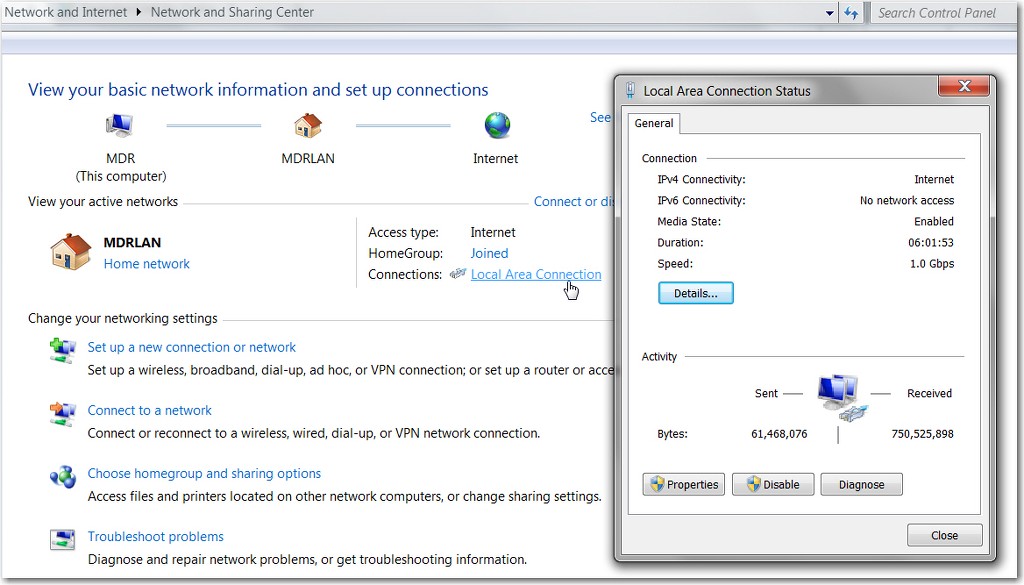
Connection speeds from PC to the router (as determined by all of the hardware and cabling involved) can be seen exactly by clicking (left or right) on the network icon in the system tray and selecting "Open Network and Sharing Center". On that dialog window, in the "View your active networks" section, click on the "local area connection" link and you will see your hardware connection speed in the resulting status window.
This is where you'll see 100Mb/s or 1.0Gb/s. Of course this has nothing to do with your "broadband speed" to/from the Internet, as it is only the maximum speed at which your PC is connecting to the router (and which is completely determined by your hardware and cabling between the PC and router).
You'll get a similar display if you use a wireless connection.
Now, it's obvious that your true real world "broadband speed" is a function of not only the service tier you pay your ISP for, but also your "intra-LAN" maximum speed capability in getting to the router (and then on to the modem and out to the Internet) from your PC. Of course if you use a wired connection from PC to router, you're almost certainly going to then be seeing the fastest possible "broadband speed" test measurement numbers as well.
However if you have a wireless connection from PC to router, well now you're subject to all the variables which influence how fast your PC can just get to the router wirelessly. Just because your wireless NIC and wireless router support say N150 or N300 wireless connection speeds, in the real world unless your wireless device is rather close to the wireless router or access point, there's no way you're going to see that type of wireless connection speed. And if you don't already start with a high-speed intra-LAN connection from device to the router, there's no way you can then see a measured "broadband speed" to/from the Internet which will compare to the comparable speed going through a wired connection from device to router.