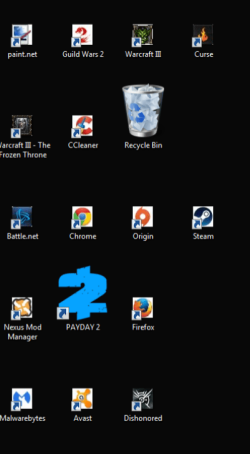
Desktop icons have become tiny

sudieken

New member
Local time
12:38 PM
Messages
3
I'm having a really strange issue with my desktop icons. They've become super tiny, and if the icons normally have a transparent background they get a white box behind them. Oddly enough a few of the shortcuts are completely normal.

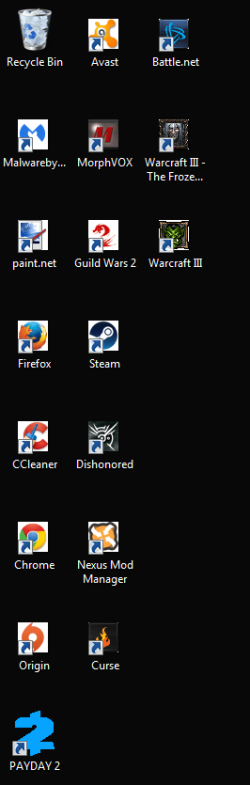
I've tried resizing them with the context menu as well as with Ctrl + Mouse Wheel. They do not resize no matter what I do. I've also tried manually recreating all of the shortcuts with no success.
 

Attachments
  • Untitled.png
    Untitled.png
    17.9 KB · Views: 1

My Computer My Computer

Computer type
PC/Desktop
OS
Windows 7 Ultimate x32
Hi sudieken welcome to Windows Seven Forums.

Those desktop icons look fairly normal to me for small icons. Have you tried right clicking your mouse on the desktop & selecting View. This will give you the option of Large, Medium & Small Icons.
 

My Computer My Computer

Computer type
PC/Desktop
Computer Manufacturer/Model Number
Self built using existing case
OS
Windows 7 Home Premium 64 bit sp1
CPU
Intel i5 3570 3.4Ghz Ivy Bridge SKT 1155 quad core
Motherboard
Gigabyte Z77-HD3 SKT 1155 2xSata 3, 4x USB 3.0
Memory
G-Skill Rip Jaws 16Gb (8x2) DDR3 -1600 PC3 12800 CL 10 red
Graphics Card(s)
Gigabyte NVIDIA GT610 1Gb DDR3 810/1200 PCI-E 2.0 Silent
Sound Card
NVIDIA High Definition & Realtech High Definition Audio
Monitor(s) Displays
2 x Philips 226V4L 16:9 aspect ratio
Screen Resolution
1920 x 1080 HD
Hard Drives
Samsung 840 Pro 256gb SSD, SATA 3.
Hitachi Touro Portable 1tb, USB 3.0 HDD used for image b/ups.
PSU
Corsair VS450
Case
Codeng
Cooling
PSU fan & CPU fan
Keyboard
Logitech
Mouse
Logitech Wireless trackball M570
Internet Speed
Wireless 3G. 3mg down & 550kb up.
Antivirus
Bitdefender Internet Security 2020
Browser
Opera (Current Version) & Firefox
Other Info
MS Office 2013 Pro. Davis weather station software. MGE Nova 600 avr UPS.
Ranger has given you good advice. The method I prefer which gives the precise size that you want is to hold down cntrl button and then use the mouse wheel to adjust size.
 

My Computer My Computer

Computer type
PC/Desktop
Computer Manufacturer/Model Number
Dell XPS 420
OS
Windows 10, Home Clean Install
CPU
Intel Core2 processsor Q8200(2.33Ghz 1333FSB) Quad Core Tech
Motherboard
Dell
Memory
6 gb
Graphics Card(s)
ATI Radeon 256MB HD3650
Sound Card
Intergrated 7.1 Channel Audio
Monitor(s) Displays
Dell SP2009W 20"
Hard Drives
640 GB Serial ATA Hard drive
Cooling
Fan
Keyboard
Dell USB Keyboard
Mouse
Dell Premium Optical USB
Internet Speed
DSL 2.85

My Computer My Computer

Computer type
Laptop
Computer Manufacturer/Model Number
MSI GE72VR Apache Pro-416
OS
Windows 10x64 Build 1709
CPU
Intel i7 7700HQ Kaby Lake
Motherboard
Micro-Star Intl. MS-179B (U3C1)
Memory
16 GB DDR4 @2400
Graphics Card(s)
Nvidia Geforce GTX 1060
Screen Resolution
1920x1080 120Hz
Hard Drives
256 GB Nvme M.2 SSD

1TB HDD@7200
Cooling
Cooler Blast 4
Keyboard
Steel Series
Antivirus
Bit Defender Free
Browser
Edge
Like I said, I can't resize them with either method. The affected icons don't get bigger or smaller no matter what I do. I've attached a picture of what happens when I try.

Also, I just tried building the icon cache using these directions.

It doesn't seem to have done anything.

Welcome to the forums sudieken!

Easiest things first, have you tried a System Restore to a point before your icons changed size?

We have many excellent tutorials here at the forums, heres one you could try, just click on the link : http://www.sevenforums.com/tutorials/268478-icon-cache-size-change-windows.html

I'll try a system restore and report back in a few minutes.
 

Attachments

  • Untitled2.png
    Untitled2.png
    30.2 KB · Views: 0

My Computer My Computer

Computer type
PC/Desktop
OS
Windows 7 Ultimate x32
System restore finished. Nothing has changed but for some reason the icons appear normally for a split second when I refresh the desktop with F5.
 

My Computer My Computer

Computer type
PC/Desktop
OS
Windows 7 Ultimate x32

My Computer My Computer

Computer type
Laptop
Computer Manufacturer/Model Number
MSI GE72VR Apache Pro-416
OS
Windows 10x64 Build 1709
CPU
Intel i7 7700HQ Kaby Lake
Motherboard
Micro-Star Intl. MS-179B (U3C1)
Memory
16 GB DDR4 @2400
Graphics Card(s)
Nvidia Geforce GTX 1060
Screen Resolution
1920x1080 120Hz
Hard Drives
256 GB Nvme M.2 SSD

1TB HDD@7200
Cooling
Cooler Blast 4
Keyboard
Steel Series
Antivirus
Bit Defender Free
Browser
Edge
Back
Top