Solved How do I permanently remove Registry Reviver

MamaWolf

New member
Local time
10:53 AM
Messages
25
I have removed this program 3 days in a row. Twice with Geek Uninstaller & once with Add/Remove Programs. After removing it I reset my Google Chrome to get rid of the search engines it installs & restart my Microsoft Security Essentials which it turned off. When I start the PC the next day I run AdwCleaner & Registry Reviver pops back up again even though I removed it. I run Win7 Professional 64bit. I sure hope someone can help with this.
 

My Computer My Computer

Computer type
PC/Desktop
Computer Manufacturer/Model Number
HP
OS
Windows 7 Ultimate x64
Memory
16Gb
Hard Drives
2Tb
Antivirus
Emsisoft
Browser
Chrome
It must be something you`re downloading.

Why are you using Adware Cleaner and Geek uninstaller ?

MSE and MBAM are all you need, install and run scans.

Use Ccleaner to remove it and cleanup the registry, nothing else.

You can also try Revo uninstaller.

http://www.revouninstaller.com/revo_uninstaller_free_download.html

Regisrty Reviver sounds like nothing but bad news and not needed in Windows 7.
 

My Computer My Computer

Computer type
PC/Desktop
Computer Manufacturer/Model Number
Skylake Special #666
OS
Windows 10 Pro x64
CPU
Intel Core i7 6700K
Motherboard
Asus Sabertooth Z170 Mark 1
Memory
GSkill TridentZ RGB 16GB 3600 16-16-16-36
Graphics Card(s)
EVGA GTX 980 Ti SC x2
Sound Card
Realtek High Definition
Monitor(s) Displays
AOC G2460PG
Screen Resolution
1920 x 1080 144Hz
Hard Drives
Samsung 860 Pro 256GB, Seagate Barracuda 4TB x2
PSU
EVGA 1000 P2, EVGA White Custom Braided Cables
Case
Corsair Vengeance C70 Gunmetal Black
Cooling
Corsair H100i v2, Corsair ML120 x2, Thermal Grizzly Kryonaut
Keyboard
Logitech G910 Orion Spectrum
Mouse
Logitech G700s
Internet Speed
Verizon Fios Quantum Gateway 75/75
Antivirus
Windows Defender, Malwarebytes Free 3.8.3
Browser
Chrome
Other Info
Corsair SP120 x4, LG Blu-ray Drive, Durabrand HT-395 100 Watt Dolby Digital Amp, Corsair H2100 Wireless 7.1 Headset
Nothing was downloaded on the 2nd & 3rd night. It just pops up as soon as I open AdwCleaner. I will try CCleaner & I have used Geek Uninstaller for several year & never had a problem with it. I find it easier to use than Revo Uninstaller.
 

My Computer My Computer

Computer type
PC/Desktop
Computer Manufacturer/Model Number
HP
OS
Windows 7 Ultimate x64
Memory
16Gb
Hard Drives
2Tb
Antivirus
Emsisoft
Browser
Chrome
I agree 100% with AddRAM about this particular piece of ............ for want of a better word ......... "software". In the regular course of events you NEVER have to "clean", "optimize" or "revive" your registry. Its extremely delicate and the less mucking around you do in it the better. IMHO of course. Having said that......

Remove like any other program i.e. Control Panel > Uninstall or change a program > Uninstall (registry reviver) after Windows does its thing , Restart and go to your Start Menu search box. Type in ReviverSoft and hit Enter. Click on the ReviverSoft folder and delete it.
 

My Computer My Computer

Computer type
Laptop
Computer Manufacturer/Model Number
MSI GE72VR Apache Pro-416
OS
Windows 10x64 Build 1709
CPU
Intel i7 7700HQ Kaby Lake
Motherboard
Micro-Star Intl. MS-179B (U3C1)
Memory
16 GB DDR4 @2400
Graphics Card(s)
Nvidia Geforce GTX 1060
Screen Resolution
1920x1080 120Hz
Hard Drives
256 GB Nvme M.2 SSD

1TB HDD@7200
Cooling
Cooler Blast 4
Keyboard
Steel Series
Antivirus
Bit Defender Free
Browser
Edge
Well if it pops up with Adware Cleaner, maybe it`s part of it ???
 

My Computer My Computer

Computer type
PC/Desktop
Computer Manufacturer/Model Number
Skylake Special #666
OS
Windows 10 Pro x64
CPU
Intel Core i7 6700K
Motherboard
Asus Sabertooth Z170 Mark 1
Memory
GSkill TridentZ RGB 16GB 3600 16-16-16-36
Graphics Card(s)
EVGA GTX 980 Ti SC x2
Sound Card
Realtek High Definition
Monitor(s) Displays
AOC G2460PG
Screen Resolution
1920 x 1080 144Hz
Hard Drives
Samsung 860 Pro 256GB, Seagate Barracuda 4TB x2
PSU
EVGA 1000 P2, EVGA White Custom Braided Cables
Case
Corsair Vengeance C70 Gunmetal Black
Cooling
Corsair H100i v2, Corsair ML120 x2, Thermal Grizzly Kryonaut
Keyboard
Logitech G910 Orion Spectrum
Mouse
Logitech G700s
Internet Speed
Verizon Fios Quantum Gateway 75/75
Antivirus
Windows Defender, Malwarebytes Free 3.8.3
Browser
Chrome
Other Info
Corsair SP120 x4, LG Blu-ray Drive, Durabrand HT-395 100 Watt Dolby Digital Amp, Corsair H2100 Wireless 7.1 Headset
As part of the cleaning I first go to Control Panel, Internet Options and delete the Temporary Internet Files, could have an infection hiding in one of them. Might also help to empty the files in C:\Users\YourUserName\AppData\Local\Temp, some won't allow deleting. It does help CCleaner and Malwarebytes take less time scanning.
 

My Computer My Computer

Computer type
PC/Desktop
Computer Manufacturer/Model Number
Customs, Dell, Gateway, HP, Toshiba, Acer, ASUS
OS
Windows 7 Ultimate 64-bit, Windows 8.1 64-bit, Mac OS X 10.10, Linux Mint 17, Windows 10 Pro TP
Keyboard
Microsoft
Mouse
Microsoft
Thanks for all the input guys. It never occurred to me to remove AdwCleaner also. It is my Grandson's PC & he's in bed so I will do this first thing tomorrow.
 

My Computer My Computer

Computer type
PC/Desktop
Computer Manufacturer/Model Number
HP
OS
Windows 7 Ultimate x64
Memory
16Gb
Hard Drives
2Tb
Antivirus
Emsisoft
Browser
Chrome
...Registry Reviver pops back up again even though I removed it....
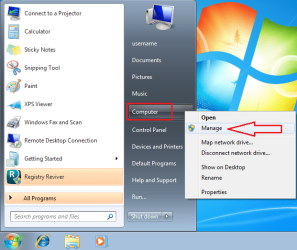
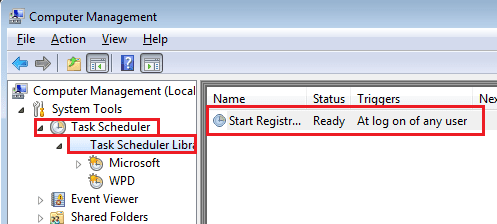
The app normally creates a scheduled task to run/scan as soon as the user that installed it logs on. You might want to check each scheduled task to see if you can find the one associated with Registry Reviver... then look to see where the app is running from.

Start > right click on Computer and select Manage from the context menu:

Registry Reviver1.png


Expand the tree in the left most pane and double click on the entry for Registry Reviver:

Registry Reviver2.png


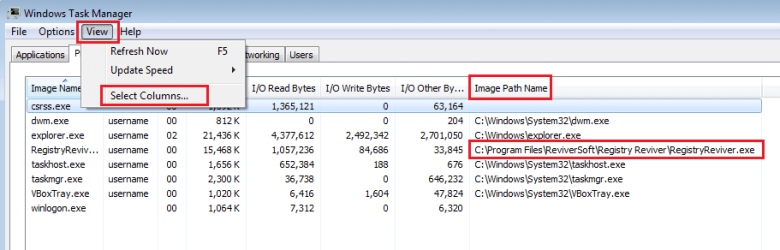
Take note of the path:

Registry Reviver3.png


Please let us know where the app is running from. If Registry Reviver is running from a non-standard location, I would like to know that before you get rid of that scheduled task.

If there is no scheduled task starting Registry Reviver, then do the steps that you normally do to get Registry Reviver to start and setup Task Manager to tell you where Registry Reviver is running from.

Registry Reviver4.png


You would not normally care where Registry Reviver is running from. Normally, you just want it to stop running. I'm just asking for this info for my own interest in this app.


...I have used Geek Uninstaller for several year & never had a problem with it...
For what it is worth: I've never found a need for these uninstaller apps. The normal uninstall method might leave stuff behind, but that stuff is generally harmless. Your mileage may vary. The normal uninstallation process for Registry Reviver opens your browser for a 50% discount to buy the app. How nice of them. /sarcasm


...It is my Grandson's PC...
Maybe he should not be using a user account that has admin rights on the computer.
 

My Computer My Computer

Computer type
Laptop
Computer Manufacturer/Model Number
Employer provided Dell Latitude
OS
W7 Pro SP1 64bit
CPU
i7
Memory
8GB
Graphics Card(s)
Intel HD Graphics
Hard Drives
crappy SSD
Antivirus
Employer mandated Symantec Endpoint Protection
Browser
Pale Moon 64bit, IE11 64bit & Chrome 64bit
I just want to let all you guys who helped know what the problem was. First of all I checked the scheduled tasks & Registry Reviver was not there. Once again we started AdwCleaner--voila--it's back. We uninstalled AdwCleaner & the problem is gone. You Guys are wonderful. I am 68 years old & am pretty knowledgeable about my PC. As a result my 14 year old Grandson thinks his Grandma 'Hung the Moon'. Y'All make me look good!

Many Thanks for all the help.
You Guys Rock!
MamaWolf
 

My Computer My Computer

Computer type
PC/Desktop
Computer Manufacturer/Model Number
HP
OS
Windows 7 Ultimate x64
Memory
16Gb
Hard Drives
2Tb
Antivirus
Emsisoft
Browser
Chrome
Where did you download AdwCleaner from?

I just used AdwCleaner from Bleeping Computer and no such garbage came with it.
I never download AdwCleaner from any other place.
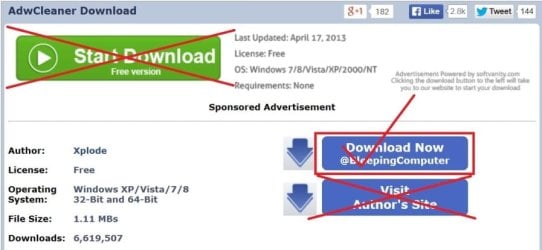
You will even get garbage from the authors site.


AdwCleaner Download
 

My Computer My Computer

Computer type
PC/Desktop
Computer Manufacturer/Model Number
Home made Desktop
OS
Windows 10 Pro. 64/ version 1709 Windows 7 Pro/64
CPU
Intel i7-6800K @ 4.3
Motherboard
ASUS X-99 Deluxe II
Memory
Corsair Platinum 16 gig @2400
Graphics Card(s)
EVGA GTX 1070 OC
Monitor(s) Displays
Asus 27" LED LCD/VE278Q
Screen Resolution
1920-1080 or 1280-720 HDMI
Hard Drives
INTEL SSD 730-240 Gb Sata 3.0/
PSU
EVGA Platium 1200W
Case
Phanteks Luxe Tempered Glass 8 fans/ one radiator
Cooling
XSPC/ Water Cooled CPU
Keyboard
Das 4 Professional
Mouse
Logitech M705/MX Anywhere 2-S
Internet Speed
100 mbits
Antivirus
Microsoft Security Essentials/ Malwarebytes Premium 3.0/ SAS
Browser
I.E. 11 default/Firefox/ ISP Time Warner Cable/Spectrum
Other Info
LG BluRay Burner/
Sound system-KLipsch-THX/
Icy Dock ssd Hot Swap bays.
That is where we downloaded it from. I always try to download from the original site---go figure.
 

My Computer My Computer

Computer type
PC/Desktop
Computer Manufacturer/Model Number
HP
OS
Windows 7 Ultimate x64
Memory
16Gb
Hard Drives
2Tb
Antivirus
Emsisoft
Browser
Chrome
This should help. A little picture from Jacee.

adwcleaner-1.JPG
 

My Computer My Computer

Computer type
PC/Desktop
Computer Manufacturer/Model Number
Home made Desktop
OS
Windows 10 Pro. 64/ version 1709 Windows 7 Pro/64
CPU
Intel i7-6800K @ 4.3
Motherboard
ASUS X-99 Deluxe II
Memory
Corsair Platinum 16 gig @2400
Graphics Card(s)
EVGA GTX 1070 OC
Monitor(s) Displays
Asus 27" LED LCD/VE278Q
Screen Resolution
1920-1080 or 1280-720 HDMI
Hard Drives
INTEL SSD 730-240 Gb Sata 3.0/
PSU
EVGA Platium 1200W
Case
Phanteks Luxe Tempered Glass 8 fans/ one radiator
Cooling
XSPC/ Water Cooled CPU
Keyboard
Das 4 Professional
Mouse
Logitech M705/MX Anywhere 2-S
Internet Speed
100 mbits
Antivirus
Microsoft Security Essentials/ Malwarebytes Premium 3.0/ SAS
Browser
I.E. 11 default/Firefox/ ISP Time Warner Cable/Spectrum
Other Info
LG BluRay Burner/
Sound system-KLipsch-THX/
Icy Dock ssd Hot Swap bays.
You are right. I just checked out Bleeping Computer & I like what I'm seeing.

Many Thanks!
 

My Computer My Computer

Computer type
PC/Desktop
Computer Manufacturer/Model Number
HP
OS
Windows 7 Ultimate x64
Memory
16Gb
Hard Drives
2Tb
Antivirus
Emsisoft
Browser
Chrome
Back
Top