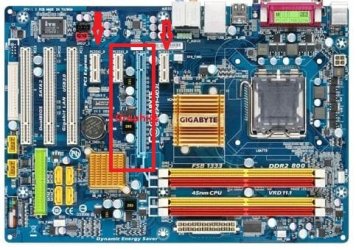
Hi
I am seeking help regarding an Nvidia GTX260 graphic card we have but which takes up two slots on the mobo. In the process the GTX260 hides a PCIe x1 socket required to install a TV capture card. As a result the Nvidia card is not currently installed because it hides the PCIe x1 socket and I'm still using a very old video card (an ATI X1950 card with 256Mb ram) although to be fair it has served me very well up to now.
So far I've been happy using the Windows Classic layout but now I'd like to join the rest of the Windows 7 community and start using the aero facility. Yesterday I tried setting up and using the aero facility only to find the graphic card is not fully up to it. However, I believe the Nvidia card we have should, I think, be man enough to run the TV card and other things I do at the same time.
This is where my question comes in. Is there any way I can connect the TV card to the PCIe x1 and have the GTX260 installed??? I've been looking at flexible PCIe x1 adapters but cannot sort out in my own mind exactly how they could possibly be used. Does anyone have any suggestions or is it a case of biting the bullet and finding a single width graphic card? Yes, I know a new computer would be great but we are pensioners and cannot afford to splash out on such luxuries.
If anyone has any ideas of how I can install both the TV card and the Nvidia GTX260 double width card please let me know - it would be very much appreciated. Thanks.
Tracey
I am seeking help regarding an Nvidia GTX260 graphic card we have but which takes up two slots on the mobo. In the process the GTX260 hides a PCIe x1 socket required to install a TV capture card. As a result the Nvidia card is not currently installed because it hides the PCIe x1 socket and I'm still using a very old video card (an ATI X1950 card with 256Mb ram) although to be fair it has served me very well up to now.
So far I've been happy using the Windows Classic layout but now I'd like to join the rest of the Windows 7 community and start using the aero facility. Yesterday I tried setting up and using the aero facility only to find the graphic card is not fully up to it. However, I believe the Nvidia card we have should, I think, be man enough to run the TV card and other things I do at the same time.
This is where my question comes in. Is there any way I can connect the TV card to the PCIe x1 and have the GTX260 installed??? I've been looking at flexible PCIe x1 adapters but cannot sort out in my own mind exactly how they could possibly be used. Does anyone have any suggestions or is it a case of biting the bullet and finding a single width graphic card? Yes, I know a new computer would be great but we are pensioners and cannot afford to splash out on such luxuries.
If anyone has any ideas of how I can install both the TV card and the Nvidia GTX260 double width card please let me know - it would be very much appreciated. Thanks.
Tracey
My Computer
At a glance
Windows 7 Home Premium 64-bit and Window 10 P...Intel i5-4690K8Gb VengeanceNvidia GTX760
- Computer type
- PC/Desktop
- Computer Manufacturer/Model Number
- Self built
- OS
- Windows 7 Home Premium 64-bit and Window 10 Pro (dual boot)
- CPU
- Intel i5-4690K
- Motherboard
- Gigabyte Z97P-D3
- Memory
- 8Gb Vengeance
- Graphics Card(s)
- Nvidia GTX760
- Sound Card
- Integrated with Mobo (Realtek 887)
- Monitor(s) Displays
- Iiyama E2407HDS (x2)
- Screen Resolution
- 1920 x 1080
- Hard Drives
- 1 x 240GB Kingston (System disk)
1 x 256GB Samsung SSD
1 x 1TB Samsung hard disk (internal)
1 x 3TB WD My Book (external)
- PSU
- Atrix 500W
- Case
- Antec One
- Cooling
- Corsair H80i
- Keyboard
- Logitech wireless
- Mouse
- Logitech wireless
- Internet Speed
- Up to 24Mb
- Antivirus
- Avast! Free antivirus
- Browser
- Opera, Firefox, Chrome
- Other Info
- Wacom Bamboo Tablet