Solved Is there any way of saving a completely unrecognisable hard drive?

hellothere2

New member
Local time
3:37 PM
Messages
17
I have two of them, both do the same thing. They don't come up in my computer, device manager, or disk management so I don't know what to do. I just want to be able to see what's on there, before I throw them out.

Western Digatal - 500Gb SATA / 16MB Cache WD5000AAKS

Thanks :)
 

My Computer My Computer

At a glance

Microsoft Windows 7 Ultimate 64-bit 7601 Mult...Intel(R) Core(TM) i5-3570K CPU @ 3.40GHz8.00 GBNVIDIA GeForce GTX 560
Computer type
PC/Desktop
Computer Manufacturer/Model Number
custom build
OS
Microsoft Windows 7 Ultimate 64-bit 7601 Multiprocessor Free Service Pack 1
CPU
Intel(R) Core(TM) i5-3570K CPU @ 3.40GHz
Motherboard
ASUSTeK COMPUTER INC. P8H77-M
Memory
8.00 GB
Graphics Card(s)
NVIDIA GeForce GTX 560
Hard Drives
Toshiba DT01ACA300
Keyboard
Tt
Antivirus
AVG
Browser
Chrome

My Computer My Computer

At a glance

Windows 10 Pro. 64/ version 1709 Windows 7 Pr...Intel i7-6800K @ 4.3Corsair Platinum 16 gig @2400EVGA GTX 1070 OC
Computer type
PC/Desktop
Computer Manufacturer/Model Number
Home made Desktop
OS
Windows 10 Pro. 64/ version 1709 Windows 7 Pro/64
CPU
Intel i7-6800K @ 4.3
Motherboard
ASUS X-99 Deluxe II
Memory
Corsair Platinum 16 gig @2400
Graphics Card(s)
EVGA GTX 1070 OC
Monitor(s) Displays
Asus 27" LED LCD/VE278Q
Screen Resolution
1920-1080 or 1280-720 HDMI
Hard Drives
INTEL SSD 730-240 Gb Sata 3.0/
PSU
EVGA Platium 1200W
Case
Phanteks Luxe Tempered Glass 8 fans/ one radiator
Cooling
XSPC/ Water Cooled CPU
Keyboard
Das 4 Professional
Mouse
Logitech M705/MX Anywhere 2-S
Internet Speed
100 mbits
Antivirus
Microsoft Security Essentials/ Malwarebytes Premium 3.0/ SAS
Browser
I.E. 11 default/Firefox/ ISP Time Warner Cable/Spectrum
Other Info
LG BluRay Burner/
Sound system-KLipsch-THX/
Icy Dock ssd Hot Swap bays.
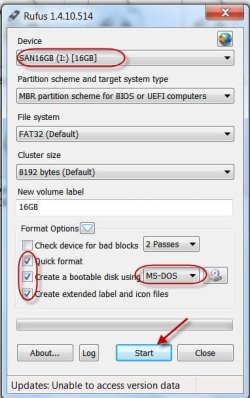
Create a bootable MSDOS pendrive with Rufus Rufus - Create bootable USB drives the easy way

Download WD Datalifeguard Diagnostics for DOS WD Support / Downloads / SATA & SAS / WD Blue / SE / SE16 (SATA II), extract and copy the dlgdiag5.exe to the root of the pendrive, boot from the pendrive using the one time boot menu and run it.

If it fails to recognise your drive, that is it - your external drive is dead.

In such a case, the next best thing you can do is to open the enclosure, take out the HDD and try out by hooking it as an internal drive on a desktop. In some cases only the SATA to USB interface card may be faulty and the HDD itself may be OK. ( In some WD externals, the SATA to USB interface is integrated with the HDD and in that case you are again out of luck. You can't do this.)

Finally, if you don't know what you have put in it, I presume that the data in it is of no value to you and since you have lived without it, bring down a sledge hammer on to the drive and destroy it.( Should this have been my first suggestion rather??????:D)
 

My Computer My Computer

At a glance

Windows 7 Home Premium 32 bit
OS
Windows 7 Home Premium 32 bit
Haha, as to your last suggestion, I may or may not have memories (diaries, photos, old work) that I might want. I would love to sledge hammer it right now but would hate to permanently destroy something that might mean something to me.

I would love to try your first suggestion, but I'm failing to get Rufus to create the bootable USB as the file is an .exe file and not an image. So I'm not sure what to do about that?
 

My Computer My Computer

At a glance

Microsoft Windows 7 Ultimate 64-bit 7601 Mult...Intel(R) Core(TM) i5-3570K CPU @ 3.40GHz8.00 GBNVIDIA GeForce GTX 560
Computer type
PC/Desktop
Computer Manufacturer/Model Number
custom build
OS
Microsoft Windows 7 Ultimate 64-bit 7601 Multiprocessor Free Service Pack 1
CPU
Intel(R) Core(TM) i5-3570K CPU @ 3.40GHz
Motherboard
ASUSTeK COMPUTER INC. P8H77-M
Memory
8.00 GB
Graphics Card(s)
NVIDIA GeForce GTX 560
Hard Drives
Toshiba DT01ACA300
Keyboard
Tt
Antivirus
AVG
Browser
Chrome
Nevermind, I had to change it to FAT32 and FreeDOS
 

My Computer My Computer

At a glance

Microsoft Windows 7 Ultimate 64-bit 7601 Mult...Intel(R) Core(TM) i5-3570K CPU @ 3.40GHz8.00 GBNVIDIA GeForce GTX 560
Computer type
PC/Desktop
Computer Manufacturer/Model Number
custom build
OS
Microsoft Windows 7 Ultimate 64-bit 7601 Multiprocessor Free Service Pack 1
CPU
Intel(R) Core(TM) i5-3570K CPU @ 3.40GHz
Motherboard
ASUSTeK COMPUTER INC. P8H77-M
Memory
8.00 GB
Graphics Card(s)
NVIDIA GeForce GTX 560
Hard Drives
Toshiba DT01ACA300
Keyboard
Tt
Antivirus
AVG
Browser
Chrome
15-11-2014 12-20-08.jpg

Backup all data on your pendrive before using Rufus.
 

My Computer My Computer

At a glance

Windows 7 Home Premium 32 bit
OS
Windows 7 Home Premium 32 bit
Thanks. So I ran the first test, got 'error status code 0007'. I then did the bigger test, and it stopped a little way through it, saying 'too many errors, test stopped, error status code 0225'. But, now my computer is recognising that there is a hard drive there, but it's unreadable.

Are there any programs that will recover whatever is recoverable on the hard drive?

Thanks heaps.
 

My Computer My Computer

At a glance

Microsoft Windows 7 Ultimate 64-bit 7601 Mult...Intel(R) Core(TM) i5-3570K CPU @ 3.40GHz8.00 GBNVIDIA GeForce GTX 560
Computer type
PC/Desktop
Computer Manufacturer/Model Number
custom build
OS
Microsoft Windows 7 Ultimate 64-bit 7601 Multiprocessor Free Service Pack 1
CPU
Intel(R) Core(TM) i5-3570K CPU @ 3.40GHz
Motherboard
ASUSTeK COMPUTER INC. P8H77-M
Memory
8.00 GB
Graphics Card(s)
NVIDIA GeForce GTX 560
Hard Drives
Toshiba DT01ACA300
Keyboard
Tt
Antivirus
AVG
Browser
Chrome
When there are too many bad sectors, most data in there would have been corrupted.

While I can't say for sure whether you will get anything out of what I shall suggest, no harm in trying.

Try and see whether live Linux can see any folders/files that can be recovered.

Download Lucid Puppy (Ubuntu Compatible Build) 5.2.8 ISO from Long-Term-Supported WaryPuppy (LTS)

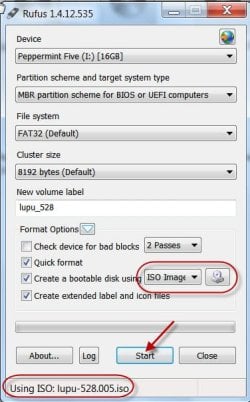
Create your bootable Lucid Puppy pen drive again with Rufus. (This time you will select ISO with the drop down arrow, click on the drive icon next to it and select the Lucid Puppy ISO (132.6MB))

15-11-2014 14-05-56.jpg

Run Lucid puppy and see whether you can see any folders and files to recover.

[Go to the topic Recovering files from the non-bootable Internal Drive: in this thread http://www.sevenforums.com/software/198909-lucid-puppy-way-recover-files-non-bootable-computer.html on how-to. In your case it will be your external drive.]
 

My Computer My Computer

At a glance

Windows 7 Home Premium 32 bit
OS
Windows 7 Home Premium 32 bit
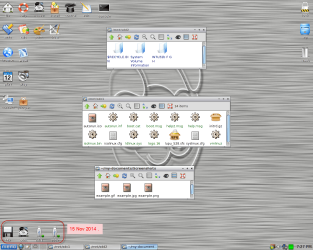
I did all that, and both my good and bad hard drives do not come up in the bottom left hand corner, is there something I'm doing wrong?
 

My Computer My Computer

At a glance

Microsoft Windows 7 Ultimate 64-bit 7601 Mult...Intel(R) Core(TM) i5-3570K CPU @ 3.40GHz8.00 GBNVIDIA GeForce GTX 560
Computer type
PC/Desktop
Computer Manufacturer/Model Number
custom build
OS
Microsoft Windows 7 Ultimate 64-bit 7601 Multiprocessor Free Service Pack 1
CPU
Intel(R) Core(TM) i5-3570K CPU @ 3.40GHz
Motherboard
ASUSTeK COMPUTER INC. P8H77-M
Memory
8.00 GB
Graphics Card(s)
NVIDIA GeForce GTX 560
Hard Drives
Toshiba DT01ACA300
Keyboard
Tt
Antivirus
AVG
Browser
Chrome
I'm trying out the other bad hard drive, thought it was the same one but turns out it's a seagate st2000dl003 2000Gb. I can't find the software like the one you provided me for the western digital, do you know of any? Thanks
 

My Computer My Computer

At a glance

Microsoft Windows 7 Ultimate 64-bit 7601 Mult...Intel(R) Core(TM) i5-3570K CPU @ 3.40GHz8.00 GBNVIDIA GeForce GTX 560
Computer type
PC/Desktop
Computer Manufacturer/Model Number
custom build
OS
Microsoft Windows 7 Ultimate 64-bit 7601 Multiprocessor Free Service Pack 1
CPU
Intel(R) Core(TM) i5-3570K CPU @ 3.40GHz
Motherboard
ASUSTeK COMPUTER INC. P8H77-M
Memory
8.00 GB
Graphics Card(s)
NVIDIA GeForce GTX 560
Hard Drives
Toshiba DT01ACA300
Keyboard
Tt
Antivirus
AVG
Browser
Chrome
I did all that, and both my good and bad hard drives do not come up in the bottom left hand corner, is there something I'm doing wrong?

Your internal drive and the Lucid Puppy pen drive should atleast show up positively. Redownload the Lucid Puppy ISO, recreate the bootable pen drive and check. To make sure that your pendrive is OK, place a check mark on " Check device for bad blocks" and also uncheck "Quick format" in RUFUS. This will check your pendrive and do a full format.Apart from these I have no other suggestions.

I'm trying out the other bad hard drive, thought it was the same one but turns out it's a seagate st2000dl003 2000Gb. I can't find the software like the one you provided me for the western digital, do you know of any? Thanks

http://www.sevenforums.com/tutorials/313457-seatools-dos-windows-how-use.html

( I went off for my afternoon nap and got up only now. :D)
 
Last edited:

My Computer My Computer

At a glance

Windows 7 Home Premium 32 bit
OS
Windows 7 Home Premium 32 bit
God bless afternoon naps. Thanks, I downloaded the Seagate active partition recovery and have found that it's certainly not empty and can't throw it out just yet. Just have to wait another 12 hours superscan to finish.

Thanks again for your help :)
 

My Computer My Computer

At a glance

Microsoft Windows 7 Ultimate 64-bit 7601 Mult...Intel(R) Core(TM) i5-3570K CPU @ 3.40GHz8.00 GBNVIDIA GeForce GTX 560
Computer type
PC/Desktop
Computer Manufacturer/Model Number
custom build
OS
Microsoft Windows 7 Ultimate 64-bit 7601 Multiprocessor Free Service Pack 1
CPU
Intel(R) Core(TM) i5-3570K CPU @ 3.40GHz
Motherboard
ASUSTeK COMPUTER INC. P8H77-M
Memory
8.00 GB
Graphics Card(s)
NVIDIA GeForce GTX 560
Hard Drives
Toshiba DT01ACA300
Keyboard
Tt
Antivirus
AVG
Browser
Chrome
I'm having trouble using the win32 disk imager, I managed to find a copy of the program that would actually work, and mounted the SeaToolsDOS223ALL.ISO to the USB but it didn't work on startup, (no bootmgr.exe). Can't use Rufus, as it says it's not a bootable iso file, so maybe I have the wrong file but I'm not sure where the right file is.
 

My Computer My Computer

At a glance

Microsoft Windows 7 Ultimate 64-bit 7601 Mult...Intel(R) Core(TM) i5-3570K CPU @ 3.40GHz8.00 GBNVIDIA GeForce GTX 560
Computer type
PC/Desktop
Computer Manufacturer/Model Number
custom build
OS
Microsoft Windows 7 Ultimate 64-bit 7601 Multiprocessor Free Service Pack 1
CPU
Intel(R) Core(TM) i5-3570K CPU @ 3.40GHz
Motherboard
ASUSTeK COMPUTER INC. P8H77-M
Memory
8.00 GB
Graphics Card(s)
NVIDIA GeForce GTX 560
Hard Drives
Toshiba DT01ACA300
Keyboard
Tt
Antivirus
AVG
Browser
Chrome
Are you following the exact procedure of creating a bootable pen drive as given in option 2 of Arc's tutorial?
i.e., extracting the ISO with 7-Zip or WinRAR, renaming the seatools.ima as seatools.img and then write that to Win32 Disk Imager?

Also in BIOS AHCI to ATA (IDE/SATA)

You can download Win32 Disk Imager from Win32 Disk Imager | SourceForge.net

( Rufus will not work with that ISO)

If still you have problems just forget about it. Write the ISO into a CD and boot from that CD to run Seatools.
 

My Computer My Computer

At a glance

Windows 7 Home Premium 32 bit
OS
Windows 7 Home Premium 32 bit
Ah I wasn't doing the extracting part, guess I skipped over it thinking I had already done it. Anyway, I got it to work, though no devices were detected, my BIOS thing was already in IDE (is that good/bad?), so is it safe to say that there is nothing I can do to see what's on this hard drive?
 

My Computer My Computer

At a glance

Microsoft Windows 7 Ultimate 64-bit 7601 Mult...Intel(R) Core(TM) i5-3570K CPU @ 3.40GHz8.00 GBNVIDIA GeForce GTX 560
Computer type
PC/Desktop
Computer Manufacturer/Model Number
custom build
OS
Microsoft Windows 7 Ultimate 64-bit 7601 Multiprocessor Free Service Pack 1
CPU
Intel(R) Core(TM) i5-3570K CPU @ 3.40GHz
Motherboard
ASUSTeK COMPUTER INC. P8H77-M
Memory
8.00 GB
Graphics Card(s)
NVIDIA GeForce GTX 560
Hard Drives
Toshiba DT01ACA300
Keyboard
Tt
Antivirus
AVG
Browser
Chrome
Seagate External drive: You can still open the external case, take out the HDD, hook it as a second internal drive on a desktop and check.

Western Digital external drive: Try with Lucid Puppy. As I said if you had done it properly you should atleast see your internal drive as well as the Lucid Puppy pen drive . If you didn't see anything I can only say you again did not do it properly. :D

Note: I followed my own instructions in post#8 :),created my Lucid Puppy pendrive just to make sure that I haven't faltered anywhere. When I booted my desktop with it I could see all the drives connected - my internal drive, the Lucid Puppy pendrive, and another external HDD. Screenshot below.

image-1.png

BIOS: If your system was setup as IDE, leave it at that. No need to change it.

I have no more suggestions to offer.
 

My Computer My Computer

At a glance

Windows 7 Home Premium 32 bit
OS
Windows 7 Home Premium 32 bit
Thanks very much for your suggestions, I got at least one to work, I appreciate your help :)
 

My Computer My Computer

At a glance

Microsoft Windows 7 Ultimate 64-bit 7601 Mult...Intel(R) Core(TM) i5-3570K CPU @ 3.40GHz8.00 GBNVIDIA GeForce GTX 560
Computer type
PC/Desktop
Computer Manufacturer/Model Number
custom build
OS
Microsoft Windows 7 Ultimate 64-bit 7601 Multiprocessor Free Service Pack 1
CPU
Intel(R) Core(TM) i5-3570K CPU @ 3.40GHz
Motherboard
ASUSTeK COMPUTER INC. P8H77-M
Memory
8.00 GB
Graphics Card(s)
NVIDIA GeForce GTX 560
Hard Drives
Toshiba DT01ACA300
Keyboard
Tt
Antivirus
AVG
Browser
Chrome
Back
Top