Intel 82852/82855 GM/GME Graphics Controller Driver Issues

arcking

New member
Local time
12:13 PM
Messages
6
I'm having trouble installing the drivers for a Intel 82852/82855 GM/GME Graphics Controller in Windows 7 on a Gateway/Motion Computing M1300 tablet.

Before you say "DriverMax" please note that Windows 7 is the only operating system installed on the tablet. I hope there's another way to get it working.

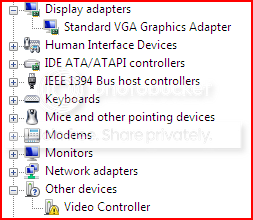
Here's the thing that strikes me as odd: I have gotten it to work perfectly, but as soon as I restart it goes back to its old ways (default VGA controller driver, etc).

Here's what I do to get it working:

1) I run the setup file that came with the driver I downloaded from Intel (version 14.19.50), either natively or in Windows XP compatibility mode,
2) The setup software asks me to restart, and I comply

When the computer boots back up after those steps everything is working just fine, BUT then a Windows prompt appears telling me that I need to restart in order to complete the driver configuration. When I restart hardware once again has trouble.

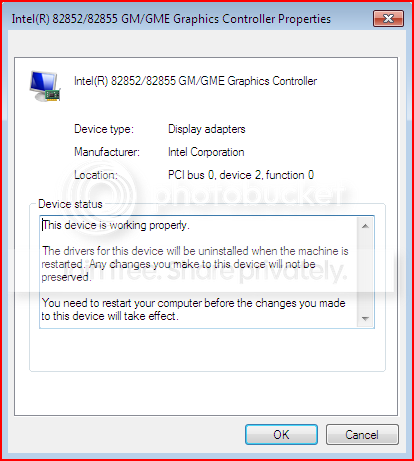
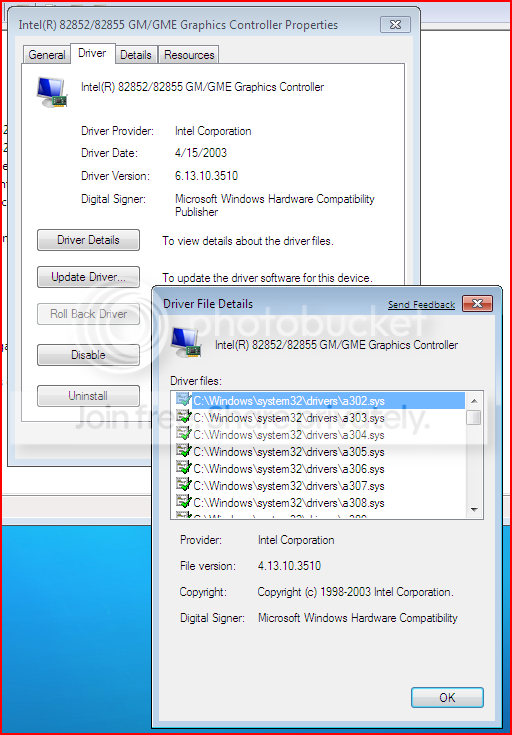
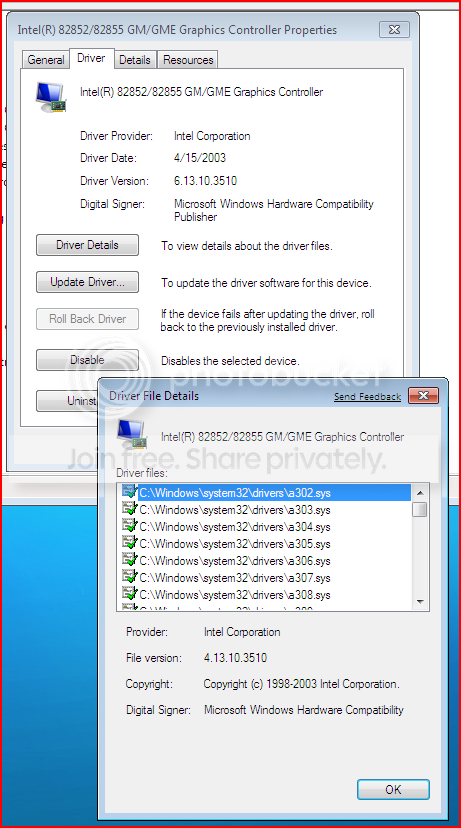
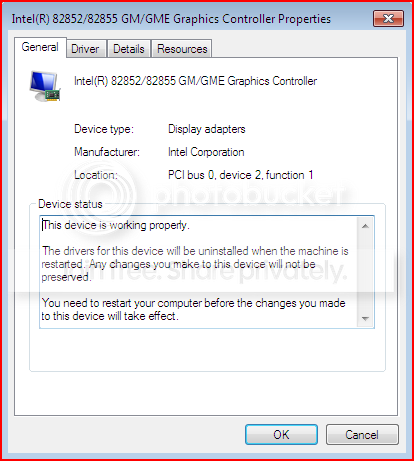
Here are some screenshots that took while the driver was working correctly:
Capture.png


Capture2.png


Why does it say that it will uninstall the drivers when restarted?

Capture3.png


Capture5.png


Capture4.png


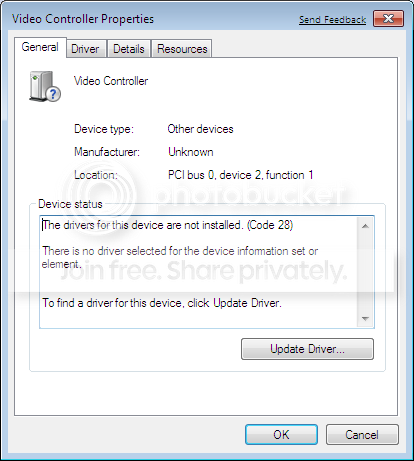
And here are some screenshots taken while the driver is NOT working correctly:
NotWorking.png


NotWorking2.png


NotWorking3.png


My real problem with not having the correct driver installed is not that display functions are lost (though they are), but that the Hibernate and Stand By modes are disabled.

Does anyone have any suggestions? Is there a way to keep Windows 7 from reverting to the old driver?

Thanks for your help!
 

My Computer

OS
Windows 7, Windows Vista, Windows XP Pro & Tablet, OS X
I have this problem too. Because it defaults back to "standard VGA" when I watch video it is very "liney", in other words, not the full shilling.

No matter what I do I simply cannot convince Win7 that my driver, (exported using Drivermax), is the correct one and that is the one I want Win7 to use.

Win7 is a pesky little blighter!
 

My Computer

Computer Manufacturer/Model Number
Acer Travelmate 4600
OS
Windows 7 post RC1 7227 32bit
CPU
Intel Centrino 1.60GHz
Memory
1.25GB
Graphics Card(s)
Mobile Intel(R) 915GM/GMS,910GML Express Chipset Family
Sound Card
Realtek High Definition Audio
Monitor(s) Displays
Inbuilt Laptop Display
Screen Resolution
1400x1050
Hard Drives
80gb split (25GB/50GB)
500GB Seagate external
Cooling
Inbuilt
Keyboard
Logitech Elite
Mouse
Old Dell optical thing
Internet Speed
10mb Virginmedia
Hi Arcking,

Try installing it this way; When I downloaded the driver from Gateway and ran it, it made a folder C:\cabs\9522919
Go to Device manager click on your device, select Update driver and point windows to above folder where it should find and with a bit of luck install the driver.
 

My Computer

Computer Manufacturer/Model Number
Something I threw together
OS
Windows 7 Ultimate x64
CPU
Intel Core i7-2600K
Motherboard
Asus P8P67
Memory
16 GB G Skill F3-10666 CL9D-4GBRL
Graphics Card(s)
ATI Radeon HD 6870
Sound Card
ATI Radeon HDMI / Realtek ALC892
Monitor(s) Displays
2 x 22" standard monitors / LG32LC56v TV to watch films
Screen Resolution
1920 x1080
Hard Drives
2 x OCZ Vertex2 111.79GB
3 x Samsung103SJ
1 x Samsung103UJ
1 x WD3200BEVT
1 x Hitachi5K320-160
PSU
Thermaltake Toughpower Cable Management 750W
Case
Antec 300
Cooling
Noctua NH-U12P SE2 and 5 120mm Case fans
Keyboard
Microsoft Comfort Curve Keyboard 2000
Mouse
Hama M3110 / Logitech M305
Internet Speed
16000
Other Info
I have also used Fedora, Suse, Ubuntu Linux
And all other Windows from 95 to date except ME
Hi Arcking,

Try installing it this way; When I downloaded the driver from Gateway and ran it, it made a folder C:\cabs\9522919
Go to Device manager click on your device, select Update driver and point windows to above folder where it should find and with a bit of luck install the driver.
Yeah I've done it that way. I pointed to the exact folder, it installs it, tells me to re-start Windows to "finsih installing your software" then when I have re-started Windows reverts back to the standard VGA driver.

Very frustrating.
 

My Computer

Computer Manufacturer/Model Number
Acer Travelmate 4600
OS
Windows 7 post RC1 7227 32bit
CPU
Intel Centrino 1.60GHz
Memory
1.25GB
Graphics Card(s)
Mobile Intel(R) 915GM/GMS,910GML Express Chipset Family
Sound Card
Realtek High Definition Audio
Monitor(s) Displays
Inbuilt Laptop Display
Screen Resolution
1400x1050
Hard Drives
80gb split (25GB/50GB)
500GB Seagate external
Cooling
Inbuilt
Keyboard
Logitech Elite
Mouse
Old Dell optical thing
Internet Speed
10mb Virginmedia
Try installing it this way; When I downloaded the driver from Gateway and ran it, it made a folder C:\cabs\9522919
Go to Device manager click on your device, select Update driver and point windows to above folder where it should find and with a bit of luck install the driver.

Have you had success using that method? When I tried it it did not work. Of the three drivers I have tried (1 from Motion Computing, 1 from Gateway, and 1 from Intel) only the driver from Intel has worked the way it's supposed to (though only for one restart). The others install, but then are reinstalled (and lost) on the restart required by Windows for their installation. The Intel driver works (I can rotate the screen) but is lost when you restart the computer (after the intitial, Intel prompted, restart to install the drivers).

Is there a way to "lock" the driver?
 

My Computer

OS
Windows 7, Windows Vista, Windows XP Pro & Tablet, OS X
Have you had success using that method? When I tried it it did not work. Of the three drivers I have tried (1 from Motion Computing, 1 from Gateway, and 1 from Intel) only the driver from Intel has worked the way it's supposed to (though only for one restart). The others install, but then are reinstalled (and lost) on the restart required by Windows for their installation. The Intel driver works (I can rotate the screen) but is lost when you restart the computer (after the intitial, Intel prompted, restart to install the drivers).

Is there a way to "lock" the driver?

Hi arcking,

This method tells windows that you want to use a specific driver, I cannot relate to it though as I have not had this particular problem. It could also be that this hardware is not going to work with 7. :(

I do not know if driver signing is working on the beta but that could cause a similar problem, have a look here;
Vista: Disable the Digital Driver Signing Enforcement | Microsoft Vista | Tech-Recipes

Alternately you could try deleting the driver (or swapping it) that windows is using, after disabling auto update, so that it has no other alternative but to use the driver that you provide. Both of these ideas might work but it could also lead to blue screens and an eventual new installation

I hope this helps :)

Pooch
 

My Computer

Computer Manufacturer/Model Number
Something I threw together
OS
Windows 7 Ultimate x64
CPU
Intel Core i7-2600K
Motherboard
Asus P8P67
Memory
16 GB G Skill F3-10666 CL9D-4GBRL
Graphics Card(s)
ATI Radeon HD 6870
Sound Card
ATI Radeon HDMI / Realtek ALC892
Monitor(s) Displays
2 x 22" standard monitors / LG32LC56v TV to watch films
Screen Resolution
1920 x1080
Hard Drives
2 x OCZ Vertex2 111.79GB
3 x Samsung103SJ
1 x Samsung103UJ
1 x WD3200BEVT
1 x Hitachi5K320-160
PSU
Thermaltake Toughpower Cable Management 750W
Case
Antec 300
Cooling
Noctua NH-U12P SE2 and 5 120mm Case fans
Keyboard
Microsoft Comfort Curve Keyboard 2000
Mouse
Hama M3110 / Logitech M305
Internet Speed
16000
Other Info
I have also used Fedora, Suse, Ubuntu Linux
And all other Windows from 95 to date except ME
I finally had 855gm work on M1300 using se7en's suggestion:
1) downloading latest drivers (v14.19.50) for XP from Intel's site and extracting them to a separate folder
2) booting W7 in the safe mode
3) Device Manager -> Video Adapter (VGA compatible) -> Properties
4) Driver -> Update driver -> Browse -> Let me pick -> Display adapters -> Have disk -> give path to "win2000" folder of the extracted driver
5) After you get error about driver installation, in Device Manager click on "Scan for new hardware"
6) Boot your W7 in "Disable driver signing enforcement" mode

The steps need to be followed precisely. I skipped the step 5 at first few times, and it didn't work. but once I did all the steps, and let the device manager refreshes a couple of time (on its own), it worked beautifully. Now I can rotate the screen and M1300 can go to sleep as well.
 

My Computer

OS
windows 7
I finally had 855gm work on M1300 using se7en's suggestion:


The steps need to be followed precisely. I skipped the step 5 at first few times, and it didn't work. but once I did all the steps, and let the device manager refreshes a couple of time (on its own), it worked beautifully. Now I can rotate the screen and M1300 can go to sleep as well.

I can't wait to give it a try! I'm glad I'm not the only one trying to get W7 up on an M1300.
 

My Computer

OS
Windows 7, Windows Vista, Windows XP Pro & Tablet, OS X
The steps need to be followed precisely. I skipped the step 5 at first few times, and it didn't work. but once I did all the steps, and let the device manager refreshes a couple of time (on its own), it worked beautifully. Now I can rotate the screen and M1300 can go to sleep as well.

I couldn't get it to work, so I have a few questions:

1) Do I need to boot W7 in "Disable driver signing enforcement" mode every time, or just the first time after installing the driver in Safe Mode?

2) I didn't get an error about driver installation, so I just clicked "Scan for new hardware" after I installed the driver. Might this shed some light on the issue?

Any other suggestions?
 

My Computer

OS
Windows 7, Windows Vista, Windows XP Pro & Tablet, OS X
1> only when install the driver
2> I don't remember if I had error during installation. but in the end there are two graphic devices, one with right driver but another has yellow mark on it.

before I used the steps listed, I also tried disable driver signing check by execute:
c:> bcdedit /set nointegritychecks ON

c:>bcdedit /set loadoptions DDISABLE_INTEGRITY_CHECKS

None of these worked, but I didn't undo them afterward. might be these are needed as well?
 

My Computer

OS
windows 7
Anything new from MicroSoft on solving this most vexing problem.

We need good Vista/7 drivers to install.

I use a Fujitsu 7010D laptop which, under XP works perfectly, but there are NO Vista or Seven drivers available.

Thanks!
BarryT
 

My Computer

OS
Vista Ultimate
i have drivers that i guess someone extracted and exported using DriverMax. it says it is from the "Microsoft Corporation-XDDM". its driver version is 6.14.10.4656. i was wondering if these are the latest vista/windows 7 compliant driver? i got this driver to work with native windows resolution (build 7022 fixes the freezing when full video acceleration is up all the way while playing a video), but when i run the Windows Experience Index, it finishes with an error message about the drivers (not specifially saying video drivers). When i turn down all the way to the third notch on the left in the troubleshooting menu, the WEI works all the way through. i was wondering if i can fix this?

Also, did anyone get Aero to work on this graphics adapter?
 

My Computer

Computer Manufacturer/Model Number
Dell Latitude D505
OS
Windows 7
CPU
Pentium M 1.5 Ghz
Memory
1 GB DDR-333 RAM
Graphics Card(s)
Intel 852/855 GM/GME
Monitor(s) Displays
15" XGA LCD and 28" standard TV w/ S-Video output
Screen Resolution
1024 X 768
Hard Drives
40 GB Hard Drive, 20 GB external
I was unable to get any of the drivers for this chipset to work properly. The drivers worked under both XP and Vista, but when they are installed under W7, it results in a black screen upon reboot. Unfortunately, Intel will not be giving us any drivers that will work. Hopefully there is a solution in the works from Microsoft or a third-party company.
 

My Computer

Computer Manufacturer/Model Number
Gateway 4540 laptop
OS
Windows 7 Ultimate Beta
CPU
Intel Pentium M 1.5GHz
Memory
2 GB
Graphics Card(s)
Intel 82852/82855 GM/GME Graphics Controller
Screen Resolution
1024x768
I found 82852/82855 driver for windows 7/vista

I finally found 82852/82855 GM/GME Graphics Controller for windows 7/vista, and its 100% working i've tried it, you can download on my website:
 

My Computer

OS
windows 7 beta
I finally found 82852/82855 GM/GME Graphics Controller for windows 7/vista, and its 100% working i've tried it, you can download on my website:

How do we do that (download the file, that is)???
BarryT
 

My Computer

OS
Vista Ultimate
Just download the file, extract it and update your graphics controller driver (i use HP nx9020 laptop). Its only 1.4 Mb
 

My Computer

OS
windows 7 beta
How do we do that (download the file, that is)???
BarryT
It's on the download page - gonna try these now
Weblinks

Edit: Still no joy with these. I know when it will be fine cus my DVD's will look better, unlike the crappy looking rubbish I see now. :(

I really wish my old XP/Vista drivers would work. ;(
 

My Computer

Computer Manufacturer/Model Number
Acer Travelmate 4600
OS
Windows 7 post RC1 7227 32bit
CPU
Intel Centrino 1.60GHz
Memory
1.25GB
Graphics Card(s)
Mobile Intel(R) 915GM/GMS,910GML Express Chipset Family
Sound Card
Realtek High Definition Audio
Monitor(s) Displays
Inbuilt Laptop Display
Screen Resolution
1400x1050
Hard Drives
80gb split (25GB/50GB)
500GB Seagate external
Cooling
Inbuilt
Keyboard
Logitech Elite
Mouse
Old Dell optical thing
Internet Speed
10mb Virginmedia

My Computer

Computer Manufacturer/Model Number
Acer Travelmate 4600
OS
Windows 7 post RC1 7227 32bit
CPU
Intel Centrino 1.60GHz
Memory
1.25GB
Graphics Card(s)
Mobile Intel(R) 915GM/GMS,910GML Express Chipset Family
Sound Card
Realtek High Definition Audio
Monitor(s) Displays
Inbuilt Laptop Display
Screen Resolution
1400x1050
Hard Drives
80gb split (25GB/50GB)
500GB Seagate external
Cooling
Inbuilt
Keyboard
Logitech Elite
Mouse
Old Dell optical thing
Internet Speed
10mb Virginmedia
Did they????

Nope. Same drivers I was able to get previously. Don't work with the GSM845/855 Graphics Chips, at least in the Fujitsu 7010D laptop.

Nice try though...
Barry
 

My Computer

OS
Vista Ultimate
Back
Top