Can an old storage HDD slow down a PC?

MajorG

New member
Member
Local time
5:34 PM
Messages
69
Well.. Can it?

I am talking about an HDD that is used just for storage of files that are not used by the system.
So unless I use them, can it slow down the PC somehow?

I'm thinking that it can't.
 

My Computer My Computer

Computer type
PC/Desktop
OS
Win 7 64 bit
CPU
I5 3470
Motherboard
GA-H77M-D3H
Memory
Corsair 8GB DDR3 1600MHZ
Graphics Card(s)
Sparkle GTX460 1GB
Screen Resolution
1920X1080
Hard Drives
WD 320GB
Samsung 1TB F3
PSU
FSP 700W
Cooling
Scythe Grand Kama Cross
Internet Speed
30Mbps
Antivirus
Microsoft Security Essentials
Browser
FF,GC
it cant--as long as indexing is turned off (for that drive), system protection is turned off (for that drive), it hasn't been assigned for use as a scratch disk, and finally it hasn't been assigned to perform any background functions.
 

My Computer My Computer

Computer type
PC/Desktop
Computer Manufacturer/Model Number
SALEON Systems V3.1
OS
Windows 7 Ultimate 32bit
CPU
Intel Core 2 Extreme QX6850
Motherboard
ASUSTeK P5G41-M LE
Memory
4 gb
Graphics Card(s)
NVIDIA GeForce 8400GS
Hard Drives
Intel 120 GB SSD, Seagate 250GB, Seagate 2TB
Antivirus
Comodo
Browser
Chrome
it cant--as long as indexing is turned off (for that drive), system protection is turned off (for that drive), it hasn't been assigned for use as a scratch disk, and finally it hasn't been assigned to perform any background functions.
Thanks for the comment mate.
Now a few questions..

1. What do you mean by saying "Indexing"?
2. How and where do I check "system protection" for a drive?
3. Scratch disk?
4. What if I use that HDD as a torrent files drive? For seeding.
 

My Computer My Computer

Computer type
PC/Desktop
OS
Win 7 64 bit
CPU
I5 3470
Motherboard
GA-H77M-D3H
Memory
Corsair 8GB DDR3 1600MHZ
Graphics Card(s)
Sparkle GTX460 1GB
Screen Resolution
1920X1080
Hard Drives
WD 320GB
Samsung 1TB F3
PSU
FSP 700W
Cooling
Scythe Grand Kama Cross
Internet Speed
30Mbps
Antivirus
Microsoft Security Essentials
Browser
FF,GC
"1. What do you mean by saying "Indexing"?
2. How and where do I check "system protection" for a drive?
3. Scratch disk?
4. What if I use that HDD as a torrent files drive? For seeding"

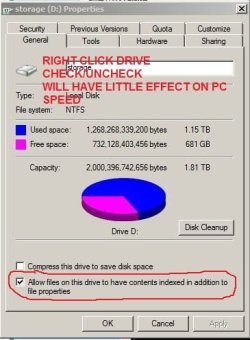
1. see attached-right click drive--select 'properties'--check box at bottom
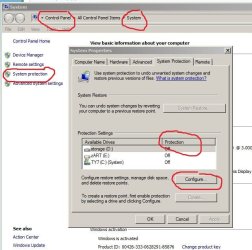
2. see attached-control panel>system>system protection
3. if you're using a program like Photoshop--you can setup a drive as a 'scratch disk' to allow the program to perform better--you probably don't need to worry about this.
4.for seeding--your torrent client will seed from the file's downloaded location, which could affect the drives speed but shouldn't affect the PC speed--but--will use your CPU (slightly)--best to download to a secondary drive--not your C drive--especially if your primary drive is an SSD
 

Attachments

  • INDEXING.JPG
    INDEXING.JPG
    37.5 KB · Views: 48
  • SYS PROTECTION.JPG
    SYS PROTECTION.JPG
    62.3 KB · Views: 48

My Computer My Computer

Computer type
PC/Desktop
Computer Manufacturer/Model Number
SALEON Systems V3.1
OS
Windows 7 Ultimate 32bit
CPU
Intel Core 2 Extreme QX6850
Motherboard
ASUSTeK P5G41-M LE
Memory
4 gb
Graphics Card(s)
NVIDIA GeForce 8400GS
Hard Drives
Intel 120 GB SSD, Seagate 250GB, Seagate 2TB
Antivirus
Comodo
Browser
Chrome
"1. What do you mean by saying "Indexing"?
2. How and where do I check "system protection" for a drive?
3. Scratch disk?
4. What if I use that HDD as a torrent files drive? For seeding"

1. see attached-right click drive--select 'properties'--check box at bottom
2. see attached-control panel>system>system protection
3. if you're using a program like Photoshop--you can setup a drive as a 'scratch disk' to allow the program to perform better--you probably don't need to worry about this.
4.for seeding--your torrent client will seed from the file's downloaded location, which could affect the drives speed but shouldn't affect the PC speed--but--will use your CPU (slightly)--best to download to a secondary drive--not your C drive--especially if your primary drive is an SSD

4. I meant that my "old storage drive" would be the one that holds my torrent files. It isn't C drive or any main partition. Just a simple storage drive.
Will using it for torrent seeding slow down my PC somehow (as this drive is very old, slow and potentially unstable)?

Thank you for your comment, images and explaining. Much appriciated.
 

My Computer My Computer

Computer type
PC/Desktop
OS
Win 7 64 bit
CPU
I5 3470
Motherboard
GA-H77M-D3H
Memory
Corsair 8GB DDR3 1600MHZ
Graphics Card(s)
Sparkle GTX460 1GB
Screen Resolution
1920X1080
Hard Drives
WD 320GB
Samsung 1TB F3
PSU
FSP 700W
Cooling
Scythe Grand Kama Cross
Internet Speed
30Mbps
Antivirus
Microsoft Security Essentials
Browser
FF,GC
you are welcome--am out
 

My Computer My Computer

Computer type
PC/Desktop
Computer Manufacturer/Model Number
SALEON Systems V3.1
OS
Windows 7 Ultimate 32bit
CPU
Intel Core 2 Extreme QX6850
Motherboard
ASUSTeK P5G41-M LE
Memory
4 gb
Graphics Card(s)
NVIDIA GeForce 8400GS
Hard Drives
Intel 120 GB SSD, Seagate 250GB, Seagate 2TB
Antivirus
Comodo
Browser
Chrome
As far as indexing, it can bog down a system while indexing is running on earlier versions of Windows. But once indexing is complete, indexing needs only keep track of new files and changes to files - which would be minimal on "storage" drives.

W7 and especially W8 indexing is greatly improved over previous versions. In these versions, indexing steps way into the background when you are using your computer so don't bog our systems down.

With XP, I always disabled indexing. But W7 and especially W8 are not XP. So I keep indexing on with all my drives now.

If you are into torrents and partake in illegal filesharing (coping/distributing copyrighted materials - songs, movies, etc.) without the required compensation for the "intellectual property" and you are experiencing system slow downs, I sure would suspect malware activity and would advise to stop using torrents immediately.
 

My Computer My Computer

Computer Manufacturer/Model Number
BrightWorks Systems B4
OS
Windows 7 Profession 64-bit
CPU
Intel Core i7-860 Quad
Motherboard
Gigabyte P55-UD4P
Memory
Mushkin 4x2Gb PC12800
Graphics Card(s)
Gigabyte GTX260 896Mb
Sound Card
Integrated 7.1 HD Dolby
Monitor(s) Displays
2 Samsung 2220wm-HAS 22"
Screen Resolution
1680 x 1050 | 1680 x 1050
Hard Drives
WD HE 1Tb
PSU
Corsair TX-750W
Case
Ultra M998
Cooling
OEM
Keyboard
MS Wireless Comfort 5000
Mouse
MS Wireless 5000
Internet Speed
Cable and pretty darn fast
Of course it will slow you system.
You will find that doing this will limit your help receive.
From post #5

Will using it for torrent seeding slow down my PC somehow (as this drive is very old, slow and potentially unstable)?
 

My Computer My Computer

Computer type
PC/Desktop
Computer Manufacturer/Model Number
Home made Desktop
OS
Windows 10 Pro. 64/ version 1709 Windows 7 Pro/64
CPU
Intel i7-6800K @ 4.3
Motherboard
ASUS X-99 Deluxe II
Memory
Corsair Platinum 16 gig @2400
Graphics Card(s)
EVGA GTX 1070 OC
Monitor(s) Displays
Asus 27" LED LCD/VE278Q
Screen Resolution
1920-1080 or 1280-720 HDMI
Hard Drives
INTEL SSD 730-240 Gb Sata 3.0/
PSU
EVGA Platium 1200W
Case
Phanteks Luxe Tempered Glass 8 fans/ one radiator
Cooling
XSPC/ Water Cooled CPU
Keyboard
Das 4 Professional
Mouse
Logitech M705/MX Anywhere 2-S
Internet Speed
100 mbits
Antivirus
Microsoft Security Essentials/ Malwarebytes Premium 3.0/ SAS
Browser
I.E. 11 default/Firefox/ ISP Time Warner Cable/Spectrum
Other Info
LG BluRay Burner/
Sound system-KLipsch-THX/
Icy Dock ssd Hot Swap bays.
Another option in Windows will slow response to/from a drive. That is if you have a power option set to turn off the drive after so many minutes. One more is the drive itself. The "Green" drives are slow as it is but they have firmware that shuts down the drive too. Some of the larger drives (>1TB) can take up to a minute to come "alive" if allowed to sleep.
 

My Computer My Computer

Computer type
PC/Desktop
Computer Manufacturer/Model Number
Built 2/11/2011
OS
Windows 7 Pro-x64
CPU
i7-2600 3.4GHz - 3.8GHz Turbo
Motherboard
Intel DH67BL-B3
Memory
8Gb - 2x4GB, Muskin 991770 PC3-1333
Graphics Card(s)
Integrated Intel HD 2000
Sound Card
Integrated Intel 10.1 HD, RealTek ALC892
Monitor(s) Displays
Asus LCD VH222H, Haier HL24XSL2a
Screen Resolution
1920x1080, 1920x1080
Hard Drives
Crucial SSD C300-128Gb,
Western Digital WD5002AALX - 500Gb,
Western Digital WD7501AALS - 750Gb
PSU
Seasonic 650W 80+ Gold Modular
Case
Rosewill Defender
Cooling
Stock CPU, Four 120mm case fans, PCH fan added
Keyboard
Logitech EX100 Y-RBH94 Wireless
Mouse
Logitech EX100 M-RCE95 Wireless
Internet Speed
3.0/1.5 Mbs
Antivirus
Microsoft Security Essentials
Browser
Microsoft Internet Explorer 11
Other Info
Antec Veris Premier-Multimedia IR Station,
Cyber Accoustics-3602 Speakers,
AFT XM-5U Card Reader,
Hauppauge TV-HVR-2250,
Sony LX300 USB Turntable
As far as indexing, it can bog down a system while indexing is running on earlier versions of Windows. But once indexing is complete, indexing needs only keep track of new files and changes to files - which would be minimal on "storage" drives.

W7 and especially W8 indexing is greatly improved over previous versions. In these versions, indexing steps way into the background when you are using your computer so don't bog our systems down.

With XP, I always disabled indexing. But W7 and especially W8 are not XP. So I keep indexing on with all my drives now.

If you are into torrents and partake in illegal filesharing (coping/distributing copyrighted materials - songs, movies, etc.) without the required compensation for the "intellectual property" and you are experiencing system slow downs, I sure would suspect malware activity and would advise to stop using torrents immediately.


Another option in Windows will slow response to/from a drive. That is if you have a power option set to turn off the drive after so many minutes. One more is the drive itself. The "Green" drives are slow as it is but they have firmware that shuts down the drive too. Some of the larger drives (>1TB) can take up to a minute to come "alive" if allowed to sleep.
Alright, thanks guys.

Of course it will slow you system.
You will find that doing this will limit your help receive.
From post #5

Will using it for torrent seeding slow down my PC somehow (as this drive is very old, slow and potentially unstable)?
I am very sorry for downloading old movies I can't find anywhere in my country..
:sleepy:
 

My Computer My Computer

Computer type
PC/Desktop
OS
Win 7 64 bit
CPU
I5 3470
Motherboard
GA-H77M-D3H
Memory
Corsair 8GB DDR3 1600MHZ
Graphics Card(s)
Sparkle GTX460 1GB
Screen Resolution
1920X1080
Hard Drives
WD 320GB
Samsung 1TB F3
PSU
FSP 700W
Cooling
Scythe Grand Kama Cross
Internet Speed
30Mbps
Antivirus
Microsoft Security Essentials
Browser
FF,GC
Back
Top