Preparing SDD for HDD migration via cloning

A short while ago I ask whether I could / should swap the SSD with teh HDD and then boot from the windows recovery disk I made yesterday and then restore the disk image from my external drive to the SSD? Does that sound like a good plan?

You say "Windows recovery disk". Not sure what that means or how it was made.

If it is a bootable disk, what choices does it give you when you boot from it?

You say "disk image". Disk image of what partition or partitions? Disk image made with what application? Windows built-in imaging? Acronis?

I think you've got a 256 GB SSD, which would have maybe 238 GB usable. Is that big enough to hold the partitions contained in your "disk image"?

At some point, you have to consider the time involved in trouble-shooting and compare that to a clean install. Not to mention your will to live.
 

My Computer My Computer

At a glance

Windows 7 Home Premium SP1, 64-bitIntel Skylake i5-6600K, not overclocked8 GB HyperX DDR4-2666 (2 x 4 GB)none; graphics are integrated on CPU
Computer type
PC/Desktop
Computer Manufacturer/Model Number
Ignatz Special; 4 speed manual gearbox; factory air conditioning; one of one
OS
Windows 7 Home Premium SP1, 64-bit
CPU
Intel Skylake i5-6600K, not overclocked
Motherboard
AsRock Z170M Extreme 4, micro ATX
Memory
8 GB HyperX DDR4-2666 (2 x 4 GB)
Graphics Card(s)
none; graphics are integrated on CPU
Sound Card
onboard: Realtek ALC1150; external: USB Behringer UF0-202
Monitor(s) Displays
Dell S2340M 23 inch IPS
Screen Resolution
1600 x 900
Hard Drives
System: Crucial MX100 series SSD, 128 GB;
Data: Samsung Spinpoint 103SJ, 1 TB;
Backup: WD Caviar Green WD30EZRX-00D8PB0, 3 TB
PSU
Rosewill SilentNight 500 watt fanless, semi-modular
Case
Antec Solo II
Cooling
Noctua NH-U12S; Noctua F12 intake, Noctua S12A exhaust
Keyboard
Microsoft 200 6JH-00001 USB
Mouse
Dell or Microsoft optical wired; USB
Antivirus
Microsoft Security Essentials and Malwarebytes Premium
Browser
Pale Moon
Other Info
All fans PWM; speeds at idle: CPU circa 500 rpm; intake circa 600 rpm; exhaust circa 600 rpm; CPU temps 27 idle and 47 C load in a warm room (27 C/81 F) when running Intel Extreme Tuning Utility stress test.
A short while ago I ask whether I could / should swap the SSD with teh HDD and then boot from the windows recovery disk I made yesterday and then restore the disk image from my external drive to the SSD? Does that sound like a good plan?

You say "Windows recovery disk". Not sure what that means or how it was made.

If it is a bootable disk, what choices does it give you when you boot from it?

You say "disk image". Disk image of what partition or partitions? Disk image made with what application? Windows built-in imaging? Acronis?
I think you've got a 256 GB SSD, which would have maybe 238 GB usable. Is that big enough to hold the partitions contained in your "disk image"?

At some point, you have to consider the time involved in trouble-shooting and compare that to a clean install. Not to mention your will to live.

In answer to your questions:
Using windows 7 - create a system repair disk

I used to Acronis to create images of the 3 different partitions. Sizes are C: 223GB (already shrunk), HP_tools 4Gb and Recovery 20 GB so total is 247GB - The c: was defrag at the start of this project then I shrank the volume. However only 80 gb is used.

A number of options including Restore you computer using a system image that you created earlier. Also Use recovery tool, which leads into another menu which includes System image recovery and HP recovery. However if I swap the the SSD & HDD over these options will not work(?) as the recovery tool would need access to the recovery partition on HDD??


How can I reinstall? I don't have a windows disk, just the HP recovery which I would not be able to use as it is on the HDD?

if I use system image backup option from the windows repair disk it does not automatically find the image on USB attached external hard disk, however it does provide the option to locate the file yourself on the network - you are prompted to enter a pathname, could I enter the path where the partition images are located on my external hard drive?

Finally before I really do anything else I need to prove to myself whether this SSD is bust or whether this is a problem with the USB connector. My gut tells me that the SSD is a dud. If I swap the SSD with the HDD and then boot with the repair disk one of the options there is to launch a command prompt. This being the case I could run diskpart and then check whether the SSD is recognised properly???

Thanks again for your help.

Simon
 

My Computer My Computer

At a glance

Windows 7
Computer type
Laptop
Computer Manufacturer/Model Number
HP
OS
Windows 7
Attach the SSD to a system using sata. Boot from ACRONIS disaster recovery disc and try to restore.
 

My Computer My Computer

At a glance

Microsoft Windows 7 Home Premium 64-bits 7601...Intel(R) Core(TM) i3 CPU M 370 @ 2.40GHz4,00 GBATI Mobility Radeon HD 5400 Series
Computer type
Laptop
Computer Manufacturer/Model Number
ACER ASPIRE 5742G
OS
Microsoft Windows 7 Home Premium 64-bits 7601 Multiprocessor Free Service Pack 1
CPU
Intel(R) Core(TM) i3 CPU M 370 @ 2.40GHz
Motherboard
Acer Aspire 5742G
Memory
4,00 GB
Graphics Card(s)
ATI Mobility Radeon HD 5400 Series
Sound Card
(1) AMD High Definition Audio Device (2) Realtek High Defi
Screen Resolution
1366 x 768 x 32 bits (4294967296 colors) @ 60 Hz
Hard Drives
WDC WD5000BEVT-22ZAT0
How can I reinstall? I don't have a windows disk, just the HP recovery which I would not be able to use as it is on the HDD?
A common issue with new computers during setup is the prompt to make the Factory Restore discs is missed or dismissed. All the OEM/Brand computers I've set up had a program to do it. If the original HDD is still usable one might look for that program and create the discs, with Win7 and later would need DVD-R or DVD+R discs but some newer ones can use a USB Thumb/Flash drive or DVD+R/DL discs. Booting to those discs should put the computer back to it as-shipped condition. I'll have to do it later today for a client.
 

My Computer My Computer

At a glance

Windows 7 Ultimate 64-bit, Windows 8.1 64-bit...
Computer type
PC/Desktop
Computer Manufacturer/Model Number
Customs, Dell, Gateway, HP, Toshiba, Acer, ASUS
OS
Windows 7 Ultimate 64-bit, Windows 8.1 64-bit, Mac OS X 10.10, Linux Mint 17, Windows 10 Pro TP
Keyboard
Microsoft
Mouse
Microsoft
Ok so it appears that there might be a problem with the USB / SATA connector as i have replace the HDD with SDD and then at the command prompt and running diskpart I am able to see the SSD and it is online and has 238GB. I have also managed to reduced the size of my main partition to half of what it was previously (by moving some 'unmovable' file encountered by defrag!) so I have plenty of space now. What I still unsure is how i going to be able to restore my disk image which resides on a WD External Hard Drive to the installed SSD.
When i boot from the Window Repair disk that created previously and select restore your computer using a system image that you created previously it does not find an image. I am then offered the opportunity to from a network location so I type in the pathname of the image stored on my usb hard drive but it does not find it. It also provide an opportunity to load drivers for a device but cannot find the drivers for the USD Hard Drive.
I just need the simplest of getting my stored image of my USB HDD to the my shinny new installed SDD which I am now desperate to use:confused:
 

My Computer My Computer

At a glance

Windows 7
Computer type
Laptop
Computer Manufacturer/Model Number
HP
OS
Windows 7
It's an acronis image isn't it?
you can see the internal SSD with diskpart and the external hardrive which contains the image.

So what's the problem?
-starting acronis? Just create a disaster recovery bootable CD within acrionis. https://kb.acronis.com/content/4828
-procedure to use acronis? .... i don't know. I simply clone or use macrium reflect/aomei backupper
 

My Computer My Computer

At a glance

Microsoft Windows 7 Home Premium 64-bits 7601...Intel(R) Core(TM) i3 CPU M 370 @ 2.40GHz4,00 GBATI Mobility Radeon HD 5400 Series
Computer type
Laptop
Computer Manufacturer/Model Number
ACER ASPIRE 5742G
OS
Microsoft Windows 7 Home Premium 64-bits 7601 Multiprocessor Free Service Pack 1
CPU
Intel(R) Core(TM) i3 CPU M 370 @ 2.40GHz
Motherboard
Acer Aspire 5742G
Memory
4,00 GB
Graphics Card(s)
ATI Mobility Radeon HD 5400 Series
Sound Card
(1) AMD High Definition Audio Device (2) Realtek High Defi
Screen Resolution
1366 x 768 x 32 bits (4294967296 colors) @ 60 Hz
Hard Drives
WDC WD5000BEVT-22ZAT0
It's an acronis image isn't it?
you can see the internal SSD with diskpart and the external hardrive which contains the image.

So what's the problem?
-starting acronis? Just create a disaster recovery bootable CD within acrionis. https://kb.acronis.com/content/4828
-procedure to use acronis? .... i don't know. I simply clone or use macrium reflect/aomei backupper


Yes and Yes

Procedure for Acronis that is what i am trying to work out right now!?

I am also in the process of make a HP restore disk which would (if required - hopefully not) allow me to install windowss 7 afresh on the SSD.
 

My Computer My Computer

At a glance

Windows 7
Computer type
Laptop
Computer Manufacturer/Model Number
HP
OS
Windows 7
Just create a disaster recovery bootable CD within acronis, or download and burn it. https://kb.acronis.com/content/4828

I am also in the process of make a HP restore disk which would (if required - hopefully not) allow me to install windowss 7 afresh on the SSD.
You can clone with partition wizard. Or clone with macrium reflect. or macrium reflect backup/restore. All software I can help you with.

But you can also do it with acronis!! But I have no exprerience with that tool.
 

My Computer My Computer

At a glance

Microsoft Windows 7 Home Premium 64-bits 7601...Intel(R) Core(TM) i3 CPU M 370 @ 2.40GHz4,00 GBATI Mobility Radeon HD 5400 Series
Computer type
Laptop
Computer Manufacturer/Model Number
ACER ASPIRE 5742G
OS
Microsoft Windows 7 Home Premium 64-bits 7601 Multiprocessor Free Service Pack 1
CPU
Intel(R) Core(TM) i3 CPU M 370 @ 2.40GHz
Motherboard
Acer Aspire 5742G
Memory
4,00 GB
Graphics Card(s)
ATI Mobility Radeon HD 5400 Series
Sound Card
(1) AMD High Definition Audio Device (2) Realtek High Defi
Screen Resolution
1366 x 768 x 32 bits (4294967296 colors) @ 60 Hz
Hard Drives
WDC WD5000BEVT-22ZAT0
Only real important partition is the current C partition. Restoring it to SSD couldn't be so difficult. Be sure it will be primary and ACTIVE. You can mark it ACTIVE later anyway. You can align it later.

341041d1416510097-preparing-sdd-hdd-migration-via-cloning-diskman.jpg
 

My Computer My Computer

At a glance

Microsoft Windows 7 Home Premium 64-bits 7601...Intel(R) Core(TM) i3 CPU M 370 @ 2.40GHz4,00 GBATI Mobility Radeon HD 5400 Series
Computer type
Laptop
Computer Manufacturer/Model Number
ACER ASPIRE 5742G
OS
Microsoft Windows 7 Home Premium 64-bits 7601 Multiprocessor Free Service Pack 1
CPU
Intel(R) Core(TM) i3 CPU M 370 @ 2.40GHz
Motherboard
Acer Aspire 5742G
Memory
4,00 GB
Graphics Card(s)
ATI Mobility Radeon HD 5400 Series
Sound Card
(1) AMD High Definition Audio Device (2) Realtek High Defi
Screen Resolution
1366 x 768 x 32 bits (4294967296 colors) @ 60 Hz
Hard Drives
WDC WD5000BEVT-22ZAT0
I finally made it! It has taken me a total of around 10 hours, however i do believe that it worth the wait. The laptop boots up and is ready to use in about 33 seconds. A week ago it was taking almost 4 times as long as this. Then I cleared out loads of rubbish and defragged the drive ran disabled most programs that starting automatically when the system start up. This reduced the time to around 70 seconds, so that the current boot is about half of that.

I did as advised and created a rescue disk in Acronis and then I was able to boot from this and recover the save partition images to the newly installed SSD. This process took about 90 mins to complete.

I would like to thanks everyone who provided me with assistance. I have learnt quite a lot in the process.

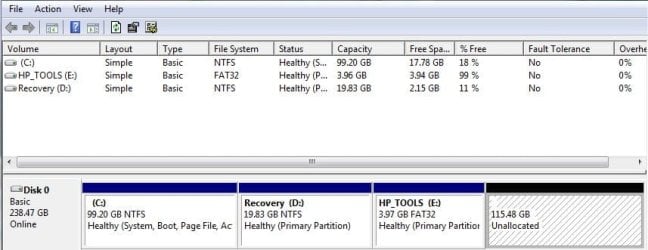
I do have one final question. I have just checked in disk manager and have an unallocated space and I seem to be unable to expand the C:\ volume to take up the slack - it is greyed out:huh:

The allocated volume is over 100GB in size so I will definitely it going forward. I enlose a screen shot showing the current situation.

Thanks again.
Simon
 

Attachments

  • diskman.JPG
    diskman.JPG
    49.8 KB · Views: 0

My Computer My Computer

At a glance

Windows 7
Computer type
Laptop
Computer Manufacturer/Model Number
HP
OS
Windows 7
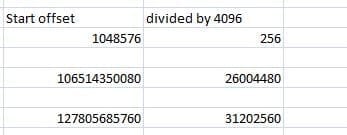
Oh I have just checked the alignment and it appears to be good?
 

Attachments

  • ssd_align.JPG
    ssd_align.JPG
    13.8 KB · Views: 7

My Computer My Computer

At a glance

Windows 7
Computer type
Laptop
Computer Manufacturer/Model Number
HP
OS
Windows 7
I finally made it! It has taken me a total of around 10 hours, however i do believe that it worth the wait. The laptop boots up and is ready to use in about 33 seconds. A week ago it was taking almost 4 times as long as this. Then I cleared out loads of rubbish and defragged the drive ran disabled most programs that starting automatically when the system start up. This reduced the time to around 70 seconds, so that the current boot is about half of that.

I did as advised and created a rescue disk in Acronis and then I was able to boot from this and recover the save partition images to the newly installed SSD. This process took about 90 mins to complete.

I would like to thanks everyone who provided me with assistance. I have learnt quite a lot in the process.

I do have one final question. I have just checked in disk manager and have an unallocated space and I seem to be unable to expand the C:\ volume to take up the slack - it is greyed out:huh:

The allocated volume is over 100GB in size so I will definitely it going forward. I enlose a screen shot showing the current situation.

Thanks again.
Simon

This is sorted i think, I remove the smaller partitions are extended the main partition and now will restore the other partitions.
 

My Computer My Computer

At a glance

Windows 7
Computer type
Laptop
Computer Manufacturer/Model Number
HP
OS
Windows 7
I do have one final question. I have just checked in disk manager and have an unallocated space and I seem to be unable to expand the C:\ volume to take up the slack - it is greyed out:huh:

That's because the unallocated space is NOT immediately adjacent to the right of C. You could add that space to E, but only E.

That's a limitation of Windows Disk Management. Other tools, such as Partition Wizard, could have added the space to C.
 

My Computer My Computer

At a glance

Windows 7 Home Premium SP1, 64-bitIntel Skylake i5-6600K, not overclocked8 GB HyperX DDR4-2666 (2 x 4 GB)none; graphics are integrated on CPU
Computer type
PC/Desktop
Computer Manufacturer/Model Number
Ignatz Special; 4 speed manual gearbox; factory air conditioning; one of one
OS
Windows 7 Home Premium SP1, 64-bit
CPU
Intel Skylake i5-6600K, not overclocked
Motherboard
AsRock Z170M Extreme 4, micro ATX
Memory
8 GB HyperX DDR4-2666 (2 x 4 GB)
Graphics Card(s)
none; graphics are integrated on CPU
Sound Card
onboard: Realtek ALC1150; external: USB Behringer UF0-202
Monitor(s) Displays
Dell S2340M 23 inch IPS
Screen Resolution
1600 x 900
Hard Drives
System: Crucial MX100 series SSD, 128 GB;
Data: Samsung Spinpoint 103SJ, 1 TB;
Backup: WD Caviar Green WD30EZRX-00D8PB0, 3 TB
PSU
Rosewill SilentNight 500 watt fanless, semi-modular
Case
Antec Solo II
Cooling
Noctua NH-U12S; Noctua F12 intake, Noctua S12A exhaust
Keyboard
Microsoft 200 6JH-00001 USB
Mouse
Dell or Microsoft optical wired; USB
Antivirus
Microsoft Security Essentials and Malwarebytes Premium
Browser
Pale Moon
Other Info
All fans PWM; speeds at idle: CPU circa 500 rpm; intake circa 600 rpm; exhaust circa 600 rpm; CPU temps 27 idle and 47 C load in a warm room (27 C/81 F) when running Intel Extreme Tuning Utility stress test.
Oh I have just checked the alignment and it appears to be good?

Alignment is fine.

About all I'd do at this point is:

1: Run a benchmark on the SSD to confirm to yourself that its speeds are OK. Compare your benchmark speeds to other users results with the same drive. Google for that. The fact is that your drive may be "slower" or "faster" than other drives and models, but there's little chance you'd ever notice the difference. The advantage of SSDs is in their access time and even bad SSDs are much faster than HDDs.

2: Confirm that defrag is turned off for the SSD.

3: Establish some type of maintenance routine, possibly with CCleaner or Windows Disk Cleanup.

4: You can turn off hibernation or adjust the page file size or location if you are crowded for space on the SSD.

5: Investigate/play with whatever tools the SSD manufacturer may have provided. Intel SSDs come with a great "toolbox". I hear mixed reports about Samsung tools. Don't know about other brands.
 

My Computer My Computer

At a glance

Windows 7 Home Premium SP1, 64-bitIntel Skylake i5-6600K, not overclocked8 GB HyperX DDR4-2666 (2 x 4 GB)none; graphics are integrated on CPU
Computer type
PC/Desktop
Computer Manufacturer/Model Number
Ignatz Special; 4 speed manual gearbox; factory air conditioning; one of one
OS
Windows 7 Home Premium SP1, 64-bit
CPU
Intel Skylake i5-6600K, not overclocked
Motherboard
AsRock Z170M Extreme 4, micro ATX
Memory
8 GB HyperX DDR4-2666 (2 x 4 GB)
Graphics Card(s)
none; graphics are integrated on CPU
Sound Card
onboard: Realtek ALC1150; external: USB Behringer UF0-202
Monitor(s) Displays
Dell S2340M 23 inch IPS
Screen Resolution
1600 x 900
Hard Drives
System: Crucial MX100 series SSD, 128 GB;
Data: Samsung Spinpoint 103SJ, 1 TB;
Backup: WD Caviar Green WD30EZRX-00D8PB0, 3 TB
PSU
Rosewill SilentNight 500 watt fanless, semi-modular
Case
Antec Solo II
Cooling
Noctua NH-U12S; Noctua F12 intake, Noctua S12A exhaust
Keyboard
Microsoft 200 6JH-00001 USB
Mouse
Dell or Microsoft optical wired; USB
Antivirus
Microsoft Security Essentials and Malwarebytes Premium
Browser
Pale Moon
Other Info
All fans PWM; speeds at idle: CPU circa 500 rpm; intake circa 600 rpm; exhaust circa 600 rpm; CPU temps 27 idle and 47 C load in a warm room (27 C/81 F) when running Intel Extreme Tuning Utility stress test.

My Computer My Computer

At a glance

Microsoft Windows 7 Home Premium 64-bits 7601...Intel(R) Core(TM) i3 CPU M 370 @ 2.40GHz4,00 GBATI Mobility Radeon HD 5400 Series
Computer type
Laptop
Computer Manufacturer/Model Number
ACER ASPIRE 5742G
OS
Microsoft Windows 7 Home Premium 64-bits 7601 Multiprocessor Free Service Pack 1
CPU
Intel(R) Core(TM) i3 CPU M 370 @ 2.40GHz
Motherboard
Acer Aspire 5742G
Memory
4,00 GB
Graphics Card(s)
ATI Mobility Radeon HD 5400 Series
Sound Card
(1) AMD High Definition Audio Device (2) Realtek High Defi
Screen Resolution
1366 x 768 x 32 bits (4294967296 colors) @ 60 Hz
Hard Drives
WDC WD5000BEVT-22ZAT0
Back
Top