Solved Windows keeps 'freezing', might not be caused by ram (only)

danodomonkos

New member
Local time
2:58 PM
Messages
15
Hi,

A few months ago my laptop stoped working, i had to force shut down. It didnt boot to windows, so I reinstalled windows on it. Then i found out that my hdd was defective so i borrowed my friends hdd. I installed windows again, and now everything works fine, expect for one thing, which i cant tell exactly, and i would need some help on that because i'm out of ideas.

So what's the issue. My system keeps freezing, in a way that i can interact with windows, alt+tab around, move the mouse and such, but if i e.g open a new tab in Chrome, and open some page e.g facebook, it will show the small loading circle, and open facebook after all this freezing mess is gone. Now this keeps happening like every 20-30 minutes in windows, and more often in games.

What could be the source of the problem? Obviously the RAM. I checked both of my rams with memtest86, and it did indeed show errors. I have two ram sticks, one of which is faulty and the other isnt. So we are cool, arent we? I should buy a new ram and ill be fine. Well, not really.

The real issue is that the problem occurs even if i only use my ram that doesnt have errors based on memtest.(actually, this thing happens even more often when only 1 ram stick is plugged in.)

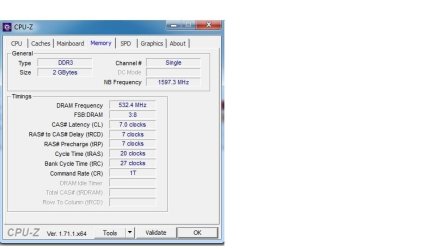
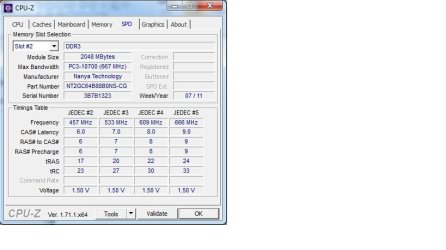
-I'll attach photos of cpu-z's ram tabs, im not an expert, but i think that everything is fine here.
(pictures are taken with the 'good' ram stick being put in only, but cpuz shows exactly the same things when the other one is plugged in as well)

-I cleaned the connections of rams, that cant be an issue either.

-I installed all the drivers, expect that this program called DriverAgent thinks that my Standard AHCI 1.0 Serial ATA Controller's driver isnt installed, while device manager says that it is.

I hope you can give me some advice, because i'm kinda lost here right now.

Dan

Edit: obvious solution would be to put these ram sticks to an other laptop, but that's not an option for me right now.

Edit2: oops, i went noobtard, didnt post specs.
Here they are:
win 7 64 bit
amd radeon hd7400M series video card
amd athlon ii p360 dualcore processor
4gb ram (2gb - 2gb) (nanya kingston ddr3 1333mhz)
this is a packard bell en tk 81 laptop
 

Attachments
  • cpuz1.jpg
    cpuz1.jpg
    38.6 KB · Views: 0
  • cpuz2.jpg
    cpuz2.jpg
    29.9 KB · Views: 0

My Computer My Computer

At a glance

Windows 7 Home professional 64 bitAmd athlon II p360 dual core4gbAmd radeon hd 7400m 512 vram
Computer type
Laptop
Computer Manufacturer/Model Number
Packard Bell
OS
Windows 7 Home professional 64 bit
CPU
Amd athlon II p360 dual core
Motherboard
amd 785gx + sb850
Memory
4gb
Graphics Card(s)
Amd radeon hd 7400m 512 vram
Sorry for bump, but 200 views almost and no reply? Come on :))

I checked my ram module in AIDA64. Once again: i dont know much about these ram stuff, but is it okay that i have 5 different memory timings? (also isnt 1.5V a bit high? i'm just guessing)
IF anything would be wrong here, there is no way i can change it unfortunately, because my bios is really not a good bios. I can only chnage the boot order and some basic stuff.

Module Name Nanya NT2GC64B88B0NS-CG
Serial Number 53791323h (588478803)
Manufacture Date Week 7 / 2011
Module Size 2 GB (1 rank, 8 banks)
Module Type SO-DIMM
Memory Type DDR3 SDRAM
Memory Speed DDR3-1333 (667 MHz)
Module Width 64 bit
Module Voltage 1.5 V
Error Detection Method None
Refresh Rate Normal (7.8 us)
DRAM Manufacturer Nanya

@ 666 MHz 9-9-9-24 (CL-RCD-RP-RAS) / 33-107-4-10-5-5-20 (RC-RFC-RRD-WR-WTR-RTP-FAW)
@ 609 MHz 8-8-8-22 (CL-RCD-RP-RAS) / 30-98-4-10-5-5-19 (RC-RFC-RRD-WR-WTR-RTP-FAW)
@ 533 MHz 7-7-7-20 (CL-RCD-RP-RAS) / 27-86-4-8-4-4-16 (RC-RFC-RRD-WR-WTR-RTP-FAW)
@ 457 MHz 6-6-6-17 (CL-RCD-RP-RAS) / 23-74-3-7-4-4-14 (RC-RFC-RRD-WR-WTR-RTP-FAW)
@ 380 MHz 5-5-5-14 (CL-RCD-RP-RAS) / 19-61-3-6-3-3-12 (RC-RFC-RRD-WR-WTR-RTP-FAW)
 
Last edited:

My Computer My Computer

At a glance

Windows 7 Home professional 64 bitAmd athlon II p360 dual core4gbAmd radeon hd 7400m 512 vram
Computer type
Laptop
Computer Manufacturer/Model Number
Packard Bell
OS
Windows 7 Home professional 64 bit
CPU
Amd athlon II p360 dual core
Motherboard
amd 785gx + sb850
Memory
4gb
Graphics Card(s)
Amd radeon hd 7400m 512 vram
If you are only running 1 stick of ram I think it would be better placed in ram slot #1
 

My Computer My Computer

At a glance

Win7 Ultimate X64Intel i5 3570K8GB DDR3 1600Onboard
Computer type
PC/Desktop
Computer Manufacturer/Model Number
Pauly Special
OS
Win7 Ultimate X64
CPU
Intel i5 3570K
Motherboard
Gigabyte Z77X-DS3H
Memory
8GB DDR3 1600
Graphics Card(s)
Onboard
Sound Card
Onboard
Screen Resolution
1280x1024
Hard Drives
Samsung 840 Evo SSD (OS)
1TB Spinner (Data)
PSU
800W Arctic
Case
Cooler Master
Cooling
3x120mm Fans
Keyboard
MS Wireless
Mouse
MS Wireless
Internet Speed
20M
If you are only running 1 stick of ram I think it would be better placed in ram slot #1

tried both slot1 and slot 2. same effect.

forgot to mention that the cpu usage drops to 1-4% when a 'freeze' happens and it goes back to its original usage when it ends. The ram usage stays constantly where it was before the 'freeze'.

In the event viewer i don't see anything related to this issue.

Temperatures are also okay.

I also installed all important windows updates, the problem is the same as it was before the updates.
 

My Computer My Computer

At a glance

Windows 7 Home professional 64 bitAmd athlon II p360 dual core4gbAmd radeon hd 7400m 512 vram
Computer type
Laptop
Computer Manufacturer/Model Number
Packard Bell
OS
Windows 7 Home professional 64 bit
CPU
Amd athlon II p360 dual core
Motherboard
amd 785gx + sb850
Memory
4gb
Graphics Card(s)
Amd radeon hd 7400m 512 vram

My Computer My Computer

At a glance

Win7 Ultimate X64Intel i5 3570K8GB DDR3 1600Onboard
Computer type
PC/Desktop
Computer Manufacturer/Model Number
Pauly Special
OS
Win7 Ultimate X64
CPU
Intel i5 3570K
Motherboard
Gigabyte Z77X-DS3H
Memory
8GB DDR3 1600
Graphics Card(s)
Onboard
Sound Card
Onboard
Screen Resolution
1280x1024
Hard Drives
Samsung 840 Evo SSD (OS)
1TB Spinner (Data)
PSU
800W Arctic
Case
Cooler Master
Cooling
3x120mm Fans
Keyboard
MS Wireless
Mouse
MS Wireless
Internet Speed
20M

Alright, thanks for the links.

I've done scannow (dont know how could i forget it tho) and it says it didn't find any integrity violation.

I've also done this clean boot thingy (never heard of it). Well i noticed that the laptop booted a bit faster, and i could open chrome almost instantly instead of waiting minutes. I'll play some games for ~30 minutes and see if it helped my freezing issue or not.
 

My Computer My Computer

At a glance

Windows 7 Home professional 64 bitAmd athlon II p360 dual core4gbAmd radeon hd 7400m 512 vram
Computer type
Laptop
Computer Manufacturer/Model Number
Packard Bell
OS
Windows 7 Home professional 64 bit
CPU
Amd athlon II p360 dual core
Motherboard
amd 785gx + sb850
Memory
4gb
Graphics Card(s)
Amd radeon hd 7400m 512 vram
If it does help your freezing you can try re enabling bit by bit to see where the problem lies but TBH you can leave most of it off unless you find a function that you need has gone awol
 

My Computer My Computer

At a glance

Win7 Ultimate X64Intel i5 3570K8GB DDR3 1600Onboard
Computer type
PC/Desktop
Computer Manufacturer/Model Number
Pauly Special
OS
Win7 Ultimate X64
CPU
Intel i5 3570K
Motherboard
Gigabyte Z77X-DS3H
Memory
8GB DDR3 1600
Graphics Card(s)
Onboard
Sound Card
Onboard
Screen Resolution
1280x1024
Hard Drives
Samsung 840 Evo SSD (OS)
1TB Spinner (Data)
PSU
800W Arctic
Case
Cooler Master
Cooling
3x120mm Fans
Keyboard
MS Wireless
Mouse
MS Wireless
Internet Speed
20M
If it does help your freezing you can try re enabling bit by bit to see where the problem lies but TBH you can leave most of it off unless you find a function that you need has gone awol

unfortunately it didnt help... It's the same as it was. Can you tell me if the timings, voltages and other stuff that i posted are okay or not please? :)
 

My Computer My Computer

At a glance

Windows 7 Home professional 64 bitAmd athlon II p360 dual core4gbAmd radeon hd 7400m 512 vram
Computer type
Laptop
Computer Manufacturer/Model Number
Packard Bell
OS
Windows 7 Home professional 64 bit
CPU
Amd athlon II p360 dual core
Motherboard
amd 785gx + sb850
Memory
4gb
Graphics Card(s)
Amd radeon hd 7400m 512 vram
Just check your bios settings are the same as the values on the sticker of the ram, these are normally automatically done but it is wise to double check
 

My Computer My Computer

At a glance

Win7 Ultimate X64Intel i5 3570K8GB DDR3 1600Onboard
Computer type
PC/Desktop
Computer Manufacturer/Model Number
Pauly Special
OS
Win7 Ultimate X64
CPU
Intel i5 3570K
Motherboard
Gigabyte Z77X-DS3H
Memory
8GB DDR3 1600
Graphics Card(s)
Onboard
Sound Card
Onboard
Screen Resolution
1280x1024
Hard Drives
Samsung 840 Evo SSD (OS)
1TB Spinner (Data)
PSU
800W Arctic
Case
Cooler Master
Cooling
3x120mm Fans
Keyboard
MS Wireless
Mouse
MS Wireless
Internet Speed
20M
Just check your bios settings are the same as the values on the sticker of the ram, these are normally automatically done but it is wise to double check

As i mentioned most of my bios settings are restricted, i can only change basics like boot order.
Please read the whole thing so you'll know what exactly im talking about.
 

My Computer My Computer

At a glance

Windows 7 Home professional 64 bitAmd athlon II p360 dual core4gbAmd radeon hd 7400m 512 vram
Computer type
Laptop
Computer Manufacturer/Model Number
Packard Bell
OS
Windows 7 Home professional 64 bit
CPU
Amd athlon II p360 dual core
Motherboard
amd 785gx + sb850
Memory
4gb
Graphics Card(s)
Amd radeon hd 7400m 512 vram
Someone help please? </3
 

My Computer My Computer

At a glance

Windows 7 Home professional 64 bitAmd athlon II p360 dual core4gbAmd radeon hd 7400m 512 vram
Computer type
Laptop
Computer Manufacturer/Model Number
Packard Bell
OS
Windows 7 Home professional 64 bit
CPU
Amd athlon II p360 dual core
Motherboard
amd 785gx + sb850
Memory
4gb
Graphics Card(s)
Amd radeon hd 7400m 512 vram
I managed to solve my problem on my own...

Even though device manager said that every driver is okay, i wasnt so sure about it so i downloaded this tool called DriverIdentifier, and ran it. It showed me that plenty of drivers arent up to date or arent installed. Throught this software i downloaded a 720mb amd chipset driver megapack and installed it. I also took out my bad ram. Now everything works like a charm. Hope this helps someone
 

My Computer My Computer

At a glance

Windows 7 Home professional 64 bitAmd athlon II p360 dual core4gbAmd radeon hd 7400m 512 vram
Computer type
Laptop
Computer Manufacturer/Model Number
Packard Bell
OS
Windows 7 Home professional 64 bit
CPU
Amd athlon II p360 dual core
Motherboard
amd 785gx + sb850
Memory
4gb
Graphics Card(s)
Amd radeon hd 7400m 512 vram
Back
Top