Unallocated drive, partition recovered but not recognized

renarde

New member
Local time
5:21 PM
Messages
17
Greetings! Thanks in advance for your help. I'm stumped. Jumanji or Brink, I'm hoping you can help.

I'm an IT professional, and am usually pretty good at resolving my computer issues, but I haven't been able to fix this one. I use Centos 5 at work, Centos 6 on a home server and am comfortable using command prompts in Windows. I use Windows 7 Ultimate x64 on most of my home machines.

I have a 3Tb external Hitachi drive, which was formatted as GPT. It contains a lot of hard to replace media files.

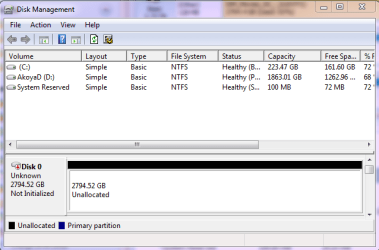
My system lost power while Windows was booting and the drives in the external cases were spinning up. Now when I open Disk Management, I get the dreaded "You must initialize a disk before Logical Disk Manager can access it" message. I know better than to let it initialize and format my drive! I hit "Cancel", and the drive shows as "Not Initialized" "Unallocated".

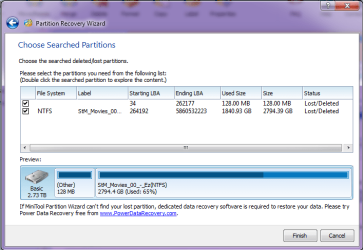
Following Jumanji's excellent instructions, I am using Partition Wizard Pro v8.1.1 and have tried 3 times to recover the partition and assign a drive letter. Partition Wizard sees the full partition, and when I explore it, the files appear to be intact and readable. So it looks like I'll be able to recover the partition.

Next I choose both partitions on the 3Tb drive (the main one and the 128Mb stub that Windows requires) assign a drive letter to the main partition and click "Apply". Then Partition Wizard says "Updating partition information" and "Apply all the pending changes successfully".

It looks like the partition was recovered.

But when I go back into Disk Management and rescan the disks, the drive still shows as "Not Initialized" "Unallocated". I've tried rebooting my system.... the drive still shows as "Not Initialized" "Unallocated".

If I must, I will use a data recovery program to try to pull off the data. But since Partition Wizard can see the partition, it seems to me that it must be possible to fix whatever got corrupted and is making the disk unreadable to Windows.

Many thanks for your time and expertise,

April
 

Attachments
  • DiskManagement20141209.PNG
    DiskManagement20141209.PNG
    17.1 KB · Views: 32
  • PartitionRecoveryWizard20141209.PNG
    PartitionRecoveryWizard20141209.PNG
    26.3 KB · Views: 0

My Computer My Computer

At a glance

Win 7 Ultimate x64Intel Core i3-4150Kingston HyperX DDR3 240 Pin UDIMM 16 GbOnboard Intel
Computer type
PC/Desktop
Computer Manufacturer/Model Number
custom
OS
Win 7 Ultimate x64
CPU
Intel Core i3-4150
Motherboard
GIGABYTE GA-Z97X-UD5H mobo
Memory
Kingston HyperX DDR3 240 Pin UDIMM 16 Gb
Graphics Card(s)
Onboard Intel
Hard Drives
2 internal
10 in JBOD cases
Antivirus
Malwarebytes & MSSE
Browser
Current Firefox
Do not panic.

Your data is still there and we shall attempt to recover your drive as it is. If not possible then only we shall employ Test Disk and copy the data to another external drive. Do not attempt any other software in haste.

Please use Windows 7 PC and post a full screenshot of how your 3TB external drive looks in PW now.

Since you are in the IT field read this at your leisure:

http://www.sevenforums.com/performa...ary-mbr-logical-partitions-3.html#post2693984
 

My Computer My Computer

At a glance

Windows 7 Home Premium 32 bit
OS
Windows 7 Home Premium 32 bit
Good to hear from you Jumanji.

I haven't touched the drive since I started the post, knowing that trying the wrong "fix" could cost me my data!

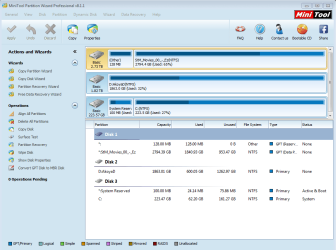
This is what the drive currently looks like in PW. The partition I'm trying to recover is StM_Movies_00_-_Ez.

Many thanks!
 

Attachments

  • PartitionRecoveryWizard20141210_1.PNG
    PartitionRecoveryWizard20141210_1.PNG
    39.8 KB · Views: 2

My Computer My Computer

At a glance

Win 7 Ultimate x64Intel Core i3-4150Kingston HyperX DDR3 240 Pin UDIMM 16 GbOnboard Intel
Computer type
PC/Desktop
Computer Manufacturer/Model Number
custom
OS
Win 7 Ultimate x64
CPU
Intel Core i3-4150
Motherboard
GIGABYTE GA-Z97X-UD5H mobo
Memory
Kingston HyperX DDR3 240 Pin UDIMM 16 Gb
Graphics Card(s)
Onboard Intel
Hard Drives
2 internal
10 in JBOD cases
Antivirus
Malwarebytes & MSSE
Browser
Current Firefox
You are running Partition Wizard inside WIN7? Can you succesfuly assing a drive lettter to StM_movies_00.... partition? Press apply afterwards.
 

My Computer My Computer

At a glance

Microsoft Windows 7 Home Premium 64-bits 7601...Intel(R) Core(TM) i3 CPU M 370 @ 2.40GHz4,00 GBATI Mobility Radeon HD 5400 Series
Computer type
Laptop
Computer Manufacturer/Model Number
ACER ASPIRE 5742G
OS
Microsoft Windows 7 Home Premium 64-bits 7601 Multiprocessor Free Service Pack 1
CPU
Intel(R) Core(TM) i3 CPU M 370 @ 2.40GHz
Motherboard
Acer Aspire 5742G
Memory
4,00 GB
Graphics Card(s)
ATI Mobility Radeon HD 5400 Series
Sound Card
(1) AMD High Definition Audio Device (2) Realtek High Defi
Screen Resolution
1366 x 768 x 32 bits (4294967296 colors) @ 60 Hz
Hard Drives
WDC WD5000BEVT-22ZAT0
Kaktussoft, thanks for your help :-)

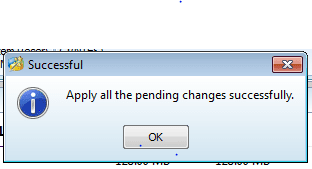
Just to be sure, I tried assigning a drive letter in Partition Wizard again. I get this message "Apply all the pending changes successfully" after I click "Apply".

Then I go back into Windows Disk Management, and the drive still shows as "Not Initialized" "Unallocated". This is the case even after I reboot my system.

Many thanks,

April
 

Attachments

  • PartitionRecoveryWizardSuccess20141210.PNG
    PartitionRecoveryWizardSuccess20141210.PNG
    4 KB · Views: 29

My Computer My Computer

At a glance

Win 7 Ultimate x64Intel Core i3-4150Kingston HyperX DDR3 240 Pin UDIMM 16 GbOnboard Intel
Computer type
PC/Desktop
Computer Manufacturer/Model Number
custom
OS
Win 7 Ultimate x64
CPU
Intel Core i3-4150
Motherboard
GIGABYTE GA-Z97X-UD5H mobo
Memory
Kingston HyperX DDR3 240 Pin UDIMM 16 Gb
Graphics Card(s)
Onboard Intel
Hard Drives
2 internal
10 in JBOD cases
Antivirus
Malwarebytes & MSSE
Browser
Current Firefox
but PW shows the drive letter? Also after exitting and rerunning PW?
 

My Computer My Computer

At a glance

Microsoft Windows 7 Home Premium 64-bits 7601...Intel(R) Core(TM) i3 CPU M 370 @ 2.40GHz4,00 GBATI Mobility Radeon HD 5400 Series
Computer type
Laptop
Computer Manufacturer/Model Number
ACER ASPIRE 5742G
OS
Microsoft Windows 7 Home Premium 64-bits 7601 Multiprocessor Free Service Pack 1
CPU
Intel(R) Core(TM) i3 CPU M 370 @ 2.40GHz
Motherboard
Acer Aspire 5742G
Memory
4,00 GB
Graphics Card(s)
ATI Mobility Radeon HD 5400 Series
Sound Card
(1) AMD High Definition Audio Device (2) Realtek High Defi
Screen Resolution
1366 x 768 x 32 bits (4294967296 colors) @ 60 Hz
Hard Drives
WDC WD5000BEVT-22ZAT0
Kaktussoft,


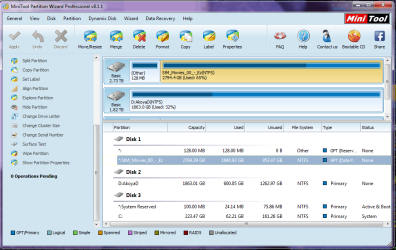
Sadly, no. I have tried assigning a drive letter in PW several times, and each time, it does not show a drive letter assigned to the recovered partition. I have tried restarting PW and rebooting my machine, then trying again. It's as if something in my MBR or boot partition is refusing to accept the updated partition information.

The attached screenshot is what the partitions currently look like in PW. As you can see, the two healthy disks (C: and D: ) have assigned drive letters. The partition I'm trying to recover shows * where the drive letter should be.

Again, I appreciate your help :-)

April
 

My Computer My Computer

At a glance

Win 7 Ultimate x64Intel Core i3-4150Kingston HyperX DDR3 240 Pin UDIMM 16 GbOnboard Intel
Computer type
PC/Desktop
Computer Manufacturer/Model Number
custom
OS
Win 7 Ultimate x64
CPU
Intel Core i3-4150
Motherboard
GIGABYTE GA-Z97X-UD5H mobo
Memory
Kingston HyperX DDR3 240 Pin UDIMM 16 Gb
Graphics Card(s)
Onboard Intel
Hard Drives
2 internal
10 in JBOD cases
Antivirus
Malwarebytes & MSSE
Browser
Current Firefox
Helps if I attach the screenshot!
 

Attachments

  • PartitionRecoveryWizard20141210_2.PNG
    PartitionRecoveryWizard20141210_2.PNG
    52.6 KB · Views: 0

My Computer My Computer

At a glance

Win 7 Ultimate x64Intel Core i3-4150Kingston HyperX DDR3 240 Pin UDIMM 16 GbOnboard Intel
Computer type
PC/Desktop
Computer Manufacturer/Model Number
custom
OS
Win 7 Ultimate x64
CPU
Intel Core i3-4150
Motherboard
GIGABYTE GA-Z97X-UD5H mobo
Memory
Kingston HyperX DDR3 240 Pin UDIMM 16 Gb
Graphics Card(s)
Onboard Intel
Hard Drives
2 internal
10 in JBOD cases
Antivirus
Malwarebytes & MSSE
Browser
Current Firefox
Yes. What drive letter did you assign in PW? After you did "Apply", did PW show the drive with that drive letter? OK, I am late. May be PW itself did not take the drive letter.Right?
 

My Computer My Computer

At a glance

Windows 7 Home Premium 32 bit
OS
Windows 7 Home Premium 32 bit
Jumanji and Kaktussoft,

I assigned drive letter "U:", but PW shows it as "*:StM_Movies_00_-_Ez". So apparently the drive assignment didn't stick.

Thanks again for your time and expertise,

April
 

My Computer My Computer

At a glance

Win 7 Ultimate x64Intel Core i3-4150Kingston HyperX DDR3 240 Pin UDIMM 16 GbOnboard Intel
Computer type
PC/Desktop
Computer Manufacturer/Model Number
custom
OS
Win 7 Ultimate x64
CPU
Intel Core i3-4150
Motherboard
GIGABYTE GA-Z97X-UD5H mobo
Memory
Kingston HyperX DDR3 240 Pin UDIMM 16 Gb
Graphics Card(s)
Onboard Intel
Hard Drives
2 internal
10 in JBOD cases
Antivirus
Malwarebytes & MSSE
Browser
Current Firefox
I shall be on the sidelines and let Kaktussoft deal with this.
 

My Computer My Computer

At a glance

Windows 7 Home Premium 32 bit
OS
Windows 7 Home Premium 32 bit
From elevated command prompt:

Code:
diskpart
select disk 0
select part 0
detail part
select part 1
detail part
exit
post output
 

My Computer My Computer

At a glance

Microsoft Windows 7 Home Premium 64-bits 7601...Intel(R) Core(TM) i3 CPU M 370 @ 2.40GHz4,00 GBATI Mobility Radeon HD 5400 Series
Computer type
Laptop
Computer Manufacturer/Model Number
ACER ASPIRE 5742G
OS
Microsoft Windows 7 Home Premium 64-bits 7601 Multiprocessor Free Service Pack 1
CPU
Intel(R) Core(TM) i3 CPU M 370 @ 2.40GHz
Motherboard
Acer Aspire 5742G
Memory
4,00 GB
Graphics Card(s)
ATI Mobility Radeon HD 5400 Series
Sound Card
(1) AMD High Definition Audio Device (2) Realtek High Defi
Screen Resolution
1366 x 768 x 32 bits (4294967296 colors) @ 60 Hz
Hard Drives
WDC WD5000BEVT-22ZAT0
Jumanji, thanks for your help to this point, and I'll read your post about GPT vs. MBR.

Kaktussoft, I ran the commands you suggested as Administrator, and here's the output:

Microsoft Windows [Version 6.1.7600]
Copyright (c) 2009 Microsoft Corporation. All rights reserved.

C:\Windows\System32>diskpart

Microsoft DiskPart version 6.1.7600
Copyright (C) 1999-2008 Microsoft Corporation.
On computer: AKOYA

DISKPART> select disk 0

Disk 0 is now the selected disk.

DISKPART> select part 0

Virtual Disk Service error:
The disk is not initialized.


DISKPART> detail part

There is no partition selected.
Please select a partition and try again.

DISKPART> select part 1

Virtual Disk Service error:
The disk is not initialized.


DISKPART> detail part

There is no partition selected.
Please select a partition and try again.

DISKPART>

FYI, I'm heading to work and taking the drive with me to troubleshoot there. I'll be unavailable for about 30 minutes, or longer if things are already crazy at work.

Many thanks,

April
 

My Computer My Computer

At a glance

Win 7 Ultimate x64Intel Core i3-4150Kingston HyperX DDR3 240 Pin UDIMM 16 GbOnboard Intel
Computer type
PC/Desktop
Computer Manufacturer/Model Number
custom
OS
Win 7 Ultimate x64
CPU
Intel Core i3-4150
Motherboard
GIGABYTE GA-Z97X-UD5H mobo
Memory
Kingston HyperX DDR3 240 Pin UDIMM 16 Gb
Graphics Card(s)
Onboard Intel
Hard Drives
2 internal
10 in JBOD cases
Antivirus
Malwarebytes & MSSE
Browser
Current Firefox
Gentlemen,

FYI I'm now at work, and my Win 7 Ultimate x64 laptop here has the same problem with the drive. In Disk Management it is still showing up as "Not Initialized" "Unallocated". So far, that is 3 Windows 7 Ultimate x64 machines that don't recognize that partition.

April
 

My Computer My Computer

At a glance

Win 7 Ultimate x64Intel Core i3-4150Kingston HyperX DDR3 240 Pin UDIMM 16 GbOnboard Intel
Computer type
PC/Desktop
Computer Manufacturer/Model Number
custom
OS
Win 7 Ultimate x64
CPU
Intel Core i3-4150
Motherboard
GIGABYTE GA-Z97X-UD5H mobo
Memory
Kingston HyperX DDR3 240 Pin UDIMM 16 Gb
Graphics Card(s)
Onboard Intel
Hard Drives
2 internal
10 in JBOD cases
Antivirus
Malwarebytes & MSSE
Browser
Current Firefox
Do you have a spare large harddrive? If so... delete its partitions or at least shrink them ... so at least 2 TB unallocated space is on that drive. Afterwards in PW ... Copy the StM_Movies_00_-_Ez partition to that space.
How to Copy Partition | MiniTool Partition Wizard Tutorial

Is the new partition working as expected and can you assign a drive letter?
 

My Computer My Computer

At a glance

Microsoft Windows 7 Home Premium 64-bits 7601...Intel(R) Core(TM) i3 CPU M 370 @ 2.40GHz4,00 GBATI Mobility Radeon HD 5400 Series
Computer type
Laptop
Computer Manufacturer/Model Number
ACER ASPIRE 5742G
OS
Microsoft Windows 7 Home Premium 64-bits 7601 Multiprocessor Free Service Pack 1
CPU
Intel(R) Core(TM) i3 CPU M 370 @ 2.40GHz
Motherboard
Acer Aspire 5742G
Memory
4,00 GB
Graphics Card(s)
ATI Mobility Radeon HD 5400 Series
Sound Card
(1) AMD High Definition Audio Device (2) Realtek High Defi
Screen Resolution
1366 x 768 x 32 bits (4294967296 colors) @ 60 Hz
Hard Drives
WDC WD5000BEVT-22ZAT0
Kaktussoft,

It sounds like you're saying the partition can't be recovered on the drive it's currently on, and I need to use PW to copy the content off to a new drive.

I'll have to wait to do that until later. I have plenty of retired 2Tb drives, but they're at home (the drive is here at work with me) so I can't start the copy now.

Before I try that, it seems to me that since PW can see the partition details, there may be a Unix or DOS tool that that would allow me to fix the partition information through command prompts.

Or is that just too risky, and I should just copy off the data while I can?

In any case, nothing I have tried so far has made the partition visible to Windows, or allowed me to assign a drive letter, either in PW or Windows.

Many thanks,

April
 

My Computer My Computer

At a glance

Win 7 Ultimate x64Intel Core i3-4150Kingston HyperX DDR3 240 Pin UDIMM 16 GbOnboard Intel
Computer type
PC/Desktop
Computer Manufacturer/Model Number
custom
OS
Win 7 Ultimate x64
CPU
Intel Core i3-4150
Motherboard
GIGABYTE GA-Z97X-UD5H mobo
Memory
Kingston HyperX DDR3 240 Pin UDIMM 16 Gb
Graphics Card(s)
Onboard Intel
Hard Drives
2 internal
10 in JBOD cases
Antivirus
Malwarebytes & MSSE
Browser
Current Firefox
In PW I can see the very small and large partition. But in win7 it's not partitioned at all!! How come.... I don't know.
 

My Computer My Computer

At a glance

Microsoft Windows 7 Home Premium 64-bits 7601...Intel(R) Core(TM) i3 CPU M 370 @ 2.40GHz4,00 GBATI Mobility Radeon HD 5400 Series
Computer type
Laptop
Computer Manufacturer/Model Number
ACER ASPIRE 5742G
OS
Microsoft Windows 7 Home Premium 64-bits 7601 Multiprocessor Free Service Pack 1
CPU
Intel(R) Core(TM) i3 CPU M 370 @ 2.40GHz
Motherboard
Acer Aspire 5742G
Memory
4,00 GB
Graphics Card(s)
ATI Mobility Radeon HD 5400 Series
Sound Card
(1) AMD High Definition Audio Device (2) Realtek High Defi
Screen Resolution
1366 x 768 x 32 bits (4294967296 colors) @ 60 Hz
Hard Drives
WDC WD5000BEVT-22ZAT0
Truly! That's why I asked for help.... because even though the partitions are visible in PW, they won't recover and I can't assign a drive letter.

I won't be home for a few hours, and until then, I won't be able to copy the files to a new drive. If you have any other ideas I'd be happy to try them.

Many thanks,

April
 

My Computer My Computer

At a glance

Win 7 Ultimate x64Intel Core i3-4150Kingston HyperX DDR3 240 Pin UDIMM 16 GbOnboard Intel
Computer type
PC/Desktop
Computer Manufacturer/Model Number
custom
OS
Win 7 Ultimate x64
CPU
Intel Core i3-4150
Motherboard
GIGABYTE GA-Z97X-UD5H mobo
Memory
Kingston HyperX DDR3 240 Pin UDIMM 16 Gb
Graphics Card(s)
Onboard Intel
Hard Drives
2 internal
10 in JBOD cases
Antivirus
Malwarebytes & MSSE
Browser
Current Firefox
Truly! That's why I asked for help.... because even though the partitions are visible in PW, they won't recover and I can't assign a drive letter.

I won't be home for a few hours, and until then, I won't be able to copy the files to a new drive. If you have any other ideas I'd be happy to try them.

Many thanks,

April
The partitions have been recovered by PW. They are visible in PW (after recovery) and stay visible all the time. Correct?
That's why I want you to (try to) make a partition copy. At least you have a backup then.
 

My Computer My Computer

At a glance

Microsoft Windows 7 Home Premium 64-bits 7601...Intel(R) Core(TM) i3 CPU M 370 @ 2.40GHz4,00 GBATI Mobility Radeon HD 5400 Series
Computer type
Laptop
Computer Manufacturer/Model Number
ACER ASPIRE 5742G
OS
Microsoft Windows 7 Home Premium 64-bits 7601 Multiprocessor Free Service Pack 1
CPU
Intel(R) Core(TM) i3 CPU M 370 @ 2.40GHz
Motherboard
Acer Aspire 5742G
Memory
4,00 GB
Graphics Card(s)
ATI Mobility Radeon HD 5400 Series
Sound Card
(1) AMD High Definition Audio Device (2) Realtek High Defi
Screen Resolution
1366 x 768 x 32 bits (4294967296 colors) @ 60 Hz
Hard Drives
WDC WD5000BEVT-22ZAT0
Well, the partition that I want to recover has always been visible in PW when I scan for it. From the beginning, I have not been able to assign a drive letter to it, and Windows won't see it. Truly, it's always wise to back up data *first*. I'll start that copy when I get home. Since it's over 2Tb of data, I expect that to take a while. Many thanks, April
 

My Computer My Computer

At a glance

Win 7 Ultimate x64Intel Core i3-4150Kingston HyperX DDR3 240 Pin UDIMM 16 GbOnboard Intel
Computer type
PC/Desktop
Computer Manufacturer/Model Number
custom
OS
Win 7 Ultimate x64
CPU
Intel Core i3-4150
Motherboard
GIGABYTE GA-Z97X-UD5H mobo
Memory
Kingston HyperX DDR3 240 Pin UDIMM 16 Gb
Graphics Card(s)
Onboard Intel
Hard Drives
2 internal
10 in JBOD cases
Antivirus
Malwarebytes & MSSE
Browser
Current Firefox
Back
Top