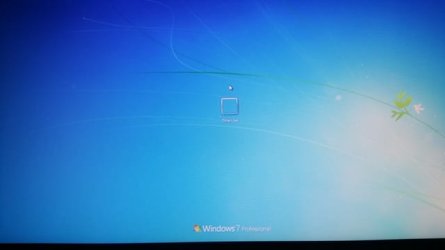
WIN7 login screen just has (Other User) available and I can't login?

My Computer My Computer

At a glance

64-bit Windows 11 Pro for WorkstationsIntel i7-8700K OC'd to 5 GHz64 GB (4x16GB) G.SKILL TridentZ RGB DDR4 3600...ASUS ROG-STRIX-GTX1080TI-O11G-GAMING
Computer type
PC/Desktop
Computer Manufacturer/Model Number
Self built custom
OS
64-bit Windows 11 Pro for Workstations
CPU
Intel i7-8700K OC'd to 5 GHz
Motherboard
ASUS ROG Maximus XI Formula Z390
Memory
64 GB (4x16GB) G.SKILL TridentZ RGB DDR4 3600 MHz
Graphics Card(s)
ASUS ROG-STRIX-GTX1080TI-O11G-GAMING
Sound Card
Integrated
Monitor(s) Displays
2 x Samsung Odyssey G7 27"
Screen Resolution
2560x1440
Hard Drives
1TB Samsung 990 PRO M.2,
4TB Samsung 990 PRO PRO M.2,
TerraMaster F8 SSD Plus NAS
PSU
Seasonic Prime Titanium 850W
Case
Thermaltake Core P3
Cooling
Corsair Hydro H115i
Keyboard
Logitech wireless K800
Mouse
Logitech MX Master 4
Internet Speed
2 Gb/s Download and 100 Mb/s Upload
Antivirus
Malwarebyte Anti-Malware Premium
Browser
Google Chrome
Other Info
Logitech Z625 speaker system,
Logitech BRIO 4K Pro webcam,
HP Color LaserJet Pro MFP M477fdn,
APC SMART-UPS RT 1000 XL - SURT1000XLI,
Galaxy S23 Plus phone
Three times I have asked this:

If so once you access Regedit you can first try making the changes in Logon Screen - Fix Showing Only "Other User" and Last Logged On User to see if it remedies the problem with a reboot.

If you're able to access regedit as shown then you can first try making the changes in this blue link for Logon Screen - Fix Showing Only "Other User" and Last Logged On User. After completing these, reboot to see if it logs in normally. If not enable the Built-in Administrator to see if it will start.

Confirm that you entered regedit as shown in Option Two of Built-in Administrator - Enable from WinRE and made the changes in Method Two of Logon Screen - Fix Showing Only "Other User" and Last Logged On User.
 
See if this may be able to help since you cannot log in to Windows.

1. Open a command prompt at boot.

2. In the command prompt, type the command below and press Enter.
regedit
3. Now pick up at step 5 below.

http://www.sevenforums.com/tutorial...showing-only-other-user-last-logged-user.html

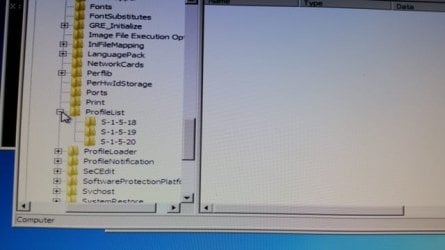
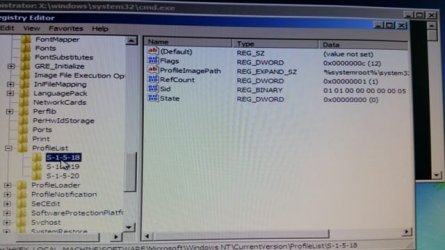
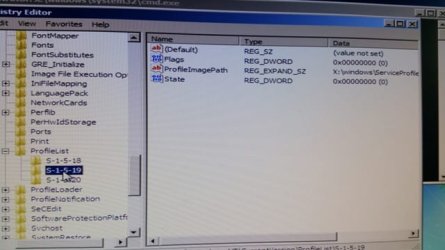
Brink I've followed the instructions that apply in the registry. (STEP 7A) I have SYSTEMPROFILE, LOCALSERVICE & NETWORKSERVICES in the ProfileImagepath (STEP7B), I don't have GUEST, ADMIN, OR any names I've used? (STEP7C) n/a, (STEP7D) I have FLAGS, PROFILEIMAGEPATH & STATE in all three of my subkeys (S-1-5-18) (S-1-5-19) (S-1-5-20) Should I have more subkeys?
 

My Computer My Computer

At a glance

windows7 premium 64biti7 980XCORSAIR DDR2000EVGA GTX580
Computer type
PC/Desktop
Computer Manufacturer/Model Number
custom build
OS
windows7 premium 64bit
CPU
i7 980X
Motherboard
ASUS
Memory
CORSAIR DDR2000
Graphics Card(s)
EVGA GTX580
Hard Drives
CRUCIAL SSD 300 256GB OS
CRUCIAL SSD M4 256GB FSX
Antivirus
MCAFEE
Browser
IE10
Three times I have asked this:

If so once you access Regedit you can first try making the changes in Logon Screen - Fix Showing Only "Other User" and Last Logged On User to see if it remedies the problem with a reboot.
This need not solve the problem

If you're able to access regedit as shown then you can first try making the changes in this blue link for Logon Screen - Fix Showing Only "Other User" and Last Logged On User. After completing these, reboot to see if it logs in normally. If not enable the Built-in Administrator to see if it will start.
This need not solve the problem

Confirm that you entered regedit as shown in Option Two of Built-in Administrator - Enable from WinRE and made the changes in Method Two of Logon Screen - Fix Showing Only "Other User" and Last Logged On User.
Yes I entered registry and followed method II, because I have 64bit OS this did not work either?
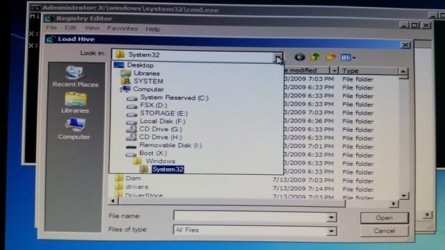
Is there away to post pic's? I've taken pic's of steps and the steps in the registry where I load the Hive and go to my OS drv I see a drv called BOOT (X) and it has all the files that is called out for me to look for, but I don't recognize that drive? So the very first attempt to follow your steps I did it in that drv.

My second attempt I clicked on the the correct OS drv and completed all steps and it's still not working?
 

My Computer My Computer

At a glance

windows7 premium 64biti7 980XCORSAIR DDR2000EVGA GTX580
Computer type
PC/Desktop
Computer Manufacturer/Model Number
custom build
OS
windows7 premium 64bit
CPU
i7 980X
Motherboard
ASUS
Memory
CORSAIR DDR2000
Graphics Card(s)
EVGA GTX580
Hard Drives
CRUCIAL SSD 300 256GB OS
CRUCIAL SSD M4 256GB FSX
Antivirus
MCAFEE
Browser
IE10
Your specs show only 1 drive, is that correct?

Your specs also show McAfee. Could you disable that for a test and try to log in?

Do you use Advanced System Care or any other IObit programs?

Do you have more that the C partition on the ssd?
 

My Computer My Computer

At a glance

Windows 10 Pro. 64/ version 1709 Windows 7 Pr...Intel i7-6800K @ 4.3Corsair Platinum 16 gig @2400EVGA GTX 1070 OC
Computer type
PC/Desktop
Computer Manufacturer/Model Number
Home made Desktop
OS
Windows 10 Pro. 64/ version 1709 Windows 7 Pro/64
CPU
Intel i7-6800K @ 4.3
Motherboard
ASUS X-99 Deluxe II
Memory
Corsair Platinum 16 gig @2400
Graphics Card(s)
EVGA GTX 1070 OC
Monitor(s) Displays
Asus 27" LED LCD/VE278Q
Screen Resolution
1920-1080 or 1280-720 HDMI
Hard Drives
INTEL SSD 730-240 Gb Sata 3.0/
PSU
EVGA Platium 1200W
Case
Phanteks Luxe Tempered Glass 8 fans/ one radiator
Cooling
XSPC/ Water Cooled CPU
Keyboard
Das 4 Professional
Mouse
Logitech M705/MX Anywhere 2-S
Internet Speed
100 mbits
Antivirus
Microsoft Security Essentials/ Malwarebytes Premium 3.0/ SAS
Browser
I.E. 11 default/Firefox/ ISP Time Warner Cable/Spectrum
Other Info
LG BluRay Burner/
Sound system-KLipsch-THX/
Icy Dock ssd Hot Swap bays.
Your specs show only 1 drive, is that correct?

Your specs also show McAfee. Could you disable that for a test and try to log in?

Do you use Advanced System Care or any other IObit programs?

Do you have more that the C partition on the ssd?

Bear I have a total of three drives, OS on SSD, FLIGHTSIM on SSD, Storage on 1TB HD.

I can't logon to the computer to turn off MacAfee .

No.
 

My Computer My Computer

At a glance

windows7 premium 64biti7 980XCORSAIR DDR2000EVGA GTX580
Computer type
PC/Desktop
Computer Manufacturer/Model Number
custom build
OS
windows7 premium 64bit
CPU
i7 980X
Motherboard
ASUS
Memory
CORSAIR DDR2000
Graphics Card(s)
EVGA GTX580
Hard Drives
CRUCIAL SSD 300 256GB OS
CRUCIAL SSD M4 256GB FSX
Antivirus
MCAFEE
Browser
IE10
See if this may be able to help since you cannot log in to Windows.

1. Open a command prompt at boot.

2. In the command prompt, type the command below and press Enter.
regedit
3. Now pick up at step 5 below.

http://www.sevenforums.com/tutorial...showing-only-other-user-last-logged-user.html

Brink I've followed the instructions that apply in the registry. (STEP 7A) I have SYSTEMPROFILE, LOCALSERVICE & NETWORKSERVICES in the ProfileImagepath (STEP7B), I don't have GUEST, ADMIN, OR any names I've used? (STEP7C) n/a, (STEP7D) I have FLAGS, PROFILEIMAGEPATH & STATE in all three of my subkeys (S-1-5-18) (S-1-5-19) (S-1-5-20) Should I have more subkeys?

Sorry, some of the steps went missing. Do this instead.

1. Do only steps 1 to 4 in METHOD TWO below.

http://www.sevenforums.com/tutorials/102552-built-administrator-enable-winre.html

2. Now pick up at step 5 below.

http://www.sevenforums.com/tutorial...showing-only-other-user-last-logged-user.html
 

My Computer My Computer

At a glance

64-bit Windows 11 Pro for WorkstationsIntel i7-8700K OC'd to 5 GHz64 GB (4x16GB) G.SKILL TridentZ RGB DDR4 3600...ASUS ROG-STRIX-GTX1080TI-O11G-GAMING
Computer type
PC/Desktop
Computer Manufacturer/Model Number
Self built custom
OS
64-bit Windows 11 Pro for Workstations
CPU
Intel i7-8700K OC'd to 5 GHz
Motherboard
ASUS ROG Maximus XI Formula Z390
Memory
64 GB (4x16GB) G.SKILL TridentZ RGB DDR4 3600 MHz
Graphics Card(s)
ASUS ROG-STRIX-GTX1080TI-O11G-GAMING
Sound Card
Integrated
Monitor(s) Displays
2 x Samsung Odyssey G7 27"
Screen Resolution
2560x1440
Hard Drives
1TB Samsung 990 PRO M.2,
4TB Samsung 990 PRO PRO M.2,
TerraMaster F8 SSD Plus NAS
PSU
Seasonic Prime Titanium 850W
Case
Thermaltake Core P3
Cooling
Corsair Hydro H115i
Keyboard
Logitech wireless K800
Mouse
Logitech MX Master 4
Internet Speed
2 Gb/s Download and 100 Mb/s Upload
Antivirus
Malwarebyte Anti-Malware Premium
Browser
Google Chrome
Other Info
Logitech Z625 speaker system,
Logitech BRIO 4K Pro webcam,
HP Color LaserJet Pro MFP M477fdn,
APC SMART-UPS RT 1000 XL - SURT1000XLI,
Galaxy S23 Plus phone
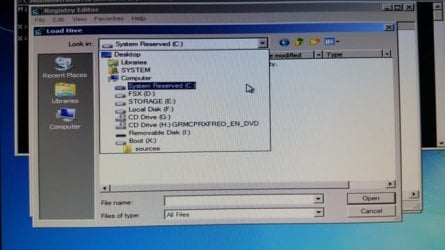
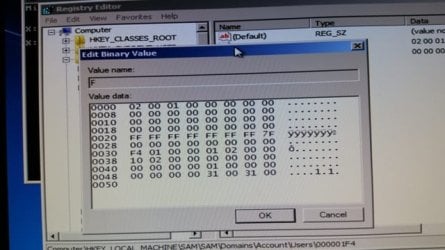
Here are some pic's showing screen shots my system. See the pic with my HD, the one listed as BOOT X I don't know where that came from. The one label local disk F is the DRV with my OS on it AND the last round of testing on the following: How to Enable the Built-in Elevated "Administrator" Account from WinRE step II,
Logon Screen - Fix Showing Only "Other User" and Last Logged On User


Attachments

  • 20141216_111713 R.jpg
    20141216_111713 R.jpg
    17.5 KB · Views: 5
  • 20141216_213518R.jpg
    20141216_213518R.jpg
    36 KB · Views: 6
  • 20141216_214016R.jpg
    20141216_214016R.jpg
    41 KB · Views: 6
  • 20141217_135742R.jpg
    20141217_135742R.jpg
    30.4 KB · Views: 6
  • 20141217_141203R.jpg
    20141217_141203R.jpg
    39.2 KB · Views: 6
  • 20141217_141211R.jpg
    20141217_141211R.jpg
    34.9 KB · Views: 6
  • 20141217_143427R.jpg
    20141217_143427R.jpg
    37.1 KB · Views: 5
  • 20141217_144921R.jpg
    20141217_144921R.jpg
    39.3 KB · Views: 5

My Computer My Computer

At a glance

windows7 premium 64biti7 980XCORSAIR DDR2000EVGA GTX580
Computer type
PC/Desktop
Computer Manufacturer/Model Number
custom build
OS
windows7 premium 64bit
CPU
i7 980X
Motherboard
ASUS
Memory
CORSAIR DDR2000
Graphics Card(s)
EVGA GTX580
Hard Drives
CRUCIAL SSD 300 256GB OS
CRUCIAL SSD M4 256GB FSX
Antivirus
MCAFEE
Browser
IE10
Boot X is the boot disk or stick normally.

Letters are often different in WinRE. If D has your OS files then access registry there.

It's best to have all other drives unplugged during troubleshooting. But if win7 is booted by another drive then it will need to be reconnected and set first to boot in BIOS unless we make Win7 drive independently bootable. This can be determined by posting a screenshot of Partition Wizard boot disk output. It's probably safe to assume if you don't have a Dual Boot that System Reserved is booting Win7 though we often see Repairs derail the boot files to other drives.
 
I don't want to get into the way but I'm thinking if all other drives except the one that (C) Windows 7 is installed it might make things easier to troubleshoot.

Could you answer my other question in post #25?
 

My Computer My Computer

At a glance

Windows 10 Pro. 64/ version 1709 Windows 7 Pr...Intel i7-6800K @ 4.3Corsair Platinum 16 gig @2400EVGA GTX 1070 OC
Computer type
PC/Desktop
Computer Manufacturer/Model Number
Home made Desktop
OS
Windows 10 Pro. 64/ version 1709 Windows 7 Pro/64
CPU
Intel i7-6800K @ 4.3
Motherboard
ASUS X-99 Deluxe II
Memory
Corsair Platinum 16 gig @2400
Graphics Card(s)
EVGA GTX 1070 OC
Monitor(s) Displays
Asus 27" LED LCD/VE278Q
Screen Resolution
1920-1080 or 1280-720 HDMI
Hard Drives
INTEL SSD 730-240 Gb Sata 3.0/
PSU
EVGA Platium 1200W
Case
Phanteks Luxe Tempered Glass 8 fans/ one radiator
Cooling
XSPC/ Water Cooled CPU
Keyboard
Das 4 Professional
Mouse
Logitech M705/MX Anywhere 2-S
Internet Speed
100 mbits
Antivirus
Microsoft Security Essentials/ Malwarebytes Premium 3.0/ SAS
Browser
I.E. 11 default/Firefox/ ISP Time Warner Cable/Spectrum
Other Info
LG BluRay Burner/
Sound system-KLipsch-THX/
Icy Dock ssd Hot Swap bays.
Back
Top