Take Ownership Shortcut

Add "Take Ownership" to Context Menu of Files, Folders, and Drives in Windows


   Information
This tutorial will show you how to add Take Ownership to the context menu of all files, folders, and drives for all users in Windows.

This will allow you to be able to instantly take ownership of a file, folder (and all contents), or drive (and all contents) by changing the owner to the current user and grant the Owner_Rights SID (current owner) full access permission.

You must be an administrator to be able to add, remove, and use the "Take Ownership" context menu.

   Note
Application files (ex: EXE, CMD, MSI) will continue to have Run as administrator instead of Take Ownership in their context menu.


When you right click or press and hold on a file, folder, or drive, and click/tap on Take Ownership, you may be prompted by UAC for permission to do so first.

If a user is logged in as an administrator, then the user would just click/tap on Yes to approve and take ownership. The owner of the file, folder, or drive would be changed to the current administrator user account. Permissions would be set to allow the Owner_Rights SID (current owner) full control of the file, folder, or drive.

If a user is logged in as a standard user, then the user would need to enter a selected administrator's password to approve and take ownership. The owner of the file, folder, or drive would be changed to the selected administrator account, and not the standard user. Permissions would be set to allow the Owner_Rights SID (current owner) full control of the file, folder, or drive.


The Take Ownership context menu will not be available when you right click on the C: drive, C:\Program Files folder, C:\Program Files (x86) folder, C:\ProgramData folder, C:\Users folder, and C:\Windows folder. This was done because taking ownership of these system folders can make Windows unstable since it would also take ownership of all the folder's content at the same time.

You will still be able to use the Take Ownership context menu of files inside the folder locations above.

If you would like to have a custom location(s) of your own to not have the context menu, then please feel free to post a request in this tutorial thread. I'll be happy to post back with a custom .reg file for it.

   Warning
This context menu will only work with English Windows installations.

If you have a different language, then please post a reply with what language you have instead. I'll be happy to post back a translated version for you.


EXAMPLE: Take Ownership in Context Menu
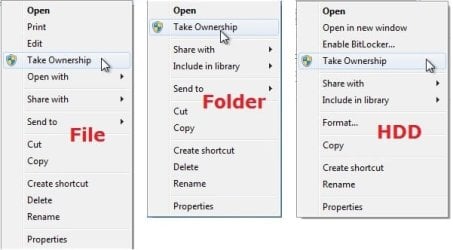
example.jpg


Here's How:

1. Do step 2, 3, or 4 below for what you would like to do.


2. To Add "Take Ownership" to Context Menu

   Note
Application files (ex: EXE, CMD, MSI) will still have Run as administrator instead of Take Ownership in the context menu when you use this step.

A) Click/tap on the Download button below to download the file below, and go to step 5 below.

Add_Take_Ownership_to_context_menu


Download


3. To Add "Take Ownership" with Pause to Context Menu

   Note
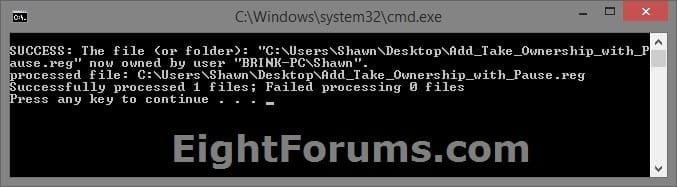
This option pauses the command when you use the "Take Ownership" context menu to be able to see the command results. This can be handy to verify setting ownership and permissions was successful or not.

Application files (ex: EXE, CMD, MSI) will still have Run as administrator instead of Take Ownership in the context menu when you use this step.


Take_Ownership_Pause.jpg


A) Click/tap on the Download button below to download the file below, and go to step 5 below.

Add_Take_Ownership_with_Pause_to_context_menu.reg


Download


4. To Remove "Take Ownership" from Context Menu

   Note
This is the default setting, and will also restore the default Run as administrator for .exe files.


A) Click/tap on the Download button below to download the file below, and go to step 5 below.

Remove_Take_Ownership_from_context_menu.reg


Download


5. Save the .reg file to your Desktop.

6. Double click on the downloaded .reg file to merge it.

7. If prompted, click on Run, Yes (UAC), Yes, and OK to approve the merge.

8. When finished, you can delete the downloaded .reg file if you like.


That's it,
Shawn


Attachments

Last edited:
One more annoying thing with Windows 7. If you launch a program as an administrator, you, the user who launched that program, may not have full access rights to files it creates even if you have administrator rights.

One example, the game Kerbal Space Program creates a log file. In some cases Windows will block the game from being able to write to its own files and folders - even when it's not installed in Program Files. Launch it as an administrator and the user with admin rights is blocked from having write access to the game's log and save files.

But make a copy of them and delete the old file and you have full access until the game is run again as an administrator, upon which Windows 7 will put a write access block on the files. If the game is run again not as an administrator, then it's blocked from some of its own files unless the user makes copies and deletes the originals.

That's not security, that's just being pointlessly annoying. A secure file is one that only the user that created it can access when logged in. If anyone else can have full access to a file simply by making a copy, then there is no point at all to doing a half-measure access block. It's just like having a locked vault door with the combination code posted next to it.

Is there a way to turn that "feature" off?
 

My Computer My Computer

At a glance

Win7 Ultimate 64bitT56004gig
Computer type
Laptop
Computer Manufacturer/Model Number
Dell Inspiron E1505
OS
Win7 Ultimate 64bit
CPU
T5600
Memory
4gig
Hard Drives
500 gig
It's no problem at all. I'm glad you got it sorted. :)

Sounds like some sort of permissions issue for the folder that the log file is being saved to. The file could also be locked by the program.
 

My Computer My Computer

At a glance

64-bit Windows 11 Pro for WorkstationsIntel i7-8700K OC'd to 5 GHz64 GB (4x16GB) G.SKILL TridentZ RGB DDR4 3600...ASUS ROG-STRIX-GTX1080TI-O11G-GAMING
Computer type
PC/Desktop
Computer Manufacturer/Model Number
Self built custom
OS
64-bit Windows 11 Pro for Workstations
CPU
Intel i7-8700K OC'd to 5 GHz
Motherboard
ASUS ROG Maximus XI Formula Z390
Memory
64 GB (4x16GB) G.SKILL TridentZ RGB DDR4 3600 MHz
Graphics Card(s)
ASUS ROG-STRIX-GTX1080TI-O11G-GAMING
Sound Card
Integrated
Monitor(s) Displays
2 x Samsung Odyssey G7 27"
Screen Resolution
2560x1440
Hard Drives
1TB Samsung 990 PRO M.2,
4TB Samsung 990 PRO PRO M.2,
TerraMaster F8 SSD Plus NAS
PSU
Seasonic Prime Titanium 850W
Case
Thermaltake Core P3
Cooling
Corsair Hydro H115i
Keyboard
Logitech wireless K800
Mouse
Logitech MX Master 4
Internet Speed
2 Gb/s Download and 100 Mb/s Upload
Antivirus
Malwarebyte Anti-Malware Premium
Browser
Google Chrome
Other Info
Logitech Z625 speaker system,
Logitech BRIO 4K Pro webcam,
HP Color LaserJet Pro MFP M477fdn,
APC SMART-UPS RT 1000 XL - SURT1000XLI,
Galaxy S23 Plus phone
Absolutely Perfect

Thank you so much for this post. It was exactly what I was looking for!!!
 

My Computer My Computer

At a glance

windows 7 pro 32 bitintel core 2 duo4gb ramATI Radeon HD 2400 XT 256MB PCI-E Low Profile...
Computer type
PC/Desktop
Computer Manufacturer/Model Number
dell optiplex 755
OS
windows 7 pro 32 bit
CPU
intel core 2 duo
Memory
4gb ram
Graphics Card(s)
ATI Radeon HD 2400 XT 256MB PCI-E Low Profile DMS-59
Hard Drives
Western Digital 640 GB Caviar Blue
Antivirus
norton 360/ 360 total security
Browser
opera
Avoid this in Windows 8.1

I tried this in Windows 8.1 and it considerably slowed down the file manager. I would open it and after 5 seconds the green bar at the top would start filling up, seemingly never to stop. Also right-clicking on a file or expand/collapsing folders would take ages. As I had added other stuff it took me a while to find the culprit. Now I have removed it and it and the File Manager is OK.
 

My Computer My Computer

At a glance

Windows 8.1 64 bits
Computer type
PC/Desktop
Computer Manufacturer/Model Number
Dell
OS
Windows 8.1 64 bits
I tried this in Windows 8.1 and it considerably slowed down the file manager. I would open it and after 5 seconds the green bar at the top would start filling up, seemingly never to stop. Also right-clicking on a file or expand/collapsing folders would take ages. As I had added other stuff it took me a while to find the culprit. Now I have removed it and it and the File Manager is OK.

Hello fvila,

This tutorial only adds "Take Ownership" to the context menu, it would have no affect on performance since it doesn't do anything until you click on "Take Ownership" to then affect permissions. I suspect that it may have been caused by something else.

The version of this tutorial for Windows 8/8.1 is below instead though.

Take Ownership - Add to Context Menu in Windows 8
 

My Computer My Computer

At a glance

64-bit Windows 11 Pro for WorkstationsIntel i7-8700K OC'd to 5 GHz64 GB (4x16GB) G.SKILL TridentZ RGB DDR4 3600...ASUS ROG-STRIX-GTX1080TI-O11G-GAMING
Computer type
PC/Desktop
Computer Manufacturer/Model Number
Self built custom
OS
64-bit Windows 11 Pro for Workstations
CPU
Intel i7-8700K OC'd to 5 GHz
Motherboard
ASUS ROG Maximus XI Formula Z390
Memory
64 GB (4x16GB) G.SKILL TridentZ RGB DDR4 3600 MHz
Graphics Card(s)
ASUS ROG-STRIX-GTX1080TI-O11G-GAMING
Sound Card
Integrated
Monitor(s) Displays
2 x Samsung Odyssey G7 27"
Screen Resolution
2560x1440
Hard Drives
1TB Samsung 990 PRO M.2,
4TB Samsung 990 PRO PRO M.2,
TerraMaster F8 SSD Plus NAS
PSU
Seasonic Prime Titanium 850W
Case
Thermaltake Core P3
Cooling
Corsair Hydro H115i
Keyboard
Logitech wireless K800
Mouse
Logitech MX Master 4
Internet Speed
2 Gb/s Download and 100 Mb/s Upload
Antivirus
Malwarebyte Anti-Malware Premium
Browser
Google Chrome
Other Info
Logitech Z625 speaker system,
Logitech BRIO 4K Pro webcam,
HP Color LaserJet Pro MFP M477fdn,
APC SMART-UPS RT 1000 XL - SURT1000XLI,
Galaxy S23 Plus phone
Wrong culprit...

I thought removing Take Ownership solved the problem, but in fact the slowness has reappeared. So I guess I was casting accusations wrongly
 

My Computer My Computer

At a glance

Windows 8.1 64 bits
Computer type
PC/Desktop
Computer Manufacturer/Model Number
Dell
OS
Windows 8.1 64 bits
I added the Take Ownership reg, but it removed the Run as Administrator option from files as well including .EXEs. It also didn't allow me to edit or copy the Autorun.inf file that I ran Take Ownership on.

Support would be appreciated.
Thanks
 

My Computer My Computer

At a glance

Windows 7 Home Premium 64 bit
Computer type
PC/Desktop
OS
Windows 7 Home Premium 64 bit
I added the Take Ownership reg, but it removed the Run as Administrator option from files as well including .EXEs. It also didn't allow me to edit or copy the Autorun.inf file that I ran Take Ownership on.

Support would be appreciated.
Thanks

Hello Brakus,

You can use step 6 to remove "Take Ownership", and restore "Run as administrator" for .exe files.

Afterwards, you may need to manually take ownership and set permissions of the Autorun.inf file for your account.

Take Ownership of file

http://www.sevenforums.com/tutorials/122666-permissions-allow-deny-users-groups.html
 

My Computer My Computer

At a glance

64-bit Windows 11 Pro for WorkstationsIntel i7-8700K OC'd to 5 GHz64 GB (4x16GB) G.SKILL TridentZ RGB DDR4 3600...ASUS ROG-STRIX-GTX1080TI-O11G-GAMING
Computer type
PC/Desktop
Computer Manufacturer/Model Number
Self built custom
OS
64-bit Windows 11 Pro for Workstations
CPU
Intel i7-8700K OC'd to 5 GHz
Motherboard
ASUS ROG Maximus XI Formula Z390
Memory
64 GB (4x16GB) G.SKILL TridentZ RGB DDR4 3600 MHz
Graphics Card(s)
ASUS ROG-STRIX-GTX1080TI-O11G-GAMING
Sound Card
Integrated
Monitor(s) Displays
2 x Samsung Odyssey G7 27"
Screen Resolution
2560x1440
Hard Drives
1TB Samsung 990 PRO M.2,
4TB Samsung 990 PRO PRO M.2,
TerraMaster F8 SSD Plus NAS
PSU
Seasonic Prime Titanium 850W
Case
Thermaltake Core P3
Cooling
Corsair Hydro H115i
Keyboard
Logitech wireless K800
Mouse
Logitech MX Master 4
Internet Speed
2 Gb/s Download and 100 Mb/s Upload
Antivirus
Malwarebyte Anti-Malware Premium
Browser
Google Chrome
Other Info
Logitech Z625 speaker system,
Logitech BRIO 4K Pro webcam,
HP Color LaserJet Pro MFP M477fdn,
APC SMART-UPS RT 1000 XL - SURT1000XLI,
Galaxy S23 Plus phone
Found the culprit!

In my case one of my disks was KO, the one I used for backups (so I never opened it). Every time I tried to open the File Explorer or clicked open/close a folder on the other disks, it would spend seconds trying to access that disk. Also a mutted noise I thought came from someone with a hammer on another floor was in fact the disk banging in its lodgings. After removal, the file manager was working perfectly.
 

My Computer My Computer

At a glance

Windows 8.1 64 bits
Computer type
PC/Desktop
Computer Manufacturer/Model Number
Dell
OS
Windows 8.1 64 bits
Help! I need to reverse Take Ownership

I have only one account on my PC, and it is an Administrator account. The Read-only attributes on files in my C:/Users/Tony folder wouldn't change, so I used the Take Ownership shortcut to give me Administrator privileges over them (or so I thought).

Now I cannot access any of the files in the C:/Users/Tony folder! Yes - Duh!! :doh: I've tried System Restore to an earlier date, but this hasn't worked.
Is there a way to effectively reverse taking ownership?

Any help would be very gratefully received!

Tony
 

My Computer My Computer

At a glance

Windows 7 Home Premium 64-bit4GB
Computer type
PC/Desktop
Computer Manufacturer/Model Number
Novatech
OS
Windows 7 Home Premium 64-bit
Memory
4GB
Antivirus
Norton 360
Browser
IE11
I have only one account on my PC, and it is an Administrator account. The Read-only attributes on files in my C:/Users/Tony folder wouldn't change, so I used the Take Ownership shortcut to give me Administrator privileges over them (or so I thought).

Now I cannot access any of the files in the C:/Users/Tony folder! Yes - Duh!! :doh: I've tried System Restore to an earlier date, but this hasn't worked.

Is there a way to effectively reverse taking ownership?

Any help would be very gratefully received!

Tony


Hello Tony, and welcome to Seven Forums.

As you found out, system restore does not include user profile folders. :(

By default, you are already the owner of your own "C:/Users/Tony" profile folder and it's contents.

Are you sure the files are read-only?

http://www.sevenforums.com/tutorials/63741-read-only-file-folder-attribute.html

What do you see for it's permission settings?

http://www.sevenforums.com/tutorials/122666-permissions-allow-deny-users-groups.html

http://www.sevenforums.com/tutorials/9733-screenshots-files-upload-post-seven-forums.html

As a test for now, use step 6 in the tutorial on the first page to remove "Take Ownership" to see if that may help if you used the .exe option.
 

My Computer My Computer

At a glance

64-bit Windows 11 Pro for WorkstationsIntel i7-8700K OC'd to 5 GHz64 GB (4x16GB) G.SKILL TridentZ RGB DDR4 3600...ASUS ROG-STRIX-GTX1080TI-O11G-GAMING
Computer type
PC/Desktop
Computer Manufacturer/Model Number
Self built custom
OS
64-bit Windows 11 Pro for Workstations
CPU
Intel i7-8700K OC'd to 5 GHz
Motherboard
ASUS ROG Maximus XI Formula Z390
Memory
64 GB (4x16GB) G.SKILL TridentZ RGB DDR4 3600 MHz
Graphics Card(s)
ASUS ROG-STRIX-GTX1080TI-O11G-GAMING
Sound Card
Integrated
Monitor(s) Displays
2 x Samsung Odyssey G7 27"
Screen Resolution
2560x1440
Hard Drives
1TB Samsung 990 PRO M.2,
4TB Samsung 990 PRO PRO M.2,
TerraMaster F8 SSD Plus NAS
PSU
Seasonic Prime Titanium 850W
Case
Thermaltake Core P3
Cooling
Corsair Hydro H115i
Keyboard
Logitech wireless K800
Mouse
Logitech MX Master 4
Internet Speed
2 Gb/s Download and 100 Mb/s Upload
Antivirus
Malwarebyte Anti-Malware Premium
Browser
Google Chrome
Other Info
Logitech Z625 speaker system,
Logitech BRIO 4K Pro webcam,
HP Color LaserJet Pro MFP M477fdn,
APC SMART-UPS RT 1000 XL - SURT1000XLI,
Galaxy S23 Plus phone
Hello, Brink

Yes: I misunderstood the meaning of the shaded box (="Default neutral setting that is always displayed"). I thought it meant that some of the folder contents were read-only. However, this is a minor issue now.

Having run "Take Ownership" with all the files and folders contained in the C:\users\tony folder, programmes will not work, since they cannot access those files.

<<As a test for now, use step 6 in the tutorial on the first page to remove "Take Ownership" to see if that may help if you used the .exe option.>> I have run RemoveTakeOwnership and it no longer appears in the context menu.

But how can I reverse whatever changes were made to files and folders?

Tony
 

My Computer My Computer

At a glance

Windows 7 Home Premium 64-bit4GB
Computer type
PC/Desktop
Computer Manufacturer/Model Number
Novatech
OS
Windows 7 Home Premium 64-bit
Memory
4GB
Antivirus
Norton 360
Browser
IE11
If you used the Take Ownership option for .exe files, it sometimes may cause an issue with .exe files opening in Windows 8, so I just wanted to test and make sure that wasn't part of the issue in Windows 7.

The context menu changes the owner to be the "administrators" group, and sets permissions to "Allow" administrators "Full control".

Double check the permissions of your files to make sure that your account is set to "Allow" "Full control" of them.

http://www.sevenforums.com/tutorials/122666-permissions-allow-deny-users-groups.html
 

My Computer My Computer

At a glance

64-bit Windows 11 Pro for WorkstationsIntel i7-8700K OC'd to 5 GHz64 GB (4x16GB) G.SKILL TridentZ RGB DDR4 3600...ASUS ROG-STRIX-GTX1080TI-O11G-GAMING
Computer type
PC/Desktop
Computer Manufacturer/Model Number
Self built custom
OS
64-bit Windows 11 Pro for Workstations
CPU
Intel i7-8700K OC'd to 5 GHz
Motherboard
ASUS ROG Maximus XI Formula Z390
Memory
64 GB (4x16GB) G.SKILL TridentZ RGB DDR4 3600 MHz
Graphics Card(s)
ASUS ROG-STRIX-GTX1080TI-O11G-GAMING
Sound Card
Integrated
Monitor(s) Displays
2 x Samsung Odyssey G7 27"
Screen Resolution
2560x1440
Hard Drives
1TB Samsung 990 PRO M.2,
4TB Samsung 990 PRO PRO M.2,
TerraMaster F8 SSD Plus NAS
PSU
Seasonic Prime Titanium 850W
Case
Thermaltake Core P3
Cooling
Corsair Hydro H115i
Keyboard
Logitech wireless K800
Mouse
Logitech MX Master 4
Internet Speed
2 Gb/s Download and 100 Mb/s Upload
Antivirus
Malwarebyte Anti-Malware Premium
Browser
Google Chrome
Other Info
Logitech Z625 speaker system,
Logitech BRIO 4K Pro webcam,
HP Color LaserJet Pro MFP M477fdn,
APC SMART-UPS RT 1000 XL - SURT1000XLI,
Galaxy S23 Plus phone
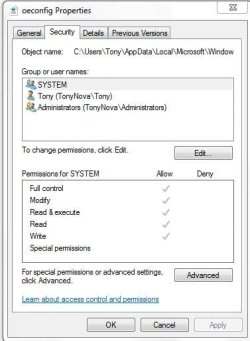
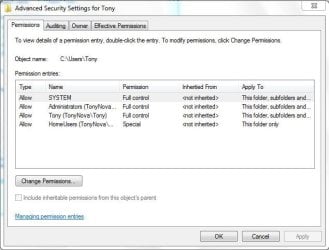
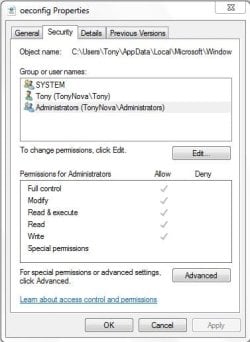
I've checked the permissions at various stages down the folder tree: they all appear to give full permissions. I attach five .jpg files showing:
  • the Security/Advanced Permissions tab for the c:\Users\Tony folder (the top of the affected tree)
  • the Security/Advanced Permissions tab for an email file (at C:\Users\Tony\AppData\Local\Microsoft\Windows Live Mail\dadavies...)
  • the Security tab for that file showing permissions for SYSTEM
  • the Security tab for that file showing permissions for Tony
  • the Security tab for that file showing permissions for Administrators
I have tried to locate a log that Take Ownership might have generated, but without success. Will there be one?

I confirm that my email program will not recognise any content, and displays the empty, basic folders. When it does, it might indicate that we've got a solution!

Tony
 

Attachments

  • Security-Administrators.JPG
    Security-Administrators.JPG
    34.3 KB · Views: 611
  • Security-Tony.JPG
    Security-Tony.JPG
    33.7 KB · Views: 656
  • Security-System.JPG
    Security-System.JPG
    33.8 KB · Views: 681
  • Users_Tony Security-Advanced.JPG
    Users_Tony Security-Advanced.JPG
    44.5 KB · Views: 727
Last edited by a moderator:

My Computer My Computer

At a glance

Windows 7 Home Premium 64-bit4GB
Computer type
PC/Desktop
Computer Manufacturer/Model Number
Novatech
OS
Windows 7 Home Premium 64-bit
Memory
4GB
Antivirus
Norton 360
Browser
IE11
I don't see anything out of order. What and how are you doing when you get the access denied error for them? Please post some screenshots to see if anything may stand out.
 

My Computer My Computer

At a glance

64-bit Windows 11 Pro for WorkstationsIntel i7-8700K OC'd to 5 GHz64 GB (4x16GB) G.SKILL TridentZ RGB DDR4 3600...ASUS ROG-STRIX-GTX1080TI-O11G-GAMING
Computer type
PC/Desktop
Computer Manufacturer/Model Number
Self built custom
OS
64-bit Windows 11 Pro for Workstations
CPU
Intel i7-8700K OC'd to 5 GHz
Motherboard
ASUS ROG Maximus XI Formula Z390
Memory
64 GB (4x16GB) G.SKILL TridentZ RGB DDR4 3600 MHz
Graphics Card(s)
ASUS ROG-STRIX-GTX1080TI-O11G-GAMING
Sound Card
Integrated
Monitor(s) Displays
2 x Samsung Odyssey G7 27"
Screen Resolution
2560x1440
Hard Drives
1TB Samsung 990 PRO M.2,
4TB Samsung 990 PRO PRO M.2,
TerraMaster F8 SSD Plus NAS
PSU
Seasonic Prime Titanium 850W
Case
Thermaltake Core P3
Cooling
Corsair Hydro H115i
Keyboard
Logitech wireless K800
Mouse
Logitech MX Master 4
Internet Speed
2 Gb/s Download and 100 Mb/s Upload
Antivirus
Malwarebyte Anti-Malware Premium
Browser
Google Chrome
Other Info
Logitech Z625 speaker system,
Logitech BRIO 4K Pro webcam,
HP Color LaserJet Pro MFP M477fdn,
APC SMART-UPS RT 1000 XL - SURT1000XLI,
Galaxy S23 Plus phone
I added the Take Ownership reg, but it removed the Run as Administrator option from files as well including .EXEs. It also didn't allow me to edit or copy the Autorun.inf file that I ran Take Ownership on.

Support would be appreciated.
Thanks

Hello Brakus,

You can use step 6 to remove "Take Ownership", and restore "Run as administrator" for .exe files.

Afterwards, you may need to manually take ownership and set permissions of the Autorun.inf file for your account.

Take Ownership of file

http://www.sevenforums.com/tutorials/122666-permissions-allow-deny-users-groups.html


Thanks for the responce Brink, but I did delete the .reg file from where I had downloaded it and it did not restore run as administrator to .exe files. It is actual inhibiting me from running installers on my PC as when they request administrator access it just runs take ownership instead, and halts the installation. The only option is to hit enter which closes CMD and ends installation.
 

My Computer My Computer

At a glance

Windows 7 Home Premium 64 bit
Computer type
PC/Desktop
OS
Windows 7 Home Premium 64 bit

My Computer My Computer

At a glance

64-bit Windows 11 Pro for WorkstationsIntel i7-8700K OC'd to 5 GHz64 GB (4x16GB) G.SKILL TridentZ RGB DDR4 3600...ASUS ROG-STRIX-GTX1080TI-O11G-GAMING
Computer type
PC/Desktop
Computer Manufacturer/Model Number
Self built custom
OS
64-bit Windows 11 Pro for Workstations
CPU
Intel i7-8700K OC'd to 5 GHz
Motherboard
ASUS ROG Maximus XI Formula Z390
Memory
64 GB (4x16GB) G.SKILL TridentZ RGB DDR4 3600 MHz
Graphics Card(s)
ASUS ROG-STRIX-GTX1080TI-O11G-GAMING
Sound Card
Integrated
Monitor(s) Displays
2 x Samsung Odyssey G7 27"
Screen Resolution
2560x1440
Hard Drives
1TB Samsung 990 PRO M.2,
4TB Samsung 990 PRO PRO M.2,
TerraMaster F8 SSD Plus NAS
PSU
Seasonic Prime Titanium 850W
Case
Thermaltake Core P3
Cooling
Corsair Hydro H115i
Keyboard
Logitech wireless K800
Mouse
Logitech MX Master 4
Internet Speed
2 Gb/s Download and 100 Mb/s Upload
Antivirus
Malwarebyte Anti-Malware Premium
Browser
Google Chrome
Other Info
Logitech Z625 speaker system,
Logitech BRIO 4K Pro webcam,
HP Color LaserJet Pro MFP M477fdn,
APC SMART-UPS RT 1000 XL - SURT1000XLI,
Galaxy S23 Plus phone
Hello, Brink
What and how are you doing when you get the access denied error for them? Please post some screenshots to see if anything may stand out.
I am just running (some) programs when they do not complete. Some work, others bring up errors, which I've captured in 9 screen snips, enclosed in the attached .zip file. As well as these errors, problems with Internet Explorer include: not keeping/recognising cookies, and not recording/recognising History.
I've three particular questions:
1) Does the installed Add_Take_Ownership program produce a dump or log file when run?
2) You will know what the installed program changes in the Registry when run: can the program be reverse-engineered to restore the Registry to what it was before, if we have an idea of what was replaced? (and would a back-up copy of the Registry help)?
3) Are the changes contained solely in the Registry or in the files themselves (ie. would copying the files and pasting them back into a newly-installed Windows be a possible solution?)

Tony
 

Attachments

My Computer My Computer

At a glance

Windows 7 Home Premium 64-bit4GB
Computer type
PC/Desktop
Computer Manufacturer/Model Number
Novatech
OS
Windows 7 Home Premium 64-bit
Memory
4GB
Antivirus
Norton 360
Browser
IE11
Hey Tony,

Q1) The "Take Ownership" context menu doesn't create a dump or log.

Q2) If you mean the .reg files for the "Take Ownership" context menu, then step 6 will remove it from the context menu. you could undo changes made when using "Take Ownership" by manually setting the owner and permission back to what they were before, or to do a system restore using a restore point dated before the change. A restore point will not affect anything in your "C:\Users\(user-name)" folders though.

Q3) When you use the "Take Ownership" context menu on a file, it only affects the owner and permission settings of the file itself. There are no registry changes made. If you copy and paste the files to a NTFS (not FAT32) formatted partition, then the permissions will carry over with them, but you would not want to do that with Windows system files.

The issues in your screenshots seem to be related to something else though. As a test, create another user account, and see how everything works while logged in to the new account.
 

My Computer My Computer

At a glance

64-bit Windows 11 Pro for WorkstationsIntel i7-8700K OC'd to 5 GHz64 GB (4x16GB) G.SKILL TridentZ RGB DDR4 3600...ASUS ROG-STRIX-GTX1080TI-O11G-GAMING
Computer type
PC/Desktop
Computer Manufacturer/Model Number
Self built custom
OS
64-bit Windows 11 Pro for Workstations
CPU
Intel i7-8700K OC'd to 5 GHz
Motherboard
ASUS ROG Maximus XI Formula Z390
Memory
64 GB (4x16GB) G.SKILL TridentZ RGB DDR4 3600 MHz
Graphics Card(s)
ASUS ROG-STRIX-GTX1080TI-O11G-GAMING
Sound Card
Integrated
Monitor(s) Displays
2 x Samsung Odyssey G7 27"
Screen Resolution
2560x1440
Hard Drives
1TB Samsung 990 PRO M.2,
4TB Samsung 990 PRO PRO M.2,
TerraMaster F8 SSD Plus NAS
PSU
Seasonic Prime Titanium 850W
Case
Thermaltake Core P3
Cooling
Corsair Hydro H115i
Keyboard
Logitech wireless K800
Mouse
Logitech MX Master 4
Internet Speed
2 Gb/s Download and 100 Mb/s Upload
Antivirus
Malwarebyte Anti-Malware Premium
Browser
Google Chrome
Other Info
Logitech Z625 speaker system,
Logitech BRIO 4K Pro webcam,
HP Color LaserJet Pro MFP M477fdn,
APC SMART-UPS RT 1000 XL - SURT1000XLI,
Galaxy S23 Plus phone
thank you

works perfectly:sick:
 

My Computer My Computer

At a glance

Windows 7 Home Premium 32bit.amd athlon 62x2 duelcore 4200 2.2ghz2 gignvidia gforce 6400
Computer type
PC/Desktop
Computer Manufacturer/Model Number
Custom - GigaByte Motherboard
OS
Windows 7 Home Premium 32bit.
CPU
amd athlon 62x2 duelcore 4200 2.2ghz
Motherboard
Gigabyte
Memory
2 gig
Graphics Card(s)
nvidia gforce 6400
Hard Drives
western digital
Antivirus
avg
Browser
mozilla
Back
Top