
Libraries - Restore Default

How to Restore the Default Libraries in Windows 7 and Windows 8


   Information
In case you have a missing Library, this will show you how to restore all of the default Libraries in Windows 7.
   Note
Libraries let you access and arrange items from one or more folders quickly without moving them from their original location. Libraries themselves don't store your files or folders. Instead, they point to different locations on a hard disk or external drive attached to your computer. This gives you easy access to a category of files no matter where they are stored. For instance, if you have music files on your hard disk and on an external drive, you can access all of your music files from within the "Music" library.

Here's a list of the default libraries, as well as the folders you can access in each library:
  • Documents library -Use this library to access the Personal Documents folder, where you can store word-processing documents, spreadsheets, presentations, and other text-related files. By default, files that you move, copy, or save to the Documents library are stored in the Personal Documents folder.
  • Pictures library - Use this library to access the Personal Pictures folder, where you can store digital pictures, whether you get them from your camera, scanner, or in e‑mail from other people. By default, files that you move, copy, or save to the Pictures library are stored in the Personal Pictures folder.
  • Music library - Use this library to access your Personal Music folder, where you can store digital music, such as songs that you copy from an audio CD or download from the Internet. By default, files that you move, copy, or save to the Music library are stored in the Personal Music folder.
  • Videos library - Use this library to access your Personal Videos folder, where you can store videos, such as clips from your digital camera or camcorder, or video files that you download from the Internet. By default, files that you move, copy, or save to the Videos library are stored in the Personal Videos folder.
For more information about Windows 7 Libraries see:
   Tip
The full path to the hidden Libraries folder is below.

C:\Users\(User-Name)\AppData\Roaming\Microsoft\Windows\Libraries

OR

%AppData%\Microsoft\Windows\Libraries


EXAMPLE: Default Libraries
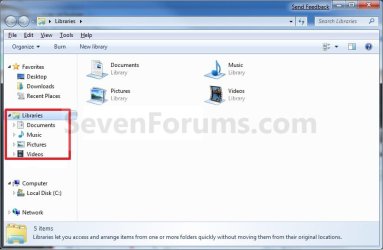
Default_Libraries.jpg


OPTION ONE

To Restore Default Libraries using "Restore Default Libraries"


1. Open Windows Explorer.

2. Right click or press and hold on Libraries in the navigation pane, and click/tap on Restore Default Libraries. (see screenshot below)
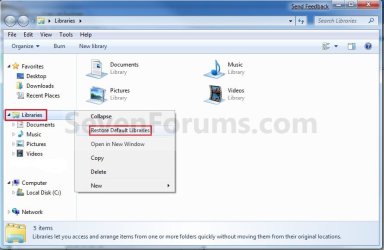
Libraries.jpg


OPTION TWO

To Restore Default Libraries by Unhiding them


   Note
This option is only helpful if your library or libraries have been hidden.

1. For how, see: How to Fix Libraries when Hidden and Empty in Windows 7 and Windows 8


OPTION THREE

To Restore Default Libraries using a REG File


   Note
This option will restore the default registry entries for the default libraries of all users.

You must be logged in as an administrator to be able to do this option.


1. If OPTION ONE and OPTION TWO above didn't help, then click/tap on the download button below to download the below.
Restore_Default_Libraries.reg


Download


2. Save the .reg file to your desktop.

3. Double click/tap on the .reg file to merge it.

4. If prompted, click/tap on Run, Yes (UAC), Yes, and OK to approve merging the .reg file.

5. Restart the computer to apply.

6. You can now delete the downloaded .reg file if you like.

That's it,
Shawn


Attachments

Last edited:
That does not hep to me either.

They look like this

libraries.png
 

My Computer

Computer type
PC/Desktop
Computer Manufacturer/Model Number
Custom build
OS
Windows 7 SP1 x64 Ultimate
CPU
FX 8320 4ghz
Motherboard
Gigabyte 970A UD3P
Memory
Crucial Ballistix Tactical 8GB 240-Pin DDR3 1600 Mhz
Graphics Card(s)
Sapphire R9 270 Dual X
Sound Card
VIA HD Audio
Monitor(s) Displays
Samsung SyncMaster 2032BW
Screen Resolution
1680 * 1050
Hard Drives
WD Blue WD10EZEX
PSU
Energon 650w
Case
Aerocool Strike X One
Cooling
Xigmatek Dark Knight SD1283 Night Hawk Edition
Keyboard
Typhoon CarbonKey
Mouse
Trust GXT 25 Gaming Mouse
Internet Speed
120mb/4mb
Antivirus
Comodo Internet Security 8.1
Browser
Firefox
Other Info
CfosSpeed 10
Hello DigDeep,

Not sure what happened to your Libraries, but you might see if running a sfc /scannow command may be able to fix them.

If not, then you can create a new adminsitrator account, copy the contents of your old account's user folders into the corresponding new account's user folders. If everything checks out ok, then you can delete the old account from within the new one.

If all else fails, or you do not want to create another account, then you can do a repair install without losing anything.

Hope this helps,
Shawn
 

My Computer

Computer type
PC/Desktop
Computer Manufacturer/Model Number
Self built custom
OS
64-bit Windows 11 Pro for Workstations
CPU
Intel i7-8700K OC'd to 5 GHz
Motherboard
ASUS ROG Maximus XI Formula Z390
Memory
64 GB (4x16GB) G.SKILL TridentZ RGB DDR4 3600 MHz
Graphics Card(s)
ASUS ROG-STRIX-GTX1080TI-O11G-GAMING
Sound Card
Integrated
Monitor(s) Displays
2 x Samsung Odyssey G7 27"
Screen Resolution
2560x1440
Hard Drives
1TB Samsung 990 PRO M.2,
4TB Samsung 990 PRO PRO M.2,
TerraMaster F8 SSD Plus NAS
PSU
Seasonic Prime Titanium 850W
Case
Thermaltake Core P3
Cooling
Corsair Hydro H115i
Keyboard
Logitech wireless K800
Mouse
Logitech MX Master 4
Internet Speed
2 Gb/s Download and 100 Mb/s Upload
Antivirus
Malwarebyte Anti-Malware Premium
Browser
Google Chrome
Other Info
Logitech Z625 speaker system,
Logitech BRIO 4K Pro webcam,
HP Color LaserJet Pro MFP M477fdn,
APC SMART-UPS RT 1000 XL - SURT1000XLI,
Galaxy S23 Plus phone
Try this (worked for me)

Select all the default libraries, delete them then follow the original instructions from shawn. This method worked for me :D
 

My Computer

OS
Windows 7 Proffesional, xp pro, windows vista
..which original instructions from Shawn?

Presumably means the ones contained in the original tutorial at the top of this page under "Here's How"
 

My Computer

Computer Manufacturer/Model Number
Self-Built Jan 2010
OS
Windows 7 64-bit
CPU
Intel Core i5 750 2.66Ghz
Motherboard
Asus P7P55D Pro
Memory
Crucial 8GB (4x2GB) DDR3 1333MHz
Graphics Card(s)
Sapphire HD 5850 1GB GDDR5
Monitor(s) Displays
Benq G2420HDBL LED LCD 24" DVI-D 1920x1080
Screen Resolution
1680 x 1050
Hard Drives
Samsung SpinPoint F3 1TB SATAII 7200rpm 32MB Cache (x2)
PSU
Corsair HX 750W
Case
Antec 300
Cooling
Arctic Cooling Freezer 7 Pro rev 2
Keyboard
Microsoft Reclusa
Mouse
Microsoft IntelliMouse Explorer 3.0
Internet Speed
10 Mb/sec (cable modem)
Other Info
Sony AD7241S 24x DVD±RW SATA Dual Layer & RAM Burner + LightScribe
works. thanks!
 

My Computer

Computer Manufacturer/Model Number
HP
OS
Win7
CPU
Intel Centrino T2050 1.6GHz
Memory
2.00GB
Graphics Card(s)
Mobile Intel 945 Express Chipset
Sound Card
Conexant HD audio
Screen Resolution
1280x800
Hard Drives
Samsung HM120JI 120GB
Mouse
Genius GM-04003A XSCROLL
Internet Speed
2M Cable
Other Info
HP Pavilion dv6000 Laptop
You're welcome VeLiKi. :)
 

My Computer

Computer type
PC/Desktop
Computer Manufacturer/Model Number
Self built custom
OS
64-bit Windows 11 Pro for Workstations
CPU
Intel i7-8700K OC'd to 5 GHz
Motherboard
ASUS ROG Maximus XI Formula Z390
Memory
64 GB (4x16GB) G.SKILL TridentZ RGB DDR4 3600 MHz
Graphics Card(s)
ASUS ROG-STRIX-GTX1080TI-O11G-GAMING
Sound Card
Integrated
Monitor(s) Displays
2 x Samsung Odyssey G7 27"
Screen Resolution
2560x1440
Hard Drives
1TB Samsung 990 PRO M.2,
4TB Samsung 990 PRO PRO M.2,
TerraMaster F8 SSD Plus NAS
PSU
Seasonic Prime Titanium 850W
Case
Thermaltake Core P3
Cooling
Corsair Hydro H115i
Keyboard
Logitech wireless K800
Mouse
Logitech MX Master 4
Internet Speed
2 Gb/s Download and 100 Mb/s Upload
Antivirus
Malwarebyte Anti-Malware Premium
Browser
Google Chrome
Other Info
Logitech Z625 speaker system,
Logitech BRIO 4K Pro webcam,
HP Color LaserJet Pro MFP M477fdn,
APC SMART-UPS RT 1000 XL - SURT1000XLI,
Galaxy S23 Plus phone
I can't delete my four folders under Libraries. I can expand the Libraries folder on the left in the navigation pane to show videos, documents, photos and music, but when I click on Libraries itself nothing appears on the right hand side, it remains empty.

I have tried to delete these four folders exposed when expanding Libraries but none of them are budging
 

My Computer

Computer Manufacturer/Model Number
Custom Built
OS
XP Pro
CPU
AMD Sempron Processor 3000+ 1.8GHz
Motherboard
Asus K8V-MX
Memory
2.0 GB
Graphics Card(s)
Ge Force FX 5500
Sound Card
Intergrated
Monitor(s) Displays
yusmart 19" Monitor 1280x1024
Hard Drives
320GB HD
PSU
N/A
Case
N/A
Cooling
N/A

My Computer

Computer type
PC/Desktop
Computer Manufacturer/Model Number
Self built custom
OS
64-bit Windows 11 Pro for Workstations
CPU
Intel i7-8700K OC'd to 5 GHz
Motherboard
ASUS ROG Maximus XI Formula Z390
Memory
64 GB (4x16GB) G.SKILL TridentZ RGB DDR4 3600 MHz
Graphics Card(s)
ASUS ROG-STRIX-GTX1080TI-O11G-GAMING
Sound Card
Integrated
Monitor(s) Displays
2 x Samsung Odyssey G7 27"
Screen Resolution
2560x1440
Hard Drives
1TB Samsung 990 PRO M.2,
4TB Samsung 990 PRO PRO M.2,
TerraMaster F8 SSD Plus NAS
PSU
Seasonic Prime Titanium 850W
Case
Thermaltake Core P3
Cooling
Corsair Hydro H115i
Keyboard
Logitech wireless K800
Mouse
Logitech MX Master 4
Internet Speed
2 Gb/s Download and 100 Mb/s Upload
Antivirus
Malwarebyte Anti-Malware Premium
Browser
Google Chrome
Other Info
Logitech Z625 speaker system,
Logitech BRIO 4K Pro webcam,
HP Color LaserJet Pro MFP M477fdn,
APC SMART-UPS RT 1000 XL - SURT1000XLI,
Galaxy S23 Plus phone
Just a quick note on this - I have an issue where I thought that my Libraries were missing, and the first two steps above did not fix the problem. I was about to perform the repair install, when I discovered the the libraries weren't actually missing. They were just hidden!

If you are having this specific issue, you can delete the (hidden) libraries, THEN restore the default libraries. It worked for me.
 

My Computer

OS
Windows 7 Ultimate
Thank you Brycesenz. I have added this to the tutorial so that is can others with the same issue. :)
 

My Computer

Computer type
PC/Desktop
Computer Manufacturer/Model Number
Self built custom
OS
64-bit Windows 11 Pro for Workstations
CPU
Intel i7-8700K OC'd to 5 GHz
Motherboard
ASUS ROG Maximus XI Formula Z390
Memory
64 GB (4x16GB) G.SKILL TridentZ RGB DDR4 3600 MHz
Graphics Card(s)
ASUS ROG-STRIX-GTX1080TI-O11G-GAMING
Sound Card
Integrated
Monitor(s) Displays
2 x Samsung Odyssey G7 27"
Screen Resolution
2560x1440
Hard Drives
1TB Samsung 990 PRO M.2,
4TB Samsung 990 PRO PRO M.2,
TerraMaster F8 SSD Plus NAS
PSU
Seasonic Prime Titanium 850W
Case
Thermaltake Core P3
Cooling
Corsair Hydro H115i
Keyboard
Logitech wireless K800
Mouse
Logitech MX Master 4
Internet Speed
2 Gb/s Download and 100 Mb/s Upload
Antivirus
Malwarebyte Anti-Malware Premium
Browser
Google Chrome
Other Info
Logitech Z625 speaker system,
Logitech BRIO 4K Pro webcam,
HP Color LaserJet Pro MFP M477fdn,
APC SMART-UPS RT 1000 XL - SURT1000XLI,
Galaxy S23 Plus phone
Thanks for the tutorial! This was really bugging me. And thanks to brycesenz for the trick that did it.
 

My Computer

Computer Manufacturer/Model Number
Pugh Technologies
OS
W7 Professional x64
CPU
AMD Athlon II X3 445 Rana 3.10 GHz
Motherboard
MSI 870A-G54
Memory
PNY XLR DDR3 1600 4x2GB
Graphics Card(s)
NVIDIA GeForce GTS 450 (fermi) 1GB GDDR5
Sound Card
Realtek ALC892 onboard
Monitor(s) Displays
ASUS VE205t, Viewsonic VX2035WM
Screen Resolution
1600x900, 1600x1050
Hard Drives
977GB Hitachi Hitachi HDS721010CLA332
244GB Western Digital WDC WD2500AAJS-65B4A0
488GB Western Digital WDC WD5000AAJS-00A8B0
488GB Western Digital WDC WD5000AAKS-00UU3A0
PSU
Antec EarthWatts EA650 650W
Case
ThermalTake Armor A90 Mid Tower
Cooling
3x 120mm in, 1x 120mm & 200mm out, self built hydro-cooler
Keyboard
Logitec 55
Mouse
Razer Deathadder
Internet Speed
20 Mbps D/L, 9 Mbps U/L
You're most welcome Patrick, and indeed thank you to Bryce. :)
 

My Computer

Computer type
PC/Desktop
Computer Manufacturer/Model Number
Self built custom
OS
64-bit Windows 11 Pro for Workstations
CPU
Intel i7-8700K OC'd to 5 GHz
Motherboard
ASUS ROG Maximus XI Formula Z390
Memory
64 GB (4x16GB) G.SKILL TridentZ RGB DDR4 3600 MHz
Graphics Card(s)
ASUS ROG-STRIX-GTX1080TI-O11G-GAMING
Sound Card
Integrated
Monitor(s) Displays
2 x Samsung Odyssey G7 27"
Screen Resolution
2560x1440
Hard Drives
1TB Samsung 990 PRO M.2,
4TB Samsung 990 PRO PRO M.2,
TerraMaster F8 SSD Plus NAS
PSU
Seasonic Prime Titanium 850W
Case
Thermaltake Core P3
Cooling
Corsair Hydro H115i
Keyboard
Logitech wireless K800
Mouse
Logitech MX Master 4
Internet Speed
2 Gb/s Download and 100 Mb/s Upload
Antivirus
Malwarebyte Anti-Malware Premium
Browser
Google Chrome
Other Info
Logitech Z625 speaker system,
Logitech BRIO 4K Pro webcam,
HP Color LaserJet Pro MFP M477fdn,
APC SMART-UPS RT 1000 XL - SURT1000XLI,
Galaxy S23 Plus phone
A fix that worked for me when nothing above did

I appeared to have a little glitch. Could have been caused by all my fussing around trying to get the Media Center to properly get folders added (still working on that). Suddenly, my libraries had nothing in them and no access to them.

I navigated to the folder where the libraries are held:

file:///C:/Users/%username%/AppData/Roaming/Microsoft/Windows/Libraries

For each library listed:

http://www.sevenforums.com/tutorials/122666-permissions-allow-deny-users-groups.html

1) right click on it and select properties
2) go to security tab and see if your user name is listed in the top window (mine was NOT)
3) Click the Edit button
4) Click the Add button
5) In the object names box, enter your user name and then click Check Names, click OK once found and validated
6) Click on your name in the top list of Group or user names
7) Select in the Permissions window the "Full Control" option, then Apply

Repeat for each folder.

This worked for me where nothing else above did.
 

My Computer

OS
Win 7 x64 Ent.
CPU
Intel Quad
Motherboard
eVGA 945 SLI
Memory
4G
Graphics Card(s)
Dual nVidia SLI 8600
Monitor(s) Displays
3
Hard Drives
6 SATA
This doesn't work for me...

I've gotton a virus that I was able to delete, but it deleted almost 9,000 songs out of Windows Media Player, and the folders. I have to start over and rebuild my library. I want to put my songs back in the Music Library, but the defaults do not show, and I cannot restore them. What can I do?
 

My Computer

OS
Windows 7 Home Premium 64bit
Hello TubularBell, and welcome to Seven Forums.

First, double check to make sure that you are virus and malware free.

You might see if using either Previous Versions, or the free programs Recuva and ShadowExplorer may be able to recover any of your deleted songs.

Next, see if running a sfc /scannow command may be able to allow you to use this tutorial to restore your default libraries afterwards.

If not, then it may be easier to create a new administrator account to use instead, and just copy over anything that you want from the old account into it.

Hope this helps,
Shawn
 

My Computer

Computer type
PC/Desktop
Computer Manufacturer/Model Number
Self built custom
OS
64-bit Windows 11 Pro for Workstations
CPU
Intel i7-8700K OC'd to 5 GHz
Motherboard
ASUS ROG Maximus XI Formula Z390
Memory
64 GB (4x16GB) G.SKILL TridentZ RGB DDR4 3600 MHz
Graphics Card(s)
ASUS ROG-STRIX-GTX1080TI-O11G-GAMING
Sound Card
Integrated
Monitor(s) Displays
2 x Samsung Odyssey G7 27"
Screen Resolution
2560x1440
Hard Drives
1TB Samsung 990 PRO M.2,
4TB Samsung 990 PRO PRO M.2,
TerraMaster F8 SSD Plus NAS
PSU
Seasonic Prime Titanium 850W
Case
Thermaltake Core P3
Cooling
Corsair Hydro H115i
Keyboard
Logitech wireless K800
Mouse
Logitech MX Master 4
Internet Speed
2 Gb/s Download and 100 Mb/s Upload
Antivirus
Malwarebyte Anti-Malware Premium
Browser
Google Chrome
Other Info
Logitech Z625 speaker system,
Logitech BRIO 4K Pro webcam,
HP Color LaserJet Pro MFP M477fdn,
APC SMART-UPS RT 1000 XL - SURT1000XLI,
Galaxy S23 Plus phone
Now here's my problem

I was able to recover the music I lost by restoring media player to an earlier date. NOW, media player will not stop updating media library. When I close out of media player and reopen it, it starts updating again, and will freeze up. I have read instructions about going to Tools, options, library and unchecking retrieve additional information from the internet. Doesn't help.
I tried to use the code entered into search at the start menu for clearing out media player and letting the system rebuild it, but my computer says the code isn't found. When Media Player updates, it freezes media player, and I get 'not responding'. It's frustrating. I tried Itunes, but I HATE it already.
I think I'm screwed. I don't know what else to do to make media player run the way it did.
HELP! PLEASE!
 

My Computer

OS
Windows 7 Home Premium 64bit
I'm afraid I don't know what to suggest about Media Player, but you might post this separate issue in a new thread to see if it may get a solution posted to it quicker.
 

My Computer

Computer type
PC/Desktop
Computer Manufacturer/Model Number
Self built custom
OS
64-bit Windows 11 Pro for Workstations
CPU
Intel i7-8700K OC'd to 5 GHz
Motherboard
ASUS ROG Maximus XI Formula Z390
Memory
64 GB (4x16GB) G.SKILL TridentZ RGB DDR4 3600 MHz
Graphics Card(s)
ASUS ROG-STRIX-GTX1080TI-O11G-GAMING
Sound Card
Integrated
Monitor(s) Displays
2 x Samsung Odyssey G7 27"
Screen Resolution
2560x1440
Hard Drives
1TB Samsung 990 PRO M.2,
4TB Samsung 990 PRO PRO M.2,
TerraMaster F8 SSD Plus NAS
PSU
Seasonic Prime Titanium 850W
Case
Thermaltake Core P3
Cooling
Corsair Hydro H115i
Keyboard
Logitech wireless K800
Mouse
Logitech MX Master 4
Internet Speed
2 Gb/s Download and 100 Mb/s Upload
Antivirus
Malwarebyte Anti-Malware Premium
Browser
Google Chrome
Other Info
Logitech Z625 speaker system,
Logitech BRIO 4K Pro webcam,
HP Color LaserJet Pro MFP M477fdn,
APC SMART-UPS RT 1000 XL - SURT1000XLI,
Galaxy S23 Plus phone
Back
Top