Solved How can I get my network adapter to go wireless?

lascott7

New member
Local time
12:56 PM
Messages
38
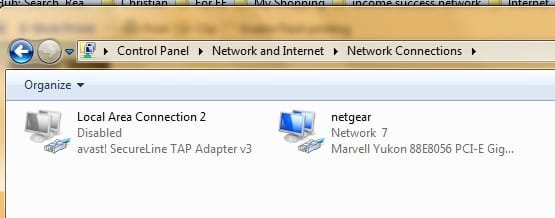
Hello guys I'm a tech- savvy momma and wanted to know how can I get my network adapter that was once a router to show up as wireless? I see it as connected wired but it's not. Could it be I don't have a real wireless network adapter? I'm also using ddt-k forums for flashing the router. Can anyone please help?
 

My Computer My Computer

At a glance

Windows 10 64-bitLenovo8gigs
Computer type
PC/Desktop
Computer Manufacturer/Model Number
Hp PC on an Acer motherboard so it's a mixed mutt. ;)
OS
Windows 10 64-bit
CPU
Lenovo
Motherboard
Lenovo
Memory
8gigs
Monitor(s) Displays
Acer 17''
Hard Drives
512 MB
Case
Lenovo case
Keyboard
Lifeworks backlit wired keyboard
Mouse
Soongo blue wured mouse
Antivirus
AVG Anti-Virus
Browser
Brave v 1.60.118

My Computer My Computer

At a glance

Dual Boot: Windows 8.1 & Server 2012r2 VMs: K...A10 7700 Kavari SteamRoller8GB DDR3 SDRAM PC3-85001024MB ATI AMD Radeon R7 Graphics
Computer type
PC/Desktop
Computer Manufacturer/Model Number
Custom
OS
Dual Boot: Windows 8.1 & Server 2012r2 VMs: Kali Linux, Backbox, Matriux, Windows 8.1
CPU
A10 7700 Kavari SteamRoller
Motherboard
ASUS A88XM-PLUS (FM2+ )
Memory
8GB DDR3 SDRAM PC3-8500
Graphics Card(s)
1024MB ATI AMD Radeon R7 Graphics
Sound Card
Realtek High Definition Audio
Monitor(s) Displays
Samsung
Hard Drives
SSD Crucial 120gb
WD VelociRaptor 1tb
PSU
Rosewill Gaming 650w
Case
Rosewill Galaxy 2
Internet Speed
55/12
Antivirus
Malwarebytes, MSE, SAS
Browser
FireFox, Chrome
I surely will when on next break at 7pm est my time. Thanks [emoji2]
 

My Computer My Computer

At a glance

Windows 10 64-bitLenovo8gigs
Computer type
PC/Desktop
Computer Manufacturer/Model Number
Hp PC on an Acer motherboard so it's a mixed mutt. ;)
OS
Windows 10 64-bit
CPU
Lenovo
Motherboard
Lenovo
Memory
8gigs
Monitor(s) Displays
Acer 17''
Hard Drives
512 MB
Case
Lenovo case
Keyboard
Lifeworks backlit wired keyboard
Mouse
Soongo blue wured mouse
Antivirus
AVG Anti-Virus
Browser
Brave v 1.60.118

My Computer My Computer

At a glance

Windows 10 64-bitLenovo8gigs
Computer type
PC/Desktop
Computer Manufacturer/Model Number
Hp PC on an Acer motherboard so it's a mixed mutt. ;)
OS
Windows 10 64-bit
CPU
Lenovo
Motherboard
Lenovo
Memory
8gigs
Monitor(s) Displays
Acer 17''
Hard Drives
512 MB
Case
Lenovo case
Keyboard
Lifeworks backlit wired keyboard
Mouse
Soongo blue wured mouse
Antivirus
AVG Anti-Virus
Browser
Brave v 1.60.118
Hello gator can you still help me? I am now able to see my Hubby's Xbox one, his PC and my WiFi printer under my network sections. But I am unable to see our Amazon fure tv device. Please help thanks.
 

My Computer My Computer

At a glance

Windows 10 64-bitLenovo8gigs
Computer type
PC/Desktop
Computer Manufacturer/Model Number
Hp PC on an Acer motherboard so it's a mixed mutt. ;)
OS
Windows 10 64-bit
CPU
Lenovo
Motherboard
Lenovo
Memory
8gigs
Monitor(s) Displays
Acer 17''
Hard Drives
512 MB
Case
Lenovo case
Keyboard
Lifeworks backlit wired keyboard
Mouse
Soongo blue wured mouse
Antivirus
AVG Anti-Virus
Browser
Brave v 1.60.118
Hello gator can you still help me? I am now able to see my Hubby's Xbox one, his PC and my WiFi printer under my network sections. But I am unable to see our Amazon fure tv device. Please help thanks.

Sorry about that, managing so many threads is difficult.

Just as a run down, your internet connection is fine right now and you are only having problems with Fure tv?
 

My Computer My Computer

At a glance

Dual Boot: Windows 8.1 & Server 2012r2 VMs: K...A10 7700 Kavari SteamRoller8GB DDR3 SDRAM PC3-85001024MB ATI AMD Radeon R7 Graphics
Computer type
PC/Desktop
Computer Manufacturer/Model Number
Custom
OS
Dual Boot: Windows 8.1 & Server 2012r2 VMs: Kali Linux, Backbox, Matriux, Windows 8.1
CPU
A10 7700 Kavari SteamRoller
Motherboard
ASUS A88XM-PLUS (FM2+ )
Memory
8GB DDR3 SDRAM PC3-8500
Graphics Card(s)
1024MB ATI AMD Radeon R7 Graphics
Sound Card
Realtek High Definition Audio
Monitor(s) Displays
Samsung
Hard Drives
SSD Crucial 120gb
WD VelociRaptor 1tb
PSU
Rosewill Gaming 650w
Case
Rosewill Galaxy 2
Internet Speed
55/12
Antivirus
Malwarebytes, MSE, SAS
Browser
FireFox, Chrome
Oh ok. That's understandable. Yes I am having problems seeing it from my PC. I can see everything else on my PC through Network section of my windows explorer
 

My Computer My Computer

At a glance

Windows 10 64-bitLenovo8gigs
Computer type
PC/Desktop
Computer Manufacturer/Model Number
Hp PC on an Acer motherboard so it's a mixed mutt. ;)
OS
Windows 10 64-bit
CPU
Lenovo
Motherboard
Lenovo
Memory
8gigs
Monitor(s) Displays
Acer 17''
Hard Drives
512 MB
Case
Lenovo case
Keyboard
Lifeworks backlit wired keyboard
Mouse
Soongo blue wured mouse
Antivirus
AVG Anti-Virus
Browser
Brave v 1.60.118
Can you tell me the exact model of your router? Right now you are connected via ethernet. You will need a Wifi adapter on your PC to connect to it. To connect to your TV, I'm assuming its Wifi and you should have a disc or utility that goes with it that you need to setup on your PC so that they can be linked up.

The only way for your TV to show up on your network is if you had the TV connected to your wifi or you have it connected directly to your router/switch.
 

My Computer My Computer

At a glance

Dual Boot: Windows 8.1 & Server 2012r2 VMs: K...A10 7700 Kavari SteamRoller8GB DDR3 SDRAM PC3-85001024MB ATI AMD Radeon R7 Graphics
Computer type
PC/Desktop
Computer Manufacturer/Model Number
Custom
OS
Dual Boot: Windows 8.1 & Server 2012r2 VMs: Kali Linux, Backbox, Matriux, Windows 8.1
CPU
A10 7700 Kavari SteamRoller
Motherboard
ASUS A88XM-PLUS (FM2+ )
Memory
8GB DDR3 SDRAM PC3-8500
Graphics Card(s)
1024MB ATI AMD Radeon R7 Graphics
Sound Card
Realtek High Definition Audio
Monitor(s) Displays
Samsung
Hard Drives
SSD Crucial 120gb
WD VelociRaptor 1tb
PSU
Rosewill Gaming 650w
Case
Rosewill Galaxy 2
Internet Speed
55/12
Antivirus
Malwarebytes, MSE, SAS
Browser
FireFox, Chrome
I have a netgear WGR614v8 and I already WiFi connection its weird because my router is flashed on ddt firmware to work as a network adapter but on my PC it shows up in status bar as wired liked the Ethernet hooked up. Weird. I wanted to save so be money by turning it into a network adapter.
 

My Computer My Computer

At a glance

Windows 10 64-bitLenovo8gigs
Computer type
PC/Desktop
Computer Manufacturer/Model Number
Hp PC on an Acer motherboard so it's a mixed mutt. ;)
OS
Windows 10 64-bit
CPU
Lenovo
Motherboard
Lenovo
Memory
8gigs
Monitor(s) Displays
Acer 17''
Hard Drives
512 MB
Case
Lenovo case
Keyboard
Lifeworks backlit wired keyboard
Mouse
Soongo blue wured mouse
Antivirus
AVG Anti-Virus
Browser
Brave v 1.60.118
Can you tell me the exact model of your router? Right now you are connected via ethernet. You will need a Wifi adapter on your PC to connect to it. To connect to your TV, I'm assuming its Wifi and you should have a disc or utility that goes with it that you need to setup on your PC so that they can be linked up.

The only way for your TV to show up on your network is if you had the TV connected to your wifi or you have it connected directly to your router/switch.
Hello Gator can you still help me? I need your help with my PC. Thanks.
 

My Computer My Computer

At a glance

Windows 10 64-bitLenovo8gigs
Computer type
PC/Desktop
Computer Manufacturer/Model Number
Hp PC on an Acer motherboard so it's a mixed mutt. ;)
OS
Windows 10 64-bit
CPU
Lenovo
Motherboard
Lenovo
Memory
8gigs
Monitor(s) Displays
Acer 17''
Hard Drives
512 MB
Case
Lenovo case
Keyboard
Lifeworks backlit wired keyboard
Mouse
Soongo blue wured mouse
Antivirus
AVG Anti-Virus
Browser
Brave v 1.60.118
As far as I know you have internet connection right? The router may produce a signal but you will need to connect your TV to that router if your TV in fact accepts wifi connections. If not, you will need to use whatever utility your TV uses to sync to your PC. I don't know of any other way to get a TV to join the network. Its either gotta be connected to the network via ethernet cable/wifi OR it needs to sync to your PC in some way, similar to Windows Media Center syncing to your Xbox etc.
 

My Computer My Computer

At a glance

Dual Boot: Windows 8.1 & Server 2012r2 VMs: K...A10 7700 Kavari SteamRoller8GB DDR3 SDRAM PC3-85001024MB ATI AMD Radeon R7 Graphics
Computer type
PC/Desktop
Computer Manufacturer/Model Number
Custom
OS
Dual Boot: Windows 8.1 & Server 2012r2 VMs: Kali Linux, Backbox, Matriux, Windows 8.1
CPU
A10 7700 Kavari SteamRoller
Motherboard
ASUS A88XM-PLUS (FM2+ )
Memory
8GB DDR3 SDRAM PC3-8500
Graphics Card(s)
1024MB ATI AMD Radeon R7 Graphics
Sound Card
Realtek High Definition Audio
Monitor(s) Displays
Samsung
Hard Drives
SSD Crucial 120gb
WD VelociRaptor 1tb
PSU
Rosewill Gaming 650w
Case
Rosewill Galaxy 2
Internet Speed
55/12
Antivirus
Malwarebytes, MSE, SAS
Browser
FireFox, Chrome
As far as I know you have internet connection right? The router may produce a signal but you will need to connect your TV to that router if your TV in fact accepts wifi connections. If not, you will need to use whatever utility your TV uses to sync to your PC. I don't know of any other way to get a TV to join the network. Its either gotta be connected to the network via ethernet cable/wifi OR it needs to sync to your PC in some way, similar to Windows Media Center syncing to your Xbox etc.
Oh it's not a smart TV but the main thing is getting the Amazon fire TV device to connect to my pc but it connects to my Hubby's laptop.
 

My Computer My Computer

At a glance

Windows 10 64-bitLenovo8gigs
Computer type
PC/Desktop
Computer Manufacturer/Model Number
Hp PC on an Acer motherboard so it's a mixed mutt. ;)
OS
Windows 10 64-bit
CPU
Lenovo
Motherboard
Lenovo
Memory
8gigs
Monitor(s) Displays
Acer 17''
Hard Drives
512 MB
Case
Lenovo case
Keyboard
Lifeworks backlit wired keyboard
Mouse
Soongo blue wured mouse
Antivirus
AVG Anti-Virus
Browser
Brave v 1.60.118
As far as I know you have internet connection right? The router may produce a signal but you will need to connect your TV to that router if your TV in fact accepts wifi connections. If not, you will need to use whatever utility your TV uses to sync to your PC. I don't know of any other way to get a TV to join the network. Its either gotta be connected to the network via ethernet cable/wifi OR it needs to sync to your PC in some way, similar to Windows Media Center syncing to your Xbox etc.
Oh it's not a smart TV but the main thing is getting the Amazon fire TV device to connect to my pc but it connects to my Hubby's laptop.

Im not familiar with the Amazon Fire Tv device, how does your husband connect to this device? Via wifi? Your PC will need a wifi adapter if so. You can get one at the store for I think about $30-40.
 

My Computer My Computer

At a glance

Dual Boot: Windows 8.1 & Server 2012r2 VMs: K...A10 7700 Kavari SteamRoller8GB DDR3 SDRAM PC3-85001024MB ATI AMD Radeon R7 Graphics
Computer type
PC/Desktop
Computer Manufacturer/Model Number
Custom
OS
Dual Boot: Windows 8.1 & Server 2012r2 VMs: Kali Linux, Backbox, Matriux, Windows 8.1
CPU
A10 7700 Kavari SteamRoller
Motherboard
ASUS A88XM-PLUS (FM2+ )
Memory
8GB DDR3 SDRAM PC3-8500
Graphics Card(s)
1024MB ATI AMD Radeon R7 Graphics
Sound Card
Realtek High Definition Audio
Monitor(s) Displays
Samsung
Hard Drives
SSD Crucial 120gb
WD VelociRaptor 1tb
PSU
Rosewill Gaming 650w
Case
Rosewill Galaxy 2
Internet Speed
55/12
Antivirus
Malwarebytes, MSE, SAS
Browser
FireFox, Chrome
As far as I know you have internet connection right? The router may produce a signal but you will need to connect your TV to that router if your TV in fact accepts wifi connections. If not, you will need to use whatever utility your TV uses to sync to your PC. I don't know of any other way to get a TV to join the network. Its either gotta be connected to the network via ethernet cable/wifi OR it needs to sync to your PC in some way, similar to Windows Media Center syncing to your Xbox etc.
Oh it's not a smart TV but the main thing is getting the Amazon fire TV device to connect to my pc but it connects to my Hubby's laptop.

Im not familiar with the Amazon Fire Tv device, how does your husband connect to this device? Via wifi? Your PC will need a wifi adapter if so. You can get one at the store for I think about $30-40.
Yes his laptop is on WiFi. I was hoping the network adapter that was once a router I'm using connects to Xbox one. Weird.
 

My Computer My Computer

At a glance

Windows 10 64-bitLenovo8gigs
Computer type
PC/Desktop
Computer Manufacturer/Model Number
Hp PC on an Acer motherboard so it's a mixed mutt. ;)
OS
Windows 10 64-bit
CPU
Lenovo
Motherboard
Lenovo
Memory
8gigs
Monitor(s) Displays
Acer 17''
Hard Drives
512 MB
Case
Lenovo case
Keyboard
Lifeworks backlit wired keyboard
Mouse
Soongo blue wured mouse
Antivirus
AVG Anti-Virus
Browser
Brave v 1.60.118
What type of network adapter do you have? There is a difference between connecting to your Xbox and connecting to Wifi.

When your husband connects to Amazon Fire TV, what does he usually do and/or when he first set it up, how did he connect?
 

My Computer My Computer

At a glance

Dual Boot: Windows 8.1 & Server 2012r2 VMs: K...A10 7700 Kavari SteamRoller8GB DDR3 SDRAM PC3-85001024MB ATI AMD Radeon R7 Graphics
Computer type
PC/Desktop
Computer Manufacturer/Model Number
Custom
OS
Dual Boot: Windows 8.1 & Server 2012r2 VMs: Kali Linux, Backbox, Matriux, Windows 8.1
CPU
A10 7700 Kavari SteamRoller
Motherboard
ASUS A88XM-PLUS (FM2+ )
Memory
8GB DDR3 SDRAM PC3-8500
Graphics Card(s)
1024MB ATI AMD Radeon R7 Graphics
Sound Card
Realtek High Definition Audio
Monitor(s) Displays
Samsung
Hard Drives
SSD Crucial 120gb
WD VelociRaptor 1tb
PSU
Rosewill Gaming 650w
Case
Rosewill Galaxy 2
Internet Speed
55/12
Antivirus
Malwarebytes, MSE, SAS
Browser
FireFox, Chrome
What type of network adapter do you have? There is a difference between connecting to your Xbox and connecting to Wifi.

When your husband connects to Amazon Fire TV, what does he usually do and/or when he first set it up, how did he connect?
He connects through WiFi. I'm assuming my netgear wgv8 router which I turned into a network adapter would connect like regular WiFi adapter to the Amazon fire TV but I will try to unplug it and hook it up via USB to my PC to see what happens.
 

My Computer My Computer

At a glance

Windows 10 64-bitLenovo8gigs
Computer type
PC/Desktop
Computer Manufacturer/Model Number
Hp PC on an Acer motherboard so it's a mixed mutt. ;)
OS
Windows 10 64-bit
CPU
Lenovo
Motherboard
Lenovo
Memory
8gigs
Monitor(s) Displays
Acer 17''
Hard Drives
512 MB
Case
Lenovo case
Keyboard
Lifeworks backlit wired keyboard
Mouse
Soongo blue wured mouse
Antivirus
AVG Anti-Virus
Browser
Brave v 1.60.118
Or should I connect to the router first?
 

My Computer My Computer

At a glance

Windows 10 64-bitLenovo8gigs
Computer type
PC/Desktop
Computer Manufacturer/Model Number
Hp PC on an Acer motherboard so it's a mixed mutt. ;)
OS
Windows 10 64-bit
CPU
Lenovo
Motherboard
Lenovo
Memory
8gigs
Monitor(s) Displays
Acer 17''
Hard Drives
512 MB
Case
Lenovo case
Keyboard
Lifeworks backlit wired keyboard
Mouse
Soongo blue wured mouse
Antivirus
AVG Anti-Virus
Browser
Brave v 1.60.118
Your PC needs a Wifi adapter to connect wirelessly. To me is seems you have an ethernet card with no wifi capabilities.

Are you saying your Amazon Fire TV has a USB stick that allows you to connect to Wifi?

To connect to your Amazon Fire TV, I'd assume you have a utility CD or something so that you can sync it to your PC.

What steps did your husband perform to get the Amazon TV to connect to his laptop and what exactly does he do each time he "connects" to it?
 

My Computer My Computer

At a glance

Dual Boot: Windows 8.1 & Server 2012r2 VMs: K...A10 7700 Kavari SteamRoller8GB DDR3 SDRAM PC3-85001024MB ATI AMD Radeon R7 Graphics
Computer type
PC/Desktop
Computer Manufacturer/Model Number
Custom
OS
Dual Boot: Windows 8.1 & Server 2012r2 VMs: Kali Linux, Backbox, Matriux, Windows 8.1
CPU
A10 7700 Kavari SteamRoller
Motherboard
ASUS A88XM-PLUS (FM2+ )
Memory
8GB DDR3 SDRAM PC3-8500
Graphics Card(s)
1024MB ATI AMD Radeon R7 Graphics
Sound Card
Realtek High Definition Audio
Monitor(s) Displays
Samsung
Hard Drives
SSD Crucial 120gb
WD VelociRaptor 1tb
PSU
Rosewill Gaming 650w
Case
Rosewill Galaxy 2
Internet Speed
55/12
Antivirus
Malwarebytes, MSE, SAS
Browser
FireFox, Chrome
Your PC needs a Wifi adapter to connect wirelessly. To me is seems you have an ethernet card with no wifi capabilities.

Are you saying your Amazon Fire TV has a USB stick that allows you to connect to Wifi?

To connect to your Amazon Fire TV, I'd assume you have a utility CD or something so that you can sync it to your PC.

What steps did your husband perform to get the Amazon TV to connect to his laptop and what exactly does he do each time he "connects" to it?
Oh OK. I will just have to buy a USB WiFi network adapter then. I was thinking my router that I turned into WiFi adapter connected good to my Hubby's PC and Xbox that I would be able to connect to amazon fTV. Thanks anyway I'll just do that. As for the steps for my Hubby's laptop which has built in WiFi adapter which most laptops do, all I did was allow homegroup then go to network and it was there.
 

My Computer My Computer

At a glance

Windows 10 64-bitLenovo8gigs
Computer type
PC/Desktop
Computer Manufacturer/Model Number
Hp PC on an Acer motherboard so it's a mixed mutt. ;)
OS
Windows 10 64-bit
CPU
Lenovo
Motherboard
Lenovo
Memory
8gigs
Monitor(s) Displays
Acer 17''
Hard Drives
512 MB
Case
Lenovo case
Keyboard
Lifeworks backlit wired keyboard
Mouse
Soongo blue wured mouse
Antivirus
AVG Anti-Virus
Browser
Brave v 1.60.118
Ok. I just went ahead and bought a nano wireless network adapter so it all works. Thanks Gator for everything. Thread closed.
 

My Computer My Computer

At a glance

Windows 10 64-bitLenovo8gigs
Computer type
PC/Desktop
Computer Manufacturer/Model Number
Hp PC on an Acer motherboard so it's a mixed mutt. ;)
OS
Windows 10 64-bit
CPU
Lenovo
Motherboard
Lenovo
Memory
8gigs
Monitor(s) Displays
Acer 17''
Hard Drives
512 MB
Case
Lenovo case
Keyboard
Lifeworks backlit wired keyboard
Mouse
Soongo blue wured mouse
Antivirus
AVG Anti-Virus
Browser
Brave v 1.60.118
Back
Top