Have Cabled internet connection want to go wireless

pranoymitra

New member
Local time
3:17 PM
Messages
9
I have a cabled internet connection, connect it to my laptop type URL and then it ask for username password and then i can log in

I want to make it a wireless connection, for this

1. Do i need a modem or just router would suffice

2. What specification of instrument do i require?

Please help asap
 

My Computer My Computer

At a glance

Windows 7 Home premium
OS
Windows 7 Home premium
You will need a wireles router and a NIC card or USB device. Then it is a matter of setting up the connection. This will include creating a User and KEY. The key is to protect the router from being "hacked."
 

My Computer My Computer

At a glance

Windows 7 Enterprise 64bit Desktops; Windows ...AMD Athlon 2 X3; I5-6200 6th gen (Dell)8 Gig Desktop, 8Gig Laptop, 16Gig LaptopRadeon R5450 1Gig
Computer type
PC/Desktop
Computer Manufacturer/Model Number
Custom Desktop (2 alike) Dell inspiron 13" W10 Laptop Dell Inspiron 17 5759
OS
Windows 7 Enterprise 64bit Desktops; Windows 7 Professional 64Bit 17"Laptop
CPU
AMD Athlon 2 X3; I5-6200 6th gen (Dell)
Motherboard
Gigabyte GA 78LMT-USB3 (2 Desktops)
Memory
8 Gig Desktop, 8Gig Laptop, 16Gig Laptop
Graphics Card(s)
Radeon R5450 1Gig
Sound Card
Creative SB X-Fi Titanium Extreme Audio Desktop 1
Monitor(s) Displays
Dell 2419
Screen Resolution
1920x1080
Hard Drives
Crucial M500 500GB SSD Desktop 1 and Laptops
Samsung 850EVO 250GB - Desktop 2
PSU
Thermaltake 600watt
Case
Rosewill
Cooling
Scythe Typhoon 120mm
Keyboard
Kensington
Mouse
Logitech M310
Internet Speed
50/50
Antivirus
Avast
Browser
Firefox 68
Thanks for your reply

1. Is it fine to conclude that I wont require a modem???
2. NIC card?? is it there in my laptop?? never heard about it
 

My Computer My Computer

At a glance

Windows 7 Home premium
OS
Windows 7 Home premium
is it there in my laptop??
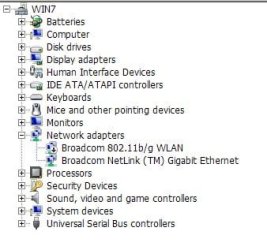
Take a look in Control Panel > Device Manager > Network and tell what you see.
 

Attachments

  • netw.JPG
    netw.JPG
    23.6 KB · Views: 6

My Computer My Computer

At a glance

W7, W8.1
Computer type
Laptop
Computer Manufacturer/Model Number
Dell \ Lenovo\ HP \ Toshiba
OS
W7, W8.1
Antivirus
MSE, Malwarebytes
Browser
FF
PFA

For modem??? do i require it??
 

Attachments

  • device manager.png
    device manager.png
    10.7 KB · Views: 11

My Computer My Computer

At a glance

Windows 7 Home premium
OS
Windows 7 Home premium
Can any one please tell me whether i require a MODEM or not
and do i have a NIC card in my Laptop or not
 

My Computer My Computer

At a glance

Windows 7 Home premium
OS
Windows 7 Home premium
Thanks for your reply

1. Is it fine to conclude that I wont require a modem???
2. NIC card?? is it there in my laptop?? never heard about it

In regards to your questions;

1. To use the laptop at home, you will need a modem. If you go "out and about" and visit establishments that provide WiFi, then you will piggyback a connection through their service.

2. Most newer laptops have an internal card for wireless access.

Visit the following link for more detailed information;

http://www.ehow.com/how_4853821_set-up-wireless-internet-laptop.html

HTH
 

My Computer My Computer

At a glance

Windows 7 Professional x64Intel i5 quad processor16 GBRadeon HD 5770
Computer type
PC/Desktop
Computer Manufacturer/Model Number
Custom Built
OS
Windows 7 Professional x64
CPU
Intel i5 quad processor
Motherboard
DP67BG
Memory
16 GB
Graphics Card(s)
Radeon HD 5770
Sound Card
Realtek High Definition Audio
Monitor(s) Displays
Samsung SyncMaster
Screen Resolution
1920X1080
Hard Drives
WD 2TB (SATA Internal)
WD 1TB (USB External)
PSU
Corsair GS800
Case
Tower (Generic)
Cooling
3 Internal Fans
Keyboard
MS Wireless
Mouse
MS Optical Wired
Internet Speed
54 mbps
Antivirus
Emsisoft
Browser
IE-Version 9, Palemoon-Version 24.2.0

My Computer My Computer

At a glance

W7, W8.1
Computer type
Laptop
Computer Manufacturer/Model Number
Dell \ Lenovo\ HP \ Toshiba
OS
W7, W8.1
Antivirus
MSE, Malwarebytes
Browser
FF
The cable that connects to your laptop, what's at the other end? Knowing what that is and what it's capable of should answer your questions?

I will assume it's a router. But I can't assume it's capable of wireless.

If the router is not wireless-capable, then look to replace it.
 

My Computer My Computer

At a glance

Windows 7 Home Premium x64
OS
Windows 7 Home Premium x64
its some thing via which the internet service provider provides internet to different flats in my locality. Will try to know it from him. We just log in, and based on our package we get different internet speed
 

My Computer My Computer

At a glance

Windows 7 Home premium
OS
Windows 7 Home premium
Back
Top