Download cCleaner standard version (FREE)
Press the Run button on the download action bar
Do not select to install any additional software if offered (toolbars,etc) - untick the check box
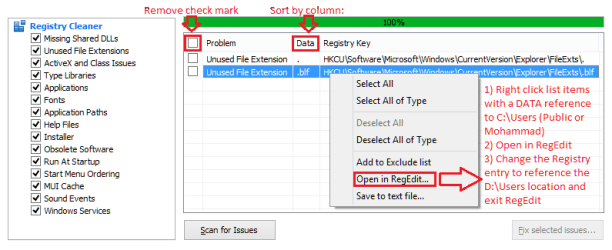
Launch cCleaner and select the registry menu pick on the left - press the scan button.
Press the column header Data to sort the entries.
Important! Remove the tick from the checkbox in the selected column header. This should clear all checkboxes. The intent is to have nothing selected - empty checkboxes.
Thanks a lot,
No results were found. Thus, what do you mean with 'Remove the tick from the checkbox'

You absolute meant in the results of the scanning with 'CCleaner', I would need to scroll through the list looking for 'C:\Users\Public'. If so, I would be saying that no results at all were found after scanning.Pay attention here: scroll through the list looking for C:\Users\Public
Right click the entry
Select Open in Regedit
Rename the key or modify the value to D:\Users\Public
Close Regedit after you've made the change
Or otherwise, you meant I will need to open the 'Regedit', then under which entry will need to look for 'D:\Users\Public'?
As you may have known from our discussion that I have two new 'old' user accounts' folders recreated 'public' and 'existing' accounts. Which means Registry had an try for the new 'old' folder 'C:\Users' for both 'Public' and 'Mohammad'.When you have changed all references of C:\Users\Public to D:\Users\Public found by cCleaner, run another Registry scan to make sure.

The new 'old' folder for the public account was created in the 'C:\Users\Public' after installing Sharp printer drivers which created a folder 'Printer Status Monitor' in the Documents folder; Thus, only the 'Documents' folder(screen shot below) in the public user was created in the new 'old' folder.

The new 'old' folder for the existing account 'Mohammad' was created in the 'C:\Users\Mohammad' after installing HP support assistant, and iSkysoft software. Only the 'App' folder(screen shot below) was created by these two program in the new 'old' folder 'C:\Users\Mohammad'

As a result, Why will I only need me to change the 'C:\Users\Public', and what about the 'C:\Users\Mohammad'?
As you may have known from our discussion that I have two new 'old' user accounts' folders recreated 'public' and 'existing' accounts.Here's a trick I use to see if the registry has an try for the new 'old' folder.
Rename the folder that was created by the install or update.
I'll use C:\Users\Public as an example.
Rename C:\Users\Public to C:\Users\x-Public
As a result, Why will I only need me to rename the 'C:\Users\Public', and what about the 'C:\Users\Mohammad'?
Moreover, ListCuser-b.txt created by running the command below doesn't contain any tries for the new 'old' folder. 'C:\Users\Public'
C:
cd C:\Users
dir /a /s > ListCuser-b.txt
(cd C:\Users, dir /a /s > ListCuser-b.txt')
However, 'ListCuser-b.txt' only contains tries for the new 'old' folder. 'C:\Users\Mohammad'for the existing account, If I need a command to create 'ListCuser-b.txt' containing any tries for the new 'old' folder 'C:\Users\Public', which is for the public folder, what one will be? Dost this below give me 'listCuser-b.txt' for the 'C:\Users\Public'? However, running that command gave me 'Access is denied'

Look here in the contents of the ListCuser-b.txt for the new 'old' folder. 'C:\Users\Mohammad'::
HTML:
 Volume in drive C is OS Partition
 Volume Serial Number is DBB3-CF00

 Directory of C:\Users\Mohammad

09/24/14  01:29 AM    <DIR>          .
09/24/14  01:29 AM    <DIR>          ..
09/24/14  01:29 AM    <DIR>          AppData
               0 File(s)              0 bytes

 Directory of C:\Users\Mohammad\AppData

09/24/14  01:29 AM    <DIR>          .
09/24/14  01:29 AM    <DIR>          ..
11/03/14  12:53 AM    <DIR>          Local
               0 File(s)              0 bytes

 Directory of C:\Users\Mohammad\AppData\Local

11/03/14  12:53 AM    <DIR>          .
11/03/14  12:53 AM    <DIR>          ..
11/03/14  12:53 AM    <DIR>          Hewlett-Packard
09/24/14  01:29 AM    <DIR>          iSkysoft
               0 File(s)              0 bytes

 Directory of C:\Users\Mohammad\AppData\Local\Hewlett-Packard

11/03/14  12:53 AM    <DIR>          .
11/03/14  12:53 AM    <DIR>          ..
11/03/14  12:53 AM    <DIR>          HP Support Framework
               0 File(s)              0 bytes

 Directory of C:\Users\Mohammad\AppData\Local\Hewlett-Packard\HP Support Framework

11/03/14  12:53 AM    <DIR>          .
11/03/14  12:53 AM    <DIR>          ..
11/03/14  12:53 AM    <DIR>          Reg
               0 File(s)              0 bytes

 Directory of C:\Users\Mohammad\AppData\Local\Hewlett-Packard\HP Support Framework\Reg

11/03/14  12:53 AM    <DIR>          .
11/03/14  12:53 AM    <DIR>          ..
11/03/14  12:53 AM               312 RegistrationInfo.xml
               1 File(s)            312 bytes

 Directory of C:\Users\Mohammad\AppData\Local\iSkysoft

09/24/14  01:29 AM    <DIR>          .
09/24/14  01:29 AM    <DIR>          ..
09/24/14  01:29 AM    <DIR>          ISHelper
               0 File(s)              0 bytes

 Directory of C:\Users\Mohammad\AppData\Local\iSkysoft\ISHelper

09/24/14  01:29 AM    <DIR>          .
09/24/14  01:29 AM    <DIR>          ..
               0 File(s)              0 bytes

     Total Files Listed:
               1 File(s)            312 bytes
              23 Dir(s)  260,947,603,456 bytes free
Last edited:
My Computer
At a glance
Windows 7 Home Premium 64BitIntel Core i5, 2.3GHzDDR3- 6GBIntel Graphics Family, Radeon HD 6770M
- Computer type
- Laptop
- Computer Manufacturer/Model Number
- HP, Pavilion
- OS
- Windows 7 Home Premium 64Bit
- CPU
- Intel Core i5, 2.3GHz
- Motherboard
- Hewlett-Packard- Model 1657
- Memory
- DDR3- 6GB
- Graphics Card(s)
- Intel Graphics Family, Radeon HD 6770M
- Hard Drives
- Toshiba 700GB
- Antivirus
- Microsot Secuirty Eessentials
- Browser
- MS IE, Google Chrom, and FireFox