Windows 10 on a USB stick

Thanks, I'll have a look at it.
 

My Computer My Computer

At a glance

Vista, Windows7, Mint Mate, Zorin, Windows 8from 1.6GHz Duo to i7
Computer Manufacturer/Model Number
HP, Dell, Gateway, Toshiba - 4 laptops and 2 desktops
OS
Vista, Windows7, Mint Mate, Zorin, Windows 8
CPU
from 1.6GHz Duo to i7
Monitor(s) Displays
2x HP w2207
Hard Drives
5x HDD, 7x SSD, 12x Externals
Keyboard
with trackball - no mices
Mouse
Trackball mice
Internet Speed
DSL 6000
WHS, I finally got around to this, I used your ImageX.exe as I couldn't find or figure out how to remove the Imagex.exe file from the iso for waik and I didn't have a cd or usb drive to actually install it. I seem to be having some luck,,, iam able to boot from the USB and see the windows ten splash and spinning (loading) dots but it just hangs there I waited almost an hour and no boot. I came back to w7 and scanned the thumbdrive and couldn't find the boot folder so I re-did bcdboot L:\windows /s L: and now I see the boot folder again,,,,, then tried again, same thing and again when back in win7 boot folder is missing unless I tick unhide system files in folder options then I see it.
Your tutorial says "
The first thing you will have to do is the Windows 10 normal installation." So does this mean start the install from within my win7 install?? that seems my only option so far but I don't want to accidentally install ten over my win7 os that I currently use.
Any ideas what I maybe doing wrong? I also noticed after your tutorial there are a few files such as "set up.exe,bootmgr.efi,Autorun.inif" not included on my thumb drive.
Thanks again for your help and great tutorial everything went as you said, took 5+hrs to create the usb drive but that's probably because my drive is slow but is the fastest I have.
J
 

My Computer My Computer

At a glance

Win 7 64 UltimateAMD 8350 Bulldozer 4ghz6gbATI Radeon HD 5770 X 2
Computer type
PC/Desktop
Computer Manufacturer/Model Number
JRockZ
OS
Win 7 64 Ultimate
CPU
AMD 8350 Bulldozer 4ghz
Motherboard
Asus M5a97 R2
Memory
6gb
Graphics Card(s)
ATI Radeon HD 5770 X 2
Sound Card
Board
Monitor(s) Displays
Dual Gateway 19" and 32" TV 3 displays at once :D
Screen Resolution
1440X900
Hard Drives
OCZ Agility SSD Patriot Blaze 120
PSU
750 Watt Thermaltake Tough Power
Case
Diablotek EVO Mid Tower Case CPA-6170 - 8X 120mm case fans
Cooling
Corsair Liquid Cooled
Antivirus
NAV
Browser
Always IE
WHS, I finally got around to this, I seem to be having some luck,,, iam able to boot from the USB and see the windows ten splash and spinning (loading) dots but it just hangs there.

The first thing you will have to do is the Windows 10 normal installation." So does this mean start the install from within my win7 install?? that seems my only option so far but I don't want to accidentally install ten over my win7 os that I currently use.
Any ideas what I maybe doing wrong?

Thanks again for your help and great tutorial everything went as you said, took 5+hrs to create the usb drive but that's probably because my drive is slow but is the fastest I have.
J

JRockZ, I am having the exact same issue when booting my laptop from the USB. Since the USB already has Windows 10 on it from the BD ROM drive I wasn't sure about installing it. I thought maybe after boot up from the USB then you would install it on the USB even though you've put everything on it already from the Windows 10 iso that was downloaded.

So far a pretty cool project, thanks whs :geek: Like JRock I'm concerned about installing it over my existing Win7 install. I have backups so no problems there but it'd be a PIA to have to reimage either the desktop or laptop. From my experience my problems are caused by something I'm doing or failed to do :o
 

My Computer My Computer

At a glance

Windows 11 Home x64AMD Ryzen 5 5600GG.SKILL Ripjaws Gaming Series (2x8G) DDR4None (AMD Radeon Graphics on MB and CPU)
Computer type
PC/Desktop
Computer Manufacturer/Model Number
Self built
OS
Windows 11 Home x64
CPU
AMD Ryzen 5 5600G
Motherboard
ASUSTeK Prime B450M-A II
Memory
G.SKILL Ripjaws Gaming Series (2x8G) DDR4
Graphics Card(s)
None (AMD Radeon Graphics on MB and CPU)
Sound Card
None (integrated on MB)
Monitor(s) Displays
Acer S200HLAbd Black 20"
Screen Resolution
1600 x 900
Hard Drives
Samsung SSD 840 EVO 120GB (W10)
WD Blue 500G SATA 6G WDBAAX5000ENC-NRSN (Backup/Storage)
PSU
Corsair CX500 500W ATX12V v2.3 80 Plus Bronze Active PFC
Case
Unknown
Cooling
CPU-stock cooling fan, 1 extra 80mm case fan
Keyboard
Azio KB505U Large Print Tri-Color Illuminated USB Keyboard
Mouse
MS Optical Wheel Mouse (USB)
Internet Speed
ATT Fiber 5000/VOIP 5G down/5G up
Antivirus
Win Defender, SAS, Spyware Blaster all free editions
Browser
Firefox, Waterfox, sometimes Edge
JRockZ, I am having the exact same issue when booting my laptop from the USB. Since the USB already has Windows 10 on it from the BD ROM drive I wasn't sure about installing it. I thought maybe after boot up from the USB then you would install it on the USB even though you've put everything on it already from the Windows 10 iso that was downloaded.

So far a pretty cool project, thanks whs :geek: Like JRock I'm concerned about installing it over my existing Win7 install. I have backups so no problems there but it'd be a PIA to have to reimage either the desktop or laptop. From my experience my problems are caused by something I'm doing or failed to do :o
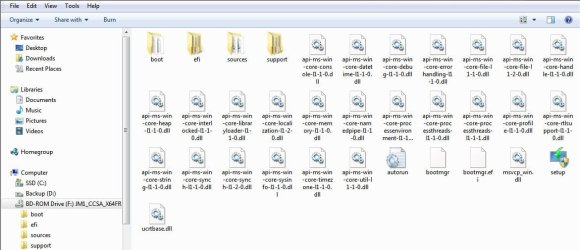
Im also thinking maybe it is something I did or didn't do,,, when I mount the iso in the BDrom I can get it to start the install in my win7 environment but im not sure if that's what whs means to do or not,,,, Maybe because im using WindowsTechnicalPreview-x64-EN-US.iso and not the enterprise version? and also it could be my USB drive,,, though brand new 32gb patriot slate I bought it on a whim (12bucks)then read reviews on it and that even though usb3.0 its still only giving usb2 speeds or slower, horrible reviews. Also could have something to do with my bios being set to fast boot, UEFi setting/s maybe or something else.
After reading WHS post on win ten forums he is getting a 8 or 10 sec boot from the usb in 3.0 I think he said, so I guess I screwed up. Will await the almighty whs's replies and see what he says.
 

My Computer My Computer

At a glance

Win 7 64 UltimateAMD 8350 Bulldozer 4ghz6gbATI Radeon HD 5770 X 2
Computer type
PC/Desktop
Computer Manufacturer/Model Number
JRockZ
OS
Win 7 64 Ultimate
CPU
AMD 8350 Bulldozer 4ghz
Motherboard
Asus M5a97 R2
Memory
6gb
Graphics Card(s)
ATI Radeon HD 5770 X 2
Sound Card
Board
Monitor(s) Displays
Dual Gateway 19" and 32" TV 3 displays at once :D
Screen Resolution
1440X900
Hard Drives
OCZ Agility SSD Patriot Blaze 120
PSU
750 Watt Thermaltake Tough Power
Case
Diablotek EVO Mid Tower Case CPA-6170 - 8X 120mm case fans
Cooling
Corsair Liquid Cooled
Antivirus
NAV
Browser
Always IE
So does this mean start the install from within my win7 install?? that seems my only option so far but I don't want to accidentally install ten over my win7 os that I currently use.
Of course you have to install it but from the stick and on the stick. How else will it run.
 

My Computer My Computer

At a glance

Vista, Windows7, Mint Mate, Zorin, Windows 8from 1.6GHz Duo to i7
Computer Manufacturer/Model Number
HP, Dell, Gateway, Toshiba - 4 laptops and 2 desktops
OS
Vista, Windows7, Mint Mate, Zorin, Windows 8
CPU
from 1.6GHz Duo to i7
Monitor(s) Displays
2x HP w2207
Hard Drives
5x HDD, 7x SSD, 12x Externals
Keyboard
with trackball - no mices
Mouse
Trackball mice
Internet Speed
DSL 6000
So does this mean start the install from within my win7 install?? that seems my only option so far but I don't want to accidentally install ten over my win7 os that I currently use.
Of course you have to install it but from the stick and on the stick. How else will it run.
Ok well like Steve said I was just afraid it may overwrite/dual boot my system which I don't want, I just want to be able to run 10 from the usb standalone... but like steve, I created an image yesterday I can always revert back to if I have to just would be a pita that's all.
 

My Computer My Computer

At a glance

Win 7 64 UltimateAMD 8350 Bulldozer 4ghz6gbATI Radeon HD 5770 X 2
Computer type
PC/Desktop
Computer Manufacturer/Model Number
JRockZ
OS
Win 7 64 Ultimate
CPU
AMD 8350 Bulldozer 4ghz
Motherboard
Asus M5a97 R2
Memory
6gb
Graphics Card(s)
ATI Radeon HD 5770 X 2
Sound Card
Board
Monitor(s) Displays
Dual Gateway 19" and 32" TV 3 displays at once :D
Screen Resolution
1440X900
Hard Drives
OCZ Agility SSD Patriot Blaze 120
PSU
750 Watt Thermaltake Tough Power
Case
Diablotek EVO Mid Tower Case CPA-6170 - 8X 120mm case fans
Cooling
Corsair Liquid Cooled
Antivirus
NAV
Browser
Always IE
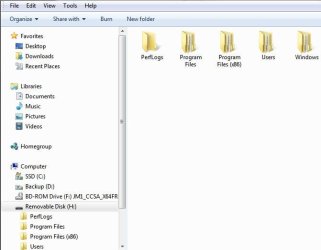
I can't find the "setup" installer to start the installation from the stick on the stick, it is there in the BD ROM but I can't seem to locate the installer to start the process on my USB stick. Snip of BD ROM below:

BD ROM.JPG

The USB stick doesn't show the setup, pardon my ignorance but please tell me how to start the install from the stick. Snip of USB stick below:

USB Removable media.JPG
 

My Computer My Computer

At a glance

Windows 11 Home x64AMD Ryzen 5 5600GG.SKILL Ripjaws Gaming Series (2x8G) DDR4None (AMD Radeon Graphics on MB and CPU)
Computer type
PC/Desktop
Computer Manufacturer/Model Number
Self built
OS
Windows 11 Home x64
CPU
AMD Ryzen 5 5600G
Motherboard
ASUSTeK Prime B450M-A II
Memory
G.SKILL Ripjaws Gaming Series (2x8G) DDR4
Graphics Card(s)
None (AMD Radeon Graphics on MB and CPU)
Sound Card
None (integrated on MB)
Monitor(s) Displays
Acer S200HLAbd Black 20"
Screen Resolution
1600 x 900
Hard Drives
Samsung SSD 840 EVO 120GB (W10)
WD Blue 500G SATA 6G WDBAAX5000ENC-NRSN (Backup/Storage)
PSU
Corsair CX500 500W ATX12V v2.3 80 Plus Bronze Active PFC
Case
Unknown
Cooling
CPU-stock cooling fan, 1 extra 80mm case fan
Keyboard
Azio KB505U Large Print Tri-Color Illuminated USB Keyboard
Mouse
MS Optical Wheel Mouse (USB)
Internet Speed
ATT Fiber 5000/VOIP 5G down/5G up
Antivirus
Win Defender, SAS, Spyware Blaster all free editions
Browser
Firefox, Waterfox, sometimes Edge
I can't find the "setup" installer to start the installation from the stick on the stick, it is there in the BD ROM but I can't seem to locate the installer to start the process on my USB stick. Snip of BD ROM below:

View attachment 345279

The USB stick doesn't show the setup, pardon my ignorance but please tell me how to start the install from the stick. Snip of USB stick below:

View attachment 345280

You have to boot from the USB drive is my guess but like I said with mine it just sits there on the windows splash screen with spinning dots and nothing ever happens,,, I let it go about 60 mins and got nothing, no change and no way out had to just hard power down and restart my PC.
Obviously it can be done IF WHS got it working and possibly others,, it maybe the imagex.exe possibly but im pretty sure that was just for creating the image that is on the USB drive, I didn't have any issues with that. Im just going to split up a portable drive I have and install right to it and use that I guess,,, again I just didn't want to dual boot or mix win ten with 7 at all I wanted it completely stand alone,, no big deal though.
 

My Computer My Computer

At a glance

Win 7 64 UltimateAMD 8350 Bulldozer 4ghz6gbATI Radeon HD 5770 X 2
Computer type
PC/Desktop
Computer Manufacturer/Model Number
JRockZ
OS
Win 7 64 Ultimate
CPU
AMD 8350 Bulldozer 4ghz
Motherboard
Asus M5a97 R2
Memory
6gb
Graphics Card(s)
ATI Radeon HD 5770 X 2
Sound Card
Board
Monitor(s) Displays
Dual Gateway 19" and 32" TV 3 displays at once :D
Screen Resolution
1440X900
Hard Drives
OCZ Agility SSD Patriot Blaze 120
PSU
750 Watt Thermaltake Tough Power
Case
Diablotek EVO Mid Tower Case CPA-6170 - 8X 120mm case fans
Cooling
Corsair Liquid Cooled
Antivirus
NAV
Browser
Always IE
JRock is right. You have to boot with (from) the stick.
 

My Computer My Computer

At a glance

Vista, Windows7, Mint Mate, Zorin, Windows 8from 1.6GHz Duo to i7
Computer Manufacturer/Model Number
HP, Dell, Gateway, Toshiba - 4 laptops and 2 desktops
OS
Vista, Windows7, Mint Mate, Zorin, Windows 8
CPU
from 1.6GHz Duo to i7
Monitor(s) Displays
2x HP w2207
Hard Drives
5x HDD, 7x SSD, 12x Externals
Keyboard
with trackball - no mices
Mouse
Trackball mice
Internet Speed
DSL 6000
I think he`s still trying to create the stick.
 

My Computer My Computer

At a glance

Windows 10 Pro x64Intel Core i7 6700KGSkill TridentZ RGB 16GB 3600 16-16-16-36EVGA GTX 980 Ti SC x2
Computer type
PC/Desktop
Computer Manufacturer/Model Number
Skylake Special #666
OS
Windows 10 Pro x64
CPU
Intel Core i7 6700K
Motherboard
Asus Sabertooth Z170 Mark 1
Memory
GSkill TridentZ RGB 16GB 3600 16-16-16-36
Graphics Card(s)
EVGA GTX 980 Ti SC x2
Sound Card
Realtek High Definition
Monitor(s) Displays
AOC G2460PG
Screen Resolution
1920 x 1080 144Hz
Hard Drives
Samsung 860 Pro 256GB, Seagate Barracuda 4TB x2
PSU
EVGA 1000 P2, EVGA White Custom Braided Cables
Case
Corsair Vengeance C70 Gunmetal Black
Cooling
Corsair H100i v2, Corsair ML120 x2, Thermal Grizzly Kryonaut
Keyboard
Logitech G910 Orion Spectrum
Mouse
Logitech G700s
Internet Speed
Verizon Fios Quantum Gateway 75/75
Antivirus
Windows Defender, Malwarebytes Free 3.8.3
Browser
Chrome
Other Info
Corsair SP120 x4, LG Blu-ray Drive, Durabrand HT-395 100 Watt Dolby Digital Amp, Corsair H2100 Wireless 7.1 Headset
AddRam as far as I know I completed the tutorial and finished the stick,, I followed all steps and the last thing I did to the usb stick was
bcdboot F:\windows /s F:
 

My Computer My Computer

At a glance

Win 7 64 UltimateAMD 8350 Bulldozer 4ghz6gbATI Radeon HD 5770 X 2
Computer type
PC/Desktop
Computer Manufacturer/Model Number
JRockZ
OS
Win 7 64 Ultimate
CPU
AMD 8350 Bulldozer 4ghz
Motherboard
Asus M5a97 R2
Memory
6gb
Graphics Card(s)
ATI Radeon HD 5770 X 2
Sound Card
Board
Monitor(s) Displays
Dual Gateway 19" and 32" TV 3 displays at once :D
Screen Resolution
1440X900
Hard Drives
OCZ Agility SSD Patriot Blaze 120
PSU
750 Watt Thermaltake Tough Power
Case
Diablotek EVO Mid Tower Case CPA-6170 - 8X 120mm case fans
Cooling
Corsair Liquid Cooled
Antivirus
NAV
Browser
Always IE
I`m talking about cmmtch
 

My Computer My Computer

At a glance

Windows 10 Pro x64Intel Core i7 6700KGSkill TridentZ RGB 16GB 3600 16-16-16-36EVGA GTX 980 Ti SC x2
Computer type
PC/Desktop
Computer Manufacturer/Model Number
Skylake Special #666
OS
Windows 10 Pro x64
CPU
Intel Core i7 6700K
Motherboard
Asus Sabertooth Z170 Mark 1
Memory
GSkill TridentZ RGB 16GB 3600 16-16-16-36
Graphics Card(s)
EVGA GTX 980 Ti SC x2
Sound Card
Realtek High Definition
Monitor(s) Displays
AOC G2460PG
Screen Resolution
1920 x 1080 144Hz
Hard Drives
Samsung 860 Pro 256GB, Seagate Barracuda 4TB x2
PSU
EVGA 1000 P2, EVGA White Custom Braided Cables
Case
Corsair Vengeance C70 Gunmetal Black
Cooling
Corsair H100i v2, Corsair ML120 x2, Thermal Grizzly Kryonaut
Keyboard
Logitech G910 Orion Spectrum
Mouse
Logitech G700s
Internet Speed
Verizon Fios Quantum Gateway 75/75
Antivirus
Windows Defender, Malwarebytes Free 3.8.3
Browser
Chrome
Other Info
Corsair SP120 x4, LG Blu-ray Drive, Durabrand HT-395 100 Watt Dolby Digital Amp, Corsair H2100 Wireless 7.1 Headset
I've created a second USB flash drive stick following the tutorial exactly, used the amd64 imagex.exe from the WAIK tools. This stick is a 64G USB3 PNY brand, the image.exe transfer took 61 minutes, the other stick I used yesterday took 207 minutes. Also HD Tune shows 0.8 seconds access time so this stick should be good to go for this project.

The computer booted from the USB/Removable Device and gave the same results as before, Windows 10 logo splash screen and the small spinning dots below that. Waited and waited with nothing more happening (20+ minutes) This doesn't appear to be an install screen, it looks like a boot screen to me. What exactly is happening when that first "boot" screen appears, is it actually installing on the USB stick and I should leave it alone?

Looks like there is something still missing or not being called on the stick that will start the install, it appears to be trying to boot but there's nothing beyond that. I'm trying something else and will post results if any to report.
 

My Computer My Computer

At a glance

Windows 11 Home x64AMD Ryzen 5 5600GG.SKILL Ripjaws Gaming Series (2x8G) DDR4None (AMD Radeon Graphics on MB and CPU)
Computer type
PC/Desktop
Computer Manufacturer/Model Number
Self built
OS
Windows 11 Home x64
CPU
AMD Ryzen 5 5600G
Motherboard
ASUSTeK Prime B450M-A II
Memory
G.SKILL Ripjaws Gaming Series (2x8G) DDR4
Graphics Card(s)
None (AMD Radeon Graphics on MB and CPU)
Sound Card
None (integrated on MB)
Monitor(s) Displays
Acer S200HLAbd Black 20"
Screen Resolution
1600 x 900
Hard Drives
Samsung SSD 840 EVO 120GB (W10)
WD Blue 500G SATA 6G WDBAAX5000ENC-NRSN (Backup/Storage)
PSU
Corsair CX500 500W ATX12V v2.3 80 Plus Bronze Active PFC
Case
Unknown
Cooling
CPU-stock cooling fan, 1 extra 80mm case fan
Keyboard
Azio KB505U Large Print Tri-Color Illuminated USB Keyboard
Mouse
MS Optical Wheel Mouse (USB)
Internet Speed
ATT Fiber 5000/VOIP 5G down/5G up
Antivirus
Win Defender, SAS, Spyware Blaster all free editions
Browser
Firefox, Waterfox, sometimes Edge
What I tried was putting one of the files from the WAIK tools folder where the imagex.exe was. There are several other things in the folder besides the imagex.exe. I tried copying a "WimMountInstall" and putting it in the Windows folder on the USB stick, no luck.

Heck maybe the entire amd64 folder should have been included in the image transfer to the USB stick to start the install. Seems like there is something missing between the boot file and the OS image, looks like the boot is starting from the USB but nothing happens. Maybe I need to wait longer, when I click on "Safely Remove Hardware and Eject Media" I get the message that it's in use, close all files then try again. There isn't anything on the stick I can see that is in use. This is after I've hit reset to get out of the endless boot screen and reboot back into Win7.

Should the boot screen move along into an install screen, and how long would that take? This is an image of an OS, in the past when I've reimaged my desktop there wasn't an "install" screen, it just installed the image without much user input once the back up image was chosen.

Can somebody point me in the right direction, the tutorial was great, step by step that worked until the point of installing Windows 10 TP on the stick. That's where I'm stuck.
 

My Computer My Computer

At a glance

Windows 11 Home x64AMD Ryzen 5 5600GG.SKILL Ripjaws Gaming Series (2x8G) DDR4None (AMD Radeon Graphics on MB and CPU)
Computer type
PC/Desktop
Computer Manufacturer/Model Number
Self built
OS
Windows 11 Home x64
CPU
AMD Ryzen 5 5600G
Motherboard
ASUSTeK Prime B450M-A II
Memory
G.SKILL Ripjaws Gaming Series (2x8G) DDR4
Graphics Card(s)
None (AMD Radeon Graphics on MB and CPU)
Sound Card
None (integrated on MB)
Monitor(s) Displays
Acer S200HLAbd Black 20"
Screen Resolution
1600 x 900
Hard Drives
Samsung SSD 840 EVO 120GB (W10)
WD Blue 500G SATA 6G WDBAAX5000ENC-NRSN (Backup/Storage)
PSU
Corsair CX500 500W ATX12V v2.3 80 Plus Bronze Active PFC
Case
Unknown
Cooling
CPU-stock cooling fan, 1 extra 80mm case fan
Keyboard
Azio KB505U Large Print Tri-Color Illuminated USB Keyboard
Mouse
MS Optical Wheel Mouse (USB)
Internet Speed
ATT Fiber 5000/VOIP 5G down/5G up
Antivirus
Win Defender, SAS, Spyware Blaster all free editions
Browser
Firefox, Waterfox, sometimes Edge
It looks like you have no boot files. Did you run this command.

bcdboot F:\windows /s F:

If yes, is your partition on the stick an active primary NTFS partition.

I made 2 sticks and one SSD and they all work perfectly. Once you have the imagex.exe on your desktop and the .iso in the virtual CD or a real DVD, then you really need to run only the 2 commands.
 

My Computer My Computer

At a glance

Vista, Windows7, Mint Mate, Zorin, Windows 8from 1.6GHz Duo to i7
Computer Manufacturer/Model Number
HP, Dell, Gateway, Toshiba - 4 laptops and 2 desktops
OS
Vista, Windows7, Mint Mate, Zorin, Windows 8
CPU
from 1.6GHz Duo to i7
Monitor(s) Displays
2x HP w2207
Hard Drives
5x HDD, 7x SSD, 12x Externals
Keyboard
with trackball - no mices
Mouse
Trackball mice
Internet Speed
DSL 6000
It looks like you have no boot files. Did you run this command.

bcdboot F:\windows /s F:

If yes, is your partition on the stick an active primary NTFS partition.

I made 2 sticks and one SSD and they all work perfectly. Once you have the imagex.exe on your desktop and the .iso in the virtual CD or a real DVD, then you really need to run only the 2 commands.
For Mine I verified yes and yes! Seems after command prompt runs

bcdboot F:\windows /s F:

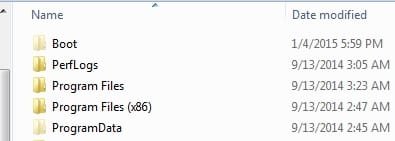
The boot folder is there but is a hidden folder I went to my folder views and ticked do not show hidden files and folders,, when I did that and then ticked it back to show them the boot folder was gone completely so its not staying for some reason.

EDIT but if I uncheck hide protected operating system files it is still there,, im guessing maybe because I need to "take ownership" maybe? would that even matter??
 

Attachments

  • boot1.jpg
    boot1.jpg
    8.1 KB · Views: 8

My Computer My Computer

At a glance

Win 7 64 UltimateAMD 8350 Bulldozer 4ghz6gbATI Radeon HD 5770 X 2
Computer type
PC/Desktop
Computer Manufacturer/Model Number
JRockZ
OS
Win 7 64 Ultimate
CPU
AMD 8350 Bulldozer 4ghz
Motherboard
Asus M5a97 R2
Memory
6gb
Graphics Card(s)
ATI Radeon HD 5770 X 2
Sound Card
Board
Monitor(s) Displays
Dual Gateway 19" and 32" TV 3 displays at once :D
Screen Resolution
1440X900
Hard Drives
OCZ Agility SSD Patriot Blaze 120
PSU
750 Watt Thermaltake Tough Power
Case
Diablotek EVO Mid Tower Case CPA-6170 - 8X 120mm case fans
Cooling
Corsair Liquid Cooled
Antivirus
NAV
Browser
Always IE
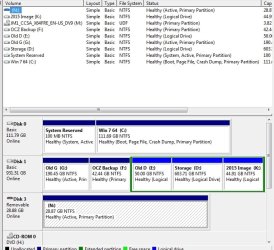
Playing around with the files is not going to solve the problem. Can you post a picture of your disk management with the stick plugged in. I want to check something.
 

My Computer My Computer

At a glance

Vista, Windows7, Mint Mate, Zorin, Windows 8from 1.6GHz Duo to i7
Computer Manufacturer/Model Number
HP, Dell, Gateway, Toshiba - 4 laptops and 2 desktops
OS
Vista, Windows7, Mint Mate, Zorin, Windows 8
CPU
from 1.6GHz Duo to i7
Monitor(s) Displays
2x HP w2207
Hard Drives
5x HDD, 7x SSD, 12x Externals
Keyboard
with trackball - no mices
Mouse
Trackball mice
Internet Speed
DSL 6000
Playing around with the files is not going to solve the problem. Can you post a picture of your disk management with the stick plugged in. I want to check something.
Almost scared to do that,,, lol its messy!
But here ya go.
Volume N: is my usb 32gb
 

Attachments

  • disks1.jpg
    disks1.jpg
    78.8 KB · Views: 1

My Computer My Computer

At a glance

Win 7 64 UltimateAMD 8350 Bulldozer 4ghz6gbATI Radeon HD 5770 X 2
Computer type
PC/Desktop
Computer Manufacturer/Model Number
JRockZ
OS
Win 7 64 Ultimate
CPU
AMD 8350 Bulldozer 4ghz
Motherboard
Asus M5a97 R2
Memory
6gb
Graphics Card(s)
ATI Radeon HD 5770 X 2
Sound Card
Board
Monitor(s) Displays
Dual Gateway 19" and 32" TV 3 displays at once :D
Screen Resolution
1440X900
Hard Drives
OCZ Agility SSD Patriot Blaze 120
PSU
750 Watt Thermaltake Tough Power
Case
Diablotek EVO Mid Tower Case CPA-6170 - 8X 120mm case fans
Cooling
Corsair Liquid Cooled
Antivirus
NAV
Browser
Always IE
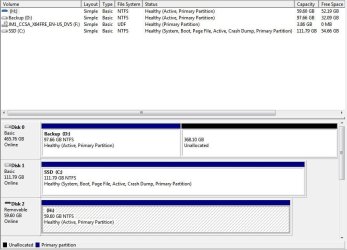
Disk management screen shot. I did do the boot file command again, this time when booting from the USB in my laptop (Dell Latitude E6400, refurbished) I got a Windows 10 screen saying previous installs had failed, it was titled "Recovery Tools" and gave me startup options like safe mode, boot logging, etc... That was something I hadn't seen before. I wanted to post the disk management before trying again in my desktop. Could be the boot file is/was corrupt causing my problem. This is the first time I've gotten anything but the logo with spinning dots below it.

Disk Mgmt.JPG
 
Last edited:

My Computer My Computer

At a glance

Windows 11 Home x64AMD Ryzen 5 5600GG.SKILL Ripjaws Gaming Series (2x8G) DDR4None (AMD Radeon Graphics on MB and CPU)
Computer type
PC/Desktop
Computer Manufacturer/Model Number
Self built
OS
Windows 11 Home x64
CPU
AMD Ryzen 5 5600G
Motherboard
ASUSTeK Prime B450M-A II
Memory
G.SKILL Ripjaws Gaming Series (2x8G) DDR4
Graphics Card(s)
None (AMD Radeon Graphics on MB and CPU)
Sound Card
None (integrated on MB)
Monitor(s) Displays
Acer S200HLAbd Black 20"
Screen Resolution
1600 x 900
Hard Drives
Samsung SSD 840 EVO 120GB (W10)
WD Blue 500G SATA 6G WDBAAX5000ENC-NRSN (Backup/Storage)
PSU
Corsair CX500 500W ATX12V v2.3 80 Plus Bronze Active PFC
Case
Unknown
Cooling
CPU-stock cooling fan, 1 extra 80mm case fan
Keyboard
Azio KB505U Large Print Tri-Color Illuminated USB Keyboard
Mouse
MS Optical Wheel Mouse (USB)
Internet Speed
ATT Fiber 5000/VOIP 5G down/5G up
Antivirus
Win Defender, SAS, Spyware Blaster all free editions
Browser
Firefox, Waterfox, sometimes Edge
Both sticks look OK as far as Disk Management goes.
 

My Computer My Computer

At a glance

Vista, Windows7, Mint Mate, Zorin, Windows 8from 1.6GHz Duo to i7
Computer Manufacturer/Model Number
HP, Dell, Gateway, Toshiba - 4 laptops and 2 desktops
OS
Vista, Windows7, Mint Mate, Zorin, Windows 8
CPU
from 1.6GHz Duo to i7
Monitor(s) Displays
2x HP w2207
Hard Drives
5x HDD, 7x SSD, 12x Externals
Keyboard
with trackball - no mices
Mouse
Trackball mice
Internet Speed
DSL 6000
Back
Top