Solved Everything is crashing? Chrome pages and games. What's up?

My Computer My Computer

At a glance

Windows 10 Pro. 64/ version 1709 Windows 7 Pr...Intel i7-6800K @ 4.3Corsair Platinum 16 gig @2400EVGA GTX 1070 OC
Computer type
PC/Desktop
Computer Manufacturer/Model Number
Home made Desktop
OS
Windows 10 Pro. 64/ version 1709 Windows 7 Pro/64
CPU
Intel i7-6800K @ 4.3
Motherboard
ASUS X-99 Deluxe II
Memory
Corsair Platinum 16 gig @2400
Graphics Card(s)
EVGA GTX 1070 OC
Monitor(s) Displays
Asus 27" LED LCD/VE278Q
Screen Resolution
1920-1080 or 1280-720 HDMI
Hard Drives
INTEL SSD 730-240 Gb Sata 3.0/
PSU
EVGA Platium 1200W
Case
Phanteks Luxe Tempered Glass 8 fans/ one radiator
Cooling
XSPC/ Water Cooled CPU
Keyboard
Das 4 Professional
Mouse
Logitech M705/MX Anywhere 2-S
Internet Speed
100 mbits
Antivirus
Microsoft Security Essentials/ Malwarebytes Premium 3.0/ SAS
Browser
I.E. 11 default/Firefox/ ISP Time Warner Cable/Spectrum
Other Info
LG BluRay Burner/
Sound system-KLipsch-THX/
Icy Dock ssd Hot Swap bays.
Hmmm, with the 'good' memory - how many passes did you run memtest and in how many slots.

I really can't proceed until you've completed the memtest in all slots. I'd be wasting your time if it turns out to be memory or a short on one of the slots.

Here's your last update - 5 hours ago
Memtest for 4 passes with two 8 GB kits (A and B). Tested separately and on different slots.
1st slot
B, not tested yet, but applications still crashing. I basically tried using the "good" ram in the first slow as suggested by another person from another forum. It still crashes.
3rd slot
B encountered 0 errors ; Applications crashing
2nd slot
B encountered 0 errors ; Applications crashing
4th slot
A encountered 5 errors ; Applications crashing
B encountered 0 errors ; Applications crashing

What I'd like to see is more like this

Slot# 1 RAM A
Slot# 2 empty
Slot# 3 empty
Slot# 4 empty
8 passes - no errors

Slot# 1 empty
Slot# 2 RAM A
Slot# 3 empty
Slot# 4 empty
8 passes - no errors

Slot# 1 empty
Slot# 2 empty
Slot# 3 RAM A
Slot# 4 empty
8 passes - no errors

Slot# 1 empty
Slot# 2 empty
Slot# 3 empty
Slot# 4 RAM A
8 passes - 5 errors

and then the same detail for RAM B

Remember we can't see what you see, we don't know what you know unless you inform us.

I also said to hold off on the driver update (and that Greg would point towards Windows Update - I've worked with Greg on a few threads :))

So before I go any further, let me know how many passes memtest ran on RAM B and verify for me that the tests were executed with only RAM B inserted. I think there was only slot 1 left to test based on the data you posted. The time seems a little short to have run 8 passes though (I could be wrong).

Let me know about the RAM and let Greg know about the driver from Windows Update.

Thanks,

Bill
.


Sorry it took so long. After 7 hours and 42 minutes, I've finally completed one 8 pass of a single slot. I'll try to list the memtests I've tried so far using the format you requested.

Slot# 1 empty
Slot# 3 empty
Slot# 2 empty
Slot# 4 RAM A
4 passes - 5 errors

Slot# 1 empty
Slot# 3 empty
Slot# 2 empty
Slot# 4 RAM B
4 passes - no errors

Slot# 1 empty
Slot# 3 empty
Slot# 2 RAM B
Slot# 4 empty
4 passes - no errors

Slot# 1 empty
Slot# 3 RAM B
Slot# 2 empty
Slot# 4 empty
4 passes - no errors

Slot# 1 RAM B
Slot# 3 empty
Slot# 2 empty
Slot# 4 empty
8 passes - no errors

Slot# 1 RAM A
Slot# 3 empty
Slot# 2 empty
Slot# 4 empty
8 passes - in progress

Okay Slartybart I can't find said screen shot.
Could you give us a post number.

From my post # 15

Use this tutorial by Brink so we all can see your pictures.

Screenshots and Files - Upload and Post in Seven Forums

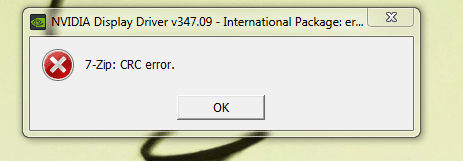
I think this was the screenshot he was referring to. IozT5Fc.png . That was the official Nvidia driver downloaded from their website. I tried doing what you suggested "Automatically deliver drivers via Windows Update (Step 3)". But my Windows update hasn't picked up a missing graphics driver. I removed the driver using "Programs and Features". Then went into DXDIAG > Graphics. It still shows my GTX 970. Have I not completely removed it? I still have NVIDIA Geforece experience and it did pick up the missing driver and requested to update, but I can't complete the update because the installer would always crash.
 

My Computer My Computer

At a glance

Windows 7 Home Premium 64bitIntel Core i7 4790k @ 4.0 ghz8gb x2 Kingston Hyperx Fury Blue Memory RAM @...Gigabyte GeForce GTX 970 G1 Gaming 4GB GDDR5 ...
Computer type
PC/Desktop
OS
Windows 7 Home Premium 64bit
CPU
Intel Core i7 4790k @ 4.0 ghz
Motherboard
Gigabyte z97x-SLI motherboard
Memory
8gb x2 Kingston Hyperx Fury Blue Memory RAM @ 1600 mhz
Graphics Card(s)
Gigabyte GeForce GTX 970 G1 Gaming 4GB GDDR5 PCiE Video Grap
Hard Drives
Samsung Evo 500 GB SSD x2
PSU
Corsair CX750M Powersupply
Cooling
Corsair H100i Watercooler
7-Zip: Data Error while installing NVIDIA drivers

Did you install all other Important and Optional Updates because there can be Performance Updates that apply to this problem that are queued either place. This is why it's always good to install all Updates offered except Bingware.

Okay, I'll try downloading the drivers again. However, I'm not sure if that's the problem as I've tried manually downloading the drivers and updating through Geforce Experience. But I'll try downloading it through a different computer.

Yes, there are no Optional and Important updates queued. How do I request that Windows Update look for more updates?
 

My Computer My Computer

At a glance

Windows 7 Home Premium 64bitIntel Core i7 4790k @ 4.0 ghz8gb x2 Kingston Hyperx Fury Blue Memory RAM @...Gigabyte GeForce GTX 970 G1 Gaming 4GB GDDR5 ...
Computer type
PC/Desktop
OS
Windows 7 Home Premium 64bit
CPU
Intel Core i7 4790k @ 4.0 ghz
Motherboard
Gigabyte z97x-SLI motherboard
Memory
8gb x2 Kingston Hyperx Fury Blue Memory RAM @ 1600 mhz
Graphics Card(s)
Gigabyte GeForce GTX 970 G1 Gaming 4GB GDDR5 PCiE Video Grap
Hard Drives
Samsung Evo 500 GB SSD x2
PSU
Corsair CX750M Powersupply
Cooling
Corsair H100i Watercooler

My Computer My Computer

At a glance

w7 ultimate 64-bit sp1i5 2500K @4.52x4GB G.Skill Ripjaws-X 2,133 CL9GTX 560Ti
Computer type
PC/Desktop
Computer Manufacturer/Model Number
custom build
OS
w7 ultimate 64-bit sp1
CPU
i5 2500K @4.5
Motherboard
MSI P67A-GD65 rev2
Memory
2x4GB G.Skill Ripjaws-X 2,133 CL9
Graphics Card(s)
GTX 560Ti
Sound Card
on board
Monitor(s) Displays
BenQ G2410HD
Screen Resolution
1920x1080
Hard Drives
Samsung 2.5-Inch 250 GB 850 EVO
PSU
BeQuiet 600W
Keyboard
K65
Mouse
Razer Deathadder Ergonomic Gaming Mouse
Internet Speed
35Mbps
Tick all boxes at Control Panel>Windows Update>Change Settings.

Okay, I'll do that once I get home!

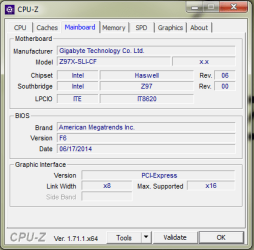
Hi, can you please post a screen of CPU-Z "mainboard" tab? Are you using the latest BIOS?
GIGABYTE - Motherboard - Socket 1150 - GA-Z97X-SLI (rev. 1.1)

I'll post a screen once I get home. I believe I got my drivers from this website GIGABYTE - Motherboard - Socket 1150 - GA-Z97X-SLI (rev. 1.0) . Do you think that one you provided was newer?
 

My Computer My Computer

At a glance

Windows 7 Home Premium 64bitIntel Core i7 4790k @ 4.0 ghz8gb x2 Kingston Hyperx Fury Blue Memory RAM @...Gigabyte GeForce GTX 970 G1 Gaming 4GB GDDR5 ...
Computer type
PC/Desktop
OS
Windows 7 Home Premium 64bit
CPU
Intel Core i7 4790k @ 4.0 ghz
Motherboard
Gigabyte z97x-SLI motherboard
Memory
8gb x2 Kingston Hyperx Fury Blue Memory RAM @ 1600 mhz
Graphics Card(s)
Gigabyte GeForce GTX 970 G1 Gaming 4GB GDDR5 PCiE Video Grap
Hard Drives
Samsung Evo 500 GB SSD x2
PSU
Corsair CX750M Powersupply
Cooling
Corsair H100i Watercooler
well looks like they have two different boards rev 1.0 and 1.1 (CPU-Z will show which one you have) both have had BIOS F6 released to "Improve Intel K-sku CPU performance" which might be why your CPU running HOT/working hard when it is not under heavy load (if you have BIOS F5 - CPU is not supported by F3&4)
 

My Computer My Computer

At a glance

w7 ultimate 64-bit sp1i5 2500K @4.52x4GB G.Skill Ripjaws-X 2,133 CL9GTX 560Ti
Computer type
PC/Desktop
Computer Manufacturer/Model Number
custom build
OS
w7 ultimate 64-bit sp1
CPU
i5 2500K @4.5
Motherboard
MSI P67A-GD65 rev2
Memory
2x4GB G.Skill Ripjaws-X 2,133 CL9
Graphics Card(s)
GTX 560Ti
Sound Card
on board
Monitor(s) Displays
BenQ G2410HD
Screen Resolution
1920x1080
Hard Drives
Samsung 2.5-Inch 250 GB 850 EVO
PSU
BeQuiet 600W
Keyboard
K65
Mouse
Razer Deathadder Ergonomic Gaming Mouse
Internet Speed
35Mbps

My Computer My Computer

At a glance

Windows 7 Home Premium 64bitIntel Core i7 4790k @ 4.0 ghz8gb x2 Kingston Hyperx Fury Blue Memory RAM @...Gigabyte GeForce GTX 970 G1 Gaming 4GB GDDR5 ...
Computer type
PC/Desktop
OS
Windows 7 Home Premium 64bit
CPU
Intel Core i7 4790k @ 4.0 ghz
Motherboard
Gigabyte z97x-SLI motherboard
Memory
8gb x2 Kingston Hyperx Fury Blue Memory RAM @ 1600 mhz
Graphics Card(s)
Gigabyte GeForce GTX 970 G1 Gaming 4GB GDDR5 PCiE Video Grap
Hard Drives
Samsung Evo 500 GB SSD x2
PSU
Corsair CX750M Powersupply
Cooling
Corsair H100i Watercooler
Some further progress today:

Slot# 1 empty
Slot# 3 empty
Slot# 2 empty
Slot# 4 RAM A
4 passes - 5 errors

Slot# 1 empty
Slot# 3 empty
Slot# 2 empty
Slot# 4 RAM B
4 passes - no errors

Slot# 1 empty
Slot# 3 empty
Slot# 2 RAM B
Slot# 4 empty
4 passes - no errors

Slot# 1 empty
Slot# 3 RAM B
Slot# 2 empty
Slot# 4 empty
4 passes - no errors

Slot# 1 RAM B
Slot# 3 empty
Slot# 2 empty
Slot# 4 empty
8 passes - no errors

Slot# 1 RAM A
Slot# 3 empty
Slot# 2 empty
Slot# 4 empty
8 passes - 0 errors


So, even the supposedly "bad" ram came out with 0 errors this time. I think I might run it on slot 4 again to see if any errors come up? What do you guys think?

Also and more importantly, I think I have just confirmed that this isn't a software issue. Running a fresh install of Windows 8 also caused a crash to Internet Explorer.. I was hoping this would be a software issue.. but oh well..
 

My Computer My Computer

At a glance

Windows 7 Home Premium 64bitIntel Core i7 4790k @ 4.0 ghz8gb x2 Kingston Hyperx Fury Blue Memory RAM @...Gigabyte GeForce GTX 970 G1 Gaming 4GB GDDR5 ...
Computer type
PC/Desktop
OS
Windows 7 Home Premium 64bit
CPU
Intel Core i7 4790k @ 4.0 ghz
Motherboard
Gigabyte z97x-SLI motherboard
Memory
8gb x2 Kingston Hyperx Fury Blue Memory RAM @ 1600 mhz
Graphics Card(s)
Gigabyte GeForce GTX 970 G1 Gaming 4GB GDDR5 PCiE Video Grap
Hard Drives
Samsung Evo 500 GB SSD x2
PSU
Corsair CX750M Powersupply
Cooling
Corsair H100i Watercooler
You already have F6, so that is good. Don't update it for now as to not cause any other problems.
 

My Computer My Computer

At a glance

w7 ultimate 64-bit sp1i5 2500K @4.52x4GB G.Skill Ripjaws-X 2,133 CL9GTX 560Ti
Computer type
PC/Desktop
Computer Manufacturer/Model Number
custom build
OS
w7 ultimate 64-bit sp1
CPU
i5 2500K @4.5
Motherboard
MSI P67A-GD65 rev2
Memory
2x4GB G.Skill Ripjaws-X 2,133 CL9
Graphics Card(s)
GTX 560Ti
Sound Card
on board
Monitor(s) Displays
BenQ G2410HD
Screen Resolution
1920x1080
Hard Drives
Samsung 2.5-Inch 250 GB 850 EVO
PSU
BeQuiet 600W
Keyboard
K65
Mouse
Razer Deathadder Ergonomic Gaming Mouse
Internet Speed
35Mbps
Oh.. crap.. I actually just updated it to F7.. my bad... darn :/

Browser is still crashing.. so..
 

My Computer My Computer

At a glance

Windows 7 Home Premium 64bitIntel Core i7 4790k @ 4.0 ghz8gb x2 Kingston Hyperx Fury Blue Memory RAM @...Gigabyte GeForce GTX 970 G1 Gaming 4GB GDDR5 ...
Computer type
PC/Desktop
OS
Windows 7 Home Premium 64bit
CPU
Intel Core i7 4790k @ 4.0 ghz
Motherboard
Gigabyte z97x-SLI motherboard
Memory
8gb x2 Kingston Hyperx Fury Blue Memory RAM @ 1600 mhz
Graphics Card(s)
Gigabyte GeForce GTX 970 G1 Gaming 4GB GDDR5 PCiE Video Grap
Hard Drives
Samsung Evo 500 GB SSD x2
PSU
Corsair CX750M Powersupply
Cooling
Corsair H100i Watercooler
I'll have to check your Mobo to determine if it is dual channel - you might already know aor could easily tell by looking at the slots. Dual channel slots are color coded.

If the Mobo is dual channel, it might not like memory in one slot or another when only one stick is inserted.
Rule of thumb
- one RAM stick goes in slot 1
- two RAM sticks (1 goes in slot 1 and the 2nd goes in slot 3)

The Mobo 'pairs' the sticks for better performance and usually complains (passively = slower perf, actively=crashes)
Note, that is just an example - the slot #s are Mobo specific.

But ... that's why I was so adamant about doing the RAM tests in a particular way. That plus once you get through the exercise, you can scratch memory off the list of possible causes. Getting RAM off the list is important because everything goes through it.

Bill
.
 

My Computer My Computer

At a glance

x64 (6.3.9600) Win8.1 Pro & soon dual boot x6...AMD A6-3420M APU with Radeon(tm) HD Graphics6.00 GBAMD Radeon(TM) HD 6520G
Computer type
Laptop
Computer Manufacturer/Model Number
HP Pavilion dv6-6c10us
OS
x64 (6.3.9600) Win8.1 Pro & soon dual boot x64 (6.1.7601) Win7_SP1 HomePrem
CPU
AMD A6-3420M APU with Radeon(tm) HD Graphics
Motherboard
Hewlett-Packard 1805
Memory
6.00 GB
Graphics Card(s)
AMD Radeon(TM) HD 6520G
Sound Card
(1) AMD High Definition Audio Device (2) IDT High Definiti
Monitor(s) Displays
HP W2072a 20" LCD (1600 x 900) @ 60 Hz
Screen Resolution
1366 x 768 x 32 bits (4294967296 colors) @ 60 Hz
Hard Drives
ST640LM0 00 HM641JI SATA Disk Device
Keyboard
Logitech k520 wireless KB
Mouse
Logitech m320 wireless mouse (bundled with KB)
Internet Speed
15/5 | 54 MB Wireless 'n'
Antivirus
Realtime: Defender or Avast | On-demand: Malwarebytes, ESET
Browser
IE 11 on Win8, IE 10 on win 7
Other Info
Media: [Gimp, Audacity, VLC] || Comm: [WEmail 2012, Skype] || Productivity: [OpenOffice,| Textpad] || Utils: [Sysinternals, cCleaner, Speccy, Defraggler]
I'll have to check your Mobo to determine if it is dual channel - you might already know aor could easily tell by looking at the slots. Dual channel slots are color coded.

If the Mobo is dual channel, it might not like memory in one slot or another when only one stick is inserted.
Rule of thumb
- one RAM stick goes in slot 1
- two RAM sticks (1 goes in slot 1 and the 2nd goes in slot 3)

The Mobo 'pairs' the sticks for better performance and usually complains (passively = slower perf, actively=crashes)
Note, that is just an example - the slot #s are Mobo specific.

But ... that's why I was so adamant about doing the RAM tests in a particular way. That plus once you get through the exercise, you can scratch memory off the list of possible causes. Getting RAM off the list is important because everything goes through it.

Bill
.

Yes they are color coded. When I ram dual channel, I had them in slots 1 and 2; thus the way I formatted my memtest results ( slot 4, slot2, slot 3, slot 1). The ram that previously came up with errors showed no errors this time. What do you think is the problem?
 

My Computer My Computer

At a glance

Windows 7 Home Premium 64bitIntel Core i7 4790k @ 4.0 ghz8gb x2 Kingston Hyperx Fury Blue Memory RAM @...Gigabyte GeForce GTX 970 G1 Gaming 4GB GDDR5 ...
Computer type
PC/Desktop
OS
Windows 7 Home Premium 64bit
CPU
Intel Core i7 4790k @ 4.0 ghz
Motherboard
Gigabyte z97x-SLI motherboard
Memory
8gb x2 Kingston Hyperx Fury Blue Memory RAM @ 1600 mhz
Graphics Card(s)
Gigabyte GeForce GTX 970 G1 Gaming 4GB GDDR5 PCiE Video Grap
Hard Drives
Samsung Evo 500 GB SSD x2
PSU
Corsair CX750M Powersupply
Cooling
Corsair H100i Watercooler
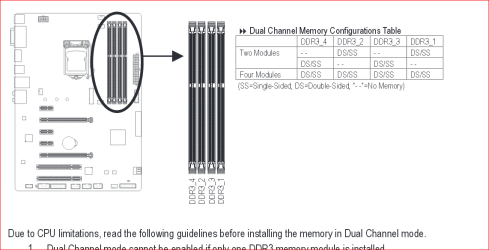
This is what I found on the Gigabyte site.

How memory should be installed for normal operation in Dual Channel.
Does this match you motherboard manual. Some times the manual is printed incorrectly.

Also could you look in the lower left corner of your motherboard it should show either Rev 1.0 or 1.1

Gigabyte memory.PNG
 

My Computer My Computer

At a glance

Windows 10 Pro. 64/ version 1709 Windows 7 Pr...Intel i7-6800K @ 4.3Corsair Platinum 16 gig @2400EVGA GTX 1070 OC
Computer type
PC/Desktop
Computer Manufacturer/Model Number
Home made Desktop
OS
Windows 10 Pro. 64/ version 1709 Windows 7 Pro/64
CPU
Intel i7-6800K @ 4.3
Motherboard
ASUS X-99 Deluxe II
Memory
Corsair Platinum 16 gig @2400
Graphics Card(s)
EVGA GTX 1070 OC
Monitor(s) Displays
Asus 27" LED LCD/VE278Q
Screen Resolution
1920-1080 or 1280-720 HDMI
Hard Drives
INTEL SSD 730-240 Gb Sata 3.0/
PSU
EVGA Platium 1200W
Case
Phanteks Luxe Tempered Glass 8 fans/ one radiator
Cooling
XSPC/ Water Cooled CPU
Keyboard
Das 4 Professional
Mouse
Logitech M705/MX Anywhere 2-S
Internet Speed
100 mbits
Antivirus
Microsoft Security Essentials/ Malwarebytes Premium 3.0/ SAS
Browser
I.E. 11 default/Firefox/ ISP Time Warner Cable/Spectrum
Other Info
LG BluRay Burner/
Sound system-KLipsch-THX/
Icy Dock ssd Hot Swap bays.
This is what I found on the Gigabyte site.

How memory should be installed for normal operation in Dual Channel.
Does this match you motherboard manual. Some times the manual is printed incorrectly.

Also could you look in the lower left corner of your motherboard it should show either Rev 1.0 or 1.1

View attachment 345526

I'm pretty sure I installed my memory correctly.

Also, my motherboard says Rev 1.0.

Any ideas of what I can try?
 

My Computer My Computer

At a glance

Windows 7 Home Premium 64bitIntel Core i7 4790k @ 4.0 ghz8gb x2 Kingston Hyperx Fury Blue Memory RAM @...Gigabyte GeForce GTX 970 G1 Gaming 4GB GDDR5 ...
Computer type
PC/Desktop
OS
Windows 7 Home Premium 64bit
CPU
Intel Core i7 4790k @ 4.0 ghz
Motherboard
Gigabyte z97x-SLI motherboard
Memory
8gb x2 Kingston Hyperx Fury Blue Memory RAM @ 1600 mhz
Graphics Card(s)
Gigabyte GeForce GTX 970 G1 Gaming 4GB GDDR5 PCiE Video Grap
Hard Drives
Samsung Evo 500 GB SSD x2
PSU
Corsair CX750M Powersupply
Cooling
Corsair H100i Watercooler
Their is only one proper way to install ram and that is exactly as per the motherboard manual.
It' worth checking again. How you move them around during memory test doesn't matter as log as the test can see them.

When you run Memtest86 it doesn't tell you if the ram is installed correctly. It tells you if the ram and the ram slots work correctly. After the test you install the ram back the way the motherboard manual instructs you to.

So I don't have to read this whole thread again could you tell us the results of the memory test.

Did you find bad ram and or ram slots in the motherboard?
 

My Computer My Computer

At a glance

Windows 10 Pro. 64/ version 1709 Windows 7 Pr...Intel i7-6800K @ 4.3Corsair Platinum 16 gig @2400EVGA GTX 1070 OC
Computer type
PC/Desktop
Computer Manufacturer/Model Number
Home made Desktop
OS
Windows 10 Pro. 64/ version 1709 Windows 7 Pro/64
CPU
Intel i7-6800K @ 4.3
Motherboard
ASUS X-99 Deluxe II
Memory
Corsair Platinum 16 gig @2400
Graphics Card(s)
EVGA GTX 1070 OC
Monitor(s) Displays
Asus 27" LED LCD/VE278Q
Screen Resolution
1920-1080 or 1280-720 HDMI
Hard Drives
INTEL SSD 730-240 Gb Sata 3.0/
PSU
EVGA Platium 1200W
Case
Phanteks Luxe Tempered Glass 8 fans/ one radiator
Cooling
XSPC/ Water Cooled CPU
Keyboard
Das 4 Professional
Mouse
Logitech M705/MX Anywhere 2-S
Internet Speed
100 mbits
Antivirus
Microsoft Security Essentials/ Malwarebytes Premium 3.0/ SAS
Browser
I.E. 11 default/Firefox/ ISP Time Warner Cable/Spectrum
Other Info
LG BluRay Burner/
Sound system-KLipsch-THX/
Icy Dock ssd Hot Swap bays.
Their is only one proper way to install ram and that is exactly as per the motherboard manual.
It' worth checking again. How you move them around during memory test doesn't matter as log as the test can see them.

When you run Memtest86 it doesn't tell you if the ram is installed correctly. It tells you if the ram and the ram slots work correctly. After the test you install the ram back the way the motherboard manual instructs you to.

So I don't have to read this whole thread again could you tell us the results of the memory test.

Did you find bad ram and or ram slots in the motherboard?


Hi, thanks for responding.

Here are the results for the memtest

Slot# 1 empty
Slot# 3 empty
Slot# 2 empty
Slot# 4 RAM A
4 passes - 5 errors

Slot# 1 empty
Slot# 3 empty
Slot# 2 empty
Slot# 4 RAM B
4 passes - no errors

Slot# 1 empty
Slot# 3 empty
Slot# 2 RAM B
Slot# 4 empty
4 passes - no errors

Slot# 1 empty
Slot# 3 RAM B
Slot# 2 empty
Slot# 4 empty
4 passes - no errors

Slot# 1 RAM B
Slot# 3 empty
Slot# 2 empty
Slot# 4 empty
8 passes - no errors

Slot# 1 RAM A
Slot# 3 empty
Slot# 2 empty
Slot# 4 empty
8 passes - 0 errors
 

My Computer My Computer

At a glance

Windows 7 Home Premium 64bitIntel Core i7 4790k @ 4.0 ghz8gb x2 Kingston Hyperx Fury Blue Memory RAM @...Gigabyte GeForce GTX 970 G1 Gaming 4GB GDDR5 ...
Computer type
PC/Desktop
OS
Windows 7 Home Premium 64bit
CPU
Intel Core i7 4790k @ 4.0 ghz
Motherboard
Gigabyte z97x-SLI motherboard
Memory
8gb x2 Kingston Hyperx Fury Blue Memory RAM @ 1600 mhz
Graphics Card(s)
Gigabyte GeForce GTX 970 G1 Gaming 4GB GDDR5 PCiE Video Grap
Hard Drives
Samsung Evo 500 GB SSD x2
PSU
Corsair CX750M Powersupply
Cooling
Corsair H100i Watercooler
...
So, even the supposedly "bad" ram came out with 0 errors this time. I think I might run it on slot 4 again to see if any errors come up? What do you guys think?

Also and more importantly, I think I have just confirmed that this isn't a software issue. Running a fresh install of Windows 8 also caused a crash to Internet Explorer.. I was hoping this would be a software issue.. but oh well..

Is RAM A the one you determined was bad before? I'm getting confused.

If I have followed your testing it seems to indicate that Slot 4 is questionable. If it was bad, both sticks would fail.

I am a bit concerned that you are changing things (fresh install of Win8, updating BIOS,, trying to install the Nvidia driver) while trying to troubleshoot. The only way I can help is if the system stays in the same state and a component is tested. When that component, be it software or hardware is eliminated from the possible culprits, then another component can be tested.

Here's what I'd do next - run with only one stick inserted in whatever slot the manual says to run a single stick. Use the stick that is not suspect.

I think we've beat the memory testing to a standstill.

Please identify the page you downloaded the current installed driver.
Here's what I found, but I need you to confirm it is the correct page BEFORE you install it
GIGABYTE - Graphics Card - NVIDIA - PCI Express Solution - GeForce 900 Series - GV-N970G1 GAMING-4GD (rev. 1.0/1.1) ?
x.png

+edit:
DO NOT INSTALL the driver it has been confirmed as the correct board AND a member request that you install it.
-edit

I reviewed the thread and I jumped in when you started testing the memory, but going back to post# 1, I'm not sure of the issue you're trying to solve.

I'll just ask.

Does the system BSOD or are you just getting application crashes?

and ... is anything overclocked? Yes? - reset everything, including BIOS to defaults.

I'll check back after I get some sleep.
 
Last edited:

My Computer My Computer

At a glance

x64 (6.3.9600) Win8.1 Pro & soon dual boot x6...AMD A6-3420M APU with Radeon(tm) HD Graphics6.00 GBAMD Radeon(TM) HD 6520G
Computer type
Laptop
Computer Manufacturer/Model Number
HP Pavilion dv6-6c10us
OS
x64 (6.3.9600) Win8.1 Pro & soon dual boot x64 (6.1.7601) Win7_SP1 HomePrem
CPU
AMD A6-3420M APU with Radeon(tm) HD Graphics
Motherboard
Hewlett-Packard 1805
Memory
6.00 GB
Graphics Card(s)
AMD Radeon(TM) HD 6520G
Sound Card
(1) AMD High Definition Audio Device (2) IDT High Definiti
Monitor(s) Displays
HP W2072a 20" LCD (1600 x 900) @ 60 Hz
Screen Resolution
1366 x 768 x 32 bits (4294967296 colors) @ 60 Hz
Hard Drives
ST640LM0 00 HM641JI SATA Disk Device
Keyboard
Logitech k520 wireless KB
Mouse
Logitech m320 wireless mouse (bundled with KB)
Internet Speed
15/5 | 54 MB Wireless 'n'
Antivirus
Realtime: Defender or Avast | On-demand: Malwarebytes, ESET
Browser
IE 11 on Win8, IE 10 on win 7
Other Info
Media: [Gimp, Audacity, VLC] || Comm: [WEmail 2012, Skype] || Productivity: [OpenOffice,| Textpad] || Utils: [Sysinternals, cCleaner, Speccy, Defraggler]
Bill I'm having the same problem.
I'm not able to keep track of what is and what isn't.
I'm not able to follow the thread with any reasonable understanding.

@NanoDice

You are our eyes and ears. We only know know what you post.
We need to know exactly what you have done and the results.
If you go running off doing things not requested by helping members you are wasting your time and ours.
We want to help you but you have to let us help you.

1.What is the computer doing now? How well does it run?

2. What have you done and the results?

3. Exactly what ram have you been using and in what slots.

4. What have you done to fix the ram errors you were getting.

5. What have you changed sense you started this thread.
 

My Computer My Computer

At a glance

Windows 10 Pro. 64/ version 1709 Windows 7 Pr...Intel i7-6800K @ 4.3Corsair Platinum 16 gig @2400EVGA GTX 1070 OC
Computer type
PC/Desktop
Computer Manufacturer/Model Number
Home made Desktop
OS
Windows 10 Pro. 64/ version 1709 Windows 7 Pro/64
CPU
Intel i7-6800K @ 4.3
Motherboard
ASUS X-99 Deluxe II
Memory
Corsair Platinum 16 gig @2400
Graphics Card(s)
EVGA GTX 1070 OC
Monitor(s) Displays
Asus 27" LED LCD/VE278Q
Screen Resolution
1920-1080 or 1280-720 HDMI
Hard Drives
INTEL SSD 730-240 Gb Sata 3.0/
PSU
EVGA Platium 1200W
Case
Phanteks Luxe Tempered Glass 8 fans/ one radiator
Cooling
XSPC/ Water Cooled CPU
Keyboard
Das 4 Professional
Mouse
Logitech M705/MX Anywhere 2-S
Internet Speed
100 mbits
Antivirus
Microsoft Security Essentials/ Malwarebytes Premium 3.0/ SAS
Browser
I.E. 11 default/Firefox/ ISP Time Warner Cable/Spectrum
Other Info
LG BluRay Burner/
Sound system-KLipsch-THX/
Icy Dock ssd Hot Swap bays.
Back
Top