Solved Hard Drive contains old data after Windows 7 Re-Installation

Rex Prime

New member
Local time
12:43 PM
Messages
5
I just re-installed Windows 7, and it seems like I forgot to re-format the hard disk when re-installing. There seems to be 200GB of space taken up, but I have know idea where to find it and delete it. Any ideas how to find this old data from the previous installation and remove it?
 

My Computer My Computer

Computer type
PC/Desktop
Computer Manufacturer/Model Number
Custom
OS
Windows 7 Professional x64
CPU
Athlon X4 860k
Motherboard
Asus A78M-E
Memory
Forgot the name, 8GB Ram
Graphics Card(s)
MSI Radeon R7 260X
Hard Drives
Seagate Barrcuda 1TB
Antivirus
Avast
Browser
Chrome
I just re-installed Windows 7, and it seems like I forgot to re-format the hard disk when re-installing. There seems to be 200GB of space taken up, but I have know idea where to find it and delete it. Any ideas how to find this old data from the previous installation and remove it?

If you are trying to do a clean install, you don't have to re-format. Just delete all partitions when you come to the partitioning screen after booting from the install disc. That will leave unallocated space. Tell Windows to install to that unallocated space. It will format as necessary.

As for your 200 GB: you say it's "taken up". Then you say you want to "find it and delete it". Then you say it's "old data".

So I'm not clear what you mean, where you sit, or what you want to do.

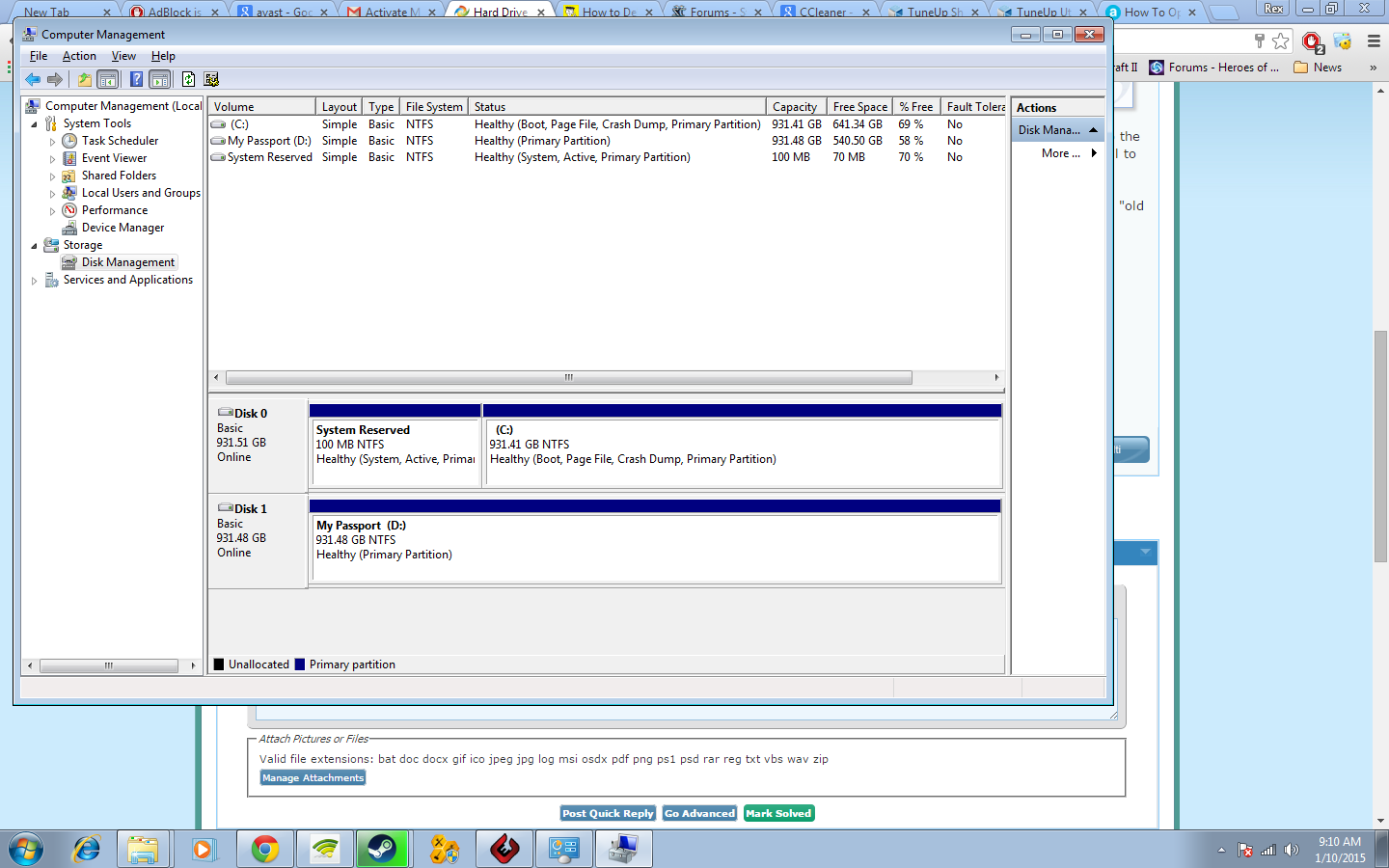
Post a screen shot of Windows Disk Management.
 

My Computer My Computer

Computer type
PC/Desktop
Computer Manufacturer/Model Number
Ignatz Special; 4 speed manual gearbox; factory air conditioning; one of one
OS
Windows 7 Home Premium SP1, 64-bit
CPU
Intel Skylake i5-6600K, not overclocked
Motherboard
AsRock Z170M Extreme 4, micro ATX
Memory
8 GB HyperX DDR4-2666 (2 x 4 GB)
Graphics Card(s)
none; graphics are integrated on CPU
Sound Card
onboard: Realtek ALC1150; external: USB Behringer UF0-202
Monitor(s) Displays
Dell S2340M 23 inch IPS
Screen Resolution
1600 x 900
Hard Drives
System: Crucial MX100 series SSD, 128 GB;
Data: Samsung Spinpoint 103SJ, 1 TB;
Backup: WD Caviar Green WD30EZRX-00D8PB0, 3 TB
PSU
Rosewill SilentNight 500 watt fanless, semi-modular
Case
Antec Solo II
Cooling
Noctua NH-U12S; Noctua F12 intake, Noctua S12A exhaust
Keyboard
Microsoft 200 6JH-00001 USB
Mouse
Dell or Microsoft optical wired; USB
Antivirus
Microsoft Security Essentials and Malwarebytes Premium
Browser
Pale Moon
Other Info
All fans PWM; speeds at idle: CPU circa 500 rpm; intake circa 600 rpm; exhaust circa 600 rpm; CPU temps 27 idle and 47 C load in a warm room (27 C/81 F) when running Intel Extreme Tuning Utility stress test.
Was editing to include more details but then my internet stopped as I submitted it.

Here, let me tell the story in more detail. I installed a Windows 7, I let Steam allocate a lot of space for games to install. However, Direct X error happens, can only be fixed by getting whole new Windows. I do that. However, I blindly click on the Nexts, and install. When I open the new Windows, it seems like the amount space taken up is the same. Which means that old data is still there. I want to know how to remove that old allocated disk space from the previous windows installation.

9Qj21pK.png
 

My Computer My Computer

Computer type
PC/Desktop
Computer Manufacturer/Model Number
Custom
OS
Windows 7 Professional x64
CPU
Athlon X4 860k
Motherboard
Asus A78M-E
Memory
Forgot the name, 8GB Ram
Graphics Card(s)
MSI Radeon R7 260X
Hard Drives
Seagate Barrcuda 1TB
Antivirus
Avast
Browser
Chrome
Your C drive has a capacity of 931 GB.

There is 641 free, meaning 290 have been used.

Windows takes up maybe 20 GB.

So, yes, something else is on the drive other than Windows.

Offhand, it looks like you did not in fact do a clean install, unless you have deliberately installed something else after you installed Windows.

I assume you wanted to do a clean install. Did you in fact boot from the install disc and delete all partitions? Or what?

If you want a clean install, I'd start over. It only takes a half hour.
 

My Computer My Computer

Computer type
PC/Desktop
Computer Manufacturer/Model Number
Ignatz Special; 4 speed manual gearbox; factory air conditioning; one of one
OS
Windows 7 Home Premium SP1, 64-bit
CPU
Intel Skylake i5-6600K, not overclocked
Motherboard
AsRock Z170M Extreme 4, micro ATX
Memory
8 GB HyperX DDR4-2666 (2 x 4 GB)
Graphics Card(s)
none; graphics are integrated on CPU
Sound Card
onboard: Realtek ALC1150; external: USB Behringer UF0-202
Monitor(s) Displays
Dell S2340M 23 inch IPS
Screen Resolution
1600 x 900
Hard Drives
System: Crucial MX100 series SSD, 128 GB;
Data: Samsung Spinpoint 103SJ, 1 TB;
Backup: WD Caviar Green WD30EZRX-00D8PB0, 3 TB
PSU
Rosewill SilentNight 500 watt fanless, semi-modular
Case
Antec Solo II
Cooling
Noctua NH-U12S; Noctua F12 intake, Noctua S12A exhaust
Keyboard
Microsoft 200 6JH-00001 USB
Mouse
Dell or Microsoft optical wired; USB
Antivirus
Microsoft Security Essentials and Malwarebytes Premium
Browser
Pale Moon
Other Info
All fans PWM; speeds at idle: CPU circa 500 rpm; intake circa 600 rpm; exhaust circa 600 rpm; CPU temps 27 idle and 47 C load in a warm room (27 C/81 F) when running Intel Extreme Tuning Utility stress test.
Yeah. that's the problem. I forgot to delete all partitions. All I know is that there is data from the old Windows that is taking up 200gb of space, I want to get rid of that.
 

My Computer My Computer

Computer type
PC/Desktop
Computer Manufacturer/Model Number
Custom
OS
Windows 7 Professional x64
CPU
Athlon X4 860k
Motherboard
Asus A78M-E
Memory
Forgot the name, 8GB Ram
Graphics Card(s)
MSI Radeon R7 260X
Hard Drives
Seagate Barrcuda 1TB
Antivirus
Avast
Browser
Chrome
Yeah. that's the problem. I forgot to delete all partitions. All I know is that there is data from the old Windows that is taking up 200gb of space, I want to get rid of that.

Any reason you can't do it over and delete all partitions?

You may have a Windows.old folder, which means you didn't do a clean install.
 

My Computer My Computer

Computer type
PC/Desktop
Computer Manufacturer/Model Number
Ignatz Special; 4 speed manual gearbox; factory air conditioning; one of one
OS
Windows 7 Home Premium SP1, 64-bit
CPU
Intel Skylake i5-6600K, not overclocked
Motherboard
AsRock Z170M Extreme 4, micro ATX
Memory
8 GB HyperX DDR4-2666 (2 x 4 GB)
Graphics Card(s)
none; graphics are integrated on CPU
Sound Card
onboard: Realtek ALC1150; external: USB Behringer UF0-202
Monitor(s) Displays
Dell S2340M 23 inch IPS
Screen Resolution
1600 x 900
Hard Drives
System: Crucial MX100 series SSD, 128 GB;
Data: Samsung Spinpoint 103SJ, 1 TB;
Backup: WD Caviar Green WD30EZRX-00D8PB0, 3 TB
PSU
Rosewill SilentNight 500 watt fanless, semi-modular
Case
Antec Solo II
Cooling
Noctua NH-U12S; Noctua F12 intake, Noctua S12A exhaust
Keyboard
Microsoft 200 6JH-00001 USB
Mouse
Dell or Microsoft optical wired; USB
Antivirus
Microsoft Security Essentials and Malwarebytes Premium
Browser
Pale Moon
Other Info
All fans PWM; speeds at idle: CPU circa 500 rpm; intake circa 600 rpm; exhaust circa 600 rpm; CPU temps 27 idle and 47 C load in a warm room (27 C/81 F) when running Intel Extreme Tuning Utility stress test.
Yeah. that's the problem. I forgot to delete all partitions. All I know is that there is data from the old Windows that is taking up 200gb of space, I want to get rid of that.

Any reason you can't do it over and delete all partitions?

You may have a Windows.old folder, which means you didn't do a clean install.

Yes! There is a Windows.old folder!

So, how should I go on from now? To delete all the old filled and allocated disk space? It seems like it has all the files and folders that are filling up the space. Is it safe to just delete it?
 

My Computer My Computer

Computer type
PC/Desktop
Computer Manufacturer/Model Number
Custom
OS
Windows 7 Professional x64
CPU
Athlon X4 860k
Motherboard
Asus A78M-E
Memory
Forgot the name, 8GB Ram
Graphics Card(s)
MSI Radeon R7 260X
Hard Drives
Seagate Barrcuda 1TB
Antivirus
Avast
Browser
Chrome
Yeah. that's the problem. I forgot to delete all partitions. All I know is that there is data from the old Windows that is taking up 200gb of space, I want to get rid of that.

Any reason you can't do it over and delete all partitions?

You may have a Windows.old folder, which means you didn't do a clean install.

Yes! There is a Windows.old folder!

So, how should I go on from now? To delete all the old filled and allocated disk space? It seems like it has all the files and folders that are filling up the space. Is it safe to just delete it?

It's safe to delete it if you are sure you don't need anything in it.

But it isn't a clean install. You did an upgrade of some type.
 

My Computer My Computer

Computer type
PC/Desktop
Computer Manufacturer/Model Number
Ignatz Special; 4 speed manual gearbox; factory air conditioning; one of one
OS
Windows 7 Home Premium SP1, 64-bit
CPU
Intel Skylake i5-6600K, not overclocked
Motherboard
AsRock Z170M Extreme 4, micro ATX
Memory
8 GB HyperX DDR4-2666 (2 x 4 GB)
Graphics Card(s)
none; graphics are integrated on CPU
Sound Card
onboard: Realtek ALC1150; external: USB Behringer UF0-202
Monitor(s) Displays
Dell S2340M 23 inch IPS
Screen Resolution
1600 x 900
Hard Drives
System: Crucial MX100 series SSD, 128 GB;
Data: Samsung Spinpoint 103SJ, 1 TB;
Backup: WD Caviar Green WD30EZRX-00D8PB0, 3 TB
PSU
Rosewill SilentNight 500 watt fanless, semi-modular
Case
Antec Solo II
Cooling
Noctua NH-U12S; Noctua F12 intake, Noctua S12A exhaust
Keyboard
Microsoft 200 6JH-00001 USB
Mouse
Dell or Microsoft optical wired; USB
Antivirus
Microsoft Security Essentials and Malwarebytes Premium
Browser
Pale Moon
Other Info
All fans PWM; speeds at idle: CPU circa 500 rpm; intake circa 600 rpm; exhaust circa 600 rpm; CPU temps 27 idle and 47 C load in a warm room (27 C/81 F) when running Intel Extreme Tuning Utility stress test.
Any reason you can't do it over and delete all partitions?

You may have a Windows.old folder, which means you didn't do a clean install.

Yes! There is a Windows.old folder!

So, how should I go on from now? To delete all the old filled and allocated disk space? It seems like it has all the files and folders that are filling up the space. Is it safe to just delete it?

It's safe to delete it if you are sure you don't need anything in it.

But it isn't a clean install. You did an upgrade of some type.

Yeah, must have been very weird. Anyways, Windows.Old had all the old files, and has now been deleted, and my disk space is free again! :D
 

My Computer My Computer

Computer type
PC/Desktop
Computer Manufacturer/Model Number
Custom
OS
Windows 7 Professional x64
CPU
Athlon X4 860k
Motherboard
Asus A78M-E
Memory
Forgot the name, 8GB Ram
Graphics Card(s)
MSI Radeon R7 260X
Hard Drives
Seagate Barrcuda 1TB
Antivirus
Avast
Browser
Chrome
Yeah. that's the problem. I forgot to delete all partitions. All I know is that there is data from the old Windows that is taking up 200gb of space, I want to get rid of that.

Any reason you can't do it over and delete all partitions?

You may have a Windows.old folder, which means you didn't do a clean install.

When I did a clean install, I definitely had Windows Old.

Must I Keep Windows.old? | PCWorld

When you do a clean install off a retail Windows 7 DVD, the installation protects your files by putting them into that folder.
 

My Computer My Computer

Computer type
PC/Desktop
Computer Manufacturer/Model Number
Self-Built
OS
Windows 7 Professional X64
CPU
Core i7 (2nd gen) i7-2600K / 3.40GHz
Motherboard
ASUS P8Z77-V Intel 7 Series Motherboard
Memory
DDR3 2400MHz (OC) 16gb
Graphics Card(s)
Intel(R) HD Graphics 3000, -1988 Mb
Sound Card
8 ChannelsAudio Chipset Realtek ALC892
Monitor(s) Displays
LG 29UM65 Black 29"
Screen Resolution
2560 x 1080
Hard Drives
840 EVO 250 GB SSD ;2tb (2);Seagate;1tb Seagate; 750 gb Seagate; wd ext (2) 750 gb,WD 2tb X 2;WD 3TB Black
PSU
750 watt
Case
Thermaltake RX -1
Cooling
2120mm Fans Included 1Other Fan Ports 5x 200mm Fan Ports
Keyboard
Microsoft Digital Media Pro
Mouse
Microsoft Wireless 6000
Internet Speed
U-verse 18 mbps
Antivirus
MSE
Browser
Firefox, Chrome and my favorite: Pale Moon
Other Info
HdHomerun Dual Tuner.
SRS Audio Lab,
Pioneer BDR 208-DBK
PS3-What a difference in my Surround Sound Receiver!
HP 4540s - My new Toy.
Epson R280 Printer- To personalize my Dvds.
Canon MP 560 - For scanning.

My Computer My Computer

Computer type
PC/Desktop
Computer Manufacturer/Model Number
Home made Desktop
OS
Windows 10 Pro. 64/ version 1709 Windows 7 Pro/64
CPU
Intel i7-6800K @ 4.3
Motherboard
ASUS X-99 Deluxe II
Memory
Corsair Platinum 16 gig @2400
Graphics Card(s)
EVGA GTX 1070 OC
Monitor(s) Displays
Asus 27" LED LCD/VE278Q
Screen Resolution
1920-1080 or 1280-720 HDMI
Hard Drives
INTEL SSD 730-240 Gb Sata 3.0/
PSU
EVGA Platium 1200W
Case
Phanteks Luxe Tempered Glass 8 fans/ one radiator
Cooling
XSPC/ Water Cooled CPU
Keyboard
Das 4 Professional
Mouse
Logitech M705/MX Anywhere 2-S
Internet Speed
100 mbits
Antivirus
Microsoft Security Essentials/ Malwarebytes Premium 3.0/ SAS
Browser
I.E. 11 default/Firefox/ ISP Time Warner Cable/Spectrum
Other Info
LG BluRay Burner/
Sound system-KLipsch-THX/
Icy Dock ssd Hot Swap bays.
Back
Top