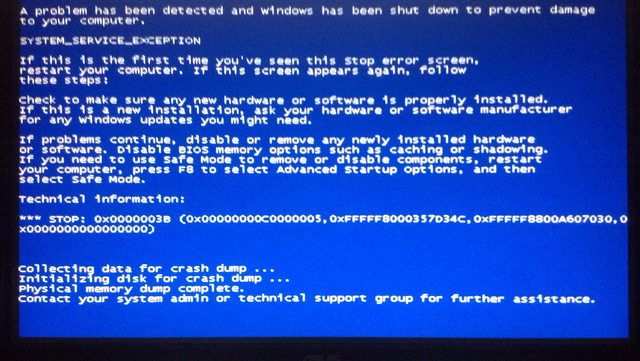
Intermittent BSODs with no obvious commonality

My Computer My Computer

Computer type
PC/Desktop
Computer Manufacturer/Model Number
Custom build
OS
Windows 7 Home Premium x64
CPU
Intel i5 750 2.67 ghz
Motherboard
Asus P7P55 LX
Memory
12gb
Graphics Card(s)
Galaxy 60XMH6HS3HMW GeForce GTX 460
Hard Drives
Samsung 1TB HD103SJ
Antivirus
ESET NOD32
Browser
Google Chrome
I saw you ran MemTest earlier.....can you confirm it was MemTest86+ that you ran?
 

My Computer My Computer

Computer type
PC/Desktop
Computer Manufacturer/Model Number
Golden Mk. I.4
OS
Windows 10 Pro x64 ; Xubuntu x64
CPU
Intel i7 860 @ 2.80 GHz O/C'ed to 4.0GHz
Motherboard
Gigabyte P55A-UD3R Rev.1. Award BIOS F13
Memory
16GB Corsair Vengance DDR3 @ 661 MHz Dual Channel (9-9-9-24)
Graphics Card(s)
EVGA NVidia GTX 560 1024MB
Sound Card
Realtek Integrated
Monitor(s) Displays
Dual Samsung SyncMaster 2494HS
Screen Resolution
1920*1080 and 1920*1080
Hard Drives
1*Samsung 840 EVO 120GB SSD;
1*OCZ Vertex 2 60GB SSD;
2*Samsung F3 SpinPoint 1TB in RAID0;
1*Samsung F1 SpinPoint 1TB;
2*Western Digital 1TB External USB 3.0
1*Western Digital 500GB External USB 3.0
1*Seagate 500GB External USB 2.0
PSU
Thermaltake ToughPower QFan 750W
Case
Thermaltake Element S VK60001W2Z
Cooling
Corsair H60 Water Cooling, 2*230mm and 2*80mm case fans
Keyboard
Logitech G110
Mouse
Logitech MX518
I saw you ran MemTest earlier.....can you confirm it was MemTest86+ that you ran?

No it was just MemTest86, I was not aware there was a difference, should I run +?
 

My Computer My Computer

Computer type
PC/Desktop
Computer Manufacturer/Model Number
Custom build
OS
Windows 7 Home Premium x64
CPU
Intel i5 750 2.67 ghz
Motherboard
Asus P7P55 LX
Memory
12gb
Graphics Card(s)
Galaxy 60XMH6HS3HMW GeForce GTX 460
Hard Drives
Samsung 1TB HD103SJ
Antivirus
ESET NOD32
Browser
Google Chrome
Yes....run MemTest86+ 8 passes minimum please.
 

My Computer My Computer

Computer type
PC/Desktop
Computer Manufacturer/Model Number
Golden Mk. I.4
OS
Windows 10 Pro x64 ; Xubuntu x64
CPU
Intel i7 860 @ 2.80 GHz O/C'ed to 4.0GHz
Motherboard
Gigabyte P55A-UD3R Rev.1. Award BIOS F13
Memory
16GB Corsair Vengance DDR3 @ 661 MHz Dual Channel (9-9-9-24)
Graphics Card(s)
EVGA NVidia GTX 560 1024MB
Sound Card
Realtek Integrated
Monitor(s) Displays
Dual Samsung SyncMaster 2494HS
Screen Resolution
1920*1080 and 1920*1080
Hard Drives
1*Samsung 840 EVO 120GB SSD;
1*OCZ Vertex 2 60GB SSD;
2*Samsung F3 SpinPoint 1TB in RAID0;
1*Samsung F1 SpinPoint 1TB;
2*Western Digital 1TB External USB 3.0
1*Western Digital 500GB External USB 3.0
1*Seagate 500GB External USB 2.0
PSU
Thermaltake ToughPower QFan 750W
Case
Thermaltake Element S VK60001W2Z
Cooling
Corsair H60 Water Cooling, 2*230mm and 2*80mm case fans
Keyboard
Logitech G110
Mouse
Logitech MX518

My Computer My Computer

Computer type
PC/Desktop
Computer Manufacturer/Model Number
Custom build
OS
Windows 7 Home Premium x64
CPU
Intel i5 750 2.67 ghz
Motherboard
Asus P7P55 LX
Memory
12gb
Graphics Card(s)
Galaxy 60XMH6HS3HMW GeForce GTX 460
Hard Drives
Samsung 1TB HD103SJ
Antivirus
ESET NOD32
Browser
Google Chrome
Sorry, I'm completely out of ideas as to how we could get the .dmp files to be generated. I'll have to spend some time researching this a bit more.
 

My Computer My Computer

Computer type
PC/Desktop
Computer Manufacturer/Model Number
Golden Mk. I.4
OS
Windows 10 Pro x64 ; Xubuntu x64
CPU
Intel i7 860 @ 2.80 GHz O/C'ed to 4.0GHz
Motherboard
Gigabyte P55A-UD3R Rev.1. Award BIOS F13
Memory
16GB Corsair Vengance DDR3 @ 661 MHz Dual Channel (9-9-9-24)
Graphics Card(s)
EVGA NVidia GTX 560 1024MB
Sound Card
Realtek Integrated
Monitor(s) Displays
Dual Samsung SyncMaster 2494HS
Screen Resolution
1920*1080 and 1920*1080
Hard Drives
1*Samsung 840 EVO 120GB SSD;
1*OCZ Vertex 2 60GB SSD;
2*Samsung F3 SpinPoint 1TB in RAID0;
1*Samsung F1 SpinPoint 1TB;
2*Western Digital 1TB External USB 3.0
1*Western Digital 500GB External USB 3.0
1*Seagate 500GB External USB 2.0
PSU
Thermaltake ToughPower QFan 750W
Case
Thermaltake Element S VK60001W2Z
Cooling
Corsair H60 Water Cooling, 2*230mm and 2*80mm case fans
Keyboard
Logitech G110
Mouse
Logitech MX518
Sorry, I'm completely out of ideas as to how we could get the .dmp files to be generated. I'll have to spend some time researching this a bit more.

I appreciate that, I went through all the options I could think of myself before turning here. Do BSODs even help you without dumps? I am curious if I should continue posting them


My Computer My Computer

Computer type
PC/Desktop
Computer Manufacturer/Model Number
Custom build
OS
Windows 7 Home Premium x64
CPU
Intel i5 750 2.67 ghz
Motherboard
Asus P7P55 LX
Memory
12gb
Graphics Card(s)
Galaxy 60XMH6HS3HMW GeForce GTX 460
Hard Drives
Samsung 1TB HD103SJ
Antivirus
ESET NOD32
Browser
Google Chrome

My Computer My Computer

Computer type
PC/Desktop
Computer Manufacturer/Model Number
Custom build
OS
Windows 7 Home Premium x64
CPU
Intel i5 750 2.67 ghz
Motherboard
Asus P7P55 LX
Memory
12gb
Graphics Card(s)
Galaxy 60XMH6HS3HMW GeForce GTX 460
Hard Drives
Samsung 1TB HD103SJ
Antivirus
ESET NOD32
Browser
Google Chrome
No, I have no evidence that it was the HDD. In the absence of any other suggestions (and I'm still coming up empty) I was going to suggest doing a clean install (either to the existing HDD or a newer SSD) if you choose.

Before you take that step, lets check the HDD - something we haven't yet tried right?

Run the SHORT test of the Windows version of SeaTools please:
http://www.sevenforums.com/tutorials/313457-seatools-dos-windows-how-use.html
 

My Computer My Computer

Computer type
PC/Desktop
Computer Manufacturer/Model Number
Golden Mk. I.4
OS
Windows 10 Pro x64 ; Xubuntu x64
CPU
Intel i7 860 @ 2.80 GHz O/C'ed to 4.0GHz
Motherboard
Gigabyte P55A-UD3R Rev.1. Award BIOS F13
Memory
16GB Corsair Vengance DDR3 @ 661 MHz Dual Channel (9-9-9-24)
Graphics Card(s)
EVGA NVidia GTX 560 1024MB
Sound Card
Realtek Integrated
Monitor(s) Displays
Dual Samsung SyncMaster 2494HS
Screen Resolution
1920*1080 and 1920*1080
Hard Drives
1*Samsung 840 EVO 120GB SSD;
1*OCZ Vertex 2 60GB SSD;
2*Samsung F3 SpinPoint 1TB in RAID0;
1*Samsung F1 SpinPoint 1TB;
2*Western Digital 1TB External USB 3.0
1*Western Digital 500GB External USB 3.0
1*Seagate 500GB External USB 2.0
PSU
Thermaltake ToughPower QFan 750W
Case
Thermaltake Element S VK60001W2Z
Cooling
Corsair H60 Water Cooling, 2*230mm and 2*80mm case fans
Keyboard
Logitech G110
Mouse
Logitech MX518
No, I have no evidence that it was the HDD. In the absence of any other suggestions (and I'm still coming up empty) I was going to suggest doing a clean install (either to the existing HDD or a newer SSD) if you choose.

Before you take that step, lets check the HDD - something we haven't yet tried right?

Run the SHORT test of the Windows version of SeaTools please:
http://www.sevenforums.com/tutorials/313457-seatools-dos-windows-how-use.html

I believe I have already done all these tests but I did the SMART check, the drive self test, and the short generic test and my hard drive passed them all, I don't have any large enough backup media to do a flatten and reinstall on my current hard drive so that solution will have to wait until I can get a chance to get an SSD
 

My Computer My Computer

Computer type
PC/Desktop
Computer Manufacturer/Model Number
Custom build
OS
Windows 7 Home Premium x64
CPU
Intel i5 750 2.67 ghz
Motherboard
Asus P7P55 LX
Memory
12gb
Graphics Card(s)
Galaxy 60XMH6HS3HMW GeForce GTX 460
Hard Drives
Samsung 1TB HD103SJ
Antivirus
ESET NOD32
Browser
Google Chrome
OK. Let us know how you get on. Sorry it couldn't be a simpler solution for you :(
 

My Computer My Computer

Computer type
PC/Desktop
Computer Manufacturer/Model Number
Golden Mk. I.4
OS
Windows 10 Pro x64 ; Xubuntu x64
CPU
Intel i7 860 @ 2.80 GHz O/C'ed to 4.0GHz
Motherboard
Gigabyte P55A-UD3R Rev.1. Award BIOS F13
Memory
16GB Corsair Vengance DDR3 @ 661 MHz Dual Channel (9-9-9-24)
Graphics Card(s)
EVGA NVidia GTX 560 1024MB
Sound Card
Realtek Integrated
Monitor(s) Displays
Dual Samsung SyncMaster 2494HS
Screen Resolution
1920*1080 and 1920*1080
Hard Drives
1*Samsung 840 EVO 120GB SSD;
1*OCZ Vertex 2 60GB SSD;
2*Samsung F3 SpinPoint 1TB in RAID0;
1*Samsung F1 SpinPoint 1TB;
2*Western Digital 1TB External USB 3.0
1*Western Digital 500GB External USB 3.0
1*Seagate 500GB External USB 2.0
PSU
Thermaltake ToughPower QFan 750W
Case
Thermaltake Element S VK60001W2Z
Cooling
Corsair H60 Water Cooling, 2*230mm and 2*80mm case fans
Keyboard
Logitech G110
Mouse
Logitech MX518
If most of them are ntfs, directx, and system service exceptions (which is what I see here the most), and memory tests out OK, then the likelihood is this is driver related, a kernel-mode driver specifically. I'd put good money on either the disk controller driver or the antivirus driver, so we'll have to see how things go from here.
 

My Computer My Computer

Computer type
PC/Desktop
Computer Manufacturer/Model Number
Custom
OS
Windows 10 Pro x64
CPU
Intel Core i7 4790K @ 4.5GHz
Motherboard
Asus Maximus Hero VII
Memory
32GB DDR3
Graphics Card(s)
Nvidia GeForce GTX970
Sound Card
Realtek HD Audio
Screen Resolution
1920x1200
Hard Drives
1x Samsung 250GB SSD
4x WD RE 2TB (RAIDZ)
PSU
Corsair AX760i
Case
Fractal Design Define R4
Cooling
Noctua NH-D15
If most of them are ntfs, directx, and system service exceptions (which is what I see here the most), and memory tests out OK, then the likelihood is this is driver related, a kernel-mode driver specifically. I'd put good money on either the disk controller driver or the antivirus driver, so we'll have to see how things go from here.

I tried it with MSE, NOD32, and no antivirus at all and still got bluescreens. I've ordered an SSD at this point so hopefully that will, if not fix the problem, at least allow minidumps to be created.
 

My Computer My Computer

Computer type
PC/Desktop
Computer Manufacturer/Model Number
Custom build
OS
Windows 7 Home Premium x64
CPU
Intel i5 750 2.67 ghz
Motherboard
Asus P7P55 LX
Memory
12gb
Graphics Card(s)
Galaxy 60XMH6HS3HMW GeForce GTX 460
Hard Drives
Samsung 1TB HD103SJ
Antivirus
ESET NOD32
Browser
Google Chrome
So new hard drive fresh Windows install and unfortunately I got a crash but it did produce a minidump this time
 

My Computer My Computer

Computer type
PC/Desktop
Computer Manufacturer/Model Number
Custom build
OS
Windows 7 Home Premium x64
CPU
Intel i5 750 2.67 ghz
Motherboard
Asus P7P55 LX
Memory
12gb
Graphics Card(s)
Galaxy 60XMH6HS3HMW GeForce GTX 460
Hard Drives
Samsung 1TB HD103SJ
Antivirus
ESET NOD32
Browser
Google Chrome
Here's another, should I continue this thread or start a new one?
 

My Computer My Computer

Computer type
PC/Desktop
Computer Manufacturer/Model Number
Custom build
OS
Windows 7 Home Premium x64
CPU
Intel i5 750 2.67 ghz
Motherboard
Asus P7P55 LX
Memory
12gb
Graphics Card(s)
Galaxy 60XMH6HS3HMW GeForce GTX 460
Hard Drives
Samsung 1TB HD103SJ
Antivirus
ESET NOD32
Browser
Google Chrome
I guess I'll upload another dump from the fresh install and minidumps included to see if anyone has an idea
 
Last edited:

My Computer My Computer

Computer type
PC/Desktop
Computer Manufacturer/Model Number
Custom build
OS
Windows 7 Home Premium x64
CPU
Intel i5 750 2.67 ghz
Motherboard
Asus P7P55 LX
Memory
12gb
Graphics Card(s)
Galaxy 60XMH6HS3HMW GeForce GTX 460
Hard Drives
Samsung 1TB HD103SJ
Antivirus
ESET NOD32
Browser
Google Chrome
It's another crash in Chrome - can you please configure your system for a complete memory dump, and zip \Windows\Memory.dmp then upload to a file sharing site the next time the crash occurs? Minidumps are, for the most part, useless for things like this.
 

My Computer My Computer

Computer type
PC/Desktop
Computer Manufacturer/Model Number
Custom
OS
Windows 10 Pro x64
CPU
Intel Core i7 4790K @ 4.5GHz
Motherboard
Asus Maximus Hero VII
Memory
32GB DDR3
Graphics Card(s)
Nvidia GeForce GTX970
Sound Card
Realtek HD Audio
Screen Resolution
1920x1200
Hard Drives
1x Samsung 250GB SSD
4x WD RE 2TB (RAIDZ)
PSU
Corsair AX760i
Case
Fractal Design Define R4
Cooling
Noctua NH-D15

My Computer My Computer

Computer type
PC/Desktop
Computer Manufacturer/Model Number
Custom build
OS
Windows 7 Home Premium x64
CPU
Intel i5 750 2.67 ghz
Motherboard
Asus P7P55 LX
Memory
12gb
Graphics Card(s)
Galaxy 60XMH6HS3HMW GeForce GTX 460
Hard Drives
Samsung 1TB HD103SJ
Antivirus
ESET NOD32
Browser
Google Chrome
This looks an awful lot like a driver issue:

Code:
// Thread involved in the crash:
0: kd> !thread
THREAD fffffa800d352b50  Cid 0944.07e0  Teb: 00000000fff80000 Win32Thread: 0000000000000000 RUNNING on processor 0
Not impersonating
DeviceMap                 fffff8a0023575d0
Owning Process            fffffa800ccf5060       Image:         chrome.exe
Attached Process          N/A            Image:         N/A
Wait Start TickCount      2832752        Ticks: 0
Context Switch Count      75596          IdealProcessor: 3             
UserTime                  00:01:04.802
KernelTime                00:00:01.638
Win32 Start Address 0x000000005d33958b
Stack Init fffff8800772fdb0 Current fffff8800772faa0
Base fffff88007730000 Limit fffff8800772a000 Call 0
Priority 9 BasePriority 8 UnusualBoost 0 ForegroundBoost 0 IoPriority 2 PagePriority 5
Child-SP          RetAddr           : Args to Child                                                           : Call Site
fffff880`0772e8a8 fffff800`02cd0169 : 00000000`0000003b 00000000`c0000005 fffff800`02cd5325 fffff880`0772f170 : nt!KeBugCheckEx
fffff880`0772e8b0 fffff800`02ccfabc : fffff880`0772f918 fffff880`0772f170 00000000`00000000 fffff800`02cfbc50 : nt!KiBugCheckDispatch+0x69
fffff880`0772e9f0 fffff800`02cfb75d : fffff800`02ef2d48 00000000`00000000 fffff800`02c5b000 fffff880`0772f918 : nt!KiSystemServiceHandler+0x7c
fffff880`0772ea30 fffff800`02cfa535 : fffff800`02e206c4 fffff880`0772eaa8 fffff880`0772f918 fffff800`02c5b000 : nt!RtlpExecuteHandlerForException+0xd
fffff880`0772ea60 fffff800`02d0b4c1 : fffff880`0772f918 fffff880`0772f170 fffff880`00000000 fffff800`02e4be80 : nt!RtlDispatchException+0x415
fffff880`0772f140 fffff800`02cd0242 : fffff880`0772f918 fffffa80`56b34cc0 fffff880`0772f9c0 00000000`00000000 : nt!KiDispatchException+0x135
fffff880`0772f7e0 fffff800`02cceb4a : 00000000`00000000 00000000`00000000 00000000`00000000 00000000`00000000 : nt!KiExceptionDispatch+0xc2
fffff880`0772f9c0 fffff800`02cd5325 : 00000000`00000000 00000000`00000000 00000000`00000000 00000000`74d12450 : nt!KiGeneralProtectionFault+0x10a (TrapFrame @ fffff880`0772f9c0)
fffff880`0772fb50 fffff800`02fb9d44 : 00000000`00000000 00000000`00000001 fffffa80`09754800 fffff880`0772fc01 : nt!KeSetEvent+0x1e3
fffff880`0772fbc0 fffff800`02ccfe53 : fffffa80`0d352b50 00000000`00000514 00000000`00000000 fffffa80`56b34cc0 : nt!NtSetEvent+0x90
fffff880`0772fc20 00000000`74d12e09 : 00000000`00000000 00000000`00000000 00000000`00000000 00000000`00000000 : nt!KiSystemServiceCopyEnd+0x13 (TrapFrame @ fffff880`0772fc20)
00000000`07ccf028 00000000`00000000 : 00000000`00000000 00000000`00000000 00000000`00000000 00000000`00000000 : 0x74d12e09

// Exception chain showing KiSystemServiceHandler as an exception handler for KiSystemServiceCopyEnd - exception handler is spanning a protection boundary
0: kd> !exchain
12 stack frames, scanning for handlers...
Frame 0x03: nt!RtlpExecuteHandlerForException+0xd (fffff800`02cfb75d)
  ehandler nt!RtlpExceptionHandler (fffff800`02cfb720)
Frame 0x05: nt!KiDispatchException+0x135 (fffff800`02d0b4c1)
  ehandler nt!_GSHandlerCheck_SEH (fffff800`02ca7be8)
Frame 0x09: nt!NtSetEvent+0x90 (fffff800`02fb9d44)
  ehandler nt!_C_specific_handler (fffff800`02cfbc50)
Frame 0x0a: nt!KiSystemServiceCopyEnd+0x13 (fffff800`02ccfe53)
  ehandler nt!KiSystemServiceHandler (fffff800`02ccfa40)
Frame 0x0b: error getting module for 0000000074d12e09


// Disassembling this, we can see the 3B bugcheck:
0: kd> uf nt!KiSystemServiceHandler

...
nt!KiSystemServiceHandler+0x54:
fffff800`02ccfa94 65488b042588010000 mov   rax,qword ptr gs:[188h]
fffff800`02ccfa9d 80b8f601000000  cmp     byte ptr [rax+1F6h],0      // <- will call KiBugCheckDispatch with 3B
fffff800`02ccfaa4 7416            je      nt!KiSystemServiceHandler+0x7c (fffff800`02ccfabc)

nt!KiSystemServiceHandler+0x66:
fffff800`02ccfaa6 4d33d2          xor     r10,r10
fffff800`02ccfaa9 4d8bc8          mov     r9,r8
fffff800`02ccfaac 4c8b4110        mov     r8,qword ptr [rcx+10h]
fffff800`02ccfab0 8b11            mov     edx,dword ptr [rcx]
fffff800`02ccfab2 b93b000000      mov     ecx,3Bh
fffff800`02ccfab7 e844060000      call    nt!KiBugCheckDispatch (fffff800`02cd0100)      // <- this is on the stack
...

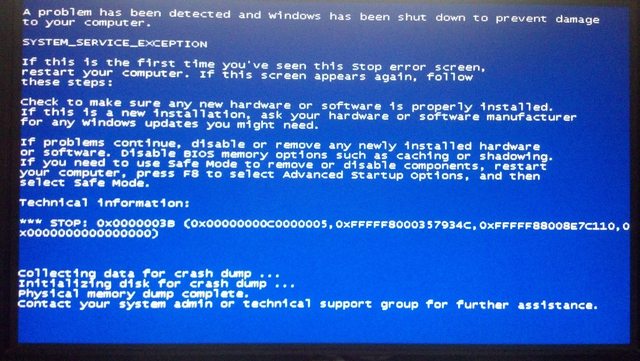
The system checks an exception in kernel mode, and if it would result in a user-mode unwind, the system bugchecks with this code (0x3B, SYSTEM_SERVICE_EXCEPTION). What this means is that you (very) likely have a driver that's causing issues, assuming your system RAM has passed MemTestx86+ testing. If that's the case, Driver Verifier is going to be required (enable, reboot, wait for another crash) to catch the culprit that's actually causing the exception from user-mode. The settings discussed here are appropriate.
 

My Computer My Computer

Computer type
PC/Desktop
Computer Manufacturer/Model Number
Custom
OS
Windows 10 Pro x64
CPU
Intel Core i7 4790K @ 4.5GHz
Motherboard
Asus Maximus Hero VII
Memory
32GB DDR3
Graphics Card(s)
Nvidia GeForce GTX970
Sound Card
Realtek HD Audio
Screen Resolution
1920x1200
Hard Drives
1x Samsung 250GB SSD
4x WD RE 2TB (RAIDZ)
PSU
Corsair AX760i
Case
Fractal Design Define R4
Cooling
Noctua NH-D15

My Computer My Computer

Computer type
PC/Desktop
Computer Manufacturer/Model Number
Custom build
OS
Windows 7 Home Premium x64
CPU
Intel i5 750 2.67 ghz
Motherboard
Asus P7P55 LX
Memory
12gb
Graphics Card(s)
Galaxy 60XMH6HS3HMW GeForce GTX 460
Hard Drives
Samsung 1TB HD103SJ
Antivirus
ESET NOD32
Browser
Google Chrome
Back
Top