Solved Overclocking i7 2600 @ 3.7 GHz

leonnkeong

New member
Member
Local time
3:48 AM
Messages
68
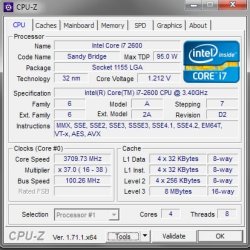
I just reset my bios and I did not set any changes on my Clock Speed. However, after I boot up, I realise that my default clock speed (3.4 GHz) shoot up to 3.7 Ghz. Is this normal? I don't really need this much, 3.4 GHz should be good.

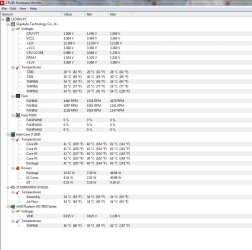
Idle temp @ 40 C

Is this setup and temp. normal? Should I downgrade it or just let it be?

Thanks in advance guru! :D
 

Attachments

  • Fullscreen capture 1162015 85106 PM.bmp.jpg
    Fullscreen capture 1162015 85106 PM.bmp.jpg
    51.9 KB · Views: 30
  • Fullscreen capture 1162015 85012 PM.bmp.jpg
    Fullscreen capture 1162015 85012 PM.bmp.jpg
    98.3 KB · Views: 1

My Computer My Computer

OS
Windows Ultimate x64
CPU
Intel i7 2600 @ 3.8GHz
Motherboard
Gigabyte Z77P-D3
Memory
Corsair Vengeance 8GB Dual Channel
Graphics Card(s)
Sapphire ATI HD7850 2GB
Case
CM RC 690 II
Cooling
Corsair H60
Keyboard
Razer Lycosa
Mouse
Razer Deathadder 3.5G
Internet Speed
VIP10 @ 10 mbps
Check your BIOS. See how the Turbo Boost is set.

Also, if set, the processor should clock down when not loaded.
CPU C1E and CPU EIST
 

My Computer My Computer

Computer type
PC/Desktop
Computer Manufacturer/Model Number
Custom Built
OS
Windows 10 Pro x64, Windows 8.1 Pro x64, Windows 7 Ultimate x64 SP1,
CPU
INTEL i9-7920X LGA 2066
Motherboard
Gigabyte X299-WU8 F3
Memory
64 GB (4 X 16 GB) G-Skill V Series DDR4 3200 Quad Channel
Graphics Card(s)
EVGA GTX 1060 SC 3 GB
Sound Card
Realtek Onboard ALC1220
Monitor(s) Displays
2 x Samsung S27E310
Screen Resolution
1920x1080
Hard Drives
Samsung 2 x 970 EVO Plus 500 GB NVMe
1 x 6TB WD 6003FZBX SATA
1 x 6TB WD 60EFRX SATA
12 x 3TB WD 30EFRX SATA
PSU
Seasonic X-1050
Case
Thermaltake Armor+
Cooling
Corsair H80i V2 Liquid AOI Cooler
Keyboard
Logitech G510s
Mouse
Logitech MX Master 2S
Internet Speed
200 Mb/s
Antivirus
ESET NOD32 13.1
Browser
EDGE (Dev, Canary, Beta), Chrome
Other Info
ASUS RT-AC68U router
Malwarebytes 4.0.4
Check your BIOS. See how the Turbo Boost is set.

Also, if set, the processor should clock down when not loaded.
CPU C1E and CPU EIST

It is set enable. It will clock down when not loaded, just that do you think this feature necessary and will it damage my system etc?
 

My Computer My Computer

OS
Windows Ultimate x64
CPU
Intel i7 2600 @ 3.8GHz
Motherboard
Gigabyte Z77P-D3
Memory
Corsair Vengeance 8GB Dual Channel
Graphics Card(s)
Sapphire ATI HD7850 2GB
Case
CM RC 690 II
Cooling
Corsair H60
Keyboard
Razer Lycosa
Mouse
Razer Deathadder 3.5G
Internet Speed
VIP10 @ 10 mbps
As long as your temperatures remain good, no, it will not harm your system.
 

My Computer My Computer

Computer type
PC/Desktop
Computer Manufacturer/Model Number
Custom Built
OS
Windows 10 Pro x64, Windows 8.1 Pro x64, Windows 7 Ultimate x64 SP1,
CPU
INTEL i9-7920X LGA 2066
Motherboard
Gigabyte X299-WU8 F3
Memory
64 GB (4 X 16 GB) G-Skill V Series DDR4 3200 Quad Channel
Graphics Card(s)
EVGA GTX 1060 SC 3 GB
Sound Card
Realtek Onboard ALC1220
Monitor(s) Displays
2 x Samsung S27E310
Screen Resolution
1920x1080
Hard Drives
Samsung 2 x 970 EVO Plus 500 GB NVMe
1 x 6TB WD 6003FZBX SATA
1 x 6TB WD 60EFRX SATA
12 x 3TB WD 30EFRX SATA
PSU
Seasonic X-1050
Case
Thermaltake Armor+
Cooling
Corsair H80i V2 Liquid AOI Cooler
Keyboard
Logitech G510s
Mouse
Logitech MX Master 2S
Internet Speed
200 Mb/s
Antivirus
ESET NOD32 13.1
Browser
EDGE (Dev, Canary, Beta), Chrome
Other Info
ASUS RT-AC68U router
Malwarebytes 4.0.4
As long as your temperatures remain good, no, it will not harm your system.

Idle around < 49 C. Max load on gaming, rendering around < 80 C. Good thing? But I'm on Corsair H60 Water cooling, 40+ temp kinda high isn't? ;/
 

My Computer My Computer

OS
Windows Ultimate x64
CPU
Intel i7 2600 @ 3.8GHz
Motherboard
Gigabyte Z77P-D3
Memory
Corsair Vengeance 8GB Dual Channel
Graphics Card(s)
Sapphire ATI HD7850 2GB
Case
CM RC 690 II
Cooling
Corsair H60
Keyboard
Razer Lycosa
Mouse
Razer Deathadder 3.5G
Internet Speed
VIP10 @ 10 mbps
The idle temps are a little high but the temp of 80C is up there. Does your CPU fan increase? How is it set?
 

My Computer My Computer

Computer type
PC/Desktop
Computer Manufacturer/Model Number
Custom Built
OS
Windows 10 Pro x64, Windows 8.1 Pro x64, Windows 7 Ultimate x64 SP1,
CPU
INTEL i9-7920X LGA 2066
Motherboard
Gigabyte X299-WU8 F3
Memory
64 GB (4 X 16 GB) G-Skill V Series DDR4 3200 Quad Channel
Graphics Card(s)
EVGA GTX 1060 SC 3 GB
Sound Card
Realtek Onboard ALC1220
Monitor(s) Displays
2 x Samsung S27E310
Screen Resolution
1920x1080
Hard Drives
Samsung 2 x 970 EVO Plus 500 GB NVMe
1 x 6TB WD 6003FZBX SATA
1 x 6TB WD 60EFRX SATA
12 x 3TB WD 30EFRX SATA
PSU
Seasonic X-1050
Case
Thermaltake Armor+
Cooling
Corsair H80i V2 Liquid AOI Cooler
Keyboard
Logitech G510s
Mouse
Logitech MX Master 2S
Internet Speed
200 Mb/s
Antivirus
ESET NOD32 13.1
Browser
EDGE (Dev, Canary, Beta), Chrome
Other Info
ASUS RT-AC68U router
Malwarebytes 4.0.4
CPU fan running 4k+ RPM. 2 extra fans both running 1k+ RPM.

Question : Setting clock speed lower will reduce temp?
 

My Computer My Computer

OS
Windows Ultimate x64
CPU
Intel i7 2600 @ 3.8GHz
Motherboard
Gigabyte Z77P-D3
Memory
Corsair Vengeance 8GB Dual Channel
Graphics Card(s)
Sapphire ATI HD7850 2GB
Case
CM RC 690 II
Cooling
Corsair H60
Keyboard
Razer Lycosa
Mouse
Razer Deathadder 3.5G
Internet Speed
VIP10 @ 10 mbps
Yes it would.
 

My Computer My Computer

Computer type
PC/Desktop
Computer Manufacturer/Model Number
Custom Built
OS
Windows 10 Pro x64, Windows 8.1 Pro x64, Windows 7 Ultimate x64 SP1,
CPU
INTEL i9-7920X LGA 2066
Motherboard
Gigabyte X299-WU8 F3
Memory
64 GB (4 X 16 GB) G-Skill V Series DDR4 3200 Quad Channel
Graphics Card(s)
EVGA GTX 1060 SC 3 GB
Sound Card
Realtek Onboard ALC1220
Monitor(s) Displays
2 x Samsung S27E310
Screen Resolution
1920x1080
Hard Drives
Samsung 2 x 970 EVO Plus 500 GB NVMe
1 x 6TB WD 6003FZBX SATA
1 x 6TB WD 60EFRX SATA
12 x 3TB WD 30EFRX SATA
PSU
Seasonic X-1050
Case
Thermaltake Armor+
Cooling
Corsair H80i V2 Liquid AOI Cooler
Keyboard
Logitech G510s
Mouse
Logitech MX Master 2S
Internet Speed
200 Mb/s
Antivirus
ESET NOD32 13.1
Browser
EDGE (Dev, Canary, Beta), Chrome
Other Info
ASUS RT-AC68U router
Malwarebytes 4.0.4

My Computer My Computer

Computer type
PC/Desktop
Computer Manufacturer/Model Number
Skylake Special #666
OS
Windows 10 Pro x64
CPU
Intel Core i7 6700K
Motherboard
Asus Sabertooth Z170 Mark 1
Memory
GSkill TridentZ RGB 16GB 3600 16-16-16-36
Graphics Card(s)
EVGA GTX 980 Ti SC x2
Sound Card
Realtek High Definition
Monitor(s) Displays
AOC G2460PG
Screen Resolution
1920 x 1080 144Hz
Hard Drives
Samsung 860 Pro 256GB, Seagate Barracuda 4TB x2
PSU
EVGA 1000 P2, EVGA White Custom Braided Cables
Case
Corsair Vengeance C70 Gunmetal Black
Cooling
Corsair H100i v2, Corsair ML120 x2, Thermal Grizzly Kryonaut
Keyboard
Logitech G910 Orion Spectrum
Mouse
Logitech G700s
Internet Speed
Verizon Fios Quantum Gateway 75/75
Antivirus
Windows Defender, Malwarebytes Free 3.8.3
Browser
Chrome
Other Info
Corsair SP120 x4, LG Blu-ray Drive, Durabrand HT-395 100 Watt Dolby Digital Amp, Corsair H2100 Wireless 7.1 Headset
It`s supposed to throttle up, totally normal. But if you can set the throttle up speed to 3.6 it would help.

What thermal paste do you use ?

My 1st attempt at water cooling was the H60, I was not impressed with it at all.

Just a suggestion.

Thermaltake Water 3.0 Extreme S CLW0224-B Water Cooler - Newegg.com

Arctic Silver Arctic Alumina 14g Premium Ceramic, Polysynthetic thermal compound AA-14G - Newegg.com

I'm actually looking forward to Cooler Master Seidon 240M. Good thing?
 

My Computer My Computer

OS
Windows Ultimate x64
CPU
Intel i7 2600 @ 3.8GHz
Motherboard
Gigabyte Z77P-D3
Memory
Corsair Vengeance 8GB Dual Channel
Graphics Card(s)
Sapphire ATI HD7850 2GB
Case
CM RC 690 II
Cooling
Corsair H60
Keyboard
Razer Lycosa
Mouse
Razer Deathadder 3.5G
Internet Speed
VIP10 @ 10 mbps
I don't know much about the Seidon, but I do know those idle temps are high. Maybe clean the dust from the rad and find better fans for it, and re paste the CPU after cleaning off the old paste from the CPU and CPU cooler. With fans, the amount of air is not nearly as important as The pressure they produce to push the air through the radiator. The best fans, well that a story for another thread. Everyone has their preference. But find ones with high static pressure and a noise level you can live with.
 

My Computers My Computers

System One System Two

  • Computer type
    PC/Desktop
    Computer Manufacturer/Model Number
    ALWAYS UNDER CONSTRUCTION
    OS
    Windows 11 Pro
    CPU
    Ryzen 9 5900X
    Motherboard
    Asus X570 Crosshair Viii Hero
    Memory
    32GB G Skill DDR4-3600
    Graphics Card(s)
    EVGA RTX 3080 FTW 3 Ultra
    Sound Card
    On Board/Sennheiser PC37X Headset
    Monitor(s) Displays
    3 X Asus 27"
    Screen Resolution
    2560x1440
    Hard Drives
    2 X 1 TB NVME drives
    PSU
    EVGA 850
    Case
    Phanteks Eclipse P400A
    Cooling
    EVGA 280 AIO
    Keyboard
    Logitech G510s/ Logitech G13
    Mouse
    Logitech G502
    Internet Speed
    24/1
    Antivirus
    ESET/MBAM Pro/SAS Pro
    Browser
    Chrome/ Firefox/ Edge
  • Computer type
    Laptop
    System Manufacturer/Model Number
    Dell 16 Plus
    OS
    Windows 11 Pro
    CPU
    Intel Ultra 9 288V
    Memory
    32 GB LPDDR5X 8533
    Monitor(s) Displays
    16" Mini-LED HDR600 Touch 90 Hz
    Screen Resolution
    2560X1600
    Hard Drives
    1 TB NVME
I don't know much about the Seidon, but I do know those idle temps are high. Maybe clean the dust from the rad and find better fans for it, and re paste the CPU after cleaning off the old paste from the CPU and CPU cooler. With fans, the amount of air is not nearly as important as The pressure they produce to push the air through the radiator. The best fans, well that a story for another thread. Everyone has their preference. But find ones with high static pressure and a noise level you can live with.

When it comes down to fans agree a lot of personal preferences and depending on the application and type of Radiator being used either air or liquid topic for another post.

Agree your idle temps are high and the system may need a good cleaning and or Thermal Grease replaced. Should be around 25C to 32c depending on the Core in the CPU. Just checked the temps on a 2600K & a 4930K at Idle. Cores should be with in 5 to 7 degrees C depending on CPU & Thermal Grease. Example 25C thru 32C at Idle. Not all Chip Sets Are Created Equal.

CPU Temps:
80C is in the blue safe Long Life.
85C Yellow
95C Red Can run at 95c advanced O. Clockers only not recommended short life.
 

My Computer My Computer

Computer type
PC/Desktop
Computer Manufacturer/Model Number
Custom Build
OS
Windows 7 Ultimate 64 BIT
CPU
I 7 4930K @ 4.4 GHz
Motherboard
Asus Rampage lV Black Edition
Memory
G Skill Z Series 2133 MHz 16 Gb
Graphics Card(s)
Evga GTX 780 S.C. x 2 SLI
Sound Card
Peach Tree Nova 125SE DAC & Amp D-5 Speakers/Audeze LCD 2
Monitor(s) Displays
Dell Ultra Sharp Curved U3415W
Screen Resolution
3440 X 1440
Hard Drives
C: Intel 730 Series 250Gb
4 x Western Digital Velocity Raptors 300 GB Each
1 x Western Digital Black Caviar 2 Tb Storage 5 GB Page Files & Temp Files moved from C: Drive, Media Files.
1 x Western Digital Black Caviar 2 Tb Removable back up.
PSU
Corsair AX 1500i
Case
CaseLabs Magnum 8
Cooling
Noctua Fans NFS12A x 11 & CPU Heat Sink Nh-D14
Keyboard
Enermax Aurora
Mouse
Logitech G3
Internet Speed
100 Mbps
Antivirus
Norton Security 2015
Browser
Internet Explorer 10
Other Info
Various programs installed on 4 hard drives depending on usage. Air filters are custom by DEMCIFILTERS. Optic Drives None. System is built for Flight Simulator X and other flight sims. 3 x PDB boards for the fans and LCD lights. Really helps with cable management. Case fan RPM is a constant 1350 rpm extremely quiet system cannot hear the system running.
Back
Top