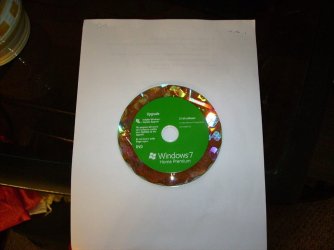
Solved Clean install Windows 7 32 bit and I have a Program Files x86 folder.

Attachments

  • Windows1.jpg
    Windows1.jpg
    73.6 KB · Views: 5

My Computer My Computer

At a glance

Windows 7 32bitAMD Athlon™ 64 X2 dual core 4000+ processor2048 MB DDR2, 667 MHz, (PC2-5300)Pny NVIDIA GeForce gt610 1024mb ddr3
Computer type
PC/Desktop
Computer Manufacturer/Model Number
Gateway GM5470E Desktop Computer
OS
Windows 7 32bit
CPU
AMD Athlon™ 64 X2 dual core 4000+ processor
Motherboard
ECS MCP61P-AM motherboard(micro_atx)
Memory
2048 MB DDR2, 667 MHz, (PC2-5300)
Graphics Card(s)
Pny NVIDIA GeForce gt610 1024mb ddr3
Sound Card
on-board integrated
Monitor(s) Displays
Vizio 24 inch 1920x1080 hd Tv
Screen Resolution
1920x1080
Hard Drives
Intel 3500 series 120gb
PSU
Corsair 430
Keyboard
Gateway wireless
Mouse
Gateway wireless
Internet Speed
2.2 .868
Browser
Seamonkey
And you did a clean install with it ? Formatting the install partition before you clicked next ?
 

My Computer My Computer

At a glance

Windows 10 Pro x64Intel Core i7 6700KGSkill TridentZ RGB 16GB 3600 16-16-16-36EVGA GTX 980 Ti SC x2
Computer type
PC/Desktop
Computer Manufacturer/Model Number
Skylake Special #666
OS
Windows 10 Pro x64
CPU
Intel Core i7 6700K
Motherboard
Asus Sabertooth Z170 Mark 1
Memory
GSkill TridentZ RGB 16GB 3600 16-16-16-36
Graphics Card(s)
EVGA GTX 980 Ti SC x2
Sound Card
Realtek High Definition
Monitor(s) Displays
AOC G2460PG
Screen Resolution
1920 x 1080 144Hz
Hard Drives
Samsung 860 Pro 256GB, Seagate Barracuda 4TB x2
PSU
EVGA 1000 P2, EVGA White Custom Braided Cables
Case
Corsair Vengeance C70 Gunmetal Black
Cooling
Corsair H100i v2, Corsair ML120 x2, Thermal Grizzly Kryonaut
Keyboard
Logitech G910 Orion Spectrum
Mouse
Logitech G700s
Internet Speed
Verizon Fios Quantum Gateway 75/75
Antivirus
Windows Defender, Malwarebytes Free 3.8.3
Browser
Chrome
Other Info
Corsair SP120 x4, LG Blu-ray Drive, Durabrand HT-395 100 Watt Dolby Digital Amp, Corsair H2100 Wireless 7.1 Headset
Program Files is the folder for 32-bit programs on Windows 32-bit installs
Program Files (x86) is the folder for 32-bit programs on Windows 64-bit installs

It sounds as though a 64-bit install media was used instead of 32-bit media.

Greg's advice is best - start over and make sure you follow all of the steps, including which bit depth to create.

Thanks for the disc image - guess I was wrong on using the incorrect bit depth install media :o

Still, follow the Clean Reinstall tutorial and create new install media from a step in the tutorial. That is your best bet
 

My Computer My Computer

At a glance

x64 (6.3.9600) Win8.1 Pro & soon dual boot x6...AMD A6-3420M APU with Radeon(tm) HD Graphics6.00 GBAMD Radeon(TM) HD 6520G
Computer type
Laptop
Computer Manufacturer/Model Number
HP Pavilion dv6-6c10us
OS
x64 (6.3.9600) Win8.1 Pro & soon dual boot x64 (6.1.7601) Win7_SP1 HomePrem
CPU
AMD A6-3420M APU with Radeon(tm) HD Graphics
Motherboard
Hewlett-Packard 1805
Memory
6.00 GB
Graphics Card(s)
AMD Radeon(TM) HD 6520G
Sound Card
(1) AMD High Definition Audio Device (2) IDT High Definiti
Monitor(s) Displays
HP W2072a 20" LCD (1600 x 900) @ 60 Hz
Screen Resolution
1366 x 768 x 32 bits (4294967296 colors) @ 60 Hz
Hard Drives
ST640LM0 00 HM641JI SATA Disk Device
Keyboard
Logitech k520 wireless KB
Mouse
Logitech m320 wireless mouse (bundled with KB)
Internet Speed
15/5 | 54 MB Wireless 'n'
Antivirus
Realtime: Defender or Avast | On-demand: Malwarebytes, ESET
Browser
IE 11 on Win8, IE 10 on win 7
Other Info
Media: [Gimp, Audacity, VLC] || Comm: [WEmail 2012, Skype] || Productivity: [OpenOffice,| Textpad] || Utils: [Sysinternals, cCleaner, Speccy, Defraggler]
But it`s a 32 bit disk.
 

My Computer My Computer

At a glance

Windows 10 Pro x64Intel Core i7 6700KGSkill TridentZ RGB 16GB 3600 16-16-16-36EVGA GTX 980 Ti SC x2
Computer type
PC/Desktop
Computer Manufacturer/Model Number
Skylake Special #666
OS
Windows 10 Pro x64
CPU
Intel Core i7 6700K
Motherboard
Asus Sabertooth Z170 Mark 1
Memory
GSkill TridentZ RGB 16GB 3600 16-16-16-36
Graphics Card(s)
EVGA GTX 980 Ti SC x2
Sound Card
Realtek High Definition
Monitor(s) Displays
AOC G2460PG
Screen Resolution
1920 x 1080 144Hz
Hard Drives
Samsung 860 Pro 256GB, Seagate Barracuda 4TB x2
PSU
EVGA 1000 P2, EVGA White Custom Braided Cables
Case
Corsair Vengeance C70 Gunmetal Black
Cooling
Corsair H100i v2, Corsair ML120 x2, Thermal Grizzly Kryonaut
Keyboard
Logitech G910 Orion Spectrum
Mouse
Logitech G700s
Internet Speed
Verizon Fios Quantum Gateway 75/75
Antivirus
Windows Defender, Malwarebytes Free 3.8.3
Browser
Chrome
Other Info
Corsair SP120 x4, LG Blu-ray Drive, Durabrand HT-395 100 Watt Dolby Digital Amp, Corsair H2100 Wireless 7.1 Headset
Start over with the latest official installation media provided in Clean Reinstall Windows 7
then follow those steps to get and keep a perfect install.
I've already done that and this is the disk I used

That is not the latest official installation media and doesn't even have SP1 hence is so outdated I wouldn't use it, especially when the latest official media is provided in Step 1 of Clean Reinstall Windows 7 saving hours of updating.
 
But it`s a 32 bit disk.
I know, the screen shot was posted while I was writing the post... I corrected the post and even gave myself one of these :o

Second one today :o:o
 

My Computer My Computer

At a glance

x64 (6.3.9600) Win8.1 Pro & soon dual boot x6...AMD A6-3420M APU with Radeon(tm) HD Graphics6.00 GBAMD Radeon(TM) HD 6520G
Computer type
Laptop
Computer Manufacturer/Model Number
HP Pavilion dv6-6c10us
OS
x64 (6.3.9600) Win8.1 Pro & soon dual boot x64 (6.1.7601) Win7_SP1 HomePrem
CPU
AMD A6-3420M APU with Radeon(tm) HD Graphics
Motherboard
Hewlett-Packard 1805
Memory
6.00 GB
Graphics Card(s)
AMD Radeon(TM) HD 6520G
Sound Card
(1) AMD High Definition Audio Device (2) IDT High Definiti
Monitor(s) Displays
HP W2072a 20" LCD (1600 x 900) @ 60 Hz
Screen Resolution
1366 x 768 x 32 bits (4294967296 colors) @ 60 Hz
Hard Drives
ST640LM0 00 HM641JI SATA Disk Device
Keyboard
Logitech k520 wireless KB
Mouse
Logitech m320 wireless mouse (bundled with KB)
Internet Speed
15/5 | 54 MB Wireless 'n'
Antivirus
Realtime: Defender or Avast | On-demand: Malwarebytes, ESET
Browser
IE 11 on Win8, IE 10 on win 7
Other Info
Media: [Gimp, Audacity, VLC] || Comm: [WEmail 2012, Skype] || Productivity: [OpenOffice,| Textpad] || Utils: [Sysinternals, cCleaner, Speccy, Defraggler]
Right, the 32-bit version of Windows will have C:\Program Files Folder while the 64-bit Windows will have C:\Program Files Folder for 64-bit programs plus C:\Program Files (x86) Folder for 32-bit programs. I've seen where if a Program Files (x86) Folder exists after a 32-bit version of Windows is installed it meant the newer install was not clean. The last two I saw like that required a truly clean reinstall to get it straightened out.
 

My Computer My Computer

At a glance

Windows 7 Ultimate 64-bit, Windows 8.1 64-bit...
Computer type
PC/Desktop
Computer Manufacturer/Model Number
Customs, Dell, Gateway, HP, Toshiba, Acer, ASUS
OS
Windows 7 Ultimate 64-bit, Windows 8.1 64-bit, Mac OS X 10.10, Linux Mint 17, Windows 10 Pro TP
Keyboard
Microsoft
Mouse
Microsoft
And that`s what I asked again in post #22.

Even though his thread title states clean install of 32 bit.

We will await his return.
 

My Computer My Computer

At a glance

Windows 10 Pro x64Intel Core i7 6700KGSkill TridentZ RGB 16GB 3600 16-16-16-36EVGA GTX 980 Ti SC x2
Computer type
PC/Desktop
Computer Manufacturer/Model Number
Skylake Special #666
OS
Windows 10 Pro x64
CPU
Intel Core i7 6700K
Motherboard
Asus Sabertooth Z170 Mark 1
Memory
GSkill TridentZ RGB 16GB 3600 16-16-16-36
Graphics Card(s)
EVGA GTX 980 Ti SC x2
Sound Card
Realtek High Definition
Monitor(s) Displays
AOC G2460PG
Screen Resolution
1920 x 1080 144Hz
Hard Drives
Samsung 860 Pro 256GB, Seagate Barracuda 4TB x2
PSU
EVGA 1000 P2, EVGA White Custom Braided Cables
Case
Corsair Vengeance C70 Gunmetal Black
Cooling
Corsair H100i v2, Corsair ML120 x2, Thermal Grizzly Kryonaut
Keyboard
Logitech G910 Orion Spectrum
Mouse
Logitech G700s
Internet Speed
Verizon Fios Quantum Gateway 75/75
Antivirus
Windows Defender, Malwarebytes Free 3.8.3
Browser
Chrome
Other Info
Corsair SP120 x4, LG Blu-ray Drive, Durabrand HT-395 100 Watt Dolby Digital Amp, Corsair H2100 Wireless 7.1 Headset
And you did a clean install with it ? Formatting the install partition before you clicked next ?

Sorry for the late post but I had errands to run
Yes. The partition was already formatted to ntfs and nothing was on it.
 

My Computer My Computer

At a glance

Windows 7 32bitAMD Athlon™ 64 X2 dual core 4000+ processor2048 MB DDR2, 667 MHz, (PC2-5300)Pny NVIDIA GeForce gt610 1024mb ddr3
Computer type
PC/Desktop
Computer Manufacturer/Model Number
Gateway GM5470E Desktop Computer
OS
Windows 7 32bit
CPU
AMD Athlon™ 64 X2 dual core 4000+ processor
Motherboard
ECS MCP61P-AM motherboard(micro_atx)
Memory
2048 MB DDR2, 667 MHz, (PC2-5300)
Graphics Card(s)
Pny NVIDIA GeForce gt610 1024mb ddr3
Sound Card
on-board integrated
Monitor(s) Displays
Vizio 24 inch 1920x1080 hd Tv
Screen Resolution
1920x1080
Hard Drives
Intel 3500 series 120gb
PSU
Corsair 430
Keyboard
Gateway wireless
Mouse
Gateway wireless
Internet Speed
2.2 .868
Browser
Seamonkey
Already formatted by what ?

Did you format it during the install ?

While you are not doing anything, you should download the 32 bit SP1-U iso file of the version you have an activation key for from here.

Official Windows 7 SP1 ISO from Digital River « My Digital Life

After fully updating mine it still looks the same. I have not installed any programs yet, I will install my usual few and post back any changes.
 
Last edited:

My Computer My Computer

At a glance

Windows 10 Pro x64Intel Core i7 6700KGSkill TridentZ RGB 16GB 3600 16-16-16-36EVGA GTX 980 Ti SC x2
Computer type
PC/Desktop
Computer Manufacturer/Model Number
Skylake Special #666
OS
Windows 10 Pro x64
CPU
Intel Core i7 6700K
Motherboard
Asus Sabertooth Z170 Mark 1
Memory
GSkill TridentZ RGB 16GB 3600 16-16-16-36
Graphics Card(s)
EVGA GTX 980 Ti SC x2
Sound Card
Realtek High Definition
Monitor(s) Displays
AOC G2460PG
Screen Resolution
1920 x 1080 144Hz
Hard Drives
Samsung 860 Pro 256GB, Seagate Barracuda 4TB x2
PSU
EVGA 1000 P2, EVGA White Custom Braided Cables
Case
Corsair Vengeance C70 Gunmetal Black
Cooling
Corsair H100i v2, Corsair ML120 x2, Thermal Grizzly Kryonaut
Keyboard
Logitech G910 Orion Spectrum
Mouse
Logitech G700s
Internet Speed
Verizon Fios Quantum Gateway 75/75
Antivirus
Windows Defender, Malwarebytes Free 3.8.3
Browser
Chrome
Other Info
Corsair SP120 x4, LG Blu-ray Drive, Durabrand HT-395 100 Watt Dolby Digital Amp, Corsair H2100 Wireless 7.1 Headset
Something is odd ...
Re-reading this thread in post #18 i see
I always install most of my programs here:c:\Program Files\CoolApps with various folders inside
I have never installed a program into the Program Files folder.
I wonder if installing there might be causing an issue ???
Maybe using that folder confuses some installers ??? programs use that folder in addition to the "installation" folder ...
I use the default install location...
 

My Computer My Computer

At a glance

Multi-Boot W7_Pro_x64 W8.1_Pro_x64 W10_Pro_x6...AMD Athlon II x4 6206GB GSkill DDR2 800AMD 4670 GPU + AMD 4200 IGP
Computer type
PC/Desktop
Computer Manufacturer/Model Number
home built
OS
Multi-Boot W7_Pro_x64 W8.1_Pro_x64 W10_Pro_x64 +Linux_VMs +Chromium_VM
CPU
AMD Athlon II x4 620
Motherboard
Gigabyte GA-MA785G-UD3H
Memory
6GB GSkill DDR2 800
Graphics Card(s)
AMD 4670 GPU + AMD 4200 IGP
Sound Card
on board Realtek ALC889A
Monitor(s) Displays
RCA 40" LCD TV, Insignia 32" LCD TV, HP 15" LCD monitor
Screen Resolution
1680 x 1050
Hard Drives
OCZ Vertex 3 120GB,
Samsung F3 1TB (3),
Several others - WD, Seagate, Hitachi, ...
PSU
Corsair 500 W
Case
Rosewill mid tower
Cooling
CM 90mm rifle
Keyboard
Gyration wireless, Logitech wireless, Dell USB wired
Mouse
Gyration wireless, Logitech wireless, V7 USB wired
Internet Speed
Spectrum - 100Mbps D / 10Mbps U
Antivirus
Avast, MBAM3, EMET, WinPatrol
Browser
Pale Moon, Firefox, IE
Other Info
2 multi-boot PC's
Mainly HTPC/Office/Gen purpose (no gaming).
Trendnet USB KVM.
LG DVD burner/Blue Ray Player.
Tray system for removable SATA backup drives.

Not currently OCd, under-volted.
I use Hybrid sleep, rarely re-boot or shutdown.

Hauppauge HD-PVR, Avermedia PCIe TV Tuner, Hauppauge PCI TV Tuner.
Already formatted by what ?

Did you format it during the install ?
No I used G-Parted. Anyways I noticed that every folder in Local Disk (c:) was created on July 13, 2009
except SVInfo and Recovery which were created on Jan.12, 2015 I'm talking about the default unopened folders i.e. PerfLogs,Documents and Setttings, Program Files, ...x86, ProgramData
Recovery, SVI, Users, amd Windows. Doesn't that mean that x86 is actually on my install disK?
Oh one other thing my Upgrade package came with two disks 32and64 bit.
 

My Computer My Computer

At a glance

Windows 7 32bitAMD Athlon™ 64 X2 dual core 4000+ processor2048 MB DDR2, 667 MHz, (PC2-5300)Pny NVIDIA GeForce gt610 1024mb ddr3
Computer type
PC/Desktop
Computer Manufacturer/Model Number
Gateway GM5470E Desktop Computer
OS
Windows 7 32bit
CPU
AMD Athlon™ 64 X2 dual core 4000+ processor
Motherboard
ECS MCP61P-AM motherboard(micro_atx)
Memory
2048 MB DDR2, 667 MHz, (PC2-5300)
Graphics Card(s)
Pny NVIDIA GeForce gt610 1024mb ddr3
Sound Card
on-board integrated
Monitor(s) Displays
Vizio 24 inch 1920x1080 hd Tv
Screen Resolution
1920x1080
Hard Drives
Intel 3500 series 120gb
PSU
Corsair 430
Keyboard
Gateway wireless
Mouse
Gateway wireless
Internet Speed
2.2 .868
Browser
Seamonkey
As posted by the OP in post #10 "It is 32 bit and was installed to a quick formatted ssd that I had put 64 bit on earlier but changed my mind about using 64 bit. Vista had never been on this drive." I don't think a quick format will hide old system files from a windows install. Art.
 

My Computer My Computer

At a glance

Win7 sp1 Pro 64bit / XP sp2 Pro (games only)Intel Core 2 Duo E8400 @ 3.00GHz8.00 GB Dual-Channel DDR2 @ 400MHz (5-5-5-18)1024MB GeForce GTX 560
Computer type
PC/Desktop
Computer Manufacturer/Model Number
Home built
OS
Win7 sp1 Pro 64bit / XP sp2 Pro (games only)
CPU
Intel Core 2 Duo E8400 @ 3.00GHz
Motherboard
Intel Corporation DP35DP (CPU1)
Memory
8.00 GB Dual-Channel DDR2 @ 400MHz (5-5-5-18)
Graphics Card(s)
1024MB GeForce GTX 560
Sound Card
NVIDIA High Definition Audio
Monitor(s) Displays
SyncMaster (2048x1152@60Hz)
Hard Drives
240GB Sandisc Extreme Pro SSD
244GB Seagate ST3250410AS
488GB Seagate ST500DM002-1BD142
931GB Western Digital WDC WD1003FZEX
PSU
Corsair 720
Case
ATX
Keyboard
HID Keyboard Device Logitech
Mouse
HID-compliant mouse Microsoft
Other Info
TSSTcorp CDDVDW SH-S223L

HL-DT-ST BD-RE BH12LS35
Yes it will, it will be like nothing is on the partition. But he should have done it with the installer.
 

My Computer My Computer

At a glance

Windows 10 Pro x64Intel Core i7 6700KGSkill TridentZ RGB 16GB 3600 16-16-16-36EVGA GTX 980 Ti SC x2
Computer type
PC/Desktop
Computer Manufacturer/Model Number
Skylake Special #666
OS
Windows 10 Pro x64
CPU
Intel Core i7 6700K
Motherboard
Asus Sabertooth Z170 Mark 1
Memory
GSkill TridentZ RGB 16GB 3600 16-16-16-36
Graphics Card(s)
EVGA GTX 980 Ti SC x2
Sound Card
Realtek High Definition
Monitor(s) Displays
AOC G2460PG
Screen Resolution
1920 x 1080 144Hz
Hard Drives
Samsung 860 Pro 256GB, Seagate Barracuda 4TB x2
PSU
EVGA 1000 P2, EVGA White Custom Braided Cables
Case
Corsair Vengeance C70 Gunmetal Black
Cooling
Corsair H100i v2, Corsair ML120 x2, Thermal Grizzly Kryonaut
Keyboard
Logitech G910 Orion Spectrum
Mouse
Logitech G700s
Internet Speed
Verizon Fios Quantum Gateway 75/75
Antivirus
Windows Defender, Malwarebytes Free 3.8.3
Browser
Chrome
Other Info
Corsair SP120 x4, LG Blu-ray Drive, Durabrand HT-395 100 Watt Dolby Digital Amp, Corsair H2100 Wireless 7.1 Headset
Something is odd ...
Re-reading this thread in post #18 i see
I always install most of my programs here:c:\Program Files\CoolApps with various folders inside
I have never installed a program into the Program Files folder.
I wonder if installing there might be causing an issue ???
Maybe using that folder confuses some installers ??? programs use that folder in addition to the "installation" folder ...
I use the default install location...

You may have hit the nail on the head, and he should not have made these folders as the program installers do this themselves. I just installed about 8 programs and the file path was the same on everyone, never Program Files x86. I seriously think you made this folder up yourself and just don`t want to remember doing it. And my C partition is still exactly the same.
 
Last edited:

My Computer My Computer

At a glance

Windows 10 Pro x64Intel Core i7 6700KGSkill TridentZ RGB 16GB 3600 16-16-16-36EVGA GTX 980 Ti SC x2
Computer type
PC/Desktop
Computer Manufacturer/Model Number
Skylake Special #666
OS
Windows 10 Pro x64
CPU
Intel Core i7 6700K
Motherboard
Asus Sabertooth Z170 Mark 1
Memory
GSkill TridentZ RGB 16GB 3600 16-16-16-36
Graphics Card(s)
EVGA GTX 980 Ti SC x2
Sound Card
Realtek High Definition
Monitor(s) Displays
AOC G2460PG
Screen Resolution
1920 x 1080 144Hz
Hard Drives
Samsung 860 Pro 256GB, Seagate Barracuda 4TB x2
PSU
EVGA 1000 P2, EVGA White Custom Braided Cables
Case
Corsair Vengeance C70 Gunmetal Black
Cooling
Corsair H100i v2, Corsair ML120 x2, Thermal Grizzly Kryonaut
Keyboard
Logitech G910 Orion Spectrum
Mouse
Logitech G700s
Internet Speed
Verizon Fios Quantum Gateway 75/75
Antivirus
Windows Defender, Malwarebytes Free 3.8.3
Browser
Chrome
Other Info
Corsair SP120 x4, LG Blu-ray Drive, Durabrand HT-395 100 Watt Dolby Digital Amp, Corsair H2100 Wireless 7.1 Headset
Something is odd ...
Re-reading this thread in post #18 i see
I always install most of my programs here:c:\Program Files\CoolApps with various folders inside
I have never installed a program into the Program Files folder.
I wonder if installing there might be causing an issue ???
Maybe using that folder confuses some installers ??? programs use that folder in addition to the "installation" folder ...
I use the default install location...

You may have hit the nail on the head, and he should not have made these folders as the program installers do this themselves. I just installed about 8 programs and the file path was the same on everyone, never Program Files x86. I seriously think you made this folder up yourself and just don`t want to remember doing it.
I have also Never installed a program to Program Filesx86 I always install
to c:\Program Files\CoolApps and I have been doing this since I first did my Upgrade install over Vista in Oct. 2009. i do it this way because I don't like this huge long list of Programs Files. My CoolApps folder is Divided into several generic categories i.e.... Utilities, MediaPlayers, GuiHelpers, etc. And My system was rock solid.
 

My Computer My Computer

At a glance

Windows 7 32bitAMD Athlon™ 64 X2 dual core 4000+ processor2048 MB DDR2, 667 MHz, (PC2-5300)Pny NVIDIA GeForce gt610 1024mb ddr3
Computer type
PC/Desktop
Computer Manufacturer/Model Number
Gateway GM5470E Desktop Computer
OS
Windows 7 32bit
CPU
AMD Athlon™ 64 X2 dual core 4000+ processor
Motherboard
ECS MCP61P-AM motherboard(micro_atx)
Memory
2048 MB DDR2, 667 MHz, (PC2-5300)
Graphics Card(s)
Pny NVIDIA GeForce gt610 1024mb ddr3
Sound Card
on-board integrated
Monitor(s) Displays
Vizio 24 inch 1920x1080 hd Tv
Screen Resolution
1920x1080
Hard Drives
Intel 3500 series 120gb
PSU
Corsair 430
Keyboard
Gateway wireless
Mouse
Gateway wireless
Internet Speed
2.2 .868
Browser
Seamonkey
Already formatted by what ?

Did you format it during the install ?
No I used G-Parted. Anyways I noticed that every folder in Local Disk (c:) was created on July 13, 2009
except SVInfo and Recovery which were created on Jan.12, 2015 I'm talking about the default unopened folders i.e. PerfLogs,Documents and Setttings, Program Files, ...x86, ProgramData
Recovery, SVI, Users, amd Windows. Doesn't that mean that x86 is actually on my install disK?
Oh one other thing my Upgrade package came with two disks 32and64 bit.

Would someone answer the question I posed above. Please
Anyways what I might do is shut down Windows and Using recovery options on my disk Boot up and
using Command prompt move the Program filesx86 folder to my Desktop and then see how things go
...or not.
 

My Computer My Computer

At a glance

Windows 7 32bitAMD Athlon™ 64 X2 dual core 4000+ processor2048 MB DDR2, 667 MHz, (PC2-5300)Pny NVIDIA GeForce gt610 1024mb ddr3
Computer type
PC/Desktop
Computer Manufacturer/Model Number
Gateway GM5470E Desktop Computer
OS
Windows 7 32bit
CPU
AMD Athlon™ 64 X2 dual core 4000+ processor
Motherboard
ECS MCP61P-AM motherboard(micro_atx)
Memory
2048 MB DDR2, 667 MHz, (PC2-5300)
Graphics Card(s)
Pny NVIDIA GeForce gt610 1024mb ddr3
Sound Card
on-board integrated
Monitor(s) Displays
Vizio 24 inch 1920x1080 hd Tv
Screen Resolution
1920x1080
Hard Drives
Intel 3500 series 120gb
PSU
Corsair 430
Keyboard
Gateway wireless
Mouse
Gateway wireless
Internet Speed
2.2 .868
Browser
Seamonkey
So then why do you ask or care that you have a Program Files x86 folder :confused:
What does it matter how long the programs file folder list is, there`s no reason to even go into it.

And once again you say "Upgrade install over Vista" why do you mention this again ?

If you want it right then download the SP1 iso file, burn to dvd and re install windows, and don`t make any folders inside the Program files folder, there is no reason to.

And do not forget to format the install partition using the install disc. When you get to the partitions screen you highlite your install partition, then choose drive options then format.

Yes, your disk is 32 bit, it says so right on it, and your system properties tells you you have 32 bit installed.
 

My Computer My Computer

At a glance

Windows 10 Pro x64Intel Core i7 6700KGSkill TridentZ RGB 16GB 3600 16-16-16-36EVGA GTX 980 Ti SC x2
Computer type
PC/Desktop
Computer Manufacturer/Model Number
Skylake Special #666
OS
Windows 10 Pro x64
CPU
Intel Core i7 6700K
Motherboard
Asus Sabertooth Z170 Mark 1
Memory
GSkill TridentZ RGB 16GB 3600 16-16-16-36
Graphics Card(s)
EVGA GTX 980 Ti SC x2
Sound Card
Realtek High Definition
Monitor(s) Displays
AOC G2460PG
Screen Resolution
1920 x 1080 144Hz
Hard Drives
Samsung 860 Pro 256GB, Seagate Barracuda 4TB x2
PSU
EVGA 1000 P2, EVGA White Custom Braided Cables
Case
Corsair Vengeance C70 Gunmetal Black
Cooling
Corsair H100i v2, Corsair ML120 x2, Thermal Grizzly Kryonaut
Keyboard
Logitech G910 Orion Spectrum
Mouse
Logitech G700s
Internet Speed
Verizon Fios Quantum Gateway 75/75
Antivirus
Windows Defender, Malwarebytes Free 3.8.3
Browser
Chrome
Other Info
Corsair SP120 x4, LG Blu-ray Drive, Durabrand HT-395 100 Watt Dolby Digital Amp, Corsair H2100 Wireless 7.1 Headset
So then why do you ask or care that you have a Program Files x86 folder :confused:
What does it matter how long the programs file folder list is, there`s no reason to even go into it.

And once again you say "Upgrade install over Vista" why do you mention this again ?

If you want it right then download the SP1 iso file, burn to dvd and re install windows, and don`t make any folders inside the Program files folder, there is no reason to.

And do not forget to format the install partition using the install disc. When you get to the partitions screen you highlite your install partition, then choose drive options then format.

Yes, your disk is 32 bit, it says so right on it, and your system properties tells you you have 32 bit installed.

Actually I'm not all that worried about it. Since if I'm not mistaken the fact that is was created
when the disks were stamped( July 13, 2009)means that folder is in fact on my cd it comes with my
installation of Windows .
I already have a SP1 burned DVD. I downloaded the iso file and burned it sometime after I installed SP1
and since I have cloned my ssd to my old Seagate drive as a backup I could take my SP1 dvd and do a repair install to it. I don't think a repair install would touch either of those folders though.
 

My Computer My Computer

At a glance

Windows 7 32bitAMD Athlon™ 64 X2 dual core 4000+ processor2048 MB DDR2, 667 MHz, (PC2-5300)Pny NVIDIA GeForce gt610 1024mb ddr3
Computer type
PC/Desktop
Computer Manufacturer/Model Number
Gateway GM5470E Desktop Computer
OS
Windows 7 32bit
CPU
AMD Athlon™ 64 X2 dual core 4000+ processor
Motherboard
ECS MCP61P-AM motherboard(micro_atx)
Memory
2048 MB DDR2, 667 MHz, (PC2-5300)
Graphics Card(s)
Pny NVIDIA GeForce gt610 1024mb ddr3
Sound Card
on-board integrated
Monitor(s) Displays
Vizio 24 inch 1920x1080 hd Tv
Screen Resolution
1920x1080
Hard Drives
Intel 3500 series 120gb
PSU
Corsair 430
Keyboard
Gateway wireless
Mouse
Gateway wireless
Internet Speed
2.2 .868
Browser
Seamonkey
Back
Top