Solved Won't print to plotter in XP mode

SD63

New member
Local time
6:43 PM
Messages
11
I'm new to the forum and not sure if this is the best thread to post this in.

I am running Win 7 Ultimate 64 bit, Virtual PC, XP Mode, and AutoCAD 2000.

There are no problems running AutoCAD 2000 in XP mode. My problem is getting my Roland DG flat bed pen plotter to print. It is an RP-22W. The plotter is similar to the RP-11 except it is ANSI B size with electrostatic paper hold. The newest drivers available are for Win XP.

I installed the drivers successfully in XP mode. When I try to print a test page from LPT1 the print queue shows the complete data transfer. When I try to print from COM1 (or any COM port) it stops at about 5% and displays a printing error. I reconfigure the driver for whichever port I try. COM port is enabled in virtual pc but nothing shows for lpt port.

I have read a number of posts on the Seven Forums about printing problems in XP mode, but none of the solutions seem to work for me. I cannot setup the printer in Win 7 because the drivers are incompatible.

Does any one have suggestions short of buying a new plotter?

AMD A8 7600 CPU
GigabyteF2A88XM-D3H motherboard LPT and COM ports on board
8GB DDR3 1600 RAM
WD 500GB Blue (times 2)

P.S. BIOS is LPT and COM enabled
 

My Computer My Computer

Computer type
PC/Desktop
Computer Manufacturer/Model Number
custom build
OS
Windows 7 Ultimate x64
CPU
AMD A8 7600
Motherboard
Gigabyte F2A88XM-D3H
Memory
ADATA DDR3 1600 4GBx2 (8GB)
Graphics Card(s)
on board
Hard Drives
two WD 500GB Blue
Antivirus
Eset NOD32
Browser
IE 11
Hi there

I always advise people to GET RID OF XP MODE - It's slow and IMO not really fit for purpose.

Get vmplayer (FREE) and install XP as a full VM. If you use UNITY MODE in the VM it has much better desktop integration than XP MODE.

My HP plotter works 100% on my XP VM.

You can install the drivers directly on the XP VM -- I'm still using a Minidisc system on XP. OK the HOST machine won't be able to access to Plotter but you don't really care so long as it prints. You can SHARE data disks with W7 anyway (connect as a network drive) so not a problem if the DATA is on the W7 system.

Again FORGET XP MODE.

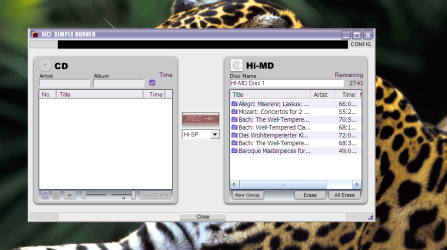
Here's a Minidisc application on an XP VM - the Host doesn't even KNOW about Minidiscs. As a test I'm running this XP VM on a WINDOWS 10 X-64 HOST.

Run XP on VMware player and forget XP Mode..

Cheers
jimbo
 

Attachments

  • minidisc.png
    minidisc.png
    140 KB · Views: 1
Last edited:

My Computer My Computer

Computer type
PC/Desktop
Computer Manufacturer/Model Number
Custom built, several laptops HP/ASUS
OS
Linux CENTOS 7 / various Windows OS'es and servers
CPU
Intel i7 Intel i5
Memory
8GB, 16GB
Graphics Card(s)
On Motherboard
Sound Card
Realtek HD audio
Monitor(s) Displays
Apple Cinema display, Samsung LCD
Screen Resolution
1920 X 1080
Hard Drives
4 X 1TB SATA
Mouse
Toshiba wireless laser
Internet Speed
> 20MB up
Thanks Jimbo, for the suggestion. I will try it this weekend when I find time. I'll post a reply to let you know how it works out.
 

My Computer My Computer

Computer type
PC/Desktop
Computer Manufacturer/Model Number
custom build
OS
Windows 7 Ultimate x64
CPU
AMD A8 7600
Motherboard
Gigabyte F2A88XM-D3H
Memory
ADATA DDR3 1600 4GBx2 (8GB)
Graphics Card(s)
on board
Hard Drives
two WD 500GB Blue
Antivirus
Eset NOD32
Browser
IE 11
Thanks Jimbo, for the suggestion. I will try it this weekend when I find time. I'll post a reply to let you know how it works out.

Hi there

Good Luck -- I can't see the point of throwing away perfectly good hardware just because a newer OS doesn't support it. Decent Plotters aren't the cheapest bits of kit to find either - especially those that can do decent blue prints as in architectural drawings / design.

If stuff is REALLY old then OK.

I also have a great canon LIDE scanner which also works on digitising Film negatives -- a lot better than some of the newer "el cheapo" gear. Instead of paying for VUESCAN (It's a solution for some I know) I still use my XP VM system for scanning -- works fine.

I also have some old Studio hardware for creating and cutting VINYL Discs !!! runs perfectly on an XP VM.
You can just install the programs directly on to the XP VM machine and connect up the hardware whatever the HOST.

Cheers
jimbo
 

My Computer My Computer

Computer type
PC/Desktop
Computer Manufacturer/Model Number
Custom built, several laptops HP/ASUS
OS
Linux CENTOS 7 / various Windows OS'es and servers
CPU
Intel i7 Intel i5
Memory
8GB, 16GB
Graphics Card(s)
On Motherboard
Sound Card
Realtek HD audio
Monitor(s) Displays
Apple Cinema display, Samsung LCD
Screen Resolution
1920 X 1080
Hard Drives
4 X 1TB SATA
Mouse
Toshiba wireless laser
Internet Speed
> 20MB up
Well VM Player is much nicer than VirtualPC.
I installed VMPlayer and my XP Home. It's interesting that I still need to register XP after Microsoft has abandoned it.

Still no luck with printing. Tried installing printer drivers on COM1 (default) and the print queue shows complete file transferred but it doesn't print. Tried to delete printer and reinstall drivers for LPT1 but VMPlayer shows printer is connected to COM1 and printing fails. When I tried to delete the printer from VMPlayer it says "printer cannot be deleted until virtual machine is powered down". I'm not sure how to delete the printer when the program is not operating. Tried the plotter in self test mode to make sure it's still working and it works perfectly.

Anyway, I'm still no further ahead. If VM will only output to a printer that works in Win7 this setup will never work. The drivers only work in XP and older OS.

Any more ideas out there?
 

My Computer My Computer

Computer type
PC/Desktop
Computer Manufacturer/Model Number
custom build
OS
Windows 7 Ultimate x64
CPU
AMD A8 7600
Motherboard
Gigabyte F2A88XM-D3H
Memory
ADATA DDR3 1600 4GBx2 (8GB)
Graphics Card(s)
on board
Hard Drives
two WD 500GB Blue
Antivirus
Eset NOD32
Browser
IE 11
I did some more tweaking with my setup and finally got the plotter to print from LPT1. It's unknown to me why it wouldn't print through the COM1 port since that was the port I used when I had XP as my only OS.

Thanks Jimbo for steering me in the right direction with VMPlayer.

Problem solved.
 

My Computer My Computer

Computer type
PC/Desktop
Computer Manufacturer/Model Number
custom build
OS
Windows 7 Ultimate x64
CPU
AMD A8 7600
Motherboard
Gigabyte F2A88XM-D3H
Memory
ADATA DDR3 1600 4GBx2 (8GB)
Graphics Card(s)
on board
Hard Drives
two WD 500GB Blue
Antivirus
Eset NOD32
Browser
IE 11
Back
Top