Solved How do i correct these driver errors in my Device Manager

vid4763

New member
Member
Local time
7:46 AM
Messages
94
Location
Niagara Falls/ Buffalo, NY
Hello,

1st time poster on the website. The last week I have been trying to clean up my Toshiba laptop and make it a little faster (I know, but I thought I was clever enough to!).

So, after running various utilities and apps, and reading through your forums with things related to my efforts and learning about things like event viewer, system information, resource health report, etc.... here are most of my issues with a few screen captures to view.

ISSUE 1:

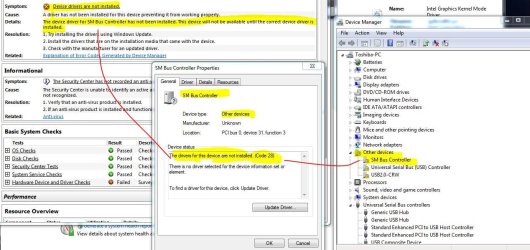
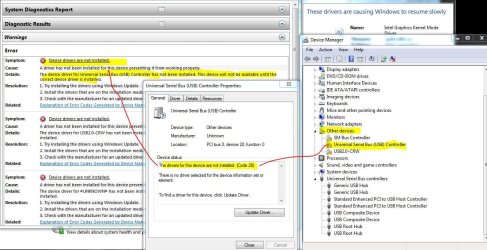
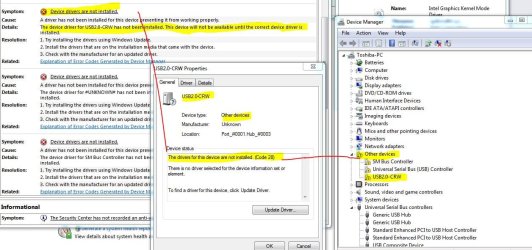
I found in my Device Manager some "other device" drivers had errors.
-SM Bus Controller
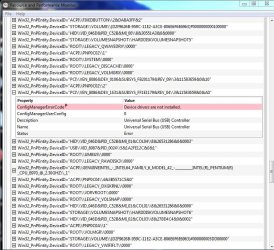
-Universal Serial Bus (USB) Controller
-USB 2.0-CRW

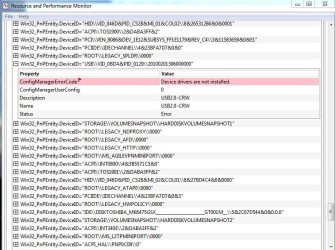
Five of the screen captures relate to these driver errors. I'm asking for help identifying these drivers as necessary and how I can restore or update them, and if they're not necessary how I can delete/disable them?

issue 2:

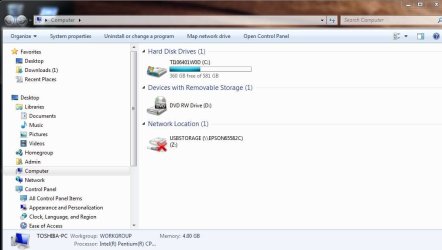
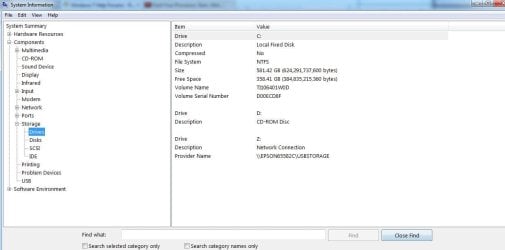
As I said, I've been trying to learn how to tweak my Laptop. I'm not sure if I caused this next one. within the last few days I started getting "not all networks found" error after Windows starts. It refers to the "Z" drive with a string USBSTORAGE (\\EPSON65582C) which is related to last 2 screen captures. (brief history....I've been researching tweaking boot up and improving my pc maintenance. I have a little experience, but I'd never be mistaken for an IT expert. so, I cleaned up my "msconfig" startup programs. disabling my 2 Epson status monitors. Downloaded free version of System Mechanic (Iolo) & ran it, downloaded Autoruns (Sysinternals) and ran that, ran Ccleaner, Malwarebytes, AVG, and even Trend Micro Housecall free online. to clean up my Laptop.

So, any help with this Z drive issue is appreciated. ways to restore, disable?

ISSUE 3:

This is related more to my recent self education, as I briefly explained, than to the above mentioned driver issues and maybe I should post on another area of the forum, but I thought if any experts can help with the driver issues they may share opinions.

As stated above, I downloaded Autoruns (Sysinternals); System Mechanic(Iolo); Windows Repair All-in-one(from Tweaking.com); CPU-Z; and Simple System Tweaker (from Tweaking.com).

I tried to be diligent and thorough researching the credibility and usefulness of these programs. Autoruns and System Mechanic have been pretty good, but I'm still learning. CPU-Z is pretty simple and convenient. I ran Tweaking.com Windows repair and it made some changes and fixed some stuff, not sure if it made much difference. Haven't tried Simple System Tweaker yet.

What are your opinions of these freeware programs?? just want to make my simple laptop efficient nd quick as possible, booting and processing.

Thx!

Vid
 

Attachments

  • SM Bus Controller bad driver.JPG
    SM Bus Controller bad driver.JPG
    126.2 KB · Views: 2
  • USB Controller bas driver.JPG
    USB Controller bas driver.JPG
    143.6 KB · Views: 3
  • USB2.0-CRW bad driver.JPG
    USB2.0-CRW bad driver.JPG
    131 KB · Views: 1
  • Driver Errors screen capture 1.JPG
    Driver Errors screen capture 1.JPG
    92 KB · Views: 1
  • Driver Errors screen capture 2.JPG
    Driver Errors screen capture 2.JPG
    77.4 KB · Views: 1
  • Drive Z error 2.JPG
    Drive Z error 2.JPG
    56.4 KB · Views: 2
  • Drive Z error.JPG
    Drive Z error.JPG
    56.1 KB · Views: 1

My Computer

Computer type
Laptop
Computer Manufacturer/Model Number
Toshiba Satellite c855-s5214
OS
windows 7 professional 64 bit Version 6.1.7601 Service Pack 1 Build 7601
CPU
Intel(R) Pentium(R) CPU B970 @ 2.30GHz, 2300 Mhz, 2 cores
Motherboard
Toshiba Portable BIOS Insyde Corp Version 1.60 Date 4/20/12
Memory
8Gb
Graphics Card(s)
Intel HD Graphics Driver Vers 9.17.10.3347 Date 10/31/20
Hard Drives
SanDisk Extreme Pro SSD 480 Gb (approx. 381gb free)
Firmware Version X21200RL
Migrated and Installed 4/3/2015
Antivirus
BitDefender AntiVirus Free Edition Version 1.0.21.1099
Browser
Internet Explorer 11 update version 11.0.16
Other Info
Additional Systems:

Samsung NP-QX410 Laptop Windows 7 Home Premium SP1
Samsung 850 EVO 250G 4G ram
Avast! Free 2015

Toshiba A205-S7468 Laptop Windows 7 Ultimate
WD 320G HDD 4G ram
AVG free 2015
Regarding issue 1, install the chipset drivers from your computer manufacturers web site.

I personally do not recommend using tune-up or tweaking tools.
 

My Computer

Computer type
PC/Desktop
Computer Manufacturer/Model Number
Custom Built
OS
Windows 10 Pro x64, Windows 8.1 Pro x64, Windows 7 Ultimate x64 SP1,
CPU
INTEL i9-7920X LGA 2066
Motherboard
Gigabyte X299-WU8 F3
Memory
64 GB (4 X 16 GB) G-Skill V Series DDR4 3200 Quad Channel
Graphics Card(s)
EVGA GTX 1060 SC 3 GB
Sound Card
Realtek Onboard ALC1220
Monitor(s) Displays
2 x Samsung S27E310
Screen Resolution
1920x1080
Hard Drives
Samsung 2 x 970 EVO Plus 500 GB NVMe
1 x 6TB WD 6003FZBX SATA
1 x 6TB WD 60EFRX SATA
12 x 3TB WD 30EFRX SATA
PSU
Seasonic X-1050
Case
Thermaltake Armor+
Cooling
Corsair H80i V2 Liquid AOI Cooler
Keyboard
Logitech G510s
Mouse
Logitech MX Master 2S
Internet Speed
200 Mb/s
Antivirus
ESET NOD32 13.1
Browser
EDGE (Dev, Canary, Beta), Chrome
Other Info
ASUS RT-AC68U router
Malwarebytes 4.0.4
Regarding issue 1, install the chipset drivers from your computer manufacturers web site.

I personally do not recommend using tune-up or tweaking tools.

:ditto:
 

My Computer

Computer type
PC/Desktop
Computer Manufacturer/Model Number
HP
OS
Windows 7 Pro 32bit
CPU
Dual Core
Antivirus
Trend Micro
Regarding issue 1, install the chipset drivers from your computer manufacturers web site.


Thank you for the reply, help, and advice! I really appreciate it! Sorry it took me so long to respond to your replies. I discovered I also had a malware/virus issue that another forum area and member has helped guide me back to cleanliness.....

So, back to my unresolved driver issues....

I went to Toshiba, searched my laptop model #. The site left me confused if they were the correct drivers. I'd really appreciate some further assistance.

I have this link which gives me 4 different drivers:

Drivers & Software Support | Toshiba

I've never done this, always just had windows updates, etc....

Some expert guidance on method of updating these drivers, what other drivers I should check for updates (i.e, BIOS, etc.....)

as it's been 4-5 days since I have replied, I will give a day or so fro response. I can understand if you think I may have disappeared or fixed problem. if I don't get a response in 24 hours I may contact direct.....I hope that's ok.


VID
 

My Computer

Computer type
Laptop
Computer Manufacturer/Model Number
Toshiba Satellite c855-s5214
OS
windows 7 professional 64 bit Version 6.1.7601 Service Pack 1 Build 7601
CPU
Intel(R) Pentium(R) CPU B970 @ 2.30GHz, 2300 Mhz, 2 cores
Motherboard
Toshiba Portable BIOS Insyde Corp Version 1.60 Date 4/20/12
Memory
8Gb
Graphics Card(s)
Intel HD Graphics Driver Vers 9.17.10.3347 Date 10/31/20
Hard Drives
SanDisk Extreme Pro SSD 480 Gb (approx. 381gb free)
Firmware Version X21200RL
Migrated and Installed 4/3/2015
Antivirus
BitDefender AntiVirus Free Edition Version 1.0.21.1099
Browser
Internet Explorer 11 update version 11.0.16
Other Info
Additional Systems:

Samsung NP-QX410 Laptop Windows 7 Home Premium SP1
Samsung 850 EVO 250G 4G ram
Avast! Free 2015

Toshiba A205-S7468 Laptop Windows 7 Ultimate
WD 320G HDD 4G ram
AVG free 2015
Wow that list of Tosh drivers is ugly--I don't blame you for being intimidated by it. I think what I'd do before attempting any of that is simply in Dev Mgr to right-click each of those "Other devices" and select Update Driver Software and then Search Automatically to see what Windows comes-up with.
 

My Computer

Computer type
Laptop
Computer Manufacturer/Model Number
Dell Latitude E6540 Laptop
OS
Windows 7 Professional 64bit
CPU
Intel Core i7 4600M @ 2.90GHz
Motherboard
Dell Inc. 0CYT5F (SOCKET 0)
Memory
16.0GB Dual-Channel DDR3 @ 797MHz (11-11-11-28)
Graphics Card(s)
Intel HD Graphics 4600 (Dell) 2048MB ATI AMD Radeon HD 8790M
Sound Card
Realtek High Definition Audio
Monitor(s) Displays
HP ZR30w (2560x1600@60Hz)
Hard Drives
256GB LITEONIT LMT-256M6M-41 mm SATA (SSD)
1TB Samsung SSD 860 EVO mSATA SATA (SSD)
2TB USB 3.0 USB Device
115GB SanDisk Ultra Fit USB
Other Info
Multiple Dell E-Port Plus II Port Replicator/Docking Stations 0Y72NH USB 3.0 + 130W AC Adapters

My Computer

Computer type
PC/Desktop
Computer Manufacturer/Model Number
Custom Built
OS
Windows 10 Pro x64, Windows 8.1 Pro x64, Windows 7 Ultimate x64 SP1,
CPU
INTEL i9-7920X LGA 2066
Motherboard
Gigabyte X299-WU8 F3
Memory
64 GB (4 X 16 GB) G-Skill V Series DDR4 3200 Quad Channel
Graphics Card(s)
EVGA GTX 1060 SC 3 GB
Sound Card
Realtek Onboard ALC1220
Monitor(s) Displays
2 x Samsung S27E310
Screen Resolution
1920x1080
Hard Drives
Samsung 2 x 970 EVO Plus 500 GB NVMe
1 x 6TB WD 6003FZBX SATA
1 x 6TB WD 60EFRX SATA
12 x 3TB WD 30EFRX SATA
PSU
Seasonic X-1050
Case
Thermaltake Armor+
Cooling
Corsair H80i V2 Liquid AOI Cooler
Keyboard
Logitech G510s
Mouse
Logitech MX Master 2S
Internet Speed
200 Mb/s
Antivirus
ESET NOD32 13.1
Browser
EDGE (Dev, Canary, Beta), Chrome
Other Info
ASUS RT-AC68U router
Malwarebytes 4.0.4
Thx for getting back to me so quick! I found the chipset update. downloaded & installed the drivers, then rebooted as instructed.

after reboot I checked my driver list in control panel and found a few issues weren't resolved. here are screen shots:
 

Attachments

  • Unknown device driver error.JPG
    Unknown device driver error.JPG
    125.8 KB · Views: 1
  • USB2.0 driver error.JPG
    USB2.0 driver error.JPG
    97 KB · Views: 1
  • USB Controller driver error.JPG
    USB Controller driver error.JPG
    125.2 KB · Views: 1
  • R&P Monitor Health Report 312015.JPG
    R&P Monitor Health Report 312015.JPG
    97.4 KB · Views: 2

My Computer

Computer type
Laptop
Computer Manufacturer/Model Number
Toshiba Satellite c855-s5214
OS
windows 7 professional 64 bit Version 6.1.7601 Service Pack 1 Build 7601
CPU
Intel(R) Pentium(R) CPU B970 @ 2.30GHz, 2300 Mhz, 2 cores
Motherboard
Toshiba Portable BIOS Insyde Corp Version 1.60 Date 4/20/12
Memory
8Gb
Graphics Card(s)
Intel HD Graphics Driver Vers 9.17.10.3347 Date 10/31/20
Hard Drives
SanDisk Extreme Pro SSD 480 Gb (approx. 381gb free)
Firmware Version X21200RL
Migrated and Installed 4/3/2015
Antivirus
BitDefender AntiVirus Free Edition Version 1.0.21.1099
Browser
Internet Explorer 11 update version 11.0.16
Other Info
Additional Systems:

Samsung NP-QX410 Laptop Windows 7 Home Premium SP1
Samsung 850 EVO 250G 4G ram
Avast! Free 2015

Toshiba A205-S7468 Laptop Windows 7 Ultimate
WD 320G HDD 4G ram
AVG free 2015
hello everybody. I have a Dell Inspiron 15 laptop which came with Win 8.1 and I changed it to Win 7. It is a 64 bit system and laptop. I have two devices that are not working, and the drivers from Dell site do not work either. It is: USB controller and the wifi Network controller. What should I do??? thanks
 

My Computer

Computer type
Laptop
Computer Manufacturer/Model Number
Dell
OS
Windows 7 x64 Ultimate
@Vid4763

It looks like you are missing the USB 3.0 drivers. Check for that in the list.
 

My Computer

Computer type
PC/Desktop
Computer Manufacturer/Model Number
Custom Built
OS
Windows 10 Pro x64, Windows 8.1 Pro x64, Windows 7 Ultimate x64 SP1,
CPU
INTEL i9-7920X LGA 2066
Motherboard
Gigabyte X299-WU8 F3
Memory
64 GB (4 X 16 GB) G-Skill V Series DDR4 3200 Quad Channel
Graphics Card(s)
EVGA GTX 1060 SC 3 GB
Sound Card
Realtek Onboard ALC1220
Monitor(s) Displays
2 x Samsung S27E310
Screen Resolution
1920x1080
Hard Drives
Samsung 2 x 970 EVO Plus 500 GB NVMe
1 x 6TB WD 6003FZBX SATA
1 x 6TB WD 60EFRX SATA
12 x 3TB WD 30EFRX SATA
PSU
Seasonic X-1050
Case
Thermaltake Armor+
Cooling
Corsair H80i V2 Liquid AOI Cooler
Keyboard
Logitech G510s
Mouse
Logitech MX Master 2S
Internet Speed
200 Mb/s
Antivirus
ESET NOD32 13.1
Browser
EDGE (Dev, Canary, Beta), Chrome
Other Info
ASUS RT-AC68U router
Malwarebytes 4.0.4
Thanks for getting back to me pbcopter. I downloaded and installed the USB3.0 driver from Toshiba. there are 2 more drivers missing/error. I will look for them on the website, or should I look for them elsewhere?

Here is the health report after USB3.0 update:
 

Attachments

  • health report after USB 3.0 driver update.JPG
    health report after USB 3.0 driver update.JPG
    92 KB · Views: 1

My Computer

Computer type
Laptop
Computer Manufacturer/Model Number
Toshiba Satellite c855-s5214
OS
windows 7 professional 64 bit Version 6.1.7601 Service Pack 1 Build 7601
CPU
Intel(R) Pentium(R) CPU B970 @ 2.30GHz, 2300 Mhz, 2 cores
Motherboard
Toshiba Portable BIOS Insyde Corp Version 1.60 Date 4/20/12
Memory
8Gb
Graphics Card(s)
Intel HD Graphics Driver Vers 9.17.10.3347 Date 10/31/20
Hard Drives
SanDisk Extreme Pro SSD 480 Gb (approx. 381gb free)
Firmware Version X21200RL
Migrated and Installed 4/3/2015
Antivirus
BitDefender AntiVirus Free Edition Version 1.0.21.1099
Browser
Internet Explorer 11 update version 11.0.16
Other Info
Additional Systems:

Samsung NP-QX410 Laptop Windows 7 Home Premium SP1
Samsung 850 EVO 250G 4G ram
Avast! Free 2015

Toshiba A205-S7468 Laptop Windows 7 Ultimate
WD 320G HDD 4G ram
AVG free 2015
pbcopter......update...... I found nothing on Toshiba for USB2.0-CRW, even a general search of the site. I ran device manager and the "unknown" driver updated as well as the USB3.0 ("unknown" didn't fix when I 1st checked device manager).

So now the only driver missing/error is USB2.0-CRW.

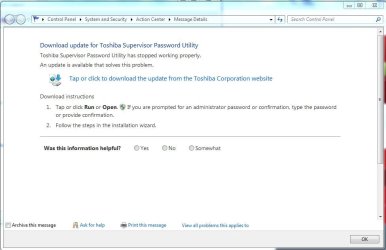
Also, I did a scan for hardware changes and it gave me "Toshiba Supervisor Password Utility has stopped working properly". Is this a useful and/or necessary utility??

Please let me know if you have advice. Thanks for your time!!

screen shots:
 

Attachments

  • Device manager USB2.0 CRW.JPG
    Device manager USB2.0 CRW.JPG
    65.4 KB · Views: 0
  • Tosh Spvr Passwork Utility.JPG
    Tosh Spvr Passwork Utility.JPG
    53.2 KB · Views: 0

My Computer

Computer type
Laptop
Computer Manufacturer/Model Number
Toshiba Satellite c855-s5214
OS
windows 7 professional 64 bit Version 6.1.7601 Service Pack 1 Build 7601
CPU
Intel(R) Pentium(R) CPU B970 @ 2.30GHz, 2300 Mhz, 2 cores
Motherboard
Toshiba Portable BIOS Insyde Corp Version 1.60 Date 4/20/12
Memory
8Gb
Graphics Card(s)
Intel HD Graphics Driver Vers 9.17.10.3347 Date 10/31/20
Hard Drives
SanDisk Extreme Pro SSD 480 Gb (approx. 381gb free)
Firmware Version X21200RL
Migrated and Installed 4/3/2015
Antivirus
BitDefender AntiVirus Free Edition Version 1.0.21.1099
Browser
Internet Explorer 11 update version 11.0.16
Other Info
Additional Systems:

Samsung NP-QX410 Laptop Windows 7 Home Premium SP1
Samsung 850 EVO 250G 4G ram
Avast! Free 2015

Toshiba A205-S7468 Laptop Windows 7 Ultimate
WD 320G HDD 4G ram
AVG free 2015
So now the only driver missing/error is USB2.0-CRW.

Please let me know if you have advice.
Right-click on the item in Device Manager, select Properties, select Details tab, click on Property dropdown and select second item (Hardware ID), and post the value shown for Hardware ID.
 

My Computer

Computer type
PC/Desktop
Computer Manufacturer/Model Number
Home-built, two systems (1) and (2)
OS
Windows 7 Pro x64 (1), Win7 Pro X64 (2)
CPU
i5-3350p 3.1Ghz/6MB-cache (1); E8400 3.0Ghz/6MB-cache (2)
Motherboard
ASUS P8Z77-V Pro (1); ASUS P5Q3 (2)
Memory
8GB PC3-12800 DDR3 (1); 4GB PC3-10600 DDR3 (2)
Graphics Card(s)
ATI HD7750 (1), (see TV cards); ATI R7 250 (2)
Sound Card
Realtek ALC892 HD Audio (1); Realtek ALC1200 HD Audio (2)
Monitor(s) Displays
Eizo HD2441W LCD, Eizo S2433W (1); Eizo 24" S2433W (2)
Screen Resolution
1920x1200, 1920x1200 (1); 1920x1200 (2)
Hard Drives
(1) 1TB SATA-II (7200RPM), 2x2TB SATA-III (7200RPM), 250GB SATA-III (10000RPM) for OS; 2x2TB external USB 3.0

(2) 320GB SATA-II (7200RPM), 750GB SATA-II (7200RPM), 150GB SATA-II (10000RPM) for OS; 2TB external USB 3.0
PSU
Nesteq ECS-6001 600W (1); Nesteq ECS-5001 500W (2)
Case
Acousti-Case 360 (1) and (2)
Cooling
Noctua NH-U12P SE2 for CPU, 2x120mm case fans (1) and (2)
Keyboard
IBM PS/2 (1) and (2)
Mouse
Logitech MX Revolution wireless (1); Microsoft wired (2)
Internet Speed
100mbps down / 10mbps up
Antivirus
Microsoft Security Essentials; Malwarebyte Anti-Malware Pro
Browser
Firefox
Other Info
Ceton InfiniTV 4-tuner cablecard-enabled TV card as well as Hauppauge HVR-2250 OTA/ATSC 2-tuner TV card in (1), running under Win7 WMC
That is a card reader that is internally connected to USB 2.0.

Go down the list and find the Card Reader driver.
 

My Computer

Computer type
PC/Desktop
Computer Manufacturer/Model Number
Custom Built
OS
Windows 10 Pro x64, Windows 8.1 Pro x64, Windows 7 Ultimate x64 SP1,
CPU
INTEL i9-7920X LGA 2066
Motherboard
Gigabyte X299-WU8 F3
Memory
64 GB (4 X 16 GB) G-Skill V Series DDR4 3200 Quad Channel
Graphics Card(s)
EVGA GTX 1060 SC 3 GB
Sound Card
Realtek Onboard ALC1220
Monitor(s) Displays
2 x Samsung S27E310
Screen Resolution
1920x1080
Hard Drives
Samsung 2 x 970 EVO Plus 500 GB NVMe
1 x 6TB WD 6003FZBX SATA
1 x 6TB WD 60EFRX SATA
12 x 3TB WD 30EFRX SATA
PSU
Seasonic X-1050
Case
Thermaltake Armor+
Cooling
Corsair H80i V2 Liquid AOI Cooler
Keyboard
Logitech G510s
Mouse
Logitech MX Master 2S
Internet Speed
200 Mb/s
Antivirus
ESET NOD32 13.1
Browser
EDGE (Dev, Canary, Beta), Chrome
Other Info
ASUS RT-AC68U router
Malwarebytes 4.0.4
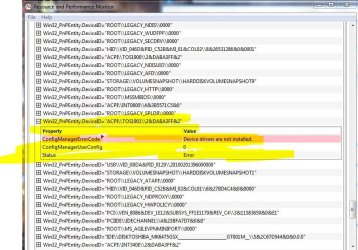
Thx pbcopter. card reader fixed the usb2.0 driver issue. after I rebooted, I ran health report and the "unklnown driver" error came up. what is this? it had disappeared, but it's back. here is the file from the health report. It states it's ACPI, PnP.......

I searched Toshiba driver list but I'm not sure which? Thanks!
 

Attachments

  • unknown driver error.JPG
    unknown driver error.JPG
    107.3 KB · Views: 0

My Computer

Computer type
Laptop
Computer Manufacturer/Model Number
Toshiba Satellite c855-s5214
OS
windows 7 professional 64 bit Version 6.1.7601 Service Pack 1 Build 7601
CPU
Intel(R) Pentium(R) CPU B970 @ 2.30GHz, 2300 Mhz, 2 cores
Motherboard
Toshiba Portable BIOS Insyde Corp Version 1.60 Date 4/20/12
Memory
8Gb
Graphics Card(s)
Intel HD Graphics Driver Vers 9.17.10.3347 Date 10/31/20
Hard Drives
SanDisk Extreme Pro SSD 480 Gb (approx. 381gb free)
Firmware Version X21200RL
Migrated and Installed 4/3/2015
Antivirus
BitDefender AntiVirus Free Edition Version 1.0.21.1099
Browser
Internet Explorer 11 update version 11.0.16
Other Info
Additional Systems:

Samsung NP-QX410 Laptop Windows 7 Home Premium SP1
Samsung 850 EVO 250G 4G ram
Avast! Free 2015

Toshiba A205-S7468 Laptop Windows 7 Ultimate
WD 320G HDD 4G ram
AVG free 2015
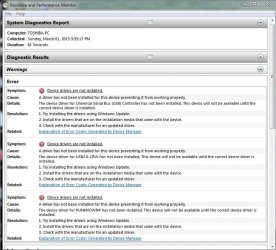
From what I can tell it requires the Toshiba Value added package (x64) from the driver list.
 

My Computer

Computer type
PC/Desktop
Computer Manufacturer/Model Number
Custom Built
OS
Windows 10 Pro x64, Windows 8.1 Pro x64, Windows 7 Ultimate x64 SP1,
CPU
INTEL i9-7920X LGA 2066
Motherboard
Gigabyte X299-WU8 F3
Memory
64 GB (4 X 16 GB) G-Skill V Series DDR4 3200 Quad Channel
Graphics Card(s)
EVGA GTX 1060 SC 3 GB
Sound Card
Realtek Onboard ALC1220
Monitor(s) Displays
2 x Samsung S27E310
Screen Resolution
1920x1080
Hard Drives
Samsung 2 x 970 EVO Plus 500 GB NVMe
1 x 6TB WD 6003FZBX SATA
1 x 6TB WD 60EFRX SATA
12 x 3TB WD 30EFRX SATA
PSU
Seasonic X-1050
Case
Thermaltake Armor+
Cooling
Corsair H80i V2 Liquid AOI Cooler
Keyboard
Logitech G510s
Mouse
Logitech MX Master 2S
Internet Speed
200 Mb/s
Antivirus
ESET NOD32 13.1
Browser
EDGE (Dev, Canary, Beta), Chrome
Other Info
ASUS RT-AC68U router
Malwarebytes 4.0.4
well......I actually did download & install that package before your reply. I had seen that as a possible solution on Toshiba's forum. Unfortunately it hasn't repaired the issue :(

On Toshiba Forum, someone had exact same driver info, got advice to download common modules driver and it fixed. another person replied they had same issue and downloaded added value package and theirs was fixed.

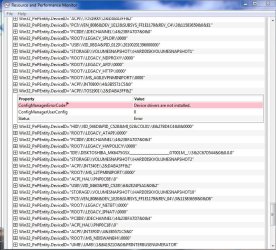
I just rebooted, no drivers report errors in device manager, BUT in the Resource and Performance System health Report I get the same error "device driver for #UNKNOWN# has not been installed. Device will not be available until the correct device driver is installed".

Could it be common modules? I didn't see that in THE list. Or is it possible it needs a BIOS update (never done that, is it same as other driver updates? just download latest version, install, reboot)

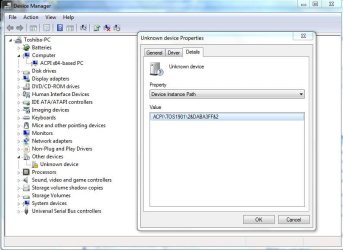
item is: Win32_PnPEntity.DeviceID="ACPI\\TOS1901\\2&DABA3FF&2"

I also found this Toshiba Forum link just now. If you could read it and let me know if this is solid advice?

http://forums.toshiba.com/t5/General-Troubleshooting/Unknown-Device-doesn-t-have-driver-ID-ACPI-QCI0701-2-amp-DABA3FF/td-p/229992


I am perplexed pbcopter..............
 

My Computer

Computer type
Laptop
Computer Manufacturer/Model Number
Toshiba Satellite c855-s5214
OS
windows 7 professional 64 bit Version 6.1.7601 Service Pack 1 Build 7601
CPU
Intel(R) Pentium(R) CPU B970 @ 2.30GHz, 2300 Mhz, 2 cores
Motherboard
Toshiba Portable BIOS Insyde Corp Version 1.60 Date 4/20/12
Memory
8Gb
Graphics Card(s)
Intel HD Graphics Driver Vers 9.17.10.3347 Date 10/31/20
Hard Drives
SanDisk Extreme Pro SSD 480 Gb (approx. 381gb free)
Firmware Version X21200RL
Migrated and Installed 4/3/2015
Antivirus
BitDefender AntiVirus Free Edition Version 1.0.21.1099
Browser
Internet Explorer 11 update version 11.0.16
Other Info
Additional Systems:

Samsung NP-QX410 Laptop Windows 7 Home Premium SP1
Samsung 850 EVO 250G 4G ram
Avast! Free 2015

Toshiba A205-S7468 Laptop Windows 7 Ultimate
WD 320G HDD 4G ram
AVG free 2015
update.....

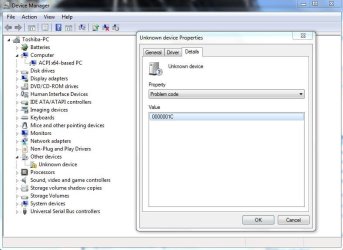
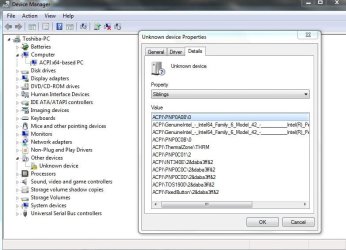
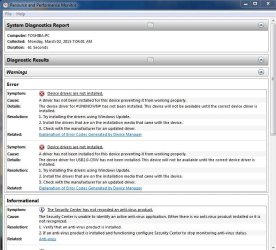
The UNKNOWN driver never went away and reappeared. It is listed under the hidden drivers in Device Manager, as I just discovered. Toshiba added value package did not repair this issue.

Here are a few more screen shots that might provide more detail
 

Attachments

  • unknown driver.JPG
    unknown driver.JPG
    57.8 KB · Views: 0
  • unknown driver problem code.JPG
    unknown driver problem code.JPG
    59.4 KB · Views: 0
  • unknown driver siblings.JPG
    unknown driver siblings.JPG
    69.4 KB · Views: 0
  • unknown driver DIP.JPG
    unknown driver DIP.JPG
    60.6 KB · Views: 0

My Computer

Computer type
Laptop
Computer Manufacturer/Model Number
Toshiba Satellite c855-s5214
OS
windows 7 professional 64 bit Version 6.1.7601 Service Pack 1 Build 7601
CPU
Intel(R) Pentium(R) CPU B970 @ 2.30GHz, 2300 Mhz, 2 cores
Motherboard
Toshiba Portable BIOS Insyde Corp Version 1.60 Date 4/20/12
Memory
8Gb
Graphics Card(s)
Intel HD Graphics Driver Vers 9.17.10.3347 Date 10/31/20
Hard Drives
SanDisk Extreme Pro SSD 480 Gb (approx. 381gb free)
Firmware Version X21200RL
Migrated and Installed 4/3/2015
Antivirus
BitDefender AntiVirus Free Edition Version 1.0.21.1099
Browser
Internet Explorer 11 update version 11.0.16
Other Info
Additional Systems:

Samsung NP-QX410 Laptop Windows 7 Home Premium SP1
Samsung 850 EVO 250G 4G ram
Avast! Free 2015

Toshiba A205-S7468 Laptop Windows 7 Ultimate
WD 320G HDD 4G ram
AVG free 2015
pbcopter, thx for all your help. I resolved the #UNKNOWN# driver issue. I followed the instruction from the poster on the Toshiba forum re this issue. The correct download was the HW Setup Utility. after completing, I rebooted laptop, checked device manager hidden drivers, nothing. then ran Resource and Performance Health Report and the driver issue was gone!!!!

Thanks again! all you time and advice is greatly appreciated!!
 

My Computer

Computer type
Laptop
Computer Manufacturer/Model Number
Toshiba Satellite c855-s5214
OS
windows 7 professional 64 bit Version 6.1.7601 Service Pack 1 Build 7601
CPU
Intel(R) Pentium(R) CPU B970 @ 2.30GHz, 2300 Mhz, 2 cores
Motherboard
Toshiba Portable BIOS Insyde Corp Version 1.60 Date 4/20/12
Memory
8Gb
Graphics Card(s)
Intel HD Graphics Driver Vers 9.17.10.3347 Date 10/31/20
Hard Drives
SanDisk Extreme Pro SSD 480 Gb (approx. 381gb free)
Firmware Version X21200RL
Migrated and Installed 4/3/2015
Antivirus
BitDefender AntiVirus Free Edition Version 1.0.21.1099
Browser
Internet Explorer 11 update version 11.0.16
Other Info
Additional Systems:

Samsung NP-QX410 Laptop Windows 7 Home Premium SP1
Samsung 850 EVO 250G 4G ram
Avast! Free 2015

Toshiba A205-S7468 Laptop Windows 7 Ultimate
WD 320G HDD 4G ram
AVG free 2015
You're welcome. I'm glad you were able to resolve it.
 

My Computer

Computer type
PC/Desktop
Computer Manufacturer/Model Number
Custom Built
OS
Windows 10 Pro x64, Windows 8.1 Pro x64, Windows 7 Ultimate x64 SP1,
CPU
INTEL i9-7920X LGA 2066
Motherboard
Gigabyte X299-WU8 F3
Memory
64 GB (4 X 16 GB) G-Skill V Series DDR4 3200 Quad Channel
Graphics Card(s)
EVGA GTX 1060 SC 3 GB
Sound Card
Realtek Onboard ALC1220
Monitor(s) Displays
2 x Samsung S27E310
Screen Resolution
1920x1080
Hard Drives
Samsung 2 x 970 EVO Plus 500 GB NVMe
1 x 6TB WD 6003FZBX SATA
1 x 6TB WD 60EFRX SATA
12 x 3TB WD 30EFRX SATA
PSU
Seasonic X-1050
Case
Thermaltake Armor+
Cooling
Corsair H80i V2 Liquid AOI Cooler
Keyboard
Logitech G510s
Mouse
Logitech MX Master 2S
Internet Speed
200 Mb/s
Antivirus
ESET NOD32 13.1
Browser
EDGE (Dev, Canary, Beta), Chrome
Other Info
ASUS RT-AC68U router
Malwarebytes 4.0.4
Back
Top