
Weird issue with wrong fonts displaying on a certain website

Reinstall FF?

I actually use ccleaner.

I don't want to override the fonts on all sites though. If I override fonts in Firefox, won't it do that for all web pages?

EDIT: Just tried it - it fixes Buzzfeed but now lots of other sites don't look right because of my forced fonts instead of the webpage choosing how it should look. So that's not a great option for me.

Personally I like to choose my own fonts but each to their own! Perhaps you should try the FF clean install?

If you backup your profile first there shouldn't be any problem.
 

My Computer My Computer

Computer type
Laptop
Computer Manufacturer/Model Number
ASUS
OS
Microsoft Windows 7 Home Premium 64-bit 7601 Multiprocessor Free Service Pack 1
CPU
AMD C-60 APU with Radeon(tm) HD Graphics
Motherboard
ASUSTeK COMPUTER INC. X501U
Memory
4.00 GB
Graphics Card(s)
AMD Radeon HD 6290 Graphics
Sound Card
(1) AMD High Definition Audio Device (2) Realtek High Defi
Screen Resolution
1366 x 768 x 32 bits (4294967296 colors) @ 60 Hz
Hard Drives
Hitachi HTS545050A7E380 SATA Disk Device
Antivirus
Comodo CIS & FW, SecureAplus App Whitelisting, Threatfire
Browser
Cyberfox 64bit, Opera 64bit, Airfox
Other Info
Spy-The-Spy, HitmanPro.Alert, Norton Connect Safe, MJRegWatcher, BitDefender TrafficLight, Voodoo Shield, Zemana AntiMalware
I actually use ccleaner.

I don't want to override the fonts on all sites though. If I override fonts in Firefox, won't it do that for all web pages?

EDIT: Just tried it - it fixes Buzzfeed but now lots of other sites don't look right because of my forced fonts instead of the webpage choosing how it should look. So that's not a great option for me.

Personally I like to choose my own fonts but each to their own! Perhaps you should try the FF clean install?

If you backup your profile first there shouldn't be any problem.

I've never backed up my profile before (I guess I should anyways). Will that save all my add-ons and add-on settings, or would I have to re-install all my add-ons again?
 

My Computer My Computer

Computer type
PC/Desktop
Computer Manufacturer/Model Number
custom build
OS
Windows 7 32bit Home Premium
CPU
Intel Core I7 920 Bloomfield
Motherboard
Asus P6T Deluxe v1
Memory
3 GB Corsair DDR3 (3x1GB)
Graphics Card(s)
NVidia GTX 570 (1 GB RAM)
Sound Card
on board
Monitor(s) Displays
Dell P2314H
Screen Resolution
1920x1080
Hard Drives
Western Digital Black 1TB (main OS)
PSU
XION Supernova XON-800R14N 800W
Case
Antec 1200
Cooling
Arctic Freezer 7 Pro Rev. 2
Keyboard
AZIO Prism
Mouse
Logitech G700S
Internet Speed
Verizon FiOS 85/85
Antivirus
Avast
Browser
Firefox/Chrome
Other Info
SansDigital rr622 RocketRaid (with non-raid Driver)
Renesas USB 3.0 card
Backup Firefox Profile?

Well you don't need to backup your Firefox profile but when Firfefox screws up or develops a problem that you can't easily fix then without a backup that enables you to selectively restore elements of your profile then you risk loosing bookmarks, add ons, about:config tweaks and so on. It's just easier to fully remove Firefox then reboot and clean install it. Especially after major updates.

You could just start by backing up your current profile. Can you backup add ons? Yes. Along with everything else.

MozBackup 1.5.1 - Report.jpg

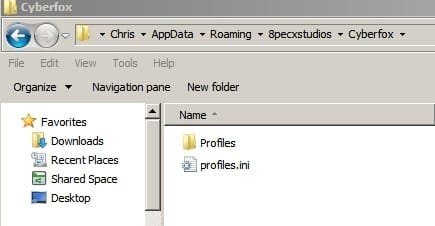
I usually also make an additional backup by making a copy of the Profiles folder and profile.ini file - but restoring elements manually using this method involves editing the files and selecting what you need to copy into a new profile.

Profile.jpg
 
Last edited:

My Computer My Computer

Computer type
Laptop
Computer Manufacturer/Model Number
ASUS
OS
Microsoft Windows 7 Home Premium 64-bit 7601 Multiprocessor Free Service Pack 1
CPU
AMD C-60 APU with Radeon(tm) HD Graphics
Motherboard
ASUSTeK COMPUTER INC. X501U
Memory
4.00 GB
Graphics Card(s)
AMD Radeon HD 6290 Graphics
Sound Card
(1) AMD High Definition Audio Device (2) Realtek High Defi
Screen Resolution
1366 x 768 x 32 bits (4294967296 colors) @ 60 Hz
Hard Drives
Hitachi HTS545050A7E380 SATA Disk Device
Antivirus
Comodo CIS & FW, SecureAplus App Whitelisting, Threatfire
Browser
Cyberfox 64bit, Opera 64bit, Airfox
Other Info
Spy-The-Spy, HitmanPro.Alert, Norton Connect Safe, MJRegWatcher, BitDefender TrafficLight, Voodoo Shield, Zemana AntiMalware
Back
Top