Devices and printers yellow triangle - everything should be ok but...

ruyjerko

New member
Local time
3:27 PM
Messages
2
Hi guys, well I'm having issues with my win 7 laptop after resetting it. My video card is not been recognized and also does my ethernet and something called PCI Simple Communications Controller.

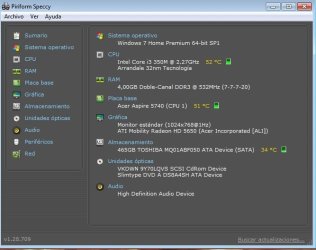
My graphics card is ATI Mobility Radeon HD 5650.

I'm posting because I have read thousand of people posting in this forum, it really helped me with many stuff but I can't find a solution for my problem and I'm running out of patience. Ethernet and the other one simply says it has not the drivers. Now the funny thing is that I downloaded all drivers from Acer and AMD. Including ethernet and graphics. It says I have the last driver.

Can someone help me? I will really appreciate if you explain yourself step by step to how to solve it.


Attached to this post you will find:
Specs of my pc by Piriform program.
"Devices and Printers"
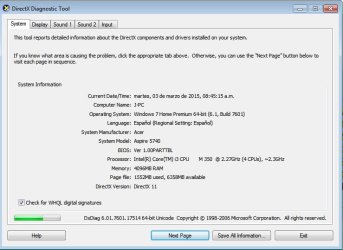
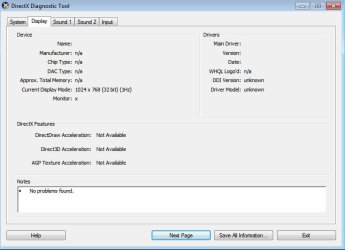
DXDIAG first and second page
 

Attachments
  • Specs.jpg
    Specs.jpg
    39.7 KB · Views: 14
  • devices and printers.jpg
    devices and printers.jpg
    31.9 KB · Views: 13
  • dxdiag1.jpg
    dxdiag1.jpg
    50.1 KB · Views: 1
  • dxdiag2.jpg
    dxdiag2.jpg
    35.3 KB · Views: 1
Last edited:

My Computer My Computer

At a glance

Windows 7 Home Premium x64
Computer type
PC/Desktop
OS
Windows 7 Home Premium x64
Hi guys, well I'm having issues with my win 7 laptop after resetting it.

Can someone help me?
From your screenshots, I believe you have an Acer Aspire 5740 laptop. You've done a reinstall of Windows from scratch, and you're now missing some drivers.

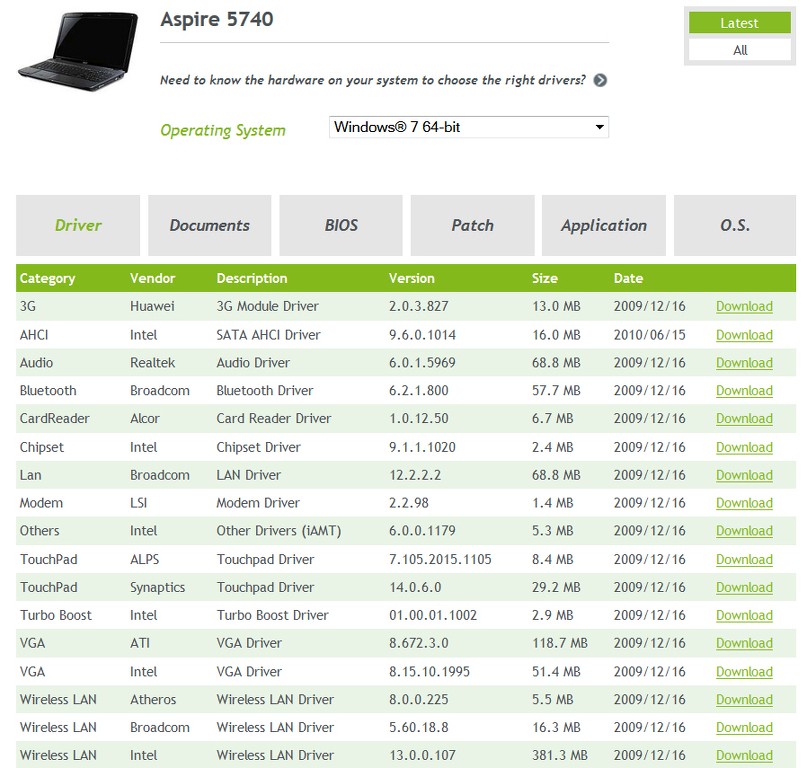
I believe you can get the Acer-provided drivers for your 5740 by going to the Acer download site and entering "Aspire 5740" in the product. If you haven't gotten all of these drivers downloaded and used them as part of your Windows reinstall, you need to.

In particular the "chipset" driver will most likely solve your "PCI simple Communications Controller" issue. The "Ethernet" problem will be addressed by the LAN driver. And the "graphics card" problem will be addressed by the VGA-ATI driver.

Try this. Most drivers may be automatically installed during the Windows reinstall by Windows Update. But other drivers need to be retrieved from the vendor site, as these appear to be.

BwFmgb.jpg
 

My Computer My Computer

At a glance

Windows 7 Pro x64 (1), Win7 Pro X64 (2)i5-3350p 3.1Ghz/6MB-cache (1); E8400 3.0Ghz/6...8GB PC3-12800 DDR3 (1); 4GB PC3-10600 DDR3 (2)ATI HD7750 (1), (see TV cards); ATI R7 250 (2)
Computer type
PC/Desktop
Computer Manufacturer/Model Number
Home-built, two systems (1) and (2)
OS
Windows 7 Pro x64 (1), Win7 Pro X64 (2)
CPU
i5-3350p 3.1Ghz/6MB-cache (1); E8400 3.0Ghz/6MB-cache (2)
Motherboard
ASUS P8Z77-V Pro (1); ASUS P5Q3 (2)
Memory
8GB PC3-12800 DDR3 (1); 4GB PC3-10600 DDR3 (2)
Graphics Card(s)
ATI HD7750 (1), (see TV cards); ATI R7 250 (2)
Sound Card
Realtek ALC892 HD Audio (1); Realtek ALC1200 HD Audio (2)
Monitor(s) Displays
Eizo HD2441W LCD, Eizo S2433W (1); Eizo 24" S2433W (2)
Screen Resolution
1920x1200, 1920x1200 (1); 1920x1200 (2)
Hard Drives
(1) 1TB SATA-II (7200RPM), 2x2TB SATA-III (7200RPM), 250GB SATA-III (10000RPM) for OS; 2x2TB external USB 3.0

(2) 320GB SATA-II (7200RPM), 750GB SATA-II (7200RPM), 150GB SATA-II (10000RPM) for OS; 2TB external USB 3.0
PSU
Nesteq ECS-6001 600W (1); Nesteq ECS-5001 500W (2)
Case
Acousti-Case 360 (1) and (2)
Cooling
Noctua NH-U12P SE2 for CPU, 2x120mm case fans (1) and (2)
Keyboard
IBM PS/2 (1) and (2)
Mouse
Logitech MX Revolution wireless (1); Microsoft wired (2)
Internet Speed
100mbps down / 10mbps up
Antivirus
Microsoft Security Essentials; Malwarebyte Anti-Malware Pro
Browser
Firefox
Other Info
Ceton InfiniTV 4-tuner cablecard-enabled TV card as well as Hauppauge HVR-2250 OTA/ATSC 2-tuner TV card in (1), running under Win7 WMC
wow you awesome. Such a nice forum that people answer after less than a day! Thank you for helping me! I'm really happy I can play with my notebook again.

Most important, I have never used ethernet before. Thanks for you this is my first time!.

Just want to point out that you were right about two out of three. The chipset isn't the correct driver (it seems) to fix the problem with PCI Simple Communications Controller. Still Yelow-triangled.

Thanks you a lot!

J
 

My Computer My Computer

At a glance

Windows 7 Home Premium x64
Computer type
PC/Desktop
OS
Windows 7 Home Premium x64
Just want to point out that you were right about two out of three. The chipset isn't the correct driver (it seems) to fix the problem with PCI Simple Communications Controller. Still Yelow-triangled.
Ok, sorry... I though it was in the chipset.

I now believe it's in the "Others - Intel - Other drivers (IAMT)" item. Give that one a try.


NOTE: generally (but not always), you can let Windows Update do the driver searching for you, even if you already have an acceptable driver installed or not. If the vendor has provided the driver to Microsoft it will be on their Windows Update Catalog site.

And you can get Windows to retrieve and install it automatically (if it's available from this source), simply by right-clicking on that item in Device Manager and select "Update driver software...". On the resulting window click on the upper choice ("search automatically for updated driver software") and Windows will attempt to determine if your currently installed driver is the most current available or not. Of course if you don't have a current driver installed that's the other possibility.

Anyway, when you click on that "search automatically" option Windows will then do the best it can, and you'll see whether you already have the latest driver installed or if a newer one was retrieved successfully and installed. You may need to reboot to actually get it in effect (but I always do anyway, no matter, if it did get installed).

If you're currently missing a driver, and Windows Update can't find one, you're back where we started... namely you must rely on the vendor's driver download site to get what you need.
 

My Computer My Computer

At a glance

Windows 7 Pro x64 (1), Win7 Pro X64 (2)i5-3350p 3.1Ghz/6MB-cache (1); E8400 3.0Ghz/6...8GB PC3-12800 DDR3 (1); 4GB PC3-10600 DDR3 (2)ATI HD7750 (1), (see TV cards); ATI R7 250 (2)
Computer type
PC/Desktop
Computer Manufacturer/Model Number
Home-built, two systems (1) and (2)
OS
Windows 7 Pro x64 (1), Win7 Pro X64 (2)
CPU
i5-3350p 3.1Ghz/6MB-cache (1); E8400 3.0Ghz/6MB-cache (2)
Motherboard
ASUS P8Z77-V Pro (1); ASUS P5Q3 (2)
Memory
8GB PC3-12800 DDR3 (1); 4GB PC3-10600 DDR3 (2)
Graphics Card(s)
ATI HD7750 (1), (see TV cards); ATI R7 250 (2)
Sound Card
Realtek ALC892 HD Audio (1); Realtek ALC1200 HD Audio (2)
Monitor(s) Displays
Eizo HD2441W LCD, Eizo S2433W (1); Eizo 24" S2433W (2)
Screen Resolution
1920x1200, 1920x1200 (1); 1920x1200 (2)
Hard Drives
(1) 1TB SATA-II (7200RPM), 2x2TB SATA-III (7200RPM), 250GB SATA-III (10000RPM) for OS; 2x2TB external USB 3.0

(2) 320GB SATA-II (7200RPM), 750GB SATA-II (7200RPM), 150GB SATA-II (10000RPM) for OS; 2TB external USB 3.0
PSU
Nesteq ECS-6001 600W (1); Nesteq ECS-5001 500W (2)
Case
Acousti-Case 360 (1) and (2)
Cooling
Noctua NH-U12P SE2 for CPU, 2x120mm case fans (1) and (2)
Keyboard
IBM PS/2 (1) and (2)
Mouse
Logitech MX Revolution wireless (1); Microsoft wired (2)
Internet Speed
100mbps down / 10mbps up
Antivirus
Microsoft Security Essentials; Malwarebyte Anti-Malware Pro
Browser
Firefox
Other Info
Ceton InfiniTV 4-tuner cablecard-enabled TV card as well as Hauppauge HVR-2250 OTA/ATSC 2-tuner TV card in (1), running under Win7 WMC
Back
Top