Help with registry/restoring factory image?

chedge05

New member
Local time
3:59 PM
Messages
18
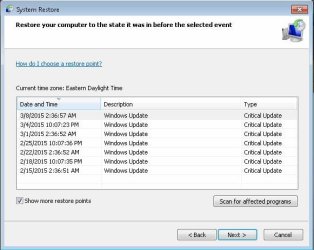
Hi all. I am trying to clean up the wreckage left on my mom's desktop. I have almost everything back to normal. My first option was to factory reset the thing. There is no factory image to restore to. I can only restore it back a few weeks. Here's the story...

There were multiple user accounts that have been added/deleted over time. When she tried to log on one day, there were two users, the guest account and a blank account. I re-booted in safe mode and restored it. From there, she said everything was fine. It happened again. She took it upon herself to do the research and from there some registry keys were deleted. There's the sticky part and the main problem.

Now, I am able to log onto the computer just fine. Here are the re-occuring issues that I am having with this machine. It freezes, alot. When it sits idle for amount of time, not even the slightest amount of activity, it freezes. The explorer restarts sometimes, and doesn't come back. (ex: folders at the bottom of the screen, running programs in the background...etc...). I have also gotten the "This version of Windows is not genuine" message. In fixing that, the only solution is to run the command prompt as Admin and type "slmgr -rearm" and that fixes the problem temporarily, but it comes and goes. (due to a false re-start when the system freezes)?

So, from here on in, what are my options, if any? If I had a Windows 7 restore disk, I would love to do so. I don't have any blank DVD's either. I wouldn't be sure how to go about doing that. I have a beginner/ nearly-intermediate knowledge of a computer.

Thanks for any help!

edit...This is the computer in my profile description. If you need any more information, let me know.
 
Last edited:

My Computer My Computer

Computer type
PC/Desktop
Computer Manufacturer/Model Number
Dell s5503w
OS
Windows 7 Home Premium 64-bit
Memory
3 GB
Graphics Card(s)
AMD
Antivirus
AVG / Advanced Systemcare
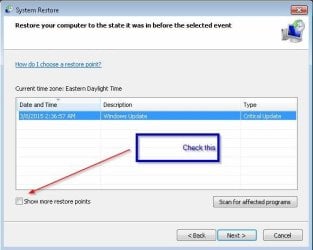
Can you do the System Restore again like you did before? That would fix any registry problems.
 

My Computer My Computer

Computer type
PC/Desktop
Computer Manufacturer/Model Number
Lenovo IdeaCenter 450
OS
Windows 10 Pro X64
CPU
Intel Quad Core i7-4770 @ 3.4Ghz
Memory
16.0GB PC3-12800 DDR3 SDRAM 1600 MHz
Graphics Card(s)
Intel Integrated HD Graphics
Sound Card
Realtek HD Audio
Monitor(s) Displays
HP 22" LCD
Screen Resolution
1680 x 1050
Hard Drives
250GB Samsung EVO SATA-3 SSD
2TB Seagate ST2000DM001 SATA-2
1.5TB Seagate ST3150041AS SATA
Keyboard
Dell USB
Mouse
Lenovo USB
Internet Speed
Cable via Road Runner 3MB Upload, 30MB Download
Antivirus
Windows Defender, MBAM Pro, MBAE
Browser
Seamonkey
Other Info
UEFI/GPT
PLDS DVD-RW DH16AERSH
Can you do the System Restore again like you did before? That would fix any registry problems.

The restore point doesn't go back that far, like now it only goes back to 3/3/15 :/
 

My Computer My Computer

Computer type
PC/Desktop
Computer Manufacturer/Model Number
Dell s5503w
OS
Windows 7 Home Premium 64-bit
Memory
3 GB
Graphics Card(s)
AMD
Antivirus
AVG / Advanced Systemcare

My Computer My Computer

Computer type
PC/Desktop
Computer Manufacturer/Model Number
Home made Desktop
OS
Windows 10 Pro. 64/ version 1709 Windows 7 Pro/64
CPU
Intel i7-6800K @ 4.3
Motherboard
ASUS X-99 Deluxe II
Memory
Corsair Platinum 16 gig @2400
Graphics Card(s)
EVGA GTX 1070 OC
Monitor(s) Displays
Asus 27" LED LCD/VE278Q
Screen Resolution
1920-1080 or 1280-720 HDMI
Hard Drives
INTEL SSD 730-240 Gb Sata 3.0/
PSU
EVGA Platium 1200W
Case
Phanteks Luxe Tempered Glass 8 fans/ one radiator
Cooling
XSPC/ Water Cooled CPU
Keyboard
Das 4 Professional
Mouse
Logitech M705/MX Anywhere 2-S
Internet Speed
100 mbits
Antivirus
Microsoft Security Essentials/ Malwarebytes Premium 3.0/ SAS
Browser
I.E. 11 default/Firefox/ ISP Time Warner Cable/Spectrum
Other Info
LG BluRay Burner/
Sound system-KLipsch-THX/
Icy Dock ssd Hot Swap bays.
I believe this tutorial by Brink should meet your needs.

http://www.sevenforums.com/tutorials/3413-repair-install.html

Thanks for the help. If it would work, that would be amazing..when I enter my product key, I get this message...

System error.

We encountered a problem with the product key you provided. Please visit the 'Microsoft Support Contact Us' page for assistance. Refer to Message Code 715-123130.

Should I contact Microsoft Support?

I couldn't find the product key, so I created a .vbs file to find it.
 

My Computer My Computer

Computer type
PC/Desktop
Computer Manufacturer/Model Number
Dell s5503w
OS
Windows 7 Home Premium 64-bit
Memory
3 GB
Graphics Card(s)
AMD
Antivirus
AVG / Advanced Systemcare
Belarc also should be able to sniff out the Windows Product Key and such.
 

My Computer My Computer

Computer type
PC/Desktop
Computer Manufacturer/Model Number
Antec desktop; Acer Aspire laptops
OS
Windows 7 Professional 64-bit
CPU
Desktop i5; Acers i5 & i7
Memory
desktop 16GB; 1 Acer 8GB & 1 Acer 16GB
Hard Drives
1TB split into 2 equal partitions [OS and data] usable by RJS
Internet Speed
AT&T DSL
Browser
FF, GChrome, msIE
Other Info
Windows 7 Firewall, Emsisoft AM/AV, MSE [scan-only], SpywareBlaster, Ruiware/BillP combine

My Computer My Computer

Computer type
PC/Desktop
Computer Manufacturer/Model Number
Dell s5503w
OS
Windows 7 Home Premium 64-bit
Memory
3 GB
Graphics Card(s)
AMD
Antivirus
AVG / Advanced Systemcare
Red flag with Belarc

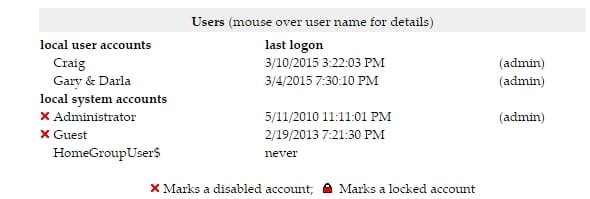
I ran the Belarc system utility. I looked through the specs, and this, to me, is a red flag. I have attached an image. Under the "user accounts", there is my account, my mom's account, the administrator account, which is disabled, and the guest account. What caught my eye is..there is an account on there named, "HomeGroupUser$" that had never been used. Is that normal?
Also, shouldn't the Admin account be the main account (my mom's), and if so, how do I fix that?
 

Attachments

  • Clipboard01.jpg
    Clipboard01.jpg
    13.8 KB · Views: 28
Last edited:

My Computer My Computer

Computer type
PC/Desktop
Computer Manufacturer/Model Number
Dell s5503w
OS
Windows 7 Home Premium 64-bit
Memory
3 GB
Graphics Card(s)
AMD
Antivirus
AVG / Advanced Systemcare

My Computer My Computer

Computer type
PC/Desktop
Computer Manufacturer/Model Number
Lenovo IdeaCenter 450
OS
Windows 10 Pro X64
CPU
Intel Quad Core i7-4770 @ 3.4Ghz
Memory
16.0GB PC3-12800 DDR3 SDRAM 1600 MHz
Graphics Card(s)
Intel Integrated HD Graphics
Sound Card
Realtek HD Audio
Monitor(s) Displays
HP 22" LCD
Screen Resolution
1680 x 1050
Hard Drives
250GB Samsung EVO SATA-3 SSD
2TB Seagate ST2000DM001 SATA-2
1.5TB Seagate ST3150041AS SATA
Keyboard
Dell USB
Mouse
Lenovo USB
Internet Speed
Cable via Road Runner 3MB Upload, 30MB Download
Antivirus
Windows Defender, MBAM Pro, MBAE
Browser
Seamonkey
Other Info
UEFI/GPT
PLDS DVD-RW DH16AERSH

My Computer My Computer

Computer type
PC/Desktop
Computer Manufacturer/Model Number
Dell s5503w
OS
Windows 7 Home Premium 64-bit
Memory
3 GB
Graphics Card(s)
AMD
Antivirus
AVG / Advanced Systemcare
If this is an original Windows 7 system, there must be a product key on the COA sticker which looks like thsi:
 

Attachments

  • coa-stickers.gif
    coa-stickers.gif
    495.9 KB · Views: 16

My Computer My Computer

Computer Manufacturer/Model Number
HP, Dell, Gateway, Toshiba - 4 laptops and 2 desktops
OS
Vista, Windows7, Mint Mate, Zorin, Windows 8
CPU
from 1.6GHz Duo to i7
Monitor(s) Displays
2x HP w2207
Hard Drives
5x HDD, 7x SSD, 12x Externals
Keyboard
with trackball - no mices
Mouse
Trackball mice
Internet Speed
DSL 6000
If this is an original Windows 7 system, there must be a product key on the COA sticker which looks like thsi:

The product key is different than the key I looked up in the registry. And that is the number that came up when I used the Belarc Utility as well. My product keys aren't matching up?
 
Last edited by a moderator:

My Computer My Computer

Computer type
PC/Desktop
Computer Manufacturer/Model Number
Dell s5503w
OS
Windows 7 Home Premium 64-bit
Memory
3 GB
Graphics Card(s)
AMD
Antivirus
AVG / Advanced Systemcare
You want to use the one on the sticker.

I removed that picture for your safety, you don't want to post your product key to the public. :)
 

My Computer My Computer

Computer type
PC/Desktop
Computer Manufacturer/Model Number
Self Built
OS
Win 10 Pro x64
CPU
Intel I5-2500K @3.3GHz
Motherboard
Asrock P67 Extreme4
Memory
16GB G.Skill Ripjaws X (4x4GB)
Graphics Card(s)
EVGA GeForce 750 Ti SC 2GB
Sound Card
ASUS Xonar DG 5.1 Channels 24-bit 96KHz PCI Interface Sound
Monitor(s) Displays
auria eq2367
Screen Resolution
1920 x 1080
Hard Drives
250GB Samsung 850 EVO SSD
1TB WD Blue
1TB Hitachi
PSU
SeaSonic X 650W 80 Plus Gold
Case
Corsair Obsidian 750D
Cooling
Corsair H60, Three 140mm case fans
Keyboard
Logitech Wireless Keyboard K520
Mouse
Logitech Wireless Mouse M310
Internet Speed
Wave Broadband ~ 100 dn 5 up
Antivirus
Windows Defender, Malwarebytes Premium
Browser
Edge, IE11, Chrome
Other Info
Laptop specs: HP g7-1365dx /
CPU: AMD A6-3420M APU with Radeon(tm) HD Graphics /
RAM: Crucial 8Gb (2x4Gb) /
SSD: Crucial M4-CT128M4SSD2 ATA Device/ FW 000F /
GFX: AMD Radeon HD 6520G /
OS: Windows 10 Pro x64
The Key of the COA sticker is the one which goes with the system and is unique. The key you found with Belarc, etc. is the key the OEM used to activate the system at the factory. That same key is on thousands of systems and useless for you.
 

My Computer My Computer

Computer Manufacturer/Model Number
HP, Dell, Gateway, Toshiba - 4 laptops and 2 desktops
OS
Vista, Windows7, Mint Mate, Zorin, Windows 8
CPU
from 1.6GHz Duo to i7
Monitor(s) Displays
2x HP w2207
Hard Drives
5x HDD, 7x SSD, 12x Externals
Keyboard
with trackball - no mices
Mouse
Trackball mice
Internet Speed
DSL 6000
The Key of the COA sticker is the one which goes with the system and is unique. The key you found with Belarc, etc. is the key the OEM used to activate the system at the factory. That same key is on thousands of systems and useless for you.

Ahh I see, thanks. I tried the recovery with that key, and this is what I get...
 

Attachments

  • Clipboard01.jpg
    Clipboard01.jpg
    9.7 KB · Views: 0

My Computer My Computer

Computer type
PC/Desktop
Computer Manufacturer/Model Number
Dell s5503w
OS
Windows 7 Home Premium 64-bit
Memory
3 GB
Graphics Card(s)
AMD
Antivirus
AVG / Advanced Systemcare
That looks like you are trying to download the ISO from Microsoft. Correct?
 

My Computer My Computer

Computer type
PC/Desktop
Computer Manufacturer/Model Number
Self Built
OS
Win 10 Pro x64
CPU
Intel I5-2500K @3.3GHz
Motherboard
Asrock P67 Extreme4
Memory
16GB G.Skill Ripjaws X (4x4GB)
Graphics Card(s)
EVGA GeForce 750 Ti SC 2GB
Sound Card
ASUS Xonar DG 5.1 Channels 24-bit 96KHz PCI Interface Sound
Monitor(s) Displays
auria eq2367
Screen Resolution
1920 x 1080
Hard Drives
250GB Samsung 850 EVO SSD
1TB WD Blue
1TB Hitachi
PSU
SeaSonic X 650W 80 Plus Gold
Case
Corsair Obsidian 750D
Cooling
Corsair H60, Three 140mm case fans
Keyboard
Logitech Wireless Keyboard K520
Mouse
Logitech Wireless Mouse M310
Internet Speed
Wave Broadband ~ 100 dn 5 up
Antivirus
Windows Defender, Malwarebytes Premium
Browser
Edge, IE11, Chrome
Other Info
Laptop specs: HP g7-1365dx /
CPU: AMD A6-3420M APU with Radeon(tm) HD Graphics /
RAM: Crucial 8Gb (2x4Gb) /
SSD: Crucial M4-CT128M4SSD2 ATA Device/ FW 000F /
GFX: AMD Radeon HD 6520G /
OS: Windows 10 Pro x64
This Microsoft site supports only retail copies of Windows. For OEM you have to turn to the OEM company.
 

My Computer My Computer

Computer Manufacturer/Model Number
HP, Dell, Gateway, Toshiba - 4 laptops and 2 desktops
OS
Vista, Windows7, Mint Mate, Zorin, Windows 8
CPU
from 1.6GHz Duo to i7
Monitor(s) Displays
2x HP w2207
Hard Drives
5x HDD, 7x SSD, 12x Externals
Keyboard
with trackball - no mices
Mouse
Trackball mice
Internet Speed
DSL 6000
That looks like you are trying to download the ISO from Microsoft. Correct?

Yes, it's my only option it seems. There's no Recovery Image on my hard drive to restore to factory. I would love for it to be that easy :)
 

My Computer My Computer

Computer type
PC/Desktop
Computer Manufacturer/Model Number
Dell s5503w
OS
Windows 7 Home Premium 64-bit
Memory
3 GB
Graphics Card(s)
AMD
Antivirus
AVG / Advanced Systemcare
This Microsoft site supports only retail copies of Windows. For OEM you have to turn to the OEM company.

I see, thank you for that information. Where would I look for that?
 

My Computer My Computer

Computer type
PC/Desktop
Computer Manufacturer/Model Number
Dell s5503w
OS
Windows 7 Home Premium 64-bit
Memory
3 GB
Graphics Card(s)
AMD
Antivirus
AVG / Advanced Systemcare
This Microsoft site supports only retail copies of Windows. For OEM you have to turn to the OEM company.

I see, thank you for that information. Where would I look for that?

Throw yourself on the mercy of Dell Incorporated, Round Rock, Texas.

They may supply disks for a fee. Maybe not. I think they did at one time.

If you like to live dangerously, you could fish around on the dreaded Internet and take your chances with whatever download you could find---possibly legit, possibly laced with unknown horrors.
 

My Computer My Computer

Computer type
PC/Desktop
Computer Manufacturer/Model Number
Ignatz Special; 4 speed manual gearbox; factory air conditioning; one of one
OS
Windows 7 Home Premium SP1, 64-bit
CPU
Intel Skylake i5-6600K, not overclocked
Motherboard
AsRock Z170M Extreme 4, micro ATX
Memory
8 GB HyperX DDR4-2666 (2 x 4 GB)
Graphics Card(s)
none; graphics are integrated on CPU
Sound Card
onboard: Realtek ALC1150; external: USB Behringer UF0-202
Monitor(s) Displays
Dell S2340M 23 inch IPS
Screen Resolution
1600 x 900
Hard Drives
System: Crucial MX100 series SSD, 128 GB;
Data: Samsung Spinpoint 103SJ, 1 TB;
Backup: WD Caviar Green WD30EZRX-00D8PB0, 3 TB
PSU
Rosewill SilentNight 500 watt fanless, semi-modular
Case
Antec Solo II
Cooling
Noctua NH-U12S; Noctua F12 intake, Noctua S12A exhaust
Keyboard
Microsoft 200 6JH-00001 USB
Mouse
Dell or Microsoft optical wired; USB
Antivirus
Microsoft Security Essentials and Malwarebytes Premium
Browser
Pale Moon
Other Info
All fans PWM; speeds at idle: CPU circa 500 rpm; intake circa 600 rpm; exhaust circa 600 rpm; CPU temps 27 idle and 47 C load in a warm room (27 C/81 F) when running Intel Extreme Tuning Utility stress test.
Back
Top