Solved Should I buy more ram..? help please!

yuji

New member
Local time
4:36 PM
Messages
18
Hello, I've had 2gb of ram on an 86 bit system for a few years on a custom built pc this is my processor type or whatever.
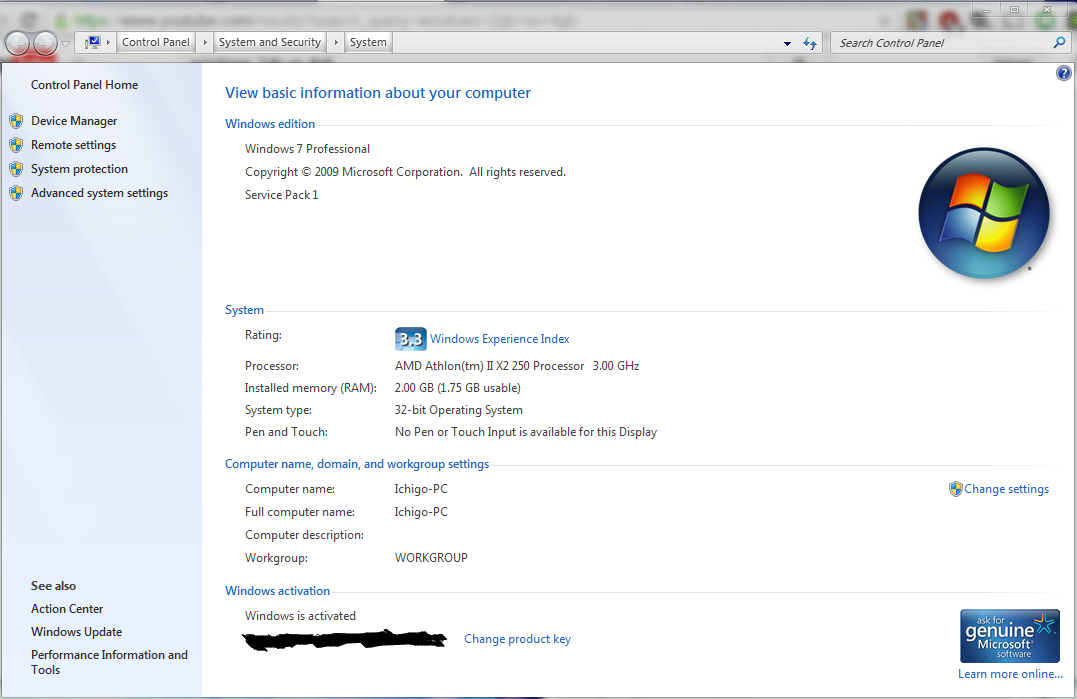
b4km0Nr.png
\
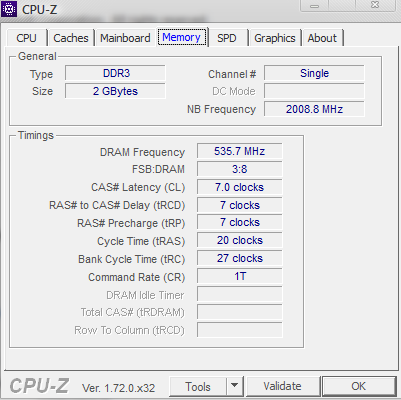
This is my current memory type.
dIcuuOI.png

I'm wondering if it's possible that upgrading would be better, I plan to switch to Windows 7 64bit (I've also been debating on upgrading to windows 8.1 64bit) I've heard 4gb of ram is more than enough for 64bit systems my system is supposed to be a dual core also what type of ram do I need? I've been planning to buy this one: G Skill Ripjaws x Series 4GB 240 Pin DDR3 SDRAM DDR3 1600 PC3 12800 Desktop Me | eBay BUT I need to know if I should buy more ram for my computer and IF I do would it be better? thanks.. I hope I've explained it well enough for you guys to understand.
 

My Computer My Computer

At a glance

Windows 7AMD Athlon(tm) II X2 250 Processor1.75 GBNVIDIA GeForce 7025 / NVIDIA nForce 630a
Computer type
PC/Desktop
Computer Manufacturer/Model Number
unknown
OS
Windows 7
CPU
AMD Athlon(tm) II X2 250 Processor
Motherboard
Gigabyte Technology Co., Ltd. M68MT-S2P
Memory
1.75 GB
Graphics Card(s)
NVIDIA GeForce 7025 / NVIDIA nForce 630a
Sound Card
(1) Realtek High Definition Audio (2) ManyCam Virtual Micr
Monitor(s) Displays
NVIDIA GeForce 7025 / NVIDIA nForce 630a
Screen Resolution
1600 x 900 x 32 bits (4294967296 colors) @ 60 Hz
Hard Drives
WDC WD50 00AAKX-001CA SCSI Disk Device
You first need to consult your Motherboard specs and see how much ram it will take and what kind of ram it needs. It would help us help you if you would fill in your system specs. We can't give you much advice if we don't know what hardware you have.
Please fill out your System Specs

   Information
Your System Specs will help us to help you, and doing it in this manner will make them available to all helpers in every post and keep us from hunting for them. We ask that you fill them out in as much detail as possible including Desktop or Laptop, Model number if it is an OEM computer and all components with the Manufacturer and Model number if possible.

If you will go to your last post and click the 'System Specs' in the bottom left of the post, you will find a link to update your system specs. Please fill those out in as much detail as possible, making sure to click save at the bottom of the page. If you would like to know what we would like, you can click 'My System Specs' at the bottom left of this post to see mine. If you do not know what your components are, this will help you accomplish this task. http://www.sevenforums.com/tutorials/180324-system-info-see-your-system-specs.html
 

My Computers My Computers

  • At a glance

    Windows 11 ProRyzen 9 5900X32GB G Skill DDR4-3600EVGA RTX 3080 FTW 3 Ultra
    Computer type
    PC/Desktop
    Computer Manufacturer/Model Number
    ALWAYS UNDER CONSTRUCTION
    OS
    Windows 11 Pro
    CPU
    Ryzen 9 5900X
    Motherboard
    Asus X570 Crosshair Viii Hero
    Memory
    32GB G Skill DDR4-3600
    Graphics Card(s)
    EVGA RTX 3080 FTW 3 Ultra
    Sound Card
    On Board/Sennheiser PC37X Headset
    Monitor(s) Displays
    3 X Asus 27"
    Screen Resolution
    2560x1440
    Hard Drives
    2 X 1 TB NVME drives
    PSU
    EVGA 850
    Case
    Phanteks Eclipse P400A
    Cooling
    EVGA 280 AIO
    Keyboard
    Logitech G510s/ Logitech G13
    Mouse
    Logitech G502
    Internet Speed
    24/1
    Antivirus
    ESET/MBAM Pro/SAS Pro
    Browser
    Chrome/ Firefox/ Edge
  • At a glance

    Windows 11 ProIntel Ultra 9 288V32 GB LPDDR5X 8533
    Computer type
    Laptop
    System Manufacturer/Model Number
    Dell 16 Plus
    OS
    Windows 11 Pro
    CPU
    Intel Ultra 9 288V
    Memory
    32 GB LPDDR5X 8533
    Monitor(s) Displays
    16" Mini-LED HDR600 Touch 90 Hz
    Screen Resolution
    2560X1600
    Hard Drives
    1 TB NVME
Alright, I've filled out as much as I could hopefully that will give you a better understanding thanks for linking that!
 

My Computer My Computer

At a glance

Windows 7AMD Athlon(tm) II X2 250 Processor1.75 GBNVIDIA GeForce 7025 / NVIDIA nForce 630a
Computer type
PC/Desktop
Computer Manufacturer/Model Number
unknown
OS
Windows 7
CPU
AMD Athlon(tm) II X2 250 Processor
Motherboard
Gigabyte Technology Co., Ltd. M68MT-S2P
Memory
1.75 GB
Graphics Card(s)
NVIDIA GeForce 7025 / NVIDIA nForce 630a
Sound Card
(1) Realtek High Definition Audio (2) ManyCam Virtual Micr
Monitor(s) Displays
NVIDIA GeForce 7025 / NVIDIA nForce 630a
Screen Resolution
1600 x 900 x 32 bits (4294967296 colors) @ 60 Hz
Hard Drives
WDC WD50 00AAKX-001CA SCSI Disk Device

My Computer My Computer

At a glance

Vista, Windows7, Mint Mate, Zorin, Windows 8from 1.6GHz Duo to i7
Computer Manufacturer/Model Number
HP, Dell, Gateway, Toshiba - 4 laptops and 2 desktops
OS
Vista, Windows7, Mint Mate, Zorin, Windows 8
CPU
from 1.6GHz Duo to i7
Monitor(s) Displays
2x HP w2207
Hard Drives
5x HDD, 7x SSD, 12x Externals
Keyboard
with trackball - no mices
Mouse
Trackball mice
Internet Speed
DSL 6000

My Computer My Computer

At a glance

Windows 10 Pro. 64/ version 1709 Windows 7 Pr...Intel i7-6800K @ 4.3Corsair Platinum 16 gig @2400EVGA GTX 1070 OC
Computer type
PC/Desktop
Computer Manufacturer/Model Number
Home made Desktop
OS
Windows 10 Pro. 64/ version 1709 Windows 7 Pro/64
CPU
Intel i7-6800K @ 4.3
Motherboard
ASUS X-99 Deluxe II
Memory
Corsair Platinum 16 gig @2400
Graphics Card(s)
EVGA GTX 1070 OC
Monitor(s) Displays
Asus 27" LED LCD/VE278Q
Screen Resolution
1920-1080 or 1280-720 HDMI
Hard Drives
INTEL SSD 730-240 Gb Sata 3.0/
PSU
EVGA Platium 1200W
Case
Phanteks Luxe Tempered Glass 8 fans/ one radiator
Cooling
XSPC/ Water Cooled CPU
Keyboard
Das 4 Professional
Mouse
Logitech M705/MX Anywhere 2-S
Internet Speed
100 mbits
Antivirus
Microsoft Security Essentials/ Malwarebytes Premium 3.0/ SAS
Browser
I.E. 11 default/Firefox/ ISP Time Warner Cable/Spectrum
Other Info
LG BluRay Burner/
Sound system-KLipsch-THX/
Icy Dock ssd Hot Swap bays.
The Crucial Scanner is an easy tool to determine how much RAM is possible, what kind you need and what it costs (in the US).

systemscanner | United States (USD)
Thanks, it says my computer has two memory slots and I'm trying to buy ram at a cheaper price at the moment, these are all too expensive right now than the one I've linked.

Just a little information. Which should also be found in the motherboard manual.

GIGABYTE - Motherboard - Socket AM3 - GA-M68MT-S2P (rev. 3.0)


2 x 1.5V DDR3 DIMM sockets supporting up to 8GB of system memory (Note 1)
Dual channel memory architecture
Support for DDR3 1333(OC)/1066/800 MHz memory modules
I see, could I buy the ram stick on the link I've posted? it has 4gb of ram + at a great price. I just want to know if it's the kind of ram stick I can use in my computer and can I do a clean install to 64bit without any problems?
 

My Computer My Computer

At a glance

Windows 7AMD Athlon(tm) II X2 250 Processor1.75 GBNVIDIA GeForce 7025 / NVIDIA nForce 630a
Computer type
PC/Desktop
Computer Manufacturer/Model Number
unknown
OS
Windows 7
CPU
AMD Athlon(tm) II X2 250 Processor
Motherboard
Gigabyte Technology Co., Ltd. M68MT-S2P
Memory
1.75 GB
Graphics Card(s)
NVIDIA GeForce 7025 / NVIDIA nForce 630a
Sound Card
(1) Realtek High Definition Audio (2) ManyCam Virtual Micr
Monitor(s) Displays
NVIDIA GeForce 7025 / NVIDIA nForce 630a
Screen Resolution
1600 x 900 x 32 bits (4294967296 colors) @ 60 Hz
Hard Drives
WDC WD50 00AAKX-001CA SCSI Disk Device
I see, could I buy the ram stick on the link I've posted? it has 4gb of ram + at a great price. I just want to know if it's the kind of ram stick I can use in my computer and can I do a clean install to 64bit without any problems?

Do you mean the RAM you linked in your first post, from Ebay?

It is this:

G.SKILL Ripjaws X Series 4GB 240-Pin DDR3 SDRAM DDR3 1600 (PC3 12800)

That looks to be compatible with your motherboard.

But you have 2 GB now. Adding this would give you 6.

Do you want 4 total or 6 total?

Or do you intend to discard the 2 GB you now have?

You should use 2 sticks total, so if you want 4 GB total, I'd look to buy one more 2 GB stick, not that 4 GB stick.

If you intend to discard the 2 you have now, you should buy two 2 GB sticks to give you 4 GB of new RAM.


You might look on your motherboard manufacturer's web site to see if there is an officially approved list of compatible RAM. Maybe yes, maybe no. If this Ebay RAM isn't on that list, it doesn't mean it won't work fine.
 

My Computer My Computer

At a glance

Windows 7 Home Premium SP1, 64-bitIntel Skylake i5-6600K, not overclocked8 GB HyperX DDR4-2666 (2 x 4 GB)none; graphics are integrated on CPU
Computer type
PC/Desktop
Computer Manufacturer/Model Number
Ignatz Special; 4 speed manual gearbox; factory air conditioning; one of one
OS
Windows 7 Home Premium SP1, 64-bit
CPU
Intel Skylake i5-6600K, not overclocked
Motherboard
AsRock Z170M Extreme 4, micro ATX
Memory
8 GB HyperX DDR4-2666 (2 x 4 GB)
Graphics Card(s)
none; graphics are integrated on CPU
Sound Card
onboard: Realtek ALC1150; external: USB Behringer UF0-202
Monitor(s) Displays
Dell S2340M 23 inch IPS
Screen Resolution
1600 x 900
Hard Drives
System: Crucial MX100 series SSD, 128 GB;
Data: Samsung Spinpoint 103SJ, 1 TB;
Backup: WD Caviar Green WD30EZRX-00D8PB0, 3 TB
PSU
Rosewill SilentNight 500 watt fanless, semi-modular
Case
Antec Solo II
Cooling
Noctua NH-U12S; Noctua F12 intake, Noctua S12A exhaust
Keyboard
Microsoft 200 6JH-00001 USB
Mouse
Dell or Microsoft optical wired; USB
Antivirus
Microsoft Security Essentials and Malwarebytes Premium
Browser
Pale Moon
Other Info
All fans PWM; speeds at idle: CPU circa 500 rpm; intake circa 600 rpm; exhaust circa 600 rpm; CPU temps 27 idle and 47 C load in a warm room (27 C/81 F) when running Intel Extreme Tuning Utility stress test.
Do you mean the RAM you linked in your first post, from Ebay?

It is this:

G.SKILL Ripjaws X Series 4GB 240-Pin DDR3 SDRAM DDR3 1600 (PC3 12800)

That looks to be compatible with your motherboard.

But you have 2 GB now. Adding this would give you 6.

Do you want 4 total or 6 total?

Or do you intend to discard the 2 GB you now have?

You should use 2 sticks total, so if you want 4 GB total, I'd look to buy one more 2 GB stick, not that 4 GB stick.

If you intend to discard the 2 you have now, you should buy two 2 GB sticks to give you 4 GB of new RAM.


You might look on your motherboard manufacturer's web site to see if there is an officially approved list of compatible RAM. Maybe yes, maybe no. If this Ebay RAM isn't on that list, it doesn't mean it won't work fine.
Well if it's compatible I'm willing to risk it,so if I can keep the 2 GB I have now and add on a total of 6 would that be better for a 64bit os installation? the more ram the better I think,thanks for responding looking forward to your next response!
 

My Computer My Computer

At a glance

Windows 7AMD Athlon(tm) II X2 250 Processor1.75 GBNVIDIA GeForce 7025 / NVIDIA nForce 630a
Computer type
PC/Desktop
Computer Manufacturer/Model Number
unknown
OS
Windows 7
CPU
AMD Athlon(tm) II X2 250 Processor
Motherboard
Gigabyte Technology Co., Ltd. M68MT-S2P
Memory
1.75 GB
Graphics Card(s)
NVIDIA GeForce 7025 / NVIDIA nForce 630a
Sound Card
(1) Realtek High Definition Audio (2) ManyCam Virtual Micr
Monitor(s) Displays
NVIDIA GeForce 7025 / NVIDIA nForce 630a
Screen Resolution
1600 x 900 x 32 bits (4294967296 colors) @ 60 Hz
Hard Drives
WDC WD50 00AAKX-001CA SCSI Disk Device
Well if it's compatible I'm willing to risk it,so if I can keep the 2 GB I have now and add on a total of 6 would that be better for a 64bit os installation? the more ram the better I think,thanks for responding looking forward to your next response!

If you have two identical 2 GB sticks, total of 4 GB, they should run in "dual channel" mode.

If you have a 2 GB stick and a 4 GB stick, total of 6 GB, I think they are going to run in single channel model.

Dual channel is slightly faster than single channel.

BUT if you actually will use the 5th and 6th GB, you are better off with 6 in single channel than 4 in dual channel.

If you never would actually use the 5th and 6th, you're probably better off with 4 in dual channel.

I have 4 in dual channel. I've never used more than about 3.2. I have 64-bit Win 7 Home Premium.

So, it's important to know how much you'll use. Check Task Manager and Resource Monitor.

You may never notice any difference between single and dual channel.

So, in the real world, it may not matter much at all whether you have 2 plus 2 for 4 total or 2 plus 4 for 6 total.
 

My Computer My Computer

At a glance

Windows 7 Home Premium SP1, 64-bitIntel Skylake i5-6600K, not overclocked8 GB HyperX DDR4-2666 (2 x 4 GB)none; graphics are integrated on CPU
Computer type
PC/Desktop
Computer Manufacturer/Model Number
Ignatz Special; 4 speed manual gearbox; factory air conditioning; one of one
OS
Windows 7 Home Premium SP1, 64-bit
CPU
Intel Skylake i5-6600K, not overclocked
Motherboard
AsRock Z170M Extreme 4, micro ATX
Memory
8 GB HyperX DDR4-2666 (2 x 4 GB)
Graphics Card(s)
none; graphics are integrated on CPU
Sound Card
onboard: Realtek ALC1150; external: USB Behringer UF0-202
Monitor(s) Displays
Dell S2340M 23 inch IPS
Screen Resolution
1600 x 900
Hard Drives
System: Crucial MX100 series SSD, 128 GB;
Data: Samsung Spinpoint 103SJ, 1 TB;
Backup: WD Caviar Green WD30EZRX-00D8PB0, 3 TB
PSU
Rosewill SilentNight 500 watt fanless, semi-modular
Case
Antec Solo II
Cooling
Noctua NH-U12S; Noctua F12 intake, Noctua S12A exhaust
Keyboard
Microsoft 200 6JH-00001 USB
Mouse
Dell or Microsoft optical wired; USB
Antivirus
Microsoft Security Essentials and Malwarebytes Premium
Browser
Pale Moon
Other Info
All fans PWM; speeds at idle: CPU circa 500 rpm; intake circa 600 rpm; exhaust circa 600 rpm; CPU temps 27 idle and 47 C load in a warm room (27 C/81 F) when running Intel Extreme Tuning Utility stress test.
You should always AddRAM when possible :D
 

My Computer My Computer

At a glance

Windows 10 Pro x64Intel Core i7 6700KGSkill TridentZ RGB 16GB 3600 16-16-16-36EVGA GTX 980 Ti SC x2
Computer type
PC/Desktop
Computer Manufacturer/Model Number
Skylake Special #666
OS
Windows 10 Pro x64
CPU
Intel Core i7 6700K
Motherboard
Asus Sabertooth Z170 Mark 1
Memory
GSkill TridentZ RGB 16GB 3600 16-16-16-36
Graphics Card(s)
EVGA GTX 980 Ti SC x2
Sound Card
Realtek High Definition
Monitor(s) Displays
AOC G2460PG
Screen Resolution
1920 x 1080 144Hz
Hard Drives
Samsung 860 Pro 256GB, Seagate Barracuda 4TB x2
PSU
EVGA 1000 P2, EVGA White Custom Braided Cables
Case
Corsair Vengeance C70 Gunmetal Black
Cooling
Corsair H100i v2, Corsair ML120 x2, Thermal Grizzly Kryonaut
Keyboard
Logitech G910 Orion Spectrum
Mouse
Logitech G700s
Internet Speed
Verizon Fios Quantum Gateway 75/75
Antivirus
Windows Defender, Malwarebytes Free 3.8.3
Browser
Chrome
Other Info
Corsair SP120 x4, LG Blu-ray Drive, Durabrand HT-395 100 Watt Dolby Digital Amp, Corsair H2100 Wireless 7.1 Headset
Adding ram is always a good thing but their is some guide lines I recommend.

1. Always get ram in matched sets.
2. Always install ram as per the motherboard manual.
3. If your motherboard is dual, triple or quad channel add the ram per the motherboard manual so you don't loose the capability. If single channel was best all motherboards would be made single channel only.
 

My Computer My Computer

At a glance

Windows 10 Pro. 64/ version 1709 Windows 7 Pr...Intel i7-6800K @ 4.3Corsair Platinum 16 gig @2400EVGA GTX 1070 OC
Computer type
PC/Desktop
Computer Manufacturer/Model Number
Home made Desktop
OS
Windows 10 Pro. 64/ version 1709 Windows 7 Pro/64
CPU
Intel i7-6800K @ 4.3
Motherboard
ASUS X-99 Deluxe II
Memory
Corsair Platinum 16 gig @2400
Graphics Card(s)
EVGA GTX 1070 OC
Monitor(s) Displays
Asus 27" LED LCD/VE278Q
Screen Resolution
1920-1080 or 1280-720 HDMI
Hard Drives
INTEL SSD 730-240 Gb Sata 3.0/
PSU
EVGA Platium 1200W
Case
Phanteks Luxe Tempered Glass 8 fans/ one radiator
Cooling
XSPC/ Water Cooled CPU
Keyboard
Das 4 Professional
Mouse
Logitech M705/MX Anywhere 2-S
Internet Speed
100 mbits
Antivirus
Microsoft Security Essentials/ Malwarebytes Premium 3.0/ SAS
Browser
I.E. 11 default/Firefox/ ISP Time Warner Cable/Spectrum
Other Info
LG BluRay Burner/
Sound system-KLipsch-THX/
Icy Dock ssd Hot Swap bays.
Also, just because a 3rd party reseller says there RAM sticks will work, doesn't mean their sticks will -- actually work. I found out there are kwik-reference sales specs, and then there are technical, inside-the-stick "buildings," architectural, --> SPECS. I purchased my sticks from the place where I got my laptop from, no problems. In short, keep your receipt until mobo fully accepts and fully uses the new twin sticks.
 

My Computer My Computer

At a glance

Windows 7 Professional 64-bitDesktop i5; Acers i5 & i7desktop 16GB; 1 Acer 8GB & 1 Acer 16GB
Computer type
PC/Desktop
Computer Manufacturer/Model Number
Antec desktop; Acer Aspire laptops
OS
Windows 7 Professional 64-bit
CPU
Desktop i5; Acers i5 & i7
Memory
desktop 16GB; 1 Acer 8GB & 1 Acer 16GB
Hard Drives
1TB split into 2 equal partitions [OS and data] usable by RJS
Internet Speed
AT&T DSL
Browser
FF, GChrome, msIE
Other Info
Windows 7 Firewall, Emsisoft AM/AV, MSE [scan-only], SpywareBlaster, Ruiware/BillP combine

My Computer My Computer

At a glance

Windows 10 Pro x64Intel Core i7 6700KGSkill TridentZ RGB 16GB 3600 16-16-16-36EVGA GTX 980 Ti SC x2
Computer type
PC/Desktop
Computer Manufacturer/Model Number
Skylake Special #666
OS
Windows 10 Pro x64
CPU
Intel Core i7 6700K
Motherboard
Asus Sabertooth Z170 Mark 1
Memory
GSkill TridentZ RGB 16GB 3600 16-16-16-36
Graphics Card(s)
EVGA GTX 980 Ti SC x2
Sound Card
Realtek High Definition
Monitor(s) Displays
AOC G2460PG
Screen Resolution
1920 x 1080 144Hz
Hard Drives
Samsung 860 Pro 256GB, Seagate Barracuda 4TB x2
PSU
EVGA 1000 P2, EVGA White Custom Braided Cables
Case
Corsair Vengeance C70 Gunmetal Black
Cooling
Corsair H100i v2, Corsair ML120 x2, Thermal Grizzly Kryonaut
Keyboard
Logitech G910 Orion Spectrum
Mouse
Logitech G700s
Internet Speed
Verizon Fios Quantum Gateway 75/75
Antivirus
Windows Defender, Malwarebytes Free 3.8.3
Browser
Chrome
Other Info
Corsair SP120 x4, LG Blu-ray Drive, Durabrand HT-395 100 Watt Dolby Digital Amp, Corsair H2100 Wireless 7.1 Headset
Well if it's compatible I'm willing to risk it,so if I can keep the 2 GB I have now and add on a total of 6 would that be better for a 64bit os installation? the more ram the better I think,thanks for responding looking forward to your next response!

If you have two identical 2 GB sticks, total of 4 GB, they should run in "dual channel" mode.

If you have a 2 GB stick and a 4 GB stick, total of 6 GB, I think they are going to run in single channel model.

Dual channel is slightly faster than single channel.

BUT if you actually will use the 5th and 6th GB, you are better off with 6 in single channel than 4 in dual channel.

If you never would actually use the 5th and 6th, you're probably better off with 4 in dual channel.

I have 4 in dual channel. I've never used more than about 3.2. I have 64-bit Win 7 Home Premium.

So, it's important to know how much you'll use. Check Task Manager and Resource Monitor.

You may never notice any difference between single and dual channel.

So, in the real world, it may not matter much at all whether you have 2 plus 2 for 4 total or 2 plus 4 for 6 total.
Hmm, then what would you suggest me do? should I just get another 2GB of ram and run it in dual mode? and if I get 2 plus 4 how would I go about putting it into use? personally I want as much memory as possible if tabs are up for a long period of time in Google Chrome, it starts to slow down same goes with using programs such as photoshop,dreamweaver etc since I've heard these programs start to eat a lot of memory at once I just want a nice set,thanks!


Your board supports 8 GB of 1333/1066/800 MHZ

Not 1600 PC3 12800

If you`re going to install 64 bit you should install 8 GB of 1333 PC3-10666 ( 2 x 4 GB sticks )

GIGABYTE - Motherboard - Socket AM3 - GA-M68MT-S2P (rev. 3.0)

G.SKILL Ripjaws Series 8GB (2 x 4GB) 240-Pin DDR3 SDRAM DDR3 1333 (PC3 10666) Desktop Memory Model F3-10666CL9D-8GBRL - Newegg.com

But get 4 GB if that`s what you can afford.
Hmm, 2 plus 4 wouldn't work then? or? I might actually consider getting it. edit: should I get a single 4 GB ram if so?
 

My Computer My Computer

At a glance

Windows 7AMD Athlon(tm) II X2 250 Processor1.75 GBNVIDIA GeForce 7025 / NVIDIA nForce 630a
Computer type
PC/Desktop
Computer Manufacturer/Model Number
unknown
OS
Windows 7
CPU
AMD Athlon(tm) II X2 250 Processor
Motherboard
Gigabyte Technology Co., Ltd. M68MT-S2P
Memory
1.75 GB
Graphics Card(s)
NVIDIA GeForce 7025 / NVIDIA nForce 630a
Sound Card
(1) Realtek High Definition Audio (2) ManyCam Virtual Micr
Monitor(s) Displays
NVIDIA GeForce 7025 / NVIDIA nForce 630a
Screen Resolution
1600 x 900 x 32 bits (4294967296 colors) @ 60 Hz
Hard Drives
WDC WD50 00AAKX-001CA SCSI Disk Device
You should buy a new matched set, I explained it.

Of course 2 plus 4 would work, but why waste the money if you will install 64 bit.

Save your money to get a good matched pair like I linked :)
 

My Computer My Computer

At a glance

Windows 10 Pro x64Intel Core i7 6700KGSkill TridentZ RGB 16GB 3600 16-16-16-36EVGA GTX 980 Ti SC x2
Computer type
PC/Desktop
Computer Manufacturer/Model Number
Skylake Special #666
OS
Windows 10 Pro x64
CPU
Intel Core i7 6700K
Motherboard
Asus Sabertooth Z170 Mark 1
Memory
GSkill TridentZ RGB 16GB 3600 16-16-16-36
Graphics Card(s)
EVGA GTX 980 Ti SC x2
Sound Card
Realtek High Definition
Monitor(s) Displays
AOC G2460PG
Screen Resolution
1920 x 1080 144Hz
Hard Drives
Samsung 860 Pro 256GB, Seagate Barracuda 4TB x2
PSU
EVGA 1000 P2, EVGA White Custom Braided Cables
Case
Corsair Vengeance C70 Gunmetal Black
Cooling
Corsair H100i v2, Corsair ML120 x2, Thermal Grizzly Kryonaut
Keyboard
Logitech G910 Orion Spectrum
Mouse
Logitech G700s
Internet Speed
Verizon Fios Quantum Gateway 75/75
Antivirus
Windows Defender, Malwarebytes Free 3.8.3
Browser
Chrome
Other Info
Corsair SP120 x4, LG Blu-ray Drive, Durabrand HT-395 100 Watt Dolby Digital Amp, Corsair H2100 Wireless 7.1 Headset
yuji I would suggest going back and read the complete thread again.
Your questions have been answered and suggestion given.
 

My Computer My Computer

At a glance

Windows 10 Pro. 64/ version 1709 Windows 7 Pr...Intel i7-6800K @ 4.3Corsair Platinum 16 gig @2400EVGA GTX 1070 OC
Computer type
PC/Desktop
Computer Manufacturer/Model Number
Home made Desktop
OS
Windows 10 Pro. 64/ version 1709 Windows 7 Pro/64
CPU
Intel i7-6800K @ 4.3
Motherboard
ASUS X-99 Deluxe II
Memory
Corsair Platinum 16 gig @2400
Graphics Card(s)
EVGA GTX 1070 OC
Monitor(s) Displays
Asus 27" LED LCD/VE278Q
Screen Resolution
1920-1080 or 1280-720 HDMI
Hard Drives
INTEL SSD 730-240 Gb Sata 3.0/
PSU
EVGA Platium 1200W
Case
Phanteks Luxe Tempered Glass 8 fans/ one radiator
Cooling
XSPC/ Water Cooled CPU
Keyboard
Das 4 Professional
Mouse
Logitech M705/MX Anywhere 2-S
Internet Speed
100 mbits
Antivirus
Microsoft Security Essentials/ Malwarebytes Premium 3.0/ SAS
Browser
I.E. 11 default/Firefox/ ISP Time Warner Cable/Spectrum
Other Info
LG BluRay Burner/
Sound system-KLipsch-THX/
Icy Dock ssd Hot Swap bays.
You should buy a new matched set, I explained it.

Of course 2 plus 4 would work, but why waste the money if you will install 64 bit.

Save your money to get a good matched pair like I linked :)
Alright, I'll do that if that's what's best for my computer thanks!


yuji I would suggest going back and read the complete thread again.
Your questions have been answered and suggestion given.
I have read through the thread, it's just my first time buying new ram for my computer so I'm making sure I'm making the right choices instead of buying too many sticks of ram -- I'l end the thread here and buy the ram that AddRAM suggested whenever I can afford it I'm close to the right amount! thanks guy for your help & sorry if I annoyed you guys too much lol. I'll mark the thread as solved!
 

My Computer My Computer

At a glance

Windows 7AMD Athlon(tm) II X2 250 Processor1.75 GBNVIDIA GeForce 7025 / NVIDIA nForce 630a
Computer type
PC/Desktop
Computer Manufacturer/Model Number
unknown
OS
Windows 7
CPU
AMD Athlon(tm) II X2 250 Processor
Motherboard
Gigabyte Technology Co., Ltd. M68MT-S2P
Memory
1.75 GB
Graphics Card(s)
NVIDIA GeForce 7025 / NVIDIA nForce 630a
Sound Card
(1) Realtek High Definition Audio (2) ManyCam Virtual Micr
Monitor(s) Displays
NVIDIA GeForce 7025 / NVIDIA nForce 630a
Screen Resolution
1600 x 900 x 32 bits (4294967296 colors) @ 60 Hz
Hard Drives
WDC WD50 00AAKX-001CA SCSI Disk Device
In no way are you annoying us, we are glad to help :)
 

My Computer My Computer

At a glance

Windows 10 Pro x64Intel Core i7 6700KGSkill TridentZ RGB 16GB 3600 16-16-16-36EVGA GTX 980 Ti SC x2
Computer type
PC/Desktop
Computer Manufacturer/Model Number
Skylake Special #666
OS
Windows 10 Pro x64
CPU
Intel Core i7 6700K
Motherboard
Asus Sabertooth Z170 Mark 1
Memory
GSkill TridentZ RGB 16GB 3600 16-16-16-36
Graphics Card(s)
EVGA GTX 980 Ti SC x2
Sound Card
Realtek High Definition
Monitor(s) Displays
AOC G2460PG
Screen Resolution
1920 x 1080 144Hz
Hard Drives
Samsung 860 Pro 256GB, Seagate Barracuda 4TB x2
PSU
EVGA 1000 P2, EVGA White Custom Braided Cables
Case
Corsair Vengeance C70 Gunmetal Black
Cooling
Corsair H100i v2, Corsair ML120 x2, Thermal Grizzly Kryonaut
Keyboard
Logitech G910 Orion Spectrum
Mouse
Logitech G700s
Internet Speed
Verizon Fios Quantum Gateway 75/75
Antivirus
Windows Defender, Malwarebytes Free 3.8.3
Browser
Chrome
Other Info
Corsair SP120 x4, LG Blu-ray Drive, Durabrand HT-395 100 Watt Dolby Digital Amp, Corsair H2100 Wireless 7.1 Headset
You are in no way annoying me.

My post #16 was just a reminder to go through the thread again so you would have a better understanding of your ram questions and the answers.

We like helping people that is why many of us spend hours each day doing just that, helping.

Let us know when you get your new ram.
 

My Computer My Computer

At a glance

Windows 10 Pro. 64/ version 1709 Windows 7 Pr...Intel i7-6800K @ 4.3Corsair Platinum 16 gig @2400EVGA GTX 1070 OC
Computer type
PC/Desktop
Computer Manufacturer/Model Number
Home made Desktop
OS
Windows 10 Pro. 64/ version 1709 Windows 7 Pro/64
CPU
Intel i7-6800K @ 4.3
Motherboard
ASUS X-99 Deluxe II
Memory
Corsair Platinum 16 gig @2400
Graphics Card(s)
EVGA GTX 1070 OC
Monitor(s) Displays
Asus 27" LED LCD/VE278Q
Screen Resolution
1920-1080 or 1280-720 HDMI
Hard Drives
INTEL SSD 730-240 Gb Sata 3.0/
PSU
EVGA Platium 1200W
Case
Phanteks Luxe Tempered Glass 8 fans/ one radiator
Cooling
XSPC/ Water Cooled CPU
Keyboard
Das 4 Professional
Mouse
Logitech M705/MX Anywhere 2-S
Internet Speed
100 mbits
Antivirus
Microsoft Security Essentials/ Malwarebytes Premium 3.0/ SAS
Browser
I.E. 11 default/Firefox/ ISP Time Warner Cable/Spectrum
Other Info
LG BluRay Burner/
Sound system-KLipsch-THX/
Icy Dock ssd Hot Swap bays.
The only annoyance around here is: the UNasked question, for which we can not answer 'cause they're unasked :)
 

My Computer My Computer

At a glance

Windows 7 Professional 64-bitDesktop i5; Acers i5 & i7desktop 16GB; 1 Acer 8GB & 1 Acer 16GB
Computer type
PC/Desktop
Computer Manufacturer/Model Number
Antec desktop; Acer Aspire laptops
OS
Windows 7 Professional 64-bit
CPU
Desktop i5; Acers i5 & i7
Memory
desktop 16GB; 1 Acer 8GB & 1 Acer 16GB
Hard Drives
1TB split into 2 equal partitions [OS and data] usable by RJS
Internet Speed
AT&T DSL
Browser
FF, GChrome, msIE
Other Info
Windows 7 Firewall, Emsisoft AM/AV, MSE [scan-only], SpywareBlaster, Ruiware/BillP combine
Back
Top