Just thought I'd add some additional examples and pictures to this thread. I have two machines, one with 3 internal hard drives and one with 4 internal hard drives. Description of each of these is very interesting, as I DO see "unallocated" space on one of them (although it's not on a drive where the OS lives, but rather on a secondary data drive).
(1) The 3-drive machine is a dual-boot setup, with WinXP and Win7. Since WinXP was installed (back in 2008) first there is no "system reserved" partition, as that XP system partition was "active" and where Boot Manager lived originally. When 7 was installed as a second OS (originally in 2009, but subsequently several times again from scratch), the Win7 Boot Manager was installed in the still "active" XP partition to support the two bootable OS's (with 7 being the default), and there still is no "system reserved".
Furthermore, this machine has undergone several hard drive upgrades/replacements over the past 6 years. I used to have all SCSI drives (off of an Adaptec controller) but eventually migrated to all SATA drives, typically larger than the original SCSI drives they replaced. In the process partitions were rearranged/resized and/or moved/resized to other drives than where they were originally located, depending on the configuration at that time and depending on the new hard drive capacity.
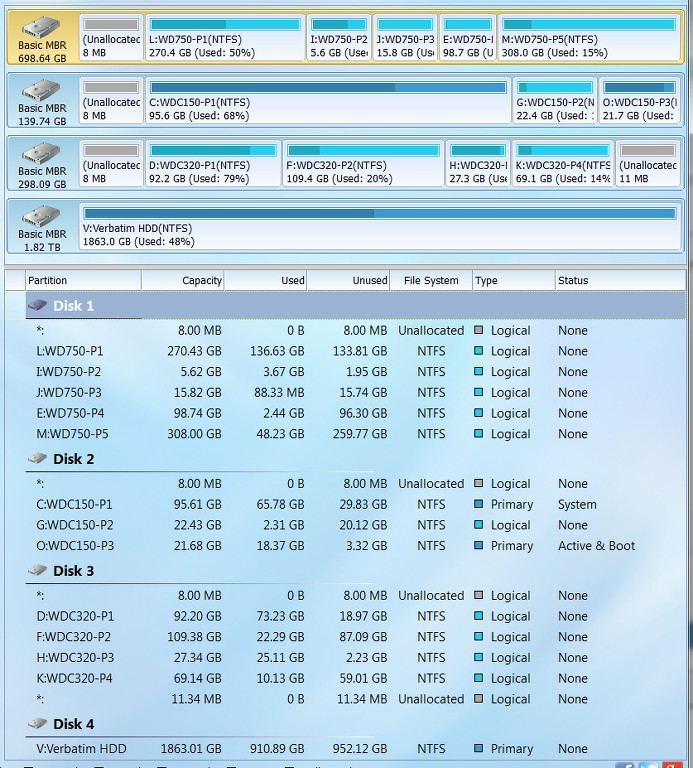
And finally, the only "primary" partitions I have on that machine are the two OS partitions, for WinXP and Win7 which are both on the same physical drive. There is also a logical partition on that same drive. All the other partitions are on other drives, and these are ALL "logical" partitions. I also have one 2TB external USB 3.0 drive for backups, and it is a single primary partition.
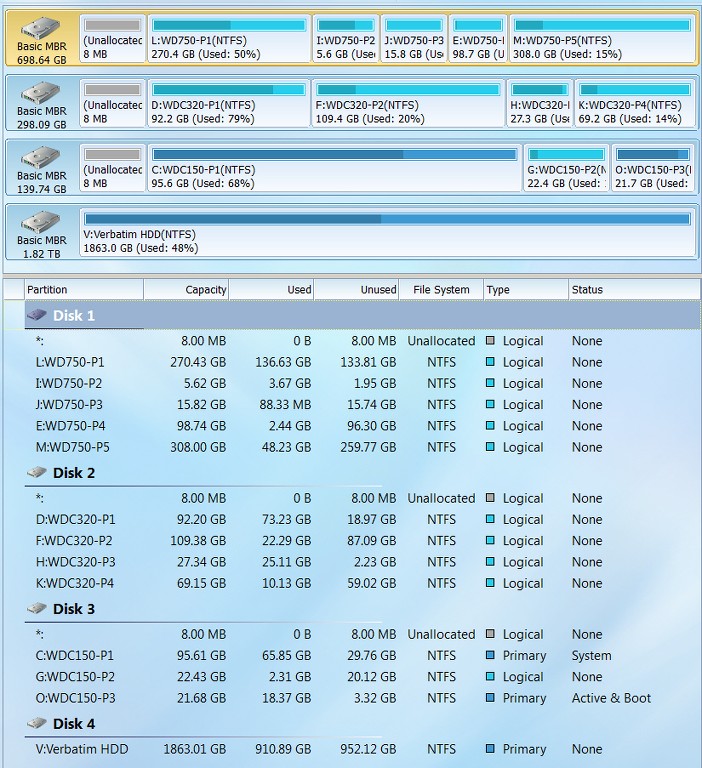
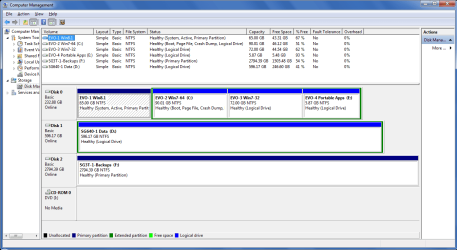
As you can see from the following PW screenshot taken under Win7, the boot drive with WinXP (O-active, primary) and Win7 (C, primary) appears as DISK2. There is a logical partition (G) in between the two OS partitions. There is also 8MB of unallocated space at the physical front of the drive, which I am certain is tied to the presence of a logical partition on the drive and is the expected "logical partition overhead" (where I believe info about the boundaries of the zero or more logical partitions is kept). It's curious that this 8MB overhead is at the front of the drive, followed by a primary partition, and then followed by the logical partition space (i.e. "extended partition"), and then the second primary partition. But this may simply be due to the history of when/how this drive originally looked when WinXP was first installed and then later Win7 was installed, coupled with the other history of SCSI/SATA drive replacement/upgrades over the years, and how I happened to do the partitioning. Anyway, it's obvious that this arrangement is functionally acceptable, though a bit unusual.
Also note that DISK3 is composed of all logical partitions. Again, there is the 8MB of "logical partition overhead" at the start of the drive. But note that there is also 11.34MB of UNALLOCATED SPACE at the right side of the drive. I honestly don't know how that came to be and what might have caused it. While the logical partitions on this drive may have been resized (through PW) over the years as space requirements for those partitions changed, I don't recall consciously not using the final 11.34MB of drive capacity in the partition size adjustments. So most likely it was PW that did this, although I never noticed it before.
Ok. Germane to this thread, I have now decided to "absorb" that 11.34 of unallocated capacity... to see if it becomes permanently annexed, or if it returns. No, it's not on the boot drive, but I'm still curious to see if it ever returns in the future.
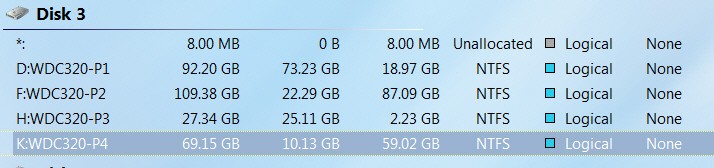
I used the PW "extend partition" dialog to extend logical partition K (just to the left of the unallocated space), which offered me the ability to absorb any amount of that unallocated space from 0 to the max of 11.34MB. I moved the slider all the way to the right, to absorb it all.
PW then re-drew things to reflect the after-result, showing the new slightly larger K partition and zero unallocated space.
I then pushed APPLY, and PW made this happen. I then re-booted (to ensure everything would remain as it currently now looked). And in fact it did look the same... EXCEPT that for some reason DISK2 and DISK3 had now "swapped"!! I can't explain that, other than it obviously is perfectly acceptable (since the system booted perfectly). It clearly has nothing to do with hardware and cabling of drives to SATA controllers on the motherboard, which obviously hadn't changed at all. It obviously had something to do with what PW had done in "updating system" after extending the K partition to be slightly larger. Anyway, it's interesting to observe... but that's all. No other effect on my environment.
So, we'll now let time go by and check back periodically to see if any "unallocated" space returns or not anywhere on the three drives of this machine.
(2) The 4-drive machine is single OS, pure Win7. As with the other 3-drive machine, this 4-drive machine (which is also my HTPC) has evolved over the years from an initial all-SCSI drive configuration to an all-SATA drive configuration. And smaller/slower SATA-II drives were upgraded to larger/faster SATA-II drives, as additional HTPC capacity and performance was required. And as with the 3-drive machine, there is also a 2TB external USB 3.0 drive used for backups (with a single primary partition).
Since this was a Win7 fresh install from scratch, there IS a "system reserved" (active) partition for Boot Manager, and then Win7 is in a primary C partition. Aside from that, all other partitions on all other internal drives are logical.
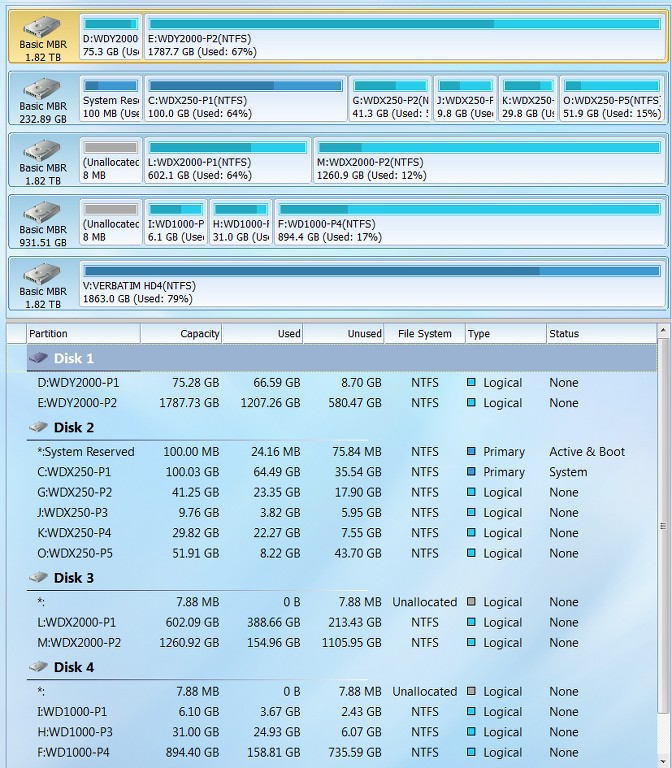
Looking at the following PW screenshot of that machine (where again partition sizes and locations have adjusted over the years, as hard drives were replaced and upgraded), there are several very interesting (and, frankly, unexpected) observations to be made:
( a ) DISK1 is composed of all logical partitions. And yet there is NO "logical partition overhead" of about 8MB present as I would expect to see. I have never seen this ever before. I can't explain it, as I have always believed there was this 8MB overhead whenever at least one logical partition was defined on a drive. Apparently there must be some other explanation for this setup, that I'm at a loss to provide, but it must have come when I used PW to copy/move/resize partitions when new larger hard drives replaced older smaller drives.
( b ) DISK2 (the boot drive) has the one primary OS partition and all the other partitions are logical. And again, I now see that there is no 8MB "logical partition overhead"!! Again, no explanation, except to assume it came from PW's work during partition rearrangement onto new drives.
( c ) DISK3 and DISK4 are all logical partitions, and do have the 8MB "logical partition overhead" on them.
( d ) NO DRIVES have any inexplicable "unallocated" space at the right.