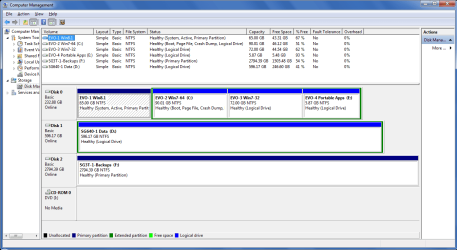
Unallocated spaces at the beginning & end of the BOOT disk

I"m saying that Windows will create those unallocated spaces during installation. I do not know about doing so after partitioning with a Linux based program. I believe that it only does so on an unallocated, blank hard drive. But maybe you have proven otherwise.

I have done Windows installations on hard drives I formatted beforehand and do not have those spaces. But those are GPT disks, so it could be something else, like it is needed on MBR disks.
 

My Computer My Computer

At a glance

Windows 7 64 Bit Home Premium SP1i7-3820GSkill F3-14900CL9Q - 16GBEVGA GeForce GTX660 - Driver 352.86
Computer type
PC/Desktop
Computer Manufacturer/Model Number
Home Built - Jan 2013
OS
Windows 7 64 Bit Home Premium SP1
CPU
i7-3820
Motherboard
Asus P9X79-PRO - Bios 4608
Memory
GSkill F3-14900CL9Q - 16GB
Graphics Card(s)
EVGA GeForce GTX660 - Driver 352.86
Sound Card
On board Realtek ALC898
Monitor(s) Displays
Acer S271HL
Screen Resolution
1920 x 1080
Hard Drives
#1- Samsung 840 Pro Series
#2- Western Digital WD1002FAEX Sata3 Black
#3- Western Digital WD1002FAEX Sata3 Black
PSU
Corsair CMPSU-850TX-V2 - 850 watt (by Seasonic)
Case
Corsair Obsidian 550D
Cooling
Standard 3 120mm case fans, Cooler Master Hyper 212 EVO
Keyboard
MS KC-0405
Mouse
Intellimouse 5-button
Internet Speed
56 Mbits/Sec (on a good day)
Antivirus
Avast & Malwarebytes
Browser
Firefox
Other Info
Asus DVD - DRW-24B1ST 24X
I have done Windows installations on hard drives I formatted beforehand and do not have those spaces. But those are GPT disks, so it could be something else, like it is needed on MBR disks.

I have a Windows triple boot on a single SSD initialized as MBR and I don't have those unallocated spaces.
I also don't have a System Reserved partition.
I pre-partition my HD's/SSD's.
 

My Computer My Computer

At a glance

Multi-Boot W7_Pro_x64 W8.1_Pro_x64 W10_Pro_x6...AMD Athlon II x4 6206GB GSkill DDR2 800AMD 4670 GPU + AMD 4200 IGP
Computer type
PC/Desktop
Computer Manufacturer/Model Number
home built
OS
Multi-Boot W7_Pro_x64 W8.1_Pro_x64 W10_Pro_x64 +Linux_VMs +Chromium_VM
CPU
AMD Athlon II x4 620
Motherboard
Gigabyte GA-MA785G-UD3H
Memory
6GB GSkill DDR2 800
Graphics Card(s)
AMD 4670 GPU + AMD 4200 IGP
Sound Card
on board Realtek ALC889A
Monitor(s) Displays
RCA 40" LCD TV, Insignia 32" LCD TV, HP 15" LCD monitor
Screen Resolution
1680 x 1050
Hard Drives
OCZ Vertex 3 120GB,
Samsung F3 1TB (3),
Several others - WD, Seagate, Hitachi, ...
PSU
Corsair 500 W
Case
Rosewill mid tower
Cooling
CM 90mm rifle
Keyboard
Gyration wireless, Logitech wireless, Dell USB wired
Mouse
Gyration wireless, Logitech wireless, V7 USB wired
Internet Speed
Spectrum - 100Mbps D / 10Mbps U
Antivirus
Avast, MBAM3, EMET, WinPatrol
Browser
Pale Moon, Firefox, IE
Other Info
2 multi-boot PC's
Mainly HTPC/Office/Gen purpose (no gaming).
Trendnet USB KVM.
LG DVD burner/Blue Ray Player.
Tray system for removable SATA backup drives.

Not currently OCd, under-volted.
I use Hybrid sleep, rarely re-boot or shutdown.

Hauppauge HD-PVR, Avermedia PCIe TV Tuner, Hauppauge PCI TV Tuner.
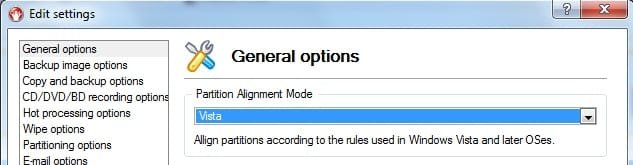
I expect partition wizard uses nt6 based alignment as standard.

Paragon lets you choose:

paragon-align.jpg

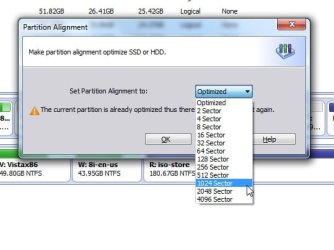
AOMEI lets you choose:

AOMEI-ALIGN.jpg
 

My Computers My Computers

  • At a glance

    7 X64i5 84002x8gb 3200mhz
    Computer type
    PC/Desktop
    OS
    7 X64
    CPU
    i5 8400
    Motherboard
    gigabyte b365m ds3h
    Memory
    2x8gb 3200mhz
    Hard Drives
    various
    PSU
    pure power 11 400w cm
    Case
    Coolermaster
    Cooling
    cryorig m9i
  • At a glance

    7x64g54008gb ddr4 2400
    Computer type
    PC/Desktop
    OS
    7x64
    CPU
    g5400
    Motherboard
    ga b365m ds3h
    Memory
    8gb ddr4 2400
    PSU
    xfx pro 450w
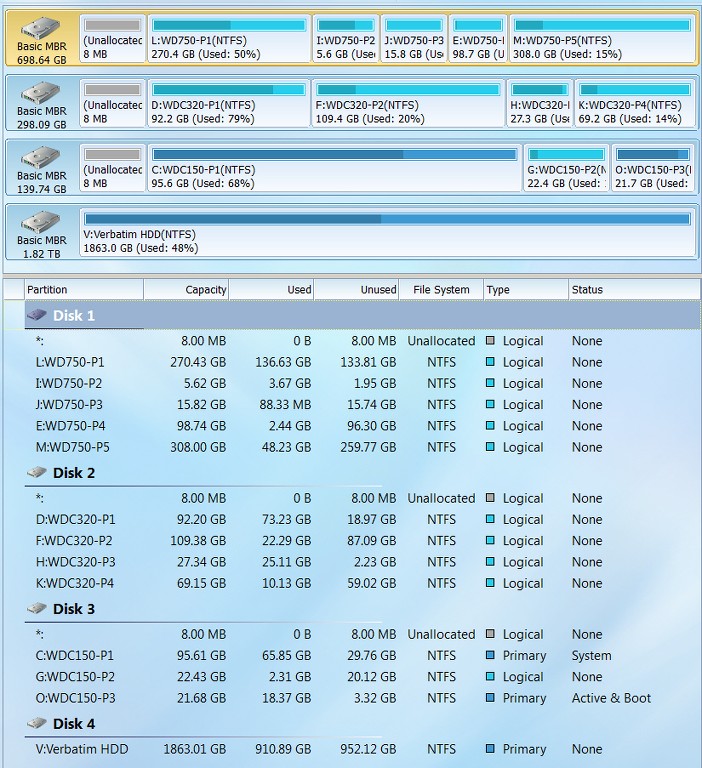
Just thought I'd add some additional examples and pictures to this thread. I have two machines, one with 3 internal hard drives and one with 4 internal hard drives. Description of each of these is very interesting, as I DO see "unallocated" space on one of them (although it's not on a drive where the OS lives, but rather on a secondary data drive).


(1) The 3-drive machine is a dual-boot setup, with WinXP and Win7. Since WinXP was installed (back in 2008) first there is no "system reserved" partition, as that XP system partition was "active" and where Boot Manager lived originally. When 7 was installed as a second OS (originally in 2009, but subsequently several times again from scratch), the Win7 Boot Manager was installed in the still "active" XP partition to support the two bootable OS's (with 7 being the default), and there still is no "system reserved".

Furthermore, this machine has undergone several hard drive upgrades/replacements over the past 6 years. I used to have all SCSI drives (off of an Adaptec controller) but eventually migrated to all SATA drives, typically larger than the original SCSI drives they replaced. In the process partitions were rearranged/resized and/or moved/resized to other drives than where they were originally located, depending on the configuration at that time and depending on the new hard drive capacity.

And finally, the only "primary" partitions I have on that machine are the two OS partitions, for WinXP and Win7 which are both on the same physical drive. There is also a logical partition on that same drive. All the other partitions are on other drives, and these are ALL "logical" partitions. I also have one 2TB external USB 3.0 drive for backups, and it is a single primary partition.

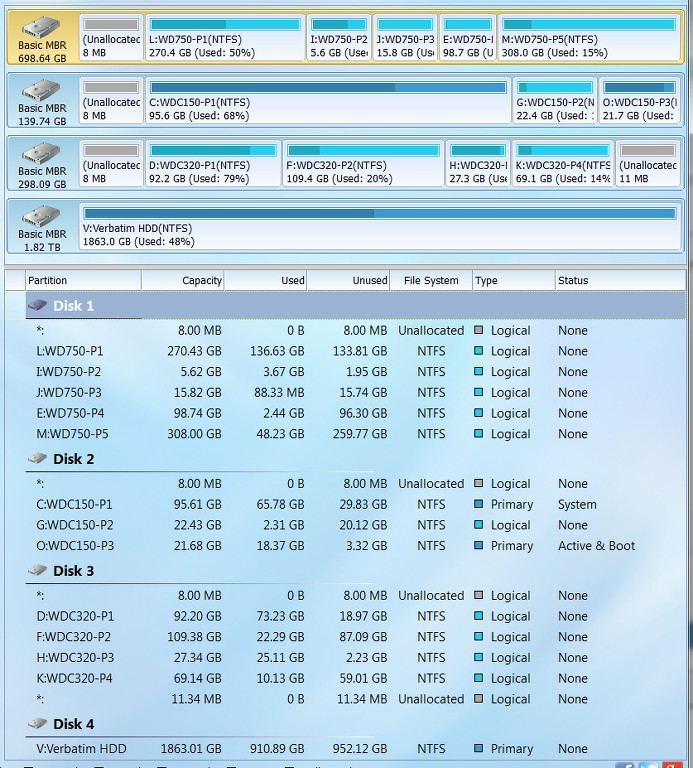
As you can see from the following PW screenshot taken under Win7, the boot drive with WinXP (O-active, primary) and Win7 (C, primary) appears as DISK2. There is a logical partition (G) in between the two OS partitions. There is also 8MB of unallocated space at the physical front of the drive, which I am certain is tied to the presence of a logical partition on the drive and is the expected "logical partition overhead" (where I believe info about the boundaries of the zero or more logical partitions is kept). It's curious that this 8MB overhead is at the front of the drive, followed by a primary partition, and then followed by the logical partition space (i.e. "extended partition"), and then the second primary partition. But this may simply be due to the history of when/how this drive originally looked when WinXP was first installed and then later Win7 was installed, coupled with the other history of SCSI/SATA drive replacement/upgrades over the years, and how I happened to do the partitioning. Anyway, it's obvious that this arrangement is functionally acceptable, though a bit unusual.

Also note that DISK3 is composed of all logical partitions. Again, there is the 8MB of "logical partition overhead" at the start of the drive. But note that there is also 11.34MB of UNALLOCATED SPACE at the right side of the drive. I honestly don't know how that came to be and what might have caused it. While the logical partitions on this drive may have been resized (through PW) over the years as space requirements for those partitions changed, I don't recall consciously not using the final 11.34MB of drive capacity in the partition size adjustments. So most likely it was PW that did this, although I never noticed it before.

DK1yZX.jpg


Ok. Germane to this thread, I have now decided to "absorb" that 11.34 of unallocated capacity... to see if it becomes permanently annexed, or if it returns. No, it's not on the boot drive, but I'm still curious to see if it ever returns in the future.

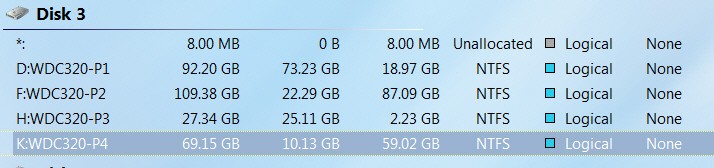
I used the PW "extend partition" dialog to extend logical partition K (just to the left of the unallocated space), which offered me the ability to absorb any amount of that unallocated space from 0 to the max of 11.34MB. I moved the slider all the way to the right, to absorb it all.

bLXcyz.jpg


PW then re-drew things to reflect the after-result, showing the new slightly larger K partition and zero unallocated space.

DTTfKM.jpg


I then pushed APPLY, and PW made this happen. I then re-booted (to ensure everything would remain as it currently now looked). And in fact it did look the same... EXCEPT that for some reason DISK2 and DISK3 had now "swapped"!! I can't explain that, other than it obviously is perfectly acceptable (since the system booted perfectly). It clearly has nothing to do with hardware and cabling of drives to SATA controllers on the motherboard, which obviously hadn't changed at all. It obviously had something to do with what PW had done in "updating system" after extending the K partition to be slightly larger. Anyway, it's interesting to observe... but that's all. No other effect on my environment.

duIJiH.jpg


So, we'll now let time go by and check back periodically to see if any "unallocated" space returns or not anywhere on the three drives of this machine.


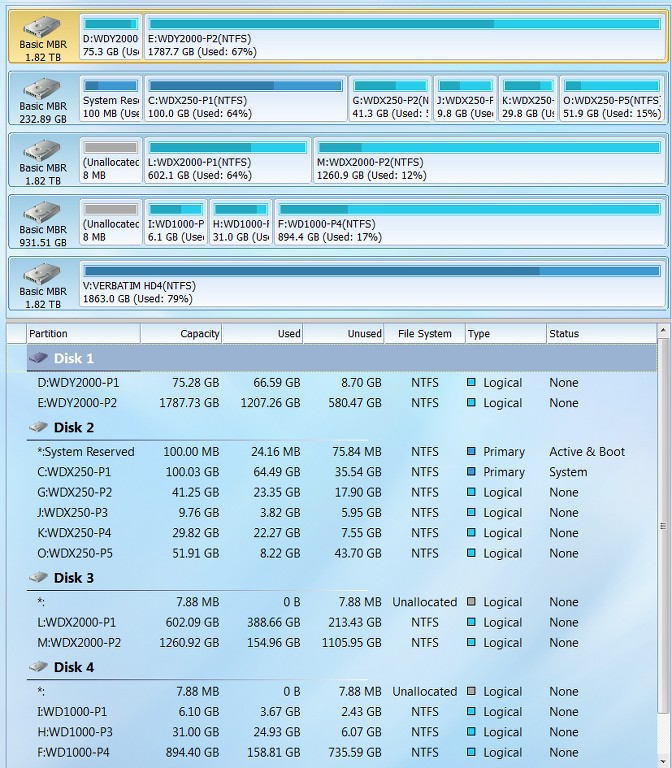
(2) The 4-drive machine is single OS, pure Win7. As with the other 3-drive machine, this 4-drive machine (which is also my HTPC) has evolved over the years from an initial all-SCSI drive configuration to an all-SATA drive configuration. And smaller/slower SATA-II drives were upgraded to larger/faster SATA-II drives, as additional HTPC capacity and performance was required. And as with the 3-drive machine, there is also a 2TB external USB 3.0 drive used for backups (with a single primary partition).

Since this was a Win7 fresh install from scratch, there IS a "system reserved" (active) partition for Boot Manager, and then Win7 is in a primary C partition. Aside from that, all other partitions on all other internal drives are logical.

Looking at the following PW screenshot of that machine (where again partition sizes and locations have adjusted over the years, as hard drives were replaced and upgraded), there are several very interesting (and, frankly, unexpected) observations to be made:

( a ) DISK1 is composed of all logical partitions. And yet there is NO "logical partition overhead" of about 8MB present as I would expect to see. I have never seen this ever before. I can't explain it, as I have always believed there was this 8MB overhead whenever at least one logical partition was defined on a drive. Apparently there must be some other explanation for this setup, that I'm at a loss to provide, but it must have come when I used PW to copy/move/resize partitions when new larger hard drives replaced older smaller drives.

( b ) DISK2 (the boot drive) has the one primary OS partition and all the other partitions are logical. And again, I now see that there is no 8MB "logical partition overhead"!! Again, no explanation, except to assume it came from PW's work during partition rearrangement onto new drives.

( c ) DISK3 and DISK4 are all logical partitions, and do have the 8MB "logical partition overhead" on them.

( d ) NO DRIVES have any inexplicable "unallocated" space at the right.

LMPDio.jpg
 

My Computer My Computer

At a glance

Windows 7 Pro x64 (1), Win7 Pro X64 (2)i5-3350p 3.1Ghz/6MB-cache (1); E8400 3.0Ghz/6...8GB PC3-12800 DDR3 (1); 4GB PC3-10600 DDR3 (2)ATI HD7750 (1), (see TV cards); ATI R7 250 (2)
Computer type
PC/Desktop
Computer Manufacturer/Model Number
Home-built, two systems (1) and (2)
OS
Windows 7 Pro x64 (1), Win7 Pro X64 (2)
CPU
i5-3350p 3.1Ghz/6MB-cache (1); E8400 3.0Ghz/6MB-cache (2)
Motherboard
ASUS P8Z77-V Pro (1); ASUS P5Q3 (2)
Memory
8GB PC3-12800 DDR3 (1); 4GB PC3-10600 DDR3 (2)
Graphics Card(s)
ATI HD7750 (1), (see TV cards); ATI R7 250 (2)
Sound Card
Realtek ALC892 HD Audio (1); Realtek ALC1200 HD Audio (2)
Monitor(s) Displays
Eizo HD2441W LCD, Eizo S2433W (1); Eizo 24" S2433W (2)
Screen Resolution
1920x1200, 1920x1200 (1); 1920x1200 (2)
Hard Drives
(1) 1TB SATA-II (7200RPM), 2x2TB SATA-III (7200RPM), 250GB SATA-III (10000RPM) for OS; 2x2TB external USB 3.0

(2) 320GB SATA-II (7200RPM), 750GB SATA-II (7200RPM), 150GB SATA-II (10000RPM) for OS; 2TB external USB 3.0
PSU
Nesteq ECS-6001 600W (1); Nesteq ECS-5001 500W (2)
Case
Acousti-Case 360 (1) and (2)
Cooling
Noctua NH-U12P SE2 for CPU, 2x120mm case fans (1) and (2)
Keyboard
IBM PS/2 (1) and (2)
Mouse
Logitech MX Revolution wireless (1); Microsoft wired (2)
Internet Speed
100mbps down / 10mbps up
Antivirus
Microsoft Security Essentials; Malwarebyte Anti-Malware Pro
Browser
Firefox
Other Info
Ceton InfiniTV 4-tuner cablecard-enabled TV card as well as Hauppauge HVR-2250 OTA/ATSC 2-tuner TV card in (1), running under Win7 WMC
Partition Wizard will not create these unallocated spaces because Linux does not have a use for them.

Wait a minute, are you saying that WINDOWS created the unallocated spaces in an autonomous operation subsequent the PARTITION WIZARD splitting the drive into separate partitions?

TVeblen got me motivated to run another test to see if this is WINDOWS or PARTITION WIZARD creating these unallocated spaces. Most of the conversation has pointed towards WINDOWS, but I did the following:

1) booted from a MACRIUM rescue disk which I believe does not care what operating system it is attempting to recover;

2) with a USB flash drive with PARTITION WIZARD installed I deleted the boot disk;

3) the size of the disk with no partitions according to PARTITION WIZARD is 238417.78 MBYTES which is 249,894,304,481.25 ....... bytes;

4) I then created 1 single primary partition on that very disk;

5) the size of that partition according to PARTITION WIZARD is 238416 MBYTES which is 249,892,438,016 .......... bytes;

NOTE the difference in size. The first is not an integer multiple of 512 bytes which if I am correct is a block size for NTFS? The 2nd size is an integer multiple. The residual 1.78 Mb. What did PARTITION WIZARD do with that residual space?

Keep in mind I am not booted into WINDOWS unless the MACRIUM rescue disk is based off a WINDOWS OS; moreover, I am creating a single primary partition. PARTITION WIZARD created 2 unallocated spaces. The 1 preceding the primary partition is 1.00Mb & the 1 following is 0.78Mb. The 1Mb space is an integer multiples of 512 bytes while the 2nd one is not.

So I am more asking a question than making a statement. This does not appear to be a WINDOWS artifact? The 1Mb preceding the primary partition is what, part of an extended boot record? The 0.78 Mb space is simply left over & no system whether WINDOWS, LINUX, APPLE, or UNIX can use since it is less than a block size?

I also did the same experiment by creating a single logical partition & the results were the same. Try it yourself. It is a quick test & you can finish in 5 minutes depending how fast your system will boot off a CD.
 

My Computer My Computer

At a glance

WIN 7 32 bit
Computer type
PC/Desktop
Computer Manufacturer/Model Number
DELL
OS
WIN 7 32 bit
I"m saying that Windows will create those unallocated spaces during installation.

NOPE, this is not the case. Read the results of my last test. PARTITION WIZARD creates those spaces independent of the OS.
 

My Computer My Computer

At a glance

WIN 7 32 bit
Computer type
PC/Desktop
Computer Manufacturer/Model Number
DELL
OS
WIN 7 32 bit
I have done Windows installations on hard drives I formatted beforehand and do not have those spaces. But those are GPT disks, so it could be something else, like it is needed on MBR disks.

I have a Windows triple boot on a single SSD initialized as MBR and I don't have those unallocated spaces.
I also don't have a System Reserved partition.
I pre-partition my HD's/SSD's.

David,
The results of my last test seem to indicate PARTITION WIZARD is creating these spaces. If I preformat my drive what partitioning tool do you use?
 

My Computer My Computer

At a glance

WIN 7 32 bit
Computer type
PC/Desktop
Computer Manufacturer/Model Number
DELL
OS
WIN 7 32 bit
I have done Windows installations on hard drives I formatted beforehand and do not have those spaces. But those are GPT disks, so it could be something else, like it is needed on MBR disks.

I have a Windows triple boot on a single SSD initialized as MBR and I don't have those unallocated spaces.
I also don't have a System Reserved partition.
I pre-partition my HD's/SSD's.

David,
The results of my last test seem to indicate PARTITION WIZARD is creating these spaces. If I preformat my drive what partitioning tool do you use?

Like dsperber i have transferred to a new HD/SSD several times over the years.
I've used different tools including Windows DM, Partition Wizard, and EASEUS Partition Master.
My last transfer i probably used Partition Wizard Pro 8.1.1
 

My Computer My Computer

At a glance

Multi-Boot W7_Pro_x64 W8.1_Pro_x64 W10_Pro_x6...AMD Athlon II x4 6206GB GSkill DDR2 800AMD 4670 GPU + AMD 4200 IGP
Computer type
PC/Desktop
Computer Manufacturer/Model Number
home built
OS
Multi-Boot W7_Pro_x64 W8.1_Pro_x64 W10_Pro_x64 +Linux_VMs +Chromium_VM
CPU
AMD Athlon II x4 620
Motherboard
Gigabyte GA-MA785G-UD3H
Memory
6GB GSkill DDR2 800
Graphics Card(s)
AMD 4670 GPU + AMD 4200 IGP
Sound Card
on board Realtek ALC889A
Monitor(s) Displays
RCA 40" LCD TV, Insignia 32" LCD TV, HP 15" LCD monitor
Screen Resolution
1680 x 1050
Hard Drives
OCZ Vertex 3 120GB,
Samsung F3 1TB (3),
Several others - WD, Seagate, Hitachi, ...
PSU
Corsair 500 W
Case
Rosewill mid tower
Cooling
CM 90mm rifle
Keyboard
Gyration wireless, Logitech wireless, Dell USB wired
Mouse
Gyration wireless, Logitech wireless, V7 USB wired
Internet Speed
Spectrum - 100Mbps D / 10Mbps U
Antivirus
Avast, MBAM3, EMET, WinPatrol
Browser
Pale Moon, Firefox, IE
Other Info
2 multi-boot PC's
Mainly HTPC/Office/Gen purpose (no gaming).
Trendnet USB KVM.
LG DVD burner/Blue Ray Player.
Tray system for removable SATA backup drives.

Not currently OCd, under-volted.
I use Hybrid sleep, rarely re-boot or shutdown.

Hauppauge HD-PVR, Avermedia PCIe TV Tuner, Hauppauge PCI TV Tuner.
I have done Windows installations on hard drives I formatted beforehand and do not have those spaces. But those are GPT disks, so it could be something else, like it is needed on MBR disks.

I have a Windows triple boot on a single SSD initialized as MBR and I don't have those unallocated spaces.
I also don't have a System Reserved partition.
I pre-partition my HD's/SSD's.

David,
The results of my last test seem to indicate PARTITION WIZARD is creating these spaces. If I preformat my drive what partitioning tool do you use?

Well I gave a shot with AOMEI Partition Asst 5.6.3 & repeated the test I discussed in post #25 & the result was a 7.84 Mb unallocated space at the END of the disk with a SINGLE primary partition. AGAIN, no system is installed. I am booting from the MACRIUM rescue disk.

So should I surmize that these leftovers are completely dependent on the partition manager & have nothing to do with the OS? If that is the case then how do I instruct the partition manager to partition my drive so that these spaces do not occur. It apparently can be done given David E's posting.
 

My Computer My Computer

At a glance

WIN 7 32 bit
Computer type
PC/Desktop
Computer Manufacturer/Model Number
DELL
OS
WIN 7 32 bit
Interesting results from all involved.

Notice, however, that PW is creating approx. 1MB unallocated spaces.
Windows will create 8MB (7.88MB) spaces.

I'm wondering if 119baystate is on to something in that PW may be having alignment type problems, starting partitions at the first full sector? A completely different issue.
 

My Computer My Computer

At a glance

Windows 7 64 Bit Home Premium SP1i7-3820GSkill F3-14900CL9Q - 16GBEVGA GeForce GTX660 - Driver 352.86
Computer type
PC/Desktop
Computer Manufacturer/Model Number
Home Built - Jan 2013
OS
Windows 7 64 Bit Home Premium SP1
CPU
i7-3820
Motherboard
Asus P9X79-PRO - Bios 4608
Memory
GSkill F3-14900CL9Q - 16GB
Graphics Card(s)
EVGA GeForce GTX660 - Driver 352.86
Sound Card
On board Realtek ALC898
Monitor(s) Displays
Acer S271HL
Screen Resolution
1920 x 1080
Hard Drives
#1- Samsung 840 Pro Series
#2- Western Digital WD1002FAEX Sata3 Black
#3- Western Digital WD1002FAEX Sata3 Black
PSU
Corsair CMPSU-850TX-V2 - 850 watt (by Seasonic)
Case
Corsair Obsidian 550D
Cooling
Standard 3 120mm case fans, Cooler Master Hyper 212 EVO
Keyboard
MS KC-0405
Mouse
Intellimouse 5-button
Internet Speed
56 Mbits/Sec (on a good day)
Antivirus
Avast & Malwarebytes
Browser
Firefox
Other Info
Asus DVD - DRW-24B1ST 24X
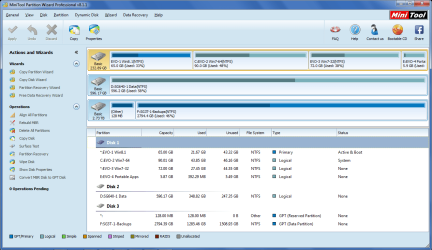
fwiw, here's a pic of my test box while running W7-64 and a Backup drive connected.
PWDisks.png
 

My Computer My Computer

At a glance

Multi-Boot W7_Pro_x64 W8.1_Pro_x64 W10_Pro_x6...AMD Athlon II x4 6206GB GSkill DDR2 800AMD 4670 GPU + AMD 4200 IGP
Computer type
PC/Desktop
Computer Manufacturer/Model Number
home built
OS
Multi-Boot W7_Pro_x64 W8.1_Pro_x64 W10_Pro_x64 +Linux_VMs +Chromium_VM
CPU
AMD Athlon II x4 620
Motherboard
Gigabyte GA-MA785G-UD3H
Memory
6GB GSkill DDR2 800
Graphics Card(s)
AMD 4670 GPU + AMD 4200 IGP
Sound Card
on board Realtek ALC889A
Monitor(s) Displays
RCA 40" LCD TV, Insignia 32" LCD TV, HP 15" LCD monitor
Screen Resolution
1680 x 1050
Hard Drives
OCZ Vertex 3 120GB,
Samsung F3 1TB (3),
Several others - WD, Seagate, Hitachi, ...
PSU
Corsair 500 W
Case
Rosewill mid tower
Cooling
CM 90mm rifle
Keyboard
Gyration wireless, Logitech wireless, Dell USB wired
Mouse
Gyration wireless, Logitech wireless, V7 USB wired
Internet Speed
Spectrum - 100Mbps D / 10Mbps U
Antivirus
Avast, MBAM3, EMET, WinPatrol
Browser
Pale Moon, Firefox, IE
Other Info
2 multi-boot PC's
Mainly HTPC/Office/Gen purpose (no gaming).
Trendnet USB KVM.
LG DVD burner/Blue Ray Player.
Tray system for removable SATA backup drives.

Not currently OCd, under-volted.
I use Hybrid sleep, rarely re-boot or shutdown.

Hauppauge HD-PVR, Avermedia PCIe TV Tuner, Hauppauge PCI TV Tuner.
You should not have un allocated space anywhere on a drive unless you personally set it up that way.

I have never seen PW create those spaces, nor windows, even on an aligned drive. And I use PW all the time.

I`ve only seen it on an XP install, and the un allocated was always to the far right of the drive.

If memory serves me correctly.

119baystate, where is your shot of Disk Management ? I don`t see it once.
 

My Computer My Computer

At a glance

Windows 10 Pro x64Intel Core i7 6700KGSkill TridentZ RGB 16GB 3600 16-16-16-36EVGA GTX 980 Ti SC x2
Computer type
PC/Desktop
Computer Manufacturer/Model Number
Skylake Special #666
OS
Windows 10 Pro x64
CPU
Intel Core i7 6700K
Motherboard
Asus Sabertooth Z170 Mark 1
Memory
GSkill TridentZ RGB 16GB 3600 16-16-16-36
Graphics Card(s)
EVGA GTX 980 Ti SC x2
Sound Card
Realtek High Definition
Monitor(s) Displays
AOC G2460PG
Screen Resolution
1920 x 1080 144Hz
Hard Drives
Samsung 860 Pro 256GB, Seagate Barracuda 4TB x2
PSU
EVGA 1000 P2, EVGA White Custom Braided Cables
Case
Corsair Vengeance C70 Gunmetal Black
Cooling
Corsair H100i v2, Corsair ML120 x2, Thermal Grizzly Kryonaut
Keyboard
Logitech G910 Orion Spectrum
Mouse
Logitech G700s
Internet Speed
Verizon Fios Quantum Gateway 75/75
Antivirus
Windows Defender, Malwarebytes Free 3.8.3
Browser
Chrome
Other Info
Corsair SP120 x4, LG Blu-ray Drive, Durabrand HT-395 100 Watt Dolby Digital Amp, Corsair H2100 Wireless 7.1 Headset
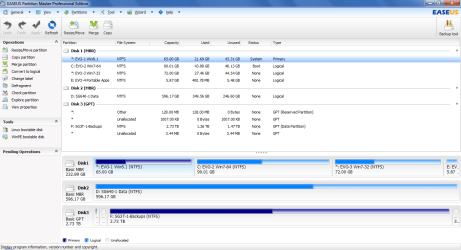
I just looked at EASEUS PM and it shows unallocated spaces for the GPT disk that Partition Wizard and Win DM don't show :p

EaseUSDisks.png

WinDMDisks.png
 

My Computer My Computer

At a glance

Multi-Boot W7_Pro_x64 W8.1_Pro_x64 W10_Pro_x6...AMD Athlon II x4 6206GB GSkill DDR2 800AMD 4670 GPU + AMD 4200 IGP
Computer type
PC/Desktop
Computer Manufacturer/Model Number
home built
OS
Multi-Boot W7_Pro_x64 W8.1_Pro_x64 W10_Pro_x64 +Linux_VMs +Chromium_VM
CPU
AMD Athlon II x4 620
Motherboard
Gigabyte GA-MA785G-UD3H
Memory
6GB GSkill DDR2 800
Graphics Card(s)
AMD 4670 GPU + AMD 4200 IGP
Sound Card
on board Realtek ALC889A
Monitor(s) Displays
RCA 40" LCD TV, Insignia 32" LCD TV, HP 15" LCD monitor
Screen Resolution
1680 x 1050
Hard Drives
OCZ Vertex 3 120GB,
Samsung F3 1TB (3),
Several others - WD, Seagate, Hitachi, ...
PSU
Corsair 500 W
Case
Rosewill mid tower
Cooling
CM 90mm rifle
Keyboard
Gyration wireless, Logitech wireless, Dell USB wired
Mouse
Gyration wireless, Logitech wireless, V7 USB wired
Internet Speed
Spectrum - 100Mbps D / 10Mbps U
Antivirus
Avast, MBAM3, EMET, WinPatrol
Browser
Pale Moon, Firefox, IE
Other Info
2 multi-boot PC's
Mainly HTPC/Office/Gen purpose (no gaming).
Trendnet USB KVM.
LG DVD burner/Blue Ray Player.
Tray system for removable SATA backup drives.

Not currently OCd, under-volted.
I use Hybrid sleep, rarely re-boot or shutdown.

Hauppauge HD-PVR, Avermedia PCIe TV Tuner, Hauppauge PCI TV Tuner.
Right, that`s a GPT disk shown using EaseUS, let`s see his shot of DM.

Let`s stick with DM from windows and PW.

I would initialize that GPT disk to MBR then partition to take full advantage of it.
 

My Computer My Computer

At a glance

Windows 10 Pro x64Intel Core i7 6700KGSkill TridentZ RGB 16GB 3600 16-16-16-36EVGA GTX 980 Ti SC x2
Computer type
PC/Desktop
Computer Manufacturer/Model Number
Skylake Special #666
OS
Windows 10 Pro x64
CPU
Intel Core i7 6700K
Motherboard
Asus Sabertooth Z170 Mark 1
Memory
GSkill TridentZ RGB 16GB 3600 16-16-16-36
Graphics Card(s)
EVGA GTX 980 Ti SC x2
Sound Card
Realtek High Definition
Monitor(s) Displays
AOC G2460PG
Screen Resolution
1920 x 1080 144Hz
Hard Drives
Samsung 860 Pro 256GB, Seagate Barracuda 4TB x2
PSU
EVGA 1000 P2, EVGA White Custom Braided Cables
Case
Corsair Vengeance C70 Gunmetal Black
Cooling
Corsair H100i v2, Corsair ML120 x2, Thermal Grizzly Kryonaut
Keyboard
Logitech G910 Orion Spectrum
Mouse
Logitech G700s
Internet Speed
Verizon Fios Quantum Gateway 75/75
Antivirus
Windows Defender, Malwarebytes Free 3.8.3
Browser
Chrome
Other Info
Corsair SP120 x4, LG Blu-ray Drive, Durabrand HT-395 100 Watt Dolby Digital Amp, Corsair H2100 Wireless 7.1 Headset
Well I gave a shot with AOMEI Partition Asst 5.6.3 & repeated the test I discussed in post #25 & the result was a 7.84 Mb unallocated space at the END of the disk with a SINGLE primary partition. AGAIN, no system is installed. I am booting from the MACRIUM rescue disk.

So should I surmize that these leftovers are completely dependent on the partition manager & have nothing to do with the OS? If that is the case then how do I instruct the partition manager to partition my drive so that these spaces do not occur. It apparently can be done given David E's posting.

After using AOMEI I then used PW to expand into the 7.84 Mb space & whatta ya no? I got a single partition without any unallocated spaces. The odd thing is the single partition is 438416Mb. That 1.78Mb residual space is missing. I will split the partition & see if it returns.
 

My Computer My Computer

At a glance

WIN 7 32 bit
Computer type
PC/Desktop
Computer Manufacturer/Model Number
DELL
OS
WIN 7 32 bit
I tell ya PW is the best.

EaseUS is also good and shows a nice layout.

Are you ever going to post the shots I requested ?

At least post the shot of DM
 
Last edited:

My Computer My Computer

At a glance

Windows 10 Pro x64Intel Core i7 6700KGSkill TridentZ RGB 16GB 3600 16-16-16-36EVGA GTX 980 Ti SC x2
Computer type
PC/Desktop
Computer Manufacturer/Model Number
Skylake Special #666
OS
Windows 10 Pro x64
CPU
Intel Core i7 6700K
Motherboard
Asus Sabertooth Z170 Mark 1
Memory
GSkill TridentZ RGB 16GB 3600 16-16-16-36
Graphics Card(s)
EVGA GTX 980 Ti SC x2
Sound Card
Realtek High Definition
Monitor(s) Displays
AOC G2460PG
Screen Resolution
1920 x 1080 144Hz
Hard Drives
Samsung 860 Pro 256GB, Seagate Barracuda 4TB x2
PSU
EVGA 1000 P2, EVGA White Custom Braided Cables
Case
Corsair Vengeance C70 Gunmetal Black
Cooling
Corsair H100i v2, Corsair ML120 x2, Thermal Grizzly Kryonaut
Keyboard
Logitech G910 Orion Spectrum
Mouse
Logitech G700s
Internet Speed
Verizon Fios Quantum Gateway 75/75
Antivirus
Windows Defender, Malwarebytes Free 3.8.3
Browser
Chrome
Other Info
Corsair SP120 x4, LG Blu-ray Drive, Durabrand HT-395 100 Watt Dolby Digital Amp, Corsair H2100 Wireless 7.1 Headset
You should not have un allocated space anywhere on a drive unless you personally set it up that way.

I have never seen PW create those spaces, nor windows, even on an aligned drive. And I use PW all the time.

I`ve only seen it on an XP install, and the un allocated was always to the far right of the drive.

If memory serves me correctly.

119baystate, where is your shot of Disk Management ? I don`t see it once.

The WINDOWS Disk MGR will not show these unallocated spaces. Besides, I have to boot into WINDOWS to run it. The screen shot of PW is posting #16 at:
Partition question : Unallocated Space Before
 

My Computer My Computer

At a glance

WIN 7 32 bit
Computer type
PC/Desktop
Computer Manufacturer/Model Number
DELL
OS
WIN 7 32 bit
I tell ya PW is the best.

EaseUS is also good and shows a nice layout.

Are you ever going to post the shots I requested ?

At least post the shot of DM

See the shot I mention above.
 

My Computer My Computer

At a glance

WIN 7 32 bit
Computer type
PC/Desktop
Computer Manufacturer/Model Number
DELL
OS
WIN 7 32 bit
That is an old shot, let`s get one when windows is installed, I assume you still have to do that, correct ?
 

My Computer My Computer

At a glance

Windows 10 Pro x64Intel Core i7 6700KGSkill TridentZ RGB 16GB 3600 16-16-16-36EVGA GTX 980 Ti SC x2
Computer type
PC/Desktop
Computer Manufacturer/Model Number
Skylake Special #666
OS
Windows 10 Pro x64
CPU
Intel Core i7 6700K
Motherboard
Asus Sabertooth Z170 Mark 1
Memory
GSkill TridentZ RGB 16GB 3600 16-16-16-36
Graphics Card(s)
EVGA GTX 980 Ti SC x2
Sound Card
Realtek High Definition
Monitor(s) Displays
AOC G2460PG
Screen Resolution
1920 x 1080 144Hz
Hard Drives
Samsung 860 Pro 256GB, Seagate Barracuda 4TB x2
PSU
EVGA 1000 P2, EVGA White Custom Braided Cables
Case
Corsair Vengeance C70 Gunmetal Black
Cooling
Corsair H100i v2, Corsair ML120 x2, Thermal Grizzly Kryonaut
Keyboard
Logitech G910 Orion Spectrum
Mouse
Logitech G700s
Internet Speed
Verizon Fios Quantum Gateway 75/75
Antivirus
Windows Defender, Malwarebytes Free 3.8.3
Browser
Chrome
Other Info
Corsair SP120 x4, LG Blu-ray Drive, Durabrand HT-395 100 Watt Dolby Digital Amp, Corsair H2100 Wireless 7.1 Headset

My Computer My Computer

At a glance

Windows 10 Pro. 64/ version 1709 Windows 7 Pr...Intel i7-6800K @ 4.3Corsair Platinum 16 gig @2400EVGA GTX 1070 OC
Computer type
PC/Desktop
Computer Manufacturer/Model Number
Home made Desktop
OS
Windows 10 Pro. 64/ version 1709 Windows 7 Pro/64
CPU
Intel i7-6800K @ 4.3
Motherboard
ASUS X-99 Deluxe II
Memory
Corsair Platinum 16 gig @2400
Graphics Card(s)
EVGA GTX 1070 OC
Monitor(s) Displays
Asus 27" LED LCD/VE278Q
Screen Resolution
1920-1080 or 1280-720 HDMI
Hard Drives
INTEL SSD 730-240 Gb Sata 3.0/
PSU
EVGA Platium 1200W
Case
Phanteks Luxe Tempered Glass 8 fans/ one radiator
Cooling
XSPC/ Water Cooled CPU
Keyboard
Das 4 Professional
Mouse
Logitech M705/MX Anywhere 2-S
Internet Speed
100 mbits
Antivirus
Microsoft Security Essentials/ Malwarebytes Premium 3.0/ SAS
Browser
I.E. 11 default/Firefox/ ISP Time Warner Cable/Spectrum
Other Info
LG BluRay Burner/
Sound system-KLipsch-THX/
Icy Dock ssd Hot Swap bays.
Back
Top