Latest Version of Malwarebytes

Has Mbam released a stable version thats newer than 2.04.1028 or is it still a beta ?

Thank you

2.1.4.1018 is now the official latest version (not a beta or Release Candidate).
See post #1 of this thread for details.
 

My Computer My Computer

Computer type
PC/Desktop
Computer Manufacturer/Model Number
home built
OS
Multi-Boot W7_Pro_x64 W8.1_Pro_x64 W10_Pro_x64 +Linux_VMs +Chromium_VM
CPU
AMD Athlon II x4 620
Motherboard
Gigabyte GA-MA785G-UD3H
Memory
6GB GSkill DDR2 800
Graphics Card(s)
AMD 4670 GPU + AMD 4200 IGP
Sound Card
on board Realtek ALC889A
Monitor(s) Displays
RCA 40" LCD TV, Insignia 32" LCD TV, HP 15" LCD monitor
Screen Resolution
1680 x 1050
Hard Drives
OCZ Vertex 3 120GB,
Samsung F3 1TB (3),
Several others - WD, Seagate, Hitachi, ...
PSU
Corsair 500 W
Case
Rosewill mid tower
Cooling
CM 90mm rifle
Keyboard
Gyration wireless, Logitech wireless, Dell USB wired
Mouse
Gyration wireless, Logitech wireless, V7 USB wired
Internet Speed
Spectrum - 100Mbps D / 10Mbps U
Antivirus
Avast, MBAM3, EMET, WinPatrol
Browser
Pale Moon, Firefox, IE
Other Info
2 multi-boot PC's
Mainly HTPC/Office/Gen purpose (no gaming).
Trendnet USB KVM.
LG DVD burner/Blue Ray Player.
Tray system for removable SATA backup drives.

Not currently OCd, under-volted.
I use Hybrid sleep, rarely re-boot or shutdown.

Hauppauge HD-PVR, Avermedia PCIe TV Tuner, Hauppauge PCI TV Tuner.
Has Mbam released a stable version thats newer than 2.04.1028 or is it still a beta ?

Thank you

2.1.4.1018 is the current, GA, release build, as explained here

As explained in that sticky topic, it is not YET available through the internal auto-updater.
That process is scheduled to begin this week and is likely to be throttled.
As of this moment, as likewise explained in that sticky, the new build is available only as a standalone installer from the Malwarebytes web site.

>>If you are already running 2.1.4.1018 RC3, then there is no need to update. It is the same build.

Thank you,
 

My Computer My Computer

Computer type
PC/Desktop
Computer Manufacturer/Model Number
Dell Studio XPS 8500
OS
OEM Windows 7 Ult (x64) SP1
CPU
Intel Core-i7 3770 @ 3.4 GHz
Motherboard
"Dell" branded
Memory
16 GB DDR3 SDRAM @ 1333 MHz
Graphics Card(s)
NVidia GeForce GT620 1 GB
Sound Card
THX TruStudio PC
Monitor(s) Displays
Dell U2410 Full HD
Hard Drives
2.0 TB SATA2 @ 7200 RPM
PSU
350W
Keyboard
MS 4000 Ergon - Wired
Mouse
Logitech Anywhere MX
Internet Speed
Cable HSI w/Turbo (router)
Antivirus
KIS-MBAM Premium-MBAE Premium
Browser
Fx (current version); IE
Other Info
And a Win7/64 Pro laptop; And a Win10/64 Pro desktop.
See my responses as bolded

David:

I note that those pix from Macrium say "detected as a function of real-time protection". I wonder if that necessarily includes downloaded definition updates.

I don't know what this means. Are you asking if a new definition update could be detected as malware ?
As I understand it a new definition update can immediately detect malware that was not detected previously.
Isn't that what happened in 2013 when the bad update treated OS system files as malware (incorrectly) ?

Maybe the ideal config would be to auto-quarantine the "malware detected" classification and not quarantine the "non-malware detected", but that's not available in the controls.

Look in MBAM GUI > Settings > Detection and Protection
In Non-Malware Protection there are drop-down lists for PUP and PUM detections, with 3 choices.
Maybe you want to try the Warn user about detections choice ?
I have always used the treat detections as malware choice.

A 40 second window is so short as to be useless. No one can research anything in that time. It may as well be 5 seconds, to better avoid what might happen in that 35 second differential.

I agree, and this has been discussed a lot on the MBAM forum.
 

My Computer My Computer

Computer type
PC/Desktop
Computer Manufacturer/Model Number
home built
OS
Multi-Boot W7_Pro_x64 W8.1_Pro_x64 W10_Pro_x64 +Linux_VMs +Chromium_VM
CPU
AMD Athlon II x4 620
Motherboard
Gigabyte GA-MA785G-UD3H
Memory
6GB GSkill DDR2 800
Graphics Card(s)
AMD 4670 GPU + AMD 4200 IGP
Sound Card
on board Realtek ALC889A
Monitor(s) Displays
RCA 40" LCD TV, Insignia 32" LCD TV, HP 15" LCD monitor
Screen Resolution
1680 x 1050
Hard Drives
OCZ Vertex 3 120GB,
Samsung F3 1TB (3),
Several others - WD, Seagate, Hitachi, ...
PSU
Corsair 500 W
Case
Rosewill mid tower
Cooling
CM 90mm rifle
Keyboard
Gyration wireless, Logitech wireless, Dell USB wired
Mouse
Gyration wireless, Logitech wireless, V7 USB wired
Internet Speed
Spectrum - 100Mbps D / 10Mbps U
Antivirus
Avast, MBAM3, EMET, WinPatrol
Browser
Pale Moon, Firefox, IE
Other Info
2 multi-boot PC's
Mainly HTPC/Office/Gen purpose (no gaming).
Trendnet USB KVM.
LG DVD burner/Blue Ray Player.
Tray system for removable SATA backup drives.

Not currently OCd, under-volted.
I use Hybrid sleep, rarely re-boot or shutdown.

Hauppauge HD-PVR, Avermedia PCIe TV Tuner, Hauppauge PCI TV Tuner.
I don't know how to clean mbam better than a total clean install of win-7 on both machines and issue default of realtime 5 minutes remain ;)
 

My Computer My Computer

Computer type
PC/Desktop
Computer Manufacturer/Model Number
Custom assembled by me :}
OS
Win-7-Pro64bit 7-H-Prem-64bit
CPU
i7-5930K 2nd i9-9940x both water blocked VRM's too
Motherboard
ASUS SABERTOOTH X99 2nd ASUS x299 Apex
Memory
Trident-z 3200C14 2nd Trident-z 3600C16
Graphics Card(s)
EVGA 1080ti ftw3 2nd Titan Xp both water blocked
Sound Card
Built-in Realtek
Monitor(s) Displays
1-AOC G2460PG 24"G-Sync 144Hz/ 2nd 1-ASUS VG248QE 24" 144Hz
Screen Resolution
1920 x 1080 144Hz
Hard Drives
2-Samsung M.2 Evo & Evo Plus
2-Samsung 850 EVO 500GB SSD's/ 3-2.5 W.D. Black 1tb-&3-1tb/3-3.5 WD Black 1tb hdd's
PSU
EVGA SuperNOVA 1000-P2 2nd 1200-P2
Case
2-Corsair Obsidian Series 450D Black ATX Mid Tower
Cooling
Custom water loops
Keyboard
Logitech G710+/ 2nd Logitech G910
Mouse
2-RedDragon M901 Perdition 16400 dpi Gaming mouse = wired
Internet Speed
Comcast Ping 19ms 89.31mbps download speed 6.12mbps upload
Antivirus
Malwarebytes Pro/ Superantispyware Pro
Browser
FireFox & Pale moon
Other Info
2nd ASUS X299 Apex/Intel i9-9940x with Custom water loop/7H-Prem-x64/Corsair 450D case/Ram Trident-z 3600C16 4x8gb / Samsung970Evo plus 500gb SSD/Dual ssd EZ swap evo/PSU EVGA SuperNova 1200w-P2 80+Platinum/GPU Titan Xp /8-ML-140 on push-pull on 2-280GTX rads
see response in blue:

I don't know what this means. Are you asking if a new definition update could be detected as malware ?
As I understand it a new definition update can immediately detect malware that was not detected previously.
Isn't that what happened in 2013 when the bad update treated OS system files as malware (incorrectly) ?


I was referring to the text shown in the pix you posted in post 836. Yes, I assume it means that a mere definition update can trigger "real time protection" immediately and that that is what happened in 2013. It just doesn't say so explicitly.


Look in MBAM GUI > Settings > Detection and Protection
In Non-Malware Protection there are drop-down lists for PUP and PUM detections, with 3 choices.
Maybe you want to try the Warn user about detections choice ?
I have always used the treat detections as malware choice.


I'm aware of those settings and have chosen warn for PUP and to treat PUM as malware. I do note that the "non-malware detected" warning in your post 836 apparently applies to both PUP and PUM, per the text shown.

I'm just trying to arrive at best practices, taking into account the possibility of disastrous malware versus the possibility of an unfortunate but not disastrous false positive. Not disastrous in the sense that I can presumably recover via an image. Barring new info, I'd rather be bricked and recover via image than be seriously infected.
 

My Computer My Computer

Computer type
PC/Desktop
Computer Manufacturer/Model Number
Ignatz Special; 4 speed manual gearbox; factory air conditioning; one of one
OS
Windows 7 Home Premium SP1, 64-bit
CPU
Intel Skylake i5-6600K, not overclocked
Motherboard
AsRock Z170M Extreme 4, micro ATX
Memory
8 GB HyperX DDR4-2666 (2 x 4 GB)
Graphics Card(s)
none; graphics are integrated on CPU
Sound Card
onboard: Realtek ALC1150; external: USB Behringer UF0-202
Monitor(s) Displays
Dell S2340M 23 inch IPS
Screen Resolution
1600 x 900
Hard Drives
System: Crucial MX100 series SSD, 128 GB;
Data: Samsung Spinpoint 103SJ, 1 TB;
Backup: WD Caviar Green WD30EZRX-00D8PB0, 3 TB
PSU
Rosewill SilentNight 500 watt fanless, semi-modular
Case
Antec Solo II
Cooling
Noctua NH-U12S; Noctua F12 intake, Noctua S12A exhaust
Keyboard
Microsoft 200 6JH-00001 USB
Mouse
Dell or Microsoft optical wired; USB
Antivirus
Microsoft Security Essentials and Malwarebytes Premium
Browser
Pale Moon
Other Info
All fans PWM; speeds at idle: CPU circa 500 rpm; intake circa 600 rpm; exhaust circa 600 rpm; CPU temps 27 idle and 47 C load in a warm room (27 C/81 F) when running Intel Extreme Tuning Utility stress test.
I'm aware of those settings and have chosen warn for PUP and to treat PUM as malware. I do note that the "non-malware detected" warning in your post 836 apparently applies to both PUP and PUM, per the text shown.

I'm just trying to arrive at best practices, taking into account the possibility of disastrous malware versus the possibility of an unfortunate but not disastrous false positive. Not disastrous in the sense that I can presumably recover via an image. Barring new info, I'd rather be bricked and recover via image than be seriously infected.
Hopefully if you have selected different choices for PUP and PUM, MBAM will handle PUP and PUM differently, as you chose.
I think the documentation just shows what can happen...and is not as detailed for all possibilities you are asking about ?

I totally agree on using a backup image for recovery, that's what i do, and that's how i recovered in 2013.
Unfortunately not everyone creates backups, and then learn a lesson when any disaster happens.

I too would like to know what is a best practice, and best settings.

A long time ago i tried to find "benign test malware files" so i could test them to see what would happen and make my choices accordingly.
I never found files to test all scenarios, so i make my best guess, and will change settings if anything ever happens and i learn i could handle it better.
 

My Computer My Computer

Computer type
PC/Desktop
Computer Manufacturer/Model Number
home built
OS
Multi-Boot W7_Pro_x64 W8.1_Pro_x64 W10_Pro_x64 +Linux_VMs +Chromium_VM
CPU
AMD Athlon II x4 620
Motherboard
Gigabyte GA-MA785G-UD3H
Memory
6GB GSkill DDR2 800
Graphics Card(s)
AMD 4670 GPU + AMD 4200 IGP
Sound Card
on board Realtek ALC889A
Monitor(s) Displays
RCA 40" LCD TV, Insignia 32" LCD TV, HP 15" LCD monitor
Screen Resolution
1680 x 1050
Hard Drives
OCZ Vertex 3 120GB,
Samsung F3 1TB (3),
Several others - WD, Seagate, Hitachi, ...
PSU
Corsair 500 W
Case
Rosewill mid tower
Cooling
CM 90mm rifle
Keyboard
Gyration wireless, Logitech wireless, Dell USB wired
Mouse
Gyration wireless, Logitech wireless, V7 USB wired
Internet Speed
Spectrum - 100Mbps D / 10Mbps U
Antivirus
Avast, MBAM3, EMET, WinPatrol
Browser
Pale Moon, Firefox, IE
Other Info
2 multi-boot PC's
Mainly HTPC/Office/Gen purpose (no gaming).
Trendnet USB KVM.
LG DVD burner/Blue Ray Player.
Tray system for removable SATA backup drives.

Not currently OCd, under-volted.
I use Hybrid sleep, rarely re-boot or shutdown.

Hauppauge HD-PVR, Avermedia PCIe TV Tuner, Hauppauge PCI TV Tuner.
Thanks for the responses gentleman .
 

My Computer My Computer

Computer type
Laptop
Computer Manufacturer/Model Number
Asus laptop U56E
OS
Microsoft Windows 7 Home Premium 64-bit 7601 Multiprocessor Free Service Pack 1
CPU
Intel(R) Core(TM) i5-2430M CPU @ 2.40GHz
Motherboard
ASUSTeK Computer Inc. U56E
Memory
6.00 GB
Graphics Card(s)
Intel(R) HD Graphics 3000
Sound Card
(1) High Definition Audio Device (2) High Definition Audio
Screen Resolution
1366 x 768 x 32 bits (4294967296 colors) @ 60 Hz
Hard Drives
WDC WD6400BPVT-80HXZT3
I totally agree on using a backup image for recovery, that's what i do, and that's how i recovered in 2013.
Unfortunately not everyone creates backups, and then learn a lesson when any disaster happens.

While creating backup images is clearly desirable, it is not a practical option for everyone - especially for those of us with very little knowledge of computers and just running one or perhaps two computers for casual home use. The various strategies and guides on this forum are excellent, but very complex for those of us with little or no knowledge of such things. I must try and get some sort of grasp on it, however, as while malware may be the number one threat to the stability of our computers, these days the monthly Windows Updates come a close second!
 

My Computer My Computer

Computer type
PC/Desktop
Computer Manufacturer/Model Number
Custom build by PC Specialist
OS
Windows 7 Home Premium 64
CPU
AMD Phenom II X4 955
Motherboard
Asus M4A78T-E
Memory
8GB Corsair XMS3 DDR3
Graphics Card(s)
Gigabyte Geforce GTX 960 2GB
Sound Card
SB Audigy
Monitor(s) Displays
BenQ 24"
Screen Resolution
1920 x 1080
Hard Drives
500GB Serial ATA
PSU
1010W Quiet Quad Rail
Case
Antec 900
Cooling
Fenrir
Keyboard
Corsair
Mouse
Logitech
Internet Speed
20mbps
Antivirus
MSE plus MBAM 2.x Free
Browser
Chrome
Other Info
Second desktop different spec but similar level.
I totally agree on using a backup image for recovery, that's what i do, and that's how i recovered in 2013.
Unfortunately not everyone creates backups, and then learn a lesson when any disaster happens.

While creating backup images is clearly desirable, it is not a practical option for everyone - especially for those of us with very little knowledge of computers and just running one or perhaps two computers for casual home use. The various strategies and guides on this forum are excellent, but very complex for those of us with little or no knowledge of such things. I must try and get some sort of grasp on it, however, as while malware may be the number one threat to the stability of our computers, these days the monthly Windows Updates come a close second!


Thats exactly what i have found also. Most are written by people with an amazing wealth of knowledge and even the most basic and simple things to them can be a real nightmare and total confusion for many others.

They are not as simple as some may think but they are very valuable for sure and much appreciated. Of course some authors make it considerably less confusing than others as well .


I should note that when i first got a computer and read a lot of the tutorials i was completely at a loss , it was just so hard to get through any of them for me .

Nowadays i know considerably more and it has become easier but there are more than a few that are still quite difficult.

On the other hand , without them i would just heave my computer through a window there's no question about that , imo no other site can match Seven forums tutorials , so please keep them and by all means add more if you wish .
 

My Computer My Computer

Computer type
Laptop
Computer Manufacturer/Model Number
Asus laptop U56E
OS
Microsoft Windows 7 Home Premium 64-bit 7601 Multiprocessor Free Service Pack 1
CPU
Intel(R) Core(TM) i5-2430M CPU @ 2.40GHz
Motherboard
ASUSTeK Computer Inc. U56E
Memory
6.00 GB
Graphics Card(s)
Intel(R) HD Graphics 3000
Sound Card
(1) High Definition Audio Device (2) High Definition Audio
Screen Resolution
1366 x 768 x 32 bits (4294967296 colors) @ 60 Hz
Hard Drives
WDC WD6400BPVT-80HXZT3
Seffrid and jonnyhillow.

Many members of this forum are limited to some degree of computer knowledge. That includes me. No one knows it all but some are closer than others. That is why we help each other to learn.

One of the reasons I spend time on this forum is to learn and gather more knowledge.
Using the Forums Tutorial is a great way to gather more knowledge.
Their is a mass of information about Back Ups in those tutorial and many members that will assist if need be.

Myself I'm here to help others and learn from others.

I do understand that at times it looks difficult to do something but on the most part with proper guidance it goes quite smoothly.

One just has to want to learn and follow instructions.
I'm also just a plain old home user with no degrees of any kind in computing that surly needs help from others to learn. Yes I have and do accept other members knowledge. It's offered freely to anybody who wants to have it.

Here is the main page for different backup methods. Take a gander through them when you get time and request help by starting a thread.

http://www.sevenforums.com/tutsearch.php?q=backups


I'm not a expert in backups but I know where I can find some.
Right here on the Seven Forum.
To be honest I'm not a expert in anything computing.
 

My Computer My Computer

Computer type
PC/Desktop
Computer Manufacturer/Model Number
Home made Desktop
OS
Windows 10 Pro. 64/ version 1709 Windows 7 Pro/64
CPU
Intel i7-6800K @ 4.3
Motherboard
ASUS X-99 Deluxe II
Memory
Corsair Platinum 16 gig @2400
Graphics Card(s)
EVGA GTX 1070 OC
Monitor(s) Displays
Asus 27" LED LCD/VE278Q
Screen Resolution
1920-1080 or 1280-720 HDMI
Hard Drives
INTEL SSD 730-240 Gb Sata 3.0/
PSU
EVGA Platium 1200W
Case
Phanteks Luxe Tempered Glass 8 fans/ one radiator
Cooling
XSPC/ Water Cooled CPU
Keyboard
Das 4 Professional
Mouse
Logitech M705/MX Anywhere 2-S
Internet Speed
100 mbits
Antivirus
Microsoft Security Essentials/ Malwarebytes Premium 3.0/ SAS
Browser
I.E. 11 default/Firefox/ ISP Time Warner Cable/Spectrum
Other Info
LG BluRay Burner/
Sound system-KLipsch-THX/
Icy Dock ssd Hot Swap bays.
Well I used mbam clean and redownloaded which the version is now 2.1.4.1018 and activated
The default installs update is 1 hour so that seems to be fixed although I deleted that task and made a new
The new update task did default to real time and 5 minutes to check for updates :p
But not a big deal I switched to daily and reoccur 1 hour which was preselected.

So far a bug that has always been annoying if you minimize mbam during a scan the scanner wasn't showing in the taskbar and disappeared in the action center,
The new version now stays listed in the taskbar :party:

During a scan the adds on the bottom do not show on the dashboard screen but do show on the scanning screen so I suppose that's good enough.
But either way at least minimizing mbam during a scan you don't have to go into action center to reopen it.

As far as looks go :/ I don't really care that much one way or another I'll be happy without the old bugs if it updates daily with only one task it will be a vast improvement,
Also if it shows the successful update announcement which it has never done since 2.0... was released I'll be happy :)
 

My Computer My Computer

Computer type
PC/Desktop
Computer Manufacturer/Model Number
Custom assembled by me :}
OS
Win-7-Pro64bit 7-H-Prem-64bit
CPU
i7-5930K 2nd i9-9940x both water blocked VRM's too
Motherboard
ASUS SABERTOOTH X99 2nd ASUS x299 Apex
Memory
Trident-z 3200C14 2nd Trident-z 3600C16
Graphics Card(s)
EVGA 1080ti ftw3 2nd Titan Xp both water blocked
Sound Card
Built-in Realtek
Monitor(s) Displays
1-AOC G2460PG 24"G-Sync 144Hz/ 2nd 1-ASUS VG248QE 24" 144Hz
Screen Resolution
1920 x 1080 144Hz
Hard Drives
2-Samsung M.2 Evo & Evo Plus
2-Samsung 850 EVO 500GB SSD's/ 3-2.5 W.D. Black 1tb-&3-1tb/3-3.5 WD Black 1tb hdd's
PSU
EVGA SuperNOVA 1000-P2 2nd 1200-P2
Case
2-Corsair Obsidian Series 450D Black ATX Mid Tower
Cooling
Custom water loops
Keyboard
Logitech G710+/ 2nd Logitech G910
Mouse
2-RedDragon M901 Perdition 16400 dpi Gaming mouse = wired
Internet Speed
Comcast Ping 19ms 89.31mbps download speed 6.12mbps upload
Antivirus
Malwarebytes Pro/ Superantispyware Pro
Browser
FireFox & Pale moon
Other Info
2nd ASUS X299 Apex/Intel i9-9940x with Custom water loop/7H-Prem-x64/Corsair 450D case/Ram Trident-z 3600C16 4x8gb / Samsung970Evo plus 500gb SSD/Dual ssd EZ swap evo/PSU EVGA SuperNova 1200w-P2 80+Platinum/GPU Titan Xp /8-ML-140 on push-pull on 2-280GTX rads
Seffrid and jonnyhillow.

Many members of this forum are limited to some degree of computer knowledge. That includes me. No one knows it all but some are closer than others. That is why we help each other to learn.

One of the reasons I spend time on this forum is to learn and gather more knowledge.
Using the Forums Tutorial is a great way to gather more knowledge.
Their is a mass of information about Back Ups in those tutorial and many members that will assist if need be.

Myself I'm here to help others and learn from others.

I do understand that at times it looks difficult to do something but on the most part with proper guidance it goes quite smoothly.

One just has to want to learn and follow instructions.
I'm also just a plain old home user with no degrees of any kind in computing that surly needs help from others to learn. Yes I have and do accept other members knowledge. It's offered freely to anybody who wants to have it.

Here is the main page for different backup methods. Take a gander through them when you get time and request help by starting a thread.

http://www.sevenforums.com/tutsearch.php?q=backups


I'm not a expert in backups but I know where I can find some.
Right here on the Seven Forum.
To be honest I'm not a expert in anything computing.


You mean all those times that i was requesting somebody to help me because i was dealing with a traumatic computer related event i was dealing with somebody who also didn't have a clue ? Thats just great really great lol.:doh::banghead::banghead:
 

My Computer My Computer

Computer type
Laptop
Computer Manufacturer/Model Number
Asus laptop U56E
OS
Microsoft Windows 7 Home Premium 64-bit 7601 Multiprocessor Free Service Pack 1
CPU
Intel(R) Core(TM) i5-2430M CPU @ 2.40GHz
Motherboard
ASUSTeK Computer Inc. U56E
Memory
6.00 GB
Graphics Card(s)
Intel(R) HD Graphics 3000
Sound Card
(1) High Definition Audio Device (2) High Definition Audio
Screen Resolution
1366 x 768 x 32 bits (4294967296 colors) @ 60 Hz
Hard Drives
WDC WD6400BPVT-80HXZT3
Well I used mbam clean and redownloaded which the version is now 2.1.4.1018 and activated
The default installs update is 1 hour
Yes, and it will be randomized to +/- 15 minutes, to balance server load. If the setting is enabled in the scheduler to check for updates before scanning, then the scheduled scans will also run at times randomized to +/- 15 minutes. If one wants a scheduled scan to run at the exact scheduled time, then one needs to disable that setting.
So far a bug that has always been annoying if you minimize mbam during a scan the scanner wasn't showing in the taskbar and disappeared in the action center,
The new version now stays listed in the taskbar :party:
That was not a bug. In version 2.0, the program minimized to the system tray by design. In version 2.1, the behavior has been changed to minimize to the task bar.
During a scan the adds on the bottom do not show on the dashboard screen but do show on the scanning screen so I suppose that's good enough.
Yes, the ads have been de-emphasized and are only present in the scanning window in this build.
But either way at least minimizing mbam during a scan you don't have to go into action center to reopen it.
Scheduled, clean scans will run silently from the system account, by design. Their logs will be found in the dashboard > history > application logs. Even with version 2.0, double-clicking the system tray icon would open the GUI.
As far as looks go :/ I don't really care that much one way or another I'll be happy without the old bugs if it updates daily with only one task it will be a vast improvement,
There will never be just one daily database update. To stay abreast of zero-hour and zero-day threats, the database will always be updated several times a day. If the user wishes to change scheduled update checks from the default, hourly setting to only once a day, that is certainly the user's choice. Doing so, however, will reduce real-time protection.
Also if it shows the successful update announcement which it has never done since 2.0... was released I'll be happy :)
Yes, that behavior was fixed in the current build. Thank you,
 

My Computer My Computer

Computer type
PC/Desktop
Computer Manufacturer/Model Number
Dell Studio XPS 8500
OS
OEM Windows 7 Ult (x64) SP1
CPU
Intel Core-i7 3770 @ 3.4 GHz
Motherboard
"Dell" branded
Memory
16 GB DDR3 SDRAM @ 1333 MHz
Graphics Card(s)
NVidia GeForce GT620 1 GB
Sound Card
THX TruStudio PC
Monitor(s) Displays
Dell U2410 Full HD
Hard Drives
2.0 TB SATA2 @ 7200 RPM
PSU
350W
Keyboard
MS 4000 Ergon - Wired
Mouse
Logitech Anywhere MX
Internet Speed
Cable HSI w/Turbo (router)
Antivirus
KIS-MBAM Premium-MBAE Premium
Browser
Fx (current version); IE
Other Info
And a Win7/64 Pro laptop; And a Win10/64 Pro desktop.
Johnny I never said, posted or indicated in any fashion such thoughts.
From you post # 852

You mean all those times that i was requesting somebody to help me because i was dealing with a traumatic computer related event i was dealing with somebody who also didn't have a clue ? Thats just great really great lol.
doh.gif
banghead.gif
banghead.gif

Some members know more than others in areas of computing. That is not knocking any member. Some members know a lot in several fields. That is just the way it is on a forum or in the world.
I'm very sorry that is all you got out of my post #850.

We have over a quarter of a million members and like me they are all not experts nor do they have to be.

Most members are probably like me.
Read threads and help when they can or read threads so they can learn. It seem to be a very good method of helping and learning for millions.
It' that simple.
 

My Computer My Computer

Computer type
PC/Desktop
Computer Manufacturer/Model Number
Home made Desktop
OS
Windows 10 Pro. 64/ version 1709 Windows 7 Pro/64
CPU
Intel i7-6800K @ 4.3
Motherboard
ASUS X-99 Deluxe II
Memory
Corsair Platinum 16 gig @2400
Graphics Card(s)
EVGA GTX 1070 OC
Monitor(s) Displays
Asus 27" LED LCD/VE278Q
Screen Resolution
1920-1080 or 1280-720 HDMI
Hard Drives
INTEL SSD 730-240 Gb Sata 3.0/
PSU
EVGA Platium 1200W
Case
Phanteks Luxe Tempered Glass 8 fans/ one radiator
Cooling
XSPC/ Water Cooled CPU
Keyboard
Das 4 Professional
Mouse
Logitech M705/MX Anywhere 2-S
Internet Speed
100 mbits
Antivirus
Microsoft Security Essentials/ Malwarebytes Premium 3.0/ SAS
Browser
I.E. 11 default/Firefox/ ISP Time Warner Cable/Spectrum
Other Info
LG BluRay Burner/
Sound system-KLipsch-THX/
Icy Dock ssd Hot Swap bays.
Layback Bear , let me ask you something my friend , did you really think that my post was serious ? I mean c, mon lol, what i wrote in my post is what i call a "JOKE" , nothing more lol.


You have always been an expert to me .
 

My Computer My Computer

Computer type
Laptop
Computer Manufacturer/Model Number
Asus laptop U56E
OS
Microsoft Windows 7 Home Premium 64-bit 7601 Multiprocessor Free Service Pack 1
CPU
Intel(R) Core(TM) i5-2430M CPU @ 2.40GHz
Motherboard
ASUSTeK Computer Inc. U56E
Memory
6.00 GB
Graphics Card(s)
Intel(R) HD Graphics 3000
Sound Card
(1) High Definition Audio Device (2) High Definition Audio
Screen Resolution
1366 x 768 x 32 bits (4294967296 colors) @ 60 Hz
Hard Drives
WDC WD6400BPVT-80HXZT3
Well I'm just one of the members that has learned a lot being on this forum. I'm not a expert in my mind because I have to much to learn.

Sorry I didn't take it as a joke. I must need more coffee.
The last 4 or 5 days I think my brain has been on vacation without my permission.
I did run out of Jack Daniels about a week ago. Maybe that is the problem.
 

My Computer My Computer

Computer type
PC/Desktop
Computer Manufacturer/Model Number
Home made Desktop
OS
Windows 10 Pro. 64/ version 1709 Windows 7 Pro/64
CPU
Intel i7-6800K @ 4.3
Motherboard
ASUS X-99 Deluxe II
Memory
Corsair Platinum 16 gig @2400
Graphics Card(s)
EVGA GTX 1070 OC
Monitor(s) Displays
Asus 27" LED LCD/VE278Q
Screen Resolution
1920-1080 or 1280-720 HDMI
Hard Drives
INTEL SSD 730-240 Gb Sata 3.0/
PSU
EVGA Platium 1200W
Case
Phanteks Luxe Tempered Glass 8 fans/ one radiator
Cooling
XSPC/ Water Cooled CPU
Keyboard
Das 4 Professional
Mouse
Logitech M705/MX Anywhere 2-S
Internet Speed
100 mbits
Antivirus
Microsoft Security Essentials/ Malwarebytes Premium 3.0/ SAS
Browser
I.E. 11 default/Firefox/ ISP Time Warner Cable/Spectrum
Other Info
LG BluRay Burner/
Sound system-KLipsch-THX/
Icy Dock ssd Hot Swap bays.
Just got the auto-update of the premium version. So far so good. No problems on install. Just trying a hyper Scan.
 

My Computer My Computer

Computer type
Laptop
Computer Manufacturer/Model Number
Hewlett-Packard/G62-107SA Notebook
OS
Microsoft Windows 7 Home Premium 64-bit Service Pack 1
CPU
Intel(R) Core(TM) i3 CPU M 330 @ 2.13GHz
Motherboard
Hewlett-Packard 1425
Memory
8 GB DDR3
Graphics Card(s)
Intel(R) HD Graphics
Sound Card
Realtek High Definition Audio
Monitor(s) Displays
Builtin
Screen Resolution
1366 x 768 x 32 bits (4294967296 colors) @ 60 Hz
Hard Drives
250 GB SATA Hard Disk Drive 7200 rpm
2TB Seagate GoFlex USB 2 Drive
1TB Iomega Prestige USB 2 Drive
1.5TB Iomega Prestige USB 2 Drive (Samsung)
2TB WD MyBook Live NAS.
Mouse
Logitech Anywhere MX
Internet Speed
152 Mbs download 10 Mbs upload
Antivirus
Norton 360
Browser
Chrome
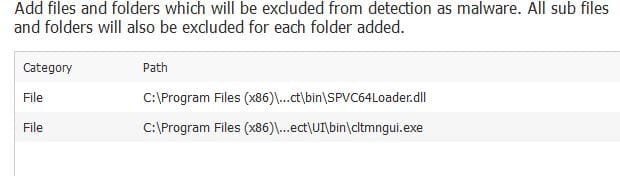
Sorry if this has been posted here (86 pages). But was offered the latest vr of MWB this morning (W7) and after install, I poked around the Malware Exclusions tab and found this: Normal or ?? Do not see this on the previous version that has yet to be updated. (W10) Tx
 

Attachments

  • MWExclu.JPG
    MWExclu.JPG
    21 KB · Views: 38

My Computer My Computer

Computer type
PC/Desktop
Computer Manufacturer/Model Number
Self Build
OS
Windows 7 Professional X64 Service Pack 1
CPU
AMD Phenom II X4 955 3.20GHz
Motherboard
Gigabyte GA-MA790X-UD4P
Memory
8G
Graphics Card(s)
GX550 Ti
Sound Card
On board
Monitor(s) Displays
Asus VW246H & Syncmaster 2243swx
Screen Resolution
1920x1080 & 1920x1080
Hard Drives
M4-CT128 SSD2, Samsung 840 256GB, 1 WDC 1TB
PSU
Corsair TX750W-V2
Case
Antec
Cooling
2 120mm fan
Keyboard
Microsoft Wireless 3050
Mouse
Microsoft Wireless 5000
Internet Speed
72/6Mbs (Cable)
Other Info
Asus AC1900 router, 8 port Trendnet Switch - Logitech Webcam Pro 9000
Sorry if this has been posted here (86 pages). But was offered the latest vr of MWB this morning (W7) and after install, I poked around the Malware Exclusions tab and found this: Normal or ?? Do not see this on the previous version that has yet to be updated. (W10) Tx

That is not a normal entry. It had to be done by someone on your system probably when using the previous version.

Jim :cool:
 

My Computer My Computer

Computer type
PC/Desktop
Computer Manufacturer/Model Number
Home Built
OS
Windows 8.1 Pro w/Media Center 64bit, Windows 7 HP 64bit
CPU
Phenom II X6 1100T
Motherboard
ASUS M5A99X EVO
Memory
Crucial Balistic 8gb DDR3-1866 CL9
Graphics Card(s)
MSI R6850 Cyclone IGD5 PE
Sound Card
On Board
Monitor(s) Displays
ASUS VE258Q 25" LED with DVI-HDMI-DisplayPort
Screen Resolution
1920 x 1080
Hard Drives
Two WD Cavier Black 2TB Sata III, WD My Book Essential 2TB USB 3.0
PSU
Seasonic X650 80 Plus GOLD Modular
Case
Corsair 400R
Cooling
Antec Kuhler H2O 620, Two 120mm and four 140mm
Keyboard
Logitech K120
Mouse
Logitech Marble Mouse USB, Logitech Precision Game Pad
Internet Speed
15MB
Antivirus
Norton IS 2013, Malwarebytes Pro Beta 2
Browser
IE-11, FF-27
Other Info
APC UPS ES 750, Netgear WNR3500L Gigabit & Wireless N Router with SamKnows Test Program, Motorola SB6120 Gigabit Cable Modem. Brother HL-2170W Laser Printer, Epson V300 Scanner
Sorry if this has been posted here (86 pages). But was offered the latest vr of MWB this morning (W7) and after install, I poked around the Malware Exclusions tab and found this: Normal or ?? Do not see this on the previous version that has yet to be updated. (W10) Tx

That is not a normal entry. It had to be done by someone on your system probably when using the previous version.

Jim :cool:

I am the only one on this machine ?? don't remember having done this...but thanks for the conformation. Hope it was not from an "external" force. I will remove.

UPDATE: Items removed, doing another scan for the heck of it. Tx
 

My Computer My Computer

Computer type
PC/Desktop
Computer Manufacturer/Model Number
Self Build
OS
Windows 7 Professional X64 Service Pack 1
CPU
AMD Phenom II X4 955 3.20GHz
Motherboard
Gigabyte GA-MA790X-UD4P
Memory
8G
Graphics Card(s)
GX550 Ti
Sound Card
On board
Monitor(s) Displays
Asus VW246H & Syncmaster 2243swx
Screen Resolution
1920x1080 & 1920x1080
Hard Drives
M4-CT128 SSD2, Samsung 840 256GB, 1 WDC 1TB
PSU
Corsair TX750W-V2
Case
Antec
Cooling
2 120mm fan
Keyboard
Microsoft Wireless 3050
Mouse
Microsoft Wireless 5000
Internet Speed
72/6Mbs (Cable)
Other Info
Asus AC1900 router, 8 port Trendnet Switch - Logitech Webcam Pro 9000
Back
Top