Unallocated spaces at the beginning & end of the BOOT disk

I was playing around and noticed something interesting !
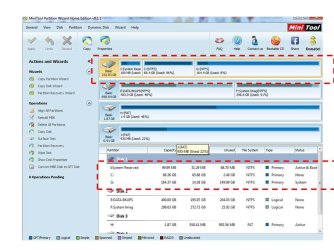
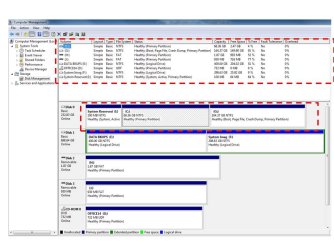
In my screen prints previously posted there is no unallocated space on my "OS" SSD, as displayed by Partition Wizard, EaseUS, and Windows Disk Management:
http://www.sevenforums.com/installa...es-beginning-end-boot-disk-4.html#post3028906
http://www.sevenforums.com/installa...es-beginning-end-boot-disk-4.html#post3028913

I was in Windows Disk Management and right clicked on Disk 0, then clicked Properties.
The Volumes tab shows 4 MB of unallocated.
This is the only place where I have seen unallocated space.
My Disk 1 similarly shows 3 MB unallocated, that no other tool shows.

I've been using this triple boot SSD and Data HD for quite a while now with no problems ...
I don't think the small unallocated space matters.
It might take a forensic disk specialist to explain why different tools see things differently ...
:geek: :eek: ;)

WinDMDisksUnalloc.png
 

My Computer My Computer

At a glance

Multi-Boot W7_Pro_x64 W8.1_Pro_x64 W10_Pro_x6...AMD Athlon II x4 6206GB GSkill DDR2 800AMD 4670 GPU + AMD 4200 IGP
Computer type
PC/Desktop
Computer Manufacturer/Model Number
home built
OS
Multi-Boot W7_Pro_x64 W8.1_Pro_x64 W10_Pro_x64 +Linux_VMs +Chromium_VM
CPU
AMD Athlon II x4 620
Motherboard
Gigabyte GA-MA785G-UD3H
Memory
6GB GSkill DDR2 800
Graphics Card(s)
AMD 4670 GPU + AMD 4200 IGP
Sound Card
on board Realtek ALC889A
Monitor(s) Displays
RCA 40" LCD TV, Insignia 32" LCD TV, HP 15" LCD monitor
Screen Resolution
1680 x 1050
Hard Drives
OCZ Vertex 3 120GB,
Samsung F3 1TB (3),
Several others - WD, Seagate, Hitachi, ...
PSU
Corsair 500 W
Case
Rosewill mid tower
Cooling
CM 90mm rifle
Keyboard
Gyration wireless, Logitech wireless, Dell USB wired
Mouse
Gyration wireless, Logitech wireless, V7 USB wired
Internet Speed
Spectrum - 100Mbps D / 10Mbps U
Antivirus
Avast, MBAM3, EMET, WinPatrol
Browser
Pale Moon, Firefox, IE
Other Info
2 multi-boot PC's
Mainly HTPC/Office/Gen purpose (no gaming).
Trendnet USB KVM.
LG DVD burner/Blue Ray Player.
Tray system for removable SATA backup drives.

Not currently OCd, under-volted.
I use Hybrid sleep, rarely re-boot or shutdown.

Hauppauge HD-PVR, Avermedia PCIe TV Tuner, Hauppauge PCI TV Tuner.
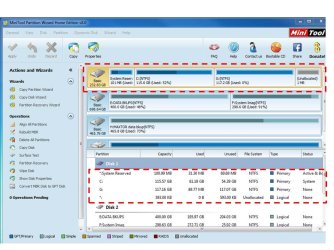
OK, this is now what I have. Read more afterward--
 

Attachments

  • screenshot4.jpg
    screenshot4.jpg
    91 KB · Views: 2

My Computer My Computer

At a glance

WIN 7 32 bit
Computer type
PC/Desktop
Computer Manufacturer/Model Number
DELL
OS
WIN 7 32 bit
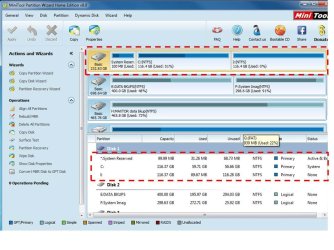
What you see above is that I merged the "SHADOW" with the UNALLOCATED space at the beginning & likewise with the new partitition with the UALLOCATED at the end. My screenshot on post #43 I got rid of all of the UNALLOCATED spaces by:
1) moving the SHADOW to the FRONT;
2) move the C partition in front of the UNALLOCATED space that was between the SHADOW & C from the previous step.
3) created the 2nd partition which engulfed the UNALLOCATED spaces.

However, when I attempted that procedure this time is when I got a boot failure & the rescue disk wanted to perform a REPAIR boot. I am going to attempt this again. It is VERY WIERD that I get different results.

BTW: thanks for the effort. I never thought I could brew up this much of a FIRESTORM unless I lit a match in TAHOE at the end of SEPTEMBER. For those of you that don't know the humidity in the SEIRRA NEVADA often is in the single digits that time of year.
 
Last edited:

My Computer My Computer

At a glance

WIN 7 32 bit
Computer type
PC/Desktop
Computer Manufacturer/Model Number
DELL
OS
WIN 7 32 bit
I got it back without any UNALLOCATED spaces. I had to do the process incrementally. What do I mean:
1) move the SHADOW to the front of the drive;
2) REBOOT;
3) MERGE the C partition with the UNALLOCATED space between C & the SHADOW;
4) REBOOT;
5) CREATE the 2nd partition;
6) REBOOT;
7) FRESH install. (still have to do this)

WHAT THE HELL!!!!!!!!!!!!!!!!!!!!!!!!!

Attached is my SCREENSHOT!
 

Attachments

  • screenshot5.jpg
    screenshot5.jpg
    94.3 KB · Views: 2

My Computer My Computer

At a glance

WIN 7 32 bit
Computer type
PC/Desktop
Computer Manufacturer/Model Number
DELL
OS
WIN 7 32 bit
I do not understand what the problem is, but whatever info you need from me to sort this out let me know.

BTW: There is NO WAY this is NORMAL as SIW2 puts it.
 

My Computer My Computer

At a glance

WIN 7 32 bit
Computer type
PC/Desktop
Computer Manufacturer/Model Number
DELL
OS
WIN 7 32 bit
Very good point DavidE.
I have noticed that in Properties/Volume but never in the pictures. Mine is 2mb.
I really don't know why it's there. I always thought it had something to do with where the ssd was picked up for alignment.
I never thought much about it until this thread. 2 mb one way or the other was never a concern of mine but now I'm curious.
 

My Computer My Computer

At a glance

Windows 10 Pro. 64/ version 1709 Windows 7 Pr...Intel i7-6800K @ 4.3Corsair Platinum 16 gig @2400EVGA GTX 1070 OC
Computer type
PC/Desktop
Computer Manufacturer/Model Number
Home made Desktop
OS
Windows 10 Pro. 64/ version 1709 Windows 7 Pro/64
CPU
Intel i7-6800K @ 4.3
Motherboard
ASUS X-99 Deluxe II
Memory
Corsair Platinum 16 gig @2400
Graphics Card(s)
EVGA GTX 1070 OC
Monitor(s) Displays
Asus 27" LED LCD/VE278Q
Screen Resolution
1920-1080 or 1280-720 HDMI
Hard Drives
INTEL SSD 730-240 Gb Sata 3.0/
PSU
EVGA Platium 1200W
Case
Phanteks Luxe Tempered Glass 8 fans/ one radiator
Cooling
XSPC/ Water Cooled CPU
Keyboard
Das 4 Professional
Mouse
Logitech M705/MX Anywhere 2-S
Internet Speed
100 mbits
Antivirus
Microsoft Security Essentials/ Malwarebytes Premium 3.0/ SAS
Browser
I.E. 11 default/Firefox/ ISP Time Warner Cable/Spectrum
Other Info
LG BluRay Burner/
Sound system-KLipsch-THX/
Icy Dock ssd Hot Swap bays.
Yep, me too. 1MB on SSD, 3MB on both 1TB spinners.

I don't know the why, but I will guess it has to do with alignment. Finding the largest chunk of even sized blocks out of a raw disk with a slightly variable number of total blocks due to manufacturing imperfections, errata, and disk condition.

Could be that experienced programmers realized that leaving small spaces on either end of a disk was safer and cleaner than dealing with problems caused by imperfect disks.
Similar to what they do in setting the default speed of processors or RAM. The end user can tweak more performance out if the want, but the manufacturer just wants to be sure the product will work correctly every time out of the box.
 

My Computer My Computer

At a glance

Windows 7 64 Bit Home Premium SP1i7-3820GSkill F3-14900CL9Q - 16GBEVGA GeForce GTX660 - Driver 352.86
Computer type
PC/Desktop
Computer Manufacturer/Model Number
Home Built - Jan 2013
OS
Windows 7 64 Bit Home Premium SP1
CPU
i7-3820
Motherboard
Asus P9X79-PRO - Bios 4608
Memory
GSkill F3-14900CL9Q - 16GB
Graphics Card(s)
EVGA GeForce GTX660 - Driver 352.86
Sound Card
On board Realtek ALC898
Monitor(s) Displays
Acer S271HL
Screen Resolution
1920 x 1080
Hard Drives
#1- Samsung 840 Pro Series
#2- Western Digital WD1002FAEX Sata3 Black
#3- Western Digital WD1002FAEX Sata3 Black
PSU
Corsair CMPSU-850TX-V2 - 850 watt (by Seasonic)
Case
Corsair Obsidian 550D
Cooling
Standard 3 120mm case fans, Cooler Master Hyper 212 EVO
Keyboard
MS KC-0405
Mouse
Intellimouse 5-button
Internet Speed
56 Mbits/Sec (on a good day)
Antivirus
Avast & Malwarebytes
Browser
Firefox
Other Info
Asus DVD - DRW-24B1ST 24X
I don`t kow, the shot in post #64 let`s good to me, now post shots using EaseUS and DM and we should be done :)

Other then the fact that you like to use Logical partitions, I see no reason for em, but hey that`s just me :D
 

My Computer My Computer

At a glance

Windows 10 Pro x64Intel Core i7 6700KGSkill TridentZ RGB 16GB 3600 16-16-16-36EVGA GTX 980 Ti SC x2
Computer type
PC/Desktop
Computer Manufacturer/Model Number
Skylake Special #666
OS
Windows 10 Pro x64
CPU
Intel Core i7 6700K
Motherboard
Asus Sabertooth Z170 Mark 1
Memory
GSkill TridentZ RGB 16GB 3600 16-16-16-36
Graphics Card(s)
EVGA GTX 980 Ti SC x2
Sound Card
Realtek High Definition
Monitor(s) Displays
AOC G2460PG
Screen Resolution
1920 x 1080 144Hz
Hard Drives
Samsung 860 Pro 256GB, Seagate Barracuda 4TB x2
PSU
EVGA 1000 P2, EVGA White Custom Braided Cables
Case
Corsair Vengeance C70 Gunmetal Black
Cooling
Corsair H100i v2, Corsair ML120 x2, Thermal Grizzly Kryonaut
Keyboard
Logitech G910 Orion Spectrum
Mouse
Logitech G700s
Internet Speed
Verizon Fios Quantum Gateway 75/75
Antivirus
Windows Defender, Malwarebytes Free 3.8.3
Browser
Chrome
Other Info
Corsair SP120 x4, LG Blu-ray Drive, Durabrand HT-395 100 Watt Dolby Digital Amp, Corsair H2100 Wireless 7.1 Headset
Very good point DavidE.
I have noticed that in Properties/Volume but never in the pictures. Mine is 2mb.
I really don't know why it's there. I always thought it had something to do with where the ssd was picked up for alignment.
I never thought much about it until this thread. 2 mb one way or the other was never a concern of mine but now I'm curious.

Alignment is exactly why it`s there Jack, we just don`t want to see it, and you shouldn`t.
 

My Computer My Computer

At a glance

Windows 10 Pro x64Intel Core i7 6700KGSkill TridentZ RGB 16GB 3600 16-16-16-36EVGA GTX 980 Ti SC x2
Computer type
PC/Desktop
Computer Manufacturer/Model Number
Skylake Special #666
OS
Windows 10 Pro x64
CPU
Intel Core i7 6700K
Motherboard
Asus Sabertooth Z170 Mark 1
Memory
GSkill TridentZ RGB 16GB 3600 16-16-16-36
Graphics Card(s)
EVGA GTX 980 Ti SC x2
Sound Card
Realtek High Definition
Monitor(s) Displays
AOC G2460PG
Screen Resolution
1920 x 1080 144Hz
Hard Drives
Samsung 860 Pro 256GB, Seagate Barracuda 4TB x2
PSU
EVGA 1000 P2, EVGA White Custom Braided Cables
Case
Corsair Vengeance C70 Gunmetal Black
Cooling
Corsair H100i v2, Corsair ML120 x2, Thermal Grizzly Kryonaut
Keyboard
Logitech G910 Orion Spectrum
Mouse
Logitech G700s
Internet Speed
Verizon Fios Quantum Gateway 75/75
Antivirus
Windows Defender, Malwarebytes Free 3.8.3
Browser
Chrome
Other Info
Corsair SP120 x4, LG Blu-ray Drive, Durabrand HT-395 100 Watt Dolby Digital Amp, Corsair H2100 Wireless 7.1 Headset
Very good point DavidE.
I have noticed that in Properties/Volume but never in the pictures. Mine is 2mb.
I really don't know why it's there. I always thought it had something to do with where the ssd was picked up for alignment.
I never thought much about it until this thread. 2 mb one way or the other was never a concern of mine but now I'm curious.

Alignment is exactly why it`s there Jack, we just don`t want to see it, and you shouldn`t.

I don't think it's a question of we don't don't want to see it and we shouldn't ... it happens ...
Isn't the question why do we see this "sometimes" depending on the tool and option we are looking at ... ?
The OP is concerned with this ...

To throw more into the mix, here is a post for Acronis Disk Director:
Small unallocated space automatically created | Wilders Security Forums
 

My Computer My Computer

At a glance

Multi-Boot W7_Pro_x64 W8.1_Pro_x64 W10_Pro_x6...AMD Athlon II x4 6206GB GSkill DDR2 800AMD 4670 GPU + AMD 4200 IGP
Computer type
PC/Desktop
Computer Manufacturer/Model Number
home built
OS
Multi-Boot W7_Pro_x64 W8.1_Pro_x64 W10_Pro_x64 +Linux_VMs +Chromium_VM
CPU
AMD Athlon II x4 620
Motherboard
Gigabyte GA-MA785G-UD3H
Memory
6GB GSkill DDR2 800
Graphics Card(s)
AMD 4670 GPU + AMD 4200 IGP
Sound Card
on board Realtek ALC889A
Monitor(s) Displays
RCA 40" LCD TV, Insignia 32" LCD TV, HP 15" LCD monitor
Screen Resolution
1680 x 1050
Hard Drives
OCZ Vertex 3 120GB,
Samsung F3 1TB (3),
Several others - WD, Seagate, Hitachi, ...
PSU
Corsair 500 W
Case
Rosewill mid tower
Cooling
CM 90mm rifle
Keyboard
Gyration wireless, Logitech wireless, Dell USB wired
Mouse
Gyration wireless, Logitech wireless, V7 USB wired
Internet Speed
Spectrum - 100Mbps D / 10Mbps U
Antivirus
Avast, MBAM3, EMET, WinPatrol
Browser
Pale Moon, Firefox, IE
Other Info
2 multi-boot PC's
Mainly HTPC/Office/Gen purpose (no gaming).
Trendnet USB KVM.
LG DVD burner/Blue Ray Player.
Tray system for removable SATA backup drives.

Not currently OCd, under-volted.
I use Hybrid sleep, rarely re-boot or shutdown.

Hauppauge HD-PVR, Avermedia PCIe TV Tuner, Hauppauge PCI TV Tuner.
Very good point DavidE.
I have noticed that in Properties/Volume but never in the pictures. Mine is 2mb.
I really don't know why it's there. I always thought it had something to do with where the ssd was picked up for alignment.
I never thought much about it until this thread. 2 mb one way or the other was never a concern of mine but now I'm curious.

Alignment is exactly why it`s there Jack, we just don`t want to see it, and you shouldn`t.

:ditto: Exactly. All my disks have these few MBs between 1 and 3.
 

My Computer My Computer

At a glance

Vista, Windows7, Mint Mate, Zorin, Windows 8from 1.6GHz Duo to i7
Computer Manufacturer/Model Number
HP, Dell, Gateway, Toshiba - 4 laptops and 2 desktops
OS
Vista, Windows7, Mint Mate, Zorin, Windows 8
CPU
from 1.6GHz Duo to i7
Monitor(s) Displays
2x HP w2207
Hard Drives
5x HDD, 7x SSD, 12x Externals
Keyboard
with trackball - no mices
Mouse
Trackball mice
Internet Speed
DSL 6000
Well I don't see it in any pictures. I only see it in properties.
Now can I find a 3rd party program that shows my 2 mb in pictures, probably if I look long enough to find such program.
 

My Computer My Computer

At a glance

Windows 10 Pro. 64/ version 1709 Windows 7 Pr...Intel i7-6800K @ 4.3Corsair Platinum 16 gig @2400EVGA GTX 1070 OC
Computer type
PC/Desktop
Computer Manufacturer/Model Number
Home made Desktop
OS
Windows 10 Pro. 64/ version 1709 Windows 7 Pro/64
CPU
Intel i7-6800K @ 4.3
Motherboard
ASUS X-99 Deluxe II
Memory
Corsair Platinum 16 gig @2400
Graphics Card(s)
EVGA GTX 1070 OC
Monitor(s) Displays
Asus 27" LED LCD/VE278Q
Screen Resolution
1920-1080 or 1280-720 HDMI
Hard Drives
INTEL SSD 730-240 Gb Sata 3.0/
PSU
EVGA Platium 1200W
Case
Phanteks Luxe Tempered Glass 8 fans/ one radiator
Cooling
XSPC/ Water Cooled CPU
Keyboard
Das 4 Professional
Mouse
Logitech M705/MX Anywhere 2-S
Internet Speed
100 mbits
Antivirus
Microsoft Security Essentials/ Malwarebytes Premium 3.0/ SAS
Browser
I.E. 11 default/Firefox/ ISP Time Warner Cable/Spectrum
Other Info
LG BluRay Burner/
Sound system-KLipsch-THX/
Icy Dock ssd Hot Swap bays.

My Computer My Computer

At a glance

Multi-Boot W7_Pro_x64 W8.1_Pro_x64 W10_Pro_x6...AMD Athlon II x4 6206GB GSkill DDR2 800AMD 4670 GPU + AMD 4200 IGP
Computer type
PC/Desktop
Computer Manufacturer/Model Number
home built
OS
Multi-Boot W7_Pro_x64 W8.1_Pro_x64 W10_Pro_x64 +Linux_VMs +Chromium_VM
CPU
AMD Athlon II x4 620
Motherboard
Gigabyte GA-MA785G-UD3H
Memory
6GB GSkill DDR2 800
Graphics Card(s)
AMD 4670 GPU + AMD 4200 IGP
Sound Card
on board Realtek ALC889A
Monitor(s) Displays
RCA 40" LCD TV, Insignia 32" LCD TV, HP 15" LCD monitor
Screen Resolution
1680 x 1050
Hard Drives
OCZ Vertex 3 120GB,
Samsung F3 1TB (3),
Several others - WD, Seagate, Hitachi, ...
PSU
Corsair 500 W
Case
Rosewill mid tower
Cooling
CM 90mm rifle
Keyboard
Gyration wireless, Logitech wireless, Dell USB wired
Mouse
Gyration wireless, Logitech wireless, V7 USB wired
Internet Speed
Spectrum - 100Mbps D / 10Mbps U
Antivirus
Avast, MBAM3, EMET, WinPatrol
Browser
Pale Moon, Firefox, IE
Other Info
2 multi-boot PC's
Mainly HTPC/Office/Gen purpose (no gaming).
Trendnet USB KVM.
LG DVD burner/Blue Ray Player.
Tray system for removable SATA backup drives.

Not currently OCd, under-volted.
I use Hybrid sleep, rarely re-boot or shutdown.

Hauppauge HD-PVR, Avermedia PCIe TV Tuner, Hauppauge PCI TV Tuner.
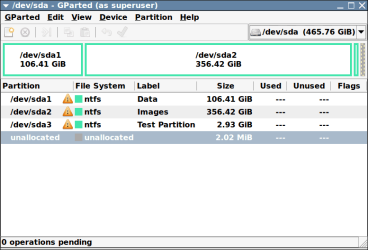
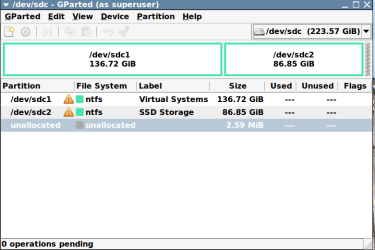
Here is what it shows with Gparted. The 125MB unallocated on the second disk is a special case and has nothing to do with our discussion.
 

Attachments

  • -dev-sda - GParted (as superuser)_001.png
    -dev-sda - GParted (as superuser)_001.png
    14.9 KB · Views: 1
  • -dev-sdb - GParted (as superuser)_002.png
    -dev-sdb - GParted (as superuser)_002.png
    13 KB · Views: 1
  • Selection_003.png
    Selection_003.png
    15.4 KB · Views: 1

My Computer My Computer

At a glance

Vista, Windows7, Mint Mate, Zorin, Windows 8from 1.6GHz Duo to i7
Computer Manufacturer/Model Number
HP, Dell, Gateway, Toshiba - 4 laptops and 2 desktops
OS
Vista, Windows7, Mint Mate, Zorin, Windows 8
CPU
from 1.6GHz Duo to i7
Monitor(s) Displays
2x HP w2207
Hard Drives
5x HDD, 7x SSD, 12x Externals
Keyboard
with trackball - no mices
Mouse
Trackball mice
Internet Speed
DSL 6000
I think I will leave well enough alone. It's not broke so I'm not looking for a fix.
 

My Computer My Computer

At a glance

Windows 10 Pro. 64/ version 1709 Windows 7 Pr...Intel i7-6800K @ 4.3Corsair Platinum 16 gig @2400EVGA GTX 1070 OC
Computer type
PC/Desktop
Computer Manufacturer/Model Number
Home made Desktop
OS
Windows 10 Pro. 64/ version 1709 Windows 7 Pro/64
CPU
Intel i7-6800K @ 4.3
Motherboard
ASUS X-99 Deluxe II
Memory
Corsair Platinum 16 gig @2400
Graphics Card(s)
EVGA GTX 1070 OC
Monitor(s) Displays
Asus 27" LED LCD/VE278Q
Screen Resolution
1920-1080 or 1280-720 HDMI
Hard Drives
INTEL SSD 730-240 Gb Sata 3.0/
PSU
EVGA Platium 1200W
Case
Phanteks Luxe Tempered Glass 8 fans/ one radiator
Cooling
XSPC/ Water Cooled CPU
Keyboard
Das 4 Professional
Mouse
Logitech M705/MX Anywhere 2-S
Internet Speed
100 mbits
Antivirus
Microsoft Security Essentials/ Malwarebytes Premium 3.0/ SAS
Browser
I.E. 11 default/Firefox/ ISP Time Warner Cable/Spectrum
Other Info
LG BluRay Burner/
Sound system-KLipsch-THX/
Icy Dock ssd Hot Swap bays.
OK, I have included 3 screenshots from PARTITION WIZARD, DISK MGR, & AOMEI. For whatever reason EASEUS did not install correctly to my flash drive. You can see that all 3 do not show UNALLOCATED spaces.

Do we have some consensus on what the issue is or was? Is it likely to occur again? Should I post another thread with my workaround to consolidate the solution? My workaround may not apply universally. It just worked in this case. I had to use both AOMEI & PARTITION WIZARD.
 

Attachments

  • screenshot6.jpg
    screenshot6.jpg
    84.9 KB · Views: 1
  • screenshot7.jpg
    screenshot7.jpg
    83.2 KB · Views: 1
  • screenshot8.jpg
    screenshot8.jpg
    57.3 KB · Views: 2

My Computer My Computer

At a glance

WIN 7 32 bit
Computer type
PC/Desktop
Computer Manufacturer/Model Number
DELL
OS
WIN 7 32 bit
OP = Original Poster - the person that started the thread.
 

My Computer My Computer

At a glance

Vista, Windows7, Mint Mate, Zorin, Windows 8from 1.6GHz Duo to i7
Computer Manufacturer/Model Number
HP, Dell, Gateway, Toshiba - 4 laptops and 2 desktops
OS
Vista, Windows7, Mint Mate, Zorin, Windows 8
CPU
from 1.6GHz Duo to i7
Monitor(s) Displays
2x HP w2207
Hard Drives
5x HDD, 7x SSD, 12x Externals
Keyboard
with trackball - no mices
Mouse
Trackball mice
Internet Speed
DSL 6000
Again, is there any kind of consensus on this? Is it likely to occur again & should I initiate another thread with my workaround?
 

My Computer My Computer

At a glance

WIN 7 32 bit
Computer type
PC/Desktop
Computer Manufacturer/Model Number
DELL
OS
WIN 7 32 bit
Nah, I think it is a rare case.
 

My Computer My Computer

At a glance

Vista, Windows7, Mint Mate, Zorin, Windows 8from 1.6GHz Duo to i7
Computer Manufacturer/Model Number
HP, Dell, Gateway, Toshiba - 4 laptops and 2 desktops
OS
Vista, Windows7, Mint Mate, Zorin, Windows 8
CPU
from 1.6GHz Duo to i7
Monitor(s) Displays
2x HP w2207
Hard Drives
5x HDD, 7x SSD, 12x Externals
Keyboard
with trackball - no mices
Mouse
Trackball mice
Internet Speed
DSL 6000
Back
Top