External HDD not show up in my computer (Not Initialised and Unknown)

Niall556

New member
Local time
10:06 PM
Messages
4
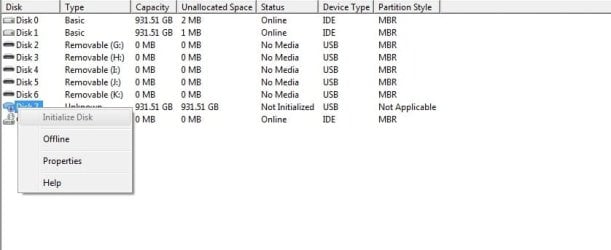
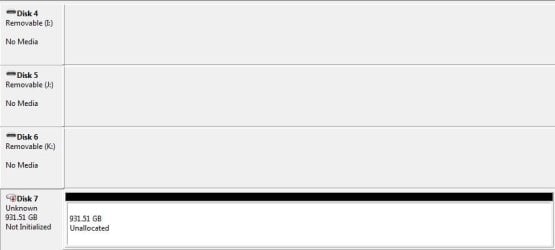
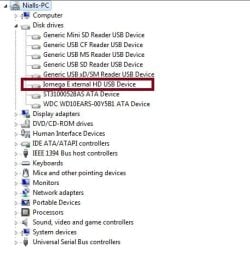
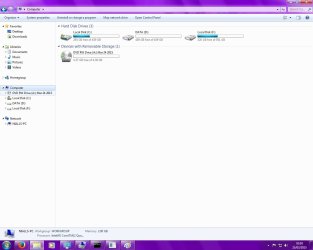
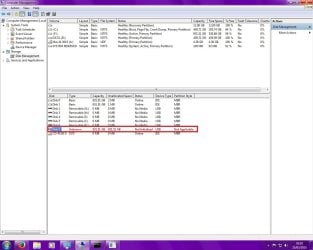
Hi, my 1tb external hard drive cannot be found in 'my computer'. It can however be found in diskpart, disk managerment, and disk manager, though it does not have a drive letter, shows as unknown and is not and wont initialize. I also get a crc error when trying to do anything with it. There is no data on the drive so i dont need to recover anything, just wanted to know if there is any way that I can use it again? Here are some screenshot I have taken.
 

Attachments
  • 1.jpg
    1.jpg
    100.8 KB · Views: 6
  • 2.jpg
    2.jpg
    25.1 KB · Views: 1
  • 3.jpg
    3.jpg
    26.4 KB · Views: 2
  • 5.jpg
    5.jpg
    15.3 KB · Views: 1
  • 6.jpg
    6.jpg
    29.7 KB · Views: 16
  • 4.jpg
    4.jpg
    60.4 KB · Views: 2

My Computer My Computer

At a glance

Windows 7 Home Premium X64
Computer type
PC/Desktop
OS
Windows 7 Home Premium X64
It`s showing in Diskpart so.....

Have you tried using Diskpart to set it up ?

Just look up the Diskpart tutorial, it will show you how to do it.

Why is F marked active ? Do you have an operating system on it ?

Is it an external drive ?

If not, it should not be marked active.
 

My Computer My Computer

At a glance

Windows 10 Pro x64Intel Core i7 6700KGSkill TridentZ RGB 16GB 3600 16-16-16-36EVGA GTX 980 Ti SC x2
Computer type
PC/Desktop
Computer Manufacturer/Model Number
Skylake Special #666
OS
Windows 10 Pro x64
CPU
Intel Core i7 6700K
Motherboard
Asus Sabertooth Z170 Mark 1
Memory
GSkill TridentZ RGB 16GB 3600 16-16-16-36
Graphics Card(s)
EVGA GTX 980 Ti SC x2
Sound Card
Realtek High Definition
Monitor(s) Displays
AOC G2460PG
Screen Resolution
1920 x 1080 144Hz
Hard Drives
Samsung 860 Pro 256GB, Seagate Barracuda 4TB x2
PSU
EVGA 1000 P2, EVGA White Custom Braided Cables
Case
Corsair Vengeance C70 Gunmetal Black
Cooling
Corsair H100i v2, Corsair ML120 x2, Thermal Grizzly Kryonaut
Keyboard
Logitech G910 Orion Spectrum
Mouse
Logitech G700s
Internet Speed
Verizon Fios Quantum Gateway 75/75
Antivirus
Windows Defender, Malwarebytes Free 3.8.3
Browser
Chrome
Other Info
Corsair SP120 x4, LG Blu-ray Drive, Durabrand HT-395 100 Watt Dolby Digital Amp, Corsair H2100 Wireless 7.1 Headset
Hello Niall556!

To try and initialize the drive through diskpart follow these:

1. Open the Start Menu, type cmd.exe, press Enter
2. Type diskpart, press Enter
3. Type list disk, press Enter
4. Type select disk X (where X is the number the certain drive), press Enter
5. Type clean, press Enter
6. Type create partition primary, press Enter
7. Type format quick fs=ntfs, press Enter
8. Type assign letter Y, where Y is the letter you'd choose, press Enter
9. Type exit, press Enter

Hope this helps!

Good luck! :)

CK_WD
 

My Computer My Computer

At a glance

Windows 7 Home Premium x64
Computer type
PC/Desktop
OS
Windows 7 Home Premium x64
Hello Niall556!

To try and initialize the drive through diskpart follow these:

1. Open the Start Menu, type cmd.exe, press Enter
2. Type diskpart, press Enter
3. Type list disk, press Enter
4. Type select disk X (where X is the number the certain drive), press Enter
5. Type clean, press Enter
6. Type create partition primary, press Enter
7. Type format quick fs=ntfs, press Enter
8. Type assign letter Y, where Y is the letter you'd choose, press Enter
9. Type exit, press Enter

Hope this helps!

Good luck! :)

CK_WD

I have already tried this but cant create the partition because of the crc error
 

My Computer My Computer

At a glance

Windows 7 Home Premium X64
Computer type
PC/Desktop
OS
Windows 7 Home Premium X64
That's interesting.

A Cyclic Redundancy Error (CRC) is and error checking technique used by computers, specifically the hard drives and optical disks. It's caused when data on the hard drive becomes corrupt.

So if there really isn't a byte of information on your drive it may be a left over of something deleted or the partition table or file system broke.

If it's visible everywhere you say, try chkdsk:

1. Type cmd in the search bar on the Start menu
2. You must run as Admin
3. Type chkdsk x: /f, where x: is your drive, the /f command will fix errors found on the disk

If this doesn't help you to Initialize it later on, try wiping it clean, by writing full zeros. You could research and use a third party program that does that. Do this if only there is really nothing on the drive!

Hope this helps!

CK_WD
 

My Computer My Computer

At a glance

Windows 7 Home Premium x64
Computer type
PC/Desktop
OS
Windows 7 Home Premium x64
That's interesting.

A Cyclic Redundancy Error (CRC) is and error checking technique used by computers, specifically the hard drives and optical disks. It's caused when data on the hard drive becomes corrupt.

So if there really isn't a byte of information on your drive it may be a left over of something deleted or the partition table or file system broke.

If it's visible everywhere you say, try chkdsk:

1. Type cmd in the search bar on the Start menu
2. You must run as Admin
3. Type chkdsk x: /f, where x: is your drive, the /f command will fix errors found on the disk

If this doesn't help you to Initialize it later on, try wiping it clean, by writing full zeros. You could research and use a third party program that does that. Do this if only there is really nothing on the drive!

Hope this helps!

CK_WD

I cant do this as the there is no drive letter assigned to hard drive
 

My Computer My Computer

At a glance

Windows 7 Home Premium X64
Computer type
PC/Desktop
OS
Windows 7 Home Premium X64

My Computer My Computer

At a glance

Windows 10 Pro x64Intel Core i7 6700KGSkill TridentZ RGB 16GB 3600 16-16-16-36EVGA GTX 980 Ti SC x2
Computer type
PC/Desktop
Computer Manufacturer/Model Number
Skylake Special #666
OS
Windows 10 Pro x64
CPU
Intel Core i7 6700K
Motherboard
Asus Sabertooth Z170 Mark 1
Memory
GSkill TridentZ RGB 16GB 3600 16-16-16-36
Graphics Card(s)
EVGA GTX 980 Ti SC x2
Sound Card
Realtek High Definition
Monitor(s) Displays
AOC G2460PG
Screen Resolution
1920 x 1080 144Hz
Hard Drives
Samsung 860 Pro 256GB, Seagate Barracuda 4TB x2
PSU
EVGA 1000 P2, EVGA White Custom Braided Cables
Case
Corsair Vengeance C70 Gunmetal Black
Cooling
Corsair H100i v2, Corsair ML120 x2, Thermal Grizzly Kryonaut
Keyboard
Logitech G910 Orion Spectrum
Mouse
Logitech G700s
Internet Speed
Verizon Fios Quantum Gateway 75/75
Antivirus
Windows Defender, Malwarebytes Free 3.8.3
Browser
Chrome
Other Info
Corsair SP120 x4, LG Blu-ray Drive, Durabrand HT-395 100 Watt Dolby Digital Amp, Corsair H2100 Wireless 7.1 Headset
its out of warrenty and ive tried that with a few programs, thanks for your help anyway :)
 

My Computer My Computer

At a glance

Windows 7 Home Premium X64
Computer type
PC/Desktop
OS
Windows 7 Home Premium X64
Looks like you`ll be buying a new drive for the enclosure then :)

Get a 500 TB :D

A 500 TB hard drive LOL, could you imagine :roflmao:
 

My Computer My Computer

At a glance

Windows 10 Pro x64Intel Core i7 6700KGSkill TridentZ RGB 16GB 3600 16-16-16-36EVGA GTX 980 Ti SC x2
Computer type
PC/Desktop
Computer Manufacturer/Model Number
Skylake Special #666
OS
Windows 10 Pro x64
CPU
Intel Core i7 6700K
Motherboard
Asus Sabertooth Z170 Mark 1
Memory
GSkill TridentZ RGB 16GB 3600 16-16-16-36
Graphics Card(s)
EVGA GTX 980 Ti SC x2
Sound Card
Realtek High Definition
Monitor(s) Displays
AOC G2460PG
Screen Resolution
1920 x 1080 144Hz
Hard Drives
Samsung 860 Pro 256GB, Seagate Barracuda 4TB x2
PSU
EVGA 1000 P2, EVGA White Custom Braided Cables
Case
Corsair Vengeance C70 Gunmetal Black
Cooling
Corsair H100i v2, Corsair ML120 x2, Thermal Grizzly Kryonaut
Keyboard
Logitech G910 Orion Spectrum
Mouse
Logitech G700s
Internet Speed
Verizon Fios Quantum Gateway 75/75
Antivirus
Windows Defender, Malwarebytes Free 3.8.3
Browser
Chrome
Other Info
Corsair SP120 x4, LG Blu-ray Drive, Durabrand HT-395 100 Watt Dolby Digital Amp, Corsair H2100 Wireless 7.1 Headset
I have distracted, I am sorry, I suppose it could happen.

Well, like AddRAM said, you will have to get a new drive. Or you could go to a professional to see if he can fix the drive with the certain tools in the certain environment.

I am sorry if we couldn't do more. Good luck! :)

CK_WD
 

My Computer My Computer

At a glance

Windows 7 Home Premium x64
Computer type
PC/Desktop
OS
Windows 7 Home Premium x64
Back
Top