
“Test Mode Windows 7 Build 7601" Watermark - Remove from Desktop
“Test Mode Windows 7 Build 7601" Watermark - Remove from Desktop

How to Remove “Test Mode Windows 7 Build 7601" Watermark from Desktop

   Information
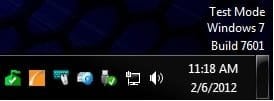
This tutorial will show you how to remove the Test Mode Windows 7 Build 7601 (with SP1 installed) or Test Mode Windows 7 Build 7600 (without SP1 installed) watermark from the lower right corner of the Windows 7 desktop by turning off test mode.

You must be logged in as an administrator to be able to do the steps in this tutorial.

   Note
According to Microsoft, the test mode watermark can appear if the test signing mode is started on the computer. This test mode may occur if an application whose drivers are not digitally signed by Microsoft is installed and still in the test phase. Microsoft added test mode to Windows so that users can test programs without having to provide an authentication certificate.

The TESTSIGNING boot configuration option determines whether Windows Vista and later versions of Windows will load any type of test-signed kernel-mode code. This option is not set by default, which means test-signed kernel-mode drivers will not load by default on 64-bit versions of Windows Vista and later versions of Windows.

For 64-bit versions of Windows Vista and later versions of Windows, the kernel-mode code signing policy requires that all kernel-mode code have a digital signature. However, in most cases, an unsigned driver can be installed and loaded on 32-bit versions of Windows Vista and later versions of Windows.


EXAMPLE: "Test Mode Windows 7 Build 7601" Watermark
Example.jpg


Here's How:
1. Open an elevated command prompt.

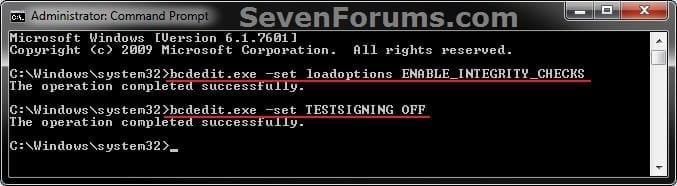
2. In the elevated command prompt, copy and paste the command below and press Enter. (see screenshot below step 3)
bcdedit.exe -set loadoptions ENABLE_INTEGRITY_CHECKS
3. In the elevated command prompt, copy and paste the command you want to use below, and press Enter. (see screenshot below)

(Turn Off test mode and remove watermark)
bcdedit.exe -set TESTSIGNING OFF

OR

(Turn On test mode and add watermark)
bcdedit.exe -set TESTSIGNING ON

CMD.jpg
4. Close the elevated command prompt.

5. Restart the computer to apply.
That's it,
Shawn


Last edited:
Hello Jadedea,

This would be from an unsigned driver. You can use the File Signature Verification tool to navigate to the folders where you want to test the driver files (ex: "C:\Windows\System32\Drivers") to see what drivers are not signed.

When you find them, you can uninstall them.

Hope this helps for now, :)
Shawn
 

My Computer My Computer

At a glance

64-bit Windows 11 Pro for WorkstationsIntel i7-8700K OC'd to 5 GHz64 GB (4x16GB) G.SKILL TridentZ RGB DDR4 3600...ASUS ROG-STRIX-GTX1080TI-O11G-GAMING
Computer type
PC/Desktop
Computer Manufacturer/Model Number
Self built custom
OS
64-bit Windows 11 Pro for Workstations
CPU
Intel i7-8700K OC'd to 5 GHz
Motherboard
ASUS ROG Maximus XI Formula Z390
Memory
64 GB (4x16GB) G.SKILL TridentZ RGB DDR4 3600 MHz
Graphics Card(s)
ASUS ROG-STRIX-GTX1080TI-O11G-GAMING
Sound Card
Integrated
Monitor(s) Displays
2 x Samsung Odyssey G7 27"
Screen Resolution
2560x1440
Hard Drives
1TB Samsung 990 PRO M.2,
4TB Samsung 990 PRO PRO M.2,
TerraMaster F8 SSD Plus NAS
PSU
Seasonic Prime Titanium 850W
Case
Thermaltake Core P3
Cooling
Corsair Hydro H115i
Keyboard
Logitech wireless K800
Mouse
Logitech MX Master 4
Internet Speed
2 Gb/s Download and 100 Mb/s Upload
Antivirus
Malwarebyte Anti-Malware Premium
Browser
Google Chrome
Other Info
Logitech Z625 speaker system,
Logitech BRIO 4K Pro webcam,
HP Color LaserJet Pro MFP M477fdn,
APC SMART-UPS RT 1000 XL - SURT1000XLI,
Galaxy S23 Plus phone
Brink,
Thanks for the tip. Ran the verifier with the log and it looks like this: difxapi.dll is the unsigned driver. I will see if I can run system repair and chose the install driver option unless you know of an easier way.

Thanks again!
 

My Computer My Computer

At a glance

District of Columbia
Computer type
PC/Desktop
Computer Manufacturer/Model Number
HP HDX 18T
OS
District of Columbia
Antivirus
Norton 360
The difxapi.dll file is for "Driver Install Frameworks for API library module".

Since this is a system file, running a sfc /scannow command may be able to sort it for you. :)
 

My Computer My Computer

At a glance

64-bit Windows 11 Pro for WorkstationsIntel i7-8700K OC'd to 5 GHz64 GB (4x16GB) G.SKILL TridentZ RGB DDR4 3600...ASUS ROG-STRIX-GTX1080TI-O11G-GAMING
Computer type
PC/Desktop
Computer Manufacturer/Model Number
Self built custom
OS
64-bit Windows 11 Pro for Workstations
CPU
Intel i7-8700K OC'd to 5 GHz
Motherboard
ASUS ROG Maximus XI Formula Z390
Memory
64 GB (4x16GB) G.SKILL TridentZ RGB DDR4 3600 MHz
Graphics Card(s)
ASUS ROG-STRIX-GTX1080TI-O11G-GAMING
Sound Card
Integrated
Monitor(s) Displays
2 x Samsung Odyssey G7 27"
Screen Resolution
2560x1440
Hard Drives
1TB Samsung 990 PRO M.2,
4TB Samsung 990 PRO PRO M.2,
TerraMaster F8 SSD Plus NAS
PSU
Seasonic Prime Titanium 850W
Case
Thermaltake Core P3
Cooling
Corsair Hydro H115i
Keyboard
Logitech wireless K800
Mouse
Logitech MX Master 4
Internet Speed
2 Gb/s Download and 100 Mb/s Upload
Antivirus
Malwarebyte Anti-Malware Premium
Browser
Google Chrome
Other Info
Logitech Z625 speaker system,
Logitech BRIO 4K Pro webcam,
HP Color LaserJet Pro MFP M477fdn,
APC SMART-UPS RT 1000 XL - SURT1000XLI,
Galaxy S23 Plus phone
Ok I tried using system repair load drivers and I could not find the driver. I looked up the driver and found 29 versions of it. Is that normal?
 

My Computer My Computer

At a glance

District of Columbia
Computer type
PC/Desktop
Computer Manufacturer/Model Number
HP HDX 18T
OS
District of Columbia
Antivirus
Norton 360
The difxapi.dll file is for "Driver Install Frameworks for API library module".

Since this is a system file, running a sfc /scannow command may be able to sort it for you. :)

It didn't fix it. It is still labeled as unsign driver and windows is still loading test mode.
 

My Computer My Computer

At a glance

District of Columbia
Computer type
PC/Desktop
Computer Manufacturer/Model Number
HP HDX 18T
OS
District of Columbia
Antivirus
Norton 360

My Computer My Computer

At a glance

64-bit Windows 11 Pro for WorkstationsIntel i7-8700K OC'd to 5 GHz64 GB (4x16GB) G.SKILL TridentZ RGB DDR4 3600...ASUS ROG-STRIX-GTX1080TI-O11G-GAMING
Computer type
PC/Desktop
Computer Manufacturer/Model Number
Self built custom
OS
64-bit Windows 11 Pro for Workstations
CPU
Intel i7-8700K OC'd to 5 GHz
Motherboard
ASUS ROG Maximus XI Formula Z390
Memory
64 GB (4x16GB) G.SKILL TridentZ RGB DDR4 3600 MHz
Graphics Card(s)
ASUS ROG-STRIX-GTX1080TI-O11G-GAMING
Sound Card
Integrated
Monitor(s) Displays
2 x Samsung Odyssey G7 27"
Screen Resolution
2560x1440
Hard Drives
1TB Samsung 990 PRO M.2,
4TB Samsung 990 PRO PRO M.2,
TerraMaster F8 SSD Plus NAS
PSU
Seasonic Prime Titanium 850W
Case
Thermaltake Core P3
Cooling
Corsair Hydro H115i
Keyboard
Logitech wireless K800
Mouse
Logitech MX Master 4
Internet Speed
2 Gb/s Download and 100 Mb/s Upload
Antivirus
Malwarebyte Anti-Malware Premium
Browser
Google Chrome
Other Info
Logitech Z625 speaker system,
Logitech BRIO 4K Pro webcam,
HP Color LaserJet Pro MFP M477fdn,
APC SMART-UPS RT 1000 XL - SURT1000XLI,
Galaxy S23 Plus phone
I was able to follow the tutorial to successfully remove the watermark. I was running in unsigned driver mode to try and get Desktop Heap Monitor to work for Windows 7. However since I have BitLocker on my drive, every time I start my computer I get a warning that the Boot Configuration Data (BCD) has changed and asks me for the BitLocker recovery key every time. I don't want to suspend and resume BitLocker to make the configuration changes the new defaults. Could anyone help with the commands to undo the configuration changes? I didn't want to randomly try things that might further change the boot configuration. I am assuming the opposite commands might be something like:
bcdedit.exe -set loadoptions DISABLE_INTEGRITY_CHECKS
bcdedit.exe -set TESTSIGNING ON
Please let me know if this is correct. Thanks.
 

My Computer My Computer

At a glance

Windows 7 Professional x64AMD Phenom II X6 1090T 3.20GHz CPU8.0GB DDR3 1333MHz (PC3-10666) SDRAM2x XFX Radeon HD 5870 1GB CrossFire
Computer type
PC/Desktop
Computer Manufacturer/Model Number
custom build
OS
Windows 7 Professional x64
CPU
AMD Phenom II X6 1090T 3.20GHz CPU
Motherboard
Gigabyte GA-890FXA-UD7 AM3 rev2.0
Memory
8.0GB DDR3 1333MHz (PC3-10666) SDRAM
Graphics Card(s)
2x XFX Radeon HD 5870 1GB CrossFire
Monitor(s) Displays
Samsung 2253LW Monitor
Hard Drives
Corsair Force GT 240GB SATA 3 6.0Gb/s SSD
PSU
Thermaltake TR2 TRX-1200M 1200W PSU
Case
CoolerMaster HAF 932 ATX Full Tower
Cooling
XIGMATEK Aegir SD128264 CPU Cooler
Keyboard
Microsoft Sculpt Ergonomic Keyboard
Mouse
Logitech M570 Wireless Trackball
Internet Speed
AT&T U-verse Max Turbo (30Mb/s down, 2Mb/s up)
Antivirus
ESET Smart Security
Browser
Google Chrome
Other Info
ASUS RT-AC66U Router
Hello Matt,

That would be correct. :)
 

My Computer My Computer

At a glance

64-bit Windows 11 Pro for WorkstationsIntel i7-8700K OC'd to 5 GHz64 GB (4x16GB) G.SKILL TridentZ RGB DDR4 3600...ASUS ROG-STRIX-GTX1080TI-O11G-GAMING
Computer type
PC/Desktop
Computer Manufacturer/Model Number
Self built custom
OS
64-bit Windows 11 Pro for Workstations
CPU
Intel i7-8700K OC'd to 5 GHz
Motherboard
ASUS ROG Maximus XI Formula Z390
Memory
64 GB (4x16GB) G.SKILL TridentZ RGB DDR4 3600 MHz
Graphics Card(s)
ASUS ROG-STRIX-GTX1080TI-O11G-GAMING
Sound Card
Integrated
Monitor(s) Displays
2 x Samsung Odyssey G7 27"
Screen Resolution
2560x1440
Hard Drives
1TB Samsung 990 PRO M.2,
4TB Samsung 990 PRO PRO M.2,
TerraMaster F8 SSD Plus NAS
PSU
Seasonic Prime Titanium 850W
Case
Thermaltake Core P3
Cooling
Corsair Hydro H115i
Keyboard
Logitech wireless K800
Mouse
Logitech MX Master 4
Internet Speed
2 Gb/s Download and 100 Mb/s Upload
Antivirus
Malwarebyte Anti-Malware Premium
Browser
Google Chrome
Other Info
Logitech Z625 speaker system,
Logitech BRIO 4K Pro webcam,
HP Color LaserJet Pro MFP M477fdn,
APC SMART-UPS RT 1000 XL - SURT1000XLI,
Galaxy S23 Plus phone
Hi thanks for your reply. I was still getting the BitLocker screen with the codes 0x12000030 and 0x16000048 which I found meant loadoptions and testsigning BCD Settings and BitLocker were still being recognized as changed settings. I ended up having to
bcdedit.exe /deletevalue {current} loadoptions
bcdedit.exe /deletevalue {current} testsigning
since it turns out those values were not set before. Now I don't have the annoying BitLocker screen anymore. Thanks
 

My Computer My Computer

At a glance

Windows 7 Professional x64AMD Phenom II X6 1090T 3.20GHz CPU8.0GB DDR3 1333MHz (PC3-10666) SDRAM2x XFX Radeon HD 5870 1GB CrossFire
Computer type
PC/Desktop
Computer Manufacturer/Model Number
custom build
OS
Windows 7 Professional x64
CPU
AMD Phenom II X6 1090T 3.20GHz CPU
Motherboard
Gigabyte GA-890FXA-UD7 AM3 rev2.0
Memory
8.0GB DDR3 1333MHz (PC3-10666) SDRAM
Graphics Card(s)
2x XFX Radeon HD 5870 1GB CrossFire
Monitor(s) Displays
Samsung 2253LW Monitor
Hard Drives
Corsair Force GT 240GB SATA 3 6.0Gb/s SSD
PSU
Thermaltake TR2 TRX-1200M 1200W PSU
Case
CoolerMaster HAF 932 ATX Full Tower
Cooling
XIGMATEK Aegir SD128264 CPU Cooler
Keyboard
Microsoft Sculpt Ergonomic Keyboard
Mouse
Logitech M570 Wireless Trackball
Internet Speed
AT&T U-verse Max Turbo (30Mb/s down, 2Mb/s up)
Antivirus
ESET Smart Security
Browser
Google Chrome
Other Info
ASUS RT-AC66U Router
Great news. :)
 

My Computer My Computer

At a glance

64-bit Windows 11 Pro for WorkstationsIntel i7-8700K OC'd to 5 GHz64 GB (4x16GB) G.SKILL TridentZ RGB DDR4 3600...ASUS ROG-STRIX-GTX1080TI-O11G-GAMING
Computer type
PC/Desktop
Computer Manufacturer/Model Number
Self built custom
OS
64-bit Windows 11 Pro for Workstations
CPU
Intel i7-8700K OC'd to 5 GHz
Motherboard
ASUS ROG Maximus XI Formula Z390
Memory
64 GB (4x16GB) G.SKILL TridentZ RGB DDR4 3600 MHz
Graphics Card(s)
ASUS ROG-STRIX-GTX1080TI-O11G-GAMING
Sound Card
Integrated
Monitor(s) Displays
2 x Samsung Odyssey G7 27"
Screen Resolution
2560x1440
Hard Drives
1TB Samsung 990 PRO M.2,
4TB Samsung 990 PRO PRO M.2,
TerraMaster F8 SSD Plus NAS
PSU
Seasonic Prime Titanium 850W
Case
Thermaltake Core P3
Cooling
Corsair Hydro H115i
Keyboard
Logitech wireless K800
Mouse
Logitech MX Master 4
Internet Speed
2 Gb/s Download and 100 Mb/s Upload
Antivirus
Malwarebyte Anti-Malware Premium
Browser
Google Chrome
Other Info
Logitech Z625 speaker system,
Logitech BRIO 4K Pro webcam,
HP Color LaserJet Pro MFP M477fdn,
APC SMART-UPS RT 1000 XL - SURT1000XLI,
Galaxy S23 Plus phone
Is there a way of removing the watermark just from an aesthetic point of view. I'm trying out modded drivers so that I can SLI two different GTX cards.

I tried the fix. It removed the watermark but it also removed the video card drivers.

You want to check deepxw's Guide or (even easier!) just grab his tool - that's RemoveWatermarkX64, for 64-bit... haven't looked for an x86 edition...

Here's an excerpt

Code:
+ File Name:  C:\Windows\System32\en-US\user32.dll.mui  V6.1.7600.16385 (x64)

   ID  String                                                Offset  Len Mod
-----  ----------------------------------------------------  ------  --- ---
  715  %wsWindows %ws                                        0x1AC4   28  OK
  716  %ws Build %ws                                         0x1AE2   26  OK
  717  Evaluation copy.                                      0x1AFE   32  OK
  718  For testing purposes only.                            0x1B20   52  OK
  738  Test Mode                                             0x1F4E   18  OK
  723  %wsMicrosoft (R) Windows (R) (Build %ws: %ws)         0x1C96   90  OK
  737  This copy of Windows is not genuine                   0x1F06   70  OK

File has been patched:  Success!
Re-checksum the file:   Success!
Backup the file:        Success!    Backup file name: user32.dll.mui.backup
Overwrite old file:     Success!

+ File Name:  C:\Windows\SysWOW64\en-US\user32.dll.mui  V6.1.7600.16385 (x86)

   ID  String                                                Offset  Len Mod
-----  ----------------------------------------------------  ------  --- ---
  715  %wsWindows %ws                                        0x1AC4   28  OK
  716  %ws Build %ws                                         0x1AE2   26  OK
  717  Evaluation copy.                                      0x1AFE   32  OK
  718  For testing purposes only.                            0x1B20   52  OK
  738  Test Mode                                             0x1F4E   18  OK
  723  %wsMicrosoft (R) Windows (R) (Build %ws: %ws)         0x1C96   90  OK
  737  This copy of Windows is not genuine                   0x1F06   70  OK

File has been patched:  Success!
Re-checksum the file:   Success!
Backup the file:        Success!    Backup file name: user32.dll.mui.backup
Overwrite old file:     Success!
Success!
 

My Computer My Computer

At a glance

Windows 7 Ultimate 64bit2.28GbNVIDIA
Computer type
Laptop
Computer Manufacturer/Model Number
Dell
OS
Windows 7 Ultimate 64bit
CPU
2.2
Memory
8Gb
Graphics Card(s)
NVIDIA
Screen Resolution
1280/762
Mouse
built in pad || iphone || MS wireless
Internet Speed
100MB
Antivirus
Avast
Browser
Chrome, Chrome portable

My Computer My Computer

At a glance

Windows 7 Home Premium 64bitIntel i5 2500k8GB Corsair DDR3Radeon HD 7870 2GB
Computer type
PC/Desktop
Computer Manufacturer/Model Number
Custom build
OS
Windows 7 Home Premium 64bit
CPU
Intel i5 2500k
Motherboard
Gigabyte Z68AP-D3
Memory
8GB Corsair DDR3
Graphics Card(s)
Radeon HD 7870 2GB
Hard Drives
2x 500GB HDD
Antivirus
Avirar
Browser
Mozilla Firefox
I also encountered this strange "Test Mode" watermark recently. The RemoveWatermark X64 tool worked for me too. :)
 

My Computer My Computer

At a glance

Windows 7 Professional 64-bit SP12.5GB
Computer type
Laptop
Computer Manufacturer/Model Number
Dell Latitude D630
OS
Windows 7 Professional 64-bit SP1
Memory
2.5GB
Hard Drives
WD 160GB 2.5 SATA
Antivirus
Avira
Browser
Chrome
Anyone know how to remove only the text message? I mean without changing the windows working mode , i need to preserve windows in test mode! Can i use resource hacker?
 

My Computer My Computer

At a glance

windows 7
Computer type
PC/Desktop
OS
windows 7
How does one get into the Test Mode? This is the first time I have heard of Test Mode.
 

My Computer My Computer

At a glance

Windows 7 Professional 64-bitDesktop i5; Acers i5 & i7desktop 16GB; 1 Acer 8GB & 1 Acer 16GB
Computer type
PC/Desktop
Computer Manufacturer/Model Number
Antec desktop; Acer Aspire laptops
OS
Windows 7 Professional 64-bit
CPU
Desktop i5; Acers i5 & i7
Memory
desktop 16GB; 1 Acer 8GB & 1 Acer 16GB
Hard Drives
1TB split into 2 equal partitions [OS and data] usable by RJS
Internet Speed
AT&T DSL
Browser
FF, GChrome, msIE
Other Info
Windows 7 Firewall, Emsisoft AM/AV, MSE [scan-only], SpywareBlaster, Ruiware/BillP combine
How does one get into the Test Mode? This is the first time I have heard of Test Mode.

Hello Roland, :-)

The tutorial in the first post here can help show you how to.
 

My Computer My Computer

At a glance

64-bit Windows 11 Pro for WorkstationsIntel i7-8700K OC'd to 5 GHz64 GB (4x16GB) G.SKILL TridentZ RGB DDR4 3600...ASUS ROG-STRIX-GTX1080TI-O11G-GAMING
Computer type
PC/Desktop
Computer Manufacturer/Model Number
Self built custom
OS
64-bit Windows 11 Pro for Workstations
CPU
Intel i7-8700K OC'd to 5 GHz
Motherboard
ASUS ROG Maximus XI Formula Z390
Memory
64 GB (4x16GB) G.SKILL TridentZ RGB DDR4 3600 MHz
Graphics Card(s)
ASUS ROG-STRIX-GTX1080TI-O11G-GAMING
Sound Card
Integrated
Monitor(s) Displays
2 x Samsung Odyssey G7 27"
Screen Resolution
2560x1440
Hard Drives
1TB Samsung 990 PRO M.2,
4TB Samsung 990 PRO PRO M.2,
TerraMaster F8 SSD Plus NAS
PSU
Seasonic Prime Titanium 850W
Case
Thermaltake Core P3
Cooling
Corsair Hydro H115i
Keyboard
Logitech wireless K800
Mouse
Logitech MX Master 4
Internet Speed
2 Gb/s Download and 100 Mb/s Upload
Antivirus
Malwarebyte Anti-Malware Premium
Browser
Google Chrome
Other Info
Logitech Z625 speaker system,
Logitech BRIO 4K Pro webcam,
HP Color LaserJet Pro MFP M477fdn,
APC SMART-UPS RT 1000 XL - SURT1000XLI,
Galaxy S23 Plus phone
Back
Top