Solved Two Active Partitions - No errors yet, but is this a problem?

Got it - will tackle this tomorrow :sleepy:
 

My Computer My Computer

Computer type
Laptop
Computer Manufacturer/Model Number
ProStar Model P157SM-A
OS
Windows 7 Professional 64 bit SP 1
CPU
Intel Core i7-4710 MQ
Motherboard
No info
Memory
16 GB
Graphics Card(s)
NVIDIA GeForce GTX 870M
Hard Drives
256 GB Samsung SSD
1TB 7200 RPM Hard Drive
Antivirus
Norton Internet Security
Browser
Internet Explorer and Mozilla Firefox
Good Luck we`ll be here :)
 
Last edited:

My Computer My Computer

Computer type
PC/Desktop
Computer Manufacturer/Model Number
Skylake Special #666
OS
Windows 10 Pro x64
CPU
Intel Core i7 6700K
Motherboard
Asus Sabertooth Z170 Mark 1
Memory
GSkill TridentZ RGB 16GB 3600 16-16-16-36
Graphics Card(s)
EVGA GTX 980 Ti SC x2
Sound Card
Realtek High Definition
Monitor(s) Displays
AOC G2460PG
Screen Resolution
1920 x 1080 144Hz
Hard Drives
Samsung 860 Pro 256GB, Seagate Barracuda 4TB x2
PSU
EVGA 1000 P2, EVGA White Custom Braided Cables
Case
Corsair Vengeance C70 Gunmetal Black
Cooling
Corsair H100i v2, Corsair ML120 x2, Thermal Grizzly Kryonaut
Keyboard
Logitech G910 Orion Spectrum
Mouse
Logitech G700s
Internet Speed
Verizon Fios Quantum Gateway 75/75
Antivirus
Windows Defender, Malwarebytes Free 3.8.3
Browser
Chrome
Other Info
Corsair SP120 x4, LG Blu-ray Drive, Durabrand HT-395 100 Watt Dolby Digital Amp, Corsair H2100 Wireless 7.1 Headset

My Computer My Computer

Computer type
Laptop
Computer Manufacturer/Model Number
ProStar Model P157SM-A
OS
Windows 7 Professional 64 bit SP 1
CPU
Intel Core i7-4710 MQ
Motherboard
No info
Memory
16 GB
Graphics Card(s)
NVIDIA GeForce GTX 870M
Hard Drives
256 GB Samsung SSD
1TB 7200 RPM Hard Drive
Antivirus
Norton Internet Security
Browser
Internet Explorer and Mozilla Firefox
I've gone through all the tutorials and links that Greg provided. I've also downloaded and installed EasyBCD and Partition Wizard.

So, before I do this, I just had a couple of additional questions (please, Brian, don't panic - these may not be as annoying as last time :rolleyes:)

1) Am I correct that the EasyBCD steps as outlined in the tutorial will also change the Boot order of my devices? Or do I have to go into the BIOS and change them myself?
(Right now my HDD (E) is ahead of my SSD (C) in the boot order.)


2) Does Partition Wizard use slightly different terminology than Disk Management?
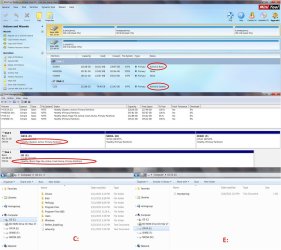
The reason I ask is that I took a look at my disks in Partition Wizard and in Disk Management, and the descriptions are different:

In Disk Management my C Drive is "Healthy (Boot, Page File, Active, Crash Dump, Primary Partition)"
In Partition Wizard my C Drive is "Active & System"

In Disk Management my E Partition on my HDD is "Healthy (System, Active, Primary Partition)"
In Partition Wizard my E Partition on my HDD is "Active & Boot"

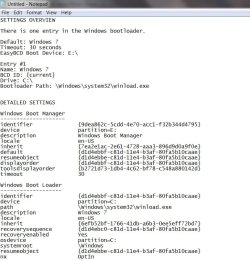
I also went into EasyBCD and pulled the View Settings information, which I have attached as a screen shot. It sees the Boot Manager on E and the Boot Loader on C

So - is this just a terminology difference between PW and DM? Or does this indicate an additional problem?

Either way, will the EasyBCD tutorial steps still be sufficient for this part of the process, or do I need to do something in addition before I move on to the other items on Greg's list?

 

Attachments

  • EasyBCD Settings.jpg
    EasyBCD Settings.jpg
    80.9 KB · Views: 1

My Computer My Computer

Computer type
Laptop
Computer Manufacturer/Model Number
ProStar Model P157SM-A
OS
Windows 7 Professional 64 bit SP 1
CPU
Intel Core i7-4710 MQ
Motherboard
No info
Memory
16 GB
Graphics Card(s)
NVIDIA GeForce GTX 870M
Hard Drives
256 GB Samsung SSD
1TB 7200 RPM Hard Drive
Antivirus
Norton Internet Security
Browser
Internet Explorer and Mozilla Firefox
In case my prior post was unclear regarding the drive descriptions, here is a composite screen shot showing Disk Management, Partition Wizard, and Windows Explorer views of my drives
 

Attachments

  • Composite.jpg
    Composite.jpg
    188.4 KB · Views: 2

My Computer My Computer

Computer type
Laptop
Computer Manufacturer/Model Number
ProStar Model P157SM-A
OS
Windows 7 Professional 64 bit SP 1
CPU
Intel Core i7-4710 MQ
Motherboard
No info
Memory
16 GB
Graphics Card(s)
NVIDIA GeForce GTX 870M
Hard Drives
256 GB Samsung SSD
1TB 7200 RPM Hard Drive
Antivirus
Norton Internet Security
Browser
Internet Explorer and Mozilla Firefox
Again, after moving the Bootmgr with EasyBCD, reboot into BIOS setup to set Win7 first hard drive to boot.

Confirm that Disk Mgmt (not Partition Wizard) says Win7 partition is System Active Boot, proving the Bootmgr has been moved. ("System" in Disk Mgmt = "Boot" in PW).

Then if necessary mark E Inactive so you can convert E, M and F partitions to Logical.
Partition - Mark as Inactive - Windows 7 Forums
How to set partition as Primary or Logical with Partition Wizard

Thanks - I focused on the tutorial link and overlooked the text about going into the BIOS to change the boot order.
 

My Computer My Computer

Computer type
Laptop
Computer Manufacturer/Model Number
ProStar Model P157SM-A
OS
Windows 7 Professional 64 bit SP 1
CPU
Intel Core i7-4710 MQ
Motherboard
No info
Memory
16 GB
Graphics Card(s)
NVIDIA GeForce GTX 870M
Hard Drives
256 GB Samsung SSD
1TB 7200 RPM Hard Drive
Antivirus
Norton Internet Security
Browser
Internet Explorer and Mozilla Firefox
This is how it will look when corrected :)
 
Last edited:

My Computer My Computer

Computer type
PC/Desktop
Computer Manufacturer/Model Number
Skylake Special #666
OS
Windows 10 Pro x64
CPU
Intel Core i7 6700K
Motherboard
Asus Sabertooth Z170 Mark 1
Memory
GSkill TridentZ RGB 16GB 3600 16-16-16-36
Graphics Card(s)
EVGA GTX 980 Ti SC x2
Sound Card
Realtek High Definition
Monitor(s) Displays
AOC G2460PG
Screen Resolution
1920 x 1080 144Hz
Hard Drives
Samsung 860 Pro 256GB, Seagate Barracuda 4TB x2
PSU
EVGA 1000 P2, EVGA White Custom Braided Cables
Case
Corsair Vengeance C70 Gunmetal Black
Cooling
Corsair H100i v2, Corsair ML120 x2, Thermal Grizzly Kryonaut
Keyboard
Logitech G910 Orion Spectrum
Mouse
Logitech G700s
Internet Speed
Verizon Fios Quantum Gateway 75/75
Antivirus
Windows Defender, Malwarebytes Free 3.8.3
Browser
Chrome
Other Info
Corsair SP120 x4, LG Blu-ray Drive, Durabrand HT-395 100 Watt Dolby Digital Amp, Corsair H2100 Wireless 7.1 Headset
So far so good
-easyBCD
-change Boot disk order
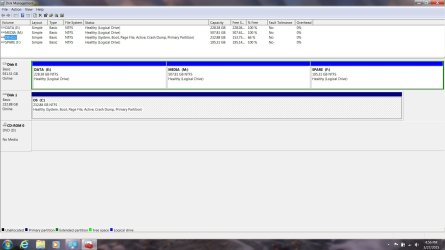
-Disk Management (see screen shot)

I'm not that familiar with working in Setup at the BIOS level, so it took me a minute or two to figure out that I had to go under "Hard Drive BBS Priorities" to move the SSD drive ahead of the HDD in the boot order before I could get it to display under the "Boot Option Priorities" - but I think it worked
 

Attachments

  • Disk Mgmt After.jpg
    Disk Mgmt After.jpg
    120.6 KB · Views: 2

My Computer My Computer

Computer type
Laptop
Computer Manufacturer/Model Number
ProStar Model P157SM-A
OS
Windows 7 Professional 64 bit SP 1
CPU
Intel Core i7-4710 MQ
Motherboard
No info
Memory
16 GB
Graphics Card(s)
NVIDIA GeForce GTX 870M
Hard Drives
256 GB Samsung SSD
1TB 7200 RPM Hard Drive
Antivirus
Norton Internet Security
Browser
Internet Explorer and Mozilla Firefox
Now you should be able to mark E inactive, and windows should boot no problem.

Do that, re boot and post a new shot :D
 

My Computer My Computer

Computer type
PC/Desktop
Computer Manufacturer/Model Number
Skylake Special #666
OS
Windows 10 Pro x64
CPU
Intel Core i7 6700K
Motherboard
Asus Sabertooth Z170 Mark 1
Memory
GSkill TridentZ RGB 16GB 3600 16-16-16-36
Graphics Card(s)
EVGA GTX 980 Ti SC x2
Sound Card
Realtek High Definition
Monitor(s) Displays
AOC G2460PG
Screen Resolution
1920 x 1080 144Hz
Hard Drives
Samsung 860 Pro 256GB, Seagate Barracuda 4TB x2
PSU
EVGA 1000 P2, EVGA White Custom Braided Cables
Case
Corsair Vengeance C70 Gunmetal Black
Cooling
Corsair H100i v2, Corsair ML120 x2, Thermal Grizzly Kryonaut
Keyboard
Logitech G910 Orion Spectrum
Mouse
Logitech G700s
Internet Speed
Verizon Fios Quantum Gateway 75/75
Antivirus
Windows Defender, Malwarebytes Free 3.8.3
Browser
Chrome
Other Info
Corsair SP120 x4, LG Blu-ray Drive, Durabrand HT-395 100 Watt Dolby Digital Amp, Corsair H2100 Wireless 7.1 Headset
Woohoo - I think this is finally done!! :party:


And, yes, I remembered to hit Apply in PW, and I double-checked that PW shows my C drive as Active & System & Boot and all the others as 'none'


And, yes, I remembered to do my Macrium backup before making these changes, copying the partitions required to restore Windows, as a precaution ... and I will now replace that image with an "after" version so I don't have to redo this


Thank you all for your patience and your help and support
 

Attachments

  • Disk Mgmt Complete.jpg
    Disk Mgmt Complete.jpg
    153.7 KB · Views: 6

My Computer My Computer

Computer type
Laptop
Computer Manufacturer/Model Number
ProStar Model P157SM-A
OS
Windows 7 Professional 64 bit SP 1
CPU
Intel Core i7-4710 MQ
Motherboard
No info
Memory
16 GB
Graphics Card(s)
NVIDIA GeForce GTX 870M
Hard Drives
256 GB Samsung SSD
1TB 7200 RPM Hard Drive
Antivirus
Norton Internet Security
Browser
Internet Explorer and Mozilla Firefox
Now you should be able to mark E inactive, and windows should boot no problem.

Do that, re boot and post a new shot :D

I took screen shots as I went, but I figured I'd just keep moving rather than post every step since things appeared to happen correctly - if anyone wants intermediate shots I have them and can post them - I even took photos of what I did when I was in the BIOS, just in case ;)

And, oh, yeah - windows booted successfully every single time
 

My Computer My Computer

Computer type
Laptop
Computer Manufacturer/Model Number
ProStar Model P157SM-A
OS
Windows 7 Professional 64 bit SP 1
CPU
Intel Core i7-4710 MQ
Motherboard
No info
Memory
16 GB
Graphics Card(s)
NVIDIA GeForce GTX 870M
Hard Drives
256 GB Samsung SSD
1TB 7200 RPM Hard Drive
Antivirus
Norton Internet Security
Browser
Internet Explorer and Mozilla Firefox
Excellent work :thumbsup:

Now make sure windows is fully updated, then create a fresh disk image and store it right there on Disk 0 :D
 
Last edited:

My Computer My Computer

Computer type
PC/Desktop
Computer Manufacturer/Model Number
Skylake Special #666
OS
Windows 10 Pro x64
CPU
Intel Core i7 6700K
Motherboard
Asus Sabertooth Z170 Mark 1
Memory
GSkill TridentZ RGB 16GB 3600 16-16-16-36
Graphics Card(s)
EVGA GTX 980 Ti SC x2
Sound Card
Realtek High Definition
Monitor(s) Displays
AOC G2460PG
Screen Resolution
1920 x 1080 144Hz
Hard Drives
Samsung 860 Pro 256GB, Seagate Barracuda 4TB x2
PSU
EVGA 1000 P2, EVGA White Custom Braided Cables
Case
Corsair Vengeance C70 Gunmetal Black
Cooling
Corsair H100i v2, Corsair ML120 x2, Thermal Grizzly Kryonaut
Keyboard
Logitech G910 Orion Spectrum
Mouse
Logitech G700s
Internet Speed
Verizon Fios Quantum Gateway 75/75
Antivirus
Windows Defender, Malwarebytes Free 3.8.3
Browser
Chrome
Other Info
Corsair SP120 x4, LG Blu-ray Drive, Durabrand HT-395 100 Watt Dolby Digital Amp, Corsair H2100 Wireless 7.1 Headset
  • Like
Reactions: whs
I've dealt with this very issue here thousands of times.


One additional thought -

Would it make any sense to create a tutorial (or some sort of informational thread that would persist) about the fact that drive numbers can change unexpectedly, and that system files can wind up in unintended places? It might save others from having to browse through 4 year old threads and track down old KB numbers and such.

I'm suggesting this because the first place I looked for information on this was Tutorials and I didn't find what I needed there.

I also saw this from BrodyBoy in November 2010, in the following thread:
http://www.sevenforums.com/installa...-port-numbers-vs-assignemnt-disk-numbers.html

"At one point, you had asked what consequence this might have, aside from being a nuisance. I see this as a serious trap for newbies trying to do clean installs, in a couple ways.

  • First, if they look in Windows to determine where to put the new install, it's very possible they could end up installing on the wrong hard drive and maybe even lose important data in the process, if the enumeration changes when they boot to the installer.
  • Second...and I didn't even know about this until I read the MS KB article...in some scenarios, the reversed disk enumeration can cause Windows Setup to put the System Reserved partition on a different HDD from the system partition. This could cause issues down the line with drive upgrades, disk imaging, etc. This seems like much more than a nuisance, and something worth avoiding.
I frequently help the technically-challenged through clean installs, via email, PMs, or texts. If I can't figure out a way to ensure consistent drive enumeration, I can't standardize a simple instruction for determining installation location. (I'm talking about people who are completely new to this, the ones who need a step-by-step walkthrough.) I've wanted to avoid making them open their laptops to disconnect cables or remove drives, if possible."
 

My Computer My Computer

Computer type
Laptop
Computer Manufacturer/Model Number
ProStar Model P157SM-A
OS
Windows 7 Professional 64 bit SP 1
CPU
Intel Core i7-4710 MQ
Motherboard
No info
Memory
16 GB
Graphics Card(s)
NVIDIA GeForce GTX 870M
Hard Drives
256 GB Samsung SSD
1TB 7200 RPM Hard Drive
Antivirus
Norton Internet Security
Browser
Internet Explorer and Mozilla Firefox
Excellent work :thumbsup:

Now make sure windows is fully updated, then create a fresh disk image and store it right there on Disk 0 :D


Absotively posilutely - or something like that ;)
 

My Computer My Computer

Computer type
Laptop
Computer Manufacturer/Model Number
ProStar Model P157SM-A
OS
Windows 7 Professional 64 bit SP 1
CPU
Intel Core i7-4710 MQ
Motherboard
No info
Memory
16 GB
Graphics Card(s)
NVIDIA GeForce GTX 870M
Hard Drives
256 GB Samsung SSD
1TB 7200 RPM Hard Drive
Antivirus
Norton Internet Security
Browser
Internet Explorer and Mozilla Firefox
The best and only thing you can do is to combat that is to put the OS drive on sata port 0 or 1, whatever number the board starts with.

The fastest port is usually always #1 6Gbps (today`s boards anyway)

Sata drivers like to play games with where the disk ends up, but it usually always straightens itself out if the drive is connected to the right port.

Others may say it doesn`t matter, to that I say.........

Why dig a hole with a shovel then, when you can use a spoon ?
 

My Computer My Computer

Computer type
PC/Desktop
Computer Manufacturer/Model Number
Skylake Special #666
OS
Windows 10 Pro x64
CPU
Intel Core i7 6700K
Motherboard
Asus Sabertooth Z170 Mark 1
Memory
GSkill TridentZ RGB 16GB 3600 16-16-16-36
Graphics Card(s)
EVGA GTX 980 Ti SC x2
Sound Card
Realtek High Definition
Monitor(s) Displays
AOC G2460PG
Screen Resolution
1920 x 1080 144Hz
Hard Drives
Samsung 860 Pro 256GB, Seagate Barracuda 4TB x2
PSU
EVGA 1000 P2, EVGA White Custom Braided Cables
Case
Corsair Vengeance C70 Gunmetal Black
Cooling
Corsair H100i v2, Corsair ML120 x2, Thermal Grizzly Kryonaut
Keyboard
Logitech G910 Orion Spectrum
Mouse
Logitech G700s
Internet Speed
Verizon Fios Quantum Gateway 75/75
Antivirus
Windows Defender, Malwarebytes Free 3.8.3
Browser
Chrome
Other Info
Corsair SP120 x4, LG Blu-ray Drive, Durabrand HT-395 100 Watt Dolby Digital Amp, Corsair H2100 Wireless 7.1 Headset
The best and only thing you can do is to combat that is to put the OS drive on sata port 0 or 1, whatever number the board starts with.

The fastest port is usually always #1 6Gbps (today`s boards anyway)

Sata drivers like to play games with where the disk ends up, but it usually always straightens itself out if the drive is connected to the right port.

I gotcha - you're saying the speed factor rather than the port number itself is what overcomes the MS characteristic of 'fastest response wins the Drive 0 slot in Disk Management' and keeps the OS drive as Drive 0 - right?
 

My Computer My Computer

Computer type
Laptop
Computer Manufacturer/Model Number
ProStar Model P157SM-A
OS
Windows 7 Professional 64 bit SP 1
CPU
Intel Core i7-4710 MQ
Motherboard
No info
Memory
16 GB
Graphics Card(s)
NVIDIA GeForce GTX 870M
Hard Drives
256 GB Samsung SSD
1TB 7200 RPM Hard Drive
Antivirus
Norton Internet Security
Browser
Internet Explorer and Mozilla Firefox
Nooooooo, I`m not saying that at all.

I said the best thing you can do is put the disk you want on port 1, on port 1, but windows DM still may not show it correctly.

For example, a board with IDE and SATA drives will always show the IDE drives as Disk 0, 1 etc before the sata drives, but that`s just windows and that`s another situation altogether.

As long as you are happy with the result, that`s all that matters ;)
 

My Computer My Computer

Computer type
PC/Desktop
Computer Manufacturer/Model Number
Skylake Special #666
OS
Windows 10 Pro x64
CPU
Intel Core i7 6700K
Motherboard
Asus Sabertooth Z170 Mark 1
Memory
GSkill TridentZ RGB 16GB 3600 16-16-16-36
Graphics Card(s)
EVGA GTX 980 Ti SC x2
Sound Card
Realtek High Definition
Monitor(s) Displays
AOC G2460PG
Screen Resolution
1920 x 1080 144Hz
Hard Drives
Samsung 860 Pro 256GB, Seagate Barracuda 4TB x2
PSU
EVGA 1000 P2, EVGA White Custom Braided Cables
Case
Corsair Vengeance C70 Gunmetal Black
Cooling
Corsair H100i v2, Corsair ML120 x2, Thermal Grizzly Kryonaut
Keyboard
Logitech G910 Orion Spectrum
Mouse
Logitech G700s
Internet Speed
Verizon Fios Quantum Gateway 75/75
Antivirus
Windows Defender, Malwarebytes Free 3.8.3
Browser
Chrome
Other Info
Corsair SP120 x4, LG Blu-ray Drive, Durabrand HT-395 100 Watt Dolby Digital Amp, Corsair H2100 Wireless 7.1 Headset
Okay - third time's the charm. I finally "got it."

When I went into Setup to change the boot order, I saw 5 SATA ports - 1, 3, and 5 had devices connected to them. (I assume the other two ports are there to support the expansion drives this box will take (it will take 2 SSD drives and 2 HDD drives in addition to a DVD drive, and I believe each pair will support RAID mode). The SSD drive is Port 5.

I'm going to find out why they are connected in the current manner, just to satisfy my curiosity. However, I'm also adopting the "don't mess with it any more if it ain't broke" approach at this point, and I don't plan to change my current arrangement unless and until it causes problems.
 

My Computer My Computer

Computer type
Laptop
Computer Manufacturer/Model Number
ProStar Model P157SM-A
OS
Windows 7 Professional 64 bit SP 1
CPU
Intel Core i7-4710 MQ
Motherboard
No info
Memory
16 GB
Graphics Card(s)
NVIDIA GeForce GTX 870M
Hard Drives
256 GB Samsung SSD
1TB 7200 RPM Hard Drive
Antivirus
Norton Internet Security
Browser
Internet Explorer and Mozilla Firefox
Post your Windows Experience Index scores when you get a chance.
 

My Computer My Computer

Computer type
PC/Desktop
Computer Manufacturer/Model Number
Skylake Special #666
OS
Windows 10 Pro x64
CPU
Intel Core i7 6700K
Motherboard
Asus Sabertooth Z170 Mark 1
Memory
GSkill TridentZ RGB 16GB 3600 16-16-16-36
Graphics Card(s)
EVGA GTX 980 Ti SC x2
Sound Card
Realtek High Definition
Monitor(s) Displays
AOC G2460PG
Screen Resolution
1920 x 1080 144Hz
Hard Drives
Samsung 860 Pro 256GB, Seagate Barracuda 4TB x2
PSU
EVGA 1000 P2, EVGA White Custom Braided Cables
Case
Corsair Vengeance C70 Gunmetal Black
Cooling
Corsair H100i v2, Corsair ML120 x2, Thermal Grizzly Kryonaut
Keyboard
Logitech G910 Orion Spectrum
Mouse
Logitech G700s
Internet Speed
Verizon Fios Quantum Gateway 75/75
Antivirus
Windows Defender, Malwarebytes Free 3.8.3
Browser
Chrome
Other Info
Corsair SP120 x4, LG Blu-ray Drive, Durabrand HT-395 100 Watt Dolby Digital Amp, Corsair H2100 Wireless 7.1 Headset
Back
Top