
I am totally blank on installation of Windows 7 on a new HDD.
I upgraded from Windows 98 to Windows 7, 6 years ago.
It was all pre-installed into my laptop.No tinkering for me.
In Win 98, all I needed was to pop in the installation CD and the installation was done when I typed in the Product Key S/N.
My 6 years old laptop is dying as the HDD is nearing it lifespan.Please read http://www.sevenforums.com/hardware...cant-boot-due-sysconfig-changed-disk-err.html
In Windows 7, I need to download the whole Windows 7 OS platform from MS server then burned into a DVD disc or a USB flashdrive.
Then I need to format the HDD to NTFS format.
Then what?
I read this section http://www.sevenforums.com/tutorial...ows-7-a.html?filter[3]=Installation and Setup and it seemed easy.
What are the procedures? It seemed complicated from the threads that I read.
What are UEFI,GPT? I only know MBR.
Do I need to partition my new HDD and copy images of my system reserved, PQ services from the dying HDD?
How do I do that?
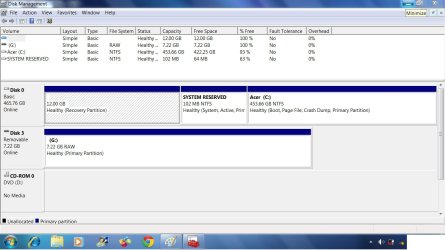
The attached picture is the old dying HDD.
Thank you for your reply
I upgraded from Windows 98 to Windows 7, 6 years ago.
It was all pre-installed into my laptop.No tinkering for me.
In Win 98, all I needed was to pop in the installation CD and the installation was done when I typed in the Product Key S/N.
My 6 years old laptop is dying as the HDD is nearing it lifespan.Please read http://www.sevenforums.com/hardware...cant-boot-due-sysconfig-changed-disk-err.html
In Windows 7, I need to download the whole Windows 7 OS platform from MS server then burned into a DVD disc or a USB flashdrive.
Then I need to format the HDD to NTFS format.
Then what?
I read this section http://www.sevenforums.com/tutorial...ows-7-a.html?filter[3]=Installation and Setup and it seemed easy.
What are the procedures? It seemed complicated from the threads that I read.
What are UEFI,GPT? I only know MBR.
Do I need to partition my new HDD and copy images of my system reserved, PQ services from the dying HDD?
How do I do that?
The attached picture is the old dying HDD.
Thank you for your reply
Attachments
Last edited:
My Computer
At a glance
Windows 7 Home Premium 64bitIntel Core 2 Duo T6600 2.2 GHz 800MHz4GBNvidia Geforce G105M
- Computer type
- Laptop
- Computer Manufacturer/Model Number
- Acer Aspire 4736G
- OS
- Windows 7 Home Premium 64bit
- CPU
- Intel Core 2 Duo T6600 2.2 GHz 800MHz
- Motherboard
- Intel PM65
- Memory
- 4GB
- Graphics Card(s)
- Nvidia Geforce G105M
- Hard Drives
- Toshiba MK5055GSX 99FKS993S LBAS 976773167
- Antivirus
- AVG Free AV 2015
- Browser
- IE & Chrome


