Install windows 7 on a new HDD with just the old (dead) HDD's COA key?

RebeccaValentin

New member
Local time
12:25 PM
Messages
37
I have a Sony Vaio laptop (VPCSA35GG) which came pre-installed with a HDD running Windows 7 Professional 64 bit. It just crashed unexpectedly & I have no way of recovering anything from it. Its completely dead. And I dont have any recovery disks.

Now I have bought a new HDD to replace the old one & want to install the same OS in it. I have only the COA key (which came with my laptop when I bought it) and a retail Windows installation CD. I dont have the disk that came with the laptop.

Would this alone do? Will the COA key alone be able to activate Windows on my new HDD?

I have very little knowledge about this, so any kind help from anyone would be highly appreciated. Kindly please provide me with some help..
 

My Computer My Computer

At a glance

Windows 7 Professional 64 bit
Computer type
Laptop
Computer Manufacturer/Model Number
Sony
OS
Windows 7 Professional 64 bit
Welcome to the forum,

You should have no problem doing that, using the COA key on a same version installer is fine, the key is what determines OEM or Retail. Is the retail disc a seven pro disc?

The COA key you are talking about is the one on this sticker right?

coa-stickers.gif

Here's a tutorial for doing the install,

http://www.sevenforums.com/tutorials/1649-clean-install-windows-7-a.html
 

My Computer My Computer

At a glance

Win 10 Pro x64Intel I5-2500K @3.3GHz16GB G.Skill Ripjaws X (4x4GB)EVGA GeForce 750 Ti SC 2GB
Computer type
PC/Desktop
Computer Manufacturer/Model Number
Self Built
OS
Win 10 Pro x64
CPU
Intel I5-2500K @3.3GHz
Motherboard
Asrock P67 Extreme4
Memory
16GB G.Skill Ripjaws X (4x4GB)
Graphics Card(s)
EVGA GeForce 750 Ti SC 2GB
Sound Card
ASUS Xonar DG 5.1 Channels 24-bit 96KHz PCI Interface Sound
Monitor(s) Displays
auria eq2367
Screen Resolution
1920 x 1080
Hard Drives
250GB Samsung 850 EVO SSD
1TB WD Blue
1TB Hitachi
PSU
SeaSonic X 650W 80 Plus Gold
Case
Corsair Obsidian 750D
Cooling
Corsair H60, Three 140mm case fans
Keyboard
Logitech Wireless Keyboard K520
Mouse
Logitech Wireless Mouse M310
Internet Speed
Wave Broadband ~ 100 dn 5 up
Antivirus
Windows Defender, Malwarebytes Premium
Browser
Edge, IE11, Chrome
Other Info
Laptop specs: HP g7-1365dx /
CPU: AMD A6-3420M APU with Radeon(tm) HD Graphics /
RAM: Crucial 8Gb (2x4Gb) /
SSD: Crucial M4-CT128M4SSD2 ATA Device/ FW 000F /
GFX: AMD Radeon HD 6520G /
OS: Windows 10 Pro x64
Welcome to the forum,

You should have no problem doing that, using the COA key on a same version installer is fine, the key is what determines OEM or Retail. Is the retail disc a seven pro disc?

The COA key you are talking about is the one on this sticker right?

View attachment 388056

Here's a tutorial for doing the install,

http://www.sevenforums.com/tutorials/1649-clean-install-windows-7-a.html

Thanks a ton! :)
Yes the retail disk is a win7 pro 64 bit one.. the same version as my previous OS..
yes, the one on the sticker..

& thanks a ton for the tutorial too.. thank you so much!
 

My Computer My Computer

At a glance

Windows 7 Professional 64 bit
Computer type
Laptop
Computer Manufacturer/Model Number
Sony
OS
Windows 7 Professional 64 bit
Yeah, you have everything you need then. You're welcome. :)
 

My Computer My Computer

At a glance

Win 10 Pro x64Intel I5-2500K @3.3GHz16GB G.Skill Ripjaws X (4x4GB)EVGA GeForce 750 Ti SC 2GB
Computer type
PC/Desktop
Computer Manufacturer/Model Number
Self Built
OS
Win 10 Pro x64
CPU
Intel I5-2500K @3.3GHz
Motherboard
Asrock P67 Extreme4
Memory
16GB G.Skill Ripjaws X (4x4GB)
Graphics Card(s)
EVGA GeForce 750 Ti SC 2GB
Sound Card
ASUS Xonar DG 5.1 Channels 24-bit 96KHz PCI Interface Sound
Monitor(s) Displays
auria eq2367
Screen Resolution
1920 x 1080
Hard Drives
250GB Samsung 850 EVO SSD
1TB WD Blue
1TB Hitachi
PSU
SeaSonic X 650W 80 Plus Gold
Case
Corsair Obsidian 750D
Cooling
Corsair H60, Three 140mm case fans
Keyboard
Logitech Wireless Keyboard K520
Mouse
Logitech Wireless Mouse M310
Internet Speed
Wave Broadband ~ 100 dn 5 up
Antivirus
Windows Defender, Malwarebytes Premium
Browser
Edge, IE11, Chrome
Other Info
Laptop specs: HP g7-1365dx /
CPU: AMD A6-3420M APU with Radeon(tm) HD Graphics /
RAM: Crucial 8Gb (2x4Gb) /
SSD: Crucial M4-CT128M4SSD2 ATA Device/ FW 000F /
GFX: AMD Radeon HD 6520G /
OS: Windows 10 Pro x64
Yeah, you have everything you need then. You're welcome. :)

Sorry to bother you again.. :(
but i just got something in my mind.
After installing Windows 7, what is the first thing I should do? Install all the drivers (in order) of my Sony Vaio or just install Windows Updates?
Thanks in advance.. :)
 

My Computer My Computer

At a glance

Windows 7 Professional 64 bit
Computer type
Laptop
Computer Manufacturer/Model Number
Sony
OS
Windows 7 Professional 64 bit
No bother. :)

I would go with drivers, then updates, updates may take you a while to get caught up.
 

My Computer My Computer

At a glance

Win 10 Pro x64Intel I5-2500K @3.3GHz16GB G.Skill Ripjaws X (4x4GB)EVGA GeForce 750 Ti SC 2GB
Computer type
PC/Desktop
Computer Manufacturer/Model Number
Self Built
OS
Win 10 Pro x64
CPU
Intel I5-2500K @3.3GHz
Motherboard
Asrock P67 Extreme4
Memory
16GB G.Skill Ripjaws X (4x4GB)
Graphics Card(s)
EVGA GeForce 750 Ti SC 2GB
Sound Card
ASUS Xonar DG 5.1 Channels 24-bit 96KHz PCI Interface Sound
Monitor(s) Displays
auria eq2367
Screen Resolution
1920 x 1080
Hard Drives
250GB Samsung 850 EVO SSD
1TB WD Blue
1TB Hitachi
PSU
SeaSonic X 650W 80 Plus Gold
Case
Corsair Obsidian 750D
Cooling
Corsair H60, Three 140mm case fans
Keyboard
Logitech Wireless Keyboard K520
Mouse
Logitech Wireless Mouse M310
Internet Speed
Wave Broadband ~ 100 dn 5 up
Antivirus
Windows Defender, Malwarebytes Premium
Browser
Edge, IE11, Chrome
Other Info
Laptop specs: HP g7-1365dx /
CPU: AMD A6-3420M APU with Radeon(tm) HD Graphics /
RAM: Crucial 8Gb (2x4Gb) /
SSD: Crucial M4-CT128M4SSD2 ATA Device/ FW 000F /
GFX: AMD Radeon HD 6520G /
OS: Windows 10 Pro x64
Yeah, you have everything you need then. You're welcome. :)

Sorry to bother you again.. :(
but i just got something in my mind.
After installing Windows 7, what is the first thing I should do? Install all the drivers (in order) of my Sony Vaio or just install Windows Updates?
Thanks in advance.. :)

Your Windows installation disc may supply all necessary drivers. It's kind of on a case by case basis.

I'd do the basic install with the Windows disc and then evaluate. Look in Device Manager for any yellow exclamation marks. Check your hardware for any issues---display settings, text size, USB port functionality, printer, etc.

If everything works to your satisfaction, I probably wouldn't install any other drivers. If not, consider the newest drivers for that particular functionality from your PC manufacturer's web site.

The most important thing is to have an Internet connection, so I'd probably download the LAN/Ethernet/NIC driver for that before I began, even though it's usually installed by Windows during the initial installation.

If you are going to install other drivers, install the INF driver first.
 

My Computer My Computer

At a glance

Windows 7 Home Premium SP1, 64-bitIntel Skylake i5-6600K, not overclocked8 GB HyperX DDR4-2666 (2 x 4 GB)none; graphics are integrated on CPU
Computer type
PC/Desktop
Computer Manufacturer/Model Number
Ignatz Special; 4 speed manual gearbox; factory air conditioning; one of one
OS
Windows 7 Home Premium SP1, 64-bit
CPU
Intel Skylake i5-6600K, not overclocked
Motherboard
AsRock Z170M Extreme 4, micro ATX
Memory
8 GB HyperX DDR4-2666 (2 x 4 GB)
Graphics Card(s)
none; graphics are integrated on CPU
Sound Card
onboard: Realtek ALC1150; external: USB Behringer UF0-202
Monitor(s) Displays
Dell S2340M 23 inch IPS
Screen Resolution
1600 x 900
Hard Drives
System: Crucial MX100 series SSD, 128 GB;
Data: Samsung Spinpoint 103SJ, 1 TB;
Backup: WD Caviar Green WD30EZRX-00D8PB0, 3 TB
PSU
Rosewill SilentNight 500 watt fanless, semi-modular
Case
Antec Solo II
Cooling
Noctua NH-U12S; Noctua F12 intake, Noctua S12A exhaust
Keyboard
Microsoft 200 6JH-00001 USB
Mouse
Dell or Microsoft optical wired; USB
Antivirus
Microsoft Security Essentials and Malwarebytes Premium
Browser
Pale Moon
Other Info
All fans PWM; speeds at idle: CPU circa 500 rpm; intake circa 600 rpm; exhaust circa 600 rpm; CPU temps 27 idle and 47 C load in a warm room (27 C/81 F) when running Intel Extreme Tuning Utility stress test.

My Computer My Computer

At a glance

Windows 7 Professional 64 bit
Computer type
Laptop
Computer Manufacturer/Model Number
Sony
OS
Windows 7 Professional 64 bit
Your Windows installation disc may supply all necessary drivers. It's kind of on a case by case basis.

I'd do the basic install with the Windows disc and then evaluate. Look in Device Manager for any yellow exclamation marks. Check your hardware for any issues---display settings, text size, USB port functionality, printer, etc.

If everything works to your satisfaction, I probably wouldn't install any other drivers. If not, consider the newest drivers for that particular functionality from your PC manufacturer's web site.

The most important thing is to have an Internet connection, so I'd probably download the LAN/Ethernet/NIC driver for that before I began, even though it's usually installed by Windows during the initial installation.

If you are going to install other drivers, install the INF driver first.

Is there any special procedure to actually get to know if any drivers are missing, apart from testing every functionality one by one?

And thanks for the information :)
 

My Computer My Computer

At a glance

Windows 7 Professional 64 bit
Computer type
Laptop
Computer Manufacturer/Model Number
Sony
OS
Windows 7 Professional 64 bit
Sorry, I know this is something which is off topic. But got some doubts.. :)

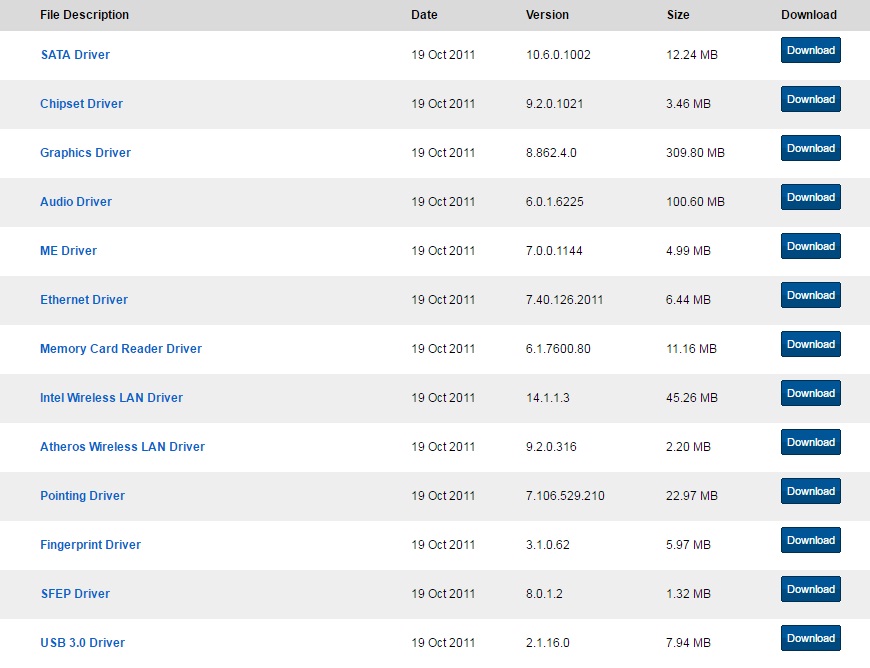
So these are the drivers from the Sony website ( I have a Sony Vaio S series laptop). When I finish installing Windows 7, I should just check for any missing drivers and install ONLY them? What if I miss something? (Im just a beginner and I have never tried anything like reinstalling Win before)
And does the Windows disk usually contain every driver mentioned here?
So if that is the case, then I should only go for driver updates?
Thanks in advance.

xlqLbiC.jpg


W4TMG08.jpg
 

My Computer My Computer

At a glance

Windows 7 Professional 64 bit
Computer type
Laptop
Computer Manufacturer/Model Number
Sony
OS
Windows 7 Professional 64 bit
Is there any special procedure to actually get to know if any drivers are missing, apart from testing every functionality one by one?

And thanks for the information :)

Look for the yellow exclamation points ("bangs") in Device Manager. They typically refer to missing drivers.

Even if you see one or more, you may not have any problems with the hardware you actually use. I wouldn't expect to see more than 1 or 2 on a fresh install. Maybe none.

Or you might.

Some people are obsessed with removing all of the bangs, even though they have no problems doing whatever they want on the PC.

Other people are obsessed with always having the "latest drivers", even though they have no issues at all--the current drivers are doing the job.

I tend to leave well enough alone. If I need to do X, Y, and Z and can in fact do X, Y, and Z, I don't get in a lather over getting the latest drivers. New drivers can have unintended and unfortunate consequences.

The standard advice is to install the INF (aka "chipset") driver first, but I'm not sure how critical that is--I'll bet it's not installed first in many many cases and probably not installed at all quite often. It's hard to get definitive info on it's importance in the last few years.

The LAN driver is the most important. Without it, you aren't getting on the Internet. Normally, Windows will install it, but since it's so critical, I'd download it and have it available just in case.
 

My Computer My Computer

At a glance

Windows 7 Home Premium SP1, 64-bitIntel Skylake i5-6600K, not overclocked8 GB HyperX DDR4-2666 (2 x 4 GB)none; graphics are integrated on CPU
Computer type
PC/Desktop
Computer Manufacturer/Model Number
Ignatz Special; 4 speed manual gearbox; factory air conditioning; one of one
OS
Windows 7 Home Premium SP1, 64-bit
CPU
Intel Skylake i5-6600K, not overclocked
Motherboard
AsRock Z170M Extreme 4, micro ATX
Memory
8 GB HyperX DDR4-2666 (2 x 4 GB)
Graphics Card(s)
none; graphics are integrated on CPU
Sound Card
onboard: Realtek ALC1150; external: USB Behringer UF0-202
Monitor(s) Displays
Dell S2340M 23 inch IPS
Screen Resolution
1600 x 900
Hard Drives
System: Crucial MX100 series SSD, 128 GB;
Data: Samsung Spinpoint 103SJ, 1 TB;
Backup: WD Caviar Green WD30EZRX-00D8PB0, 3 TB
PSU
Rosewill SilentNight 500 watt fanless, semi-modular
Case
Antec Solo II
Cooling
Noctua NH-U12S; Noctua F12 intake, Noctua S12A exhaust
Keyboard
Microsoft 200 6JH-00001 USB
Mouse
Dell or Microsoft optical wired; USB
Antivirus
Microsoft Security Essentials and Malwarebytes Premium
Browser
Pale Moon
Other Info
All fans PWM; speeds at idle: CPU circa 500 rpm; intake circa 600 rpm; exhaust circa 600 rpm; CPU temps 27 idle and 47 C load in a warm room (27 C/81 F) when running Intel Extreme Tuning Utility stress test.
Sorry, I know this is something which is off topic. But got some doubts.. :)

So these are the drivers from the Sony website ( I have a Sony Vaio S series laptop). When I finish installing Windows 7, I should just check for any missing drivers and install ONLY them? What if I miss something? (Im just a beginner and I have never tried anything like reinstalling Win before)
And does the Windows disk usually contain every driver mentioned here?
So if that is the case, then I should only go for driver updates?
Thanks in advance.

xlqLbiC.jpg


W4TMG08.jpg

There's no harm done in downloading ALL of them.

Whether you need to install them is another question.

If you need the functionality, you need a driver, but Windows will supply many, most, or all.

Evaluate after your install.

Get the Ethernet driver now, for sure. You can get the others now or later, if you need them.

With reasonable luck, you won't even need to use the downloaded Ethernet driver.
 

My Computer My Computer

At a glance

Windows 7 Home Premium SP1, 64-bitIntel Skylake i5-6600K, not overclocked8 GB HyperX DDR4-2666 (2 x 4 GB)none; graphics are integrated on CPU
Computer type
PC/Desktop
Computer Manufacturer/Model Number
Ignatz Special; 4 speed manual gearbox; factory air conditioning; one of one
OS
Windows 7 Home Premium SP1, 64-bit
CPU
Intel Skylake i5-6600K, not overclocked
Motherboard
AsRock Z170M Extreme 4, micro ATX
Memory
8 GB HyperX DDR4-2666 (2 x 4 GB)
Graphics Card(s)
none; graphics are integrated on CPU
Sound Card
onboard: Realtek ALC1150; external: USB Behringer UF0-202
Monitor(s) Displays
Dell S2340M 23 inch IPS
Screen Resolution
1600 x 900
Hard Drives
System: Crucial MX100 series SSD, 128 GB;
Data: Samsung Spinpoint 103SJ, 1 TB;
Backup: WD Caviar Green WD30EZRX-00D8PB0, 3 TB
PSU
Rosewill SilentNight 500 watt fanless, semi-modular
Case
Antec Solo II
Cooling
Noctua NH-U12S; Noctua F12 intake, Noctua S12A exhaust
Keyboard
Microsoft 200 6JH-00001 USB
Mouse
Dell or Microsoft optical wired; USB
Antivirus
Microsoft Security Essentials and Malwarebytes Premium
Browser
Pale Moon
Other Info
All fans PWM; speeds at idle: CPU circa 500 rpm; intake circa 600 rpm; exhaust circa 600 rpm; CPU temps 27 idle and 47 C load in a warm room (27 C/81 F) when running Intel Extreme Tuning Utility stress test.
There's no harm done in downloading ALL of them.

Whether you need to install them is another question.

If you need the functionality, you need a driver, but Windows will supply many, most, or all.

Evaluate after your install.

Get the Ethernet driver now, for sure. You can get the others now or later, if you need them.

With reasonable luck, you won't even need to use the downloaded Ethernet driver.

Thanks a ton again :)
So probably its enough if I have the chipset, LAN & Ethernet drivers, just in case I need any of them.. right? :)
 

My Computer My Computer

At a glance

Windows 7 Professional 64 bit
Computer type
Laptop
Computer Manufacturer/Model Number
Sony
OS
Windows 7 Professional 64 bit
There's no harm done in downloading ALL of them.

Whether you need to install them is another question.

If you need the functionality, you need a driver, but Windows will supply many, most, or all.

Evaluate after your install.

Get the Ethernet driver now, for sure. You can get the others now or later, if you need them.

With reasonable luck, you won't even need to use the downloaded Ethernet driver.

Thanks a ton again :)
So probably its enough if I have the chipset, LAN & Ethernet drivers, just in case I need any of them.. right? :)

Yeah, I'd get wireless LAN and Ethernet. I'd get them and the chipset driver now. You might eventually need some of those oddball drivers like fingerprint, etc. I'm not sure how many of the oddball drivers Windows might install as I don't use that stuff.
 

My Computer My Computer

At a glance

Windows 7 Home Premium SP1, 64-bitIntel Skylake i5-6600K, not overclocked8 GB HyperX DDR4-2666 (2 x 4 GB)none; graphics are integrated on CPU
Computer type
PC/Desktop
Computer Manufacturer/Model Number
Ignatz Special; 4 speed manual gearbox; factory air conditioning; one of one
OS
Windows 7 Home Premium SP1, 64-bit
CPU
Intel Skylake i5-6600K, not overclocked
Motherboard
AsRock Z170M Extreme 4, micro ATX
Memory
8 GB HyperX DDR4-2666 (2 x 4 GB)
Graphics Card(s)
none; graphics are integrated on CPU
Sound Card
onboard: Realtek ALC1150; external: USB Behringer UF0-202
Monitor(s) Displays
Dell S2340M 23 inch IPS
Screen Resolution
1600 x 900
Hard Drives
System: Crucial MX100 series SSD, 128 GB;
Data: Samsung Spinpoint 103SJ, 1 TB;
Backup: WD Caviar Green WD30EZRX-00D8PB0, 3 TB
PSU
Rosewill SilentNight 500 watt fanless, semi-modular
Case
Antec Solo II
Cooling
Noctua NH-U12S; Noctua F12 intake, Noctua S12A exhaust
Keyboard
Microsoft 200 6JH-00001 USB
Mouse
Dell or Microsoft optical wired; USB
Antivirus
Microsoft Security Essentials and Malwarebytes Premium
Browser
Pale Moon
Other Info
All fans PWM; speeds at idle: CPU circa 500 rpm; intake circa 600 rpm; exhaust circa 600 rpm; CPU temps 27 idle and 47 C load in a warm room (27 C/81 F) when running Intel Extreme Tuning Utility stress test.
Yeah, I'd get wireless LAN and Ethernet. I'd get them and the chipset driver now. You might eventually need some of those oddball drivers like fingerprint, etc. I'm not sure how many of the oddball drivers Windows might install as I don't use that stuff.

Thank you :)
 

My Computer My Computer

At a glance

Windows 7 Professional 64 bit
Computer type
Laptop
Computer Manufacturer/Model Number
Sony
OS
Windows 7 Professional 64 bit
Back
Top