Extract Files from Windows 7 Installation DVD

How to Extract Files from the Windows 7 Installation DVD

   Information
This will show you how to extract original files from the retail Windows 7 installation DVD. You can then use these extracted files to replace missing or corrupted system files in your current Windows 7 installation.
   Note
Normally you will find out that you have corrupted system files that cannot be repaired after your run a sfc /scannow command and look at it's log report.
   Tip
If you do not have a Windows 7 with SP1 installation disc, then you can download the latest official Windows 7 with SP1 ISO file at the link below, then create an installation DVD or USB with it.

Microsoft: Windows 7 Direct Download Links


Here's How:
1. Download and install the same free 32-bit or 64-bit 7-Zip program version as your 32-bit or 64-bit Windows 7.

2. Use Compatibiliy Mode on the 7-Zip shortcut and check the Run this program as an administrator box.

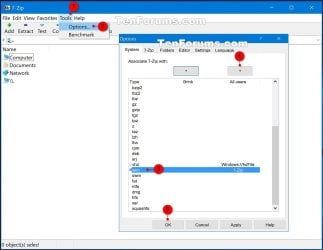
3. Run 7-Zip, then click on Tools and Options on the menu bar. Next, select (highlight) .wim, and click on the plus button for All users, and click on OK. (See screenshots below)
7-Zip.jpg
4. Insert your retail Windows 7 installation disc into the DVD drive and wait for it to be recognized.

5. In 7-Zip, navigate to your DVD drive letter (ex: E: ) that has the Windows 7 installation disc in it, and double click on the Sources folder. (See screenshot below)
Step2.jpg
6. Scroll down and double click on the install.wim file. (See screenshot below)
Step3.jpg
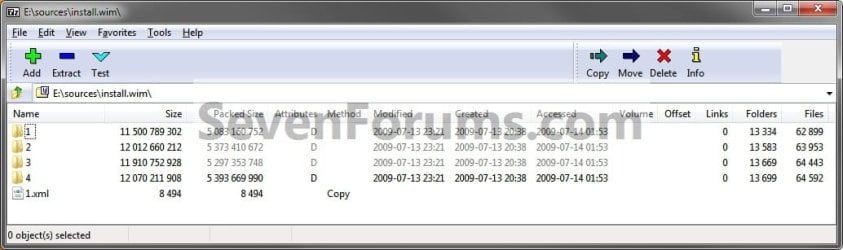
7. You will now see this for a few seconds as it opens. (See screenshot below)
Step4.jpg
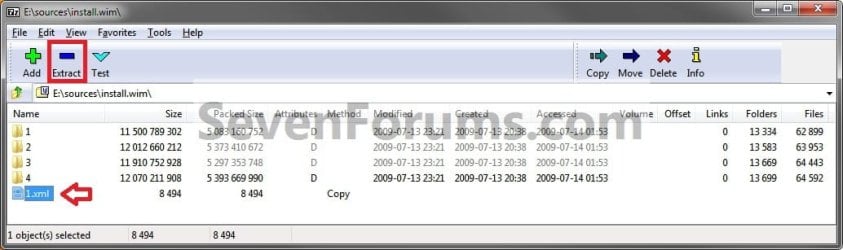
8. Each numbered folder is a different edition of Windows 7. They will vary depending on what type of Windows 7 installation DVD you have. To see what edition is for each numbered folder, select the 1.xml file and click on the Extract button on the toolbar. (See screenshots below)
Step5.jpg

Step6.jpg

9. Copy the 1.xml file to your desktop. (See screenshot below)
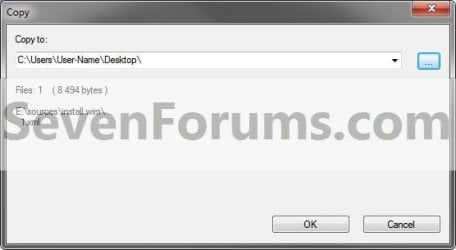
Step7.jpg
10. Open the 1.xml file on the desktop. Look for the <IMAGE INDEX="#"> entry and the <NAME>edition</NAME> entry a bit under it in the code (highlighted in red below) to see what Windows 7 edition is for each numbered folder in step 8. (See code box below with an example 1.xml file)
NOTE: This file will open in Internet Explorer by default.
Code:
[URL="file:///C:/Users/User-Name/Desktop/1.xml#"]-[/URL] <WIM>
  <TOTALBYTES>2860826557</TOTALBYTES> 
[URL="file:///C:/Users/User-Name/Desktop/1.xml#"][B][COLOR=red]-[/COLOR][/B][/URL][B][COLOR=red] <IMAGE INDEX="1">[/COLOR][/B]
  <DIRCOUNT>13290</DIRCOUNT> 
  <FILECOUNT>62943</FILECOUNT> 
  <TOTALBYTES>11500789302</TOTALBYTES> 
[URL="file:///C:/Users/User-Name/Desktop/1.xml#"]-[/URL] <CREATIONTIME>
  <HIGHPART>0x01CA0446</HIGHPART> 
  <LOWPART>0xE89FF88A</LOWPART> 
  </CREATIONTIME>
[URL="file:///C:/Users/User-Name/Desktop/1.xml#"]-[/URL] <LASTMODIFICATIONTIME>
  <HIGHPART>0x01CA045F</HIGHPART> 
  <LOWPART>0x3C8C7A24</LOWPART> 
  </LASTMODIFICATIONTIME>
[URL="file:///C:/Users/User-Name/Desktop/1.xml#"]-[/URL] <WINDOWS>
  <ARCH>9</ARCH> 
  <PRODUCTNAME>Microsoft® Windows® Operating System</PRODUCTNAME> 
  <EDITIONID>HomeBasic</EDITIONID> 
  <INSTALLATIONTYPE>Client</INSTALLATIONTYPE> 
  <HAL>acpiapic</HAL> 
  <PRODUCTTYPE>WinNT</PRODUCTTYPE> 
  <PRODUCTSUITE>Terminal Server</PRODUCTSUITE> 
[URL="file:///C:/Users/User-Name/Desktop/1.xml#"]-[/URL] <LANGUAGES>
  <LANGUAGE>en-US</LANGUAGE> 
  <DEFAULT>en-US</DEFAULT> 
  </LANGUAGES>
[URL="file:///C:/Users/User-Name/Desktop/1.xml#"]-[/URL] <VERSION>
  <MAJOR>6</MAJOR> 
  <MINOR>1</MINOR> 
  <BUILD>7600</BUILD> 
  <SPBUILD>16385</SPBUILD> 
  <SPLEVEL>0</SPLEVEL> 
  </VERSION>
  <SYSTEMROOT>WINDOWS</SYSTEMROOT> 
  </WINDOWS>
[B][COLOR=red]<NAME>Windows 7 HOMEBASIC</NAME>[/COLOR][/B] 
  <DESCRIPTION>Windows 7 HOMEBASIC</DESCRIPTION> 
  <FLAGS>HomeBasic</FLAGS> 
  <HARDLINKBYTES>4516930990</HARDLINKBYTES> 
  <DISPLAYNAME>Windows 7 Home Basic</DISPLAYNAME> 
  <DISPLAYDESCRIPTION>Windows 7 Home Basic</DISPLAYDESCRIPTION> 
  </IMAGE>
[URL="file:///C:/Users/User-Name/Desktop/1.xml#"][B][COLOR=red]-[/COLOR][/B][/URL][B][COLOR=red] <IMAGE INDEX="2">[/COLOR][/B]
  <DIRCOUNT>13539</DIRCOUNT> 
  <FILECOUNT>63997</FILECOUNT> 
  <TOTALBYTES>12012660212</TOTALBYTES> 
[URL="file:///C:/Users/User-Name/Desktop/1.xml#"]-[/URL] <CREATIONTIME>
  <HIGHPART>0x01CA0446</HIGHPART> 
  <LOWPART>0xE89FF88A</LOWPART> 
  </CREATIONTIME>
[URL="file:///C:/Users/User-Name/Desktop/1.xml#"]-[/URL] <LASTMODIFICATIONTIME>
  <HIGHPART>0x01CA045F</HIGHPART> 
  <LOWPART>0x5C029E16</LOWPART> 
  </LASTMODIFICATIONTIME>
[URL="file:///C:/Users/User-Name/Desktop/1.xml#"]-[/URL] <WINDOWS>
  <ARCH>9</ARCH> 
  <PRODUCTNAME>Microsoft® Windows® Operating System</PRODUCTNAME> 
  <EDITIONID>HomePremium</EDITIONID> 
  <INSTALLATIONTYPE>Client</INSTALLATIONTYPE> 
  <HAL>acpiapic</HAL> 
  <PRODUCTTYPE>WinNT</PRODUCTTYPE> 
  <PRODUCTSUITE>Terminal Server</PRODUCTSUITE> 
[URL="file:///C:/Users/User-Name/Desktop/1.xml#"]-[/URL] <LANGUAGES>
  <LANGUAGE>en-US</LANGUAGE> 
  <DEFAULT>en-US</DEFAULT> 
  </LANGUAGES>
[URL="file:///C:/Users/User-Name/Desktop/1.xml#"]-[/URL] <VERSION>
  <MAJOR>6</MAJOR> 
  <MINOR>1</MINOR> 
  <BUILD>7600</BUILD> 
  <SPBUILD>16385</SPBUILD> 
  <SPLEVEL>0</SPLEVEL> 
  </VERSION>
  <SYSTEMROOT>WINDOWS</SYSTEMROOT> 
  </WINDOWS>
  [B][COLOR=red]<NAME>Windows 7 HOMEPREMIUM</NAME>[/COLOR][/B] 
  <DESCRIPTION>Windows 7 HOMEPREMIUM</DESCRIPTION> 
  <FLAGS>HomePremium</FLAGS> 
  <HARDLINKBYTES>4931998179</HARDLINKBYTES> 
  <DISPLAYNAME>Windows 7 Home Premium</DISPLAYNAME> 
  <DISPLAYDESCRIPTION>Windows 7 Home Premium</DISPLAYDESCRIPTION> 
  </IMAGE>
[URL="file:///C:/Users/User-Name/Desktop/1.xml#"][B][COLOR=red]-[/COLOR][/B][/URL][B][COLOR=red] <IMAGE INDEX="3">[/COLOR][/B]
  <DIRCOUNT>13625</DIRCOUNT> 
  <FILECOUNT>64487</FILECOUNT> 
  <TOTALBYTES>11910752928</TOTALBYTES> 
[URL="file:///C:/Users/User-Name/Desktop/1.xml#"]-[/URL] <CREATIONTIME>
  <HIGHPART>0x01CA0446</HIGHPART> 
  <LOWPART>0xE89FF88A</LOWPART> 
  </CREATIONTIME>
[URL="file:///C:/Users/User-Name/Desktop/1.xml#"]-[/URL] <LASTMODIFICATIONTIME>
  <HIGHPART>0x01CA045F</HIGHPART> 
  <LOWPART>0x79D2BCF7</LOWPART> 
  </LASTMODIFICATIONTIME>
[URL="file:///C:/Users/User-Name/Desktop/1.xml#"]-[/URL] <WINDOWS>
  <ARCH>9</ARCH> 
  <PRODUCTNAME>Microsoft® Windows® Operating System</PRODUCTNAME> 
  <EDITIONID>Professional</EDITIONID> 
  <INSTALLATIONTYPE>Client</INSTALLATIONTYPE> 
  <HAL>acpiapic</HAL> 
  <PRODUCTTYPE>WinNT</PRODUCTTYPE> 
  <PRODUCTSUITE>Terminal Server</PRODUCTSUITE> 
[URL="file:///C:/Users/User-Name/Desktop/1.xml#"]-[/URL] <LANGUAGES>
  <LANGUAGE>en-US</LANGUAGE> 
  <DEFAULT>en-US</DEFAULT> 
  </LANGUAGES>
[URL="file:///C:/Users/User-Name/Desktop/1.xml#"]-[/URL] <VERSION>
  <MAJOR>6</MAJOR> 
  <MINOR>1</MINOR> 
  <BUILD>7600</BUILD> 
  <SPBUILD>16385</SPBUILD> 
  <SPLEVEL>0</SPLEVEL> 
  </VERSION>
  <SYSTEMROOT>WINDOWS</SYSTEMROOT> 
  </WINDOWS>
  [B][COLOR=red]<NAME>Windows 7 PROFESSIONAL</NAME>[/COLOR][/B] 
  <DESCRIPTION>Windows 7 PROFESSIONAL</DESCRIPTION> 
  <FLAGS>Professional</FLAGS> 
  <HARDLINKBYTES>4804037542</HARDLINKBYTES> 
  <DISPLAYNAME>Windows 7 Professional</DISPLAYNAME> 
  <DISPLAYDESCRIPTION>Windows 7 Professional</DISPLAYDESCRIPTION> 
  </IMAGE>
[URL="file:///C:/Users/User-Name/Desktop/1.xml#"][B][COLOR=red]-[/COLOR][/B][/URL][B][COLOR=red] <IMAGE INDEX="4">[/COLOR][/B]
  <DIRCOUNT>13655</DIRCOUNT> 
  <FILECOUNT>64636</FILECOUNT> 
  <TOTALBYTES>12070211908</TOTALBYTES> 
[URL="file:///C:/Users/User-Name/Desktop/1.xml#"]-[/URL] <CREATIONTIME>
  <HIGHPART>0x01CA0446</HIGHPART> 
  <LOWPART>0xE89FF88A</LOWPART> 
  </CREATIONTIME>
[URL="file:///C:/Users/User-Name/Desktop/1.xml#"]-[/URL] <LASTMODIFICATIONTIME>
  <HIGHPART>0x01CA045F</HIGHPART> 
   <LOWPART>0x97ECC597</LOWPART> 
  </LASTMODIFICATIONTIME>
[URL="file:///C:/Users/User-Name/Desktop/1.xml#"]-[/URL] <WINDOWS>
  <ARCH>9</ARCH> 
  <PRODUCTNAME>Microsoft® Windows® Operating System</PRODUCTNAME> 
  <EDITIONID>Ultimate</EDITIONID> 
  <INSTALLATIONTYPE>Client</INSTALLATIONTYPE> 
  <HAL>acpiapic</HAL> 
  <PRODUCTTYPE>WinNT</PRODUCTTYPE> 
  <PRODUCTSUITE>Terminal Server</PRODUCTSUITE> 
[URL="file:///C:/Users/User-Name/Desktop/1.xml#"]-[/URL] <LANGUAGES>
  <LANGUAGE>en-US</LANGUAGE> 
  <DEFAULT>en-US</DEFAULT> 
  </LANGUAGES>
[URL="file:///C:/Users/User-Name/Desktop/1.xml#"]-[/URL] <VERSION>
  <MAJOR>6</MAJOR> 
  <MINOR>1</MINOR> 
  <BUILD>7600</BUILD> 
  <SPBUILD>16385</SPBUILD> 
  <SPLEVEL>0</SPLEVEL> 
  </VERSION>
  <SYSTEMROOT>WINDOWS</SYSTEMROOT> 
  </WINDOWS>
  [B][COLOR=red]<NAME>Windows 7 ULTIMATE</NAME>[/COLOR][/B] 
  <DESCRIPTION>Windows 7 ULTIMATE</DESCRIPTION> 
  <FLAGS>Ultimate</FLAGS> 
  <HARDLINKBYTES>4963044302</HARDLINKBYTES> 
  <DISPLAYNAME>Windows 7 Ultimate</DISPLAYNAME> 
  <DISPLAYDESCRIPTION>Windows 7 Ultimate</DISPLAYDESCRIPTION> 
  </IMAGE>
  </WIM>
11. Now open the numbered folder (step 8) that is the same edition as your currently installed Windows 7 edition, and navigate to the Windows\System32 folder. You can now select and extract the system files that you need to your desktop. (See screenshot below)
Step8.jpg
12. Verify that each extracted file is unblocked. You can now use the extracted files to copy and replace your missing or corrupted system files in your currently installed Windows 7.

   Tip
You will need to take ownership and set permissions to "Allow" your account "Full Control" of the original file in your current installation before you will be allowed to replace it with the extracted copy.

If the system file is in use and you are unable to replace it with the extracted copy, then:
  • Open a Command Prompt at boot.
  • Do steps 4B to 4D in this tutorial first to verify the drive letter of your Windows 7 drive. It's not always C: at boot.
  • Type in the command below to copy and replace the original file with the extracted replacement file.
Copy /Y "full path of extracted replacement file" "full path of original Windows 7 system file"

For example:
If the extracted replacement uDWM.DLL is on my desktop, then I would use type this in the command prompt at boot and press enter.

Copy /Y "C:\Users\User-name\Desktop\uDWM.dll" "C:\Windows\System32\uDWM.dll"


That's it,
Shawn


Last edited:
Instead of trying to open the .wim file from a mounted ISO, see if you are able to open the ISO from within 7-Zip instead to then open the .wim from.
 

My Computer My Computer

At a glance

64-bit Windows 11 Pro for WorkstationsIntel i7-8700K OC'd to 5 GHz64 GB (4x16GB) G.SKILL TridentZ RGB DDR4 3600...ASUS ROG-STRIX-GTX1080TI-O11G-GAMING
Computer type
PC/Desktop
Computer Manufacturer/Model Number
Self built custom
OS
64-bit Windows 11 Pro for Workstations
CPU
Intel i7-8700K OC'd to 5 GHz
Motherboard
ASUS ROG Maximus XI Formula Z390
Memory
64 GB (4x16GB) G.SKILL TridentZ RGB DDR4 3600 MHz
Graphics Card(s)
ASUS ROG-STRIX-GTX1080TI-O11G-GAMING
Sound Card
Integrated
Monitor(s) Displays
2 x Samsung Odyssey G7 27"
Screen Resolution
2560x1440
Hard Drives
1TB Samsung 990 PRO M.2,
4TB Samsung 990 PRO PRO M.2,
TerraMaster F8 SSD Plus NAS
PSU
Seasonic Prime Titanium 850W
Case
Thermaltake Core P3
Cooling
Corsair Hydro H115i
Keyboard
Logitech wireless K800
Mouse
Logitech MX Master 4
Internet Speed
2 Gb/s Download and 100 Mb/s Upload
Antivirus
Malwarebyte Anti-Malware Premium
Browser
Google Chrome
Other Info
Logitech Z625 speaker system,
Logitech BRIO 4K Pro webcam,
HP Color LaserJet Pro MFP M477fdn,
APC SMART-UPS RT 1000 XL - SURT1000XLI,
Galaxy S23 Plus phone
Slightly Different Error

Instead of trying to open the .wim file from a mounted ISO, see if you are able to open the ISO from within 7-Zip instead to then open the .wim from.
I was able to open the W8.1 Enterprise ISO the same way I opened the W7 ISOs.

Your suggestion almost worked.
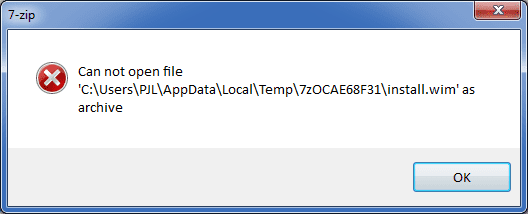
It started extracting "install.wim", but when it finished I got slightly different error message:Extract install.wim 02.png
The same thing happened with b9926 ISO (downloaded) and b10041 ISO (converted from ESD).
 

My Computer My Computer

At a glance

W7 Ultimate SP1, LM19.2 MATE, W10 Home 1703, ...AMD Phenom II x6 1100T, 3.3 GHz12GB DDR3 1333 G-Skill (4GB x 2), G-Skill (2G...NVIDIA GeForce GTX 660
Computer type
PC/Desktop
Computer Manufacturer/Model Number
n/a
OS
W7 Ultimate SP1, LM19.2 MATE, W10 Home 1703, W10 Pro 1703 VM, #All 64 bit
CPU
AMD Phenom II x6 1100T, 3.3 GHz
Motherboard
ASUS M4A88T-M/USB3 (AM3)
Memory
12GB DDR3 1333 G-Skill (4GB x 2), G-Skill (2GB x 2)
Graphics Card(s)
NVIDIA GeForce GTX 660
Sound Card
Realtek?
Monitor(s) Displays
Samsung S23B350
Screen Resolution
1920x1080
Hard Drives
WD Green 2TB (SATA), WD Green 3TB (SATA), WD Blue 4TB (SATA), WD Blue 6TB (SATA)
PSU
Cooler Master
Case
Antec GX300 Tower
Cooling
3x Antec TRICOOL 120mm Fans
Mouse
Wired Optical
Internet Speed
DSL
Antivirus
Avast
Browser
Pale Moon (64 bit)
Other Info
2018-12-27 Upgraded HDDs
2015-12-10 Upgraded case, graphics card, storage
2015-08-15 Upgraded motherboard & RAM
2015-07-15 Upgraded LM17.1 to LM17.2
Interesting. Are you using the latest 9.38 beta build of 7-Zip?
 

My Computer My Computer

At a glance

64-bit Windows 11 Pro for WorkstationsIntel i7-8700K OC'd to 5 GHz64 GB (4x16GB) G.SKILL TridentZ RGB DDR4 3600...ASUS ROG-STRIX-GTX1080TI-O11G-GAMING
Computer type
PC/Desktop
Computer Manufacturer/Model Number
Self built custom
OS
64-bit Windows 11 Pro for Workstations
CPU
Intel i7-8700K OC'd to 5 GHz
Motherboard
ASUS ROG Maximus XI Formula Z390
Memory
64 GB (4x16GB) G.SKILL TridentZ RGB DDR4 3600 MHz
Graphics Card(s)
ASUS ROG-STRIX-GTX1080TI-O11G-GAMING
Sound Card
Integrated
Monitor(s) Displays
2 x Samsung Odyssey G7 27"
Screen Resolution
2560x1440
Hard Drives
1TB Samsung 990 PRO M.2,
4TB Samsung 990 PRO PRO M.2,
TerraMaster F8 SSD Plus NAS
PSU
Seasonic Prime Titanium 850W
Case
Thermaltake Core P3
Cooling
Corsair Hydro H115i
Keyboard
Logitech wireless K800
Mouse
Logitech MX Master 4
Internet Speed
2 Gb/s Download and 100 Mb/s Upload
Antivirus
Malwarebyte Anti-Malware Premium
Browser
Google Chrome
Other Info
Logitech Z625 speaker system,
Logitech BRIO 4K Pro webcam,
HP Color LaserJet Pro MFP M477fdn,
APC SMART-UPS RT 1000 XL - SURT1000XLI,
Galaxy S23 Plus phone
Interesting. Are you using the latest 9.38 beta build of 7-Zip?
I have 7-Zip v9.22 installed.

I assume it works with 7-Zip v9.38?
 
Last edited:

My Computer My Computer

At a glance

W7 Ultimate SP1, LM19.2 MATE, W10 Home 1703, ...AMD Phenom II x6 1100T, 3.3 GHz12GB DDR3 1333 G-Skill (4GB x 2), G-Skill (2G...NVIDIA GeForce GTX 660
Computer type
PC/Desktop
Computer Manufacturer/Model Number
n/a
OS
W7 Ultimate SP1, LM19.2 MATE, W10 Home 1703, W10 Pro 1703 VM, #All 64 bit
CPU
AMD Phenom II x6 1100T, 3.3 GHz
Motherboard
ASUS M4A88T-M/USB3 (AM3)
Memory
12GB DDR3 1333 G-Skill (4GB x 2), G-Skill (2GB x 2)
Graphics Card(s)
NVIDIA GeForce GTX 660
Sound Card
Realtek?
Monitor(s) Displays
Samsung S23B350
Screen Resolution
1920x1080
Hard Drives
WD Green 2TB (SATA), WD Green 3TB (SATA), WD Blue 4TB (SATA), WD Blue 6TB (SATA)
PSU
Cooler Master
Case
Antec GX300 Tower
Cooling
3x Antec TRICOOL 120mm Fans
Mouse
Wired Optical
Internet Speed
DSL
Antivirus
Avast
Browser
Pale Moon (64 bit)
Other Info
2018-12-27 Upgraded HDDs
2015-12-10 Upgraded case, graphics card, storage
2015-08-15 Upgraded motherboard & RAM
2015-07-15 Upgraded LM17.1 to LM17.2
As a test, see how it does with the 9.38 build. That's the one I'm using where it works fine for me. Hopefully, it will for you as well.
 

My Computer My Computer

At a glance

64-bit Windows 11 Pro for WorkstationsIntel i7-8700K OC'd to 5 GHz64 GB (4x16GB) G.SKILL TridentZ RGB DDR4 3600...ASUS ROG-STRIX-GTX1080TI-O11G-GAMING
Computer type
PC/Desktop
Computer Manufacturer/Model Number
Self built custom
OS
64-bit Windows 11 Pro for Workstations
CPU
Intel i7-8700K OC'd to 5 GHz
Motherboard
ASUS ROG Maximus XI Formula Z390
Memory
64 GB (4x16GB) G.SKILL TridentZ RGB DDR4 3600 MHz
Graphics Card(s)
ASUS ROG-STRIX-GTX1080TI-O11G-GAMING
Sound Card
Integrated
Monitor(s) Displays
2 x Samsung Odyssey G7 27"
Screen Resolution
2560x1440
Hard Drives
1TB Samsung 990 PRO M.2,
4TB Samsung 990 PRO PRO M.2,
TerraMaster F8 SSD Plus NAS
PSU
Seasonic Prime Titanium 850W
Case
Thermaltake Core P3
Cooling
Corsair Hydro H115i
Keyboard
Logitech wireless K800
Mouse
Logitech MX Master 4
Internet Speed
2 Gb/s Download and 100 Mb/s Upload
Antivirus
Malwarebyte Anti-Malware Premium
Browser
Google Chrome
Other Info
Logitech Z625 speaker system,
Logitech BRIO 4K Pro webcam,
HP Color LaserJet Pro MFP M477fdn,
APC SMART-UPS RT 1000 XL - SURT1000XLI,
Galaxy S23 Plus phone
OK

As a test, see how it does with the 9.38 build. That's the one I'm using where it works fine for me. Hopefully, it will for you as well.
I've downloaded the msi, but I'm in LM17.1 at the moment, so I'll have to test it later today (it's 1:50 AM here now).
 

My Computer My Computer

At a glance

W7 Ultimate SP1, LM19.2 MATE, W10 Home 1703, ...AMD Phenom II x6 1100T, 3.3 GHz12GB DDR3 1333 G-Skill (4GB x 2), G-Skill (2G...NVIDIA GeForce GTX 660
Computer type
PC/Desktop
Computer Manufacturer/Model Number
n/a
OS
W7 Ultimate SP1, LM19.2 MATE, W10 Home 1703, W10 Pro 1703 VM, #All 64 bit
CPU
AMD Phenom II x6 1100T, 3.3 GHz
Motherboard
ASUS M4A88T-M/USB3 (AM3)
Memory
12GB DDR3 1333 G-Skill (4GB x 2), G-Skill (2GB x 2)
Graphics Card(s)
NVIDIA GeForce GTX 660
Sound Card
Realtek?
Monitor(s) Displays
Samsung S23B350
Screen Resolution
1920x1080
Hard Drives
WD Green 2TB (SATA), WD Green 3TB (SATA), WD Blue 4TB (SATA), WD Blue 6TB (SATA)
PSU
Cooler Master
Case
Antec GX300 Tower
Cooling
3x Antec TRICOOL 120mm Fans
Mouse
Wired Optical
Internet Speed
DSL
Antivirus
Avast
Browser
Pale Moon (64 bit)
Other Info
2018-12-27 Upgraded HDDs
2015-12-10 Upgraded case, graphics card, storage
2015-08-15 Upgraded motherboard & RAM
2015-07-15 Upgraded LM17.1 to LM17.2
Okey doke. I'll be here when ready. :)
 

My Computer My Computer

At a glance

64-bit Windows 11 Pro for WorkstationsIntel i7-8700K OC'd to 5 GHz64 GB (4x16GB) G.SKILL TridentZ RGB DDR4 3600...ASUS ROG-STRIX-GTX1080TI-O11G-GAMING
Computer type
PC/Desktop
Computer Manufacturer/Model Number
Self built custom
OS
64-bit Windows 11 Pro for Workstations
CPU
Intel i7-8700K OC'd to 5 GHz
Motherboard
ASUS ROG Maximus XI Formula Z390
Memory
64 GB (4x16GB) G.SKILL TridentZ RGB DDR4 3600 MHz
Graphics Card(s)
ASUS ROG-STRIX-GTX1080TI-O11G-GAMING
Sound Card
Integrated
Monitor(s) Displays
2 x Samsung Odyssey G7 27"
Screen Resolution
2560x1440
Hard Drives
1TB Samsung 990 PRO M.2,
4TB Samsung 990 PRO PRO M.2,
TerraMaster F8 SSD Plus NAS
PSU
Seasonic Prime Titanium 850W
Case
Thermaltake Core P3
Cooling
Corsair Hydro H115i
Keyboard
Logitech wireless K800
Mouse
Logitech MX Master 4
Internet Speed
2 Gb/s Download and 100 Mb/s Upload
Antivirus
Malwarebyte Anti-Malware Premium
Browser
Google Chrome
Other Info
Logitech Z625 speaker system,
Logitech BRIO 4K Pro webcam,
HP Color LaserJet Pro MFP M477fdn,
APC SMART-UPS RT 1000 XL - SURT1000XLI,
Galaxy S23 Plus phone
Last edited:

My Computer My Computer

At a glance

W7 Ultimate SP1, LM19.2 MATE, W10 Home 1703, ...AMD Phenom II x6 1100T, 3.3 GHz12GB DDR3 1333 G-Skill (4GB x 2), G-Skill (2G...NVIDIA GeForce GTX 660
Computer type
PC/Desktop
Computer Manufacturer/Model Number
n/a
OS
W7 Ultimate SP1, LM19.2 MATE, W10 Home 1703, W10 Pro 1703 VM, #All 64 bit
CPU
AMD Phenom II x6 1100T, 3.3 GHz
Motherboard
ASUS M4A88T-M/USB3 (AM3)
Memory
12GB DDR3 1333 G-Skill (4GB x 2), G-Skill (2GB x 2)
Graphics Card(s)
NVIDIA GeForce GTX 660
Sound Card
Realtek?
Monitor(s) Displays
Samsung S23B350
Screen Resolution
1920x1080
Hard Drives
WD Green 2TB (SATA), WD Green 3TB (SATA), WD Blue 4TB (SATA), WD Blue 6TB (SATA)
PSU
Cooler Master
Case
Antec GX300 Tower
Cooling
3x Antec TRICOOL 120mm Fans
Mouse
Wired Optical
Internet Speed
DSL
Antivirus
Avast
Browser
Pale Moon (64 bit)
Other Info
2018-12-27 Upgraded HDDs
2015-12-10 Upgraded case, graphics card, storage
2015-08-15 Upgraded motherboard & RAM
2015-07-15 Upgraded LM17.1 to LM17.2
Perfect. :party:
 

My Computer My Computer

At a glance

64-bit Windows 11 Pro for WorkstationsIntel i7-8700K OC'd to 5 GHz64 GB (4x16GB) G.SKILL TridentZ RGB DDR4 3600...ASUS ROG-STRIX-GTX1080TI-O11G-GAMING
Computer type
PC/Desktop
Computer Manufacturer/Model Number
Self built custom
OS
64-bit Windows 11 Pro for Workstations
CPU
Intel i7-8700K OC'd to 5 GHz
Motherboard
ASUS ROG Maximus XI Formula Z390
Memory
64 GB (4x16GB) G.SKILL TridentZ RGB DDR4 3600 MHz
Graphics Card(s)
ASUS ROG-STRIX-GTX1080TI-O11G-GAMING
Sound Card
Integrated
Monitor(s) Displays
2 x Samsung Odyssey G7 27"
Screen Resolution
2560x1440
Hard Drives
1TB Samsung 990 PRO M.2,
4TB Samsung 990 PRO PRO M.2,
TerraMaster F8 SSD Plus NAS
PSU
Seasonic Prime Titanium 850W
Case
Thermaltake Core P3
Cooling
Corsair Hydro H115i
Keyboard
Logitech wireless K800
Mouse
Logitech MX Master 4
Internet Speed
2 Gb/s Download and 100 Mb/s Upload
Antivirus
Malwarebyte Anti-Malware Premium
Browser
Google Chrome
Other Info
Logitech Z625 speaker system,
Logitech BRIO 4K Pro webcam,
HP Color LaserJet Pro MFP M477fdn,
APC SMART-UPS RT 1000 XL - SURT1000XLI,
Galaxy S23 Plus phone
error on step 6

on step 6 tried to open the install.wim as u mentioned but getting error message " can not open the file 'I:\source\install.wim' as archive"

what can be done....?
 

My Computer My Computer

At a glance

Windows 7 Ultimate x64AMD A4 7300 3.8ghz4gb 1600mhzin built radeon r3 with 128 shades
Computer type
PC/Desktop
Computer Manufacturer/Model Number
custom build
OS
Windows 7 Ultimate x64
CPU
AMD A4 7300 3.8ghz
Motherboard
gigabyte f2a58m-s1
Memory
4gb 1600mhz
Graphics Card(s)
in built radeon r3 with 128 shades
Hard Drives
250 gb
Antivirus
kaspersky
Browser
firefox
Hello Paragbhandari, and welcome to Seven Forums.

Is this a retail installation DVD, and not OEM?

For now, double check through the steps to see if you may have made a mistake somewhere. :)
 

My Computer My Computer

At a glance

64-bit Windows 11 Pro for WorkstationsIntel i7-8700K OC'd to 5 GHz64 GB (4x16GB) G.SKILL TridentZ RGB DDR4 3600...ASUS ROG-STRIX-GTX1080TI-O11G-GAMING
Computer type
PC/Desktop
Computer Manufacturer/Model Number
Self built custom
OS
64-bit Windows 11 Pro for Workstations
CPU
Intel i7-8700K OC'd to 5 GHz
Motherboard
ASUS ROG Maximus XI Formula Z390
Memory
64 GB (4x16GB) G.SKILL TridentZ RGB DDR4 3600 MHz
Graphics Card(s)
ASUS ROG-STRIX-GTX1080TI-O11G-GAMING
Sound Card
Integrated
Monitor(s) Displays
2 x Samsung Odyssey G7 27"
Screen Resolution
2560x1440
Hard Drives
1TB Samsung 990 PRO M.2,
4TB Samsung 990 PRO PRO M.2,
TerraMaster F8 SSD Plus NAS
PSU
Seasonic Prime Titanium 850W
Case
Thermaltake Core P3
Cooling
Corsair Hydro H115i
Keyboard
Logitech wireless K800
Mouse
Logitech MX Master 4
Internet Speed
2 Gb/s Download and 100 Mb/s Upload
Antivirus
Malwarebyte Anti-Malware Premium
Browser
Google Chrome
Other Info
Logitech Z625 speaker system,
Logitech BRIO 4K Pro webcam,
HP Color LaserJet Pro MFP M477fdn,
APC SMART-UPS RT 1000 XL - SURT1000XLI,
Galaxy S23 Plus phone
Here's an ideal add-on to the original solution:

1. Copy all files from the OEM DVD in either of the following locations:
D:\sources\$OEM$\system32\OEM
D:\sources\$OEM$\$$\system32\OEM
To:
C:\Windows\System32\OEM (You may want to remove the original files from this location first)

2. Follow steps 1-11 from this post but only extract the "required folder":
http://www.sevenforums.com/tutorials/42776-extract-files-windows-7-installation-dvd.html

The "required folder" (would be the folder or folders found in the root of this location):
#\Windows\System32\spp\tokens\skus\

3. Copy the extracted "required folder(s)" to the following location:
C:\Windows\System32\spp\tokens\skus

4. If the files do not copy properly, use the right click "Takeown" registry function to take ownership on the destination location:
Add "Take Ownership" to Explorer Right-Click Menu in Windows

Once ownership is taken, rename/move/delete the folder. Perform step 3 again.
Make sure to reboot the computer to check the license.

I believe this should work for all OEM manufacturer DVDs and versions.
However, you will still need an OEM key which can be entered with the following script:
cscript %windir%\system32\slmgr.vbs -ipk XXXXX-XXXXX-XXXXX-XXXXX-XXXXX
 
Last edited:

My Computer My Computer

At a glance

64
Computer type
PC/Desktop
OS
64
In searching for a fix for what seemed to be errors in my OS I found a way that seems to repair at least some of the files. I'm sure this is no secret and in the forums here somewhere. This would be a surgical strike as opposed to a war (upgrade install) or the nuclear option (clean install). I boot to the install disc and run a sfc /scannow CMD so the disc can be accessed for the repairs. This is where I found this info: How to Repair a Faulty Windows Installation Without Reformatting - Maximum PC
 

My Computer My Computer

At a glance

W7 Pro 64Ryzen 1500XG Skill 2400 - 8GBHD 6450
Computer type
PC/Desktop
Computer Manufacturer/Model Number
Custom
OS
W7 Pro 64
CPU
Ryzen 1500X
Motherboard
Gigabyte AX370 - Gaming
Memory
G Skill 2400 - 8GB
Graphics Card(s)
HD 6450
Sound Card
Realtek onboard
Monitor(s) Displays
Dell 19 square, Dell 17 square, Dell 15 square, Element 24
Hard Drives
Samsung 970 nvme 120 GB, WD 1TB 7200
Keyboard
MS ERGO 4000 mostly
Mouse
Dell standard optical
Internet Speed
15 Mbps
Antivirus
AVG, MS firewall
Browser
firefox mostly
I'm struggling to Repair my system files using this tutorial, but the new version of 7zip don't look like the old one. It don't have the "Select All" option under "tools">"options" at the bottom. It only has Two "Plus" (+) signs at the Top of the Options window.
 

My Computer My Computer

At a glance

Windows 7 Home Premium 64bitAMD A8-3520M6.00GB DDR3 @ 674MHz (9-9-9-24)512MB ATI AMD Radeon HD 6620G
Computer type
Laptop
Computer Manufacturer/Model Number
HP Pavilion dv7-6c23cl
OS
Windows 7 Home Premium 64bit
CPU
AMD A8-3520M
Motherboard
Hewlett-Packard 180B (Socket FS1)
Memory
6.00GB DDR3 @ 674MHz (9-9-9-24)
Graphics Card(s)
512MB ATI AMD Radeon HD 6620G
Sound Card
IDT High Definition Audio CODEC
Monitor(s) Displays
Generic PnP Monitor
Screen Resolution
(1600x900@60Hz)
Hard Drives
Samsung 850 EVO 250GB SSD
Mouse
Logitec M525
Internet Speed
30-75Mbps
Antivirus
Avast Free, Unfortunately
Browser
Google Chrome, Firefox, IE
Hello Nasty7, :)

I have updated step 3 to help. You should be fine with only .wim selected (plus) to open with 7-Zip by default.
 

My Computer My Computer

At a glance

64-bit Windows 11 Pro for WorkstationsIntel i7-8700K OC'd to 5 GHz64 GB (4x16GB) G.SKILL TridentZ RGB DDR4 3600...ASUS ROG-STRIX-GTX1080TI-O11G-GAMING
Computer type
PC/Desktop
Computer Manufacturer/Model Number
Self built custom
OS
64-bit Windows 11 Pro for Workstations
CPU
Intel i7-8700K OC'd to 5 GHz
Motherboard
ASUS ROG Maximus XI Formula Z390
Memory
64 GB (4x16GB) G.SKILL TridentZ RGB DDR4 3600 MHz
Graphics Card(s)
ASUS ROG-STRIX-GTX1080TI-O11G-GAMING
Sound Card
Integrated
Monitor(s) Displays
2 x Samsung Odyssey G7 27"
Screen Resolution
2560x1440
Hard Drives
1TB Samsung 990 PRO M.2,
4TB Samsung 990 PRO PRO M.2,
TerraMaster F8 SSD Plus NAS
PSU
Seasonic Prime Titanium 850W
Case
Thermaltake Core P3
Cooling
Corsair Hydro H115i
Keyboard
Logitech wireless K800
Mouse
Logitech MX Master 4
Internet Speed
2 Gb/s Download and 100 Mb/s Upload
Antivirus
Malwarebyte Anti-Malware Premium
Browser
Google Chrome
Other Info
Logitech Z625 speaker system,
Logitech BRIO 4K Pro webcam,
HP Color LaserJet Pro MFP M477fdn,
APC SMART-UPS RT 1000 XL - SURT1000XLI,
Galaxy S23 Plus phone
Thank you Brink!
 

My Computer My Computer

At a glance

Windows 7 Home Premium 64bitAMD A8-3520M6.00GB DDR3 @ 674MHz (9-9-9-24)512MB ATI AMD Radeon HD 6620G
Computer type
Laptop
Computer Manufacturer/Model Number
HP Pavilion dv7-6c23cl
OS
Windows 7 Home Premium 64bit
CPU
AMD A8-3520M
Motherboard
Hewlett-Packard 180B (Socket FS1)
Memory
6.00GB DDR3 @ 674MHz (9-9-9-24)
Graphics Card(s)
512MB ATI AMD Radeon HD 6620G
Sound Card
IDT High Definition Audio CODEC
Monitor(s) Displays
Generic PnP Monitor
Screen Resolution
(1600x900@60Hz)
Hard Drives
Samsung 850 EVO 250GB SSD
Mouse
Logitec M525
Internet Speed
30-75Mbps
Antivirus
Avast Free, Unfortunately
Browser
Google Chrome, Firefox, IE
You're most welcome. :)
 

My Computer My Computer

At a glance

64-bit Windows 11 Pro for WorkstationsIntel i7-8700K OC'd to 5 GHz64 GB (4x16GB) G.SKILL TridentZ RGB DDR4 3600...ASUS ROG-STRIX-GTX1080TI-O11G-GAMING
Computer type
PC/Desktop
Computer Manufacturer/Model Number
Self built custom
OS
64-bit Windows 11 Pro for Workstations
CPU
Intel i7-8700K OC'd to 5 GHz
Motherboard
ASUS ROG Maximus XI Formula Z390
Memory
64 GB (4x16GB) G.SKILL TridentZ RGB DDR4 3600 MHz
Graphics Card(s)
ASUS ROG-STRIX-GTX1080TI-O11G-GAMING
Sound Card
Integrated
Monitor(s) Displays
2 x Samsung Odyssey G7 27"
Screen Resolution
2560x1440
Hard Drives
1TB Samsung 990 PRO M.2,
4TB Samsung 990 PRO PRO M.2,
TerraMaster F8 SSD Plus NAS
PSU
Seasonic Prime Titanium 850W
Case
Thermaltake Core P3
Cooling
Corsair Hydro H115i
Keyboard
Logitech wireless K800
Mouse
Logitech MX Master 4
Internet Speed
2 Gb/s Download and 100 Mb/s Upload
Antivirus
Malwarebyte Anti-Malware Premium
Browser
Google Chrome
Other Info
Logitech Z625 speaker system,
Logitech BRIO 4K Pro webcam,
HP Color LaserJet Pro MFP M477fdn,
APC SMART-UPS RT 1000 XL - SURT1000XLI,
Galaxy S23 Plus phone
I have a problem with the xml file

When I open the xml file, it open with notepad not in internet explorer and I dont know what to do with that please help me . and I dont know what to in the contents, please help me Im so depressed because of this problem.

CONTENTS:
<WIM><TOTALBYTES>3406721036</TOTALBYTES><IMAGE INDEX="1"><DIRCOUNT>9384</DIRCOUNT><FILECOUNT>47447</FILECOUNT><TOTALBYTES>8471060645</TOTALBYTES><CREATIONTIME><HIGHPART>0x01CA0443</HIGHPART><LOWPART>0x6568BDF8</LOWPART></CREATIONTIME><LASTMODIFICATIONTIME><HIGHPART>0x01CA397A</HIGHPART><LOWPART>0xAE4066D0</LOWPART></LASTMODIFICATIONTIME><WINDOWS><ARCH>0</ARCH><PRODUCTNAME>Microsoft® Windows® Operating System</PRODUCTNAME><EDITIONID>Ultimate</EDITIONID><INSTALLATIONTYPE>Client</INSTALLATIONTYPE><HAL>acpiapic</HAL><PRODUCTTYPE>WinNT</PRODUCTTYPE><PRODUCTSUITE>Terminal Server</PRODUCTSUITE><LANGUAGES><LANGUAGE>en-US</LANGUAGE><DEFAULT>en-US</DEFAULT></LANGUAGES><VERSION><MAJOR>6</MAJOR><MINOR>1</MINOR><BUILD>7600</BUILD><SPBUILD>16385</SPBUILD><SPLEVEL>0</SPLEVEL></VERSION><SYSTEMROOT>WINDOWS</SYSTEMROOT></WINDOWS><NAME>Windows 7 Ultimate x86</NAME><DESCRIPTION>Windows 7 ULTIMATE</DESCRIPTION><FLAGS>Ultimate</FLAGS><HARDLINKBYTES>3504554899</HARDLINKBYTES><DISPLAYNAME>Windows 7 Ultimate</DISPLAYNAME><DISPLAYDESCRIPTION>Windows 7 Ultimate</DISPLAYDESCRIPTION></IMAGE><IMAGE INDEX="2"><DIRCOUNT>13655</DIRCOUNT><FILECOUNT>64636</FILECOUNT><TOTALBYTES>12070211908</TOTALBYTES><CREATIONTIME><HIGHPART>0x01CA0446</HIGHPART><LOWPART>0xE89FF88A</LOWPART></CREATIONTIME><LASTMODIFICATIONTIME><HIGHPART>0x01CA397B</HIGHPART><LOWPART>0x0D2A7F50</LOWPART></LASTMODIFICATIONTIME><WINDOWS><ARCH>9</ARCH><PRODUCTNAME>Microsoft® Windows® Operating System</PRODUCTNAME><EDITIONID>Ultimate</EDITIONID><INSTALLATIONTYPE>Client</INSTALLATIONTYPE><HAL>acpiapic</HAL><PRODUCTTYPE>WinNT</PRODUCTTYPE><PRODUCTSUITE>Terminal Server</PRODUCTSUITE><LANGUAGES><LANGUAGE>en-US</LANGUAGE><DEFAULT>en-US</DEFAULT></LANGUAGES><VERSION><MAJOR>6</MAJOR><MINOR>1</MINOR><BUILD>7600</BUILD><SPBUILD>16385</SPBUILD><SPLEVEL>0</SPLEVEL></VERSION><SYSTEMROOT>WINDOWS</SYSTEMROOT></WINDOWS><NAME>Windows 7 Ultimate x64</NAME><DESCRIPTION>Windows 7 ULTIMATE</DESCRIPTION><FLAGS>Ultimate</FLAGS><HARDLINKBYTES>4963044302</HARDLINKBYTES><DISPLAYNAME>Windows 7 Ultimate</DISPLAYNAME><DISPLAYDESCRIPTION>Windows 7 Ultimate</DISPLAYDESCRIPTION></IMAGE></WIM>
 
Last edited by a moderator:

My Computer My Computer

At a glance

32 bit windows 7
Computer type
PC/Desktop
OS
32 bit windows 7
Hello Airwind, and welcome to Seven Forums. :)

That's ok if it opened in Notepad. You will still be able to do step 10 to know what to use in step 11.

I bolded in red your posted XML content to help with step 10.
 

My Computer My Computer

At a glance

64-bit Windows 11 Pro for WorkstationsIntel i7-8700K OC'd to 5 GHz64 GB (4x16GB) G.SKILL TridentZ RGB DDR4 3600...ASUS ROG-STRIX-GTX1080TI-O11G-GAMING
Computer type
PC/Desktop
Computer Manufacturer/Model Number
Self built custom
OS
64-bit Windows 11 Pro for Workstations
CPU
Intel i7-8700K OC'd to 5 GHz
Motherboard
ASUS ROG Maximus XI Formula Z390
Memory
64 GB (4x16GB) G.SKILL TridentZ RGB DDR4 3600 MHz
Graphics Card(s)
ASUS ROG-STRIX-GTX1080TI-O11G-GAMING
Sound Card
Integrated
Monitor(s) Displays
2 x Samsung Odyssey G7 27"
Screen Resolution
2560x1440
Hard Drives
1TB Samsung 990 PRO M.2,
4TB Samsung 990 PRO PRO M.2,
TerraMaster F8 SSD Plus NAS
PSU
Seasonic Prime Titanium 850W
Case
Thermaltake Core P3
Cooling
Corsair Hydro H115i
Keyboard
Logitech wireless K800
Mouse
Logitech MX Master 4
Internet Speed
2 Gb/s Download and 100 Mb/s Upload
Antivirus
Malwarebyte Anti-Malware Premium
Browser
Google Chrome
Other Info
Logitech Z625 speaker system,
Logitech BRIO 4K Pro webcam,
HP Color LaserJet Pro MFP M477fdn,
APC SMART-UPS RT 1000 XL - SURT1000XLI,
Galaxy S23 Plus phone
Hi, Brink,
There is some problem in windows explorer. I tried some fixes but i do not know, sometimes it hangs and sometimes it stopped working.
i tried to regsvr32 exploreframe.dll in elevated command prompt. But i get errors, that module exploreframe.dll is failed to load . I tried sfc /scannow, which reports no error. i read this to replace the corrupted . Can i get the dll files from the OS DVD. please say, how to install the particular file. Normally i find the last extension of file letter is missing in the compressed form in dvd. How to copy this file. I am wary of copying from third sites.
 

My Computer My Computer

At a glance

Microsoft Windows 7 Ultimate 64-bit 7601 Mult...Intel(R) Core(TM)2 Duo CPU E7200 @ 2.53GHz4.00 GBNVIDIA GeForce 210
Computer type
PC/Desktop
Computer Manufacturer/Model Number
custom build
OS
Microsoft Windows 7 Ultimate 64-bit 7601 Multiprocessor Free Service Pack 1
CPU
Intel(R) Core(TM)2 Duo CPU E7200 @ 2.53GHz
Motherboard
To be filled by O.E.M. To be filled by O.E.M.
Memory
4.00 GB
Graphics Card(s)
NVIDIA GeForce 210
Sound Card
(1) NVIDIA High Definition Audio (2) Realtek High Definiti
Screen Resolution
1920 x 1080 x 32 bits (4294967296 colors) @ 60 Hz
Hard Drives
ST3500312CS ATA Device
Back
Top