Solved Separate Hdd dual boot, one OS not showing 3rd storage HDD

Xp4me

New member
Member
Local time
5:09 AM
Messages
65
I did a dual boot install of WinXP & Win7 on separate HDDs. Steps that I followed: I unplugged all HDDs except one which I installed a slipstreamed version of WinXP with AHCI driver. I then plugged in SDD drive and installed Win7 with AHCI driver during F6 option thru USB flash. I finished by plugging in a 3rd HDD storage drive already formatted (Has files on it). I turned the computer on and got the boot screen asking which version of windows I would like to run. Everything has been running great , doesn't seem to be any MBR issues so far.
Now for the problem......MY Computer shows the following.

Win7 OS
C: Win7......on Samsung SDD
D: WinXP....on Western Digital HDD
F: Storage...on Seagate Barracuda HDD

WinXP OS
C: WinXP......on Western Digital HDD
E: Win7.....on Samsung SDD

Win7 shows all 3 drives, but WinXP does not show Seagate Barracuda storage HDD. It shows in Device Manager, but not Dick Management or MY Computer.

Would appreciate any help


Gigabyte 990FXA-UD5 Rev. 3.0……….….MB
AMD FX-8350………………………….….CPU
2 Mushkin Silverline 992074 8GB…… ….Memory
Seagate Barracuda ST3000DM001 3TB… ..HDD - Storage
Western Digital WD2003FZEX 2TB….…..HDD – Win XP Pro 32Bit
Samsung 840 EVO 120GB………………....SDD – Win 7 Pro 64Bit
Seasonic M12II-650 ATX 650 Watt………..Power Supply
MSI Nvidia Geforce 660 TF 2GBD5/OC…..Video Card
 

My Computer My Computer

At a glance

XP 32 Bit & Win 7 64 BitFX 8350 AMD 8 - CoreMushkin Silverline 8GB x2 16GBMSI Twin Frozr Geforce GTX 660
Computer type
PC/Desktop
Computer Manufacturer/Model Number
Custom build
OS
XP 32 Bit & Win 7 64 Bit
CPU
FX 8350 AMD 8 - Core
Motherboard
Gigabyte 990FXA-UD5
Memory
Mushkin Silverline 8GB x2 16GB
Graphics Card(s)
MSI Twin Frozr Geforce GTX 660
Hard Drives
SSD Samsung SSD 840 EVO
HDD Seagate Barracuda ST3000DM001 3TB
Antivirus
Bitdefender Internet Security
Browser
Firefox
How is it Barrcuda 3TB formatted - MBR or GPT? XP doesn't natively recognise GPT formatted disks.
 

My Computer My Computer

At a glance

Windows 10 Pro x64 ; Xubuntu x64Intel i7 860 @ 2.80 GHz O/C'ed to 4.0GHz16GB Corsair Vengance DDR3 @ 661 MHz Dual Cha...EVGA NVidia GTX 560 1024MB
Computer type
PC/Desktop
Computer Manufacturer/Model Number
Golden Mk. I.4
OS
Windows 10 Pro x64 ; Xubuntu x64
CPU
Intel i7 860 @ 2.80 GHz O/C'ed to 4.0GHz
Motherboard
Gigabyte P55A-UD3R Rev.1. Award BIOS F13
Memory
16GB Corsair Vengance DDR3 @ 661 MHz Dual Channel (9-9-9-24)
Graphics Card(s)
EVGA NVidia GTX 560 1024MB
Sound Card
Realtek Integrated
Monitor(s) Displays
Dual Samsung SyncMaster 2494HS
Screen Resolution
1920*1080 and 1920*1080
Hard Drives
1*Samsung 840 EVO 120GB SSD;
1*OCZ Vertex 2 60GB SSD;
2*Samsung F3 SpinPoint 1TB in RAID0;
1*Samsung F1 SpinPoint 1TB;
2*Western Digital 1TB External USB 3.0
1*Western Digital 500GB External USB 3.0
1*Seagate 500GB External USB 2.0
PSU
Thermaltake ToughPower QFan 750W
Case
Thermaltake Element S VK60001W2Z
Cooling
Corsair H60 Water Cooling, 2*230mm and 2*80mm case fans
Keyboard
Logitech G110
Mouse
Logitech MX518
XP may not see a 3 TB drive, there was no such thing in the XP days.

As Golden hinted at, it should be initialized as a MBR drive and partitioned and each partition formatted in NTFS.
 

My Computer My Computer

At a glance

Windows 10 Pro x64Intel Core i7 6700KGSkill TridentZ RGB 16GB 3600 16-16-16-36EVGA GTX 980 Ti SC x2
Computer type
PC/Desktop
Computer Manufacturer/Model Number
Skylake Special #666
OS
Windows 10 Pro x64
CPU
Intel Core i7 6700K
Motherboard
Asus Sabertooth Z170 Mark 1
Memory
GSkill TridentZ RGB 16GB 3600 16-16-16-36
Graphics Card(s)
EVGA GTX 980 Ti SC x2
Sound Card
Realtek High Definition
Monitor(s) Displays
AOC G2460PG
Screen Resolution
1920 x 1080 144Hz
Hard Drives
Samsung 860 Pro 256GB, Seagate Barracuda 4TB x2
PSU
EVGA 1000 P2, EVGA White Custom Braided Cables
Case
Corsair Vengeance C70 Gunmetal Black
Cooling
Corsair H100i v2, Corsair ML120 x2, Thermal Grizzly Kryonaut
Keyboard
Logitech G910 Orion Spectrum
Mouse
Logitech G700s
Internet Speed
Verizon Fios Quantum Gateway 75/75
Antivirus
Windows Defender, Malwarebytes Free 3.8.3
Browser
Chrome
Other Info
Corsair SP120 x4, LG Blu-ray Drive, Durabrand HT-395 100 Watt Dolby Digital Amp, Corsair H2100 Wireless 7.1 Headset
How is it Barrcuda 3TB formatted - MBR or GPT? XP doesn't natively recognise GPT formatted disks.

To be honest I don't know. A small local computer store built it for me. It was already formatted, I just started saving files to it.
I then went and bought the Western Digital WD2003FZEX, connected it and installed XP on it. How would I be able to tell how it was formatted?
 

My Computer My Computer

At a glance

XP 32 Bit & Win 7 64 BitFX 8350 AMD 8 - CoreMushkin Silverline 8GB x2 16GBMSI Twin Frozr Geforce GTX 660
Computer type
PC/Desktop
Computer Manufacturer/Model Number
Custom build
OS
XP 32 Bit & Win 7 64 Bit
CPU
FX 8350 AMD 8 - Core
Motherboard
Gigabyte 990FXA-UD5
Memory
Mushkin Silverline 8GB x2 16GB
Graphics Card(s)
MSI Twin Frozr Geforce GTX 660
Hard Drives
SSD Samsung SSD 840 EVO
HDD Seagate Barracuda ST3000DM001 3TB
Antivirus
Bitdefender Internet Security
Browser
Firefox
XP may not see a 3 TB drive, there was no such thing in the XP days.

As Golden hinted at, it should be initialized as a MBR drive and partitioned and each partition formatted in NTFS.
Why would I partition a storage HDD, I'm using all of it's space for one thing? I didn't create a partition on the Win7 or WinXP drives either, never do. Isn't NTFS formatting just for operating systems, I don't know, just always thought.
Okay, I'm going to shut down now and open Win7, go into Disk Management to see if shows the type of formatting....I shall return.
 

My Computer My Computer

At a glance

XP 32 Bit & Win 7 64 BitFX 8350 AMD 8 - CoreMushkin Silverline 8GB x2 16GBMSI Twin Frozr Geforce GTX 660
Computer type
PC/Desktop
Computer Manufacturer/Model Number
Custom build
OS
XP 32 Bit & Win 7 64 Bit
CPU
FX 8350 AMD 8 - Core
Motherboard
Gigabyte 990FXA-UD5
Memory
Mushkin Silverline 8GB x2 16GB
Graphics Card(s)
MSI Twin Frozr Geforce GTX 660
Hard Drives
SSD Samsung SSD 840 EVO
HDD Seagate Barracuda ST3000DM001 3TB
Antivirus
Bitdefender Internet Security
Browser
Firefox
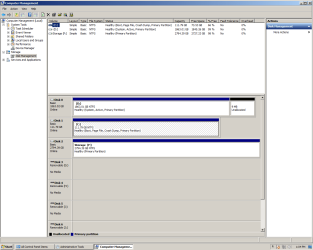
Okay, here is a screen shot from Wn7 Disk Management. It does show as NTFS file system, whether the drive was installed using a AHCI driver for MBR installation I don't know.
 

Attachments

  • Untitled.png
    Untitled.png
    32.1 KB · Views: 5

My Computer My Computer

At a glance

XP 32 Bit & Win 7 64 BitFX 8350 AMD 8 - CoreMushkin Silverline 8GB x2 16GBMSI Twin Frozr Geforce GTX 660
Computer type
PC/Desktop
Computer Manufacturer/Model Number
Custom build
OS
XP 32 Bit & Win 7 64 Bit
CPU
FX 8350 AMD 8 - Core
Motherboard
Gigabyte 990FXA-UD5
Memory
Mushkin Silverline 8GB x2 16GB
Graphics Card(s)
MSI Twin Frozr Geforce GTX 660
Hard Drives
SSD Samsung SSD 840 EVO
HDD Seagate Barracuda ST3000DM001 3TB
Antivirus
Bitdefender Internet Security
Browser
Firefox
Why would I partition a storage HDD, I'm using all of it's space for one thing?
XP cannot see a single large volume of that size......in order to see it in XP, you need to format it to smaller NTFS partitions under the MBR scheme.

Until you do, XP will never see that drive.
 

My Computer My Computer

At a glance

Windows 10 Pro x64 ; Xubuntu x64Intel i7 860 @ 2.80 GHz O/C'ed to 4.0GHz16GB Corsair Vengance DDR3 @ 661 MHz Dual Cha...EVGA NVidia GTX 560 1024MB
Computer type
PC/Desktop
Computer Manufacturer/Model Number
Golden Mk. I.4
OS
Windows 10 Pro x64 ; Xubuntu x64
CPU
Intel i7 860 @ 2.80 GHz O/C'ed to 4.0GHz
Motherboard
Gigabyte P55A-UD3R Rev.1. Award BIOS F13
Memory
16GB Corsair Vengance DDR3 @ 661 MHz Dual Channel (9-9-9-24)
Graphics Card(s)
EVGA NVidia GTX 560 1024MB
Sound Card
Realtek Integrated
Monitor(s) Displays
Dual Samsung SyncMaster 2494HS
Screen Resolution
1920*1080 and 1920*1080
Hard Drives
1*Samsung 840 EVO 120GB SSD;
1*OCZ Vertex 2 60GB SSD;
2*Samsung F3 SpinPoint 1TB in RAID0;
1*Samsung F1 SpinPoint 1TB;
2*Western Digital 1TB External USB 3.0
1*Western Digital 500GB External USB 3.0
1*Seagate 500GB External USB 2.0
PSU
Thermaltake ToughPower QFan 750W
Case
Thermaltake Element S VK60001W2Z
Cooling
Corsair H60 Water Cooling, 2*230mm and 2*80mm case fans
Keyboard
Logitech G110
Mouse
Logitech MX518
I told you why you would partition it, and now, so has Golden.

You ask questions, we give advice on how to solve problems, that`s how problems get solved.
 

My Computer My Computer

At a glance

Windows 10 Pro x64Intel Core i7 6700KGSkill TridentZ RGB 16GB 3600 16-16-16-36EVGA GTX 980 Ti SC x2
Computer type
PC/Desktop
Computer Manufacturer/Model Number
Skylake Special #666
OS
Windows 10 Pro x64
CPU
Intel Core i7 6700K
Motherboard
Asus Sabertooth Z170 Mark 1
Memory
GSkill TridentZ RGB 16GB 3600 16-16-16-36
Graphics Card(s)
EVGA GTX 980 Ti SC x2
Sound Card
Realtek High Definition
Monitor(s) Displays
AOC G2460PG
Screen Resolution
1920 x 1080 144Hz
Hard Drives
Samsung 860 Pro 256GB, Seagate Barracuda 4TB x2
PSU
EVGA 1000 P2, EVGA White Custom Braided Cables
Case
Corsair Vengeance C70 Gunmetal Black
Cooling
Corsair H100i v2, Corsair ML120 x2, Thermal Grizzly Kryonaut
Keyboard
Logitech G910 Orion Spectrum
Mouse
Logitech G700s
Internet Speed
Verizon Fios Quantum Gateway 75/75
Antivirus
Windows Defender, Malwarebytes Free 3.8.3
Browser
Chrome
Other Info
Corsair SP120 x4, LG Blu-ray Drive, Durabrand HT-395 100 Watt Dolby Digital Amp, Corsair H2100 Wireless 7.1 Headset
XP cannot see a single large volume of that size......in order to see it in XP, you need to format it to smaller NTFS partitions under the MBR scheme.

Until you do, XP will never see that drive.
New thing i learn from Golden... Thank you so much..
:D
 

My Computer My Computer

At a glance

Windows 7 Ultimate 64 bitIntel pentium 32GB RAM DDR 3Intel HD Graphics
Computer type
PC/Desktop
OS
Windows 7 Ultimate 64 bit
CPU
Intel pentium 3
Motherboard
MSI
Memory
2GB RAM DDR 3
Graphics Card(s)
Intel HD Graphics
Sound Card
Realtek Audio
Monitor(s) Displays
zenware
Screen Resolution
1680x1050
Hard Drives
80 GB
Case
i-Max
Cooling
Cooler Master
Keyboard
A4TECH
Mouse
edvan
Antivirus
Avast Anti virus 2015
Browser
Google chrome
Why would I partition a storage HDD, I'm using all of it's space for one thing?
XP cannot see a single large volume of that size......in order to see it in XP, you need to format it to smaller NTFS partitions under the MBR scheme.

Until you do, XP will never see that drive.

So I'll have to install a boot loader onto a HDD that's not running an OS?

Is there a way to hide the boot loader in case I do a Select All-Delete at some point?

Will doing this mess up my dual boot MBR that's already set up and working?

While searching for tutorials I keep seeing that MBR won't work with drives over 2.2 TB./something about having to use a diskwizard driver. I don't care about wasted space as long as I have a 2TB partition for storage. Maybe I can throw the boot loader on the 2nd partition with no drive letter so it never even gets seen, therefor never getting deleted......if that's possible.
 

My Computer My Computer

At a glance

XP 32 Bit & Win 7 64 BitFX 8350 AMD 8 - CoreMushkin Silverline 8GB x2 16GBMSI Twin Frozr Geforce GTX 660
Computer type
PC/Desktop
Computer Manufacturer/Model Number
Custom build
OS
XP 32 Bit & Win 7 64 Bit
CPU
FX 8350 AMD 8 - Core
Motherboard
Gigabyte 990FXA-UD5
Memory
Mushkin Silverline 8GB x2 16GB
Graphics Card(s)
MSI Twin Frozr Geforce GTX 660
Hard Drives
SSD Samsung SSD 840 EVO
HDD Seagate Barracuda ST3000DM001 3TB
Antivirus
Bitdefender Internet Security
Browser
Firefox
Make it a Logical drive.

It won`t mess up your DB.

Don`t understand why you don`t want to use the entire drive.

No one replied, so I figured I`d say something. Others can comment :)
 

My Computer My Computer

At a glance

Windows 10 Pro x64Intel Core i7 6700KGSkill TridentZ RGB 16GB 3600 16-16-16-36EVGA GTX 980 Ti SC x2
Computer type
PC/Desktop
Computer Manufacturer/Model Number
Skylake Special #666
OS
Windows 10 Pro x64
CPU
Intel Core i7 6700K
Motherboard
Asus Sabertooth Z170 Mark 1
Memory
GSkill TridentZ RGB 16GB 3600 16-16-16-36
Graphics Card(s)
EVGA GTX 980 Ti SC x2
Sound Card
Realtek High Definition
Monitor(s) Displays
AOC G2460PG
Screen Resolution
1920 x 1080 144Hz
Hard Drives
Samsung 860 Pro 256GB, Seagate Barracuda 4TB x2
PSU
EVGA 1000 P2, EVGA White Custom Braided Cables
Case
Corsair Vengeance C70 Gunmetal Black
Cooling
Corsair H100i v2, Corsair ML120 x2, Thermal Grizzly Kryonaut
Keyboard
Logitech G910 Orion Spectrum
Mouse
Logitech G700s
Internet Speed
Verizon Fios Quantum Gateway 75/75
Antivirus
Windows Defender, Malwarebytes Free 3.8.3
Browser
Chrome
Other Info
Corsair SP120 x4, LG Blu-ray Drive, Durabrand HT-395 100 Watt Dolby Digital Amp, Corsair H2100 Wireless 7.1 Headset
So I'll have to install a boot loader onto a HDD that's not running an OS?
Bootloader? Why? What are you talking about. Its a data drive, it doesn't need any special treatment. Go Logical as suggested by AddRAM.

You sound unsure about the basics of disk formatting, so perhaps seek some advice from a friend.
 

My Computer My Computer

At a glance

Windows 10 Pro x64 ; Xubuntu x64Intel i7 860 @ 2.80 GHz O/C'ed to 4.0GHz16GB Corsair Vengance DDR3 @ 661 MHz Dual Cha...EVGA NVidia GTX 560 1024MB
Computer type
PC/Desktop
Computer Manufacturer/Model Number
Golden Mk. I.4
OS
Windows 10 Pro x64 ; Xubuntu x64
CPU
Intel i7 860 @ 2.80 GHz O/C'ed to 4.0GHz
Motherboard
Gigabyte P55A-UD3R Rev.1. Award BIOS F13
Memory
16GB Corsair Vengance DDR3 @ 661 MHz Dual Channel (9-9-9-24)
Graphics Card(s)
EVGA NVidia GTX 560 1024MB
Sound Card
Realtek Integrated
Monitor(s) Displays
Dual Samsung SyncMaster 2494HS
Screen Resolution
1920*1080 and 1920*1080
Hard Drives
1*Samsung 840 EVO 120GB SSD;
1*OCZ Vertex 2 60GB SSD;
2*Samsung F3 SpinPoint 1TB in RAID0;
1*Samsung F1 SpinPoint 1TB;
2*Western Digital 1TB External USB 3.0
1*Western Digital 500GB External USB 3.0
1*Seagate 500GB External USB 2.0
PSU
Thermaltake ToughPower QFan 750W
Case
Thermaltake Element S VK60001W2Z
Cooling
Corsair H60 Water Cooling, 2*230mm and 2*80mm case fans
Keyboard
Logitech G110
Mouse
Logitech MX518
Okay, instead of dealing with this issue I'll just get a 2TB HDD.
Thanx for all your help.
 

My Computer My Computer

At a glance

XP 32 Bit & Win 7 64 BitFX 8350 AMD 8 - CoreMushkin Silverline 8GB x2 16GBMSI Twin Frozr Geforce GTX 660
Computer type
PC/Desktop
Computer Manufacturer/Model Number
Custom build
OS
XP 32 Bit & Win 7 64 Bit
CPU
FX 8350 AMD 8 - Core
Motherboard
Gigabyte 990FXA-UD5
Memory
Mushkin Silverline 8GB x2 16GB
Graphics Card(s)
MSI Twin Frozr Geforce GTX 660
Hard Drives
SSD Samsung SSD 840 EVO
HDD Seagate Barracuda ST3000DM001 3TB
Antivirus
Bitdefender Internet Security
Browser
Firefox
:rolleyes:
 

My Computer My Computer

At a glance

Windows 10 Pro x64 ; Xubuntu x64Intel i7 860 @ 2.80 GHz O/C'ed to 4.0GHz16GB Corsair Vengance DDR3 @ 661 MHz Dual Cha...EVGA NVidia GTX 560 1024MB
Computer type
PC/Desktop
Computer Manufacturer/Model Number
Golden Mk. I.4
OS
Windows 10 Pro x64 ; Xubuntu x64
CPU
Intel i7 860 @ 2.80 GHz O/C'ed to 4.0GHz
Motherboard
Gigabyte P55A-UD3R Rev.1. Award BIOS F13
Memory
16GB Corsair Vengance DDR3 @ 661 MHz Dual Channel (9-9-9-24)
Graphics Card(s)
EVGA NVidia GTX 560 1024MB
Sound Card
Realtek Integrated
Monitor(s) Displays
Dual Samsung SyncMaster 2494HS
Screen Resolution
1920*1080 and 1920*1080
Hard Drives
1*Samsung 840 EVO 120GB SSD;
1*OCZ Vertex 2 60GB SSD;
2*Samsung F3 SpinPoint 1TB in RAID0;
1*Samsung F1 SpinPoint 1TB;
2*Western Digital 1TB External USB 3.0
1*Western Digital 500GB External USB 3.0
1*Seagate 500GB External USB 2.0
PSU
Thermaltake ToughPower QFan 750W
Case
Thermaltake Element S VK60001W2Z
Cooling
Corsair H60 Water Cooling, 2*230mm and 2*80mm case fans
Keyboard
Logitech G110
Mouse
Logitech MX518
Back
Top