
"Startup repair" failing - hard disk space issue?

My Computer My Computer

At a glance

Microsoft Windows 7 Ultimate 32-bit 7601Intel(R) Pentium(R) Dual CPU E2160 @ 1.80GHz4.00 GB(1) VNC Mirror Driver (2) Intel(R) G33/G31 Ex...
Computer type
PC/Desktop
Computer Manufacturer/Model Number
Compac
OS
Microsoft Windows 7 Ultimate 32-bit 7601
CPU
Intel(R) Pentium(R) Dual CPU E2160 @ 1.80GHz
Motherboard
MSI Boston
Memory
4.00 GB
Graphics Card(s)
(1) VNC Mirror Driver (2) Intel(R) G33/G31 Express Chipset
Sound Card
Disabled
Monitor(s) Displays
Headless
Screen Resolution
1280 x 960 x 32 bits (4294967296 colors) @ 60 Hz
Hard Drives
ST3320820AS ATA Device
Keyboard
Headless
Mouse
Headless
Antivirus
Malwarebytes pro
Other Info
Also
Windows 8.1 Laptop and Desktop both Acer
I hope not. He has scans of family photos that aren't replaceable. No one else has them. That's why we're working so hard to get Windows to boot.

Now here's a kicker. I've deleted quite a few files. Yet the "Free" space hasn't changed at all. I'd like to try the Bios if someone can provide instructions on how to ensure C: is the drive booting?

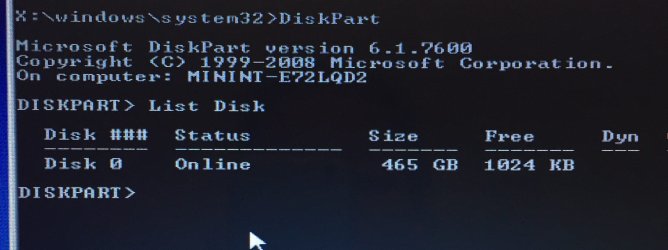
Here's the photo of the hard drive size and free space... hasn't changed and I've deleted about 10 Gigs so far.
 

Attachments

  • image.jpg
    image.jpg
    186.7 KB · Views: 0

My Computer My Computer

At a glance

Windows 7 Home Premium
Computer type
Laptop
Computer Manufacturer/Model Number
Asus
OS
Windows 7 Home Premium
Hard Drives
465 GB
HI : Have you checked in the bios to make sure your windows drive is set to BOOT first ? I had a windows update some months ago that on re-boot , no boot ... The boot changed in the bios to a old drive ..

I haven't checked the BIOS. Is it easy to get to through the command screen?


When you first try to start the computer , keep pressing delete , repeatedly (you might need to press some other button , depends on the computer brand ). then you should be able to enter the bios screen ..

Thank you. It's F8 on this laptop - and it takes me to the list beginning with "Safe Mode," etc. But I don't know where to go from there to check to make sure the laptop is booting the C: drive first.
 

My Computer My Computer

At a glance

Windows 7 Home Premium
Computer type
Laptop
Computer Manufacturer/Model Number
Asus
OS
Windows 7 Home Premium
Hard Drives
465 GB
Change to your c: drive again and do a
Code:
dir
at the bottom it should tell you the free space to, see if it's the same
 

My Computer My Computer

At a glance

Microsoft Windows 7 Ultimate 32-bit 7601Intel(R) Pentium(R) Dual CPU E2160 @ 1.80GHz4.00 GB(1) VNC Mirror Driver (2) Intel(R) G33/G31 Ex...
Computer type
PC/Desktop
Computer Manufacturer/Model Number
Compac
OS
Microsoft Windows 7 Ultimate 32-bit 7601
CPU
Intel(R) Pentium(R) Dual CPU E2160 @ 1.80GHz
Motherboard
MSI Boston
Memory
4.00 GB
Graphics Card(s)
(1) VNC Mirror Driver (2) Intel(R) G33/G31 Express Chipset
Sound Card
Disabled
Monitor(s) Displays
Headless
Screen Resolution
1280 x 960 x 32 bits (4294967296 colors) @ 60 Hz
Hard Drives
ST3320820AS ATA Device
Keyboard
Headless
Mouse
Headless
Antivirus
Malwarebytes pro
Other Info
Also
Windows 8.1 Laptop and Desktop both Acer
My Computer My Computer

At a glance

Windows 7 Pro 32bitDual Core
Computer type
PC/Desktop
Computer Manufacturer/Model Number
HP
OS
Windows 7 Pro 32bit
CPU
Dual Core
Antivirus
Trend Micro
I haven't checked the BIOS. Is it easy to get to through the command screen?


When you first try to start the computer , keep pressing delete , repeatedly (you might need to press some other button , depends on the computer brand ). then you should be able to enter the bios screen ..

Thank you. It's F8 on this laptop - and it takes me to the list beginning with "Safe Mode," etc. But I don't know where to go from there to check to make sure the laptop is booting the C: drive first.

Hopefully after all you deleted it should start normal
 

My Computer My Computer

At a glance

Microsoft Windows 7 Ultimate 32-bit 7601Intel(R) Pentium(R) Dual CPU E2160 @ 1.80GHz4.00 GB(1) VNC Mirror Driver (2) Intel(R) G33/G31 Ex...
Computer type
PC/Desktop
Computer Manufacturer/Model Number
Compac
OS
Microsoft Windows 7 Ultimate 32-bit 7601
CPU
Intel(R) Pentium(R) Dual CPU E2160 @ 1.80GHz
Motherboard
MSI Boston
Memory
4.00 GB
Graphics Card(s)
(1) VNC Mirror Driver (2) Intel(R) G33/G31 Express Chipset
Sound Card
Disabled
Monitor(s) Displays
Headless
Screen Resolution
1280 x 960 x 32 bits (4294967296 colors) @ 60 Hz
Hard Drives
ST3320820AS ATA Device
Keyboard
Headless
Mouse
Headless
Antivirus
Malwarebytes pro
Other Info
Also
Windows 8.1 Laptop and Desktop both Acer
Im not sure if this command will work but try this command
Code:
[B]c:\windows\SYSTEM32\cleanmgr.exe /cDrive [/B]
 

My Computer My Computer

At a glance

Microsoft Windows 7 Ultimate 32-bit 7601Intel(R) Pentium(R) Dual CPU E2160 @ 1.80GHz4.00 GB(1) VNC Mirror Driver (2) Intel(R) G33/G31 Ex...
Computer type
PC/Desktop
Computer Manufacturer/Model Number
Compac
OS
Microsoft Windows 7 Ultimate 32-bit 7601
CPU
Intel(R) Pentium(R) Dual CPU E2160 @ 1.80GHz
Motherboard
MSI Boston
Memory
4.00 GB
Graphics Card(s)
(1) VNC Mirror Driver (2) Intel(R) G33/G31 Express Chipset
Sound Card
Disabled
Monitor(s) Displays
Headless
Screen Resolution
1280 x 960 x 32 bits (4294967296 colors) @ 60 Hz
Hard Drives
ST3320820AS ATA Device
Keyboard
Headless
Mouse
Headless
Antivirus
Malwarebytes pro
Other Info
Also
Windows 8.1 Laptop and Desktop both Acer
Thanks all. Trying these commands now...
 

My Computer My Computer

At a glance

Windows 7 Home Premium
Computer type
Laptop
Computer Manufacturer/Model Number
Asus
OS
Windows 7 Home Premium
Hard Drives
465 GB
Have you tried to start it normally yet
 

My Computer My Computer

At a glance

Microsoft Windows 7 Ultimate 32-bit 7601Intel(R) Pentium(R) Dual CPU E2160 @ 1.80GHz4.00 GB(1) VNC Mirror Driver (2) Intel(R) G33/G31 Ex...
Computer type
PC/Desktop
Computer Manufacturer/Model Number
Compac
OS
Microsoft Windows 7 Ultimate 32-bit 7601
CPU
Intel(R) Pentium(R) Dual CPU E2160 @ 1.80GHz
Motherboard
MSI Boston
Memory
4.00 GB
Graphics Card(s)
(1) VNC Mirror Driver (2) Intel(R) G33/G31 Express Chipset
Sound Card
Disabled
Monitor(s) Displays
Headless
Screen Resolution
1280 x 960 x 32 bits (4294967296 colors) @ 60 Hz
Hard Drives
ST3320820AS ATA Device
Keyboard
Headless
Mouse
Headless
Antivirus
Malwarebytes pro
Other Info
Also
Windows 8.1 Laptop and Desktop both Acer
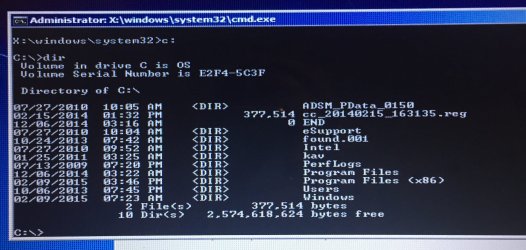
Change to your c: drive again and do a
Code:
dir
at the bottom it should tell you the free space to, see if it's the same

That looks totally wrong (free space). So weird. Trying other commands people have replied with too.
 

Attachments

  • image.jpg
    image.jpg
    336.9 KB · Views: 0

My Computer My Computer

At a glance

Windows 7 Home Premium
Computer type
Laptop
Computer Manufacturer/Model Number
Asus
OS
Windows 7 Home Premium
Hard Drives
465 GB
That's 2.5 gigs free you may have to remove more
 

My Computer My Computer

At a glance

Microsoft Windows 7 Ultimate 32-bit 7601Intel(R) Pentium(R) Dual CPU E2160 @ 1.80GHz4.00 GB(1) VNC Mirror Driver (2) Intel(R) G33/G31 Ex...
Computer type
PC/Desktop
Computer Manufacturer/Model Number
Compac
OS
Microsoft Windows 7 Ultimate 32-bit 7601
CPU
Intel(R) Pentium(R) Dual CPU E2160 @ 1.80GHz
Motherboard
MSI Boston
Memory
4.00 GB
Graphics Card(s)
(1) VNC Mirror Driver (2) Intel(R) G33/G31 Express Chipset
Sound Card
Disabled
Monitor(s) Displays
Headless
Screen Resolution
1280 x 960 x 32 bits (4294967296 colors) @ 60 Hz
Hard Drives
ST3320820AS ATA Device
Keyboard
Headless
Mouse
Headless
Antivirus
Malwarebytes pro
Other Info
Also
Windows 8.1 Laptop and Desktop both Acer
that screenshot does not mean that 1024KB is Free.
It is the Volume or capacity of your entire disk that is shown.

Your main problem is that you cannot boot into windows.
On the post where you have accessed C:\ try running this command: SFC /SCANNOW
http://www.sevenforums.com/tutorials/1538-sfc-scannow-command-system-file-checker.html?ltr=S

I am thinking it is a problem of windows. or that the HDD is failing.

This is what I got after that command... and the HDD is fine per my uncle. He took it in to be checked. They confirmed all hardware was fine ($99 fee) and offered to fix the boot up issue for another $200. That's when he asked me to try to fix it - before he pays $200. So I'm trying to help him. But I'm a web designer, not a DOS/boot up problem girl! As is quite apparent in this thread I'm sure. Haha
 

Attachments

  • image.jpg
    image.jpg
    285.6 KB · Views: 0

My Computer My Computer

At a glance

Windows 7 Home Premium
Computer type
Laptop
Computer Manufacturer/Model Number
Asus
OS
Windows 7 Home Premium
Hard Drives
465 GB

My Computer My Computer

At a glance

Windows 7 Home Premium
Computer type
Laptop
Computer Manufacturer/Model Number
Asus
OS
Windows 7 Home Premium
Hard Drives
465 GB
I guess 2.5 GB is good for windows to boot already.
The Next thing you need to do is to how to make the HDD boot for windows again.
You can still save your uncle's Movies by that.
 

My Computer My Computer

At a glance

Windows 7 Pro 32bitDual Core
Computer type
PC/Desktop
Computer Manufacturer/Model Number
HP
OS
Windows 7 Pro 32bit
CPU
Dual Core
Antivirus
Trend Micro
I guess 2.5 GB is good for windows to boot already.
The Next thing you need to do is to how to make the HDD boot for windows again.
You can still save your uncle's Movies by that.

Agreed try to reboot normally if that does not work try booting in safe mode
 

My Computer My Computer

At a glance

Microsoft Windows 7 Ultimate 32-bit 7601Intel(R) Pentium(R) Dual CPU E2160 @ 1.80GHz4.00 GB(1) VNC Mirror Driver (2) Intel(R) G33/G31 Ex...
Computer type
PC/Desktop
Computer Manufacturer/Model Number
Compac
OS
Microsoft Windows 7 Ultimate 32-bit 7601
CPU
Intel(R) Pentium(R) Dual CPU E2160 @ 1.80GHz
Motherboard
MSI Boston
Memory
4.00 GB
Graphics Card(s)
(1) VNC Mirror Driver (2) Intel(R) G33/G31 Express Chipset
Sound Card
Disabled
Monitor(s) Displays
Headless
Screen Resolution
1280 x 960 x 32 bits (4294967296 colors) @ 60 Hz
Hard Drives
ST3320820AS ATA Device
Keyboard
Headless
Mouse
Headless
Antivirus
Malwarebytes pro
Other Info
Also
Windows 8.1 Laptop and Desktop both Acer
Since you're amenable to a Clean Reinstall Windows 7 and we already know that it ends up with the best possible install, why not solve the storage problem at the same time by purchasing an external drive to back up the files? You can Copy & Paste - in Windows Recovery Console. Then delete all partitions and start fresh with the best install of Win7 one can have.

But if you'd rather focus on getting Win7 started then work through the steps for Troubleshooting Windows 7 Failure to Start because deleting files on a crowded drive is not really a fix that I've heard of before for failure to start. Instead you want to try Safe Mode, confirm the hard drive is set to boot first in BIOS, System Reserved (if you have it) or C (if you don't) is the Partition Marked Active, run Startup Repair - Run 3 Separate Times. If that doesn't start it then everything else that possibly can be done is in the blue link.

My guess is that it's infected so you might also want to run a bootable AV scan to see how bad: FREE Bootable AntiVirus Rescue CDs Download List. Once you get an idea they can help you in our Security section if you want to focus on cleaning it up.

It would probably be better and can be a great learning experience to instead do the Clean Reinstall Windows 7 as have over 1.3 million+ others without a single complaint or problem.
 
Since you're amenable to a Clean Reinstall Windows 7 and we already know that it ends up with the best possible install, why not solve the storage problem at the same time by purchasing an external drive to back up the files? You can Copy & Paste - in Windows Recovery Console. Then delete all partitions and start fresh with the best install of Win7 one can have.

But if you'd rather focus on getting Win7 started then work through the steps for Troubleshooting Windows 7 Failure to Start because deleting files on a crowded drive is not really a fix that I've heard of before for failure to start. Instead you want to try Safe Mode, confirm the hard drive is set to boot first in BIOS, System Reserved (if you have it) or C (if you don't) is the Partition Marked Active, run Startup Repair - Run 3 Separate Times. If that doesn't start it then everything else that possibly can be done is in the blue link.

My guess is that it's infected so you might also want to run a bootable AV scan to see how bad: FREE Bootable AntiVirus Rescue CDs Download List. Once you get an idea they can help you in our Security section if you want to focus on cleaning it up.

It would probably be better and can be a great learning experience to instead do the Clean Reinstall Windows 7 as have over 1.3 million+ others without a single complaint or problem.

It seems the clean reinstall erases the hard drive. That's a last resort. 95% of the storage can be deleted, but small portion is important to save if at all possible. Worst case, I'll have him take it back to the repair shop and pay $200 to have them fix to reboot. But I wanted to try to fix it first. I'll try the bootable AV scan for sure. Thank you! I'll post again tomorrow evening after I'm home from work.
 

My Computer My Computer

At a glance

Windows 7 Home Premium
Computer type
Laptop
Computer Manufacturer/Model Number
Asus
OS
Windows 7 Home Premium
Hard Drives
465 GB
You did not answer the posts did you try to start it normally or safe mode
 

My Computer My Computer

At a glance

Microsoft Windows 7 Ultimate 32-bit 7601Intel(R) Pentium(R) Dual CPU E2160 @ 1.80GHz4.00 GB(1) VNC Mirror Driver (2) Intel(R) G33/G31 Ex...
Computer type
PC/Desktop
Computer Manufacturer/Model Number
Compac
OS
Microsoft Windows 7 Ultimate 32-bit 7601
CPU
Intel(R) Pentium(R) Dual CPU E2160 @ 1.80GHz
Motherboard
MSI Boston
Memory
4.00 GB
Graphics Card(s)
(1) VNC Mirror Driver (2) Intel(R) G33/G31 Express Chipset
Sound Card
Disabled
Monitor(s) Displays
Headless
Screen Resolution
1280 x 960 x 32 bits (4294967296 colors) @ 60 Hz
Hard Drives
ST3320820AS ATA Device
Keyboard
Headless
Mouse
Headless
Antivirus
Malwarebytes pro
Other Info
Also
Windows 8.1 Laptop and Desktop both Acer
Yes do check the Safe Modes since you can more easily clean it up from there using the tools in Troubleshooting Steps for Windows 7: Malwarebytes, SuperAntiSpyware, SFC /SCANNOW Command, replace bloated AV with MSE, CCleaner, defrag, et al

Are you asking if the Clean Reinstall erases the hard drive, because it doesn't unless you want it to?

You could instead shrink the C partition and Clean Reinstall Windows 7 to a new partition you create using Partition Wizard bootable CD to Resize Partition - Partition Wizard Video Help.

Afterwards we can help you remove the remnants of the old Win7 OS and you can use that partition for storage since it will already have your files.

You'll need a partition of at least 20-50gb for the OS. User folders can be kept on the same partition or linked to the data partition - your choice. Or you can even decide to merge both partitions if you prefer one.

Some more options for you to mull over...
 
Back
Top