
1 NIC with 2 networks

CLassicD

4a756e696f72204d656d6
Power User
Local time
11:12 AM
Messages
159
Hi,

I have 1 NIC and say i set to static on a 192.168.1.x range.

I also have a phone system usinf 192.168.42.x range.

I use a seperate program in windows to configure the phone system.

Is it possible for the NIC to have 2 subnets assigned. eg with the switch configuration as static as default VLAN and phone on 802.1Q VLAN, can i set windows up to accept tagged packets through the trunked VLAN?

Anyone done anythign like this before?

Classic
 

My Computer My Computer

Computer Manufacturer/Model Number
CustomBuild001
OS
7 ultimate x64
CPU
Intel core i7 2600K
Motherboard
ASUS P8Z68-V PRO
Memory
Vengeance™ — 16GB Triple Channel DDR3 PC16000
Graphics Card(s)
GeForce GTX 560 Ti
Monitor(s) Displays
HannsG 22" widescreen (HDMI)
Screen Resolution
1680x1050
Hard Drives
Samsung 1TB x2(RAID1) Deskstar 160G, Buffalo ExHD 500GB
PSU
Corsair 850HX
Case
Antec Three Hundred Gaming Tower Case
Cooling
CPU Freezer 7 Pro Rev. 2...ANTEC 3phase cooling, 2 intake.
Keyboard
microsoft intellitype 6000 v3.0
Mouse
microsoft sidewinder
Internet Speed
50Mb
Other Info
64GB SSD in pipeline for Intel Smart Response Technology.
Each network interface can only attach to a single network at a time.

192.168.42.x seems like you're using the phone as a wifi/usb modem, can it be?
If so, the phone itself will become a second NIC with its own configuration and IP address, thus the computer will be part of 2 networks.
 

My Computer My Computer

Computer type
Laptop
Computer Manufacturer/Model Number
Toshiba Sattelite A665-S6092
OS
Windows 7 Ultimate x64
CPU
Intel Core i7-740QM
Memory
8 GB DDR3
Graphics Card(s)
NVIDIA GeForce 330GT
Screen Resolution
1366x768
Hard Drives
Samsung 840 SSD 500GB
1TB USB3 external HD
Cooling
Coolermaster Notepal U3 notebook cooling pad
Internet Speed
3mbps ASDL
Antivirus
ClamWin 0.98.7
Browser
Opera 12.17 x86 (main), Firefox 38 (sec), IE11 (last resort)
No the phone system has all phones and the phone manager on 192.168.42.x range. All these are tagged on the switch so i wonder if windows 7 can pick up the tagged packets.

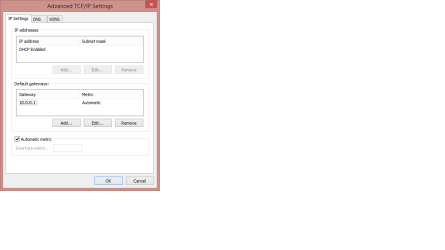
I thought advanced settings in TCP/IPv4 properties had something to do with this.

Has anyone used advanced settings in TCP/IPv4 properties before? if so for what reason?
 

My Computer My Computer

Computer Manufacturer/Model Number
CustomBuild001
OS
7 ultimate x64
CPU
Intel core i7 2600K
Motherboard
ASUS P8Z68-V PRO
Memory
Vengeance™ — 16GB Triple Channel DDR3 PC16000
Graphics Card(s)
GeForce GTX 560 Ti
Monitor(s) Displays
HannsG 22" widescreen (HDMI)
Screen Resolution
1680x1050
Hard Drives
Samsung 1TB x2(RAID1) Deskstar 160G, Buffalo ExHD 500GB
PSU
Corsair 850HX
Case
Antec Three Hundred Gaming Tower Case
Cooling
CPU Freezer 7 Pro Rev. 2...ANTEC 3phase cooling, 2 intake.
Keyboard
microsoft intellitype 6000 v3.0
Mouse
microsoft sidewinder
Internet Speed
50Mb
Other Info
64GB SSD in pipeline for Intel Smart Response Technology.
If the phone is using your wifi connection then it will get whatever IP address the DHCP assigns to it.
The 192.168.42.XX range is typically used by the phone internal DHCP server when it functions as a router (wifi/usb) for sharing its own internet connection.

Other than that I don't understand what do you mean by "tagged on the switch" or how exactly is your configuration.
 

My Computer My Computer

Computer type
Laptop
Computer Manufacturer/Model Number
Toshiba Sattelite A665-S6092
OS
Windows 7 Ultimate x64
CPU
Intel Core i7-740QM
Memory
8 GB DDR3
Graphics Card(s)
NVIDIA GeForce 330GT
Screen Resolution
1366x768
Hard Drives
Samsung 840 SSD 500GB
1TB USB3 external HD
Cooling
Coolermaster Notepal U3 notebook cooling pad
Internet Speed
3mbps ASDL
Antivirus
ClamWin 0.98.7
Browser
Opera 12.17 x86 (main), Firefox 38 (sec), IE11 (last resort)
Other than that I don't understand what do you mean by "tagged on the switch" or how exactly is your configuration.

That's HP Procurve switch configuration and tagged is the equivalent of a trunk port on a Cisco switch. The way that the port is set up is with a tagged port in one vlan for voice traffic and an untagged port in another vlan for the data traffic. Then the connection goes from the datapoint (connection to the switch) to the VOIP phone and from there to the PC.

I don't think that the PC will be able to see the tagged traffic this will not be routed on by the phone and the PC will be expecting to see it's connection on an untagged port but I could be wrong as it is not my area of expertise.
 

My Computer My Computer

Computer type
PC/Desktop
Computer Manufacturer/Model Number
Custom Build
OS
Windows 7 64bit
CPU
Intel(R) Core(TM) i7-4770K CPU @ 3.50GHz
Motherboard
Gigabyte Technology Co., Ltd. Z87-DS3H
Memory
Corsair XMS3 16GB kit (2x8GB) DDR3 1333MHz Unbuffered CL9 DI
Graphics Card(s)
(1) Intel(R) HD Graphics 4600 (2) NVIDIA GeForce GT 640
Hard Drives
(1) Samsung SSD 840 EVO 250G SCSI Disk Device (2) Samsung SSD 850 EVO 250G SCSI Disk Device (3) WDC WD10EZEX-00KUWA0 SCSI Disk Device
Antivirus
MSE
Browser
Pale Moon
I was just wondering if the phone software would pick up the .42 network, i thought it was possible for windows to pick up both networks?

anyone used the advanced settings in TCP/Ipv4 for anything interesting?

what is the purpose of adding Ip addresses?
 

Attachments

  • tcpip.png
    tcpip.png
    7.1 KB · Views: 4

My Computer My Computer

Computer Manufacturer/Model Number
CustomBuild001
OS
7 ultimate x64
CPU
Intel core i7 2600K
Motherboard
ASUS P8Z68-V PRO
Memory
Vengeance™ — 16GB Triple Channel DDR3 PC16000
Graphics Card(s)
GeForce GTX 560 Ti
Monitor(s) Displays
HannsG 22" widescreen (HDMI)
Screen Resolution
1680x1050
Hard Drives
Samsung 1TB x2(RAID1) Deskstar 160G, Buffalo ExHD 500GB
PSU
Corsair 850HX
Case
Antec Three Hundred Gaming Tower Case
Cooling
CPU Freezer 7 Pro Rev. 2...ANTEC 3phase cooling, 2 intake.
Keyboard
microsoft intellitype 6000 v3.0
Mouse
microsoft sidewinder
Internet Speed
50Mb
Other Info
64GB SSD in pipeline for Intel Smart Response Technology.

My Computer My Computer

OS
Windows 7 Professional 64bit
CPU
AMD Athlon II X3 440
Motherboard
ASUS M4A77TD
Memory
12.0 GB Dual-Channel DDR3 @ 669MHz
Graphics Card(s)
AMD Radeon HD 6850
Sound Card
AMD High Definition Audio Device
Monitor(s) Displays
Dell 317FP, Generic PnP Monitor
Screen Resolution
1920x1080
Hard Drives
112GB OCZ OCZ-AGIL ITY3 SATA Disk Device (SSD)
932GB Western Digital WDC WD10 01FALS-00E3A0 SATA Disk Device (SATA)
466GB Western Digital WDC WD50 01AALS-00L3B2 SATA Disk Device (SATA)
Case
ANTEC 300 ILLUSION
Cooling
CoolerMaster Hyper 212 plus
Other Info
I have two 4GB Corsair XMS3 modules and two 2GB Corsair XMS3 modules.
Back
Top