Solved Favicons: I Need To Find The File Path

Melita

New member
Power User
VIP
Local time
6:58 AM
Messages
293
Location
Canada
Last edited:

My Computer My Computer

At a glance

Windows 7 Home Premium 64bitAMD Dual Core C-502GB DDR3/320GB HDDAMD Radeon HD 6250
Computer Manufacturer/Model Number
Laptop - Acer Aspire 5250-BZ479
OS
Windows 7 Home Premium 64bit
CPU
AMD Dual Core C-50
Memory
2GB DDR3/320GB HDD
Graphics Card(s)
AMD Radeon HD 6250
Monitor(s) Displays
15.6" HD LED LCD
Internet Speed
ADSL
Chosen Solution

There's no "cache" for Favicons. They are saved directly in the places.sqlite file, in your Profile folder, with your bookmarks and browser history.

Source: Bookmarks don't show all favicons
First go to http://www.sevenforums.com/tutorials/394-hidden-files-folders-show-hide.html; You want to show, follow Option One, Steps one and two.

Then go to
Code:
C:\Users\[I][U][COLOR=Blue]your user name[/COLOR][/U][/I]\AppData\Roaming\Mozilla\Firefox\Profiles
  • Click on your profile, it should look something like this: 6boqw0lk.default-120653523721 it will be the only folder below Profiles, click on it.

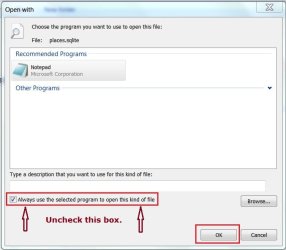
  • Scroll down until you see places.sqlite, click on it. A box will open asking you what program you would like to open this file with, notepad is acceptable.
ffbook.JPG

  • Uncheck the box, click on OK. Wait for the file to open, mine is over 10MB, took a minute.
The majority of what you see will be in programming language, but you can see the links to your saved bookmarks.


There are also bookmarkbackups located at:
Code:
C:\Users\[I][U][COLOR=Blue]your user name[/COLOR][/U][/I]\AppData\Roaming\Mozilla\Firefox\Profiles\[I][COLOR=Blue]Your Profile[/COLOR][/I]\bookmarkbackups
and it will be a sub-folder in your profile.

It is more difficult to open because it is a JSONLZ4 file, but there is a third-party program from FileInfo.com that may work to open them: File Viewer Lite
I tried to scan it with VirusTotal, but the que was taking too long so here are the results from a day ago: https://www.virustotal.com/en/file/...fcdb03e98eb28c55d0f9f14fa313d7549bb/analysis/

There is also a website that you may want: https://json-csv.com/ Use a copy of bookmarkbackups. Once converted you can paste the .csv file into Excel or Calc if your copy won't paste upload it into the converter.

I did not use either method to view the bookmarkbackups file(s) because I had no need to, but you might.


Related:
http://Reading "jsonlz4" bookmarkbackup files | forums.mozillazine.org

Help how to open JSONLZ4 files:
You can use export/import (HTML) or backup/restore (JSON) in the Bookmarks Manager to create a backup or restore the bookmarks.

Source: File extension JSONLZ4 - Open .jsonlz4 files
 
Last edited:

My Computer My Computer

At a glance

Originally Win 7 Hm Prem x64 Ver 6.1.7600 Bui...Intel i3 530 2.93GHz, 2933MHz 2 Cores 4 Logic...6GB of 1,333MHz DDR3 SDRAM32MB Intel Graphics Media Accelerator HD IGChip
Computer type
PC/Desktop
Computer Manufacturer/Model Number
Gateway DX4831-01e (Mid-Tower Desktop)
OS
Originally Win 7 Hm Prem x64 Ver 6.1.7600 Build 7601-SP1 | Upgraded to Windows 10 December 14, 2019
CPU
Intel i3 530 2.93GHz, 2933MHz 2 Cores 4 Logical Processors
Motherboard
Gateway H57M01 133 megahertz
Memory
6GB of 1,333MHz DDR3 SDRAM
Graphics Card(s)
32MB Intel Graphics Media Accelerator HD IGChip
Sound Card
Realtek High Definition Audio
Monitor(s) Displays
Gateway HX2000 20inch TFT active matrix TN
Screen Resolution
1600 x 900 x 59 hertz
Hard Drives
WDC WD10EADS-00M2B0 [HDD] (1000.20 GB) -- drive 0,
HL-DT-ST DVDRAM GH41N [CD-ROM dr]
Four card readers, and Four USB 2.0
PSU
300watts.
Case
Mid-Tower Desktop
Cooling
Stock from Gateway
Keyboard
Natural Ergonomic Keyboard 4000, see Other Info
Mouse
Orig. Gateway wore out now using Insignia USB wired optical
Internet Speed
Vz FIOS 10ms png 57.64Mbps down 65.53Mbps up Speedtest.org
Antivirus
Zamana Anti-logger with Anti-malware, MSE, Windows Firewall,
Browser
IE11.0.9600.19399-Upd ver11.0.135, Firefox 68.0.1 x64
Other Info
System Specs by Belarc.

BIOS: American Megatrends Inc. P01-A0 11/17/2009

Replaced the MS 'Natural' Standard PS/2 Enhanced 101-102 Keyboard with a new Natural Ergonomic Keyboard 4000 on August 1st 2014.

Canon Pixma MG3222 Printer.

Updated to IE11 on 12102015 | Fios Quantum Router g1100

Additional AV: SpywareBlaster, manual Mbam, SAS
Melita, did you delete your new post?

I received this email note earlier today:
Here is the message that has just been posted:
***************
I entered the exact code with my username; C:\Users\your user name\AppData\Roaming\Mozilla\Firefox\Profiles

Somehow the file is not opening. Don't I have to enter some parts of this code this way; %AppData% or %user name%
***************
You shouldn't need the %%.

Can you be clearer on why the file is not opening?

When you click on places.sqlite do you see the Open with box, and follow the steps I laid out?

If you did, Notepad should have opened, did you allow enough time for the file to open, I timed mine this time and it took my 10MB file 10secs to open.

How large is your places.sqlite file?
 

My Computer My Computer

At a glance

Originally Win 7 Hm Prem x64 Ver 6.1.7600 Bui...Intel i3 530 2.93GHz, 2933MHz 2 Cores 4 Logic...6GB of 1,333MHz DDR3 SDRAM32MB Intel Graphics Media Accelerator HD IGChip
Computer type
PC/Desktop
Computer Manufacturer/Model Number
Gateway DX4831-01e (Mid-Tower Desktop)
OS
Originally Win 7 Hm Prem x64 Ver 6.1.7600 Build 7601-SP1 | Upgraded to Windows 10 December 14, 2019
CPU
Intel i3 530 2.93GHz, 2933MHz 2 Cores 4 Logical Processors
Motherboard
Gateway H57M01 133 megahertz
Memory
6GB of 1,333MHz DDR3 SDRAM
Graphics Card(s)
32MB Intel Graphics Media Accelerator HD IGChip
Sound Card
Realtek High Definition Audio
Monitor(s) Displays
Gateway HX2000 20inch TFT active matrix TN
Screen Resolution
1600 x 900 x 59 hertz
Hard Drives
WDC WD10EADS-00M2B0 [HDD] (1000.20 GB) -- drive 0,
HL-DT-ST DVDRAM GH41N [CD-ROM dr]
Four card readers, and Four USB 2.0
PSU
300watts.
Case
Mid-Tower Desktop
Cooling
Stock from Gateway
Keyboard
Natural Ergonomic Keyboard 4000, see Other Info
Mouse
Orig. Gateway wore out now using Insignia USB wired optical
Internet Speed
Vz FIOS 10ms png 57.64Mbps down 65.53Mbps up Speedtest.org
Antivirus
Zamana Anti-logger with Anti-malware, MSE, Windows Firewall,
Browser
IE11.0.9600.19399-Upd ver11.0.135, Firefox 68.0.1 x64
Other Info
System Specs by Belarc.

BIOS: American Megatrends Inc. P01-A0 11/17/2009

Replaced the MS 'Natural' Standard PS/2 Enhanced 101-102 Keyboard with a new Natural Ergonomic Keyboard 4000 on August 1st 2014.

Canon Pixma MG3222 Printer.

Updated to IE11 on 12102015 | Fios Quantum Router g1100

Additional AV: SpywareBlaster, manual Mbam, SAS
Hello Anak,

What happened was that Windows Explorer was searching for the file for 2 hours with no result and I thought there was something wrong. So I posted the message that you have quoted. I tried again and after 3 hours of searching, the file opened. I immediately deleted my post but it looks like you have answered it just before that. I am very sorry about this!

Will get back on this later.

Regards
 

My Computer My Computer

At a glance

Windows 7 Home Premium 64bitAMD Dual Core C-502GB DDR3/320GB HDDAMD Radeon HD 6250
Computer Manufacturer/Model Number
Laptop - Acer Aspire 5250-BZ479
OS
Windows 7 Home Premium 64bit
CPU
AMD Dual Core C-50
Memory
2GB DDR3/320GB HDD
Graphics Card(s)
AMD Radeon HD 6250
Monitor(s) Displays
15.6" HD LED LCD
Internet Speed
ADSL
Hi Melita,

Aww...No harm, no foul, sometimes stuff happens, but that is an awful long time for Windows to search. If you have time like overnight while you're sleeping you might want to try rebuilding your Index: http://www.sevenforums.com/tutorials/17880-index-rebuild.html also check the Related Tutorials at the bottom of this tutorial for more options that are related to indexing like search.

You could have also tried drilling down to the file path that I gave you: C:\Users\your user name\AppData\Roaming\Mozilla\Firefox\Profiles - that would be much quicker.
   Note
Make sure you un-hide those folders and files first, and the reason you un-check the 'always use the selected program' box is if you leave it checked the file dependencies are changed and Firefox won't be able to use it because it is looking for a .sqlite file.
No hurry. When you get your thoughts together, I'll be here.
 

My Computer My Computer

At a glance

Originally Win 7 Hm Prem x64 Ver 6.1.7600 Bui...Intel i3 530 2.93GHz, 2933MHz 2 Cores 4 Logic...6GB of 1,333MHz DDR3 SDRAM32MB Intel Graphics Media Accelerator HD IGChip
Computer type
PC/Desktop
Computer Manufacturer/Model Number
Gateway DX4831-01e (Mid-Tower Desktop)
OS
Originally Win 7 Hm Prem x64 Ver 6.1.7600 Build 7601-SP1 | Upgraded to Windows 10 December 14, 2019
CPU
Intel i3 530 2.93GHz, 2933MHz 2 Cores 4 Logical Processors
Motherboard
Gateway H57M01 133 megahertz
Memory
6GB of 1,333MHz DDR3 SDRAM
Graphics Card(s)
32MB Intel Graphics Media Accelerator HD IGChip
Sound Card
Realtek High Definition Audio
Monitor(s) Displays
Gateway HX2000 20inch TFT active matrix TN
Screen Resolution
1600 x 900 x 59 hertz
Hard Drives
WDC WD10EADS-00M2B0 [HDD] (1000.20 GB) -- drive 0,
HL-DT-ST DVDRAM GH41N [CD-ROM dr]
Four card readers, and Four USB 2.0
PSU
300watts.
Case
Mid-Tower Desktop
Cooling
Stock from Gateway
Keyboard
Natural Ergonomic Keyboard 4000, see Other Info
Mouse
Orig. Gateway wore out now using Insignia USB wired optical
Internet Speed
Vz FIOS 10ms png 57.64Mbps down 65.53Mbps up Speedtest.org
Antivirus
Zamana Anti-logger with Anti-malware, MSE, Windows Firewall,
Browser
IE11.0.9600.19399-Upd ver11.0.135, Firefox 68.0.1 x64
Other Info
System Specs by Belarc.

BIOS: American Megatrends Inc. P01-A0 11/17/2009

Replaced the MS 'Natural' Standard PS/2 Enhanced 101-102 Keyboard with a new Natural Ergonomic Keyboard 4000 on August 1st 2014.

Canon Pixma MG3222 Printer.

Updated to IE11 on 12102015 | Fios Quantum Router g1100

Additional AV: SpywareBlaster, manual Mbam, SAS
Hello Anak,

The file took long to open because I had selected 'Find partial matches' in 'Folder Options'. Once I de-selected that, it opened in 7 minutes. I saw a large number of favicons but I could not be sure whether any of them are for the web shortcuts I made to the desktop, using the darg and drop method. It is also 10MB like yours. So, it must be OK.

Here is the link to my earlier post in this forum, about the favicon problem I had, and how it was sorted out.

http://www.sevenforums.com/customization/363190-i-too-have-desktop-icon-problem.html

But to save you the trouble of wading through it, I am copying the relevant parts below:

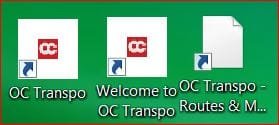
"I used Ccleaner to clean up the computer. When I re-started the computer, desktop icons for Internet web page short cuts (about 20 of them), have all changed to the same icon, the way it is seen in my attachment at the top. Before the clean up, they all had different icons according to the web page, as shown in attachment at the bottom. How can I get back the original web page icons for these short cuts?
ICONS 1ST POST.JPG

I did a cache rebuild and this is what happened:

"After the cache rebuild two things happened to the short cut icons. (1) They all changed to the usual Notepad icon of WIN 7. Please see attachment. (2) This is spooky. When a web page is opened using one of the icons, two tabs open. First tab opens 'Ghostery' home page (I use this add on with Firefox which is my default browser), and the second one opens the correct web page. This happens with all the Internet short cuts! Now I have notepad icon on all these and I am plagued with Ghostery home page."

This was the solution I discovered in the end:

"In three steps it can be put right. Reduce the page size so that I can see the messed up favicon on desk top, delete it and drag and drop page to desktop again. It is saved with the proper icon."
----------------------------------------------------------------------------------------------------------------
New Problem:

A week ago I used a programme "Temporary File Cleaner" (TFC). This time my icons did not disappear. They are still there on the desktop but after (TFC), all new shortcuts I make come with no favicons!

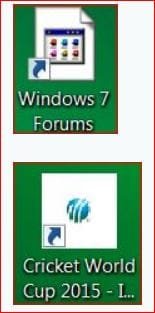
If I click on one of the old favicons that are still on the desktop (1st photo in the attachment below), to open that web page, and drag and drop the exact web page to the desktop, the short cut is made with the correct (same) favicon (2nd one in the attachment). If I make a short cut with any other page of the same web site, there is no favicon but a blank white icon (3rd picture in attachment).
FAVICON 1.JPG

Also, It is the same blank white icon that appears for all short cuts that I now make, for all new web sites, whether I make them on Desktop or in any other folder.

There is only one place a new favicon is made. Bookmarks! It is found in all new bookmarks that I make. Old bookmarks also have not lost their favicons.

BUT, If I drag and drop any bookmark, old or new, it makes the same blank white icon!

Can a solution to this be found?

Kind regards

P.S. Oh, I almost forgot. Only web shortcut Favicons are affected. All other icons for folders, programmes, applications etc. remain as they were.

 
Last edited:

My Computer My Computer

At a glance

Windows 7 Home Premium 64bitAMD Dual Core C-502GB DDR3/320GB HDDAMD Radeon HD 6250
Computer Manufacturer/Model Number
Laptop - Acer Aspire 5250-BZ479
OS
Windows 7 Home Premium 64bit
CPU
AMD Dual Core C-50
Memory
2GB DDR3/320GB HDD
Graphics Card(s)
AMD Radeon HD 6250
Monitor(s) Displays
15.6" HD LED LCD
Internet Speed
ADSL
Thank goodness it only affects your browser icons and not the OS ones, that definitely points to the browser.

Have you done any mucking around in about:config? Check to see if these two settings are set to true, I'm using this tut to show how to get to them, just make sure their set to true and not false like the tut instructs, if they are true just close/x-out the tab: http://www.sevenforums.com/tutorials/170029-firefox-favicons-disable.html

Has it been awhile since you last cleared your Firefox (FF) cache? if so try: https://support.mozilla.org/en-US/kb/how-clear-firefox-cache#w_clear-the-cache

If that doesn't help or help much try: https://addons.mozilla.org/en-us/firefox/addon/favicon-restorer/
To see if you can rebuild those favicons.

Do you use the FF sync feature? I seen reports that, that can interfere with saving favicons/icons.

This might also be a corrupt profile and you will need to create a new one. There is a way to create an extra one in FF and switch between the old and new for testing: https://support.mozilla.org/en-US/kb/profile-manager-create-and-remove-firefox-profiles

http://www.sevenforums.com/tutorials/208070-firefox-create-run-multiple-profiles.html


Related:

This may also help in rebuilding favicons: AM-DeadLink

Variations on the profile theme:
https://developer.mozilla.org/en-US/docs/Mozilla/Multiple_Firefox_Profiles

Use Multiple Firefox Profiles at the Same Time

How To Use Firefox Profiles & Run Multiple Firefox Profiles At Once
 

My Computer My Computer

At a glance

Originally Win 7 Hm Prem x64 Ver 6.1.7600 Bui...Intel i3 530 2.93GHz, 2933MHz 2 Cores 4 Logic...6GB of 1,333MHz DDR3 SDRAM32MB Intel Graphics Media Accelerator HD IGChip
Computer type
PC/Desktop
Computer Manufacturer/Model Number
Gateway DX4831-01e (Mid-Tower Desktop)
OS
Originally Win 7 Hm Prem x64 Ver 6.1.7600 Build 7601-SP1 | Upgraded to Windows 10 December 14, 2019
CPU
Intel i3 530 2.93GHz, 2933MHz 2 Cores 4 Logical Processors
Motherboard
Gateway H57M01 133 megahertz
Memory
6GB of 1,333MHz DDR3 SDRAM
Graphics Card(s)
32MB Intel Graphics Media Accelerator HD IGChip
Sound Card
Realtek High Definition Audio
Monitor(s) Displays
Gateway HX2000 20inch TFT active matrix TN
Screen Resolution
1600 x 900 x 59 hertz
Hard Drives
WDC WD10EADS-00M2B0 [HDD] (1000.20 GB) -- drive 0,
HL-DT-ST DVDRAM GH41N [CD-ROM dr]
Four card readers, and Four USB 2.0
PSU
300watts.
Case
Mid-Tower Desktop
Cooling
Stock from Gateway
Keyboard
Natural Ergonomic Keyboard 4000, see Other Info
Mouse
Orig. Gateway wore out now using Insignia USB wired optical
Internet Speed
Vz FIOS 10ms png 57.64Mbps down 65.53Mbps up Speedtest.org
Antivirus
Zamana Anti-logger with Anti-malware, MSE, Windows Firewall,
Browser
IE11.0.9600.19399-Upd ver11.0.135, Firefox 68.0.1 x64
Other Info
System Specs by Belarc.

BIOS: American Megatrends Inc. P01-A0 11/17/2009

Replaced the MS 'Natural' Standard PS/2 Enhanced 101-102 Keyboard with a new Natural Ergonomic Keyboard 4000 on August 1st 2014.

Canon Pixma MG3222 Printer.

Updated to IE11 on 12102015 | Fios Quantum Router g1100

Additional AV: SpywareBlaster, manual Mbam, SAS
Have you done any mucking around in about:config? Check to see if these two settings are set to true, I'm using this tut to show how to get to them, just make sure their set to true and not false like the tut instructs, if they are true just close/x-out the tab: http://www.sevenforums.com/tutorials/170029-firefox-favicons-disable.html
No, I didn't do any mucking around in about:config :D The two settings are set to true and I didn't have to do anything.
Has it been awhile since you last cleared your Firefox (FF) cache? if so try: https://support.mozilla.org/en-US/kb/how-clear-firefox-cache#w_clear-the-cache
I cleared it after the trouble started but did it again today.

If that doesn't help or help much try: https://addons.mozilla.org/en-us/firefox/addon/favicon-restorer/
To see if you can rebuild those favicons.
This add-on was installed.

Do you use the FF sync feature? I seen reports that, that can interfere with saving favicons/icons.
I never used this.
This might also be a corrupt profile and you will need to create a new one. There is a way to create an extra one in FF and switch between the old and new for testing: https://support.mozilla.org/en-US/kb/profile-manager-create-and-remove-firefox-profiles

http://www.sevenforums.com/tutorials/208070-firefox-create-run-multiple-profiles.htm
None of the above helped. So I am down to this one. Before doing that; my Firefox is functioning perfectly. Speed is great. Would this be so, if the profile is corrupted?

I wonder whether Firefox can be restored to an earlier time, like we do with the computer?

Regards
 
Last edited:

My Computer My Computer

At a glance

Windows 7 Home Premium 64bitAMD Dual Core C-502GB DDR3/320GB HDDAMD Radeon HD 6250
Computer Manufacturer/Model Number
Laptop - Acer Aspire 5250-BZ479
OS
Windows 7 Home Premium 64bit
CPU
AMD Dual Core C-50
Memory
2GB DDR3/320GB HDD
Graphics Card(s)
AMD Radeon HD 6250
Monitor(s) Displays
15.6" HD LED LCD
Internet Speed
ADSL
I wonder whether Firefox can be restored to an earlier time, like we do with the computer?
I believe you're thinking of this:
Restore the Default Settings in Firefox Without Uninstalling It

Have you found yourself wishing that you could start fresh with Firefox but the thought of uninstalling and then reinstalling it makes you cringe? Well now you can get that fresh clean Firefox goodness back with a simple process using “Safe Mode”.

Source: Restore the Default Settings in Firefox Without Uninstalling It
But then maybe this:
What does the refresh feature do?

All of your Firefox settings and personal information are stored in a profile folder. The refresh feature works by creating a new profile folder for you while saving your important data.
Add-ons normally stored inside the Firefox profile folder, such as extensions and themes, will be removed. Add-ons stored in other locations, such as plugins, will not be removed but any modified preferences (such as plugins you have disabled) will be reset.

Source: https://Refresh Firefox - reset add-ons and settings | support.mozilla.org
A refresh will remove extensions, themes and a few other items.
These items and settings will be removed:

Source a little further down on the refresh page.
Here's a handy utility to have in case you run into problems:
MozBackup is a simple utility for creating backups of Mozilla Firefox, Mozilla Thunderbird, Mozilla Sunbird, Flock, SeaMonkey, Mozilla Suite, Spicebird, Songbird and Netscape profiles.

It allows you to backup and restore bookmarks, mail, contacts, history, extensions, passwords, cache etc. It's an easy way to do Firefox backup, Thunderbird backup ...

Source: http://mozbackup.jasnapaka.com/
You could use it in case you have to reinstall Firefox which would be the next step if the restore/refresh doesn't work, but you might be copying your problems into the new install.
 

My Computer My Computer

At a glance

Originally Win 7 Hm Prem x64 Ver 6.1.7600 Bui...Intel i3 530 2.93GHz, 2933MHz 2 Cores 4 Logic...6GB of 1,333MHz DDR3 SDRAM32MB Intel Graphics Media Accelerator HD IGChip
Computer type
PC/Desktop
Computer Manufacturer/Model Number
Gateway DX4831-01e (Mid-Tower Desktop)
OS
Originally Win 7 Hm Prem x64 Ver 6.1.7600 Build 7601-SP1 | Upgraded to Windows 10 December 14, 2019
CPU
Intel i3 530 2.93GHz, 2933MHz 2 Cores 4 Logical Processors
Motherboard
Gateway H57M01 133 megahertz
Memory
6GB of 1,333MHz DDR3 SDRAM
Graphics Card(s)
32MB Intel Graphics Media Accelerator HD IGChip
Sound Card
Realtek High Definition Audio
Monitor(s) Displays
Gateway HX2000 20inch TFT active matrix TN
Screen Resolution
1600 x 900 x 59 hertz
Hard Drives
WDC WD10EADS-00M2B0 [HDD] (1000.20 GB) -- drive 0,
HL-DT-ST DVDRAM GH41N [CD-ROM dr]
Four card readers, and Four USB 2.0
PSU
300watts.
Case
Mid-Tower Desktop
Cooling
Stock from Gateway
Keyboard
Natural Ergonomic Keyboard 4000, see Other Info
Mouse
Orig. Gateway wore out now using Insignia USB wired optical
Internet Speed
Vz FIOS 10ms png 57.64Mbps down 65.53Mbps up Speedtest.org
Antivirus
Zamana Anti-logger with Anti-malware, MSE, Windows Firewall,
Browser
IE11.0.9600.19399-Upd ver11.0.135, Firefox 68.0.1 x64
Other Info
System Specs by Belarc.

BIOS: American Megatrends Inc. P01-A0 11/17/2009

Replaced the MS 'Natural' Standard PS/2 Enhanced 101-102 Keyboard with a new Natural Ergonomic Keyboard 4000 on August 1st 2014.

Canon Pixma MG3222 Printer.

Updated to IE11 on 12102015 | Fios Quantum Router g1100

Additional AV: SpywareBlaster, manual Mbam, SAS
I am only interested in saving bookmarks.

(1) When 'Reset', 'Refresh' or 'Create a New Profile' feature is used:

The Bookmarks are saved. I have customized my bookmarks and made 28 new folders for easy access. Will they be restored in exactly the same format (including all the separate folders with their exact contents), after the reset, refresh or with the new profile?

(2) In the event that they get deleted accidentally during any of the above operations:

If I, (1) 'Backup' or (2) 'Export Bookmarks to HTML', using the 'Import and Backup' option of Firefox Library; when I import them later, will they be restored in exactly the same format (including all the separate folders with their exact contents).

(3) If the answer to (2) above is 'Yes':

What is your opinion about my un-installing Firefox entirely and downloading it new? This may even prevent any potential glitches that are not yet apparent.

Thank you
 

My Computer My Computer

At a glance

Windows 7 Home Premium 64bitAMD Dual Core C-502GB DDR3/320GB HDDAMD Radeon HD 6250
Computer Manufacturer/Model Number
Laptop - Acer Aspire 5250-BZ479
OS
Windows 7 Home Premium 64bit
CPU
AMD Dual Core C-50
Memory
2GB DDR3/320GB HDD
Graphics Card(s)
AMD Radeon HD 6250
Monitor(s) Displays
15.6" HD LED LCD
Internet Speed
ADSL
If all your bookmarks are within your present version of Firefox;

1.) They should be.

2.) Yes.

3.) Go for it.

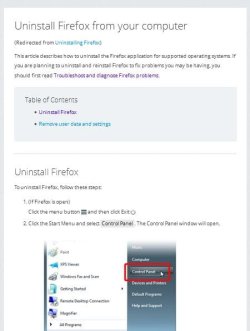
To uninstall entirely follow both steps here: Uninstall Firefox from your computer Uninstall Firefox using programs and features and the profile from appdata.
 

My Computer My Computer

At a glance

Originally Win 7 Hm Prem x64 Ver 6.1.7600 Bui...Intel i3 530 2.93GHz, 2933MHz 2 Cores 4 Logic...6GB of 1,333MHz DDR3 SDRAM32MB Intel Graphics Media Accelerator HD IGChip
Computer type
PC/Desktop
Computer Manufacturer/Model Number
Gateway DX4831-01e (Mid-Tower Desktop)
OS
Originally Win 7 Hm Prem x64 Ver 6.1.7600 Build 7601-SP1 | Upgraded to Windows 10 December 14, 2019
CPU
Intel i3 530 2.93GHz, 2933MHz 2 Cores 4 Logical Processors
Motherboard
Gateway H57M01 133 megahertz
Memory
6GB of 1,333MHz DDR3 SDRAM
Graphics Card(s)
32MB Intel Graphics Media Accelerator HD IGChip
Sound Card
Realtek High Definition Audio
Monitor(s) Displays
Gateway HX2000 20inch TFT active matrix TN
Screen Resolution
1600 x 900 x 59 hertz
Hard Drives
WDC WD10EADS-00M2B0 [HDD] (1000.20 GB) -- drive 0,
HL-DT-ST DVDRAM GH41N [CD-ROM dr]
Four card readers, and Four USB 2.0
PSU
300watts.
Case
Mid-Tower Desktop
Cooling
Stock from Gateway
Keyboard
Natural Ergonomic Keyboard 4000, see Other Info
Mouse
Orig. Gateway wore out now using Insignia USB wired optical
Internet Speed
Vz FIOS 10ms png 57.64Mbps down 65.53Mbps up Speedtest.org
Antivirus
Zamana Anti-logger with Anti-malware, MSE, Windows Firewall,
Browser
IE11.0.9600.19399-Upd ver11.0.135, Firefox 68.0.1 x64
Other Info
System Specs by Belarc.

BIOS: American Megatrends Inc. P01-A0 11/17/2009

Replaced the MS 'Natural' Standard PS/2 Enhanced 101-102 Keyboard with a new Natural Ergonomic Keyboard 4000 on August 1st 2014.

Canon Pixma MG3222 Printer.

Updated to IE11 on 12102015 | Fios Quantum Router g1100

Additional AV: SpywareBlaster, manual Mbam, SAS
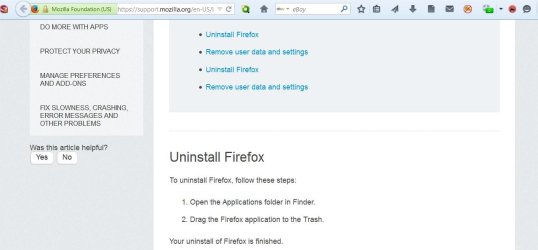
To uninstall Firefox, follow these steps:

  1. Open the Applications folder in Finder.
  2. Drag the Firefox application to the Trash.
Your uninstall of Firefox is finished.


In your link to uninstall Firefox, this seems to be the easiest. I am unable to find the one in bold above.


Regards,
 

My Computer My Computer

At a glance

Windows 7 Home Premium 64bitAMD Dual Core C-502GB DDR3/320GB HDDAMD Radeon HD 6250
Computer Manufacturer/Model Number
Laptop - Acer Aspire 5250-BZ479
OS
Windows 7 Home Premium 64bit
CPU
AMD Dual Core C-50
Memory
2GB DDR3/320GB HDD
Graphics Card(s)
AMD Radeon HD 6250
Monitor(s) Displays
15.6" HD LED LCD
Internet Speed
ADSL
I can not see any steps in my link: Uninstall Firefox from your computer that state:
To uninstall Firefox, follow these steps:

  1. Open the Applications folder in Finder.
  2. Drag the Firefox application to the Trash.
Your uninstall of Firefox is finished.
Are you sure you clicked on the proper link, maybe you were on a different tab?
 

My Computer My Computer

At a glance

Originally Win 7 Hm Prem x64 Ver 6.1.7600 Bui...Intel i3 530 2.93GHz, 2933MHz 2 Cores 4 Logic...6GB of 1,333MHz DDR3 SDRAM32MB Intel Graphics Media Accelerator HD IGChip
Computer type
PC/Desktop
Computer Manufacturer/Model Number
Gateway DX4831-01e (Mid-Tower Desktop)
OS
Originally Win 7 Hm Prem x64 Ver 6.1.7600 Build 7601-SP1 | Upgraded to Windows 10 December 14, 2019
CPU
Intel i3 530 2.93GHz, 2933MHz 2 Cores 4 Logical Processors
Motherboard
Gateway H57M01 133 megahertz
Memory
6GB of 1,333MHz DDR3 SDRAM
Graphics Card(s)
32MB Intel Graphics Media Accelerator HD IGChip
Sound Card
Realtek High Definition Audio
Monitor(s) Displays
Gateway HX2000 20inch TFT active matrix TN
Screen Resolution
1600 x 900 x 59 hertz
Hard Drives
WDC WD10EADS-00M2B0 [HDD] (1000.20 GB) -- drive 0,
HL-DT-ST DVDRAM GH41N [CD-ROM dr]
Four card readers, and Four USB 2.0
PSU
300watts.
Case
Mid-Tower Desktop
Cooling
Stock from Gateway
Keyboard
Natural Ergonomic Keyboard 4000, see Other Info
Mouse
Orig. Gateway wore out now using Insignia USB wired optical
Internet Speed
Vz FIOS 10ms png 57.64Mbps down 65.53Mbps up Speedtest.org
Antivirus
Zamana Anti-logger with Anti-malware, MSE, Windows Firewall,
Browser
IE11.0.9600.19399-Upd ver11.0.135, Firefox 68.0.1 x64
Other Info
System Specs by Belarc.

BIOS: American Megatrends Inc. P01-A0 11/17/2009

Replaced the MS 'Natural' Standard PS/2 Enhanced 101-102 Keyboard with a new Natural Ergonomic Keyboard 4000 on August 1st 2014.

Canon Pixma MG3222 Printer.

Updated to IE11 on 12102015 | Fios Quantum Router g1100

Additional AV: SpywareBlaster, manual Mbam, SAS
I can not see any steps in my link: Uninstall Firefox from your computer that state:
To uninstall Firefox, follow these steps:

  1. Open the Applications folder in Finder.
  2. Drag the Firefox application to the Trash.
Your uninstall of Firefox is finished.
Are you sure you clicked on the proper link, maybe you were on a different tab?
When I click on this link, this is the URL of the page that opens:

https://support.mozilla.org/en-US/kb/uninstall-firefox-from-your-computer

Here is a snip of the part that I am referring to. It is at the top of the page, just a few inches down:

FF 10-4.JPG
 

My Computer My Computer

At a glance

Windows 7 Home Premium 64bitAMD Dual Core C-502GB DDR3/320GB HDDAMD Radeon HD 6250
Computer Manufacturer/Model Number
Laptop - Acer Aspire 5250-BZ479
OS
Windows 7 Home Premium 64bit
CPU
AMD Dual Core C-50
Memory
2GB DDR3/320GB HDD
Graphics Card(s)
AMD Radeon HD 6250
Monitor(s) Displays
15.6" HD LED LCD
Internet Speed
ADSL
It took me a while to figure this out;

There is some kind of re-direct going on that if I reduce the zoom factor on the page that link goes to I can see multiple instances of the uninstall link, my example:
melitaff.jpg

If I give it a few seconds it changes to this:
mff.JPG

And I can reproduce this in IE10 also. Once I reduced the zoom I couldn't get it to stop even if I reset the zoom to 100% or greater, it's just I couldn't see it?


The only thing I can tell you is to:

  • Try resetting your zoom to 100% if you run a different setting,

  • Try a setting more than 100%,

  • Wait a few more seconds until it changes by itself,

  • Try to refresh the page or


  • And follow the Removing user profile data section directly below the section explaining how to uninstall Firefox On Windows.
 

My Computer My Computer

At a glance

Originally Win 7 Hm Prem x64 Ver 6.1.7600 Bui...Intel i3 530 2.93GHz, 2933MHz 2 Cores 4 Logic...6GB of 1,333MHz DDR3 SDRAM32MB Intel Graphics Media Accelerator HD IGChip
Computer type
PC/Desktop
Computer Manufacturer/Model Number
Gateway DX4831-01e (Mid-Tower Desktop)
OS
Originally Win 7 Hm Prem x64 Ver 6.1.7600 Build 7601-SP1 | Upgraded to Windows 10 December 14, 2019
CPU
Intel i3 530 2.93GHz, 2933MHz 2 Cores 4 Logical Processors
Motherboard
Gateway H57M01 133 megahertz
Memory
6GB of 1,333MHz DDR3 SDRAM
Graphics Card(s)
32MB Intel Graphics Media Accelerator HD IGChip
Sound Card
Realtek High Definition Audio
Monitor(s) Displays
Gateway HX2000 20inch TFT active matrix TN
Screen Resolution
1600 x 900 x 59 hertz
Hard Drives
WDC WD10EADS-00M2B0 [HDD] (1000.20 GB) -- drive 0,
HL-DT-ST DVDRAM GH41N [CD-ROM dr]
Four card readers, and Four USB 2.0
PSU
300watts.
Case
Mid-Tower Desktop
Cooling
Stock from Gateway
Keyboard
Natural Ergonomic Keyboard 4000, see Other Info
Mouse
Orig. Gateway wore out now using Insignia USB wired optical
Internet Speed
Vz FIOS 10ms png 57.64Mbps down 65.53Mbps up Speedtest.org
Antivirus
Zamana Anti-logger with Anti-malware, MSE, Windows Firewall,
Browser
IE11.0.9600.19399-Upd ver11.0.135, Firefox 68.0.1 x64
Other Info
System Specs by Belarc.

BIOS: American Megatrends Inc. P01-A0 11/17/2009

Replaced the MS 'Natural' Standard PS/2 Enhanced 101-102 Keyboard with a new Natural Ergonomic Keyboard 4000 on August 1st 2014.

Canon Pixma MG3222 Printer.

Updated to IE11 on 12102015 | Fios Quantum Router g1100

Additional AV: SpywareBlaster, manual Mbam, SAS
I was looking at the Firefox files, to be deleted, that are mentioned in the MozillaZine link you gave me. I opened some to have a look and closed them. When I closed my browser the following appeared on my desktop, uninvited. The .db file was not opened. The other two which looks identical, opened with Notepad.

Notice how they are grayed out. I include here, the 'Acer 5250' docx file, for grayed out appearance comparison. What should I do with these?

files 1.JPG
 

My Computer My Computer

At a glance

Windows 7 Home Premium 64bitAMD Dual Core C-502GB DDR3/320GB HDDAMD Radeon HD 6250
Computer Manufacturer/Model Number
Laptop - Acer Aspire 5250-BZ479
OS
Windows 7 Home Premium 64bit
CPU
AMD Dual Core C-50
Memory
2GB DDR3/320GB HDD
Graphics Card(s)
AMD Radeon HD 6250
Monitor(s) Displays
15.6" HD LED LCD
Internet Speed
ADSL
Nothing, I hope you didn't change anything when you opened the .db files in Notepad, you see both desktop.ini and the Thumbs.db will disappear when you change the Show hidden files folders and drives back to hidden in Tools >Folder Options >View Tab.

You will see them every time you set the view to Show files folders and drives. Those are the files that set your preferences for your desktop and the Thumbs hold the icon placemarks for your desktop icons.

Open up the view tab and move all open windows so you can see them. Make your change to hide them and when you click on Apply/OK they will disappear.
 

My Computer My Computer

At a glance

Originally Win 7 Hm Prem x64 Ver 6.1.7600 Bui...Intel i3 530 2.93GHz, 2933MHz 2 Cores 4 Logic...6GB of 1,333MHz DDR3 SDRAM32MB Intel Graphics Media Accelerator HD IGChip
Computer type
PC/Desktop
Computer Manufacturer/Model Number
Gateway DX4831-01e (Mid-Tower Desktop)
OS
Originally Win 7 Hm Prem x64 Ver 6.1.7600 Build 7601-SP1 | Upgraded to Windows 10 December 14, 2019
CPU
Intel i3 530 2.93GHz, 2933MHz 2 Cores 4 Logical Processors
Motherboard
Gateway H57M01 133 megahertz
Memory
6GB of 1,333MHz DDR3 SDRAM
Graphics Card(s)
32MB Intel Graphics Media Accelerator HD IGChip
Sound Card
Realtek High Definition Audio
Monitor(s) Displays
Gateway HX2000 20inch TFT active matrix TN
Screen Resolution
1600 x 900 x 59 hertz
Hard Drives
WDC WD10EADS-00M2B0 [HDD] (1000.20 GB) -- drive 0,
HL-DT-ST DVDRAM GH41N [CD-ROM dr]
Four card readers, and Four USB 2.0
PSU
300watts.
Case
Mid-Tower Desktop
Cooling
Stock from Gateway
Keyboard
Natural Ergonomic Keyboard 4000, see Other Info
Mouse
Orig. Gateway wore out now using Insignia USB wired optical
Internet Speed
Vz FIOS 10ms png 57.64Mbps down 65.53Mbps up Speedtest.org
Antivirus
Zamana Anti-logger with Anti-malware, MSE, Windows Firewall,
Browser
IE11.0.9600.19399-Upd ver11.0.135, Firefox 68.0.1 x64
Other Info
System Specs by Belarc.

BIOS: American Megatrends Inc. P01-A0 11/17/2009

Replaced the MS 'Natural' Standard PS/2 Enhanced 101-102 Keyboard with a new Natural Ergonomic Keyboard 4000 on August 1st 2014.

Canon Pixma MG3222 Printer.

Updated to IE11 on 12102015 | Fios Quantum Router g1100

Additional AV: SpywareBlaster, manual Mbam, SAS
I have opened all the folders and looked at what I have to do. After doing everything in the Mozillazine link, I hope to use Internet Explorer (the only other browser I have, but rarely use), and download Firefox. Is this in order?

Regards,
 

My Computer My Computer

At a glance

Windows 7 Home Premium 64bitAMD Dual Core C-502GB DDR3/320GB HDDAMD Radeon HD 6250
Computer Manufacturer/Model Number
Laptop - Acer Aspire 5250-BZ479
OS
Windows 7 Home Premium 64bit
CPU
AMD Dual Core C-50
Memory
2GB DDR3/320GB HDD
Graphics Card(s)
AMD Radeon HD 6250
Monitor(s) Displays
15.6" HD LED LCD
Internet Speed
ADSL
Sounds like you are well prepared.

One thing I might suggest is to print out any parts of the uninstall and or reinstall that may sound complicated, remember, when you install Firefox you will not have Internet Explorer to fall back on because you need to make sure you have all other programs closed including Internet Explorer to ensure a good install.
 

My Computer My Computer

At a glance

Originally Win 7 Hm Prem x64 Ver 6.1.7600 Bui...Intel i3 530 2.93GHz, 2933MHz 2 Cores 4 Logic...6GB of 1,333MHz DDR3 SDRAM32MB Intel Graphics Media Accelerator HD IGChip
Computer type
PC/Desktop
Computer Manufacturer/Model Number
Gateway DX4831-01e (Mid-Tower Desktop)
OS
Originally Win 7 Hm Prem x64 Ver 6.1.7600 Build 7601-SP1 | Upgraded to Windows 10 December 14, 2019
CPU
Intel i3 530 2.93GHz, 2933MHz 2 Cores 4 Logical Processors
Motherboard
Gateway H57M01 133 megahertz
Memory
6GB of 1,333MHz DDR3 SDRAM
Graphics Card(s)
32MB Intel Graphics Media Accelerator HD IGChip
Sound Card
Realtek High Definition Audio
Monitor(s) Displays
Gateway HX2000 20inch TFT active matrix TN
Screen Resolution
1600 x 900 x 59 hertz
Hard Drives
WDC WD10EADS-00M2B0 [HDD] (1000.20 GB) -- drive 0,
HL-DT-ST DVDRAM GH41N [CD-ROM dr]
Four card readers, and Four USB 2.0
PSU
300watts.
Case
Mid-Tower Desktop
Cooling
Stock from Gateway
Keyboard
Natural Ergonomic Keyboard 4000, see Other Info
Mouse
Orig. Gateway wore out now using Insignia USB wired optical
Internet Speed
Vz FIOS 10ms png 57.64Mbps down 65.53Mbps up Speedtest.org
Antivirus
Zamana Anti-logger with Anti-malware, MSE, Windows Firewall,
Browser
IE11.0.9600.19399-Upd ver11.0.135, Firefox 68.0.1 x64
Other Info
System Specs by Belarc.

BIOS: American Megatrends Inc. P01-A0 11/17/2009

Replaced the MS 'Natural' Standard PS/2 Enhanced 101-102 Keyboard with a new Natural Ergonomic Keyboard 4000 on August 1st 2014.

Canon Pixma MG3222 Printer.

Updated to IE11 on 12102015 | Fios Quantum Router g1100

Additional AV: SpywareBlaster, manual Mbam, SAS
Sounds like you are well prepared.

One thing I might suggest is to print out any parts of the uninstall and or reinstall that may sound complicated, remember, when you install Firefox you will not have Internet Explorer to fall back on because you need to make sure you have all other programs closed including Internet Explorer to ensure a good install.
Thank you for telling me this! I don't have a printer but I can get it done in a day or two. I forgot to ask two more things.

*Do I leave just as they are, all icons and favicons on desktop and folders?

*Of the two options available in Firefox Library for saving Bookmarks, I exported using both options and saved in 'My documents'. The option "Backup" made a .json file in notepad format. The option "Export Bookmarks to HTML" made an .html file with a Firefox icon. The latter shows full details clearly and includes my Bookmarks Folders with their names as well. If you remember, I asked you about Folders earlier. The former (.json) is not easy to read and does not show folders at all. Which of these should I use when importing Bookmarks after clean installing Firefox, if I want to see all my Bookmarks with their Folders exactly as they were in my old Firefox.

Thank you
 

My Computer My Computer

At a glance

Windows 7 Home Premium 64bitAMD Dual Core C-502GB DDR3/320GB HDDAMD Radeon HD 6250
Computer Manufacturer/Model Number
Laptop - Acer Aspire 5250-BZ479
OS
Windows 7 Home Premium 64bit
CPU
AMD Dual Core C-50
Memory
2GB DDR3/320GB HDD
Graphics Card(s)
AMD Radeon HD 6250
Monitor(s) Displays
15.6" HD LED LCD
Internet Speed
ADSL
Back
Top