External HDD Not Working - Computer Recognizes but wants to Initialize

maxtechno3

New member
Local time
9:47 AM
Messages
12
Location
California, USA
I was using my computer and everything was fine and then BSOD.

I have had BSOD occasionally before (by that I mean the last one was on Nov. 12, 2014). Usually I just restart my computer, everything is fine and go about my business, well unfortunately not this time.

I have 2 WD external hard drives connected to the computer, and one decided to stop working. I believe it has connected before when a BSOD occurred and it was unaffected at that time.

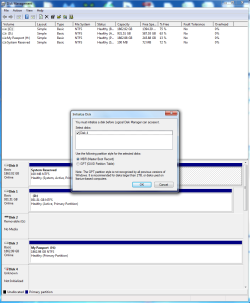
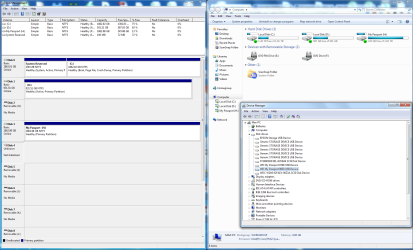
I plug the drive into the computer. It does NOT show up under My Computer. It DOES show up in Device Manager and Disk Management. See the screenshot attached.

Drive C is an internal boot drive. Drive D is an older internal drive with files from before starting anew. Drive H is another WD external drive (unaffected by BSOD). The drive that isn't working was (N:) before I believe.

In Disk Management the drive comes up as "Disk 4" and in Device Manager it is "WD My Passport 0820 USB Device".

If I connect the drive to another computer, it will install the driver software and the same issue will occur. If I "uninstall" the drive, it will reinstall the driver software and still same issue.

The LED light is constantly on, but it does NOT feel like the drive is doing anything.

When I open "Disk Management" is prompts to "initialize" the drive. Another screenshot attached.

I haven't really been able to really figure out if "initializing" is data destructive or not... I think I've seen it both ways by reading different forums.

Reading several threads with similar issues lead me to install "MiniTool Partition Wizard", but the drive doesn't show up in that program. See screenshot number 3.

So... I'm pretty much at a loss. I've seen some Linux suggestions, but I basically have never used that so would prefer to try any Windows based solutions before going to that (but will go to Linux if that is the only/best option).

Any assistance is appreciated. Thanks in advance for the help.

EDIT: I've tried using various data recovery programs, and they don't see the drive. I'm not sure why my computer can see it (sort of) but most things can't...
 

Attachments
  • External Screen.png
    External Screen.png
    395.6 KB · Views: 12
  • External Screen 2.png
    External Screen 2.png
    152.7 KB · Views: 3
  • External Screen 3.png
    External Screen 3.png
    572.4 KB · Views: 1
Last edited:

My Computer

Computer type
PC/Desktop
Computer Manufacturer/Model Number
Custom Build
OS
Windows 7 Home Premium 64bit
CPU
Intel Core 2 Quad Q9450 @ 2.66GHz
Motherboard
MSI MS-7510
Memory
8.00 GB
Graphics Card(s)
NVIDIA GeForce GTX 280
Sound Card
Sound Blaster X-Fi Xtreme Audio/Creative SB X-Fi
Monitor(s) Displays
LG Flatron W2452T
Screen Resolution
1920 x 1200
Hard Drives
ST2000DM0001 (Seagate 2TB)
WD1002FAEX (WD 1 TB)
Case
NZXT Apollo Black
Keyboard
Logitech G15
Mouse
Logitech G5
Antivirus
Kaspersky Internet Security
Browser
Chrome
Hi there.

I'm sorry to hear about the problem you have. Probably something went wrong because of the BSOD, so can you run a test on the drive using Data Lifeguard Diagnostics and post back the results? You can download the program from here:

Support Answers

Let me know how it went. :)
 

My Computer

Computer type
PC/Desktop
OS
Windows 7
Hi there.

I'm sorry to hear about the problem you have. Probably something went wrong because of the BSOD, so can you run a test on the drive using Data Lifeguard Diagnostics and post back the results? You can download the program from here:

Support Answers

Let me know how it went. :)

Data Lifeguard Diagnostics picks up the drive, but it shows it as 0 MB which obviously it isn't...

I don't understand how this happened. I had two WD external drives plugged in when the BSOD occurred and the other one is completely fine. They've also been plugged in before on other past occasions when I've sometimes had a BSOD and nothing has happened. I have never had a drive just completely die like this at all, and especially less than a year and a half after buying it (still in warranty).

The only think I can think of is that the MBR or file system partition, I'm not exactly sure of the correct term, got corrupted and now I can't see any of the files on the drive. Is there anyway to view the files on the drive despite that? Like bypassing it and using a method directly on my computer; almost like when you visit a website and it's all gibberish but you change the encoding and make the text readable - instead of having to use the MBR/file system partition, etc. on the drive, use something on my PC and just skip the corrupted part entirely so I can get access to the files, copy them off the drive and then just reformat it... Since all the drives are formatted the same out of the box, wouldn't you just use whatever format that is to read the files? Or is it not that simple? (kind of throwing out possibilities in the hope someone comes up with an idea to get my data off the drive and avoid very costly professional data recovery...)
 

My Computer

Computer type
PC/Desktop
Computer Manufacturer/Model Number
Custom Build
OS
Windows 7 Home Premium 64bit
CPU
Intel Core 2 Quad Q9450 @ 2.66GHz
Motherboard
MSI MS-7510
Memory
8.00 GB
Graphics Card(s)
NVIDIA GeForce GTX 280
Sound Card
Sound Blaster X-Fi Xtreme Audio/Creative SB X-Fi
Monitor(s) Displays
LG Flatron W2452T
Screen Resolution
1920 x 1200
Hard Drives
ST2000DM0001 (Seagate 2TB)
WD1002FAEX (WD 1 TB)
Case
NZXT Apollo Black
Keyboard
Logitech G15
Mouse
Logitech G5
Antivirus
Kaspersky Internet Security
Browser
Chrome
I'm sorry to say that, but since the DLG tool sees the drive as 0MB, then I recommend to contact our support and RMA the drive:

Support Answers

In case you have important data stored on it, you can try to retrieve it with some recovery software, but keep in mind that the more you use your drive and try to repair/get back the files there, the worse the damage may become. That's why I think it will be better to consult with a data recovery company:

Support Answers

As for the exact reasons why that happened, there's no way to say for sure, I think it is related to the BSOD which occurred. Also, please do not remove the drive from the enclosure since WD My Passport drives are hardware encrypted which means that even if the drive is removed from the enclosure and connected directly to a computer, it will be unreadable because the hardware encryption chip is missing. Furthermore, by doing so you will avoid your warranty as well.

Best of luck!
 

My Computer

Computer type
PC/Desktop
OS
Windows 7
I'm sorry to say that, but since the DLG tool sees the drive as 0MB, then I recommend to contact our support and RMA the drive:

Support Answers

In case you have important data stored on it, you can try to retrieve it with some recovery software, but keep in mind that the more you use your drive and try to repair/get back the files there, the worse the damage may become. That's why I think it will be better to consult with a data recovery company:

Support Answers

As for the exact reasons why that happened, there's no way to say for sure, I think it is related to the BSOD which occurred. Also, please do not remove the drive from the enclosure since WD My Passport drives are hardware encrypted which means that even if the drive is removed from the enclosure and connected directly to a computer, it will be unreadable because the hardware encryption chip is missing. Furthermore, by doing so you will avoid your warranty as well.

Best of luck!

So... if there is something wrong with the enclosure... then I can't bypass that because it is encrypted? What if my data is still there but something just happened with the enclosure? What do I do then??
 

My Computer

Computer type
PC/Desktop
Computer Manufacturer/Model Number
Custom Build
OS
Windows 7 Home Premium 64bit
CPU
Intel Core 2 Quad Q9450 @ 2.66GHz
Motherboard
MSI MS-7510
Memory
8.00 GB
Graphics Card(s)
NVIDIA GeForce GTX 280
Sound Card
Sound Blaster X-Fi Xtreme Audio/Creative SB X-Fi
Monitor(s) Displays
LG Flatron W2452T
Screen Resolution
1920 x 1200
Hard Drives
ST2000DM0001 (Seagate 2TB)
WD1002FAEX (WD 1 TB)
Case
NZXT Apollo Black
Keyboard
Logitech G15
Mouse
Logitech G5
Antivirus
Kaspersky Internet Security
Browser
Chrome
Yes, since your drive is hardware encrypted you cannot access your files if it's removed from the enclosure.
 

My Computer

Computer type
PC/Desktop
OS
Windows 7
What if my data is still there but something just happened with the enclosure? What do I do then??

Yes, since your drive is hardware encrypted you cannot access your files if it's removed from the enclosure.

Then what to do you if there is only something wrong with the -enclosure-?
 

My Computer

Computer type
PC/Desktop
Computer Manufacturer/Model Number
Custom Build
OS
Windows 7 Home Premium 64bit
CPU
Intel Core 2 Quad Q9450 @ 2.66GHz
Motherboard
MSI MS-7510
Memory
8.00 GB
Graphics Card(s)
NVIDIA GeForce GTX 280
Sound Card
Sound Blaster X-Fi Xtreme Audio/Creative SB X-Fi
Monitor(s) Displays
LG Flatron W2452T
Screen Resolution
1920 x 1200
Hard Drives
ST2000DM0001 (Seagate 2TB)
WD1002FAEX (WD 1 TB)
Case
NZXT Apollo Black
Keyboard
Logitech G15
Mouse
Logitech G5
Antivirus
Kaspersky Internet Security
Browser
Chrome
You cannot access the files if the drive is removed due to the hardware encryption, so that's why the best thing is to consult with a data recovery specialist:

Support Answers
 

My Computer

Computer type
PC/Desktop
OS
Windows 7
You cannot access the files if the drive is removed due to the hardware encryption, so that's why the best thing is to consult with a data recovery specialist:

Support Answers

How is even a specialist going to get to the files if the drive is encrypted...?
 

My Computer

Computer type
PC/Desktop
Computer Manufacturer/Model Number
Custom Build
OS
Windows 7 Home Premium 64bit
CPU
Intel Core 2 Quad Q9450 @ 2.66GHz
Motherboard
MSI MS-7510
Memory
8.00 GB
Graphics Card(s)
NVIDIA GeForce GTX 280
Sound Card
Sound Blaster X-Fi Xtreme Audio/Creative SB X-Fi
Monitor(s) Displays
LG Flatron W2452T
Screen Resolution
1920 x 1200
Hard Drives
ST2000DM0001 (Seagate 2TB)
WD1002FAEX (WD 1 TB)
Case
NZXT Apollo Black
Keyboard
Logitech G15
Mouse
Logitech G5
Antivirus
Kaspersky Internet Security
Browser
Chrome
I can't tell you how they could extract your information since WD is not dealing with data recovery.
 

My Computer

Computer type
PC/Desktop
OS
Windows 7
You cannot access the files if the drive is removed due to the hardware encryption, so that's why the best thing is to consult with a data recovery specialist:

Support Answers

How is even a specialist going to get to the files if the drive is encrypted...?

ha ha ha .....I shall tell you how.

The key to decrypt the drive is shared with only certain "Specialists" authorized by Western Digitals. These are the specialists listed by the Support Answers page given by MightyMicroWD.

Contact them, and knowing fully well that they are the only ones who can successfully recover the data and no other Specialist, they will demand an astronomical sum to recover data and of course they will do it in a jiffy because they and only they have the key so "benevolently" made available to them by WD.

Look what you have got in return for buying a Western Digital HDD.

How does hardware encryption benefit the user? Practically nothing.

When working, any body who steals your external drive can just plug it in and see all your data as if it is not encrypted. Why? Because the key is built-in into the interface.

If the interface fails, you are effectively locked out of your data - even if the HDD itself is OK - unless you are willing to pay only those "Specialists"
 

My Computer

OS
Windows 7 Home Premium 32 bit
I cannot see any merits in WD's hardware encryption for their external drives and I now use basic sata drives (still WD) and a docking station.

Have you tried something simple in Disk Management - right click on drive 4 (in your screenshot) and see if it gives an option to put the drive online. I would consider burning a lightweight linux distro to a CD/DVD and see if it can read the drive. Puppy linux is a very light weight linux distro.
 

My Computer

Computer type
PC/Desktop
Computer Manufacturer/Model Number
Own build
OS
Windows 7x64 Home Premium SP1
CPU
Intel i7 2600k
Motherboard
ASUS P8Z68 Deluxe
Memory
G.Skill Ripjaws (DDR3-1600) 2x4GB
Graphics Card(s)
Nvidia GeForce GTS 450; Intel HD Graphics 3000(GT2+)
Monitor(s) Displays
Dell Ultrasharp IPS panel U2311H, Samsung SyncMaster P2350
Screen Resolution
1920x1080
Hard Drives
Samsung 850 Pro SSD 256GB, Samsung SSD 840 120GB, Seagates 1TB Barracuda ST31000528AS x2
PSU
Seasonic M12II 520W
Case
Lian Li Lancool PC-K60
Cooling
Case: 1x120mm, 3x140mm CPU: Hyper 212+
Keyboard
Logitech MK520 (wireless)
Mouse
Logitech MK520
Internet Speed
6-7 Mbps
Antivirus
Norton Security Premium, Malwarebytes on 2 (MSE on 3rd PC)
Browser
FireFox
Other Info
Audio: Logitech Z523 2.1
I cannot see any merits in WD's hardware encryption for their external drives and I now use basic sata drives (still WD) and a docking station.

Have you tried something simple in Disk Management - right click on drive 4 (in your screenshot) and see if it gives an option to put the drive online. I would consider burning a lightweight linux distro to a CD/DVD and see if it can read the drive. Puppy linux is a very light weight linux distro.

I attempted to use Knoppix (no experience with linix) and it didn't seem to pick anything up...
 

My Computer

Computer type
PC/Desktop
Computer Manufacturer/Model Number
Custom Build
OS
Windows 7 Home Premium 64bit
CPU
Intel Core 2 Quad Q9450 @ 2.66GHz
Motherboard
MSI MS-7510
Memory
8.00 GB
Graphics Card(s)
NVIDIA GeForce GTX 280
Sound Card
Sound Blaster X-Fi Xtreme Audio/Creative SB X-Fi
Monitor(s) Displays
LG Flatron W2452T
Screen Resolution
1920 x 1200
Hard Drives
ST2000DM0001 (Seagate 2TB)
WD1002FAEX (WD 1 TB)
Case
NZXT Apollo Black
Keyboard
Logitech G15
Mouse
Logitech G5
Antivirus
Kaspersky Internet Security
Browser
Chrome
It seems that Western Digital designs their portable external hard drives in a way that makes it unnecessarily difficult and cost prohibitive to attempt data recovery.

A local technician attempted to open the enclosure and remove the drive so he could connect to a computer directly via SATA. Unfortunately, Western Digital decided to design the drive in a manner in which what would usually be the adapter from USB to SATA is *directly attached* to the drive itself. In other words, the drive can't be separated at all and no attempt can be made to connect it to the computer in another way. The only next step is an expensive professional service.

I got an guesstimate (since they haven't seen the drive) of between $500 to $1425. I asked them about this odd external hard drive design (since the guy from WD didn't seem to have a clue) and was told that this was something that he has only seen on WD designs.

It is bad enough that hard drive companies can get away with "limited" warranties that don't cover the data (which is tantamount to saying "our safe can withstand fire, but if doesn't, we'll replace the safe, but not the contents inside that melted/burned because our safe was crap"), but it is at least somewhat common knowledge that this is done throughout the industry. BTW this drive is still under warranty, being less than a year and a half from the date of purchase and being under said warranty until the first days of 2017.

If this thing with the WD -physical- design is true, I've never heard anything of it and I highly doubt it is something they readily disclose. I don't think this is part of the "encryption" that I have seen mentioned and that jumanji also talked about several posts above.

When I have a diagnostic done of the drive (which is free, thank goodness), if I find out that in any way that this design or their "encryption" forced me to undertake expensive professional data recovery, you can be certain that I will be having a "nice" chat with WD about the bill. None of these possible "features" and their potential adverse effects are disclosed (as far as I know), and I wouldn't be surprised if this is illegal in some way, shape or form - and if isn't and WD was taken to court, I wouldn't be at all surprised if a judge found them liable for consumers' costs because many of these costs may have only incurred due to WD's hidden "features".

I purchased WD drives because of their supposed greater reliability compared to the competition, but if and when they fail, the cost of recovery in almost all circumstances will be astronomical, then I might as well take my money to a competitor (btw any recommendations?). If others are made to realize that the downside risk of owning a WD drive is huge, I doubt they would continue to purchase them.

I'll be making sure to backup -everything- now, but I'm not so certain that it will be with WD drives. Can anyone also direct me to ways to ensure that everything from multiple sources may be backed up easily and quickly? I can search, but if anyone who responds has any suggestions off the top of their head, it would be appreciated.
 

My Computer

Computer type
PC/Desktop
Computer Manufacturer/Model Number
Custom Build
OS
Windows 7 Home Premium 64bit
CPU
Intel Core 2 Quad Q9450 @ 2.66GHz
Motherboard
MSI MS-7510
Memory
8.00 GB
Graphics Card(s)
NVIDIA GeForce GTX 280
Sound Card
Sound Blaster X-Fi Xtreme Audio/Creative SB X-Fi
Monitor(s) Displays
LG Flatron W2452T
Screen Resolution
1920 x 1200
Hard Drives
ST2000DM0001 (Seagate 2TB)
WD1002FAEX (WD 1 TB)
Case
NZXT Apollo Black
Keyboard
Logitech G15
Mouse
Logitech G5
Antivirus
Kaspersky Internet Security
Browser
Chrome
Western Digital Hardware Encryption - Prosoft Engineering, Inc.

Data Recovery of Encrypted Western Digital drives.

Note: I do not promote the authors or the firms they represent except bringing out how the hardware encryption on the Western Digital portable drives is a farce and a cruel joke on end users when it comes to data recovery due to failure of the electronic hardware encryption interface in those drives.

If at all, buy only Western Digital Elements Portable drive which does not have hardware encryption.But again I do not know whether this integrated Interface is there on this drive that precludes attaching the drive only as a secondary drive for data recovery..

Due to all these hidden things, I have long back decided that I will never never buy a Western Digital portable.
 
Last edited:

My Computer

OS
Windows 7 Home Premium 32 bit
Western Digital Hardware Encryption - Prosoft Engineering, Inc.

Data Recovery of Encrypted Western Digital drives.

Note: I do not promote the authors or the firms they represent except bringing out how the hardware encryption on the Western Digital portable drives is a farce and a cruel joke on end users when it comes to data recovery due to failure of the electronic hardware encryption interface in those drives.

If at all, buy only Western Digital Elements Portable drive which does not have hardware encryption.But again I do not know whether this integrated Interface is there on this drive that precludes attaching the drive only as a secondary drive for data recovery..

Due to all these hidden things, I have long back decided that I will never never buy a Western Digital portable.

The USB 3.0/2.0 interface is directly soldered onto the drive. In other words, if there is something wrong with that specifically, you can't separate the drive and connect it via SATA.

See this video of the drive being taken out of the enclosure to see what I mean https://www.youtube.com/watch?v=2GGTQF6oE3E
 

My Computer

Computer type
PC/Desktop
Computer Manufacturer/Model Number
Custom Build
OS
Windows 7 Home Premium 64bit
CPU
Intel Core 2 Quad Q9450 @ 2.66GHz
Motherboard
MSI MS-7510
Memory
8.00 GB
Graphics Card(s)
NVIDIA GeForce GTX 280
Sound Card
Sound Blaster X-Fi Xtreme Audio/Creative SB X-Fi
Monitor(s) Displays
LG Flatron W2452T
Screen Resolution
1920 x 1200
Hard Drives
ST2000DM0001 (Seagate 2TB)
WD1002FAEX (WD 1 TB)
Case
NZXT Apollo Black
Keyboard
Logitech G15
Mouse
Logitech G5
Antivirus
Kaspersky Internet Security
Browser
Chrome
The passports are 2.5" and I believe all of these WD size portables have proprietary non sata connections. Some of the earlier Elements did have the sata connector. I have a number of the 3.5" WD MyBook Essentials and these have Sata internal connectors but also forced hardware encryption. These drives also have the commonly used USB 3 micro B connectors that can become a problem themselves.
Take away viewpoint: Have more than one backup drive and lean towards a docking station if portability isn't a big issue.

I wouldn't be put off by not knowing linux (I'm not that knowledgeable in linux either). It is still a windowed environment and you can stumble around it with a bit of commonsense. This may help:
https://www.winhelp.us/recover-files-using-puppy-linux.html
It is actually even simpler in that you can drag drop and select copy to get your data off a disk.
 

My Computer

Computer type
PC/Desktop
Computer Manufacturer/Model Number
Own build
OS
Windows 7x64 Home Premium SP1
CPU
Intel i7 2600k
Motherboard
ASUS P8Z68 Deluxe
Memory
G.Skill Ripjaws (DDR3-1600) 2x4GB
Graphics Card(s)
Nvidia GeForce GTS 450; Intel HD Graphics 3000(GT2+)
Monitor(s) Displays
Dell Ultrasharp IPS panel U2311H, Samsung SyncMaster P2350
Screen Resolution
1920x1080
Hard Drives
Samsung 850 Pro SSD 256GB, Samsung SSD 840 120GB, Seagates 1TB Barracuda ST31000528AS x2
PSU
Seasonic M12II 520W
Case
Lian Li Lancool PC-K60
Cooling
Case: 1x120mm, 3x140mm CPU: Hyper 212+
Keyboard
Logitech MK520 (wireless)
Mouse
Logitech MK520
Internet Speed
6-7 Mbps
Antivirus
Norton Security Premium, Malwarebytes on 2 (MSE on 3rd PC)
Browser
FireFox
Other Info
Audio: Logitech Z523 2.1
I got a diagnostic back and was told "read/write heads damaged, PCB damaged, bad sectors, possible minor scratches on internal platters" with a recovery price of over $1200. I am a bit skeptical about all this given what it is currently doing... also, the drive had absolutely no issues prior to just going kaput suddenly - is it possible (reasonably... almost anything could be possible I guess...) that when it went kaput all those problems happened?
 

My Computer

Computer type
PC/Desktop
Computer Manufacturer/Model Number
Custom Build
OS
Windows 7 Home Premium 64bit
CPU
Intel Core 2 Quad Q9450 @ 2.66GHz
Motherboard
MSI MS-7510
Memory
8.00 GB
Graphics Card(s)
NVIDIA GeForce GTX 280
Sound Card
Sound Blaster X-Fi Xtreme Audio/Creative SB X-Fi
Monitor(s) Displays
LG Flatron W2452T
Screen Resolution
1920 x 1200
Hard Drives
ST2000DM0001 (Seagate 2TB)
WD1002FAEX (WD 1 TB)
Case
NZXT Apollo Black
Keyboard
Logitech G15
Mouse
Logitech G5
Antivirus
Kaspersky Internet Security
Browser
Chrome
I got a diagnostic back and was told............
How was the diagnostics performed? By whoever is charging $1200 recovery? If you can live without the data I'd just write it off as a valuable lesson - keep more than one backup.
 

My Computer

Computer type
PC/Desktop
Computer Manufacturer/Model Number
Own build
OS
Windows 7x64 Home Premium SP1
CPU
Intel i7 2600k
Motherboard
ASUS P8Z68 Deluxe
Memory
G.Skill Ripjaws (DDR3-1600) 2x4GB
Graphics Card(s)
Nvidia GeForce GTS 450; Intel HD Graphics 3000(GT2+)
Monitor(s) Displays
Dell Ultrasharp IPS panel U2311H, Samsung SyncMaster P2350
Screen Resolution
1920x1080
Hard Drives
Samsung 850 Pro SSD 256GB, Samsung SSD 840 120GB, Seagates 1TB Barracuda ST31000528AS x2
PSU
Seasonic M12II 520W
Case
Lian Li Lancool PC-K60
Cooling
Case: 1x120mm, 3x140mm CPU: Hyper 212+
Keyboard
Logitech MK520 (wireless)
Mouse
Logitech MK520
Internet Speed
6-7 Mbps
Antivirus
Norton Security Premium, Malwarebytes on 2 (MSE on 3rd PC)
Browser
FireFox
Other Info
Audio: Logitech Z523 2.1
How was the diagnostics performed? By whoever is charging $1200 recovery? If you can live without the data I'd just write it off as a valuable lesson - keep more than one backup.

I can... but I'm getting a second opinion. After talking with them, they said it's a possibility that the PCB can be switched out and it might work and referred me to a place.
 

My Computer

Computer type
PC/Desktop
Computer Manufacturer/Model Number
Custom Build
OS
Windows 7 Home Premium 64bit
CPU
Intel Core 2 Quad Q9450 @ 2.66GHz
Motherboard
MSI MS-7510
Memory
8.00 GB
Graphics Card(s)
NVIDIA GeForce GTX 280
Sound Card
Sound Blaster X-Fi Xtreme Audio/Creative SB X-Fi
Monitor(s) Displays
LG Flatron W2452T
Screen Resolution
1920 x 1200
Hard Drives
ST2000DM0001 (Seagate 2TB)
WD1002FAEX (WD 1 TB)
Case
NZXT Apollo Black
Keyboard
Logitech G15
Mouse
Logitech G5
Antivirus
Kaspersky Internet Security
Browser
Chrome
Back
Top