User Account Password - Change from WinRE

How to Change the User Account Password if Unable to Login to Windows

   Information
This tutorial will help you remove the existing user account password and set up a new password incase you have forgotten the user password using WinRE (Windows Recovery Environment)


Here's how:
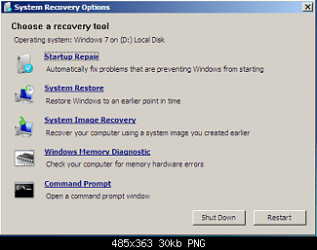
1. Boot to WinRE (Windows Recovery Environment).
1.png
2. Click on the Command Prompt option.


3. Type the following commands and press enter after each one:
  • C:
  • CD Windows\system32
  • ren cmd.exe cmd.old
  • ren magnify.exe cmd.exe
  • ren cmd.old magnify.exe
4. Restart computer.

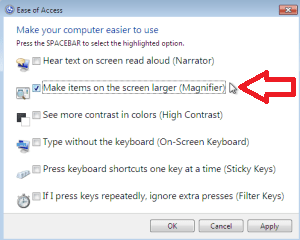
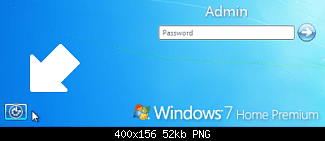
5. Click on Easy of Access centre left side bottom à Choose Magnify option.
2.png
3.png
6. A Command prompt opens up

7. Type: net user administrator /active:yes and press enter.

8. Restart the computer.

9. Logon on to the "Administrator" account, and then using User Accounts page in the Control Panel, remove or change the password of the other account.

10. Type Magnify.exe in Start Menu search box and press enter and open it.

11. Command prompt opens up

12. Type: net user administrator /active:no and press enter.

13. Restart the computer
NOTE: This will disable the administrator account.

14. Now, Boot to winRE again, and click on the Command Prompt option.


15. Type the following commands and press enter after each one:
  • C:
  • CD Windows\system32
  • ren magnify.exe cmd.old
  • ren cmd.exe magnify.exe
  • ren cmd.old cmd.exe
  • exit
16. Restart the computer – system logs on to the User account without asking for password provided there is only one user account.
That's it.
Special thanks for iseeuu for providing the screenshots.


Last edited by a moderator:
Hi, please read the 5th and 6th point in the tutorial on the first page. It answers your question. The idea here is to click on magnify.exe file and instead open the command prompt.
 

My Computer My Computer

At a glance

Windows® 8 Pro (64-bit)Intel® Core™ i5 Processor 2467M (1.60GHz, 3MB...6GB DDR3 System Memory at 1,333MHz (on BD 4GB...AMD Radeon™ HD7550M 1GB DDR3 (Ext. Graphic)
Computer Manufacturer/Model Number
Samsung NP530U4B-S02IN
OS
Windows® 8 Pro (64-bit)
CPU
Intel® Core™ i5 Processor 2467M (1.60GHz, 3MB L3 Cache)
Motherboard
Samsung Electronics
Memory
6GB DDR3 System Memory at 1,333MHz (on BD 4GB + 2GB x 1)
Graphics Card(s)
AMD Radeon™ HD7550M 1GB DDR3 (Ext. Graphic)
Sound Card
Realtek High Definition Audio
Monitor(s) Displays
35.56cm (14.0) SuperBright 300nit HD LED Display
Screen Resolution
1366x768
Hard Drives
1TB S-ATA II Hard Drive (5400RPM) with ExpressCache 16GB SSD
Internet Speed
sucks
Antivirus
Microsoft Security Essentials
Browser
Google Chrome (Sync enabled)
Thanks, This tutorial just helped me out and saved me from a lot of frustration.

This at the end of a long day, so I had to think a while about what is happening in steps 3 and 15 to make sure I understood it. I will suggest a little different approach that doesn't wipe out the use of cmd.exe while logged in as Administrator and straightening things out.

3.
c:
cd \windows\system32
ren magnify.exe magnify.exe.orig
copy cmd.exe magnify.exe
exit


15.
c:
cd \windows\system32
copy magnify.exe.orig magnify.exe answer y to overwrite existing file
(note: you can either delete magnify.exe.orig or leave it there as a backup)
exit

Rick
 

My Computer My Computer

At a glance

Windows 7 Home 32bit
OS
Windows 7 Home 32bit
Great Job Dinesh....!!!
 

My Computer My Computer

At a glance

Windows 7 Home Premium 32bit
OS
Windows 7 Home Premium 32bit

My Computer My Computer

At a glance

Windows® 8 Pro (64-bit)Intel® Core™ i5 Processor 2467M (1.60GHz, 3MB...6GB DDR3 System Memory at 1,333MHz (on BD 4GB...AMD Radeon™ HD7550M 1GB DDR3 (Ext. Graphic)
Computer Manufacturer/Model Number
Samsung NP530U4B-S02IN
OS
Windows® 8 Pro (64-bit)
CPU
Intel® Core™ i5 Processor 2467M (1.60GHz, 3MB L3 Cache)
Motherboard
Samsung Electronics
Memory
6GB DDR3 System Memory at 1,333MHz (on BD 4GB + 2GB x 1)
Graphics Card(s)
AMD Radeon™ HD7550M 1GB DDR3 (Ext. Graphic)
Sound Card
Realtek High Definition Audio
Monitor(s) Displays
35.56cm (14.0) SuperBright 300nit HD LED Display
Screen Resolution
1366x768
Hard Drives
1TB S-ATA II Hard Drive (5400RPM) with ExpressCache 16GB SSD
Internet Speed
sucks
Antivirus
Microsoft Security Essentials
Browser
Google Chrome (Sync enabled)
Hey Dinesh will you please ellaborate "step 9" with a little bit more detail by provding screen shots.
Step 9 says 'logon on to the "Administrator" account' how could i logon to the account since i don't know the pasword.....................

I'll be very thankful to you for solving my confusion.
 
Last edited by a moderator:

My Computer My Computer

At a glance

Windows 7 Ultimate x32Core 2 Duo4GBIntel(R) GMA 3000(Intel(R) Q965/Q963 Express ...
Computer Manufacturer/Model Number
ACER Vpro 3900
OS
Windows 7 Ultimate x32
CPU
Core 2 Duo
Motherboard
Veriton 3900pro
Memory
4GB
Graphics Card(s)
Intel(R) GMA 3000(Intel(R) Q965/Q963 Express Chipset Family)
Sound Card
High Definition Audio Device
Monitor(s) Displays
LCD
Screen Resolution
1024 X 768
Hard Drives
Seagate ST3500418AS ATA Device 500gig hard drive
Internet Speed
4MB
Hello MirzaAsad,

Step 9 is to log on to the built-in "Administrator" account that you just enabled in the previous steps.

If the built-in Administrator account is the one you don't know the password for, then this tutorial is not going to be able to help with that. You'll need to talk to the owner of the account for that.
 

My Computer My Computer

At a glance

64-bit Windows 11 Pro for WorkstationsIntel i7-8700K OC'd to 5 GHz64 GB (4x16GB) G.SKILL TridentZ RGB DDR4 3600...ASUS ROG-STRIX-GTX1080TI-O11G-GAMING
Computer type
PC/Desktop
Computer Manufacturer/Model Number
Self built custom
OS
64-bit Windows 11 Pro for Workstations
CPU
Intel i7-8700K OC'd to 5 GHz
Motherboard
ASUS ROG Maximus XI Formula Z390
Memory
64 GB (4x16GB) G.SKILL TridentZ RGB DDR4 3600 MHz
Graphics Card(s)
ASUS ROG-STRIX-GTX1080TI-O11G-GAMING
Sound Card
Integrated
Monitor(s) Displays
2 x Samsung Odyssey G7 27"
Screen Resolution
2560x1440
Hard Drives
1TB Samsung 990 PRO M.2,
4TB Samsung 990 PRO PRO M.2,
TerraMaster F8 SSD Plus NAS
PSU
Seasonic Prime Titanium 850W
Case
Thermaltake Core P3
Cooling
Corsair Hydro H115i
Keyboard
Logitech wireless K800
Mouse
Logitech MX Master 4
Internet Speed
2 Gb/s Download and 100 Mb/s Upload
Antivirus
Malwarebyte Anti-Malware Premium
Browser
Google Chrome
Other Info
Logitech Z625 speaker system,
Logitech BRIO 4K Pro webcam,
HP Color LaserJet Pro MFP M477fdn,
APC SMART-UPS RT 1000 XL - SURT1000XLI,
Galaxy S23 Plus phone
Brink,
But the title of this thread says "How to Change the User Account Password if Unable to Login to Windows".As obvious form the title of this tutorial, it should guide us to login to your windows admin account if you are unable to access your account but i think i'm mistaken.
Just for sake of my curiosity, what exactly this tutorial is trying to convey,please elaborate.
 

My Computer My Computer

At a glance

Windows 7 Ultimate x32Core 2 Duo4GBIntel(R) GMA 3000(Intel(R) Q965/Q963 Express ...
Computer Manufacturer/Model Number
ACER Vpro 3900
OS
Windows 7 Ultimate x32
CPU
Core 2 Duo
Motherboard
Veriton 3900pro
Memory
4GB
Graphics Card(s)
Intel(R) GMA 3000(Intel(R) Q965/Q963 Express Chipset Family)
Sound Card
High Definition Audio Device
Monitor(s) Displays
LCD
Screen Resolution
1024 X 768
Hard Drives
Seagate ST3500418AS ATA Device 500gig hard drive
Internet Speed
4MB
MirzaAsad,

The tutorial is designed to show you how to reset your user account's password when you are unable to log on to Windows. Steps 1 to 7 show you how to enable the built-in Administrator account at boot, so you could log on to it in Windows to use to change or reset your user account's password.

The built-in elevated "Administrator" account is not the same as your normal non-elevated administrator user account.

Hope this helps. :)
 

My Computer My Computer

At a glance

64-bit Windows 11 Pro for WorkstationsIntel i7-8700K OC'd to 5 GHz64 GB (4x16GB) G.SKILL TridentZ RGB DDR4 3600...ASUS ROG-STRIX-GTX1080TI-O11G-GAMING
Computer type
PC/Desktop
Computer Manufacturer/Model Number
Self built custom
OS
64-bit Windows 11 Pro for Workstations
CPU
Intel i7-8700K OC'd to 5 GHz
Motherboard
ASUS ROG Maximus XI Formula Z390
Memory
64 GB (4x16GB) G.SKILL TridentZ RGB DDR4 3600 MHz
Graphics Card(s)
ASUS ROG-STRIX-GTX1080TI-O11G-GAMING
Sound Card
Integrated
Monitor(s) Displays
2 x Samsung Odyssey G7 27"
Screen Resolution
2560x1440
Hard Drives
1TB Samsung 990 PRO M.2,
4TB Samsung 990 PRO PRO M.2,
TerraMaster F8 SSD Plus NAS
PSU
Seasonic Prime Titanium 850W
Case
Thermaltake Core P3
Cooling
Corsair Hydro H115i
Keyboard
Logitech wireless K800
Mouse
Logitech MX Master 4
Internet Speed
2 Gb/s Download and 100 Mb/s Upload
Antivirus
Malwarebyte Anti-Malware Premium
Browser
Google Chrome
Other Info
Logitech Z625 speaker system,
Logitech BRIO 4K Pro webcam,
HP Color LaserJet Pro MFP M477fdn,
APC SMART-UPS RT 1000 XL - SURT1000XLI,
Galaxy S23 Plus phone
Brink,

Tell you what you are one awesome man.Got your point and thanks very much for your help.
Love you.:)
 

My Computer My Computer

At a glance

Windows 7 Ultimate x32Core 2 Duo4GBIntel(R) GMA 3000(Intel(R) Q965/Q963 Express ...
Computer Manufacturer/Model Number
ACER Vpro 3900
OS
Windows 7 Ultimate x32
CPU
Core 2 Duo
Motherboard
Veriton 3900pro
Memory
4GB
Graphics Card(s)
Intel(R) GMA 3000(Intel(R) Q965/Q963 Express Chipset Family)
Sound Card
High Definition Audio Device
Monitor(s) Displays
LCD
Screen Resolution
1024 X 768
Hard Drives
Seagate ST3500418AS ATA Device 500gig hard drive
Internet Speed
4MB
You're most welcome MirzaAsad. :)
 

My Computer My Computer

At a glance

64-bit Windows 11 Pro for WorkstationsIntel i7-8700K OC'd to 5 GHz64 GB (4x16GB) G.SKILL TridentZ RGB DDR4 3600...ASUS ROG-STRIX-GTX1080TI-O11G-GAMING
Computer type
PC/Desktop
Computer Manufacturer/Model Number
Self built custom
OS
64-bit Windows 11 Pro for Workstations
CPU
Intel i7-8700K OC'd to 5 GHz
Motherboard
ASUS ROG Maximus XI Formula Z390
Memory
64 GB (4x16GB) G.SKILL TridentZ RGB DDR4 3600 MHz
Graphics Card(s)
ASUS ROG-STRIX-GTX1080TI-O11G-GAMING
Sound Card
Integrated
Monitor(s) Displays
2 x Samsung Odyssey G7 27"
Screen Resolution
2560x1440
Hard Drives
1TB Samsung 990 PRO M.2,
4TB Samsung 990 PRO PRO M.2,
TerraMaster F8 SSD Plus NAS
PSU
Seasonic Prime Titanium 850W
Case
Thermaltake Core P3
Cooling
Corsair Hydro H115i
Keyboard
Logitech wireless K800
Mouse
Logitech MX Master 4
Internet Speed
2 Gb/s Download and 100 Mb/s Upload
Antivirus
Malwarebyte Anti-Malware Premium
Browser
Google Chrome
Other Info
Logitech Z625 speaker system,
Logitech BRIO 4K Pro webcam,
HP Color LaserJet Pro MFP M477fdn,
APC SMART-UPS RT 1000 XL - SURT1000XLI,
Galaxy S23 Plus phone
Great articles. Works well on windows 7 home premium but not on windows 7 professional. The ren ..... does not work and will still open the narrator when you restart the system. Any solution for windows 7 professional ?
 

My Computer My Computer

At a glance

windows 7 professional 32 bitpentium R dual core e5700 @ 3.00GHz2.00GBIntel(R) Q45/Q43 Express Chipset
Computer type
PC/Desktop
Computer Manufacturer/Model Number
hp compaq
OS
windows 7 professional 32 bit
CPU
pentium R dual core e5700 @ 3.00GHz
Memory
2.00GB
Graphics Card(s)
Intel(R) Q45/Q43 Express Chipset
Antivirus
Kaspersky internet security
Browser
Mozilla fire ox
Hello genekanze,
I recently ran into this situation too, although working toward a slightly different end. To solve the problem you describe just boot to an operating system that can work with the filesystem on your computer. Most likely your filesystem will be NTFS. I like Knoppix as "the other" operating system, and is what I had available as a bootable "Live CD". After using Knoppix to do the ren and copy commands then I went back to the tutorial instructions. To use Knoppix, or a similar UNIX based operating system, you do need a bit of familiarity with that operating system.
Rick
 

My Computer My Computer

At a glance

Windows 7 Home 32bit
OS
Windows 7 Home 32bit
before I can go to RECOVERY OPTIONS and select COMMAND PROMT,,.... I HAVE TO """Select your user name and type in the password, and then click on OK."""

but I forgot my password right????
 

My Computer My Computer

At a glance

Windows 7
Computer type
PC/Desktop
OS
Windows 7
before I can go to RECOVERY OPTIONS and select COMMAND PROMT,,.... I HAVE TO """Select your user name and type in the password, and then click on OK."""

but I forgot my password right????

Hello princexyryl,

If you boot directly from your retail Windows installation media to get to recovery options, then you will not need to enter your password. :)
 

My Computer My Computer

At a glance

64-bit Windows 11 Pro for WorkstationsIntel i7-8700K OC'd to 5 GHz64 GB (4x16GB) G.SKILL TridentZ RGB DDR4 3600...ASUS ROG-STRIX-GTX1080TI-O11G-GAMING
Computer type
PC/Desktop
Computer Manufacturer/Model Number
Self built custom
OS
64-bit Windows 11 Pro for Workstations
CPU
Intel i7-8700K OC'd to 5 GHz
Motherboard
ASUS ROG Maximus XI Formula Z390
Memory
64 GB (4x16GB) G.SKILL TridentZ RGB DDR4 3600 MHz
Graphics Card(s)
ASUS ROG-STRIX-GTX1080TI-O11G-GAMING
Sound Card
Integrated
Monitor(s) Displays
2 x Samsung Odyssey G7 27"
Screen Resolution
2560x1440
Hard Drives
1TB Samsung 990 PRO M.2,
4TB Samsung 990 PRO PRO M.2,
TerraMaster F8 SSD Plus NAS
PSU
Seasonic Prime Titanium 850W
Case
Thermaltake Core P3
Cooling
Corsair Hydro H115i
Keyboard
Logitech wireless K800
Mouse
Logitech MX Master 4
Internet Speed
2 Gb/s Download and 100 Mb/s Upload
Antivirus
Malwarebyte Anti-Malware Premium
Browser
Google Chrome
Other Info
Logitech Z625 speaker system,
Logitech BRIO 4K Pro webcam,
HP Color LaserJet Pro MFP M477fdn,
APC SMART-UPS RT 1000 XL - SURT1000XLI,
Galaxy S23 Plus phone
Excellent fix. Works perfectly (plus the CMD <-> Magnify rename is a very satisfying hack :-)). Thanks, Dinesh.
 

My Computer My Computer

At a glance

Windows 7 Enterprise N (64-bit)
Computer type
PC/Desktop
Computer Manufacturer/Model Number
Advent
OS
Windows 7 Enterprise N (64-bit)
Antivirus
BitDefender
Glad to know it helped :)
 

My Computer My Computer

At a glance

Windows® 8 Pro (64-bit)Intel® Core™ i5 Processor 2467M (1.60GHz, 3MB...6GB DDR3 System Memory at 1,333MHz (on BD 4GB...AMD Radeon™ HD7550M 1GB DDR3 (Ext. Graphic)
Computer Manufacturer/Model Number
Samsung NP530U4B-S02IN
OS
Windows® 8 Pro (64-bit)
CPU
Intel® Core™ i5 Processor 2467M (1.60GHz, 3MB L3 Cache)
Motherboard
Samsung Electronics
Memory
6GB DDR3 System Memory at 1,333MHz (on BD 4GB + 2GB x 1)
Graphics Card(s)
AMD Radeon™ HD7550M 1GB DDR3 (Ext. Graphic)
Sound Card
Realtek High Definition Audio
Monitor(s) Displays
35.56cm (14.0) SuperBright 300nit HD LED Display
Screen Resolution
1366x768
Hard Drives
1TB S-ATA II Hard Drive (5400RPM) with ExpressCache 16GB SSD
Internet Speed
sucks
Antivirus
Microsoft Security Essentials
Browser
Google Chrome (Sync enabled)
I get to step 3 and can't go further. Command prompt window shows "X:\System32". I type "C:" and it gives me C:>, but the entire directory is empty! I type C:\ DIR, to verify and yes, it's empty. So I go back to "X:\System32" and rename the cmd.exe file, fine. However, there's no magnify.exe

Please advise.
 

My Computer My Computer

At a glance

Windows 7 Enterprise x64
Computer type
PC/Desktop
OS
Windows 7 Enterprise x64
Strike that, I figured it out. Before you get to the screen showing your options, it searches for previous versions of installed windows. Note the drive letter ( in my case, drive D: ).

Once I was in the command prompt, of course it showed X:\Windows\System32. Even if I did a CD D:, it would go right back to X:.

No problem, all I did was add the full drive and path before the recommended commands, and all worked. So here's what my commands looked like:


  • ren D:\Windows\System32\cmd.exe cmd.old
  • ren D:\Windows\System32\magnify.exe cmd.exe
  • ren D:\Windows\System32\cmd.old magnify.exe
Everything worked great.
 

My Computer My Computer

At a glance

Windows 7 Enterprise x64
Computer type
PC/Desktop
OS
Windows 7 Enterprise x64
Strike that, I figured it out. Before you get to the screen showing your options, it searches for previous versions of installed windows. Note the drive letter ( in my case, drive D: ).

Once I was in the command prompt, of course it showed X:\Windows\System32. Even if I did a CD D:, it would go right back to X:.

No problem, all I did was add the full drive and path before the recommended commands, and all worked. So here's what my commands looked like:


  • ren D:\Windows\System32\cmd.exe cmd.old
  • ren D:\Windows\System32\magnify.exe cmd.exe
  • ren D:\Windows\System32\cmd.old magnify.exe
Everything worked great.

That's so awesome, I had troubles using the codes from this guide until i saw your post and gave it a try. And it worked!! Thanks man! You saved my life : )
 

My Computer My Computer

At a glance

Ontarioi5-7504GBRadeon HD5700 series
Computer type
PC/Desktop
Computer Manufacturer/Model Number
Custom build
OS
Ontario
CPU
i5-750
Motherboard
gigabyte
Memory
4GB
Graphics Card(s)
Radeon HD5700 series
Hard Drives
500 gb 7200 rpm
I'm using a method similar to this to change a forgotten password in Vista. It looks like Win 7 and Vista are similar but I got to the point where I could launch the cmd prompt and was going to use the net user command to setup a temporary password to get into the account.

The problem I ran into is the username, as it is stored in the OS, is different than the full name. So my question is what would the stored name be for a full name, say Mut & Jeff? Does Windows 7/Vista only store the first 4 positions, and so in this case the username would be Mut? Or is it a different variation?

I tried with and without spaces, used a underscore where the spaces were located.

Thanks,
Greg
 

My Computer My Computer

At a glance

Windows 7 Professional (64bit)Core i7 Extreme 975 @ 3.33GHz overclocked to ...12 GB DDR3 1333MHzNVIDIA GeForce GTX 295 1.8 GB RAM
Computer Manufacturer/Model Number
Alienware Aurora
OS
Windows 7 Professional (64bit)
CPU
Core i7 Extreme 975 @ 3.33GHz overclocked to 3.6 GHz
Motherboard
Alienware 0H869M
Memory
12 GB DDR3 1333MHz
Graphics Card(s)
NVIDIA GeForce GTX 295 1.8 GB RAM
Sound Card
Creative SB X-Fi Titanium
Monitor(s) Displays
Dell 2407WFP
Screen Resolution
1920 x 1200
Hard Drives
OCZ Vertex 2 100GB SSD - Primary Drive, Western Digital 300GB SATA-II 3GB/X, 10,000 RPM, 16MB Cache - Secondary Drive
PSU
875 Watt
Case
Cosmic Black
Cooling
Alienware High-Performance Liquid Cooling
Keyboard
Logitech
Mouse
Logitech
Internet Speed
60/3MB Service
Other Info
Logitech Z-5500 THX-Certified 505-Watt 5.1 Digital Surround Sound Speaker System
Back
Top